stop lamp CHEVROLET TRAX 2017 1.G Owners Manual
[x] Cancel search | Manufacturer: CHEVROLET, Model Year: 2017, Model line: TRAX, Model: CHEVROLET TRAX 2017 1.GPages: 373, PDF Size: 6.53 MB
Page 199 of 373

Chevrolet TRAX Owner Manual (GMNA-Localizing-U.S./Canada/Mexico-
10122735) - 2017 - crc - 7/12/16
198 Driving and Operating
clear roads in shaded areas.
The surface of a curve or an
overpass can remain icy when
the surrounding roads are clear.
Avoid sudden steering
maneuvers and braking while
on ice.
. Turn off cruise control.
Blizzard Conditions
Stop the vehicle in a safe place and
signal for help. Stay with the vehicle
unless there is help nearby.
If possible, use Roadside
Assistance. See Roadside
Assistance Program 0341. To get
help and keep everyone in the
vehicle safe:
. Turn on the hazard warning
flashers.
. Tie a red cloth to an outside
mirror.
{Warning
Snow can trap engine exhaust
under the vehicle. This may
cause exhaust gases to get
inside. Engine exhaust contains
carbon monoxide (CO), which
cannot be seen or smelled. It can
cause unconsciousness and even
death.
If the vehicle is stuck in snow:
. Clear snow from the base of
the vehicle, especially any
blocking the exhaust pipe.
. Open a window about 5 cm
(2 in) on the vehicle side
that is away from the wind,
to bring in fresh air.
. Fully open the air outlets on
or under the instrument
panel.
. Adjust the climate control
system to circulate the air
inside the vehicle and set
(Continued)
Warning (Continued)
the fan speed to the highest
setting. See“Climate
Control Systems.”
For more information about CO,
see Engine Exhaust 0213.
To save fuel, run the engine for
short periods to warm the vehicle
and then shut the engine off and
partially close the window. Moving
about to keep warm also helps.
If it takes time for help to arrive,
when running the engine, push the
accelerator pedal slightly so the
engine runs faster than the idle
speed. This keeps the battery
charged to restart the vehicle and to
signal for help with the headlamps.
Do this as little as possible, to
save fuel.
If the Vehicle Is Stuck
Slowly and cautiously spin the
wheels to free the vehicle when
stuck in sand, mud, ice, or snow.
Page 205 of 373
Chevrolet TRAX Owner Manual (GMNA-Localizing-U.S./Canada/Mexico-
10122735) - 2017 - crc - 7/12/16
204 Driving and Operating
If the vehicle must be shut off in an
emergency:1. Brake using a firm and steady pressure. Do not pump the
brakes repeatedly. This may
deplete power assist, requiring
increased brake pedal force.
2. Shift the vehicle to N (Neutral). This can be done while the
vehicle is moving. After shifting
to N (Neutral), firmly apply the
brakes and steer the vehicle to
a safe location.
3. Come to a complete stop. Shift to P (Park) with an automatic
transmission, or Neutral with a
manual transmission. Turn the
ignition to LOCK/OFF.
4. Set the parking brake. See Parking Brake 0219.
{Warning
Turning off the vehicle while
moving may cause loss of power
assist in the brake and steering
(Continued)
Warning (Continued)
systems and disable the airbags.
While driving, only shut the
vehicle off in an emergency.
If the vehicle cannot be pulled over,
and must be shut off while driving,
turn the ignition to ACC/
ACCESSORY.
Caution
Using a tool to force the key to
turn in the ignition could cause
damage to the switch or break the
key. Use the correct key, make
sure it is all the way in, and turn it
only with your hand. If the key
cannot be turned by hand, see
your dealer.
1 (ACC/ACCESSORY) : This is the
position in which you can operate
things like the radio and the
windshield wipers when the engine
is off. 2 (ON/RUN) :
This position can be
used to operate the electrical
accessories and to display some
instrument cluster warning and
indicator lights. This position can
also be used for service and
diagnostics, and to verify the proper
operation of the malfunction
indicator lamp as may be required
for emission inspection purposes.
The switch stays in this position
when the engine is running.
If you leave the key in the ACC/
ACCESSORY or ON/RUN position
with the engine off, the battery could
be drained. You may not be able to
start the vehicle if the battery is
allowed to drain for an extended
period of time.
3 (START) : This is the position that
starts the engine. When the engine
starts, release the key. The ignition
switch returns to ON/RUN for
driving.
A warning tone will sound when the
driver door is opened, the ignition is
in ACC/ACCESSORY or LOCK/
OFF, and the key is in the ignition.
Page 207 of 373
Chevrolet TRAX Owner Manual (GMNA-Localizing-U.S./Canada/Mexico-
10122735) - 2017 - crc - 7/12/16
206 Driving and Operating
{Warning
Turning off the vehicle while
moving may cause loss of power
assist in the brake and steering
systems and disable the airbags.
While driving, only shut the
vehicle off in an emergency.
If the vehicle cannot be pulled over,
and must be shut off while driving,
press and hold ENGINE START/
STOP for longer than two seconds,
or press twice in five seconds.
ACC/ACCESSORY (Amber
Indicator Light) : This mode allows
you to use some electrical
accessories when the engine is off.
With the ignition off, pressing
ENGINE START/STOP one time
without the brake pedal applied will
place the ignition system in ACC/
ACCESSORY.
The ignition will switch from ACC/
ACCESSORY to OFF after
five minutes to prevent battery
rundown. ON/RUN/START (Green Indicator
Light) :
This mode is for driving and
starting. With the ignition off, and
the brake pedal applied, pressing
ENGINE START/STOP once will
place the ignition system in ON/
RUN/Start.
Once engine cranking begins,
release ENGINE START/STOP.
Engine cranking will continue until
the engine starts. See Starting the
Engine 0206.
The engine will then remain in
ON/RUN.
Service Only Mode : This power
mode is available for service and
diagnostics, and to verify the proper
operation of the malfunction
indicator lamp as may be required
for emission inspection purposes.
With the vehicle off, and the brake
pedal not applied, pressing and
holding ENGINE START/STOP for
more than five seconds will place
the vehicle in Service Only Mode. The instruments and audio system
will operate as they do in ON/RUN,
but the vehicle will not be able to be
driven. The engine will not start in
Service Only Mode.
Press ENGINE START/STOP again
to turn the vehicle off.
Starting the Engine
Place the transmission in the
proper gear.
Caution
If you add electrical parts or
accessories, you could change
the way the engine operates. Any
resulting damage would not be
covered by the vehicle warranty.
See
Add-On Electrical
Equipment 0237.
Page 239 of 373
Chevrolet TRAX Owner Manual (GMNA-Localizing-U.S./Canada/Mexico-
10122735) - 2017 - crc - 7/12/16
238 Vehicle Care
Vehicle Care
General Information
General Information . . . . . . . . . . 239
California Proposition65 Warning . . . . . . . . . . . . . . . . . 239
California Perchlorate Materials Requirements . . . . . 239
Accessories and Modifications . . . . . . . . . . . . . . . . 240
Vehicle Checks
Doing Your OwnService Work . . . . . . . . . . . . . . . 240
Hood . . . . . . . . . . . . . . . . . . . . . . . . . 241
Engine Compartment Overview . . . . . . . . . . . . . . . . . . . . 243
Engine Oil . . . . . . . . . . . . . . . . . . . . 246
Engine Oil Life System . . . . . . . 248
Automatic Transmission Fluid . . . . . . . . . . . . . . . . . . . . . . . . 249
Manual Transmission Fluid . . . 250
Hydraulic Clutch . . . . . . . . . . . . . . 250
Engine Air Cleaner/Filter . . . . . . 250
Cooling System . . . . . . . . . . . . . . 251
Engine Coolant . . . . . . . . . . . . . . . 253
Engine Overheating . . . . . . . . . . 255
Power Steering Fluid (1.4L L4 Engine) . . . . . . . . . . . . . . . . . . . . . 257 Power Steering Fluid (1.8L L4
Engine) . . . . . . . . . . . . . . . . . . . . . 257
Washer Fluid . . . . . . . . . . . . . . . . . 257
Brakes . . . . . . . . . . . . . . . . . . . . . . . 258
Brake Fluid . . . . . . . . . . . . . . . . . . . 259
Battery - North America . . . . . . 260
All-Wheel Drive . . . . . . . . . . . . . . . 261
Starter Switch Check . . . . . . . . . 261
Automatic Transmission Shift Lock Control Function
Check . . . . . . . . . . . . . . . . . . . . . . . 262
Ignition Transmission Lock Check . . . . . . . . . . . . . . . . . . . . . . . 262
Park Brake and P (Park) Mechanism Check . . . . . . . . . . 262
Wiper Blade Replacement . . . . 263
Headlamp Aiming
Headlamp Aiming . . . . . . . . . . . . 264
Bulb Replacement
Bulb Replacement . . . . . . . . . . . . 264
Halogen Bulbs . . . . . . . . . . . . . . . . 264
LED Lighting . . . . . . . . . . . . . . . . . 264
Headlamps, Front Turn Signal and Parking Lamps . . . . . . . . . 265
Fog Lamps . . . . . . . . . . . . . . . . . . . 268 Taillamps, Turn Signal,
Sidemarker, Stoplamps, and
Back-Up Lamps . . . . . . . . . . . . . 268
License Plate Lamp . . . . . . . . . . 270
Replacement Bulbs . . . . . . . . . . . 271
Electrical System
Electrical System Overload . . . 272
Fuses and Circuit Breakers . . . 272
Engine Compartment Fuse Block . . . . . . . . . . . . . . . . . . . . . . . . 273
Instrument Panel Fuse Block . . . . . . . . . . . . . . . . . . . . . . . . 276
Rear Compartment Fuse Block . . . . . . . . . . . . . . . . . . . . . . . . 278
Wheels and Tires
Tires . . . . . . . . . . . . . . . . . . . . . . . . . . 279
All-Season Tires . . . . . . . . . . . . . . 280
Winter Tires . . . . . . . . . . . . . . . . . . 280
Tire Sidewall Labeling . . . . . . . . 281
Tire Designations . . . . . . . . . . . . . 283
Tire Terminology andDefinitions . . . . . . . . . . . . . . . . . . 283
Tire Pressure . . . . . . . . . . . . . . . . . 286
Tire Pressure Monitor System . . . . . . . . . . . . . . . . . . . . . . 287
Tire Pressure Monitor Operation . . . . . . . . . . . . . . . . . . . 288
Tire Inspection . . . . . . . . . . . . . . . . 291
Tire Rotation . . . . . . . . . . . . . . . . . 291
Page 269 of 373
Chevrolet TRAX Owner Manual (GMNA-Localizing-U.S./Canada/Mexico-
10122735) - 2017 - crc - 7/12/16
268 Vehicle Care
Fog Lamps
Driver Side Shown, PassengerSide Similar
1. Tilt the wheel and remove the three Torx
®screws on the
outside of the wheel liner.
2. Bend the wheel liner back to make enough space for hand
access.
3. While holding the wheel liner with one hand, remove the
lower cover, and disengage the
bulb socket from the plug
connector by pulling the
retaining rib.
4. Turn the bulb holdercounterclockwise and remove it
from the reflector using the
other hand.
5. Remove the bulb from the bulb socket and replace with a
new bulb.
6. Insert the bulb socket into the reflector by turning clockwise
and attach the plug connector.
7. Reassemble the lower cover and front wheel liner.
Taillamps, Turn Signal,
Sidemarker, Stoplamps,
and Back-Up Lamps
Base Level Taillamp Assembly
The base model vehicle has a
halogen taillamp/stoplamp, a
stoplamp, a turn signal lamp, a
back-up lamp, and a sidemarker
lamp on the taillamp assembly.
Driver Side Shown, Passenger
Side Similar
1. Taillamp/Stoplamp
2. Back-Up Lamp
3. Turn Signal Lamp
4. Taillamp
Page 270 of 373
Chevrolet TRAX Owner Manual (GMNA-Localizing-U.S./Canada/Mexico-
10122735) - 2017 - crc - 7/12/16
Vehicle Care 269
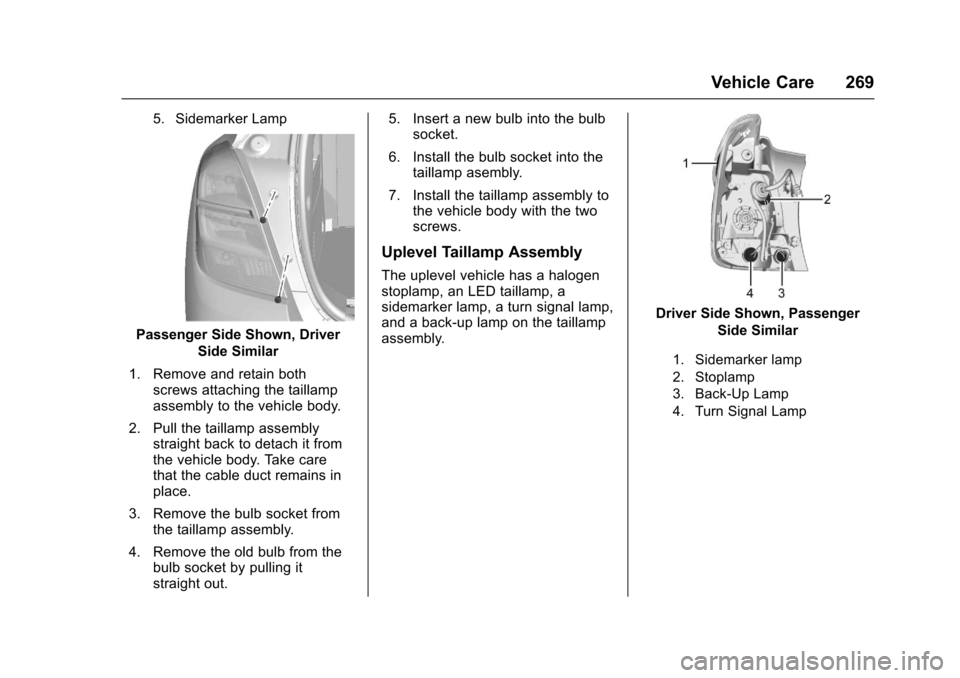
5. Sidemarker Lamp
Passenger Side Shown, DriverSide Similar
1. Remove and retain both screws attaching the taillamp
assembly to the vehicle body.
2. Pull the taillamp assembly straight back to detach it from
the vehicle body. Take care
that the cable duct remains in
place.
3. Remove the bulb socket from the taillamp assembly.
4. Remove the old bulb from the bulb socket by pulling it
straight out. 5. Insert a new bulb into the bulb
socket.
6. Install the bulb socket into the taillamp asembly.
7. Install the taillamp assembly to the vehicle body with the two
screws.
Uplevel Taillamp Assembly
The uplevel vehicle has a halogen
stoplamp, an LED taillamp, a
sidemarker lamp, a turn signal lamp,
and a back-up lamp on the taillamp
assembly.
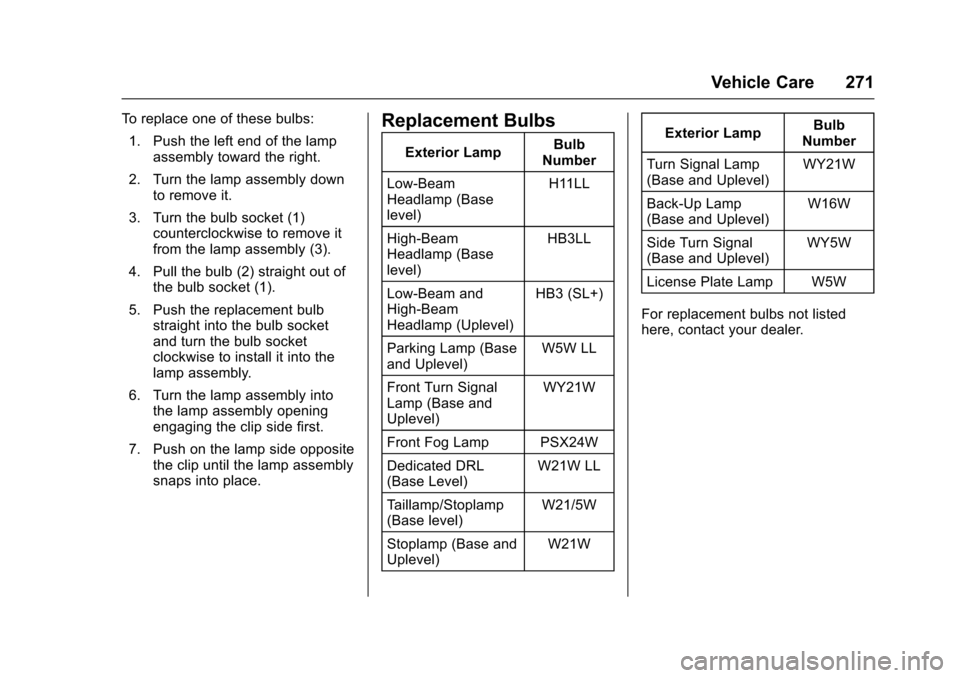
Driver Side Shown, Passenger
Side Similar
1. Sidemarker lamp
2. Stoplamp
3. Back-Up Lamp
4. Turn Signal Lamp
Page 272 of 373
Chevrolet TRAX Owner Manual (GMNA-Localizing-U.S./Canada/Mexico-
10122735) - 2017 - crc - 7/12/16
Vehicle Care 271
To replace one of these bulbs:1. Push the left end of the lamp assembly toward the right.
2. Turn the lamp assembly down to remove it.
3. Turn the bulb socket (1) counterclockwise to remove it
from the lamp assembly (3).
4. Pull the bulb (2) straight out of the bulb socket (1).
5. Push the replacement bulb straight into the bulb socket
and turn the bulb socket
clockwise to install it into the
lamp assembly.
6. Turn the lamp assembly into the lamp assembly opening
engaging the clip side first.
7. Push on the lamp side opposite the clip until the lamp assembly
snaps into place.Replacement Bulbs
Exterior Lamp Bulb
Number
Low-Beam
Headlamp (Base
level) H11LL
High-Beam
Headlamp (Base
level) HB3LL
Low-Beam and
High-Beam
Headlamp (Uplevel) HB3 (SL+)
Parking Lamp (Base
and Uplevel) W5W LL
Front Turn Signal
Lamp (Base and
Uplevel) WY21W
Front Fog Lamp PSX24W
Dedicated DRL
(Base Level) W21W LL
Taillamp/Stoplamp
(Base level) W21/5W
Stoplamp (Base and
Uplevel) W21WExterior Lamp
Bulb
Number
Turn Signal Lamp
(Base and Uplevel) WY21W
Back-Up Lamp
(Base and Uplevel) W16W
Side Turn Signal
(Base and Uplevel) WY5W
License Plate Lamp W5W
For replacement bulbs not listed
here, contact your dealer.
Page 273 of 373
Chevrolet TRAX Owner Manual (GMNA-Localizing-U.S./Canada/Mexico-
10122735) - 2017 - crc - 7/12/16
272 Vehicle Care
Electrical System
Electrical System
Overload
The vehicle has fuses and circuit
breakers to protect against an
electrical system overload.
When the current electrical load is
too heavy, the circuit breaker opens
and closes, protecting the circuit
until the current load returns to
normal or the problem is fixed. This
greatly reduces the chance of circuit
overload and fire caused by
electrical problems.
Fuses and circuit breakers protect
power devices in the vehicle.
Replace a bad fuse with a new one
of the identical size and rating.
If there is a problem on the road and
a fuse needs to be replaced, the
same amperage fuse can be
borrowed. Choose some feature of
the vehicle that is not needed to use
and replace it as soon as possible.
Headlamp Wiring
An electrical overload may cause
the lamps to go on and off, or in
some cases to remain off. Have the
headlamp wiring checked right away
if the lamps go on and off or
remain off.
Windshield Wipers
If the wiper motor overheats due to
heavy snow or ice, the windshield
wipers will stop until the motor cools
and will then restart.
Although the circuit is protected
from electrical overload, overload
due to heavy snow or ice may
cause wiper linkage damage.
Always clear ice and heavy snow
from the windshield before using the
windshield wipers.
If the overload is caused by an
electrical problem and not snow or
ice, be sure to get it fixed.
Fuses and Circuit
Breakers
The wiring circuits in the vehicle are
protected from short circuits by a
combination of fuses and circuit
breakers. This greatly reduces the
chance of damage caused by
electrical problems.
To check a fuse, look at the
silver-colored band inside the fuse.
If the band is broken or melted,
replace the fuse. Be sure to replace
a bad fuse with a new one of the
identical size and rating.
Fuses of the same amperage can
be temporarily borrowed from
another fuse location, if a fuse goes
out. Replace the fuse as soon as
possible.
To identify and check fuses, circuit
breakers, and relays, seeEngine
Compartment Fuse Block 0273,
Instrument Panel Fuse Block 0276,
and Rear Compartment Fuse
Block 0278.
Page 329 of 373

Chevrolet TRAX Owner Manual (GMNA-Localizing-U.S./Canada/Mexico-
10122735) - 2017 - crc - 7/12/16
328 Service and Maintenance
.To avoid break-down or failure to
start the vehicle, maintain a
battery with full cranking power.
. Trained dealer technicians have
the diagnostic equipment to test
the battery and ensure that the
connections and cables are
corrosion-free.
Belts
. Belts may need replacing if they
squeak or show signs of
cracking or splitting.
. Trained dealer technicians have
access to tools and equipment
to inspect the belts and
recommend adjustment or
replacement when necessary.
Brakes
Brakes stop the vehicle and are
crucial to safe driving.
. Signs of brake wear may include
chirping, grinding, or squealing
noises, or difficulty stopping. .
Trained dealer technicians have
access to tools and equipment
to inspect the brakes and
recommend quality parts
engineered for the vehicle.
Fluids
Proper fluid levels and approved
fluids protect the vehicle’s systems
and components. See
Recommended Fluids and
Lubricants 0330 for GM approved
fluids.
. Engine oil and windshield
washer fluid levels should be
checked at every fuel fill.
. Instrument cluster lights may
come on to indicate that fluids
may be low and need to be
filled.
Hoses
Hoses transport fluids and should
be regularly inspected to ensure
that there are no cracks or leaks.
With a multi-point inspection, your
dealer can inspect the hoses and
advise if replacement is needed. Lamps
Properly working headlamps,
taillamps, and brake lamps are
important to see and be seen on
the road.
.
Signs that the headlamps need
attention include dimming, failure
to light, cracking, or damage.
The brake lamps need to be
checked periodically to ensure
that they light when braking.
. With a multi-point inspection,
your dealer can check the lamps
and note any concerns.
Shocks and Struts
Shocks and struts help aid in control
for a smoother ride.
. Signs of wear may include
steering wheel vibration, bounce/
sway while braking, longer
stopping distance, or uneven
tire wear.
. As part of the multi-point
inspection, trained dealer
technicians can visually inspect
the shocks and struts for signs
Page 355 of 373
Chevrolet TRAX Owner Manual (GMNA-Localizing-U.S./Canada/Mexico-
10122735) - 2017 - crc - 7/12/16
354 OnStar
.Change the default name of the
SSID (Service Set Identifier).
This is your network’s name that
is visible to other wireless
devices. Choose a unique name
and avoid family names or
vehicle descriptions.
OnStar Wi-Fi
®Hotspot (If
Equipped)
The vehicle may have a built-in
Wi-Fi hotspot that provides access
to the Internet and web content at
4G LTE speed. Up to seven mobile
devices can be connected. A data
plan is required. Use the in-vehicle
controls only when it is safe to
do so.
1. To retrieve Wi-Fi hotspot information, press
=, wait for
the prompt, then say “Wi-Fi
settings.” On some vehicles,
touch Wi-Fi Settings on the
screen.
2. The Wi-Fi settings will display the Wi-Fi hotspot name (SSID),
password, and on some
vehicles, the connection type (no Internet connection, 3G,
4G, 4G LTE), and signal quality
(poor, good, excellent).
3. To change the SSID or password, press
Qor call
1-888-4ONSTAR to connect
with an Advisor.
After initial set-up, your vehicle’s
Wi-Fi hotspot will connect
automatically to your mobile
devices. Manage data usage by
turning Wi-Fi on or off on your
mobile device, using the
RemoteLink mobile app, or by
contacting an OnStar Advisor.
OnStar RemoteLink
®Mobile App
(If Equipped)
Download the OnStar RemoteLink
mobile app to select Apple
®iOS,
Android™, BlackBerry®,
or Windows®mobile devices.
OnStar Subscribers can access the
following services from a mobile
device:
. Remotely start/stop the vehicle,
if factory-equipped.
. Lock/unlock doors, if equipped
with automatic locks. .
Activate the horn and lamps.
. Check the vehicle’s fuel level, oil
life, or tire pressure,
if factory-equipped with the Tire
Pressure Monitor System.
. Send directions to the vehicle.
. Locate the vehicle on a map
(U.S. market only).
. Turn the vehicle's Wi-Fi hotspot
on/off, manage settings, and
monitor data consumption,
if equipped.
For OnStar RemoteLink information
and compatibility, see
www.onstar.com (U.S.) or
www.onstar.ca (Canada).
Remote Services
Contact an OnStar Advisor to
unlock the doors or sound the horn
and flash the lamps.
OnStar AtYourService
OnStar Advisors can provide offers
from restaurants and retailers on
your route, help locate hotels,
or book a room. These services
vary by market.