clock CHEVROLET TRAX 2018 User Guide
[x] Cancel search | Manufacturer: CHEVROLET, Model Year: 2018, Model line: TRAX, Model: CHEVROLET TRAX 2018Pages: 366, PDF Size: 5.44 MB
Page 257 of 366
Chevrolet TRAX Owner Manual (GMNA-Localizing-U.S./Canada/Mexico-
11354406) - 2018 - crc - 10/12/17
256 Vehicle Care
Parking Lamp
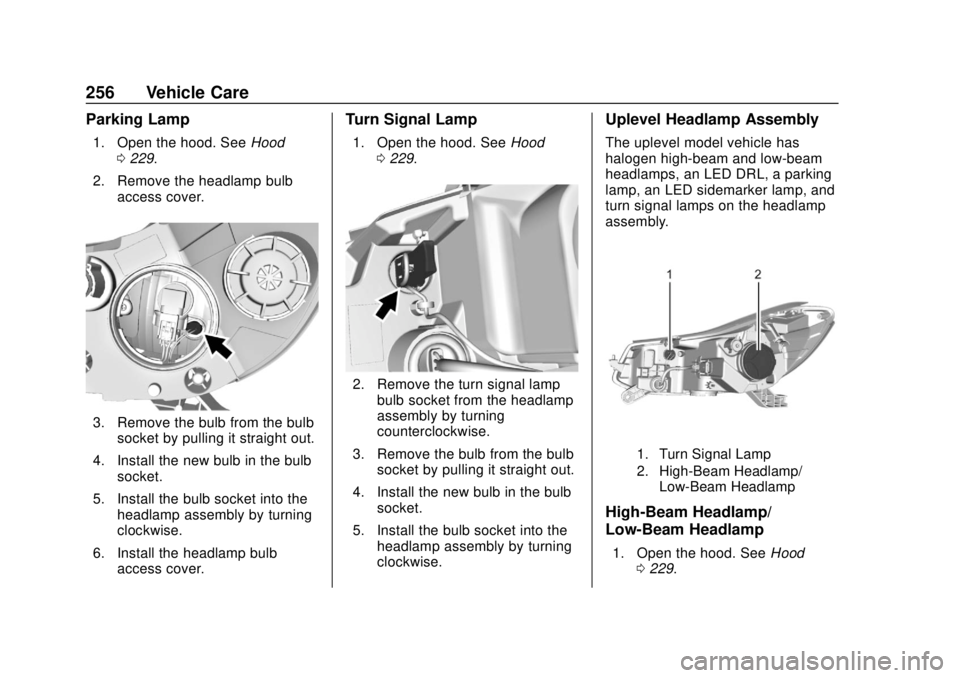
1. Open the hood. SeeHood
0 229.
2. Remove the headlamp bulb access cover.
3. Remove the bulb from the bulbsocket by pulling it straight out.
4. Install the new bulb in the bulb socket.
5. Install the bulb socket into the headlamp assembly by turning
clockwise.
6. Install the headlamp bulb access cover.
Turn Signal Lamp
1. Open the hood. See Hood
0 229.
2. Remove the turn signal lamp
bulb socket from the headlamp
assembly by turning
counterclockwise.
3. Remove the bulb from the bulb socket by pulling it straight out.
4. Install the new bulb in the bulb socket.
5. Install the bulb socket into the headlamp assembly by turning
clockwise.
Uplevel Headlamp Assembly
The uplevel model vehicle has
halogen high-beam and low-beam
headlamps, an LED DRL, a parking
lamp, an LED sidemarker lamp, and
turn signal lamps on the headlamp
assembly.
1. Turn Signal Lamp
2. High-Beam Headlamp/
Low-Beam Headlamp
High-Beam Headlamp/
Low-Beam Headlamp
1. Open the hood. See Hood
0 229.
Page 258 of 366
Chevrolet TRAX Owner Manual (GMNA-Localizing-U.S./Canada/Mexico-
11354406) - 2018 - crc - 10/12/17
Vehicle Care 257
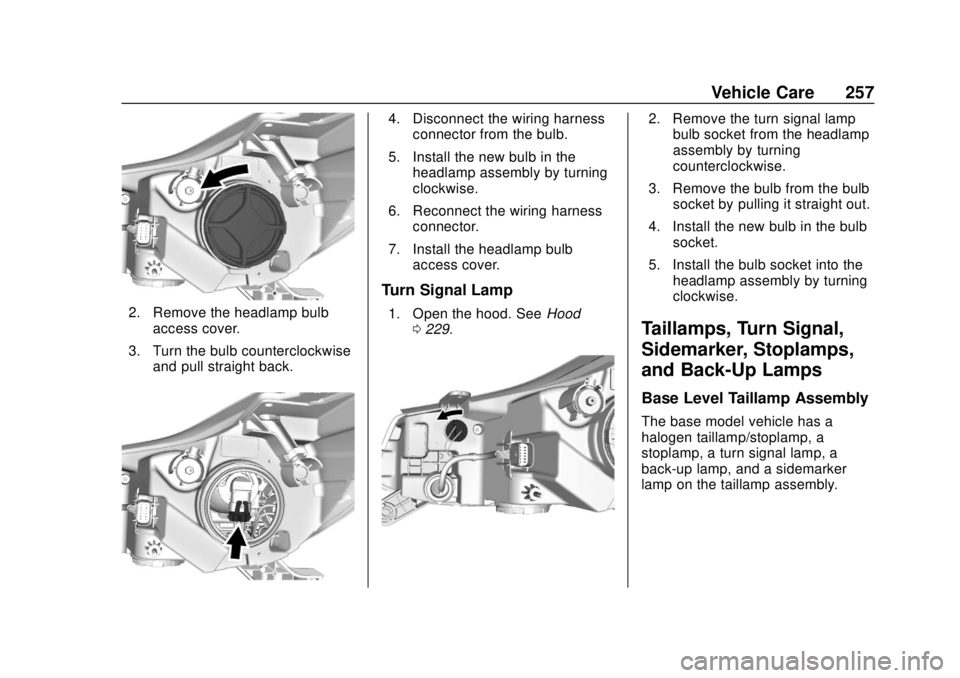
2. Remove the headlamp bulbaccess cover.
3. Turn the bulb counterclockwise and pull straight back.
4. Disconnect the wiring harnessconnector from the bulb.
5. Install the new bulb in the headlamp assembly by turning
clockwise.
6. Reconnect the wiring harness connector.
7. Install the headlamp bulb access cover.
Turn Signal Lamp
1. Open the hood. See Hood
0 229.
2. Remove the turn signal lamp
bulb socket from the headlamp
assembly by turning
counterclockwise.
3. Remove the bulb from the bulb socket by pulling it straight out.
4. Install the new bulb in the bulb socket.
5. Install the bulb socket into the headlamp assembly by turning
clockwise.
Taillamps, Turn Signal,
Sidemarker, Stoplamps,
and Back-Up Lamps
Base Level Taillamp Assembly
The base model vehicle has a
halogen taillamp/stoplamp, a
stoplamp, a turn signal lamp, a
back-up lamp, and a sidemarker
lamp on the taillamp assembly.
Page 261 of 366

Chevrolet TRAX Owner Manual (GMNA-Localizing-U.S./Canada/Mexico-
11354406) - 2018 - crc - 10/12/17
260 Vehicle Care
License Plate Lamp
Lamp Assembly
Bulb AssemblyTo replace one of these bulbs:
1. Push the left end of the lamp assembly toward the right.
2. Turn the lamp assembly down to remove it.
3. Turn the bulb socket (1) counterclockwise to remove it
from the lamp assembly (3).
4. Pull the bulb (2) straight out of the bulb socket (1).
5. Push the replacement bulb straight into the bulb socket
and turn the bulb socket
clockwise to install it into the
lamp assembly.
6. Turn the lamp assembly into the lamp assembly opening
engaging the clip side first.
7. Push on the lamp side opposite the clip until the lamp assembly
snaps into place.
Electrical System
Electrical System
Overload
The vehicle has fuses and circuit
breakers to protect against an
electrical system overload.
When the current electrical load is
too heavy, the circuit breaker opens
and closes, protecting the circuit
until the current load returns to
normal or the problem is fixed. This
greatly reduces the chance of circuit
overload and fire caused by
electrical problems.
Fuses and circuit breakers protect
power devices in the vehicle.
Replace a bad fuse with a new one
of the identical size and rating.
If there is a problem on the road and
a fuse needs to be replaced, the
same amperage fuse can be
borrowed. Choose some feature of
the vehicle that is not needed to use
and replace it as soon as possible.
Page 267 of 366
Chevrolet TRAX Owner Manual (GMNA-Localizing-U.S./Canada/Mexico-
11354406) - 2018 - crc - 10/12/17
266 Vehicle Care
FusesUsage
F14 Central gate module
F15 Lane departure warning/GENTEX
F16 –
F17 Electrical steering column lock
F18 Parking assist module/Side blind
zone alert
F19 Body control module/Regulated
voltage control
F20 Clock spring
F21 A/C/Accessory power outlet/
PRNDM
F22 Auxiliary power outlet/DC front
F23 HVAC/MDL/ICS
F24 –
F25 OnStar module/ Eraglonass Fuses
Usage
F26 Heated steering wheel
F27 Instrument cluster/ Auxiliary heater/
Auxiliary virtual
image display
F28 Trailer feed 2
F29 Infotainment system
F30 DC DC 400W
F31 Instrument cluster module battery
F32 Silver box audio module/Navigation
F33 Trailer feed 1
F34 Passive entry/ Passive start
Midi Fuses Usage M01 Positive temperature coefficient S/B Fuses Usage
S/B01 Passenger power seat 1
S/B02 –
S/B03 Front power windows
S/B04 Rear power windows
S/B05 Logistic mode relay/ DC DC 400W
S/B06 Driver power seat
S/B07 –
S/B08 Trailer interface module
Circuit
Breaker Usage
CB1 –
Relays Usage
RLY01 Accessory/Retained accessory power
RLY02 Liftgate
RLY03 –
Page 290 of 366
Chevrolet TRAX Owner Manual (GMNA-Localizing-U.S./Canada/Mexico-
11354406) - 2018 - crc - 10/12/17
Vehicle Care 289
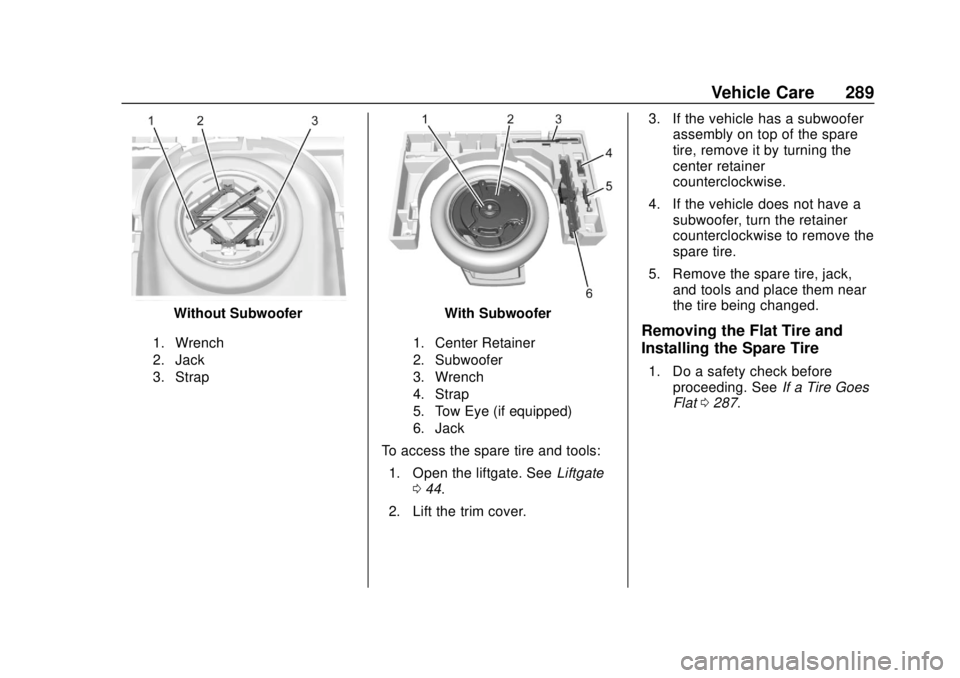
Without Subwoofer
1. Wrench
2. Jack
3. Strap
With Subwoofer
1. Center Retainer
2. Subwoofer
3. Wrench
4. Strap
5. Tow Eye (if equipped)
6. Jack
To access the spare tire and tools:1. Open the liftgate. See Liftgate
0 44.
2. Lift the trim cover. 3. If the vehicle has a subwoofer
assembly on top of the spare
tire, remove it by turning the
center retainer
counterclockwise.
4. If the vehicle does not have a subwoofer, turn the retainer
counterclockwise to remove the
spare tire.
5. Remove the spare tire, jack, and tools and place them near
the tire being changed.
Removing the Flat Tire and
Installing the Spare Tire
1. Do a safety check beforeproceeding. See If a Tire Goes
Flat 0287.
Page 291 of 366
Chevrolet TRAX Owner Manual (GMNA-Localizing-U.S./Canada/Mexico-
11354406) - 2018 - crc - 10/12/17
290 Vehicle Care
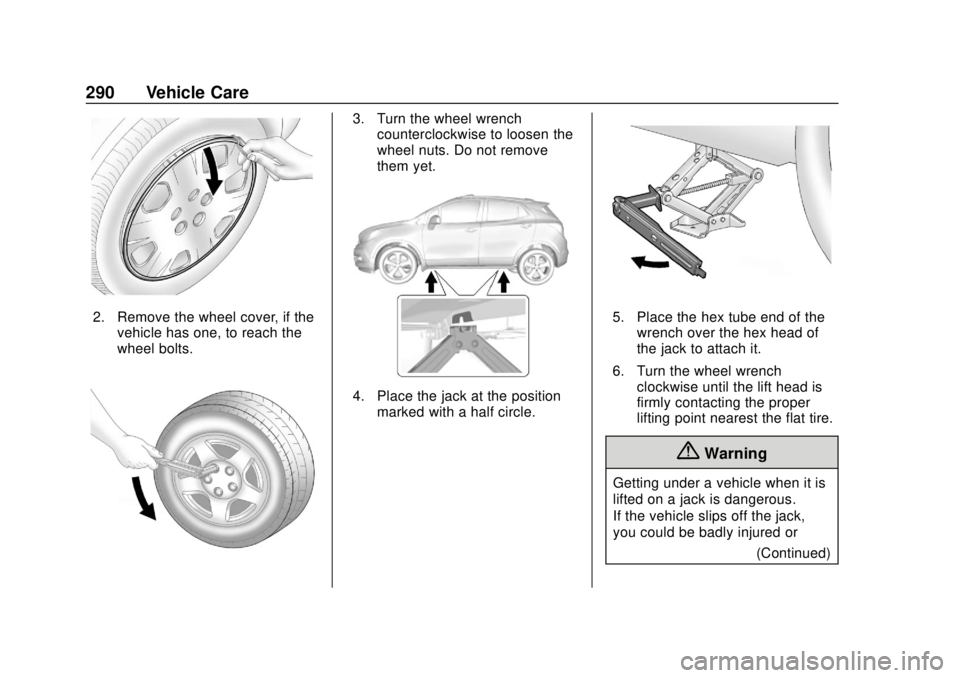
2. Remove the wheel cover, if thevehicle has one, to reach the
wheel bolts.
3. Turn the wheel wrenchcounterclockwise to loosen the
wheel nuts. Do not remove
them yet.
4. Place the jack at the position
marked with a half circle.
5. Place the hex tube end of thewrench over the hex head of
the jack to attach it.
6. Turn the wheel wrench clockwise until the lift head is
firmly contacting the proper
lifting point nearest the flat tire.
{Warning
Getting under a vehicle when it is
lifted on a jack is dangerous.
If the vehicle slips off the jack,
you could be badly injured or
(Continued)
Page 292 of 366
Chevrolet TRAX Owner Manual (GMNA-Localizing-U.S./Canada/Mexico-
11354406) - 2018 - crc - 10/12/17
Vehicle Care 291
Warning (Continued)
killed. Never get under a vehicle
when it is supported only by
a jack.
{Warning
Raising the vehicle with the jack
improperly positioned can
damage the vehicle and even
make the vehicle fall. To help
avoid personal injury and vehicle
damage, be sure to fit the jack lift
head into the proper location
before raising the vehicle.
{Warning
Lifting a vehicle and getting under
it to do maintenance or repairs is
dangerous without the
appropriate safety equipment and
training. If a jack is provided with(Continued)
Warning (Continued)
the vehicle, it is designed only for
changing a flat tire. If it is used for
anything else, you or others could
be badly injured or killed if the
vehicle slips off the jack. If a jack
is provided with the vehicle, only
use it for changing a flat tire.
7. Turn the wheel wrench clockwise to raise the vehicle
far enough off the ground so
there is enough room for the
spare tire to fit underneath the
wheel well.
8. Turn the wheel nuts counterclockwise to
remove them.
9. Remove the flat tire.
{Warning
Rust or dirt on a wheel, or on the
parts to which it is fastened, can
make wheel nuts become loose (Continued)
Warning (Continued)
after time. The wheel could come
off and cause an accident. When
changing a wheel, remove any
rust or dirt from places where the
wheel attaches to the vehicle. In
an emergency, a cloth or a paper
towel can be used; however, use
a scraper or wire brush later to
remove all rust or dirt.
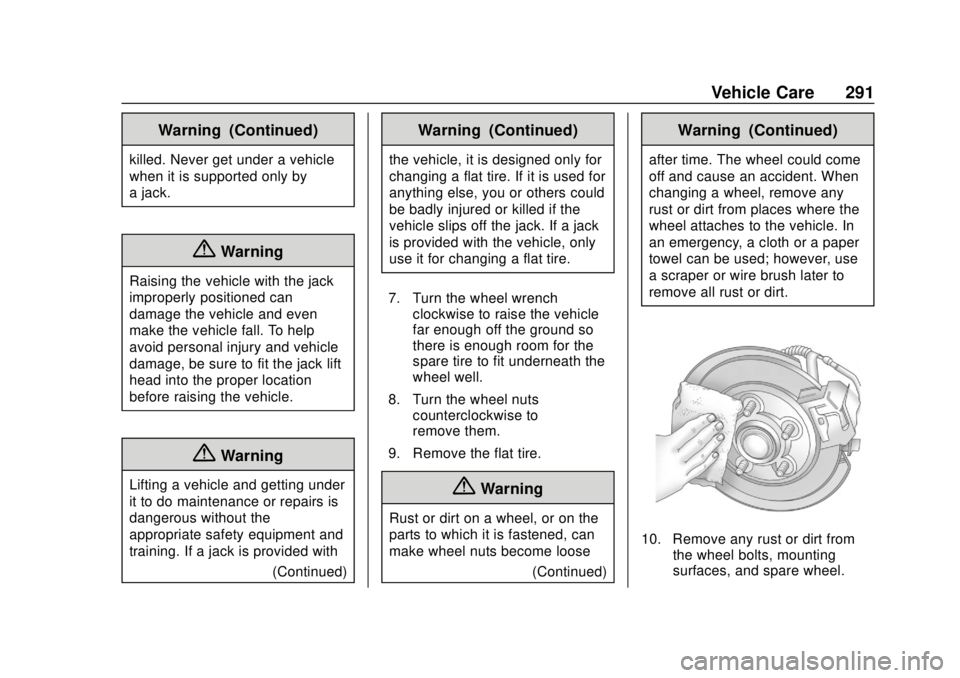
10. Remove any rust or dirt fromthe wheel bolts, mounting
surfaces, and spare wheel.
Page 293 of 366
Chevrolet TRAX Owner Manual (GMNA-Localizing-U.S./Canada/Mexico-
11354406) - 2018 - crc - 10/12/17
292 Vehicle Care
11. Place the spare tire on thewheel-mounting surface.
{Warning
Never use oil or grease on bolts
or nuts because the nuts might
come loose. The vehicle's wheel
could fall off, causing a crash.
12. Reinstall the wheel nuts. Turn each nut clockwise, by hand,
until the wheel is held against
the hub.
13. Lower the vehicle by turning the wheel wrench
counterclockwise. Lower the
jack completely.
{Warning
Wheel nuts that are improperly or
incorrectly tightened can cause
the wheels to become loose or
come off. The wheel nuts should
be tightened with a torque wrench
to the proper torque specification
(Continued)
Warning (Continued)
after replacing. Follow the torque
specification supplied by the
aftermarket manufacturer when
using accessory locking wheel
nuts. SeeCapacities and
Specifications 0325 for original
equipment wheel nut torque
specifications.
Caution
Improperly tightened wheel nuts
can lead to brake pulsation and
rotor damage. To avoid expensive
brake repairs, evenly tighten the
wheel nuts in the proper
sequence and to the proper
torque specification. See
Capacities and Specifications
0 325 for the wheel nut torque
specification.
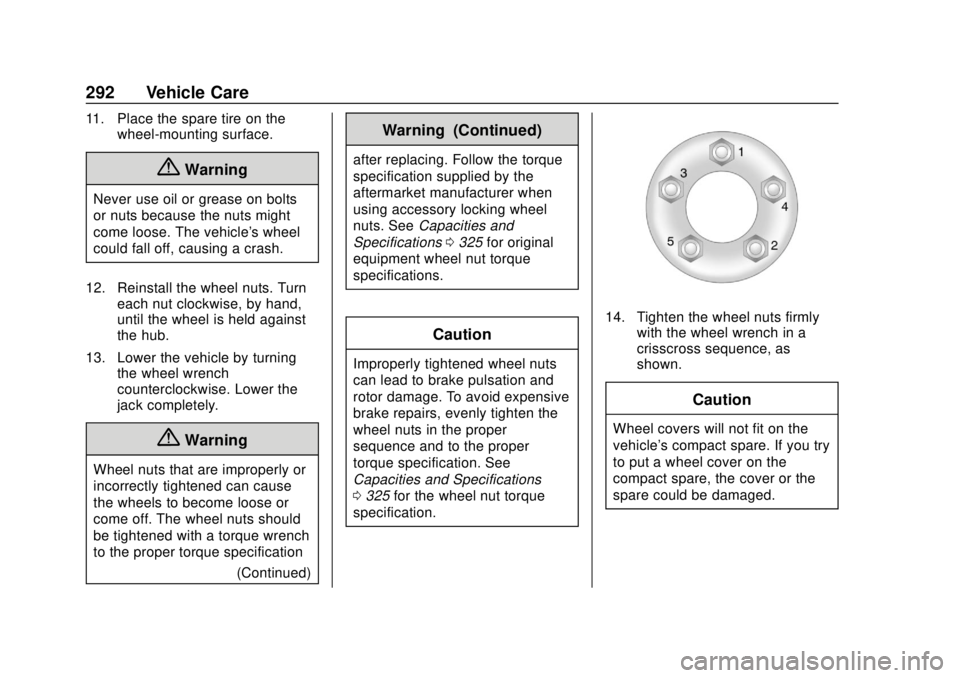
14. Tighten the wheel nuts firmly with the wheel wrench in a
crisscross sequence, as
shown.
Caution
Wheel covers will not fit on the
vehicle's compact spare. If you try
to put a wheel cover on the
compact spare, the cover or the
spare could be damaged.
Page 299 of 366
Chevrolet TRAX Owner Manual (GMNA-Localizing-U.S./Canada/Mexico-
11354406) - 2018 - crc - 10/12/17
298 Vehicle Care
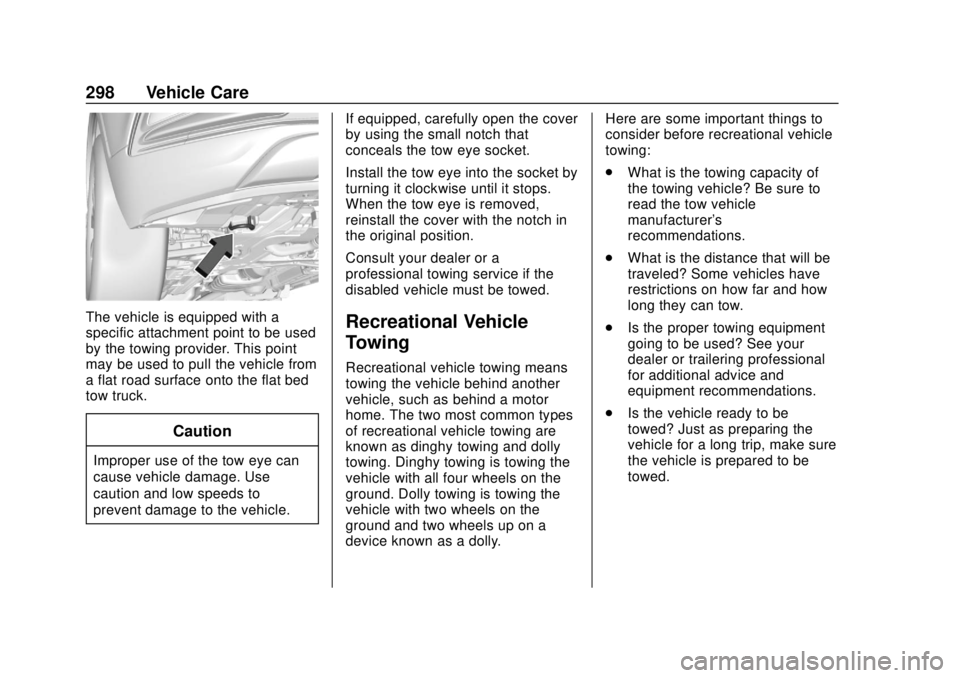
The vehicle is equipped with a
specific attachment point to be used
by the towing provider. This point
may be used to pull the vehicle from
a flat road surface onto the flat bed
tow truck.
Caution
Improper use of the tow eye can
cause vehicle damage. Use
caution and low speeds to
prevent damage to the vehicle.If equipped, carefully open the cover
by using the small notch that
conceals the tow eye socket.
Install the tow eye into the socket by
turning it clockwise until it stops.
When the tow eye is removed,
reinstall the cover with the notch in
the original position.
Consult your dealer or a
professional towing service if the
disabled vehicle must be towed.
Recreational Vehicle
Towing
Recreational vehicle towing means
towing the vehicle behind another
vehicle, such as behind a motor
home. The two most common types
of recreational vehicle towing are
known as dinghy towing and dolly
towing. Dinghy towing is towing the
vehicle with all four wheels on the
ground. Dolly towing is towing the
vehicle with two wheels on the
ground and two wheels up on a
device known as a dolly. Here are some important things to
consider before recreational vehicle
towing:
.
What is the towing capacity of
the towing vehicle? Be sure to
read the tow vehicle
manufacturer's
recommendations.
. What is the distance that will be
traveled? Some vehicles have
restrictions on how far and how
long they can tow.
. Is the proper towing equipment
going to be used? See your
dealer or trailering professional
for additional advice and
equipment recommendations.
. Is the vehicle ready to be
towed? Just as preparing the
vehicle for a long trip, make sure
the vehicle is prepared to be
towed.
Page 356 of 366

Chevrolet TRAX Owner Manual (GMNA-Localizing-U.S./Canada/Mexico-
11354406) - 2018 - crc - 10/12/17
Index 355
CargoCover . . . . . . . . . . . . . . . . . . . . . . . . . 104
Management System . . . . . . . . . 104
Caution, Danger, and Warning . . . . 3
Chains, Tire . . . . . . . . . . . . . . . . . . . . 287
Charging System Light . . . . . . . . . 118
Check Engine Light (MalfunctionIndicator) . . . . . . . . . . . . . . . . . . . . .118
Ignition Transmission Lock . . . 250
Child Restraints
Infants and Young Children . . . . . 85
Lower Anchors and Tethersfor Children . . . . . . . . . . . . . . . . . . . 90
Older Children . . . . . . . . . . . . . . . . . . 84
Securing . . . . . . . . . . . . . . . . . . .98, 100
Systems . . . . . . . . . . . . . . . . . . . . . . . . 88
Circuit Breakers . . . . . . . . . . . . . . . . 261
Cleaning Exterior Care . . . . . . . . . . . . . . . . . 301
Interior Care . . . . . . . . . . . . . . . . . . 305
Climate Control Systems . . . . . . . 171 Air Conditioning . . . . . . . . . . . . . . 171
Heating . . . . . . . . . . . . . . . . . . . . . . . 171
Clock . . . . . . . . . . . . . . . . . . . . . . . . . . . 111
Cluster, Instrument . . . . . . . . . . . . . 113
Clutch, Hydraulic . . . . . . . . . . . . . . . 238
Collision Damage Repair . . . . . . . 334 Compact Spare Tire . . . . . . . . . . . . 293
Compartments
Storage . . . . . . . . . . . . . . . . . . . . . . . 103
Compass . . . . . . . . . . . . . . . . . . . . . . . 110
Connections OnStar . . . . . . . . . . . . . . . . . . . . . . . 344
Control
Traction and ElectronicStability . . . . . . . . . . . . . . . . . . . . . 208
Control of a Vehicle . . . . . . . . . . . . . 179
Convenience Net . . . . . . . . . . . . . . . 105
Convex Mirrors . . . . . . . . . . . . . . . . . . 49
Coolant Engine TemperatureWarning Light . . . . . . . . . . . . . . . 124
Cooling . . . . . . . . . . . . . . . . . . . . . . . . . 171
Cooling System . . . . . . . . . . . . . . . . . 240
Courtesy Lamps . . . . . . . . . . . . . . . . 142
Courtesy Transportation
Program . . . . . . . . . . . . . . . . . . . . . . . 333
Cover
Cargo . . . . . . . . . . . . . . . . . . . . . . . . . 104
Cruise Control . . . . . . . . . . . . . . . . . . 210 Light . . . . . . . . . . . . . . . . . . . . . . . . . . 127
Cupholders . . . . . . . . . . . . . . . . . . . . . 103
Customer Assistance . . . . . . . . . . . 330
Offices . . . . . . . . . . . . . . . . . . . . . . . . 329 Customer Assistance (cont'd)
Text Telephone (TTY)
Users . . . . . . . . . . . . . . . . . . . . . . . 330
Customer Information
Service PublicationsOrdering Information . . . . . . . . 336
Customer Satisfaction Procedure . . . . . . . . . . . . . . . . . . . . . 327
D
Damage Repair, Collision . . . . . . . 334
Danger, Warning, and Caution . . . . 3
Data CollectionOnStar . . . . . . . . . . . . . . . . . . . . . . . 340
Data Recorders, Event . . . . . . . . . 339
Daytime Running Lamps (DRL) . . . . . . . . . . . . . . . . . . 139
Defensive Driving . . . . . . . . . . . . . . . 178
Delayed Locking . . . . . . . . . . . . . . . . . 42
Diagnostics OnStar . . . . . . . . . . . . . . . . . . . . . . . 346
Distracted Driving . . . . . . . . . . . . . . . 177
Dome Lamps . . . . . . . . . . . . . . . . . . . 142
Door Ajar Light . . . . . . . . . . . . . . . . . . . . . 127
Delayed Locking . . . . . . . . . . . . . . . . 42
Locks . . . . . . . . . . . . . . . . . . . . . . . . . . . 41
Power Locks . . . . . . . . . . . . . . . . . . . . 42