cruise control CHEVROLET TRAX 2020 User Guide
[x] Cancel search | Manufacturer: CHEVROLET, Model Year: 2020, Model line: TRAX, Model: CHEVROLET TRAX 2020Pages: 355, PDF Size: 5.75 MB
Page 198 of 355
Chevrolet TRAX Owner Manual (GMNA-Localizing-U.S./Canada/Mexico-
13556235) - 2020 - CRC - 9/19/19
Driving and Operating 197
The cruise control indicator on the
instrument cluster turns green after
cruise control has been set to the
desired speed. SeeInstrument
Cluster 097.
Resuming a Set Speed
If the cruise control is set at a
desired speed and then the brakes
or clutch for manual transmissions
are applied, the cruise control is
disengaged without erasing the set
speed from memory.
Once the vehicle reaches about
40 km/h (25 mph) or more, move the
thumbwheel up toward RES/+
briefly. The vehicle returns to the
previous set speed.
Increasing Speed While Using
Cruise Control
If the cruise control system is
already activated:
. Move the thumbwheel up toward
RES/+ and hold it until the
desired speed is reached, then
release it. .
To increase vehicle speed in
small increments, move the
thumbwheel up toward RES/+
briefly. For each press, the
vehicle goes about 1 km/h
(1 mph) faster.
The speedometer reading can be
displayed in either English or metric
units. See Instrument Cluster 097.
The increment value used depends
on the units displayed.
Reducing Speed While Using
Cruise Control
If the cruise control system is
already activated:
. Move the thumbwheel toward
SET/− and hold until the desired
lower speed is reached, then
release it.
. To decrease the vehicle speed in
small increments, move the
thumbwheel toward SET/−
briefly. For each press, the
vehicle goes about 1 km/h
(1 mph) slower. The speedometer reading can be
displayed in either English or metric
units. See
Instrument Cluster 097.
The increment value used depends
on the units displayed.
Passing Another Vehicle While
Using Cruise Control
Use the accelerator pedal to
increase the vehicle speed. When
you take your foot off the pedal, the
vehicle slows down to the previously
set cruise control speed. While
pressing the accelerator pedal or
shortly following the release to
override cruise, briefly moving the
thumbwheel toward SET/− will result
in cruise set to the current vehicle
speed.
Using Cruise Control on Hills
How well cruise control works on
hills depends on the vehicle speed,
load, and the steepness of the hills.
When going up steep hills, you
might have to step on the
accelerator pedal to maintain the
vehicle speed. When going
downhill, you might have to brake or
shift to a lower gear to keep your
Page 199 of 355
Chevrolet TRAX Owner Manual (GMNA-Localizing-U.S./Canada/Mexico-
13556235) - 2020 - CRC - 9/19/19
198 Driving and Operating
speed down. If the brake pedal is
applied, cruise control will
disengage.
Ending Cruise Control
There are four ways to end cruise
control:
.Step lightly on the brake pedal.
. Press
n.
. Shift the transmission to
N (Neutral).
. To turn off cruise control,
press
o.
Erasing Speed Memory
The cruise control set speed
is erased from memory if
ois
pressed or if the ignition is
turned off.
Driver Assistance
Systems
This vehicle may have features that
work together to help avoid crashes
or reduce crash damage while
driving, backing, and parking. Read
this entire section before using
these systems.
{Warning
Do not rely on the Driver
Assistance Systems. These
systems do not replace the need
for paying attention and driving
safely. You may not hear or see
alerts or warnings provided by
these systems. Failure to use
proper care when driving may
result in injury, death, or vehicle
damage. See Defensive Driving
0 163.
Under many conditions, these
systems will not: (Continued)
Warning (Continued)
.Detect children,
pedestrians, bicyclists,
or animals.
. Detect vehicles or objects
outside the area monitored
by the system.
. Work at all driving speeds.
. Warn you or provide you
with enough time to avoid a
crash.
. Work under poor visibility or
bad weather conditions.
. Work if the detection sensor
is not cleaned or is covered
by ice, snow, mud, or dirt.
. Work if the detection sensor
is covered up, such as with
a sticker, magnet, or metal
plate.
. Work if the area surrounding
the detection sensor is
damaged or not properly
repaired.
(Continued)
Page 205 of 355
Chevrolet TRAX Owner Manual (GMNA-Localizing-U.S./Canada/Mexico-
13556235) - 2020 - CRC - 9/19/19
204 Driving and Operating
Collision Alert
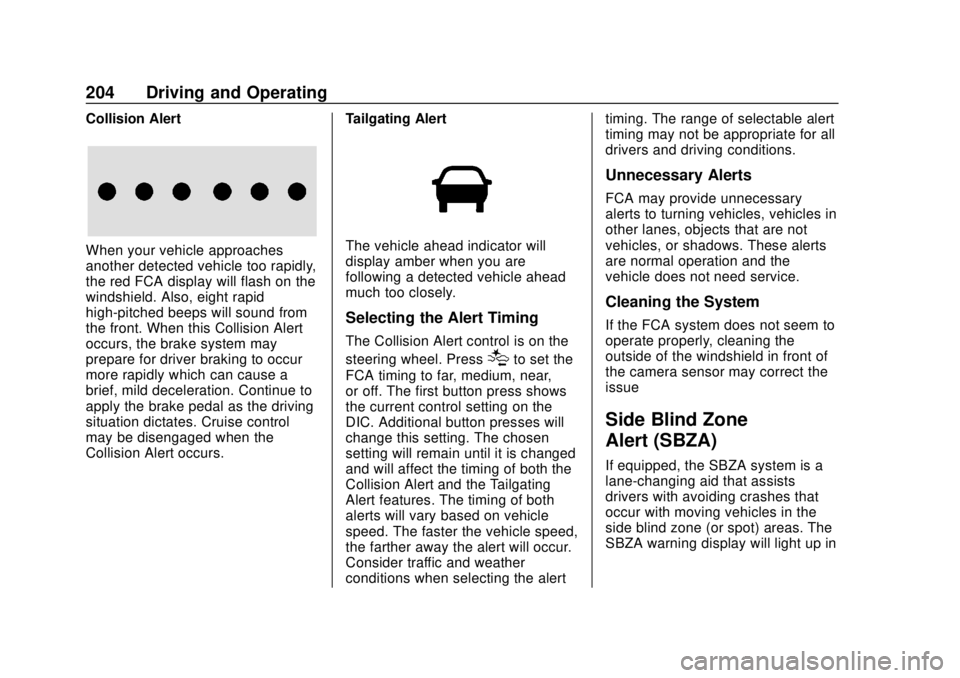
When your vehicle approaches
another detected vehicle too rapidly,
the red FCA display will flash on the
windshield. Also, eight rapid
high-pitched beeps will sound from
the front. When this Collision Alert
occurs, the brake system may
prepare for driver braking to occur
more rapidly which can cause a
brief, mild deceleration. Continue to
apply the brake pedal as the driving
situation dictates. Cruise control
may be disengaged when the
Collision Alert occurs.Tailgating AlertThe vehicle ahead indicator will
display amber when you are
following a detected vehicle ahead
much too closely.
Selecting the Alert Timing
The Collision Alert control is on the
steering wheel. Press
[to set the
FCA timing to far, medium, near,
or off. The first button press shows
the current control setting on the
DIC. Additional button presses will
change this setting. The chosen
setting will remain until it is changed
and will affect the timing of both the
Collision Alert and the Tailgating
Alert features. The timing of both
alerts will vary based on vehicle
speed. The faster the vehicle speed,
the farther away the alert will occur.
Consider traffic and weather
conditions when selecting the alert timing. The range of selectable alert
timing may not be appropriate for all
drivers and driving conditions.
Unnecessary Alerts
FCA may provide unnecessary
alerts to turning vehicles, vehicles in
other lanes, objects that are not
vehicles, or shadows. These alerts
are normal operation and the
vehicle does not need service.
Cleaning the System
If the FCA system does not seem to
operate properly, cleaning the
outside of the windshield in front of
the camera sensor may correct the
issue
Side Blind Zone
Alert (SBZA)
If equipped, the SBZA system is a
lane-changing aid that assists
drivers with avoiding crashes that
occur with moving vehicles in the
side blind zone (or spot) areas. The
SBZA warning display will light up in
Page 345 of 355

Chevrolet TRAX Owner Manual (GMNA-Localizing-U.S./Canada/Mexico-
13556235) - 2020 - CRC - 9/19/19
344 Index
CheckEngine Light (Malfunction
Indicator) . . . . . . . . . . . . . . . . . . . . 102
Ignition Transmission Lock . . . 237
Child Restraints Infants and Young Children . . . . . 68
Lower Anchors and Tethersfor Children . . . . . . . . . . . . . . . . . . . 73
Older Children . . . . . . . . . . . . . . . . . . 67
Securing . . . . . . . . . . . . . . . . . . . . 82, 84
Systems . . . . . . . . . . . . . . . . . . . . . . . . 71
Circuit Breakers . . . . . . . . . . . . . . . . 248
Cleaning Exterior Care . . . . . . . . . . . . . . . . . 288
Interior Care . . . . . . . . . . . . . . . . . . 293
Climate Control Systems . . . . . . . 155
Air Conditioning . . . . . . . . . . . . . . 155
Heating . . . . . . . . . . . . . . . . . . . . . . . 155
Clock . . . . . . . . . . . . . . . . . . . . . . . . . . . . 95
Cluster, Instrument . . . . . . . . . . . . . . 97
Clutch, Hydraulic . . . . . . . . . . . . . . . 225
Collision Damage Repair . . . . . . . 324
Compact Spare Tire . . . . . . . . . . . . 281
Compartments Storage . . . . . . . . . . . . . . . . . . . . . . . . . 87
Compass . . . . . . . . . . . . . . . . . . . . . . . . 95 Connected Services
Connections . . . . . . . . . . . . . . . . . . 340
Diagnostics . . . . . . . . . . . . . . . . . . . 341
Navigation . . . . . . . . . . . . . . . . . . . . 339
Connections Connected Services . . . . . . . . . . 340
Control
Traction and ElectronicStability . . . . . . . . . . . . . . . . . . . . . 194
Control of a Vehicle . . . . . . . . . . . . . 163
Convex Mirrors . . . . . . . . . . . . . . . . . . 29
Coolant Engine TemperatureWarning Light . . . . . . . . . . . . . . . 108
Cooling . . . . . . . . . . . . . . . . . . . . . . . . . 155
Cooling System . . . . . . . . . . . . . . . . . 227
Courtesy Lamps . . . . . . . . . . . . . . . . 126
Courtesy Transportation Program . . . . . . . . . . . . . . . . . . . . . . . 323
Cover Cargo . . . . . . . . . . . . . . . . . . . . . . . . . . . 88
Cruise Control . . . . . . . . . . . . . . . . . . 196 Light . . . . . . . . . . . . . . . . . . . . . . . . . . . 111
Cupholders . . . . . . . . . . . . . . . . . . . . . . 87
Customer Assistance . . . . . . . . . . . 320 Offices . . . . . . . . . . . . . . . . . . . . . . . . 319
Text Telephone (TTY)Users . . . . . . . . . . . . . . . . . . . . . . . 320 Customer Information
Publications Ordering
Information . . . . . . . . . . . . . . . . . . 326
Customer Satisfaction Procedure . . . . . . . . . . . . . . . . . . . . . 317
Cybersecurity . . . . . . . . . . . . . . . . . . . 329
D
Damage Repair, Collision . . . . . . . 324
Danger, Warning, and Caution . . . . 3
Data Collection OnStar . . . . . . . . . . . . . . . . . . . . . . . 330
Data Recorders, Event . . . . . . . . . 329
Daytime Running Lamps (DRL) . . . . . . . . . . . . . . . . . . 123
Defensive Driving . . . . . . . . . . . . . . . 163
Delayed Locking . . . . . . . . . . . . . . . . . 22
Diagnostics Connected Services . . . . . . . . . . 341
Distracted Driving . . . . . . . . . . . . . . . 162
Dome Lamps . . . . . . . . . . . . . . . . . . . 126
Door Ajar Light . . . . . . . . . . . . . . . . . . . . . . 111
Delayed Locking . . . . . . . . . . . . . . . . 22
Locks . . . . . . . . . . . . . . . . . . . . . . . . . . . 21
Power Locks . . . . . . . . . . . . . . . . . . . . 22
Drive Belt Routing, Engine . . . . . . 316
Page 348 of 355

Chevrolet TRAX Owner Manual (GMNA-Localizing-U.S./Canada/Mexico-
13556235) - 2020 - CRC - 9/19/19
Index 347
I
Ignition Positions . . . . . . . . . . 174, 176
Ignition Transmission LockCheck . . . . . . . . . . . . . . . . . . . . . . . . . 237
Immobilizer . . . . . . . . . . . . . . . . . . . . . . 27
Light . . . . . . . . . . . . . . . . . . . . . . . . . . .110
Indicator Owner Manual . . . . . . . . . . . . . . . . 104
Vehicle Ahead . . . . . . . . . . . . . . . . 106
Infants and Young Children,
Restraints . . . . . . . . . . . . . . . . . . . . . . 68
Information Publication Ordering . . . . . . . . . . 326
Instrument Cluster . . . . . . . . . . . . . . . 97
Instrument Panel
Storage Area . . . . . . . . . . . . . . . . . . . 87
Instrument Panel Overview . . . . . . . 5
Interior Rearview Mirrors . . . . . . . . . 30
Introduction . . . . . . . . . . . . . . . . . . 2, 129
J
Jack Auxiliary . . . . . . . . . . . . . . . . . . . . . . 140
Jump Starting - North
America . . . . . . . . . . . . . . . . . . . . . . . 282
K
Keyless EntryRemote (RKE) System . . . . . 10, 17
Keys . . . . . . . . . . . . . . . . . . . . . . . . . . . . 7, 9
L
Labeling, Tire Sidewall . . . . . . . . . . 257
Lamps Courtesy . . . . . . . . . . . . . . . . . . . . . . 126
Daytime Running (DRL) . . . . . . 123
Dome . . . . . . . . . . . . . . . . . . . . . . . . . 126
Exterior Controls . . . . . . . . . . . . . . 122
Exterior Lighting BatterySaver . . . . . . . . . . . . . . . . . . . . . . . 128
Front Fog . . . . . . . . . . . . . . . . . . . . . 125
Headlamps, Front Turn
Signal, and Parking
Lamps . . . . . . . . . . . . . . . . . . . . . . 242
License Plate . . . . . . . . . . . . . . . . . 247
Malfunction Indicator (Check Engine) . . . . . . . . . . . . . 102
On Reminder . . . . . . . . . . . . . . . . . . 111
Reading . . . . . . . . . . . . . . . . . . . . . . 126
Lane Departure
Warning (LDW) . . . . . . . . . . . . . . . . 206
Lane Departure Warning Light . . . . . . . . . . . . . . . . . . . . . . . . . . 106
Lap-Shoulder Belt . . . . . . . . . . . . . . . 50 LATCH System
Replacing Parts after a
Crash . . . . . . . . . . . . . . . . . . . . . . . . . 81
LATCH, Lower Anchors and Tethers for Children . . . . . . . . . . . . 73
LED Lighting . . . . . . . . . . . . . . . . . . . . 242
Liftgate . . . . . . . . . . . . . . . . . . . . . . . . . . 24
Lighting Entry . . . . . . . . . . . . . . . . . . . . . . . . . 127
Exit . . . . . . . . . . . . . . . . . . . . . . . . . . . 127
Illumination Control . . . . . . . . . . . 125
LED . . . . . . . . . . . . . . . . . . . . . . . . . . 242
Lights Airbag Readiness . . . . . . . . . . . . . 101
Antilock Brake System(ABS) Warning . . . . . . . . . . . . . . 105
Brake System Warning . . . . . . . 105
Charging System . . . . . . . . . . . . . 102
Check Engine (Malfunction Indicator) . . . . . . . . . . . . . . . . . . . . 102
Cruise Control . . . . . . . . . . . . . . . . . 111
Door Ajar . . . . . . . . . . . . . . . . . . . . . . 111
Engine Coolant
Temperature Warning . . . . . . . 108
Engine Oil Pressure . . . . . . . . . . 109
Flash-to-Pass . . . . . . . . . . . . . . . . . 123
Front Fog Lamp . . . . . . . . . . . . . . .110
High-Beam On . . . . . . . . . . . . . . . . .110