horn CHEVROLET TRAX 2020 User Guide
[x] Cancel search | Manufacturer: CHEVROLET, Model Year: 2020, Model line: TRAX, Model: CHEVROLET TRAX 2020Pages: 355, PDF Size: 5.75 MB
Page 121 of 355
Chevrolet TRAX Owner Manual (GMNA-Localizing-U.S./Canada/Mexico-
13556235) - 2020 - CRC - 9/19/19
120 Instruments and Controls
Power Door Locks
Touch and the following may
display:
.Open Door Anti Lock Out
. Auto Door Unlock
. Delayed Door Lock
Open Door Anti Lock Out
This setting prevents the driver door
from locking when the door is open.
If this setting is on, the Delayed
Door Lock menu will not be
available.
Touch Off or On.
Auto Door Unlock
This setting allows you to select
which doors will automatically
unlock when the vehicle is shifted
into P (Park).
Touch Off, All Doors, or Driver Door.
Delayed Door Lock
This setting delays the locking of
the doors. To override the delay,
press the power door lock switch on
the door. Touch Off or On.Remote Lock, Unlock, Start
Touch and the following may
display:
.
Remote Unlock Light Feedback
. Remote Lock Feedback
. Remote Door Unlock
. Remote Start Auto Heat Seats
. Passive Door Unlock
. Passive Door Lock
. Remote Left in Vehicle Alert
Remote Unlock Light Feedback
This setting flashes the exterior
lamps when you remotely unlock
the vehicle.
Touch Off or Flash Lights.
Remote Lock Feedback
This setting specifies how the
vehicle responds when you remotely
lock the vehicle.
Touch Off, Lights and Horn, Lights
Only, or Horn Only. Remote Door Unlock
This setting specifies whether all
doors, or just the driver door, unlock
when pressingKon the RKE
transmitter.
Touch All Doors or Driver Door.
Remote Start Auto Heat Seats
This setting automatically turns on
the heated seats when using the
remote start function on cold days.
See Heated Front Seats 040 and
Remote Vehicle Start 020.
Touch Off or On.
Passive Door Unlock
This setting specifies which doors
unlock when using the button on the
driver door handle to unlock the
vehicle.
Touch All Doors or Driver Door Only.
Page 122 of 355

Chevrolet TRAX Owner Manual (GMNA-Localizing-U.S./Canada/Mexico-
13556235) - 2020 - CRC - 9/19/19
Instruments and Controls 121
Passive Door Lock
This setting specifies whether the
vehicle will automatically lock,
or lock and alert you after all the
doors are closed, and you walk
away from the vehicle with the RKE
transmitter. SeeRemote Keyless
Entry (RKE) System Operation
(Keyless Access) 010 or
Remote Keyless Entry (RKE)
System Operation (Key Access)
0 17.
Touch Off, On with Horn
Chirp, or On.
Remote Left in Vehicle Alert
This feature sounds an alert when
the RKE transmitter is left in the
vehicle. This menu also enables
Remote No Longer in Vehicle Alert.
Touch Off or On.
Valet Mode
This will lock the infotainment
system and steering wheel controls.
It may also limit access to vehicle
storage locations, if equipped.
To enable valet mode: 1. Enter a four-digit code on the
keypad.
2. Touch Enter to go to the confirmation screen.
3. Re-enter the four-digit code.
Touch Lock or Unlock to lock or
unlock the system. Touch Back to
go back to the previous menu.
Page 252 of 355
Chevrolet TRAX Owner Manual (GMNA-Localizing-U.S./Canada/Mexico-
13556235) - 2020 - CRC - 9/19/19
Vehicle Care 251
Mini Fuses Usage31 Left high-beam headlamp
32 Right high-beam headlamp
33 Engine control module battery
34 Horn
35 A/C clutch
36 Front fog lamps
J-Case Fuses Usage
1 Electronic brake control module pump
2 Front wiper
3 Linear power module blower
4 IEC RC
5 –
6 –
7 – J-Case
Fuses Usage
8 Cooling fan low –mid
9 Cooling fan –high
10 EVP 11 Starter solenoid
U-Micro Relays Usage
2 Fuel pump
4 –
HC-Micro Relays Usage
7 Starter
Mini Relays Usage 1 Run/Crank
3 Cooling fan –mid
4 –
5 Powertrain relay
8 Cooling fan –low HC-Mini
Relays Usage
6 Cooling fan –high
Auxiliary Fuse Block
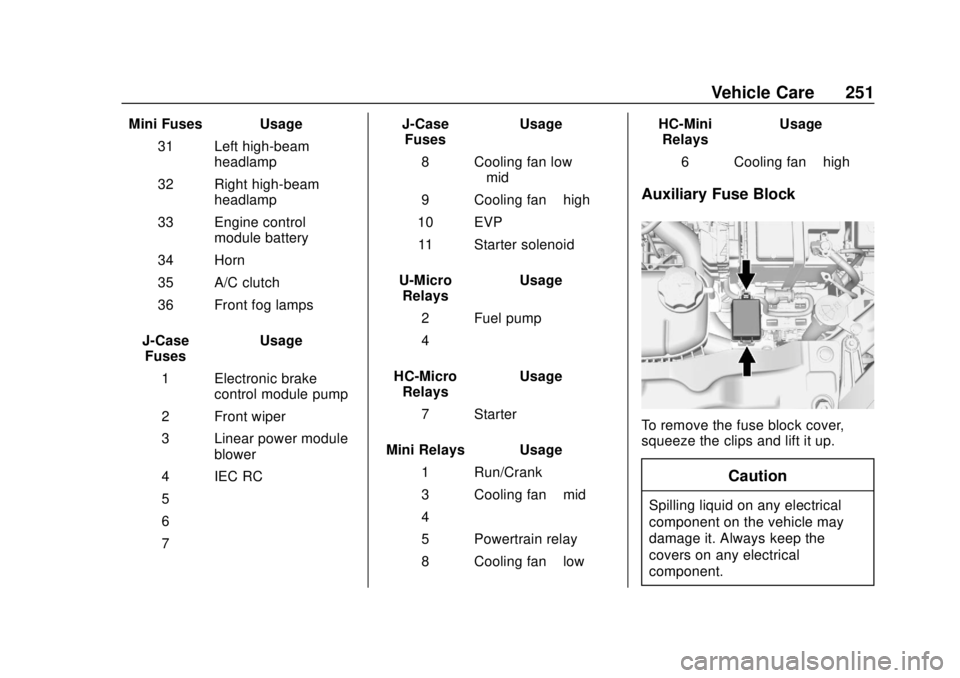
To remove the fuse block cover,
squeeze the clips and lift it up.
Caution
Spilling liquid on any electrical
component on the vehicle may
damage it. Always keep the
covers on any electrical
component.
Page 268 of 355

Chevrolet TRAX Owner Manual (GMNA-Localizing-U.S./Canada/Mexico-
13556235) - 2020 - CRC - 9/19/19
Vehicle Care 267
The TPMS sensor matching
process is:1. Set the parking brake.
2. Turn the ignition on without starting the vehicle or place the
vehicle in Service Mode. See
Ignition Positions (Key Access)
0174 or
Ignition Positions (Keyless
Access) 0176.
3. Use the MENU button to select the Vehicle Information Menu
(Menu 2) in the Driver
Information Center (DIC). See
Driver Information Center (DIC)
0111.
4. Use the thumbwheel (or up and down arrows) to scroll to the
Tire Pressure Menu Item
screen.
5. Press and hold the SET/CLR button to begin the sensor
matching process.
A message requesting
acceptance of the process may
display. 6. If requested, press the SET/
CLR button again to confirm
the selection.
The horn sounds twice to
signal the receiver is in relearn
mode and the TIRE LEARN or
TIRE LEARNING ACTIVE
message displays on the DIC
screen.
7. Start with the driver side front tire.
8. Place the relearn tool against the tire sidewall, near the valve
stem. Then press the button to
activate the TPMS sensor.
A horn chirp confirms that the
sensor identification code has
been matched to this tire and
wheel position.
9. Proceed to the passenger side front tire, and repeat the
procedure in Step 8.
10. Proceed to the passenger side rear tire, and repeat the
procedure in Step 8.
11. Proceed to the driver side rear tire, and repeat the procedure
in Step 8. The horn sounds two times to indicate the sensor
identification code has been
matched to the driver side rear
tire, and the TPMS sensor
matching process is no longer
active. The TIRE LEARN or
TIRE LEARNING ACTIVE
message on the DIC display
screen goes off.
12. Turn the vehicle off.
13. Set all four tires to the recommended air pressure
level as indicated on the Tire
and Loading Information label.
Tire Inspection
We recommend that the tires,
including the spare tire, if the
vehicle has one, be inspected
for signs of wear or damage at
least once a month.
Replace the tire if:
.The indicators at three or
more places around the tire
can be seen.
Page 342 of 355
Chevrolet TRAX Owner Manual (GMNA-Localizing-U.S./Canada/Mexico-
13556235) - 2020 - CRC - 9/19/19
Connected Services 341
devices. Manage data usage by
turning Wi-Fi on or off on your
mobile device, using the
myChevrolet mobile app, or by
contacting an OnStar Advisor. On
some vehicles, Wi-Fi can also be
managed from the Wi-Fi
Hotspot menu.
MyChevrolet Mobile App (If
Available)
Download the myChevrolet mobile
app to compatible Apple and
Android smartphones. Chevrolet
users can access the following
services from a smartphone:
.Remotely start/stop the vehicle,
if factory-equipped.
. Lock/unlock doors, if equipped
with automatic locks.
. Activate the horn and lamps.
. Check the vehicle’s fuel level, oil
life, or tire pressure,
if factory-equipped with the Tire
Pressure Monitor System.
. Send destinations to the vehicle.
. Locate the vehicle on a map
(U.S. market only). .
Turn the vehicle's Wi-Fi hotspot
on/off, manage settings, and
monitor data consumption,
if equipped.
. Locate a dealer and schedule
service.
. Request roadside assistance.
. Set a parking reminder with pin
drop, take a photo, make a note,
and set a timer.
. Connect with Chevrolet on social
media.
Features are subject to change. For
myChevrolet mobile app information
and compatibility, see
my.chevrolet.com.
An active OnStar or connected
service plan may be required.
A compatible device,
factory-installed remote start, and
power locks are required. Data rates
apply. See www.onstar.com for
details and system limitations.
Remote Services
Contact an OnStar Advisor to
unlock the doors or sound the horn
and flash the lamps.
Marketplace
OnStar Advisors can provide offers
from restaurants and retailers on
your route, help locate hotels,
or book a room. These services
vary by market.
Diagnostics
By monitoring and reporting on the
vehicle's key systems, OnStar
Advanced Diagnostics, if equipped,
provides a way to keep up on
maintenance. Capabilities vary by
model. See www.onstar.com for
details and system limitations.
Features are subject to change. For
updates on feature capabilities, see
my.chevrolet.com. Message and
data rates may apply.
Page 347 of 355

Chevrolet TRAX Owner Manual (GMNA-Localizing-U.S./Canada/Mexico-
13556235) - 2020 - CRC - 9/19/19
346 Index
Frequency StatementRadio . . . . . . . . . . . . . . . . . . . . . . . . . 327
Front Fog Lamp Light . . . . . . . . . . . . . . . . . . . . . . . . . . .110
Front Seat Armrest . . . . . . . . . . . . . . 40
Front Seats Adjustment . . . . . . . . . . . . . . . . . . . . . 37
Heated . . . . . . . . . . . . . . . . . . . . . . . . . 40
Fuel Additives . . . . . . . . . . . . . . . . . . . . . 209
Economy, Driving for Better . . . 162
Filling a Portable FuelContainer . . . . . . . . . . . . . . . . . . . .211
Filling the Tank . . . . . . . . . . . . . . . 209
Foreign Countries . . . . . . . . . . . . 209
Gauge . . . . . . . . . . . . . . . . . . . . . . . . . . 99
Low Fuel Warning Light . . . . . . . 109
Prohibited Fuels . . . . . . . . . . . . . . 208
Recommended . . . . . . . . . . . . . . . 208
Top Tier . . . . . . . . . . . . . . . . . . . . . . 208
Fuses
Engine Compartment FuseBlock . . . . . . . . . . . . . . . . . . . . . . . . 249
Fuses and Circuit Breakers . . . 248
Instrument Panel Fuse Block . . . . . . . . . . . . . . . . . . . . . . . . 252 Fuses (cont'd)
Rear Compartment Fuse
Block . . . . . . . . . . . . . . . . . . . . . . . . 254
G
Gas Strut(s) . . . . . . . . . . . . . . . . . . . . 240
GaugesFuel . . . . . . . . . . . . . . . . . . . . . . . . . . . . 99
Odometer . . . . . . . . . . . . . . . . . . . . . . . 99
Speedometer . . . . . . . . . . . . . . . . . . . 99
Tachometer . . . . . . . . . . . . . . . . . . . . . 99
Trip Odometer . . . . . . . . . . . . . . . . . . 99
Warning Lights and
Indicators . . . . . . . . . . . . . . . . . . . . . 96
General Information Service and Maintenance . . . . . 298
Towing . . . . . . . . . . . . . . . . . . . . . . . . .211
Vehicle Care . . . . . . . . . . . . . . . . . . 214
Glove Box . . . . . . . . . . . . . . . . . . . . . . . 87
GM Mobility Reimbursement Program . . . . . . . . . . . . . . . . . . . . . . . 321
H
Halogen Bulbs . . . . . . . . . . . . . . . . . . 241
Hazard Warning Flashers . . . . . . . 124
Head Restraints . . . . . . . . . . . . . . . . . 36 Headlamps
Aiming . . . . . . . . . . . . . . . . . . . . . . . . 241
Automatic . . . . . . . . . . . . . . . . . . . . . 124
Bulb Replacement . . . . . . . . . . . . 241
Daytime Running
Lamps (DRL) . . . . . . . . . . . . . . . . 123
Flash-to-Pass . . . . . . . . . . . . . . . . . 123
High-Beam On Light . . . . . . . . . . .110
High/Low Beam Changer . . . . . 123
Lamps On Reminder . . . . . . . . . . 111
Heated Front Seats . . . . . . . . . . . . . . 40
Heated Mirrors . . . . . . . . . . . . . . . . . . . 30
Heater
Engine . . . . . . . . . . . . . . . . . . . . . . . . 180
Heating . . . . . . . . . . . . . . . . . . . . . . . . . 155
High-Beam On Light . . . . . . . . . . . . 110
Hill and Mountain Roads . . . . . . . . 167
Hill Start Assist (HSA) . . . . . . . . . . 193
Hood . . . . . . . . . . . . . . . . . . . . . . . . . . . 216
Horn . . . . . . . . . . . . . . . . . . . . . . . . . . . . . 92
How to Wear Seat Belts Properly . . . . . . . . . . . . . . . . . . . . . . . . 48
HVAC . . . . . . . . . . . . . . . . . . . . . . . . . . . 155
Hydraulic Clutch . . . . . . . . . . . . . . . . 225