roof CHEVROLET TRAX 2020 User Guide
[x] Cancel search | Manufacturer: CHEVROLET, Model Year: 2020, Model line: TRAX, Model: CHEVROLET TRAX 2020Pages: 355, PDF Size: 5.75 MB
Page 88 of 355
Chevrolet TRAX Owner Manual (GMNA-Localizing-U.S./Canada/Mexico-
13556235) - 2020 - CRC - 9/19/19
Storage 87
Storage
Storage Compartments
Storage Compartments . . . . . . . . 87
Instrument Panel Storage . . . . . . 87
Glove Box . . . . . . . . . . . . . . . . . . . . . 87
Cupholders . . . . . . . . . . . . . . . . . . . . 87
Underseat Storage . . . . . . . . . . . . . 88
Additional Storage Features
Cargo Cover . . . . . . . . . . . . . . . . . . . 88
Cargo Management System . . . 88
Roof Rack System
Roof Rack System . . . . . . . . . . . . . 89
Storage
Compartments
{Warning
Do not store heavy or sharp
objects in storage compartments.
In a crash, these objects may
cause the cover to open and
could result in injury.
Instrument Panel Storage
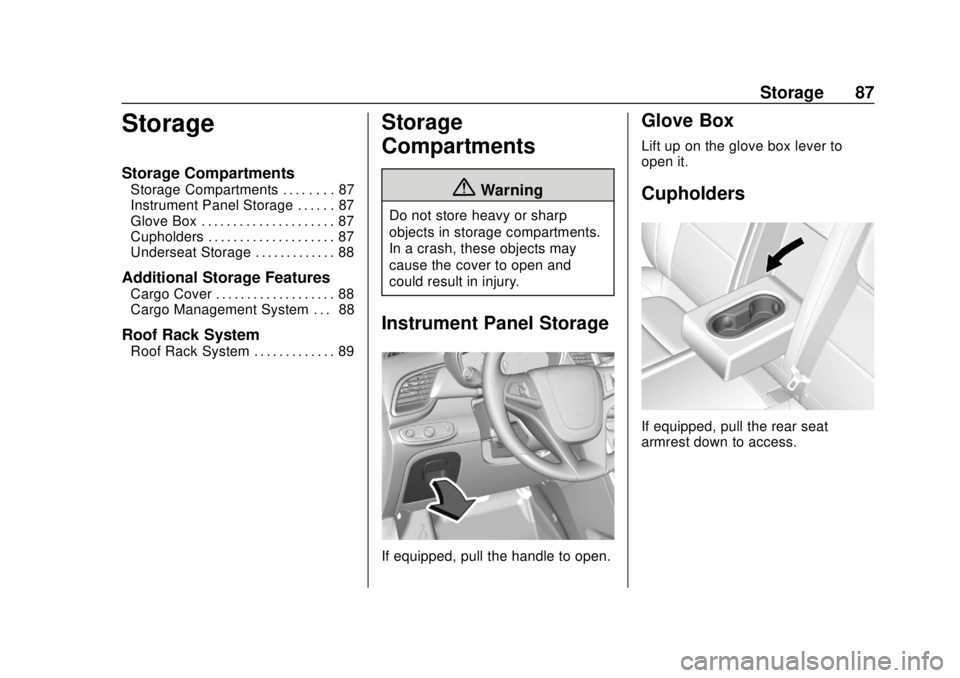
If equipped, pull the handle to open.
Glove Box
Lift up on the glove box lever to
open it.
Cupholders
If equipped, pull the rear seat
armrest down to access.
Page 90 of 355

Chevrolet TRAX Owner Manual (GMNA-Localizing-U.S./Canada/Mexico-
13556235) - 2020 - CRC - 9/19/19
Storage 89
Pull the strap to lift.
Fold the load floor. Place the hook
from the load floor inside the hook
on the side trim.
Roof Rack System
{Warning
If something is carried on top of
the vehicle that is longer or wider
than the roof rack—like paneling,
plywood, or a mattress —the
wind can catch it while the vehicle
is being driven. The item being
carried could be violently torn off,
and this could cause a collision
and damage the vehicle. Never
carry something longer or wider
than the roof rack on top of the
vehicle unless using a GM
certified accessory carrier.
For vehicles with a roof rack, the
rack can be used to load items. For
roof racks that do not have
crossrails included, GM Certified
crossrails can be purchased as an
accessory. See your dealer for
additional information.
Caution
Loading cargo on the roof rack
that weighs more than 75 kg
(165 lb) or hangs over the rear or
sides of the vehicle may damage
the vehicle. Do not load cargo
exceeding 75 kg (165 lbs) and
always load cargo so that it rests
evenly between the crossrails and
does not block the vehicle lamps
or windows. Fasten the cargo
securely.
To prevent damage or loss of cargo
when driving, check to make sure
crossrails and cargo are securely
fastened. Loading cargo on the roof
rack will make the vehicle’ s center
of gravity higher. Avoid high speeds,
sudden starts, sharp turns, sudden
braking, or abrupt maneuvers;
otherwise it may result in loss of
control. If driving for a long distance,
on rough roads, or at high speeds,
occasionally stop the vehicle to
make sure the cargo remains in its
Page 94 of 355

Chevrolet TRAX Owner Manual (GMNA-Localizing-U.S./Canada/Mexico-
13556235) - 2020 - CRC - 9/19/19
Instruments and Controls 93
Windshield Wiper/Washer
The windshield wiper/washer lever
is on the right side of the steering
column.
Move the lever to one of the
following positions:
HI :Use for fast wipes.
LO : Use for slow wipes.
INT : Move the lever up to INT for
intermittent wipes, then turn the
x
INT band up for more frequent
wipes or down for less frequent
wipes.
OFF : Use to turn the wipers off.
1X : For a single wipe, briefly move
the wiper lever down. For several
wipes, hold the wiper lever down.
b: Pull the windshield wiper lever
toward you to spray windshield
washer fluid and activate the wipers.
The wipers will continue until the
lever is released or the maximum
wash time is reached. When the
windshield wiper lever is released,
additional wipes may occur
depending on how long the
windshield washer had been
activated. See Washer Fluid0233
for information on filling the
windshield washer fluid reservoir.
Wipe Parking
If the ignition is turned off while the
wipers are on LO, HI, or INT, they
will immediately stop. If the windshield wiper lever is then
moved to OFF before the driver
door is opened or within 10 minutes,
the wipers will restart and move to
the base of the windshield.
If the ignition is turned off while the
wipers are performing wipes due to
windshield washing, the wipers
continue to run until they reach the
base of the windshield.
{Warning
In freezing weather, do not use
the washer until the windshield is
warmed. Otherwise the washer
fluid can form ice on the
windshield, blocking your vision.
{Warning
Before driving the vehicle, always
clear snow and ice from the hood,
windshield, roof, and rear of the
vehicle, including all lamps and
(Continued)
Page 137 of 355
Chevrolet TRAX Owner Manual (GMNA-Localizing-U.S./Canada/Mexico-
13556235) - 2020 - CRC - 9/19/19
136 Infotainment System
channel as a favorite. Touch a
saved favorite to recall a favorite
station or channel.
Favorites can also be stored by
touching
Hin a station or channel
list. This will highlight indicating that
it is now stored as a favorite.
The number of favorites displayed is
automatically adjusted by default,
but can be manually adjusted in
Settings in the System tab under
Favorites and then Set Number of
Audio Favorites. It can also be
adjusted in Settings in the Apps tab
under Audio and then Set Number
of Audio Favorites.
Satellite Radio
If equipped, vehicles with a valid
SiriusXM satellite radio subscription
can receive SXM programming.
SiriusXM satellite radio has a wide
variety of programming and
commercial-free music, coast to
coast, and in digital-quality sound.
In the U.S., see www.siriusxm.com or call 1-888-601-6296. In Canada,
see www.siriusxm.ca or call
1-877-438-9677.
When SXM is active, the channel
name, number, song title, and artist
display on the screen.
Radio Reception
Unplug electronic devices from the
accessory power outlets if there is
interference or static in the radio.
FM
FM signals only reach about 16 to
65 km (10 to 40 mi). Although the
radio has a built-in electronic circuit
that automatically works to reduce
interference, some static can occur,
especially around tall buildings or
hills, causing the sound to fade in
and out.
AM
The range for most AM stations is
greater than for FM, especially at
night. The longer range can cause
station frequencies to interfere with
each other. Static can also occur
when things like storms and powerlines interfere with radio reception.
When this happens, try reducing the
treble on the radio.
SiriusXM Satellite Radio
Service
If equipped, SiriusXM Satellite
Radio Service provides digital radio
reception. Tall buildings or hills can
interfere with satellite radio signals,
causing the sound to fade in and
out. In addition, traveling or standing
under heavy foliage, bridges,
garages, or tunnels may cause loss
of the SiriusXM signal for a period
of time.
Cell Phone Usage
Cell phone usage, such as making
or receiving phone calls, charging,
or just having the phone on may
cause static interference in the
radio. Unplug the phone or turn it off
if this happens.
Multi-Band Antenna
The roof antenna is for OnStar,
SiriusXM Satellite Radio (U.S. and
Canada only), and GPS (Global
Page 138 of 355

Chevrolet TRAX Owner Manual (GMNA-Localizing-U.S./Canada/Mexico-
13556235) - 2020 - CRC - 9/19/19
Infotainment System 137
Positioning System). Keep clear of
obstructions for clear reception.
If the vehicle has a sunroof, and it is
open, reception can also be
affected.Audio Players
Avoiding Untrusted Media
Devices
When using media devices such as
CDs, DVDs, Blu-ray Discs, SD
cards, USB devices, and mobile
devices, consider the source.
Untrusted media devices could
contain files that affect system
operation or performance. Avoid use
if the content or origin cannot be
trusted.
USB Port
Audio stored on a USB device may
be listened to.
This vehicle has two USB ports in
the center stack. These ports are for
data and charging.
Caution
To avoid vehicle damage, unplug
all accessories and disconnect all
accessory cables from the vehicle(Continued)
Caution (Continued)
when not in use. Accessory
cables left plugged into the
vehicle, unconnected to a device,
could be damaged or cause an
electrical short if the unconnected
end comes in contact with liquids
or another power source such as
the accessory power outlet.
Playing from a USB
A USB mass storage device can be
connected to the USB port.
Audio extensions supported by the
USB may include:
.MP3
. MP4
. AAC
. OGG
. WAV
. M4A
Page 182 of 355
Chevrolet TRAX Owner Manual (GMNA-Localizing-U.S./Canada/Mexico-
13556235) - 2020 - CRC - 9/19/19
Driving and Operating 181
{Warning
Improper use of the heater cord
or an extension cord can damage
the cord and may result in
overheating and fire.. Plug the cord into a
three-prong electrical utility
receptacle that is protected
by a ground fault detection
function. An ungrounded
outlet could cause an
electric shock.
. Use a weatherproof,
heavy-duty, 15 amp-rated
extension cord if needed.
Failure to use the
recommended extension
cord in good operating
condition, or using a
damaged heater or
extension cord, could make
(Continued)
Warning (Continued)
it overheat and cause a fire,
property damage, electric
shock, and injury.
. Do not operate the vehicle
with the heater cord
permanently attached to the
vehicle. Possible heater
cord and thermostat
damage could occur.
. While in use, do not let the
heater cord touch vehicle
parts or sharp edges. Never
close the hood on the
heater cord.
. Before starting the vehicle,
unplug the cord, reattach
the cover to the plug, and
securely fasten the cord.
Keep the cord away from
any moving parts.
4. Before starting the engine, be sure to unplug and store the
cord as it was before to keep it away from moving engine
parts. If you do not it could be
damaged.
The length of time the heater should
remain plugged in depends on
several factors. Ask a dealer in the
area where you will be parking the
vehicle for the best advice on this.
Retained Accessory
Power (RAP)
When the ignition is turned from on
to off, the following features (if
equipped) will continue to function
for up to 10 minutes, or until the
driver door is opened. These
features will also work when the
ignition is in RUN or ACC/
ACCESSORY:
. Infotainment System
. Power Windows (during RAP
this functionality will be lost
when any door is opened)
. Sunroof (during RAP this
functionality will be lost when
any door is opened)
. Auxiliary Power Outlet
Page 251 of 355
Chevrolet TRAX Owner Manual (GMNA-Localizing-U.S./Canada/Mexico-
13556235) - 2020 - CRC - 9/19/19
250 Vehicle Care
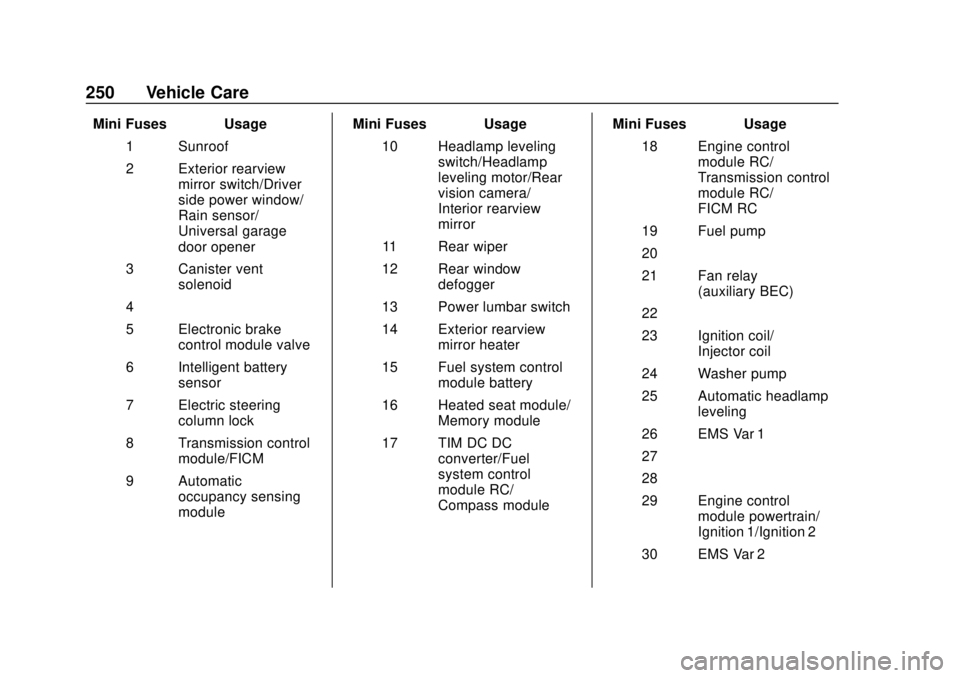
Mini Fuses Usage1 Sunroof
2 Exterior rearview mirror switch/Driver
side power window/
Rain sensor/
Universal garage
door opener
3 Canister vent solenoid
4 –
5 Electronic brake control module valve
6 Intelligent battery sensor
7 Electric steering column lock
8 Transmission control module/FICM
9 Automatic occupancy sensing
module Mini Fuses Usage
10 Headlamp leveling switch/Headlamp
leveling motor/Rear
vision camera/
Interior rearview
mirror
11 Rear wiper
12 Rear window defogger
13 Power lumbar switch
14 Exterior rearview mirror heater
15 Fuel system control module battery
16 Heated seat module/ Memory module
17 TIM DC DC converter/Fuel
system control
module RC/
Compass module Mini Fuses Usage
18 Engine control module RC/
Transmission control
module RC/
FICM RC
19 Fuel pump
20 –
21 Fan relay (auxiliary BEC)
22 –
23 Ignition coil/ Injector coil
24 Washer pump
25 Automatic headlamp leveling
26 EMS Var 1
27 –
28 –
29 Engine control module powertrain/
Ignition 1/Ignition 2
30 EMS Var 2
Page 302 of 355

Chevrolet TRAX Owner Manual (GMNA-Localizing-U.S./Canada/Mexico-
13556235) - 2020 - CRC - 9/19/19
Service and Maintenance 301
parts, or signs of wear at least
once a year. SeeExterior Care
0 288.
. Inspect power steering for
proper attachment, connections,
binding, leaks, cracks,
chafing, etc.
. Visually inspect halfshafts and
drive shafts for excessive wear,
lubricant leaks, and/or damage
including: tube dents or cracks,
constant velocity joint or
universal joint looseness,
cracked or missing boots, loose
or missing boot clamps, center
bearing excessive looseness,
loose or missing fasteners, and
axle seal leaks.
. Check restraint system
components. See Safety System
Check 053.
. Visually inspect fuel system for
damage or leaks.
. Visually inspect exhaust system
and nearby heat shields for
loose or damaged parts.
. Lubricate body components. See
Exterior Care 0288. .
Check starter switch. See Starter
Switch Check 0237.
. Check automatic transmission
shift lock control function. See
Automatic Transmission Shift
Lock Control Function Check
0237.
. Check ignition transmission lock.
See Ignition Transmission Lock
Check 0237.
. Check parking brake and
automatic transmission park
mechanism. See Park Brake and
P (Park) Mechanism Check
0 238.
. Check accelerator pedal for
damage, high effort, or binding.
Replace if needed.
. Visually inspect gas strut for
signs of wear, cracks, or other
damage. Check the hold open
ability of the strut. If the hold
open is low, service the gas
strut. See Gas Strut(s) 0240.
. Inspect sunroof track and seal,
if equipped. See Sunroof033.
Page 351 of 355

Chevrolet TRAX Owner Manual (GMNA-Localizing-U.S./Canada/Mexico-
13556235) - 2020 - CRC - 9/19/19
350 Index
Reduced Engine Power Light . . . 110
Reimbursement Program,GM Mobility . . . . . . . . . . . . . . . . . . . 321
Remote Keyless Entry (RKE) System . . . . . . . . . . . . . . 10, 17
Remote Vehicle Start . . . . . . . . . . . . 20
Replacement Parts Airbags . . . . . . . . . . . . . . . . . . . . . . . . . 66
Maintenance . . . . . . . . . . . . . . . . . . 310
Replacing Airbag System . . . . . . . . 66
Replacing LATCH System Parts after a Crash . . . . . . . . . . . . . 81
Replacing Seat Belt System Parts after a Crash . . . . . . . . . . . . . 54
Reporting Safety Defects Canadian Government . . . . . . . . 328
General Motors . . . . . . . . . . . . . . . 328
U.S. Government . . . . . . . . . . . . . 327
Restraints Where to Put . . . . . . . . . . . . . . . . . . . 72
Retained Accessory
Power (RAP) . . . . . . . . . . . . . . . . . . 181
Roads Driving, Wet . . . . . . . . . . . . . . . . . . 166
Roadside Assistance
Program . . . . . . . . . . . . . . . . . . . . . . . 321
Roof Sunroof . . . . . . . . . . . . . . . . . . . . . . . . . 33 Roof Rack System . . . . . . . . . . . . . . . 89
Rotation, Tires . . . . . . . . . . . . . . . . . . 268
Routing, Engine Drive Belt . . . . . . 316
Running the Vehicle While
Parked . . . . . . . . . . . . . . . . . . . . . . . . 185
S
Safety Defects ReportingCanadian Government . . . . . . . . 328
General Motors . . . . . . . . . . . . . . . 328
U.S. Government . . . . . . . . . . . . . 327
Safety Locks . . . . . . . . . . . . . . . . . . . . . 24
Safety System Check . . . . . . . . . . . . 53
Satellite Radio . . . . . . . . . . . . . . . . . . 136
Scheduling Appointments . . . . . . . 323
Seat Belts . . . . . . . . . . . . . . . . . . . . . . . 47 Care . . . . . . . . . . . . . . . . . . . . . . . . . . . . 53
Extender . . . . . . . . . . . . . . . . . . . . . . . . 53
How to Wear Seat Belts
Properly . . . . . . . . . . . . . . . . . . . . . . . 48
Lap-Shoulder Belt . . . . . . . . . . . . . . 50
Reminders . . . . . . . . . . . . . . . . . . . . 100
Replacing after a Crash . . . . . . . . 54
Use During Pregnancy . . . . . . . . . . 52
Seats Adjustment, Front . . . . . . . . . . . . . . . 37
Folding Seatback . . . . . . . . . . . . . . . 41
Head Restraints . . . . . . . . . . . . . . . . 36 Seats (cont'd)
Heated Front . . . . . . . . . . . . . . . . . . . 40
Lumbar Adjustment, Front . . . . . . 39
Power Adjustment, Front . . . . . . . 38
Rear . . . . . . . . . . . . . . . . . . . . . . . . . . . . 42
Reclining Seatbacks . . . . . . . . . . . . 39
Underseat Storage . . . . . . . . . . . . . 88
Securing Child Restraints . . . . 82, 84
Security OnStar . . . . . . . . . . . . . . . . . . . . . . . 333
Vehicle . . . . . . . . . . . . . . . . . . . . . . . . . 26
Vehicle Alarm . . . . . . . . . . . . . . . . . . . 26
Service . . . . . . . . . . . . . . . . . . . . . . . . . 159 Accessories andModifications . . . . . . . . . . . . . . . . 215
Climate Control System . . . . . . . 155
Doing Your Own Work . . . . . . . . 215
Maintenance Records . . . . . . . . 312
Maintenance, General
Information . . . . . . . . . . . . . . . . . . 298
Parts Identification . . . . . . . . . . . . 313
Scheduling Appointments . . . . . 323
Vehicle Soon Light . . . . . . . . . . . . 104
Services Special Application . . . . . . . . . . . 305
Servicing the Airbag . . . . . . . . . . . . . 64
Settings . . . . . . . . . . . . . . . . . . . . . . . . 149
Page 352 of 355

Chevrolet TRAX Owner Manual (GMNA-Localizing-U.S./Canada/Mexico-
13556235) - 2020 - CRC - 9/19/19
Index 351
Shift Lock Control FunctionCheck, Automatic
Transmission . . . . . . . . . . . . . . . . . . 237
Shifting Into Park . . . . . . . . . . . . . . . . . . . . . . 182
Out of Park . . . . . . . . . . . . . . . . . . . 183
Side Blind Zone Alert (SBZA) . . . 204
Sidemarker
Bulb Replacement . . . . . . . . . . . . 245
Signals, Turn and Lane-Change . . . . . . . . . . . . . . . . . 125
Spare Tire Compact . . . . . . . . . . . . . . . . . . . . . . 281
Special Application Services . . . . 305
Specifications and Capacities . . . . . . . . . . . . . . . . . . . . . 314
Speedometer . . . . . . . . . . . . . . . . . . . . 99
StabiliTrak OFF Light . . . . . . . . . . . . . . . . . . . . . 107
Start Assist, Hill . . . . . . . . . . . . . . . . . 193
Start Vehicle, Remote . . . . . . . . . . . 20
Starter Switch Check . . . . . . . . . . . 237
Starting the Engine . . . . . . . . . . . . . 178
Steering . . . . . . . . . . . . . . . . . . . . . . . . 164 Fluid, Power . . . . . . . . . . . . . . . . . . 232
Power, Warning Lights . . . . . . . . 106
Wheel Adjustment . . . . . . . . . . . . . . 92
Wheel Controls . . . . . . . . . . . . . . . . . 92 Steering Column Lock . . . . . . . . . . . 27
Stoplamps and Back-Up Lamps
Bulb Replacement . . . . . . . . . . . . 245
Storage Areas Cargo Cover . . . . . . . . . . . . . . . . . . . . 88
Cargo Management System . . . . 88
Glove Box . . . . . . . . . . . . . . . . . . . . . . 87
Instrument Panel . . . . . . . . . . . . . . . 87
Roof Rack System . . . . . . . . . . . . . . 89
Underseat . . . . . . . . . . . . . . . . . . . . . . 88
Storage Compartments . . . . . . . . . . 87
Struts
Gas . . . . . . . . . . . . . . . . . . . . . . . . . . . 240
Stuck Vehicle . . . . . . . . . . . . . . . . . . . 169
Sun Visors . . . . . . . . . . . . . . . . . . . . . . . 33
Sunroof . . . . . . . . . . . . . . . . . . . . . . . . . . 33
Symbols . . . . . . . . . . . . . . . . . . . . . . . . . . 3
System Forward CollisionAlert (FCA) . . . . . . . . . . . . . . . . . . 203
Roof Rack . . . . . . . . . . . . . . . . . . . . . . 89
Systems Driver Assistance . . . . . . . . . . . . . 198
T
Tachometer . . . . . . . . . . . . . . . . . . . . . . 99 Taillamps
Bulb Replacement . . . . . . . . . . . . 245
Text Telephone (TTY) Users . . . . 320
Theft-Deterrent Systems . . . . . 27, 28 Immobilizer . . . . . . . . . . . . . . . . . . . . . 27
Time . . . . . . . . . . . . . . . . . . . . . . . . . . . . . 95
Tires . . . . . . . . . . . . . . . . . . . . . . . . . . . . 255 All-Season . . . . . . . . . . . . . . . . . . . . 256
Buying New Tires . . . . . . . . . . . . . 270
Chains . . . . . . . . . . . . . . . . . . . . . . . . 274
Changing . . . . . . . . . . . . . . . . . . . . . 276
Compact Spare . . . . . . . . . . . . . . . 281
Designations . . . . . . . . . . . . . . . . . 259
Different Size . . . . . . . . . . . . . . . . . 271
If a Tire Goes Flat . . . . . . . . . . . . 274
Inspection . . . . . . . . . . . . . . . . . . . . 267
Pressure . . . . . . . . . . . . . . . . . . . . . . 262
Pressure Light . . . . . . . . . . . . . . . . 108
Pressure Monitor Operation . . 264
Pressure Monitor System . . . . . 263
Rotation . . . . . . . . . . . . . . . . . . . . . . 268
Sidewall Labeling . . . . . . . . . . . . . 257
Terminology and Definitions . . 260
Uniform Tire QualityGrading . . . . . . . . . . . . . . . . . . . . . 271
Wheel Alignment and Tire Balance . . . . . . . . . . . . . . . . . . . . . 273
Wheel Replacement . . . . . . . . . . 273