maintenance schedule CHEVROLET TRAX 2020 Owner's Manual
[x] Cancel search | Manufacturer: CHEVROLET, Model Year: 2020, Model line: TRAX, Model: CHEVROLET TRAX 2020Pages: 355, PDF Size: 5.75 MB
Page 306 of 355
Chevrolet TRAX Owner Manual (GMNA-Localizing-U.S./Canada/Mexico-
13556235) - 2020 - CRC - 9/19/19
Service and Maintenance 305
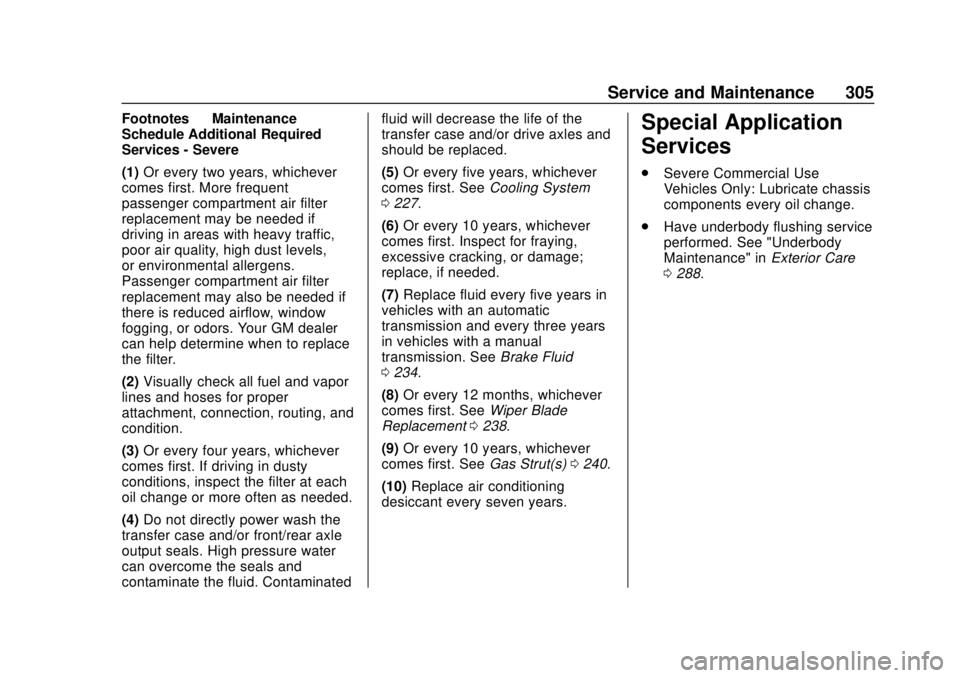
Footnotes—Maintenance
Schedule Additional Required
Services - Severe
(1) Or every two years, whichever
comes first. More frequent
passenger compartment air filter
replacement may be needed if
driving in areas with heavy traffic,
poor air quality, high dust levels,
or environmental allergens.
Passenger compartment air filter
replacement may also be needed if
there is reduced airflow, window
fogging, or odors. Your GM dealer
can help determine when to replace
the filter.
(2) Visually check all fuel and vapor
lines and hoses for proper
attachment, connection, routing, and
condition.
(3) Or every four years, whichever
comes first. If driving in dusty
conditions, inspect the filter at each
oil change or more often as needed.
(4) Do not directly power wash the
transfer case and/or front/rear axle
output seals. High pressure water
can overcome the seals and
contaminate the fluid. Contaminated fluid will decrease the life of the
transfer case and/or drive axles and
should be replaced.
(5)
Or every five years, whichever
comes first. See Cooling System
0 227.
(6) Or every 10 years, whichever
comes first. Inspect for fraying,
excessive cracking, or damage;
replace, if needed.
(7) Replace fluid every five years in
vehicles with an automatic
transmission and every three years
in vehicles with a manual
transmission. See Brake Fluid
0 234.
(8) Or every 12 months, whichever
comes first. See Wiper Blade
Replacement 0238.
(9) Or every 10 years, whichever
comes first. See Gas Strut(s)0240.
(10) Replace air conditioning
desiccant every seven years.Special Application
Services
. Severe Commercial Use
Vehicles Only: Lubricate chassis
components every oil change.
. Have underbody flushing service
performed. See "Underbody
Maintenance" in Exterior Care
0 288.
Page 313 of 355
Chevrolet TRAX Owner Manual (GMNA-Localizing-U.S./Canada/Mexico-
13556235) - 2020 - CRC - 9/19/19
312 Service and Maintenance
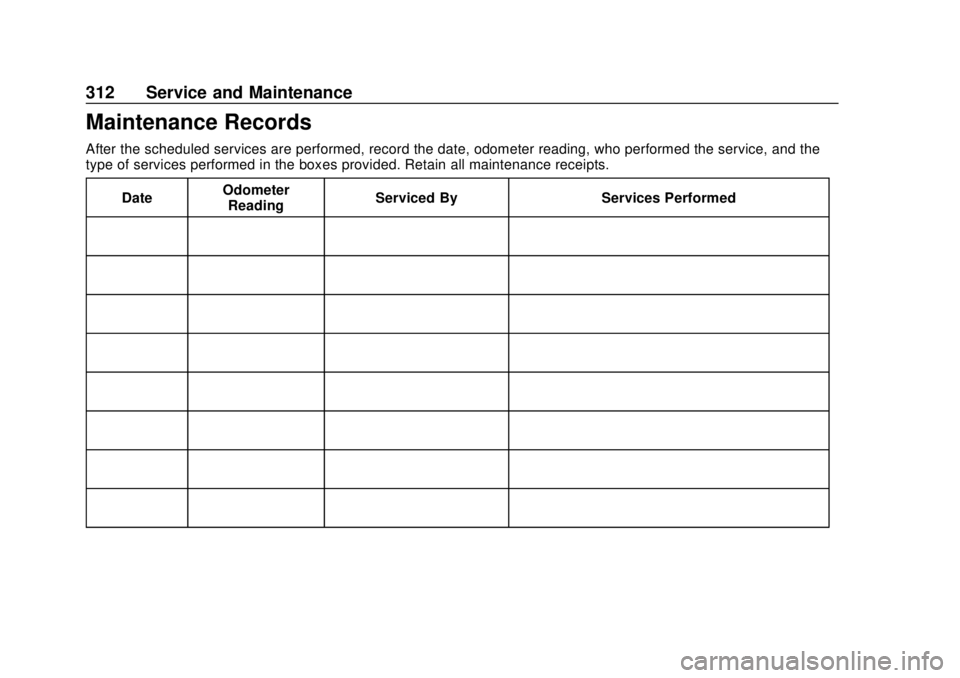
Maintenance Records
After the scheduled services are performed, record the date, odometer reading, who performed the service, and the
type of services performed in the boxes provided. Retain all maintenance receipts.Date Odometer
Reading Serviced By Services Performed
Page 321 of 355
Chevrolet TRAX Owner Manual (GMNA-Localizing-U.S./Canada/Mexico-
13556235) - 2020 - CRC - 9/19/19
320 Customer Information
Telephone devices (TTYs))
Roadside Assistance:
1-800-268-6800
Overseas
Please contact the local General
Motors Business Unit.
Customer Assistance for
Text Telephone (TTY)
Users
To assist customers who are deaf,
hard of hearing, or speech-impaired
and who use Text Telephones
(TTYs), Chevrolet has TTY
equipment available at its Customer
Assistance Center. Any TTY user in
the U.S. can communicate with
Chevrolet by dialing:
1-800-833-2438. TTY users in
Canada can dial 1-800-263-3830.
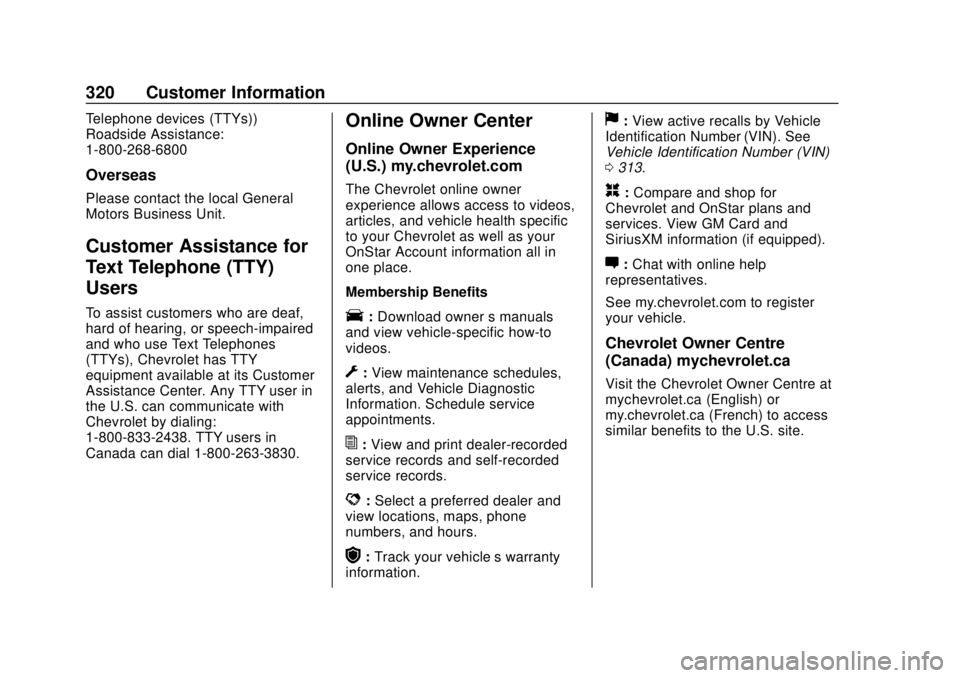
Online Owner Center
Online Owner Experience
(U.S.) my.chevrolet.com
The Chevrolet online owner
experience allows access to videos,
articles, and vehicle health specific
to your Chevrolet as well as your
OnStar Account information all in
one place.
Membership Benefits
E:Download owner ’s manuals
and view vehicle-specific how-to
videos.
G: View maintenance schedules,
alerts, and Vehicle Diagnostic
Information. Schedule service
appointments.
I: View and print dealer-recorded
service records and self-recorded
service records.
D: Select a preferred dealer and
view locations, maps, phone
numbers, and hours.
r: Track your vehicle’s warranty
information.
J: View active recalls by Vehicle
Identification Number (VIN). See
Vehicle Identification Number (VIN)
0 313.
H:Compare and shop for
Chevrolet and OnStar plans and
services. View GM Card and
SiriusXM information (if equipped).
F: Chat with online help
representatives.
See my.chevrolet.com to register
your vehicle.
Chevrolet Owner Centre
(Canada) mychevrolet.ca
Visit the Chevrolet Owner Centre at
mychevrolet.ca (English) or
my.chevrolet.ca (French) to access
similar benefits to the U.S. site.
Page 327 of 355
Chevrolet TRAX Owner Manual (GMNA-Localizing-U.S./Canada/Mexico-
13556235) - 2020 - CRC - 9/19/19
326 Customer Information
If the airbag has inflated, seeWhat
Will You See after an Airbag
Inflates? 059.
Managing the Vehicle Damage
Repair Process
In the event that the vehicle requires
damage repairs, GM recommends
that you take an active role in its
repair. If you have a pre-determined
repair facility of choice, take the
vehicle there, or have it towed there.
Specify to the facility that any
required replacement collision parts
be original equipment parts, either
new Genuine GM parts or recycled
original GM parts. Remember,
recycled parts will not be covered by
the GM vehicle warranty.
Insurance pays the bill for the repair,
but you must live with the repair.
Depending on your policy limits,
your insurance company may
initially value the repair using
aftermarket parts. Discuss this with
the repair professional, and insist on
Genuine GM parts. Remember,
if the vehicle is leased, you may be
obligated to have the vehicle repaired with Genuine GM parts,
even if your insurance coverage
does not pay the full cost.
If another party's insurance
company is paying for the repairs,
you are not obligated to accept a
repair valuation based on that
insurance company's collision policy
repair limits, as you have no
contractual limits with that company.
In such cases, you can have control
of the repair and parts choices as
long as the cost stays within
reasonable limits.
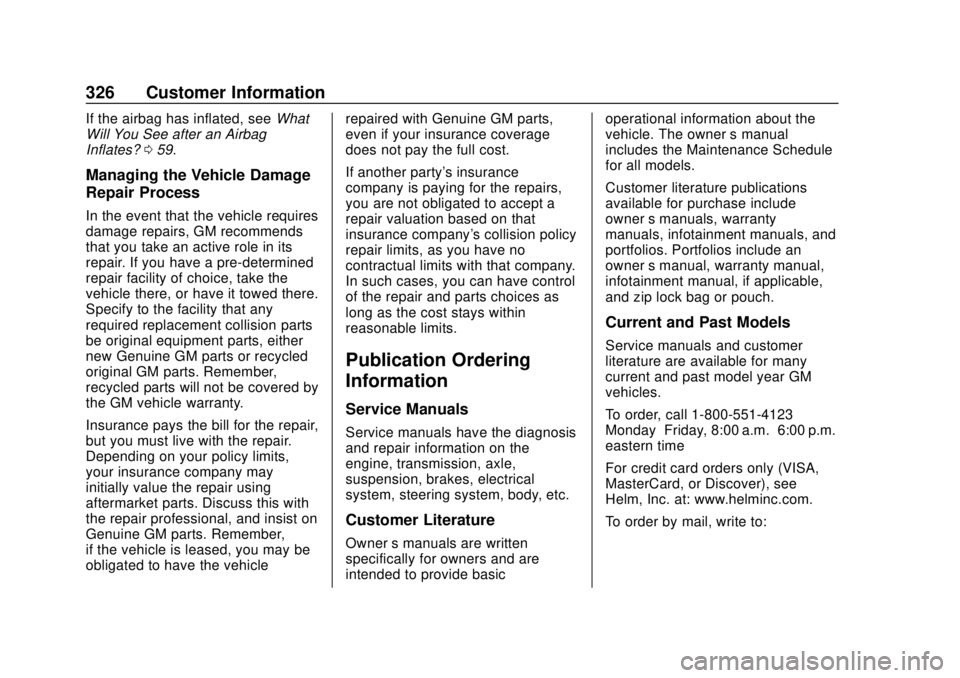
Publication Ordering
Information
Service Manuals
Service manuals have the diagnosis
and repair information on the
engine, transmission, axle,
suspension, brakes, electrical
system, steering system, body, etc.
Customer Literature
Owner
’s manuals are written
specifically for owners and are
intended to provide basic operational information about the
vehicle. The owner
’s manual
includes the Maintenance Schedule
for all models.
Customer literature publications
available for purchase include
owner ’s manuals, warranty
manuals, infotainment manuals, and
portfolios. Portfolios include an
owner ’s manual, warranty manual,
infotainment manual, if applicable,
and zip lock bag or pouch.
Current and Past Models
Service manuals and customer
literature are available for many
current and past model year GM
vehicles.
To order, call 1-800-551-4123
Monday–Friday, 8:00 a.m.–6:00 p.m.
eastern time
For credit card orders only (VISA,
MasterCard, or Discover), see
Helm, Inc. at: www.helminc.com.
To order by mail, write to:
Page 342 of 355
Chevrolet TRAX Owner Manual (GMNA-Localizing-U.S./Canada/Mexico-
13556235) - 2020 - CRC - 9/19/19
Connected Services 341
devices. Manage data usage by
turning Wi-Fi on or off on your
mobile device, using the
myChevrolet mobile app, or by
contacting an OnStar Advisor. On
some vehicles, Wi-Fi can also be
managed from the Wi-Fi
Hotspot menu.
MyChevrolet Mobile App (If
Available)
Download the myChevrolet mobile
app to compatible Apple and
Android smartphones. Chevrolet
users can access the following
services from a smartphone:
.Remotely start/stop the vehicle,
if factory-equipped.
. Lock/unlock doors, if equipped
with automatic locks.
. Activate the horn and lamps.
. Check the vehicle’s fuel level, oil
life, or tire pressure,
if factory-equipped with the Tire
Pressure Monitor System.
. Send destinations to the vehicle.
. Locate the vehicle on a map
(U.S. market only). .
Turn the vehicle's Wi-Fi hotspot
on/off, manage settings, and
monitor data consumption,
if equipped.
. Locate a dealer and schedule
service.
. Request roadside assistance.
. Set a parking reminder with pin
drop, take a photo, make a note,
and set a timer.
. Connect with Chevrolet on social
media.
Features are subject to change. For
myChevrolet mobile app information
and compatibility, see
my.chevrolet.com.
An active OnStar or connected
service plan may be required.
A compatible device,
factory-installed remote start, and
power locks are required. Data rates
apply. See www.onstar.com for
details and system limitations.
Remote Services
Contact an OnStar Advisor to
unlock the doors or sound the horn
and flash the lamps.
Marketplace
OnStar Advisors can provide offers
from restaurants and retailers on
your route, help locate hotels,
or book a room. These services
vary by market.
Diagnostics
By monitoring and reporting on the
vehicle's key systems, OnStar
Advanced Diagnostics, if equipped,
provides a way to keep up on
maintenance. Capabilities vary by
model. See www.onstar.com for
details and system limitations.
Features are subject to change. For
updates on feature capabilities, see
my.chevrolet.com. Message and
data rates may apply.
Page 349 of 355

Chevrolet TRAX Owner Manual (GMNA-Localizing-U.S./Canada/Mexico-
13556235) - 2020 - CRC - 9/19/19
348 Index
Lights (cont'd)High/Low Beam Changer . . . . . 123
Immobilizer . . . . . . . . . . . . . . . . . . . .110
Lane Departure Warning . . . . . . 106
Low Fuel Warning . . . . . . . . . . . . 109
Operate Pedal . . . . . . . . . . . . . . . . 106
Reduced Engine Power . . . . . . .110
Seat Belt Reminders . . . . . . . . . . 100
Service Vehicle Soon . . . . . . . . . 104
StabiliTrak OFF . . . . . . . . . . . . . . . 107
Tire Pressure . . . . . . . . . . . . . . . . . 108
Traction Control System
(TCS)/StabiliTrak . . . . . . . . . . . . 108
Traction Off . . . . . . . . . . . . . . . . . . . 107
Ultrasonic Parking Sensor . . . . 107
Up-Shift . . . . . . . . . . . . . . . . . . . . . . 106
Warning, Power Steering . . . . . 106
Lock Steering Column . . . . . . . . . . . . . . . . 27
Locks Automatic Door . . . . . . . . . . . . . . . . . 23
Delayed Locking . . . . . . . . . . . . . . . . 22
Door . . . . . . . . . . . . . . . . . . . . . . . . . . . . 21
Lockout Protection . . . . . . . . . . . . . . 23
Power Door . . . . . . . . . . . . . . . . . . . . . 22
Safety . . . . . . . . . . . . . . . . . . . . . . . . . . 24
Loss of Control . . . . . . . . . . . . . . . . . 166
Low Fuel Warning Light . . . . . . . . . 109 Lower Anchors and Tethers
for Children (LATCH
System) . . . . . . . . . . . . . . . . . . . . . . . . 73
Lumbar Adjustment . . . . . . . . . . . . . . 39 Front Seats . . . . . . . . . . . . . . . . . . . . . 39
M
MaintenanceRecords . . . . . . . . . . . . . . . . . . . . . . 312
Maintenance and Care Additional . . . . . . . . . . . . . . . . . . . . . 306
Maintenance Schedule . . . . . . . . . 300
Recommended Fluids andLubricants . . . . . . . . . . . . . . . . . . . 309
Malfunction Indicator Lamp . . . . . 102
Manual Mode . . . . . . . . . . . . . . . . . . . 188
Manual Transmission . . . . . . . . . . . 189 Fluid . . . . . . . . . . . . . . . . . . . . . . . . . . 225
Media Avoiding Untrusted Devices . . 137
Messages
Engine Power . . . . . . . . . . . . . . . . .118
Vehicle . . . . . . . . . . . . . . . . . . . . . . . .116
Vehicle Speed . . . . . . . . . . . . . . . . .118
Mirrors Automatic Dimming
Rearview . . . . . . . . . . . . . . . . . . . . . . 31
Convex . . . . . . . . . . . . . . . . . . . . . . . . . 29 Mirrors (cont'd)
Folding . . . . . . . . . . . . . . . . . . . . . . . . . 30
Heated . . . . . . . . . . . . . . . . . . . . . . . . . 30
Manual Rearview . . . . . . . . . . . . . . . 30
Power . . . . . . . . . . . . . . . . . . . . . . . . . . 30
Mirrors, Interior Rearview . . . . . . . . 30
Monitor System, Tire Pressure . . . . . . . . . . . . . . . . . . . . . . 263
Multi-band Antenna . . . . . . . . . . . . . 136
N
Navigation Connected Services . . . . . . . . . . 339
New Vehicle Break-In . . . . . . . . . . . 173
O
Odometer . . . . . . . . . . . . . . . . . . . . . . . . 99 Trip . . . . . . . . . . . . . . . . . . . . . . . . . . . . . 99
Off-Road Recovery . . . . . . . . . . . . . . . . . . . . . 165
Oil Engine . . . . . . . . . . . . . . . . . . . . . . . . 221
Engine Oil Life System . . . . . . . 223
Pressure Light . . . . . . . . . . . . . . . . 109
Older Children, Restraints . . . . . . . 67
Online Owner Center . . . . . . . . . . . 320
OnStar . . . . . . . . . . . . . . . . . . . . . . . . . 330
OnStar Additional Information . . . . . . . . . . . . . . . . . . . . 333