lock CHEVROLET TRAX 2020 Service Manual
[x] Cancel search | Manufacturer: CHEVROLET, Model Year: 2020, Model line: TRAX, Model: CHEVROLET TRAX 2020Pages: 355, PDF Size: 5.75 MB
Page 90 of 355

Chevrolet TRAX Owner Manual (GMNA-Localizing-U.S./Canada/Mexico-
13556235) - 2020 - CRC - 9/19/19
Storage 89
Pull the strap to lift.
Fold the load floor. Place the hook
from the load floor inside the hook
on the side trim.
Roof Rack System
{Warning
If something is carried on top of
the vehicle that is longer or wider
than the roof rack—like paneling,
plywood, or a mattress —the
wind can catch it while the vehicle
is being driven. The item being
carried could be violently torn off,
and this could cause a collision
and damage the vehicle. Never
carry something longer or wider
than the roof rack on top of the
vehicle unless using a GM
certified accessory carrier.
For vehicles with a roof rack, the
rack can be used to load items. For
roof racks that do not have
crossrails included, GM Certified
crossrails can be purchased as an
accessory. See your dealer for
additional information.
Caution
Loading cargo on the roof rack
that weighs more than 75 kg
(165 lb) or hangs over the rear or
sides of the vehicle may damage
the vehicle. Do not load cargo
exceeding 75 kg (165 lbs) and
always load cargo so that it rests
evenly between the crossrails and
does not block the vehicle lamps
or windows. Fasten the cargo
securely.
To prevent damage or loss of cargo
when driving, check to make sure
crossrails and cargo are securely
fastened. Loading cargo on the roof
rack will make the vehicle’ s center
of gravity higher. Avoid high speeds,
sudden starts, sharp turns, sudden
braking, or abrupt maneuvers;
otherwise it may result in loss of
control. If driving for a long distance,
on rough roads, or at high speeds,
occasionally stop the vehicle to
make sure the cargo remains in its
Page 92 of 355
Chevrolet TRAX Owner Manual (GMNA-Localizing-U.S./Canada/Mexico-
13556235) - 2020 - CRC - 9/19/19
Instruments and Controls 91
Instruments and
Controls
Controls
Steering Wheel Adjustment . . . . 92
Steering Wheel Controls . . . . . . . 92
Horn . . . . . . . . . . . . . . . . . . . . . . . . . . . 92
Windshield Wiper/Washer . . . . . . 93
Rear Window Wiper/Washer . . . 94
Compass . . . . . . . . . . . . . . . . . . . . . . 95
Clock . . . . . . . . . . . . . . . . . . . . . . . . . . 95
Power Outlets . . . . . . . . . . . . . . . . . 95
Warning Lights, Gauges, and
Indicators
Warning Lights, Gauges, andIndicators . . . . . . . . . . . . . . . . . . . . 96
Instrument Cluster . . . . . . . . . . . . . 97
Speedometer . . . . . . . . . . . . . . . . . . 99
Odometer . . . . . . . . . . . . . . . . . . . . . . 99
Trip Odometer . . . . . . . . . . . . . . . . . 99
Tachometer . . . . . . . . . . . . . . . . . . . . 99
Fuel Gauge . . . . . . . . . . . . . . . . . . . . 99
Seat Belt Reminders . . . . . . . . . 100
Airbag Readiness Light . . . . . . . 101
Passenger Airbag Status Indicator . . . . . . . . . . . . . . . . . . . . 101
Charging System Light . . . . . . . 102 Malfunction Indicator Lamp
(Check Engine Light) . . . . . . . . 102
Service Vehicle Soon Light . . . 104
Owner Manual Indicator . . . . . . 104
Brake System Warning Light . . . . . . . . . . . . . . . . . . . . . . . . 105
Antilock Brake System (ABS) Warning Light . . . . . . . . . . . . . . . 105
Operate Pedal Light . . . . . . . . . . 106
Up-Shift Light . . . . . . . . . . . . . . . . . 106
Power Steering Warning Light . . . . . . . . . . . . . . . . . . . . . . . . 106
Lane Departure Warning (LDW) Light . . . . . . . . . . . . . . . . . 106
Vehicle Ahead Indicator . . . . . . 106
Ultrasonic Parking Sensor Light . . . . . . . . . . . . . . . . . . . . . . . . 107
Traction Off Light . . . . . . . . . . . . . 107
StabiliTrak OFF Light . . . . . . . . . 107
Traction Control System (TCS)/ StabiliTrak Light . . . . . . . . . . . . . 108
Engine Coolant Temperature Warning Light . . . . . . . . . . . . . . . 108
Tire Pressure Light . . . . . . . . . . . 108
Engine Oil Pressure Light . . . . 109
Low Fuel Warning Light . . . . . . 109
Immobilizer Light . . . . . . . . . . . . . 110
Reduced Engine Power Light . . . . . . . . . . . . . . . . . . . . . . . . 110
High-Beam On Light . . . . . . . . . . 110 Front Fog Lamp Light . . . . . . . . . 110
Lamps On Reminder . . . . . . . . . . 111
Cruise Control Light . . . . . . . . . . . 111
Door Ajar Light . . . . . . . . . . . . . . . . 111
Information Displays
Driver Information
Center (DIC) . . . . . . . . . . . . . . . . 111
Vehicle Messages
Vehicle Messages(Uplevel) . . . . . . . . . . . . . . . . . . . . 116
Vehicle Messages (Base Level) . . . . . . . . . . . . . . . . . . . . . . . 116
Engine Power Messages . . . . . 118
Vehicle Speed Messages . . . . . 118
Vehicle Personalization
Vehicle Personalization . . . . . . . 118
Page 93 of 355
Chevrolet TRAX Owner Manual (GMNA-Localizing-U.S./Canada/Mexico-
13556235) - 2020 - CRC - 9/19/19
92 Instruments and Controls
Controls
Steering Wheel
Adjustment
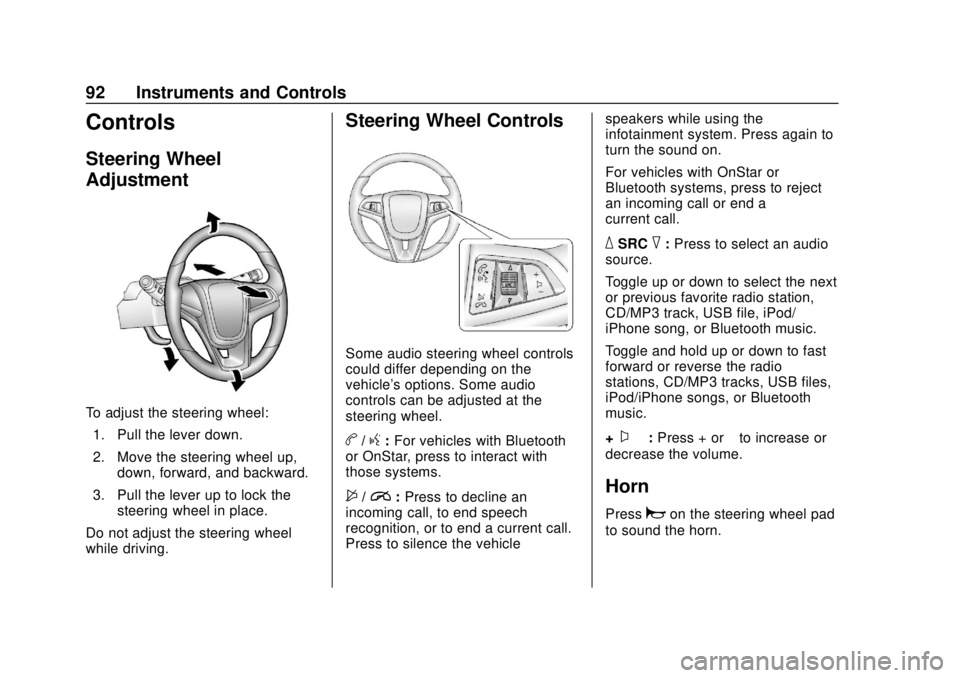
To adjust the steering wheel:1. Pull the lever down.
2. Move the steering wheel up, down, forward, and backward.
3. Pull the lever up to lock the steering wheel in place.
Do not adjust the steering wheel
while driving.
Steering Wheel Controls
Some audio steering wheel controls
could differ depending on the
vehicle's options. Some audio
controls can be adjusted at the
steering wheel.
b/g: For vehicles with Bluetooth
or OnStar, press to interact with
those systems.
$/i: Press to decline an
incoming call, to end speech
recognition, or to end a current call.
Press to silence the vehicle speakers while using the
infotainment system. Press again to
turn the sound on.
For vehicles with OnStar or
Bluetooth systems, press to reject
an incoming call or end a
current call.
_SRC^:
Press to select an audio
source.
Toggle up or down to select the next
or previous favorite radio station,
CD/MP3 track, USB file, iPod/
iPhone song, or Bluetooth music.
Toggle and hold up or down to fast
forward or reverse the radio
stations, CD/MP3 tracks, USB files,
iPod/iPhone songs, or Bluetooth
music.
+
x− :Press + or −to increase or
decrease the volume.
Horn
Pressaon the steering wheel pad
to sound the horn.
Page 94 of 355

Chevrolet TRAX Owner Manual (GMNA-Localizing-U.S./Canada/Mexico-
13556235) - 2020 - CRC - 9/19/19
Instruments and Controls 93
Windshield Wiper/Washer
The windshield wiper/washer lever
is on the right side of the steering
column.
Move the lever to one of the
following positions:
HI :Use for fast wipes.
LO : Use for slow wipes.
INT : Move the lever up to INT for
intermittent wipes, then turn the
x
INT band up for more frequent
wipes or down for less frequent
wipes.
OFF : Use to turn the wipers off.
1X : For a single wipe, briefly move
the wiper lever down. For several
wipes, hold the wiper lever down.
b: Pull the windshield wiper lever
toward you to spray windshield
washer fluid and activate the wipers.
The wipers will continue until the
lever is released or the maximum
wash time is reached. When the
windshield wiper lever is released,
additional wipes may occur
depending on how long the
windshield washer had been
activated. See Washer Fluid0233
for information on filling the
windshield washer fluid reservoir.
Wipe Parking
If the ignition is turned off while the
wipers are on LO, HI, or INT, they
will immediately stop. If the windshield wiper lever is then
moved to OFF before the driver
door is opened or within 10 minutes,
the wipers will restart and move to
the base of the windshield.
If the ignition is turned off while the
wipers are performing wipes due to
windshield washing, the wipers
continue to run until they reach the
base of the windshield.
{Warning
In freezing weather, do not use
the washer until the windshield is
warmed. Otherwise the washer
fluid can form ice on the
windshield, blocking your vision.
{Warning
Before driving the vehicle, always
clear snow and ice from the hood,
windshield, roof, and rear of the
vehicle, including all lamps and
(Continued)
Page 96 of 355

Chevrolet TRAX Owner Manual (GMNA-Localizing-U.S./Canada/Mexico-
13556235) - 2020 - CRC - 9/19/19
Instruments and Controls 95
Compass
The vehicle may have a compass
display in the Driver Information
Center (DIC).
Setting the Compass Zone
Under certain circumstances, such
as during a long trip or moving to a
new area, the compass zone will
need to be reset. If the compass is
not set to the correct zone, it may
give false readings. The compass
zone should be set to the area in
which the vehicle is currently
traveling.
Use the DIC buttons to set the
compass zone:1. While the vehicle is in P (Park), press the MENU button to
display the DIC menu.
2. Press and hold SET/CLR while the Set Area display is active.
3. Find the vehicle's currentlocation and zone number on
the map. Zones 1 through 15
are available.
4. Use
w xto change to the
correct zone number.
5. Press SET/CLR to confirm the setting.
The compass system is designed to
operate for a certain number of
miles or degrees of turn before
needing a signal from the GPS
satellites. When the compass
display shows CAL, drive the
vehicle for a short distance in an
open area where it can receive a GPS signal. The compass system
will automatically determine when a
GPS signal is restored and provide
a heading again.
Clock
The clock can be set using the
infotainment system. See "System“
under
Settings 0149.
Power Outlets
Power Outlet 110/120 Volt
Alternating Current
If equipped, this power outlet is on
the rear of the center console. It can
be used to plug in electrical
equipment that uses a maximum
limit of 150 watts.
Page 106 of 355

Chevrolet TRAX Owner Manual (GMNA-Localizing-U.S./Canada/Mexico-
13556235) - 2020 - CRC - 9/19/19
Instruments and Controls 105
This symbol is shown when you
need to see the owner’s manual for
additional instructions or
information.
Brake System Warning
Light
MetricEnglish
This light should come on briefly
when the vehicle is turned on. If it
does not come on then, have it fixed
so it will be ready to warn you if
there is a problem.
When the vehicle is on, the brake
system warning light also comes on
when the parking brake is set. The
light stays on if the parking brake
does not fully release. If it stays on
after the parking brake is fully
released, there is a brake problem.
Have the brake system inspected
right away. If the light comes on while driving,
pull off the road and stop carefully.
The brake pedal might be harder to
push, or the brake pedal may go
closer to the floor. It could take
longer to stop. If the light is still on,
have the vehicle towed for service.
See
Towing the Vehicle 0285.
{Warning
The brake system might not be
working properly if the brake
system warning light is on.
Driving with the brake system
warning light on can lead to a
crash. If the light is still on after
the vehicle has been pulled off
the road and carefully stopped,
have the vehicle towed for
service.
Antilock Brake System
(ABS) Warning Light
This light comes on briefly when the
engine is started.
If it does not, have the vehicle
serviced by your dealer. If the
system is working normally, the
indicator light then goes off.
If the ABS light stays on, turn the
ignition off. If the light comes on
while driving, stop as soon as it is
safely possible and turn the ignition
off. Then start the engine again to
reset the system. If the ABS light
stays on, or comes on again while
driving, the vehicle needs service.
If the regular brake system warning
light is not on, the vehicle still has
brakes, but not antilock brakes.
If the regular brake system warning
light is also on, the vehicle does not
Page 107 of 355
Chevrolet TRAX Owner Manual (GMNA-Localizing-U.S./Canada/Mexico-
13556235) - 2020 - CRC - 9/19/19
106 Instruments and Controls
have antilock brakes and there is a
problem with the regular brakes.
SeeBrake System Warning Light
0 105.
Operate Pedal Light
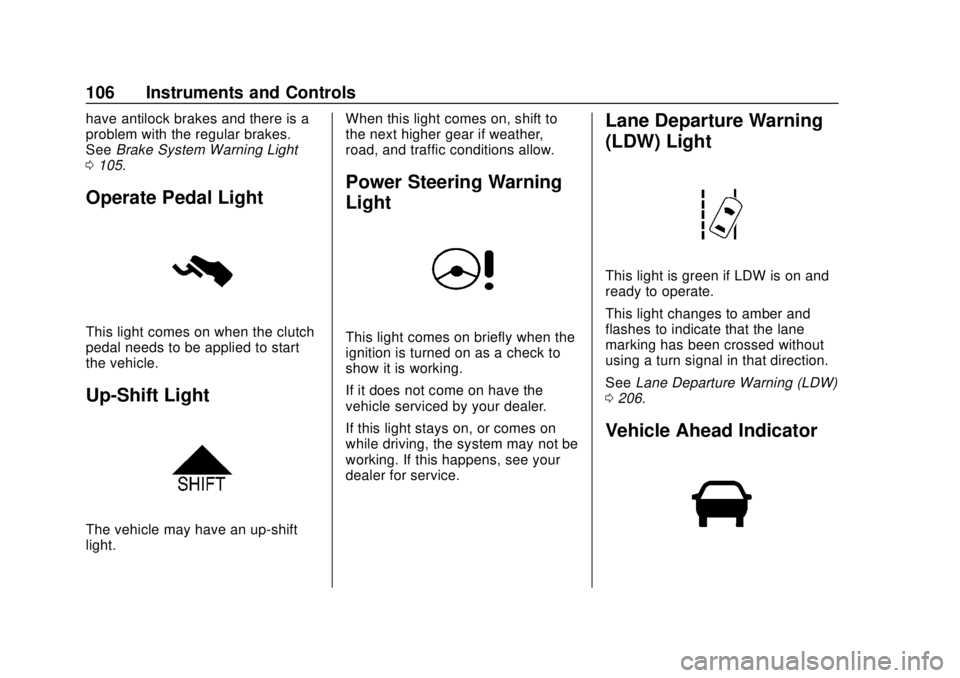
This light comes on when the clutch
pedal needs to be applied to start
the vehicle.
Up-Shift Light
The vehicle may have an up-shift
light. When this light comes on, shift to
the next higher gear if weather,
road, and traffic conditions allow.
Power Steering Warning
Light
This light comes on briefly when the
ignition is turned on as a check to
show it is working.
If it does not come on have the
vehicle serviced by your dealer.
If this light stays on, or comes on
while driving, the system may not be
working. If this happens, see your
dealer for service.
Lane Departure Warning
(LDW) Light
This light is green if LDW is on and
ready to operate.
This light changes to amber and
flashes to indicate that the lane
marking has been crossed without
using a turn signal in that direction.
See
Lane Departure Warning (LDW)
0 206.
Vehicle Ahead Indicator
Page 118 of 355
Chevrolet TRAX Owner Manual (GMNA-Localizing-U.S./Canada/Mexico-
13556235) - 2020 - CRC - 9/19/19
Instruments and Controls 117
On the base level cluster, vehicle
messages appear as code numbers.
Some of these codes may appear
along with the service vehicle soon
light and the owner’s manual
symbol in the DIC display.
2 : No Remote Detected, Press
Clutch To Restart
4 : A/C Off Due to High
Engine Temp
5 : Steering Column Is Locked
7 : Turn Steering Wheel, Turn Key
Off, Then On
9 : Turn Steering Wheel, Start
Vehicle Again
10 : Brakes Overheated
15 : Check High Mounted
Brake Lamp
16 : Check Brake Lamps
17 : Headlamp Leveling Malfunction
— Contact Service
18 : Left Low Beam Failure
20 : Right Low Beam Failure
21 : Check Left Position Lamp
22 : Check Right Position Lamp 23 :
Reversing Lamp Failure
24 : License Plate Lamp Failure
25 : Left Front Turn Indicator Failure
26 : Left Rear Turn Indicator Failure
27 : Right Front Turn Indicator
Failure
28 : Right Rear Turn Indicator
Failure
35 : Replace Battery In Remote Key
49 : Lane Departure Warning
Unavailable
52 : Change Timing Belt –See
Owner ’s Manual
53 : Tighten Gas Cap
59 : Open, Then Close Driver
Window
65 : Theft Attempted
66 : Service Theft Alarm
67 : Service Steering Column Lock
68 : Service Power Steering, Drive
with Care
77 : Service Front Camera
79 : Engine Oil Low –Add Oil 81 :
Service Transmission
84 : Engine Power Is Reduced
88 : Use Transmitter Pocket to Start
89 : Service Vehicle Soon
91 : No Remote Detected
92 : No Remote Detected, Press
Brake To Restart
93 : Press Button Again To Turn
Engine Off
94 : Shift to Park
95 : Service Airbag
174 : Low Battery
258 : Park Assist Off
Engine Oil Messages
:% CHANGE
This message displays when the
engine oil needs to be changed.
When changing the engine oil, be
sure to reset the Oil Life System.
See Engine Oil Life System 0223,
Engine Oil 0221, and Maintenance
Schedule 0300.
Page 121 of 355
Chevrolet TRAX Owner Manual (GMNA-Localizing-U.S./Canada/Mexico-
13556235) - 2020 - CRC - 9/19/19
120 Instruments and Controls
Power Door Locks
Touch and the following may
display:
.Open Door Anti Lock Out
. Auto Door Unlock
. Delayed Door Lock
Open Door Anti Lock Out
This setting prevents the driver door
from locking when the door is open.
If this setting is on, the Delayed
Door Lock menu will not be
available.
Touch Off or On.
Auto Door Unlock
This setting allows you to select
which doors will automatically
unlock when the vehicle is shifted
into P (Park).
Touch Off, All Doors, or Driver Door.
Delayed Door Lock
This setting delays the locking of
the doors. To override the delay,
press the power door lock switch on
the door. Touch Off or On.Remote Lock, Unlock, Start
Touch and the following may
display:
.
Remote Unlock Light Feedback
. Remote Lock Feedback
. Remote Door Unlock
. Remote Start Auto Heat Seats
. Passive Door Unlock
. Passive Door Lock
. Remote Left in Vehicle Alert
Remote Unlock Light Feedback
This setting flashes the exterior
lamps when you remotely unlock
the vehicle.
Touch Off or Flash Lights.
Remote Lock Feedback
This setting specifies how the
vehicle responds when you remotely
lock the vehicle.
Touch Off, Lights and Horn, Lights
Only, or Horn Only. Remote Door Unlock
This setting specifies whether all
doors, or just the driver door, unlock
when pressingKon the RKE
transmitter.
Touch All Doors or Driver Door.
Remote Start Auto Heat Seats
This setting automatically turns on
the heated seats when using the
remote start function on cold days.
See Heated Front Seats 040 and
Remote Vehicle Start 020.
Touch Off or On.
Passive Door Unlock
This setting specifies which doors
unlock when using the button on the
driver door handle to unlock the
vehicle.
Touch All Doors or Driver Door Only.
Page 122 of 355

Chevrolet TRAX Owner Manual (GMNA-Localizing-U.S./Canada/Mexico-
13556235) - 2020 - CRC - 9/19/19
Instruments and Controls 121
Passive Door Lock
This setting specifies whether the
vehicle will automatically lock,
or lock and alert you after all the
doors are closed, and you walk
away from the vehicle with the RKE
transmitter. SeeRemote Keyless
Entry (RKE) System Operation
(Keyless Access) 010 or
Remote Keyless Entry (RKE)
System Operation (Key Access)
0 17.
Touch Off, On with Horn
Chirp, or On.
Remote Left in Vehicle Alert
This feature sounds an alert when
the RKE transmitter is left in the
vehicle. This menu also enables
Remote No Longer in Vehicle Alert.
Touch Off or On.
Valet Mode
This will lock the infotainment
system and steering wheel controls.
It may also limit access to vehicle
storage locations, if equipped.
To enable valet mode: 1. Enter a four-digit code on the
keypad.
2. Touch Enter to go to the confirmation screen.
3. Re-enter the four-digit code.
Touch Lock or Unlock to lock or
unlock the system. Touch Back to
go back to the previous menu.