change wheel CHEVROLET TRAX 2020 Owners Manual
[x] Cancel search | Manufacturer: CHEVROLET, Model Year: 2020, Model line: TRAX, Model: CHEVROLET TRAX 2020Pages: 355, PDF Size: 5.75 MB
Page 7 of 355

Chevrolet TRAX Owner Manual (GMNA-Localizing-U.S./Canada/Mexico-
13556235) - 2020 - CRC - 9/19/19
6 Introduction
1.Air Vents 0157.
2. Turn Signal Lever. See Turn
and Lane-Change Signals
0 125.
Headlamp High/Low-Beam
Changer 0123.
3. Instrument Cluster 097.
4. Windshield Wiper/Washer 093.
Rear Window Wiper/Washer
0 94.
5. Light Sensor. See Automatic
Headlamp System 0124.
6. Introduction 0129.
7. Lane Departure Warning
(LDW) 0206 (If Equipped).
8. Hazard Warning Flashers
0124.
9. Passenger Seat Belt Reminder Light. See Seat Belt Reminders
0 100.
10. Shift Lever. See Automatic
Transmission 0186 or
Manual Transmission 0189.
11. Parking Brake 0192.
12. USB Port 0137. 13.
Climate Control Systems
0155.
14. Traction Control/Electronic Stability Control Button. See
Traction Control/Electronic
Stability Control 0194.
15. Ignition Positions (Key Access)
0174 or
Ignition Positions (Keyless
Access) 0176.
16. Steering Wheel Controls 092.
17. Horn 092.
18. Steering Wheel Adjustment
092.
19. Cruise Control 0196 (If
Equipped).
Forward Collision Alert (FCA)
System 0203 (If Equipped).
20. Instrument Panel Storage 087
(If Equipped).
21. Data Link Connector (DLC) (Out of View). See Malfunction
Indicator Lamp (Check Engine
Light) 0102.
22. Hood Release. See Hood
0 216. 23.
Exterior Lamp Controls 0122.
Instrument Panel Illumination
Control 0125.
Front Fog Lamps 0125 (If
Equipped).
Page 9 of 355
Chevrolet TRAX Owner Manual (GMNA-Localizing-U.S./Canada/Mexico-
13556235) - 2020 - CRC - 9/19/19
8 Keys, Doors, and Windows
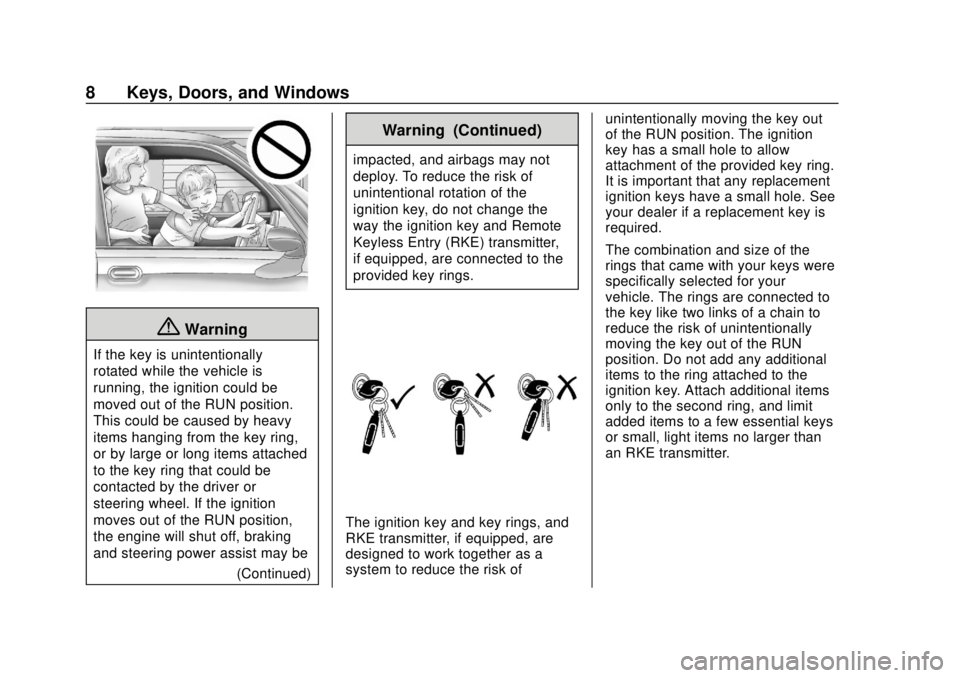
{Warning
If the key is unintentionally
rotated while the vehicle is
running, the ignition could be
moved out of the RUN position.
This could be caused by heavy
items hanging from the key ring,
or by large or long items attached
to the key ring that could be
contacted by the driver or
steering wheel. If the ignition
moves out of the RUN position,
the engine will shut off, braking
and steering power assist may be(Continued)
Warning (Continued)
impacted, and airbags may not
deploy. To reduce the risk of
unintentional rotation of the
ignition key, do not change the
way the ignition key and Remote
Keyless Entry (RKE) transmitter,
if equipped, are connected to the
provided key rings.
The ignition key and key rings, and
RKE transmitter, if equipped, are
designed to work together as a
system to reduce the risk of unintentionally moving the key out
of the RUN position. The ignition
key has a small hole to allow
attachment of the provided key ring.
It is important that any replacement
ignition keys have a small hole. See
your dealer if a replacement key is
required.
The combination and size of the
rings that came with your keys were
specifically selected for your
vehicle. The rings are connected to
the key like two links of a chain to
reduce the risk of unintentionally
moving the key out of the RUN
position. Do not add any additional
items to the ring attached to the
ignition key. Attach additional items
only to the second ring, and limit
added items to a few essential keys
or small, light items no larger than
an RKE transmitter.
Page 66 of 355
Chevrolet TRAX Owner Manual (GMNA-Localizing-U.S./Canada/Mexico-
13556235) - 2020 - CRC - 9/19/19
Seats and Restraints 65
places around the vehicle. Your
dealer and the service manual have
information about servicing the
vehicle and the airbag system. To
purchase a service manual, see
Publication Ordering Information
0326.
{Warning
For up to 10 seconds after the
vehicle is turned off and the
battery is disconnected, an airbag
can still inflate during improper
service. You can be injured if you
are close to an airbag when it
inflates. Avoid yellow connectors.
They are probably part of the
airbag system. Be sure to follow
proper service procedures, and
make sure the person performing
work for you is qualified to do so.
Adding Equipment to the
Airbag-Equipped Vehicle
Adding accessories that change the
vehicle's frame, bumper system,
height, front end, or side sheet
metal may keep the airbag system
from working properly.
The operation of the airbag system
can also be affected by changing,
including improperly repairing or
replacing, any parts of the following:
.
Airbag system, including airbag
modules, front or side impact
sensors, sensing and diagnostic
module, or airbag wiring
. Front seats, including stitching,
seams or zippers
. Seat belts
. Steering wheel, instrument
panel, overhead console, ceiling
trim, or pillar garnish trim
. Inner door seals, including
speakers
Your dealer and the service manual
have information about the location
of the airbag modules and sensors, sensing and diagnostic module, and
airbag wiring along with the proper
replacement procedures.
In addition, the vehicle has a
passenger sensing system for the
front outboard passenger position,
which includes sensors that are part
of the passenger seat. The
passenger sensing system may not
operate properly if the original seat
trim is replaced with non-GM
covers, upholstery, or trim; or with
GM covers, upholstery, or trim
designed for a different vehicle. Any
object, such as an aftermarket seat
heater or a comfort-enhancing pad
or device, installed under or on top
of the seat fabric, could also
interfere with the operation of the
passenger sensing system. This
could either prevent proper
deployment of the passenger
airbag(s) or prevent the passenger
sensing system from properly
turning off the passenger airbag(s).
See
Passenger Sensing System
0 61.
Page 118 of 355
Chevrolet TRAX Owner Manual (GMNA-Localizing-U.S./Canada/Mexico-
13556235) - 2020 - CRC - 9/19/19
Instruments and Controls 117
On the base level cluster, vehicle
messages appear as code numbers.
Some of these codes may appear
along with the service vehicle soon
light and the owner’s manual
symbol in the DIC display.
2 : No Remote Detected, Press
Clutch To Restart
4 : A/C Off Due to High
Engine Temp
5 : Steering Column Is Locked
7 : Turn Steering Wheel, Turn Key
Off, Then On
9 : Turn Steering Wheel, Start
Vehicle Again
10 : Brakes Overheated
15 : Check High Mounted
Brake Lamp
16 : Check Brake Lamps
17 : Headlamp Leveling Malfunction
— Contact Service
18 : Left Low Beam Failure
20 : Right Low Beam Failure
21 : Check Left Position Lamp
22 : Check Right Position Lamp 23 :
Reversing Lamp Failure
24 : License Plate Lamp Failure
25 : Left Front Turn Indicator Failure
26 : Left Rear Turn Indicator Failure
27 : Right Front Turn Indicator
Failure
28 : Right Rear Turn Indicator
Failure
35 : Replace Battery In Remote Key
49 : Lane Departure Warning
Unavailable
52 : Change Timing Belt –See
Owner ’s Manual
53 : Tighten Gas Cap
59 : Open, Then Close Driver
Window
65 : Theft Attempted
66 : Service Theft Alarm
67 : Service Steering Column Lock
68 : Service Power Steering, Drive
with Care
77 : Service Front Camera
79 : Engine Oil Low –Add Oil 81 :
Service Transmission
84 : Engine Power Is Reduced
88 : Use Transmitter Pocket to Start
89 : Service Vehicle Soon
91 : No Remote Detected
92 : No Remote Detected, Press
Brake To Restart
93 : Press Button Again To Turn
Engine Off
94 : Shift to Park
95 : Service Airbag
174 : Low Battery
258 : Park Assist Off
Engine Oil Messages
:% CHANGE
This message displays when the
engine oil needs to be changed.
When changing the engine oil, be
sure to reset the Oil Life System.
See Engine Oil Life System 0223,
Engine Oil 0221, and Maintenance
Schedule 0300.
Page 126 of 355
Chevrolet TRAX Owner Manual (GMNA-Localizing-U.S./Canada/Mexico-
13556235) - 2020 - CRC - 9/19/19
Lighting 125
Turn and Lane-Change
Signals
Move the lever all the way up or
down to signal a turn.
An arrow on the instrument cluster
will flash in the direction of the turn
or lane change.
Raise or lower the lever until the
arrow starts to flash to signal a lane
change. The turn signal flashes
three times.
The lever returns to its starting
position when it is released.
If after signaling a turn or lane
change the arrow flashes rapidly or
does not come on, a signal bulb
may be burned out. Replace anyburned out bulbs. If a bulb is not
burned out, check the fuse. See
Fuses and Circuit Breakers
0248.
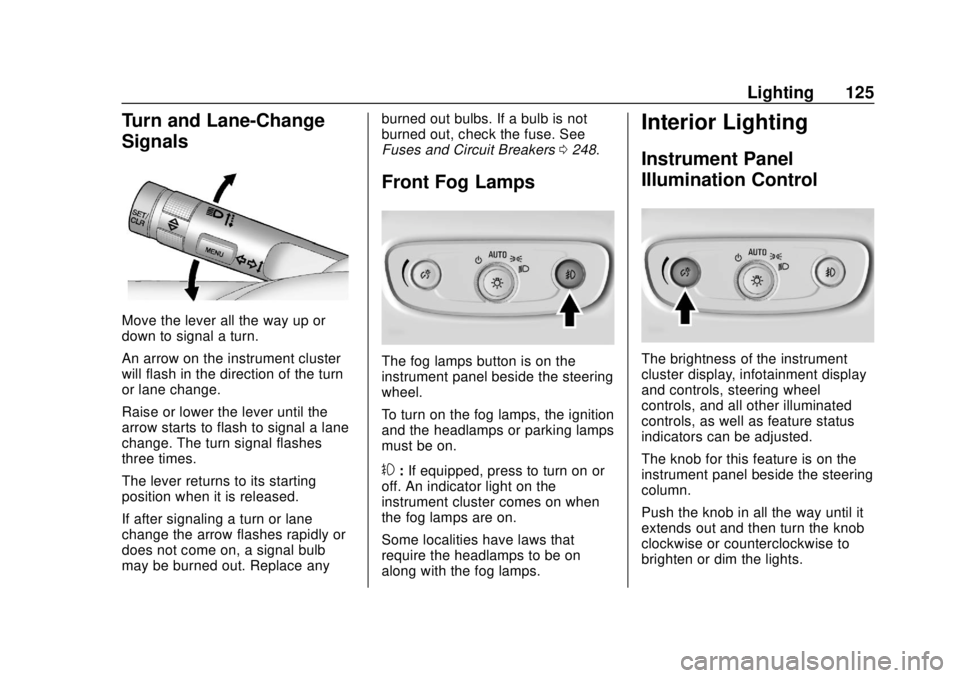
Front Fog Lamps
The fog lamps button is on the
instrument panel beside the steering
wheel.
To turn on the fog lamps, the ignition
and the headlamps or parking lamps
must be on.
#:If equipped, press to turn on or
off. An indicator light on the
instrument cluster comes on when
the fog lamps are on.
Some localities have laws that
require the headlamps to be on
along with the fog lamps.
Interior Lighting
Instrument Panel
Illumination Control
The brightness of the instrument
cluster display, infotainment display
and controls, steering wheel
controls, and all other illuminated
controls, as well as feature status
indicators can be adjusted.
The knob for this feature is on the
instrument panel beside the steering
column.
Push the knob in all the way until it
extends out and then turn the knob
clockwise or counterclockwise to
brighten or dim the lights.
Page 141 of 355
Chevrolet TRAX Owner Manual (GMNA-Localizing-U.S./Canada/Mexico-
13556235) - 2020 - CRC - 9/19/19
140 Infotainment System
Select from one of the following
Browse options to save a favorite:
Playlists :Touch
Hnext to any
playlist to store the playlist as a
favorite. Touch a screen icon in the
favorite area to recall a favorite
playlist. The first song in the playlist
begins to play.
Artists : Touch
Hnext to any artist
to store the artist as a favorite.
Touch a screen icon in the favorite
area to recall a favorite artist. The
first song in the artist list begins
to play.
Songs : Touch
Hnext to any song
to store the song as a favorite.
Touch a screen icon in the favorite
area to recall a favorite song.
Albums : Touch
Hnext to any
album to store the album as a
favorite. Touch a screen icon in the
favorite area to recall a favorite
album. The first song in the album
list begins to play.
Genres : Touch
Hnext to any
genre to store the genre as a
favorite. Touch a screen icon in the favorite area to recall a favorite
genre. The first song of the genre
begins to play.
Audiobooks :
Touch
Hnext to any
audiobook to store the audiobook as
a favorite. Touch a screen icon in
the favorite area to recall a favorite
audiobook. The first chapter in the
audiobook begins to play.
Media Playback and Mute
USB playback will be paused if the
system is muted. If the steering
wheel mute control is pressed
again, playback will resume.
If the source is changed while in
mute, playback resumes and audio
will unmute.
Auxiliary Jack
This vehicle has an auxiliary input
jack in the center stack. Possible
auxiliary audio sources include:
. Laptop computer
. Audio music player This jack is not an audio output. Do
not plug headphones into the
auxiliary input jack. Set up an
auxiliary device while the vehicle is
parked.
Connect a 3.5 mm (1/8 in) cable
from the auxiliary device to the
auxiliary input jack. When a device
is connected, the system can play
audio from the device over the
vehicle speakers.
If an auxiliary device has already
been connected, but a different
source is currently active, touch
More and select AUX to make the
source active.
Shuffle and Browse are not
available in the AUX source menu.
Bluetooth Audio
Music may be played from a paired
Bluetooth device. See
“Pairing”
under Bluetooth (Overview) 0143 or
Bluetooth (Pairing and Using the
Phone) 0144.
Volume and song selection may be
controlled by using the infotainment
controls or the phone/device.
Page 149 of 355
Chevrolet TRAX Owner Manual (GMNA-Localizing-U.S./Canada/Mexico-
13556235) - 2020 - CRC - 9/19/19
148 Infotainment System
Switching Between Calls (Call
Waiting Calls Only)
To switch between calls, press the
phone icon on the Home Page to
display the Call View. While in Call
View, touch the call information of
the call on hold to change calls.
Three-Way Calling
Three-way calling must be
supported on the Bluetooth phone
and enabled by the wireless service
carrier to work.
To start a three-way call while in a
current call:1. In the Call View, select Add Call to add another call.
2. Initiate the second call by selecting from Recents,
Contacts, or Keypad.
3. When the second call is active, press the merge icon to
conference the three-way call
together.
Ending a Call
.Pression the steering wheel
controls. .
Touch
bnext to a call to end
only that call.
. Select End on the instrument
cluster using the select control.
Dual Tone Multi-Frequency
(DTMF) Tones
The in-vehicle Bluetooth system can
send numbers during a call. This is
used when calling a menu-driven
phone system. Use the Keypad to
enter the number.
Apple CarPlay and
Android Auto
If equipped, Android Auto and/or
Apple CarPlay capability may be
available through a compatible
smartphone. If available, the
Android Auto and Apple CarPlay
icons will appear on the Home Page
of the infotainment display.
To use Android Auto and/or Apple
CarPlay: 1. Download the Android Auto
app to your smartphone from
the Google Play store. There is
no app required for Apple
CarPlay.
2. Connect your Android smartphone or Apple iPhone
by using the compatible phone
USB cable and plugging into a
USB data port. For best
performance, use the device’ s
factory-provided USB cable.
Aftermarket or third-party
cables may not work.
3. When the phone is first connected to activate Apple
CarPlay or Android Auto, the
message “Device Projection
Privacy Consent” will appear.
. Touch Continue to launch
Apple CarPlay or
Android Auto.
. Touch Disable to remove
Apple CarPlay and Android
Auto capability from the
vehicle Settings menu.
Other functions may
still work.
Page 167 of 355

Chevrolet TRAX Owner Manual (GMNA-Localizing-U.S./Canada/Mexico-
13556235) - 2020 - CRC - 9/19/19
166 Driving and Operating
3. Turn the steering wheel to gostraight down the roadway.
Loss of Control
Skidding
There are three types of skids that
correspond to the vehicle's three
control systems:
.Braking Skid —wheels are not
rolling.
. Steering or Cornering Skid —
too much speed or steering in a
curve causes tires to slip and
lose cornering force.
. Acceleration Skid —too much
throttle causes the driving
wheels to spin.
Defensive drivers avoid most skids
by taking reasonable care suited to
existing conditions, and by not
overdriving those conditions. But
skids are always possible.
If the vehicle starts to slide, follow
these suggestions: .
Ease your foot off the
accelerator pedal and steer the
way you want the vehicle to go.
The vehicle may straighten out.
Be ready for a second skid if it
occurs.
. Slow down and adjust your
driving according to weather
conditions. Stopping distance
can be longer and vehicle
control can be affected when
traction is reduced by water,
snow, ice, gravel, or other
material on the road. Learn to
recognize warning clues —such
as enough water, ice, or packed
snow on the road to make a
mirrored surface —and slow
down when you have any doubt.
. Try to avoid sudden steering,
acceleration, or braking,
including reducing vehicle speed
by shifting to a lower gear. Any
sudden changes could cause
the tires to slide.
Remember: Antilock brakes help
avoid only the braking skid.
Driving on Wet Roads
Rain and wet roads can reduce
vehicle traction and affect your
ability to stop and accelerate.
Always drive slower in these types
of driving conditions and avoid
driving through large puddles and
deep-standing or flowing water.
{Warning
Wet brakes can cause crashes.
They might not work as well in a
quick stop and could cause
pulling to one side. You could
lose control of the vehicle.
After driving through a large
puddle of water or a car/vehicle
wash, lightly apply the brake
pedal until the brakes work
normally.
Flowing or rushing water creates
strong forces. Driving through
flowing water could cause the
vehicle to be carried away. If this
happens, you and other vehicle (Continued)
Page 179 of 355

Chevrolet TRAX Owner Manual (GMNA-Localizing-U.S./Canada/Mexico-
13556235) - 2020 - CRC - 9/19/19
178 Driving and Operating
With the vehicle off, and the brake
pedal not applied, pressing and
holding ENGINE START/STOP for
more than five seconds will place
the vehicle in Service Mode.
The instruments and audio system
will operate as they do in ON/RUN,
but the vehicle will not be able to be
driven. The engine will not start in
Service Mode.
Press ENGINE START/STOP again
to turn the vehicle off.
Starting the Engine
Place the transmission in the
proper gear.
Caution
If you add electrical parts or
accessories, you could change
the way the engine operates. Any
resulting damage would not be
covered by the vehicle warranty.
SeeAdd-On Electrical Equipment
0 212.
Caution
If the steering wheel is turned
until it reaches the end of its
travel, and is held in that position
while starting the vehicle, damage
may occur to the hydraulic power
steering system and there may be
loss of power steering assist.
Automatic Transmission
Move the shift lever to P (Park) or
N (Neutral). To restart the vehicle
when it is already moving, use
N (Neutral) only.
Caution
Do not try to shift to P (Park) if the
vehicle is moving. If you do, you
could damage the transmission.
Shift to P (Park) only when the
vehicle is stopped. Manual Transmission
The shift lever should be in Neutral
and the parking brake engaged.
Hold the clutch pedal down to the
floor, press the brake pedal and
start the engine.
Starting Procedure (Key Access)
1. With your foot off the accelerator pedal, turn the
ignition key to START. When
the engine starts, let go of the
ignition.
The idle speed will go down as
the engine gets warm. Do not
race the engine immediately
after starting it. Operate the
engine and transmission gently
to allow the oil to warm up and
lubricate all moving parts.
Caution
Cranking the engine for long
periods of time, by returning the
ignition to the START position
immediately after cranking has
(Continued)
Page 192 of 355
Chevrolet TRAX Owner Manual (GMNA-Localizing-U.S./Canada/Mexico-
13556235) - 2020 - CRC - 9/19/19
Driving and Operating 191
Up-Shift Light
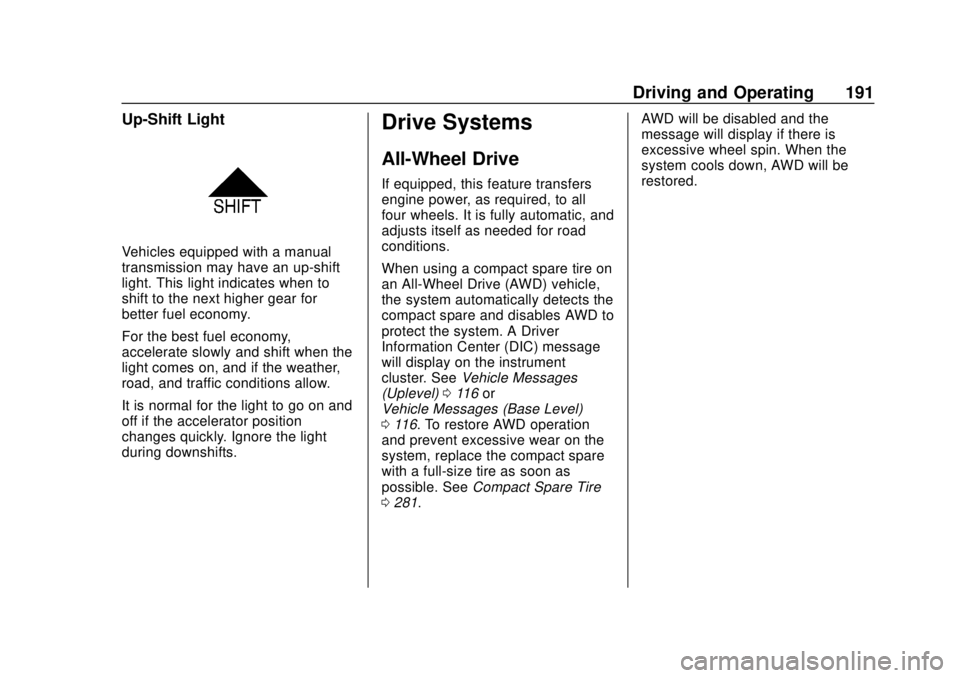
Vehicles equipped with a manual
transmission may have an up-shift
light. This light indicates when to
shift to the next higher gear for
better fuel economy.
For the best fuel economy,
accelerate slowly and shift when the
light comes on, and if the weather,
road, and traffic conditions allow.
It is normal for the light to go on and
off if the accelerator position
changes quickly. Ignore the light
during downshifts.
Drive Systems
All-Wheel Drive
If equipped, this feature transfers
engine power, as required, to all
four wheels. It is fully automatic, and
adjusts itself as needed for road
conditions.
When using a compact spare tire on
an All-Wheel Drive (AWD) vehicle,
the system automatically detects the
compact spare and disables AWD to
protect the system. A Driver
Information Center (DIC) message
will display on the instrument
cluster. SeeVehicle Messages
(Uplevel) 0116 or
Vehicle Messages (Base Level)
0 116. To restore AWD operation
and prevent excessive wear on the
system, replace the compact spare
with a full-size tire as soon as
possible. See Compact Spare Tire
0 281. AWD will be disabled and the
message will display if there is
excessive wheel spin. When the
system cools down, AWD will be
restored.