tow CHEVROLET TRAX 2021 User Guide
[x] Cancel search | Manufacturer: CHEVROLET, Model Year: 2021, Model line: TRAX, Model: CHEVROLET TRAX 2021Pages: 280, PDF Size: 8.76 MB
Page 66 of 280
Chevrolet TRAX Owner Manual (GMNA-Localizing-U.S./Canada-14609828) -
2021 - CRC - 8/21/20
Seats and Restraints 65
{Warning
Children can be seriously injured or
strangled if a shoulder belt is wrapped
around their neck. The shoulder belt can
tighten but cannot be loosened if it is
locked. The shoulder belt locks when it is
pulled all the way out of the retractor.
It unlocks when the shoulder belt is
allowed to go all the way back into the
retractor, but it cannot do this if it is
wrapped around a child’s neck. If the
shoulder belt is locked and tightened
around a child’s neck, the only way to
loosen the belt is to cut it.
Buckle any unused seat belts behind the
child restraint so children cannot reach
them. Pull the shoulder belt all the way
out of the retractor to set the lock, and
tighten the belt behind the child restraint
after the child restraint has been
installed.
Caution
Do not let the LATCH attachments rub
against the vehicle’s seat belts. This may
damage these parts. If necessary, move
buckled seat belts to avoid rubbing the
LATCH attachments.
Do not fold the rear seatback when the
seat is occupied. Do not fold the empty
rear seat with a seat belt buckled. This
could damage the seat belt or the seat.
Unbuckle and return the seat belt to its
stowed position, before folding the seat.
If you need to secure more than one child
restraint in the rear seat, see Where to Put
the Restraint 060.
1. Attach and tighten the lower attachments to the lower anchors. If the
child restraint does not have lower
attachments or the desired seating
position does not have lower anchors,
secure the child restraint with the top
tether and the seat belt. Refer to the
child restraint manufacturer instructions
and the instructions in this manual.
1.1. Find the lower anchors for the desired seating position. 1.2. Put the child restraint on the seat.
For rear outboard seating positions,
if the head restraint interferes with
the proper installation of the child
restraint, the head restraint may be
removed. See “Head Restraint
Removal and Reinstallation” at the
end of this section.
When installing a rear-facing child
restraint, it may be necessary to
move the front seat forward to
properly install the child restraint
per the child restraint manufacturer
instructions. See Seat Adjustment
0 30.
1.3. Attach and tighten the lower attachments on the child restraint
to the lower anchors.
2. If the child restraint manufacturer recommends that the top tether be
attached, attach and tighten the top
tether to the top tether anchor,
if equipped. Refer to the child restraint
instructions and the following steps:
2.1. Find the top tether anchor.
2.2. Remove the cargo cover, if equipped, before installing the
top tether. Place the cargo cover on
Page 70 of 280
Chevrolet TRAX Owner Manual (GMNA-Localizing-U.S./Canada-14609828) -
2021 - CRC - 8/21/20
Seats and Restraints 69
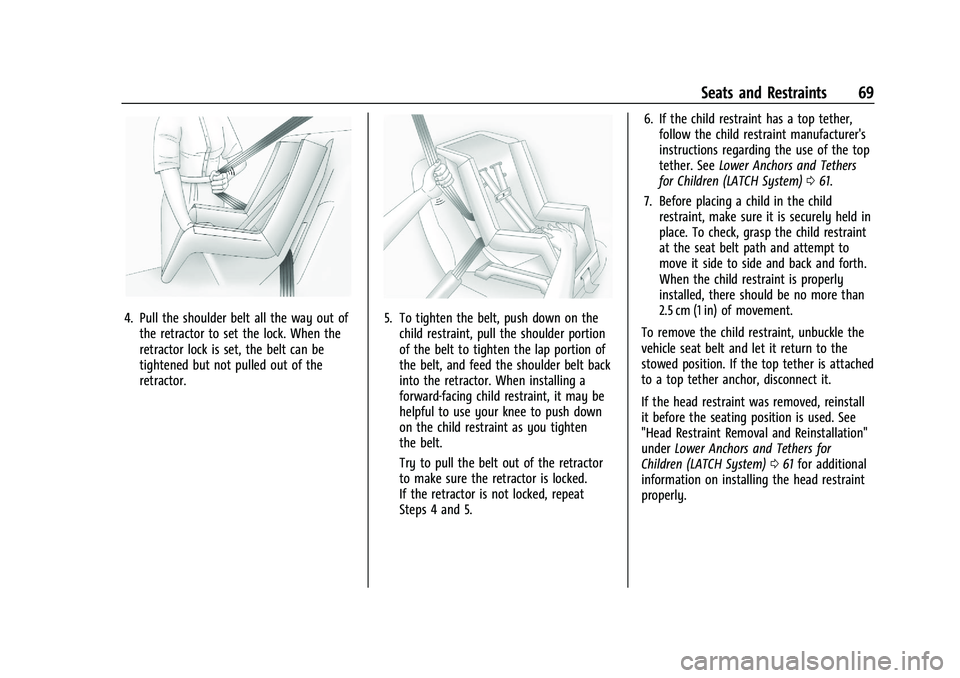
4. Pull the shoulder belt all the way out ofthe retractor to set the lock. When the
retractor lock is set, the belt can be
tightened but not pulled out of the
retractor.5. To tighten the belt, push down on thechild restraint, pull the shoulder portion
of the belt to tighten the lap portion of
the belt, and feed the shoulder belt back
into the retractor. When installing a
forward-facing child restraint, it may be
helpful to use your knee to push down
on the child restraint as you tighten
the belt.
Try to pull the belt out of the retractor
to make sure the retractor is locked.
If the retractor is not locked, repeat
Steps 4 and 5. 6. If the child restraint has a top tether,
follow the child restraint manufacturer's
instructions regarding the use of the top
tether. See Lower Anchors and Tethers
for Children (LATCH System) 061.
7. Before placing a child in the child restraint, make sure it is securely held in
place. To check, grasp the child restraint
at the seat belt path and attempt to
move it side to side and back and forth.
When the child restraint is properly
installed, there should be no more than
2.5 cm (1 in) of movement.
To remove the child restraint, unbuckle the
vehicle seat belt and let it return to the
stowed position. If the top tether is attached
to a top tether anchor, disconnect it.
If the head restraint was removed, reinstall
it before the seating position is used. See
"Head Restraint Removal and Reinstallation"
under Lower Anchors and Tethers for
Children (LATCH System) 061 for additional
information on installing the head restraint
properly.
Page 73 of 280
Chevrolet TRAX Owner Manual (GMNA-Localizing-U.S./Canada-14609828) -
2021 - CRC - 8/21/20
72 Seats and Restraints
move it side to side and back and forth.
When the child restraint is properly
installed, there should be no more than
2.5 cm (1 in) of movement.
If the airbags are off, the OFF indicator in
the passenger airbag status indicator will
come on and stay on when the vehicle is
started. If a child restraint has been installed
and the ON indicator is lit, see “If the On
Indicator Is Lit for a Child Restraint” under
Passenger Sensing System 050.
To remove the child restraint, unbuckle the
vehicle seat belt and let it return to the
stowed position.
Page 75 of 280
Chevrolet TRAX Owner Manual (GMNA-Localizing-U.S./Canada-14609828) -
2021 - CRC - 8/21/20
74 Storage
Underseat Storage
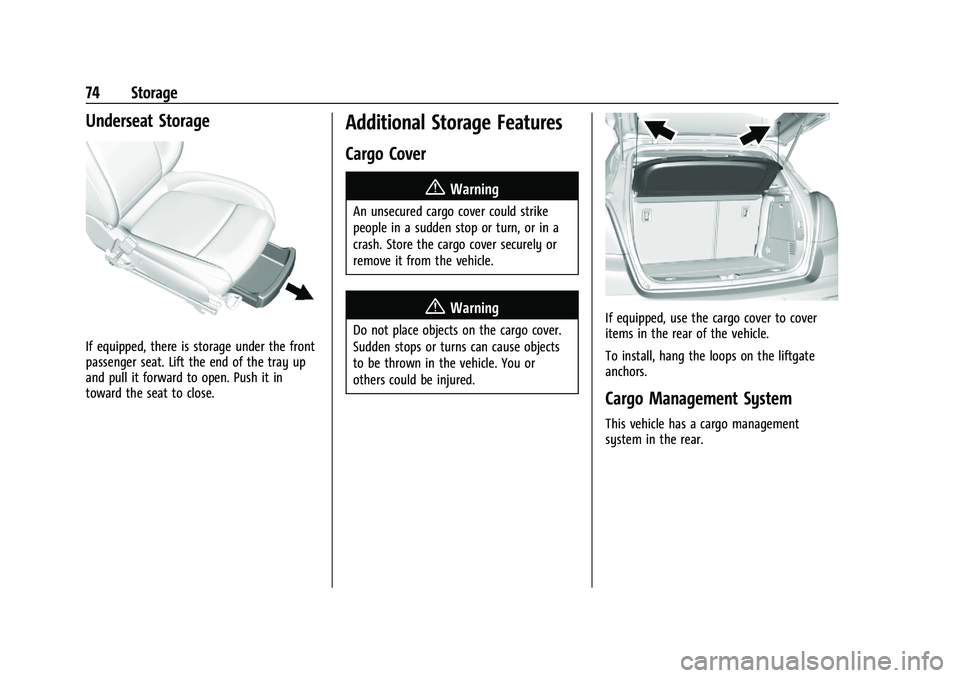
If equipped, there is storage under the front
passenger seat. Lift the end of the tray up
and pull it forward to open. Push it in
toward the seat to close.
Additional Storage Features
Cargo Cover
{Warning
An unsecured cargo cover could strike
people in a sudden stop or turn, or in a
crash. Store the cargo cover securely or
remove it from the vehicle.
{Warning
Do not place objects on the cargo cover.
Sudden stops or turns can cause objects
to be thrown in the vehicle. You or
others could be injured.If equipped, use the cargo cover to cover
items in the rear of the vehicle.
To install, hang the loops on the liftgate
anchors.
Cargo Management System
This vehicle has a cargo management
system in the rear.
Page 78 of 280
Chevrolet TRAX Owner Manual (GMNA-Localizing-U.S./Canada-14609828) -
2021 - CRC - 8/21/20
Instruments and Controls 77
Steering Wheel Controls
The infotainment system can be operated
by using the steering wheel controls. See
Steering Wheel Controls0105.
Horn
Pressaon the steering wheel pad to
sound the horn.
Windshield Wiper/Washer
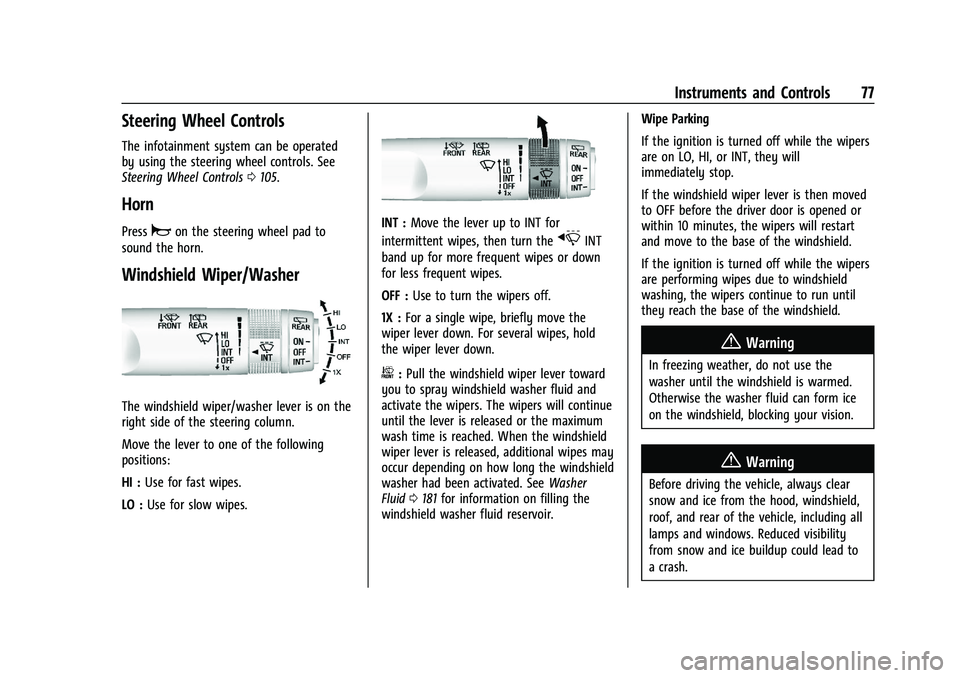
The windshield wiper/washer lever is on the
right side of the steering column.
Move the lever to one of the following
positions:
HI : Use for fast wipes.
LO : Use for slow wipes.
INT : Move the lever up to INT for
intermittent wipes, then turn the
xINT
band up for more frequent wipes or down
for less frequent wipes.
OFF : Use to turn the wipers off.
1X : For a single wipe, briefly move the
wiper lever down. For several wipes, hold
the wiper lever down.
b: Pull the windshield wiper lever toward
you to spray windshield washer fluid and
activate the wipers. The wipers will continue
until the lever is released or the maximum
wash time is reached. When the windshield
wiper lever is released, additional wipes may
occur depending on how long the windshield
washer had been activated. See Washer
Fluid 0181 for information on filling the
windshield washer fluid reservoir. Wipe Parking
If the ignition is turned off while the wipers
are on LO, HI, or INT, they will
immediately stop.
If the windshield wiper lever is then moved
to OFF before the driver door is opened or
within 10 minutes, the wipers will restart
and move to the base of the windshield.
If the ignition is turned off while the wipers
are performing wipes due to windshield
washing, the wipers continue to run until
they reach the base of the windshield.
{Warning
In freezing weather, do not use the
washer until the windshield is warmed.
Otherwise the washer fluid can form ice
on the windshield, blocking your vision.
{Warning
Before driving the vehicle, always clear
snow and ice from the hood, windshield,
roof, and rear of the vehicle, including all
lamps and windows. Reduced visibility
from snow and ice buildup could lead to
a crash.
Page 87 of 280
Chevrolet TRAX Owner Manual (GMNA-Localizing-U.S./Canada-14609828) -
2021 - CRC - 8/21/20
86 Instruments and Controls
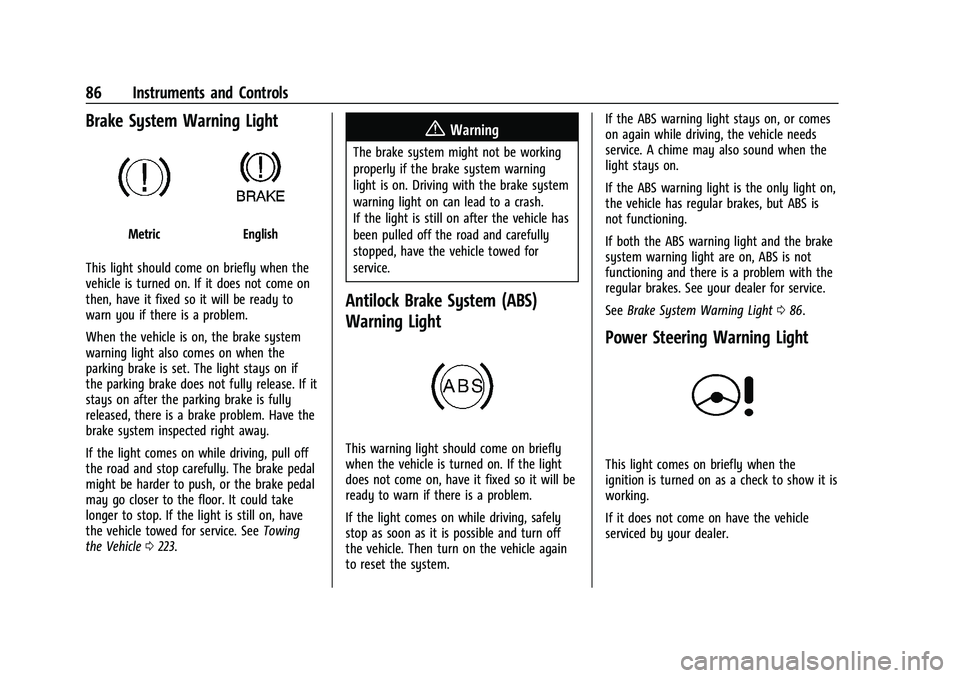
Brake System Warning Light
MetricEnglish
This light should come on briefly when the
vehicle is turned on. If it does not come on
then, have it fixed so it will be ready to
warn you if there is a problem.
When the vehicle is on, the brake system
warning light also comes on when the
parking brake is set. The light stays on if
the parking brake does not fully release. If it
stays on after the parking brake is fully
released, there is a brake problem. Have the
brake system inspected right away.
If the light comes on while driving, pull off
the road and stop carefully. The brake pedal
might be harder to push, or the brake pedal
may go closer to the floor. It could take
longer to stop. If the light is still on, have
the vehicle towed for service. See Towing
the Vehicle 0223.
{Warning
The brake system might not be working
properly if the brake system warning
light is on. Driving with the brake system
warning light on can lead to a crash.
If the light is still on after the vehicle has
been pulled off the road and carefully
stopped, have the vehicle towed for
service.
Antilock Brake System (ABS)
Warning Light
This warning light should come on briefly
when the vehicle is turned on. If the light
does not come on, have it fixed so it will be
ready to warn if there is a problem.
If the light comes on while driving, safely
stop as soon as it is possible and turn off
the vehicle. Then turn on the vehicle again
to reset the system. If the ABS warning light stays on, or comes
on again while driving, the vehicle needs
service. A chime may also sound when the
light stays on.
If the ABS warning light is the only light on,
the vehicle has regular brakes, but ABS is
not functioning.
If both the ABS warning light and the brake
system warning light are on, ABS is not
functioning and there is a problem with the
regular brakes. See your dealer for service.
See
Brake System Warning Light 086.
Power Steering Warning Light
This light comes on briefly when the
ignition is turned on as a check to show it is
working.
If it does not come on have the vehicle
serviced by your dealer.
Page 97 of 280
Chevrolet TRAX Owner Manual (GMNA-Localizing-U.S./Canada-14609828) -
2021 - CRC - 8/21/20
96 Lighting
Lighting
Exterior Lighting
Exterior Lamp Controls . . . . . . . . . . . . . . . . . 96
Headlamp High/Low-Beam Changer . . . . 96
Flash-to-Pass . . . . . . . . . . . . . . . . . . . . . . . . . . . . 97
Daytime Running Lamps (DRL) . . . . . . . . . . 97
Automatic Headlamp System . . . . . . . . . . . 97
Hazard Warning Flashers . . . . . . . . . . . . . . . 98
Turn and Lane-Change Signals . . . . . . . . . . 98
Interior Lighting
Instrument Panel IlluminationControl . . . . . . . . . . . . . . . . . . . . . . . . . . . . . . . 98
Courtesy Lamps . . . . . . . . . . . . . . . . . . . . . . . . 99
Dome Lamps . . . . . . . . . . . . . . . . . . . . . . . . . . . 99
Reading Lamps . . . . . . . . . . . . . . . . . . . . . . . . . 99
Lighting Features
Entry Lighting . . . . . . . . . . . . . . . . . . . . . . . . . . 99
Exit Lighting . . . . . . . . . . . . . . . . . . . . . . . . . . . 100
Battery Load Management . . . . . . . . . . . . 100
Battery Power Protection . . . . . . . . . . . . . . 100
Exterior Lighting Battery Saver . . . . . . . . 101
Exterior Lighting
Exterior Lamp Controls
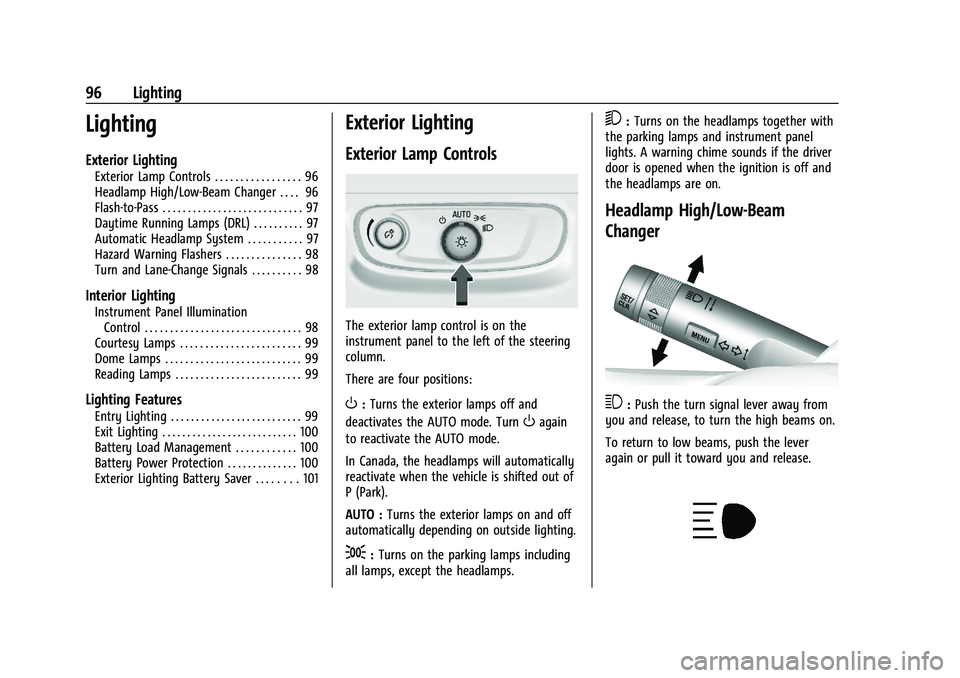
The exterior lamp control is on the
instrument panel to the left of the steering
column.
There are four positions:
O: Turns the exterior lamps off and
deactivates the AUTO mode. Turn
Oagain
to reactivate the AUTO mode.
In Canada, the headlamps will automatically
reactivate when the vehicle is shifted out of
P (Park).
AUTO : Turns the exterior lamps on and off
automatically depending on outside lighting.
;: Turns on the parking lamps including
all lamps, except the headlamps.
5: Turns on the headlamps together with
the parking lamps and instrument panel
lights. A warning chime sounds if the driver
door is opened when the ignition is off and
the headlamps are on.
Headlamp High/Low-Beam
Changer
3: Push the turn signal lever away from
you and release, to turn the high beams on.
To return to low beams, push the lever
again or pull it toward you and release.
Page 98 of 280
Chevrolet TRAX Owner Manual (GMNA-Localizing-U.S./Canada-14609828) -
2021 - CRC - 8/21/20
Lighting 97
This indicator light turns on in the
instrument cluster when the high-beam
headlamps are on.
Flash-to-Pass
To flash the high beams, pull the turn signal
lever all the way toward you. Then
release it.
Daytime Running Lamps (DRL)
Daytime Running Lamps can make it easier
for others to see the front of your vehicle
during the day. Fully functional DRL are
required on all vehicles first sold in Canada.
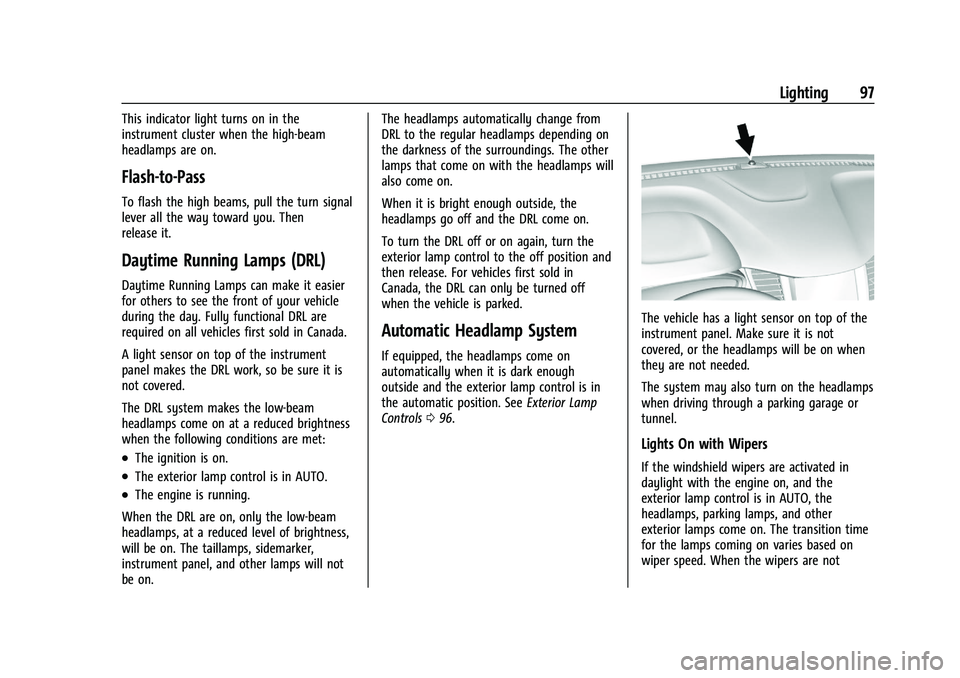
A light sensor on top of the instrument
panel makes the DRL work, so be sure it is
not covered.
The DRL system makes the low-beam
headlamps come on at a reduced brightness
when the following conditions are met:
.The ignition is on.
.The exterior lamp control is in AUTO.
.The engine is running.
When the DRL are on, only the low-beam
headlamps, at a reduced level of brightness,
will be on. The taillamps, sidemarker,
instrument panel, and other lamps will not
be on. The headlamps automatically change from
DRL to the regular headlamps depending on
the darkness of the surroundings. The other
lamps that come on with the headlamps will
also come on.
When it is bright enough outside, the
headlamps go off and the DRL come on.
To turn the DRL off or on again, turn the
exterior lamp control to the off position and
then release. For vehicles first sold in
Canada, the DRL can only be turned off
when the vehicle is parked.
Automatic Headlamp System
If equipped, the headlamps come on
automatically when it is dark enough
outside and the exterior lamp control is in
the automatic position. See
Exterior Lamp
Controls 096.
The vehicle has a light sensor on top of the
instrument panel. Make sure it is not
covered, or the headlamps will be on when
they are not needed.
The system may also turn on the headlamps
when driving through a parking garage or
tunnel.
Lights On with Wipers
If the windshield wipers are activated in
daylight with the engine on, and the
exterior lamp control is in AUTO, the
headlamps, parking lamps, and other
exterior lamps come on. The transition time
for the lamps coming on varies based on
wiper speed. When the wipers are not
Page 128 of 280
Chevrolet TRAX Owner Manual (GMNA-Localizing-U.S./Canada-14609828) -
2021 - CRC - 8/21/20
Driving and Operating 127
Driving and Operating
Driving Information
Driver Behavior . . . . . . . . . . . . . . . . . . . . . . . . 128
Driving Environment . . . . . . . . . . . . . . . . . . . 128
Vehicle Design . . . . . . . . . . . . . . . . . . . . . . . . . 128
Driving for Better Fuel Economy . . . . . . . 128
Distracted Driving . . . . . . . . . . . . . . . . . . . . . 128
Defensive Driving . . . . . . . . . . . . . . . . . . . . . . 129
Impaired Driving . . . . . . . . . . . . . . . . . . . . . . . 129
Control of a Vehicle . . . . . . . . . . . . . . . . . . . 129
Braking . . . . . . . . . . . . . . . . . . . . . . . . . . . . . . . . 130
Steering . . . . . . . . . . . . . . . . . . . . . . . . . . . . . . . 130
Off-Road Recovery . . . . . . . . . . . . . . . . . . . . . 131
Loss of Control . . . . . . . . . . . . . . . . . . . . . . . . . 131
Driving on Wet Roads . . . . . . . . . . . . . . . . . . 131
Hill and Mountain Roads . . . . . . . . . . . . . . 132
Winter Driving . . . . . . . . . . . . . . . . . . . . . . . . . 133
If the Vehicle Is Stuck . . . . . . . . . . . . . . . . . . 133
Vehicle Load Limits . . . . . . . . . . . . . . . . . . . . 134
Starting and Operating
New Vehicle Break-In . . . . . . . . . . . . . . . . . . 137
Ignition Positions (Key Access) . . . . . . . . . 138
Ignition Positions (Keyless Access) . . . . . 139
Starting the Engine . . . . . . . . . . . . . . . . . . . . 141
Winter Cover . . . . . . . . . . . . . . . . . . . . . . . . . . 142
Engine Heater . . . . . . . . . . . . . . . . . . . . . . . . . 143
Retained Accessory Power (RAP) . . . . . . . 145
Shifting Into Park . . . . . . . . . . . . . . . . . . . . . . 145Shifting out of Park . . . . . . . . . . . . . . . . . . . 146
Parking over Things That Burn . . . . . . . . . 147
Extended Parking (Keyless Access) . . . . . 147
Engine Exhaust
Engine Exhaust . . . . . . . . . . . . . . . . . . . . . . . . 147
Running the Vehicle While Parked . . . . . 148
Automatic Transmission
Automatic Transmission . . . . . . . . . . . . . . . 148
Manual Mode . . . . . . . . . . . . . . . . . . . . . . . . . 149
Drive Systems
All-Wheel Drive . . . . . . . . . . . . . . . . . . . . . . . . 150
Brakes
Antilock Brake System (ABS) . . . . . . . . . . . 150
Parking Brake . . . . . . . . . . . . . . . . . . . . . . . . . . 151
Brake Assist . . . . . . . . . . . . . . . . . . . . . . . . . . . . 151
Hill Start Assist (HSA) . . . . . . . . . . . . . . . . . . 152
Ride Control Systems
Traction Control/Electronic Stability
Control . . . . . . . . . . . . . . . . . . . . . . . . . . . . . . . 152
Cruise Control
Cruise Control . . . . . . . . . . . . . . . . . . . . . . . . . . 153
Driver Assistance Systems
Driver Assistance Systems . . . . . . . . . . . . . 155
Rear Vision Camera (RVC) . . . . . . . . . . . . . . 157
Park Assist . . . . . . . . . . . . . . . . . . . . . . . . . . . . . 158 Side Blind Zone Alert (SBZA) . . . . . . . . . . . 159
Fuel
Top Tier Fuel . . . . . . . . . . . . . . . . . . . . . . . . . . 160
Recommended Fuel . . . . . . . . . . . . . . . . . . . 160
Prohibited Fuels . . . . . . . . . . . . . . . . . . . . . . . . 161
Fuels in Foreign Countries . . . . . . . . . . . . . 161
Fuel Additives . . . . . . . . . . . . . . . . . . . . . . . . . . 161
Filling the Tank (Capless Fuel Fill) . . . . . . 161
Filling the Tank (Capped Fuel Fill) . . . . . . 163
Filling a Portable Fuel Container . . . . . . . 164
Trailer Towing
General Towing Information . . . . . . . . . . . 164
Conversions and Add-Ons
Add-On Electrical Equipment . . . . . . . . . . . 164
Page 135 of 280
Chevrolet TRAX Owner Manual (GMNA-Localizing-U.S./Canada-14609828) -
2021 - CRC - 8/21/20
134 Driving and Operating
If stuck too severely for the traction system
to free the vehicle, turn the traction system
off and use the rocking method. See
Traction Control/Electronic Stability Control
0152.
{Warning
If the vehicle's tires spin at high speed,
they can explode, and you or others
could be injured. The vehicle can
overheat, causing an engine compartment
fire or other damage. Spin the wheels as
little as possible and avoid going above
56 km/h (35 mph).
Rocking the Vehicle to Get it Out
Turn the steering wheel left and right to
clear the area around the front wheels. Turn
off any traction system. Shift back and forth
between R (Reverse) and a low forward gear,
spinning the wheels as little as possible. To
prevent transmission wear, wait until the
wheels stop spinning before shifting gears.
Release the accelerator pedal while shifting,
and press lightly on the accelerator pedal
when the transmission is in gear. Slowly
spinning the wheels in the forward and
reverse directions causes a rocking motion
that could free the vehicle. If that does not get the vehicle out after a few tries, it
might need to be towed out. If the vehicle
does need to be towed out, see
Towing the
Vehicle 0223.
Vehicle Load Limits
It is very important to know how much
weight the vehicle can carry. This
weight is called the vehicle capacity
weight and includes the weight of all
occupants, cargo, and all
nonfactory-installed options. Two labels
on the vehicle may show how much
weight it may properly carry, the Tire
and Loading Information label and the
Certification/Tire label.
{Warning
Do not load the vehicle any heavier
than the Gross Vehicle Weight Rating
(GVWR), or either the maximum
front or rear Gross Axle Weight
Rating (GAWR). This can cause
systems to break and change the
way the vehicle handles. This could
cause loss of control and a crash.
(Continued)
Warning (Continued)
Overloading can also reduce stopping
performance, damage the tires, and
shorten the life of the vehicle.
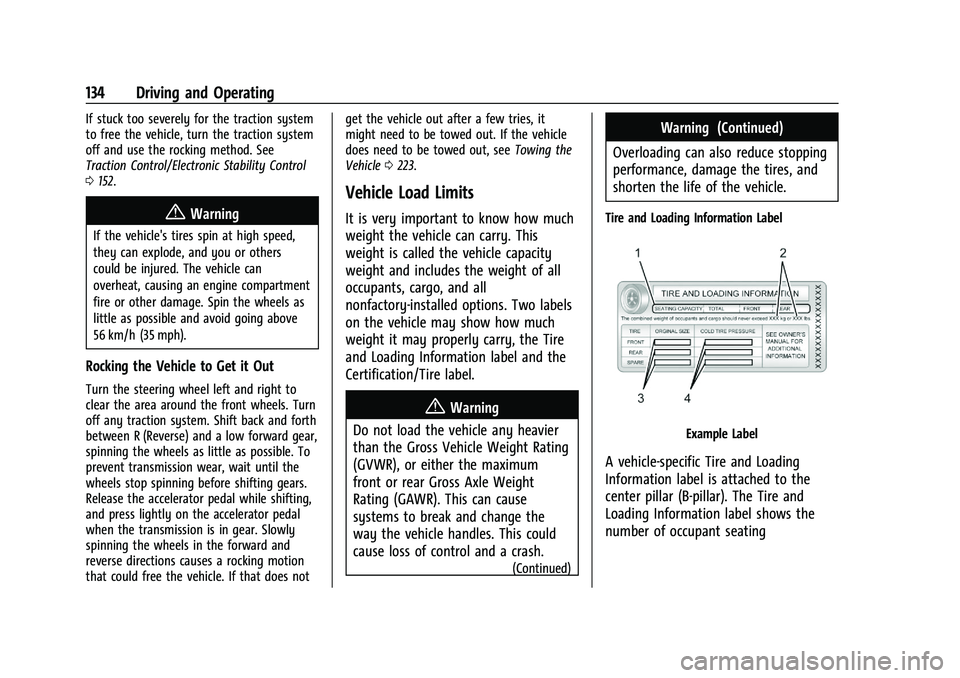
Tire and Loading Information Label
Example Label
A vehicle-specific Tire and Loading
Information label is attached to the
center pillar (B-pillar). The Tire and
Loading Information label shows the
number of occupant seating