brake CHEVROLET TRAX 2021 Owner's Guide
[x] Cancel search | Manufacturer: CHEVROLET, Model Year: 2021, Model line: TRAX, Model: CHEVROLET TRAX 2021Pages: 280, PDF Size: 8.76 MB
Page 157 of 280

Chevrolet TRAX Owner Manual (GMNA-Localizing-U.S./Canada-14609828) -
2021 - CRC - 8/21/20
156 Driving and Operating
Warning (Continued)
Under many conditions, these systems
will not:
.Detect children, pedestrians, bicyclists,
or animals.
.Detect vehicles or objects outside the
area monitored by the system.
.Work at all driving speeds.
.Warn you or provide you with enough
time to avoid a crash.
.Work under poor visibility or bad
weather conditions.
.Work if the detection sensor is not
cleaned or is covered by ice, snow,
mud, or dirt.
.Work if the detection sensor is
covered up, such as with a sticker,
magnet, or metal plate.
.Work if the area surrounding the
detection sensor is damaged or not
properly repaired.
Complete attention is always required
while driving, and you should be ready to
take action and apply the brakes and/or
steer the vehicle to avoid crashes. Audible Alert
Some driver assistance features alert the
driver of obstacles by beeping. To change
the volume of the warning chime, see
“Comfort and Convenience”
underVehicle
Personalization 093.
Cleaning
Depending on vehicle options, keep these
areas of the vehicle clean to ensure the best
driver assistance feature performance. Driver
Information Center (DIC) messages may
display when the systems are unavailable or
blocked.
.Front and rear bumpers and the area
below the bumpers
.Front grille and headlamps
.Front camera lens in the front grille or
near the front emblem
.Front side and rear side panels
.Outside of the windshield in front of the
rearview mirrors
.Side camera lens on the bottom of the
outside mirrors
.Rear side corner bumpers
.Rear Vision Camera above the license
plate
Page 160 of 280

Chevrolet TRAX Owner Manual (GMNA-Localizing-U.S./Canada-14609828) -
2021 - CRC - 8/21/20
Driving and Operating 159
.An object was hanging out of the liftgate
during the last drive cycle. Once the
object is removed, RPA will return to
normal operation.
.The bumper is damaged. Take the vehicle
to your dealer to repair the system.
.Other conditions, such as vibrations from
a jackhammer or the compression of air
brakes on a very large truck, are affecting
system performance.
If the above conditions do not exist, take
the vehicle to your dealer to repair the
system.
Side Blind Zone Alert (SBZA)
If equipped, the SBZA system is a
lane-changing aid that assists drivers with
avoiding crashes that occur with moving
vehicles in the side blind zone (or spot)
areas. The SBZA warning display will light
up in the corresponding outside side mirror
and will flash if the turn signal is on.
{Warning
SBZA does not alert the driver to vehicles
rapidly approaching outside of the side
blind zones, pedestrians, bicyclists, (Continued)
Warning (Continued)
or animals. It may not provide alerts
when changing lanes under all driving
conditions. Failure to use proper care
when changing lanes may result in injury,
death, or vehicle damage. Before making
a lane change, always check mirrors,
glance over your shoulder, and use the
turn signals.
SBZA Detection Zones
The SBZA sensor covers a zone of
approximately one lane over from both
sides of the vehicle, or 3.5 m (11 ft). The
height of the zone is approximately between 0.5 m (1.5 ft) and 2 m (6 ft) off the ground.
This zone starts at approximately the middle
of the vehicle and goes back 5 m (16 ft).
How the System Works
The SBZA symbol lights up in the side
mirrors when the system detects a moving
vehicle in the next lane over that is in the
side blind zone. This indicates it may be
unsafe to change lanes. Before making a
lane change, check the SBZA display, check
mirrors, glance over your shoulder, and use
the turn signals.
Left Side Mirror
DisplayRight Side Mirror Display
When the vehicle is started, both outside
mirror SBZA displays will briefly come on to
indicate the system is operating. When the
vehicle is in a forward gear, the left- or
right-side mirror display will light up if a
moving vehicle is detected in that blind
zone. If the turn signal is activated in the
Page 167 of 280
Chevrolet TRAX Owner Manual (GMNA-Localizing-U.S./Canada-14609828) -
2021 - CRC - 8/21/20
166 Vehicle Care
Vehicle Care
General Information
General Information . . . . . . . . . . . . . . . . . . . 167
California Proposition 65 Warning . . . . . 167
California Perchlorate MaterialsRequirements . . . . . . . . . . . . . . . . . . . . . . . . 167
Accessories and Modifications . . . . . . . . . 167
Vehicle Checks
Doing Your Own Service Work . . . . . . . . 168
Hood . . . . . . . . . . . . . . . . . . . . . . . . . . . . . . . . . . 168
Engine Compartment Overview . . . . . . . . 170
Engine Oil . . . . . . . . . . . . . . . . . . . . . . . . . . . . . 173
Engine Oil Life System . . . . . . . . . . . . . . . . . 175
Automatic Transmission Fluid . . . . . . . . . . 175
Engine Air Cleaner/Filter . . . . . . . . . . . . . . . 176
Cooling System . . . . . . . . . . . . . . . . . . . . . . . . 177
Engine Overheating . . . . . . . . . . . . . . . . . . . 180
Washer Fluid . . . . . . . . . . . . . . . . . . . . . . . . . . . 181
Brakes . . . . . . . . . . . . . . . . . . . . . . . . . . . . . . . . . 182
Brake Fluid . . . . . . . . . . . . . . . . . . . . . . . . . . . . 182
Battery - North America . . . . . . . . . . . . . . . 183
All-Wheel Drive . . . . . . . . . . . . . . . . . . . . . . . . 184
Starter Switch Check . . . . . . . . . . . . . . . . . . 184
Automatic Transmission Shift Lock Control Function Check . . . . . . . . . . . . . . 184
Park Brake and P (Park) Mechanism Check . . . . . . . . . . . . . . . . . . . . . . . . . . . . . . . . 185
Wiper Blade Replacement . . . . . . . . . . . . . 185 Windshield Replacement . . . . . . . . . . . . . . 186
Gas Strut(s) . . . . . . . . . . . . . . . . . . . . . . . . . . . 186
Headlamp Aiming
Front Headlamp Aiming . . . . . . . . . . . . . . . 187
Bulb Replacement
Bulb Replacement . . . . . . . . . . . . . . . . . . . . . 187
Halogen Bulbs . . . . . . . . . . . . . . . . . . . . . . . . . 188
LED Lighting . . . . . . . . . . . . . . . . . . . . . . . . . . . 188
Headlamps, Front Turn Signal and
Parking Lamps . . . . . . . . . . . . . . . . . . . . . . . 188
Taillamps, Turn Signal, Sidemarker, Stoplamps, and Back-Up Lamps . . . . . . 191
License Plate Lamp . . . . . . . . . . . . . . . . . . . . 192
Electrical System
Electrical System Overload . . . . . . . . . . . . . 193
Fuses and Circuit Breakers . . . . . . . . . . . . . 193
Engine Compartment Fuse Block . . . . . . 194
Instrument Panel Fuse Block . . . . . . . . . . . 197
Rear Compartment Fuse Block . . . . . . . . . 198
Wheels and Tires
Tires . . . . . . . . . . . . . . . . . . . . . . . . . . . . . . . . . . . 199
All-Season Tires . . . . . . . . . . . . . . . . . . . . . . . 200
Winter Tires . . . . . . . . . . . . . . . . . . . . . . . . . . 200
Tire Sidewall Labeling . . . . . . . . . . . . . . . . . 201
Tire Designations . . . . . . . . . . . . . . . . . . . . . . 202
Tire Terminology and Definitions . . . . . . 203
Tire Pressure . . . . . . . . . . . . . . . . . . . . . . . . . . 205
Tire Pressure Monitor System . . . . . . . . . 206 Tire Pressure Monitor Operation . . . . . . 207
Tire Inspection . . . . . . . . . . . . . . . . . . . . . . . . 209
Tire Rotation . . . . . . . . . . . . . . . . . . . . . . . . . . 209
When It Is Time for New Tires . . . . . . . . 210
Buying New Tires . . . . . . . . . . . . . . . . . . . . . . 211
Different Size Tires and Wheels . . . . . . . . 212
Uniform Tire Quality Grading . . . . . . . . . . 213
Wheel Alignment and Tire Balance . . . . 214
Wheel Replacement . . . . . . . . . . . . . . . . . . . 214
Tire Chains . . . . . . . . . . . . . . . . . . . . . . . . . . . . . 215
If a Tire Goes Flat . . . . . . . . . . . . . . . . . . . . . 215
Tire Changing . . . . . . . . . . . . . . . . . . . . . . . . . . 216
Compact Spare Tire . . . . . . . . . . . . . . . . . . . 220
Jump Starting
Jump Starting - North America . . . . . . . . . 221
Towing the Vehicle
Towing the Vehicle . . . . . . . . . . . . . . . . . . . . 223
Recreational Vehicle Towing . . . . . . . . . . . 224
Appearance Care
Exterior Care . . . . . . . . . . . . . . . . . . . . . . . . . . 226
Interior Care . . . . . . . . . . . . . . . . . . . . . . . . . . . 230
Floor Mats . . . . . . . . . . . . . . . . . . . . . . . . . . . . . 232
Page 168 of 280
Chevrolet TRAX Owner Manual (GMNA-Localizing-U.S./Canada-14609828) -
2021 - CRC - 8/21/20
Vehicle Care 167
General Information
For service and parts needs, visit your
dealer. You will receive genuine GM parts
and GM-trained and supported service
people.
Genuine GM parts have one of these marks:
California Proposition 65 Warning
{Warning
Most motor vehicles, including this one,
as well as many of its service parts and
fluids, contain and/or emit chemicals
known to the State of California to cause(Continued)
Warning (Continued)
cancer and birth defects or other
reproductive harm. Engine exhaust, many
parts and systems, many fluids, and
some component wear by-products
contain and/or emit these chemicals. For
more information go to
www.P65Warnings.ca.gov/
passenger-vehicle.
See Battery - North America 0183 and
Jump Starting - North America 0221 and the
back cover.
California Perchlorate Materials
Requirements
Certain types of automotive applications,
such as airbag initiators, seat belt
pretensioners, and lithium batteries
contained in electronic keys, may contain
perchlorate materials. Perchlorate Material –
special handling may apply. See
www.dtsc.ca.gov/hazardouswaste/
perchlorate.
Accessories and Modifications
Adding non-dealer accessories or making
modifications to the vehicle can affect
vehicle performance and safety, including
such things as airbags, braking, stability,
ride and handling, emissions systems,
aerodynamics, durability, and electronic
systems like antilock brakes, traction control,
and stability control. These accessories or
modifications could even cause malfunction
or damage not covered by the vehicle
warranty.
Damage to suspension components caused
by modifying vehicle height outside of
factory settings will not be covered by the
vehicle warranty.
Damage to vehicle components resulting
from modifications or the installation or use
of non-GM certified parts, including control
module or software modifications, is not
covered under the terms of the vehicle
warranty and may affect remaining
warranty coverage for affected parts.
GM Accessories are designed to complement
and function with other systems on the
vehicle. See your dealer to accessorize the
vehicle using genuine GM Accessories
installed by a dealer technician.
Page 172 of 280
Chevrolet TRAX Owner Manual (GMNA-Localizing-U.S./Canada-14609828) -
2021 - CRC - 8/21/20
Vehicle Care 171
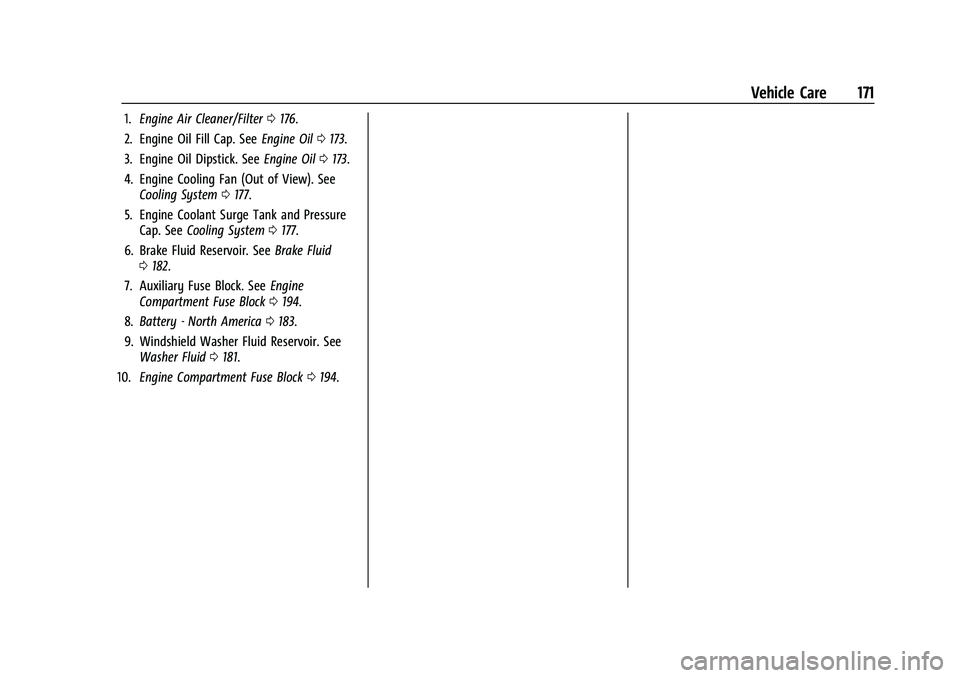
1.Engine Air Cleaner/Filter 0176.
2. Engine Oil Fill Cap. See Engine Oil0173.
3. Engine Oil Dipstick. See Engine Oil0173.
4. Engine Cooling Fan (Out of View). See Cooling System 0177.
5. Engine Coolant Surge Tank and Pressure Cap. See Cooling System 0177.
6. Brake Fluid Reservoir. See Brake Fluid
0 182.
7. Auxiliary Fuse Block. See Engine
Compartment Fuse Block 0194.
8. Battery - North America 0183.
9. Windshield Washer Fluid Reservoir. See Washer Fluid 0181.
10. Engine Compartment Fuse Block 0194.
Page 173 of 280
Chevrolet TRAX Owner Manual (GMNA-Localizing-U.S./Canada-14609828) -
2021 - CRC - 8/21/20
172 Vehicle Care
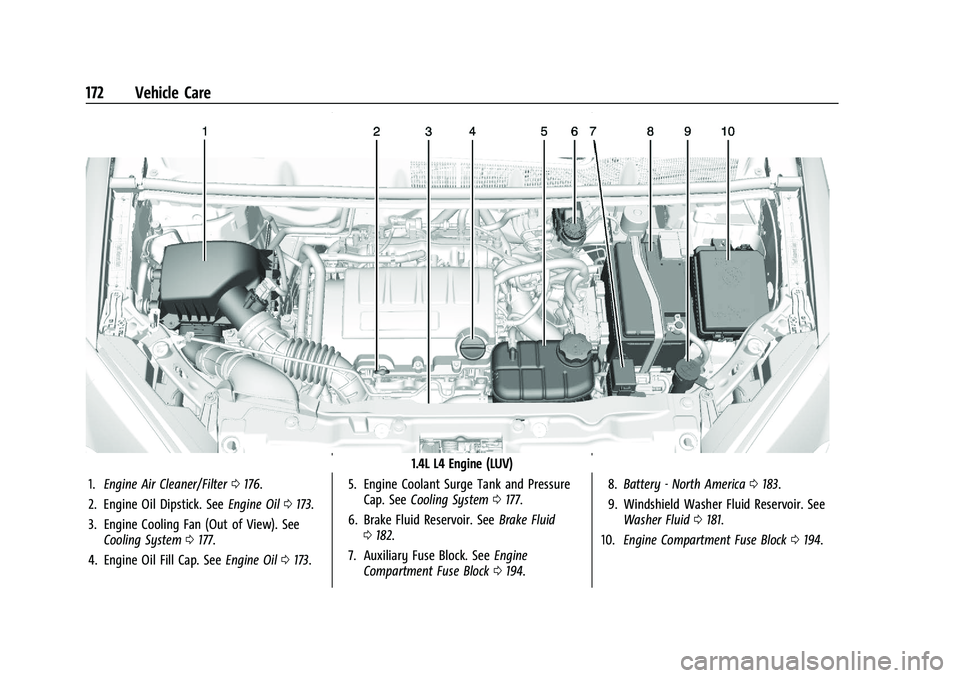
1.4L L4 Engine (LUV)
1. Engine Air Cleaner/Filter 0176.
2. Engine Oil Dipstick. See Engine Oil0173.
3. Engine Cooling Fan (Out of View). See Cooling System 0177.
4. Engine Oil Fill Cap. See Engine Oil0173. 5. Engine Coolant Surge Tank and Pressure
Cap. See Cooling System 0177.
6. Brake Fluid Reservoir. See Brake Fluid
0 182.
7. Auxiliary Fuse Block. See Engine
Compartment Fuse Block 0194. 8.
Battery - North America 0183.
9. Windshield Washer Fluid Reservoir. See Washer Fluid 0181.
10. Engine Compartment Fuse Block 0194.
Page 183 of 280
Chevrolet TRAX Owner Manual (GMNA-Localizing-U.S./Canada-14609828) -
2021 - CRC - 8/21/20
182 Vehicle Care
Brakes
Disc brake linings have built-in wear
indicators that make a high-pitched warning
sound when the brake linings are worn and
new linings are needed. The sound can come
and go or can be heard all the time when
the vehicle is moving, except when applying
the brake pedal firmly.
{Warning
The brake wear warning sound means
that soon the brakes will not work well.
That could lead to a crash. When the
brake wear warning sound is heard, have
the vehicle serviced.
Caution
Continuing to drive with worn-out brake
linings could result in costly brake
repairs.
Some driving conditions or climates can
cause a brake squeal when the brakes are
first applied, clearing up following several
applies. This does not mean something is
wrong with the brakes. Properly torqued wheel nuts are necessary
to help prevent brake pulsation. When tires
are rotated, inspect brake linings for wear
and evenly tighten wheel nuts in the proper
sequence to torque specifications. See
Capacities and Specifications
0248.
If the vehicle has rear drum brakes, they do
not have wear indicators. Drum brakes have
an inspection hole to inspect lining wear
during scheduled maintenance. When the
front brake linings are replaced, have the
rear brakes inspected. If a rear brake rubbing
noise is heard, have the rear brake linings
inspected immediately. Rear brake drums
should be removed and inspected each time
the tires are removed for rotation or
changing.
Brake pads should be replaced as complete
axle sets.Brake Pedal Travel
See your dealer if the brake pedal does not
return to normal height, or if there is a
rapid increase in pedal travel. This could be
a sign that brake service may be required.
Replacing Brake System Parts
Always replace brake system parts with
new, approved replacement parts. If this is
not done, the brakes may not work
properly. The braking performance can
change in many ways if the wrong brake
parts are installed or if parts are improperly
installed.
Brake Fluid
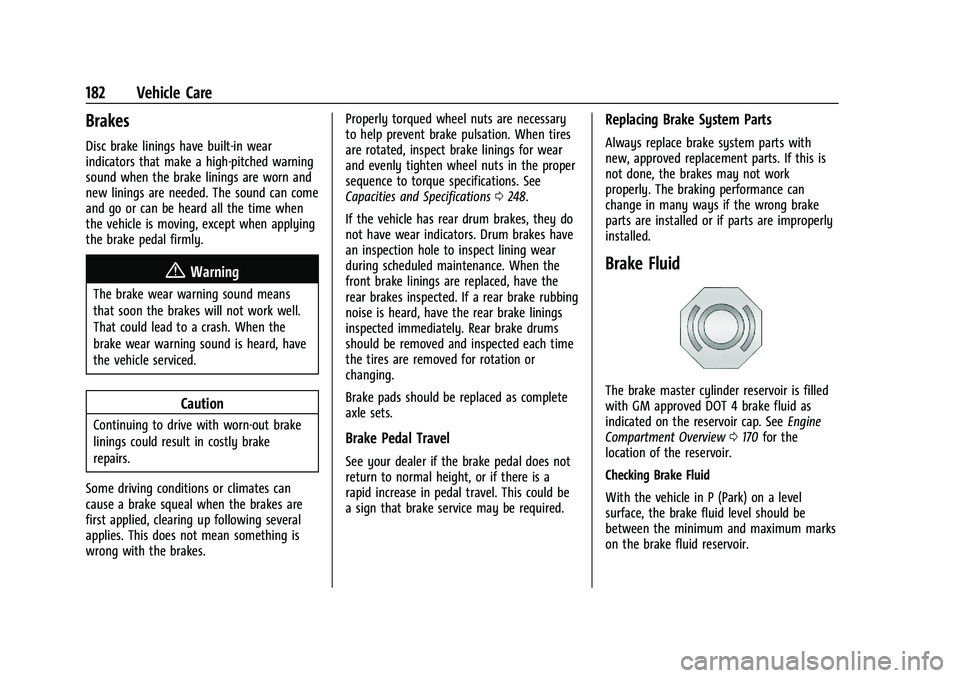
The brake master cylinder reservoir is filled
with GM approved DOT 4 brake fluid as
indicated on the reservoir cap. See Engine
Compartment Overview 0170 for the
location of the reservoir.
Checking Brake Fluid
With the vehicle in P (Park) on a level
surface, the brake fluid level should be
between the minimum and maximum marks
on the brake fluid reservoir.
Page 184 of 280
Chevrolet TRAX Owner Manual (GMNA-Localizing-U.S./Canada-14609828) -
2021 - CRC - 8/21/20
Vehicle Care 183
There are only two reasons why the brake
fluid level in the reservoir may go down:
.Normal brake lining wear. When new
linings are installed, the fluid level goes
back up.
.A fluid leak in the brake hydraulic system.
Have the brake hydraulic system fixed.
With a leak, the brakes will not
work well.
Always clean the brake fluid reservoir cap
and the area around the cap before
removing it.
Do not top off the brake fluid. Adding fluid
does not correct a leak. If fluid is added
when the linings are worn, there will be too
much fluid when new brake linings are
installed. Add or remove fluid, as necessary,
only when work is done on the brake
hydraulic system.
{Warning
If too much brake fluid is added, it can
spill on the engine and burn, if the
engine is hot enough. You or others could
be burned, and the vehicle could be
damaged. Add brake fluid only when
work is done on the brake hydraulic
system. When the brake fluid falls to a low level,
the brake warning light comes on. See
Brake
System Warning Light 086.
Brake fluid absorbs water over time which
degrades the effectiveness of the brake fluid.
Replace brake fluid at the specified intervals
to prevent increased stopping distance. See
Maintenance Schedule 0235.
What to Add
Use only GM approved DOT 4 brake fluid
from a clean, sealed container. See
Recommended Fluids and Lubricants 0243.
{Warning
The wrong or contaminated brake fluid
could result in damage to the brake
system. This could result in the loss of
braking leading to a possible injury.
Always use the proper GM approved
brake fluid.
Caution
If brake fluid is spilled on the vehicle's
painted surfaces, the paint finish can be
damaged. Immediately wash off any
painted surface.
Battery - North America
The original equipment battery is
maintenance free. Do not remove the cap
and do not add fluid.
Refer to the replacement number shown on
the original battery label when a new
battery is needed. See Engine Compartment
Overview 0170 for battery location.
{Warning
WARNING: Battery posts, terminals, and
related accessories contain lead and lead
compounds, chemicals known to the
State of California to cause cancer and
birth defects or other reproductive harm.
Batteries also contain other chemicals
known to the State of California to cause
cancer. WASH HANDS AFTER HANDLING.
For more information go to
www.P65Warnings.ca.gov/
passenger-vehicle.
See California Proposition 65 Warning 0167
and the back cover.
Page 185 of 280
Chevrolet TRAX Owner Manual (GMNA-Localizing-U.S./Canada-14609828) -
2021 - CRC - 8/21/20
184 Vehicle Care
Vehicle Storage
{Warning
Batteries have acid that can burn you and
gas that can explode. You can be badly
hurt if you are not careful. SeeJump
Starting - North America 0221 for tips on
working around a battery without
getting hurt.
Infrequent Usage: Remove the black,
negative (−) cable from the battery to keep
the battery from running down.
Extended Storage: Remove the black,
negative (−) cable from the battery or use a
battery trickle charger.
All-Wheel Drive
Transfer Case
Under normal driving conditions, transfer
case fluid does not require maintenance
unless there is a fluid leak or unusual noise.
If required, have the transfer case serviced
by your dealer.
Starter Switch Check
{Warning
When you are doing this inspection, the
vehicle could move suddenly. If the
vehicle moves, you or others could be
injured.
1. Before starting this check, be sure there is enough room around the vehicle.
2. Apply both the parking brake and the regular brake.
Do not use the accelerator pedal, and be
ready to turn off the engine immediately
if it starts.
3. Try to start the engine in each gear. The vehicle should start only in P (Park) or
N (Neutral). If the vehicle starts in any
other position, contact your dealer for
service.
Automatic Transmission Shift Lock
Control Function Check
{Warning
When you are doing this inspection, the
vehicle could move suddenly. If the
vehicle moves, you or others could be
injured.
1. Before starting this check, be sure there is enough room around the vehicle.
It should be parked on a level surface.
2. Apply the parking brake. Be ready to apply the regular brake immediately if
the vehicle begins to move.
3. With the engine off, turn the ignition on, but do not start the engine. Without
applying the regular brake, try to move
the shift lever out of P (Park) with
normal effort. If the shift lever moves
out of P (Park), contact your dealer for
service.
Page 186 of 280
Chevrolet TRAX Owner Manual (GMNA-Localizing-U.S./Canada-14609828) -
2021 - CRC - 8/21/20
Vehicle Care 185
Park Brake and P (Park)
Mechanism Check
{Warning
When you are doing this check, the
vehicle could begin to move. You or
others could be injured and property
could be damaged. Make sure there is
room in front of the vehicle in case it
begins to roll. Be ready to apply the
regular brake at once should the vehicle
begin to move.
Park on a fairly steep hill, with the vehicle
facing downhill. Keeping your foot on the
regular brake, set the parking brake.
.To check the parking brake's holding
ability: With the engine running and the
transmission in N (Neutral), slowly remove
foot pressure from the regular brake
pedal. Do this until the vehicle is held by
the parking brake only.
.To check the P (Park) mechanism's holding
ability: With the engine running, shift to
P (Park). Then release the parking brake
followed by the regular brake.
Contact your dealer if service is required.
Wiper Blade Replacement
Windshield wiper blades should be replaced
periodically. See Maintenance Schedule
0 235.
Replacement blades come in different types
and are removed in different ways. For
proper type and length, see Maintenance
Replacement Parts 0244.
Caution
Allowing the wiper arm to touch the
windshield when no wiper blade is
installed could damage the windshield.
Any damage that occurs would not be
covered by the vehicle warranty. Do not
allow the wiper arm to touch the
windshield.
Front Wiper Blade Replacement
To replace the front wiper blades:
1. Lift the wiper arm from the windshield until no further movement is possible.
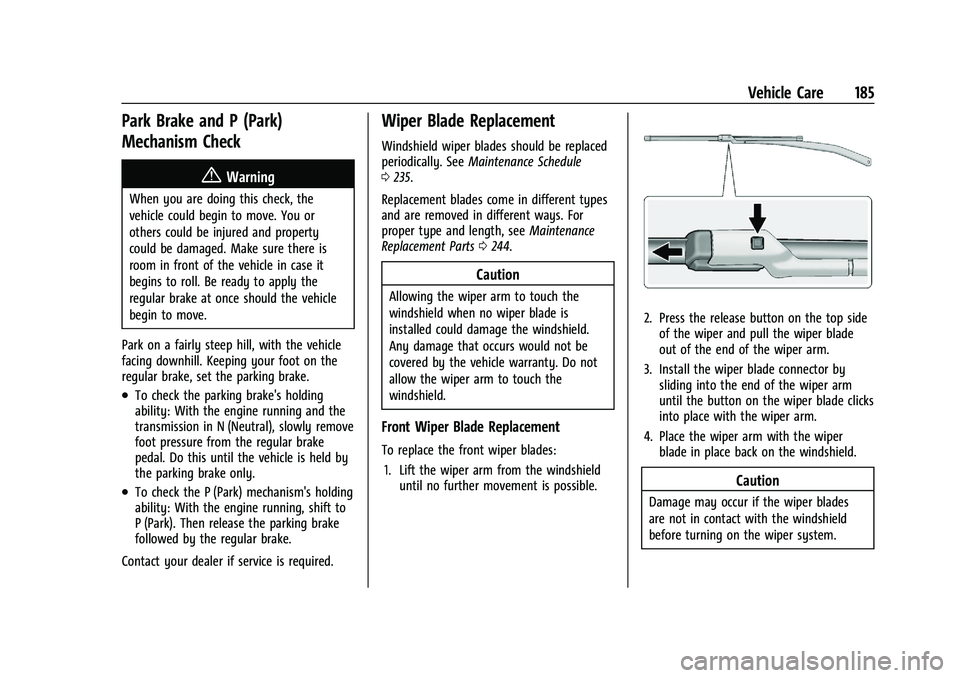
2. Press the release button on the top side
of the wiper and pull the wiper blade
out of the end of the wiper arm.
3. Install the wiper blade connector by sliding into the end of the wiper arm
until the button on the wiper blade clicks
into place with the wiper arm.
4. Place the wiper arm with the wiper blade in place back on the windshield.
Caution
Damage may occur if the wiper blades
are not in contact with the windshield
before turning on the wiper system.