ignition CHEVROLET TRAX 2021 Owner's Guide
[x] Cancel search | Manufacturer: CHEVROLET, Model Year: 2021, Model line: TRAX, Model: CHEVROLET TRAX 2021Pages: 280, PDF Size: 8.76 MB
Page 115 of 280
Chevrolet TRAX Owner Manual (GMNA-Localizing-U.S./Canada-14609828) -
2021 - CRC - 8/21/20
114 Infotainment System
Advisor Call
Selecting Advisor Call is the same as
pressing
Qor calling 1-888- 4ONSTAR
(1-888-466-7827). The X option in the upper
right corner of the screen does not end the
call, but returns to the previous display.
Turn-by-Turn Directions
With a connected plan, an OnStar Advisor
can download a destination to the vehicle or
its embedded navigation system,
if equipped. Touch Turn-by-Turn Directions
from the main page of the OnStar app and
follow the display prompts. A destination
transfer from OnStar will show the detail
view of the destination when it is
transferred from OnStar to the Navigation
application. Touch OK to go back to the
previous menu. An ABS and Guidance or
Navigation Add-On Plan is required. See
www.onstar.com for a coverage map.
Services vary by model. Map coverage is
available in the United States, Puerto Rico,
and Canada.
Wi-Fi Hotspot
Touch to display the Settings page, which
shows the configurations for the vehicle
hotspot and allows them to be changed. For more information, see www.onstar.com.Phone
Bluetooth (Overview)
The Bluetooth-capable system can interact
with many cell phones, allowing:
.Placement and receipt of calls in a
hands-free mode.
.Sharing of the cell phone’s address book
or contact list with the vehicle.
To minimize driver distraction, before
driving, and with the vehicle parked:
.Become familiar with the features of the
cell phone. Organize the phone book and
contact lists clearly and delete duplicate
or rarely used entries. If possible,
program speed dial or other shortcuts.
.Review the controls and operation of the
infotainment system.
.Pair cell phone(s) to the vehicle. The
system may not work with all cell
phones. See “Pairing”later in this section.
Vehicles with a Bluetooth system can use a
Bluetooth-capable cell phone with a
Hands-Free Profile to make and receive
phone calls. The infotainment system and
voice recognition are used to control the system. The system can be used while the
ignition is on or in ACC/ACCESSORY. The
range of the Bluetooth system can be up to
9.1 m (30 ft). Not all phones support all
functions and not all phones work with the
Bluetooth system. See
www.my.chevrolet.com for more information
about compatible phones.
Controls
Use the buttons on the infotainment system
and the steering wheel to operate the
Bluetooth system.
Steering Wheel Controls
See
Steering Wheel Controls 0105.
Infotainment System Controls
For information about how to navigate the
menu system using the infotainment
controls, see Overview0103.
PHONE : Touch the PHONE icon on the
Home Page to enter the phone main menu.
Audio System
When using the Bluetooth phone system,
sound comes through the vehicle's front
audio system speakers and overrides the
audio system. The volume level while on a
phone call can be adjusted by pressing the
Page 125 of 280
Chevrolet TRAX Owner Manual (GMNA-Localizing-U.S./Canada-14609828) -
2021 - CRC - 8/21/20
124 Climate Controls
Do not drive the vehicle until all windows
are clear.
In defrost or defog mode, excessive air
conditioning use can cause the windows to
fog. If this happens, change the air delivery
mode to
Yand reduce the fan speed.
#:If equipped with air conditioning,
follow these steps to use the system. Turn
Ato the desired speed. The air
conditioning does not operate when the fan
control knob is in the off position. Press
#
to turn the air conditioning on and off.
When
#is pressed, an indicator light
comes on to show that the air conditioning
is on.
For quick cool down on hot days:
1. Open the windows to let hot air escape.
2. Press
M.
3. Press
#.
4. Select the coolest temperature.
5. Select the highest
Aspeed.
Using these settings together for long
periods of time may cause the air inside the
vehicle to become too dry. To prevent this
from happening, after the air in the vehicle
has cooled, turn the recirculation mode off.
M: This mode recirculates and helps to
quickly cool the air inside the vehicle. It can
be used to prevent outside air and odors
from entering the vehicle.
Press the button to turn the recirculation
mode on. An indicator light comes on to
show that the recirculation is on. Press the
button again to return to outside air mode.
Using the recirculation mode for extended
periods may cause the windows to fog.
If this happens, select the defrost mode.
Max
#is available when the air
conditioning is selected and the temperature
is set to the coolest setting while the
outside air temperature is warm. When Max
#is activated, the air inside the vehicle is
automatically recirculated, which helps to
quickly cool the vehicle. The recirculation
indicator will not be lit.
To allow outside air to enter in these
conditions, press the recirculation button
twice. The recirculation indicator will not
be lit.
MorL: If equipped, press to heat the
driver or passenger seat. See Heated Front
Seats 033.
Rear Window and Outside Mirror
Defogger
1:Press to turn the rear window and
outside mirror defogger on or off. An
indicator light comes on to show that the
feature is on.
The rear window defogger turns off after
about 15 minutes. It can also be turned off
by pressing
1again or by turning the
ignition off or to ACC/ACCESSORY. If turned
on again it runs for about five minutes
before turning off.
Do not drive the vehicle until all the
windows are clear.
If equipped with heated outside mirrors,
they turn on with the rear window defogger
and help to clear fog or frost from the
surface of the mirror. See Heated Mirrors
0 25.
Caution
Using a razor blade or sharp object on
the inside rear window can damage the
antenna or defogger. Repairs would not
be covered by the vehicle warranty. Do
not stick anything to the rear window.
Page 128 of 280
Chevrolet TRAX Owner Manual (GMNA-Localizing-U.S./Canada-14609828) -
2021 - CRC - 8/21/20
Driving and Operating 127
Driving and Operating
Driving Information
Driver Behavior . . . . . . . . . . . . . . . . . . . . . . . . 128
Driving Environment . . . . . . . . . . . . . . . . . . . 128
Vehicle Design . . . . . . . . . . . . . . . . . . . . . . . . . 128
Driving for Better Fuel Economy . . . . . . . 128
Distracted Driving . . . . . . . . . . . . . . . . . . . . . 128
Defensive Driving . . . . . . . . . . . . . . . . . . . . . . 129
Impaired Driving . . . . . . . . . . . . . . . . . . . . . . . 129
Control of a Vehicle . . . . . . . . . . . . . . . . . . . 129
Braking . . . . . . . . . . . . . . . . . . . . . . . . . . . . . . . . 130
Steering . . . . . . . . . . . . . . . . . . . . . . . . . . . . . . . 130
Off-Road Recovery . . . . . . . . . . . . . . . . . . . . . 131
Loss of Control . . . . . . . . . . . . . . . . . . . . . . . . . 131
Driving on Wet Roads . . . . . . . . . . . . . . . . . . 131
Hill and Mountain Roads . . . . . . . . . . . . . . 132
Winter Driving . . . . . . . . . . . . . . . . . . . . . . . . . 133
If the Vehicle Is Stuck . . . . . . . . . . . . . . . . . . 133
Vehicle Load Limits . . . . . . . . . . . . . . . . . . . . 134
Starting and Operating
New Vehicle Break-In . . . . . . . . . . . . . . . . . . 137
Ignition Positions (Key Access) . . . . . . . . . 138
Ignition Positions (Keyless Access) . . . . . 139
Starting the Engine . . . . . . . . . . . . . . . . . . . . 141
Winter Cover . . . . . . . . . . . . . . . . . . . . . . . . . . 142
Engine Heater . . . . . . . . . . . . . . . . . . . . . . . . . 143
Retained Accessory Power (RAP) . . . . . . . 145
Shifting Into Park . . . . . . . . . . . . . . . . . . . . . . 145Shifting out of Park . . . . . . . . . . . . . . . . . . . 146
Parking over Things That Burn . . . . . . . . . 147
Extended Parking (Keyless Access) . . . . . 147
Engine Exhaust
Engine Exhaust . . . . . . . . . . . . . . . . . . . . . . . . 147
Running the Vehicle While Parked . . . . . 148
Automatic Transmission
Automatic Transmission . . . . . . . . . . . . . . . 148
Manual Mode . . . . . . . . . . . . . . . . . . . . . . . . . 149
Drive Systems
All-Wheel Drive . . . . . . . . . . . . . . . . . . . . . . . . 150
Brakes
Antilock Brake System (ABS) . . . . . . . . . . . 150
Parking Brake . . . . . . . . . . . . . . . . . . . . . . . . . . 151
Brake Assist . . . . . . . . . . . . . . . . . . . . . . . . . . . . 151
Hill Start Assist (HSA) . . . . . . . . . . . . . . . . . . 152
Ride Control Systems
Traction Control/Electronic Stability
Control . . . . . . . . . . . . . . . . . . . . . . . . . . . . . . . 152
Cruise Control
Cruise Control . . . . . . . . . . . . . . . . . . . . . . . . . . 153
Driver Assistance Systems
Driver Assistance Systems . . . . . . . . . . . . . 155
Rear Vision Camera (RVC) . . . . . . . . . . . . . . 157
Park Assist . . . . . . . . . . . . . . . . . . . . . . . . . . . . . 158 Side Blind Zone Alert (SBZA) . . . . . . . . . . . 159
Fuel
Top Tier Fuel . . . . . . . . . . . . . . . . . . . . . . . . . . 160
Recommended Fuel . . . . . . . . . . . . . . . . . . . 160
Prohibited Fuels . . . . . . . . . . . . . . . . . . . . . . . . 161
Fuels in Foreign Countries . . . . . . . . . . . . . 161
Fuel Additives . . . . . . . . . . . . . . . . . . . . . . . . . . 161
Filling the Tank (Capless Fuel Fill) . . . . . . 161
Filling the Tank (Capped Fuel Fill) . . . . . . 163
Filling a Portable Fuel Container . . . . . . . 164
Trailer Towing
General Towing Information . . . . . . . . . . . 164
Conversions and Add-Ons
Add-On Electrical Equipment . . . . . . . . . . . 164
Page 133 of 280
Chevrolet TRAX Owner Manual (GMNA-Localizing-U.S./Canada-14609828) -
2021 - CRC - 8/21/20
132 Driving and Operating
{Warning
Wet brakes can cause crashes. They
might not work as well in a quick stop
and could cause pulling to one side. You
could lose control of the vehicle.
After driving through a large puddle of
water or a car/vehicle wash, lightly apply
the brake pedal until the brakes work
normally.
Flowing or rushing water creates strong
forces. Driving through flowing water
could cause the vehicle to be carried
away. If this happens, you and other
vehicle occupants could drown. Do not
ignore police warnings and be very
cautious about trying to drive through
flowing water.
Hydroplaning
Hydroplaning is dangerous. Water can build
up under the vehicle's tires so they actually
ride on the water. This can happen if the
road is wet enough and you are going fast
enough. When the vehicle is hydroplaning, it
has little or no contact with the road.There is no hard and fast rule about
hydroplaning. The best advice is to slow
down when the road is wet.
Other Rainy Weather Tips
Besides slowing down, other wet weather
driving tips include:
.Allow extra following distance.
.Pass with caution.
.Keep windshield wiping equipment in
good shape.
.Keep the windshield washer fluid reservoir
filled.
.Have good tires with proper tread depth.
See
Tires 0199.
.Turn off cruise control.
Hill and Mountain Roads
Driving on steep hills or through mountains
is different than driving on flat or rolling
terrain. Tips include:
.Keep the vehicle serviced and in good
shape.
.Check all fluid levels and brakes, tires,
cooling system, and transmission.
.Shift to a lower gear when going down
steep or long hills.
{Warning
Using the brakes to slow the vehicle on a
long downhill slope can cause brake
overheating, can reduce brake
performance, and could result in a loss of
braking. Shift the transmission to a lower
gear to let the engine assist the brakes
on a steep downhill slope.
{Warning
Coasting downhill in N (Neutral) or with
the ignition off is dangerous. This can
cause overheating of the brakes and loss
of steering assist. Always have the engine
running and the vehicle in gear.
.Drive at speeds that keep the vehicle in
its own lane. Do not swing wide or cross
the center line.
.Be alert on top of hills; something could
be in your lane (e.g., stalled car, crash).
.Pay attention to special road signs (e.g.,
falling rocks area, winding roads, long
grades, passing or no-passing zones) and
take appropriate action.
Page 139 of 280
Chevrolet TRAX Owner Manual (GMNA-Localizing-U.S./Canada-14609828) -
2021 - CRC - 8/21/20
138 Driving and Operating
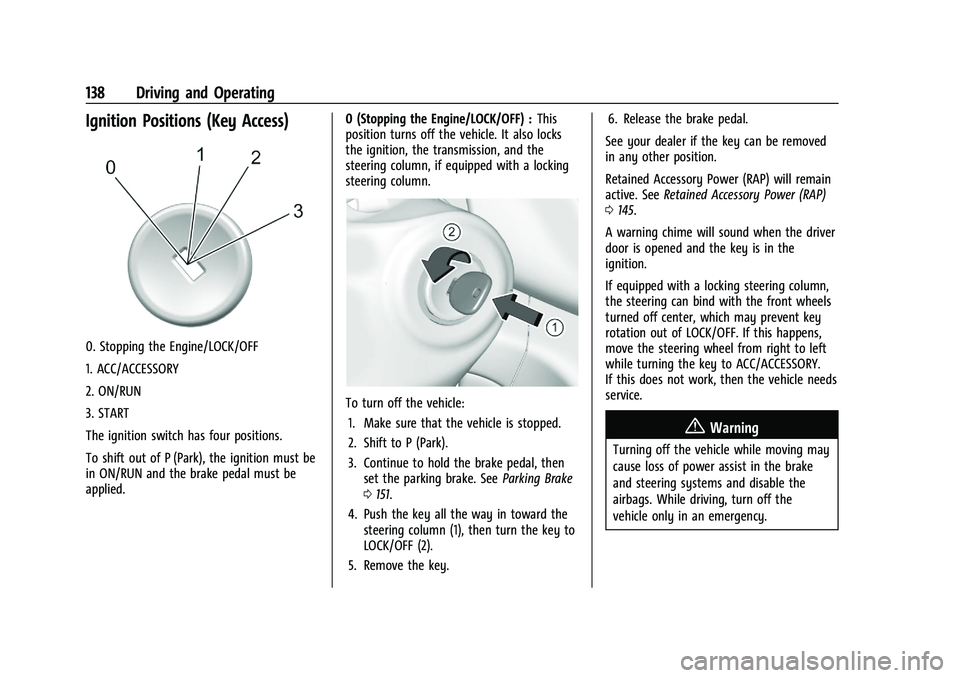
Ignition Positions (Key Access)
0. Stopping the Engine/LOCK/OFF
1. ACC/ACCESSORY
2. ON/RUN
3. START
The ignition switch has four positions.
To shift out of P (Park), the ignition must be
in ON/RUN and the brake pedal must be
applied.0 (Stopping the Engine/LOCK/OFF) :
This
position turns off the vehicle. It also locks
the ignition, the transmission, and the
steering column, if equipped with a locking
steering column.
To turn off the vehicle:
1. Make sure that the vehicle is stopped.
2. Shift to P (Park).
3. Continue to hold the brake pedal, then set the parking brake. See Parking Brake
0 151.
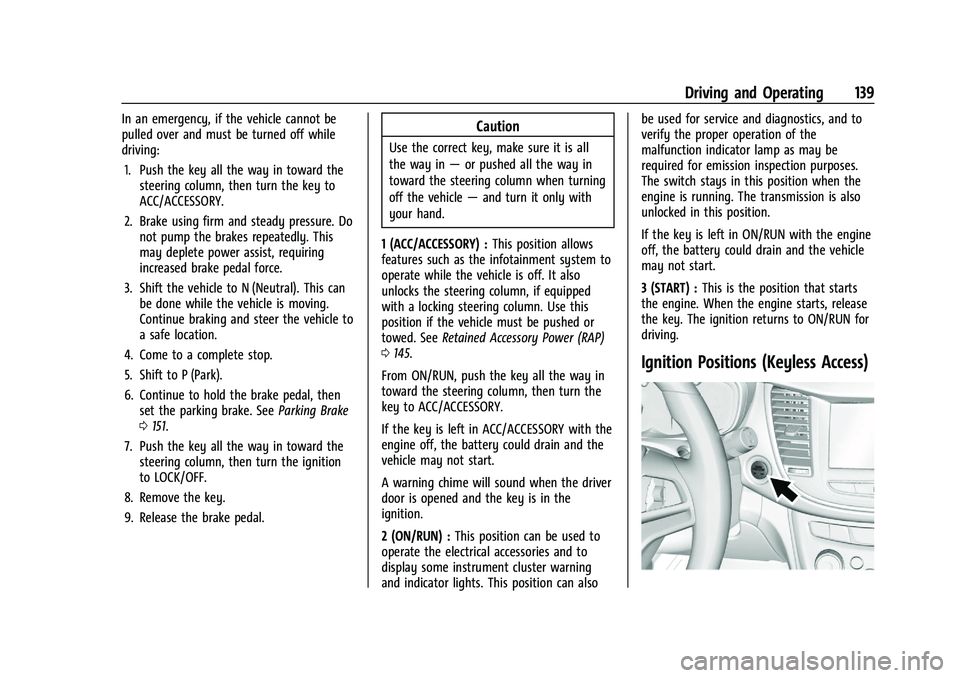
4. Push the key all the way in toward the steering column (1), then turn the key to
LOCK/OFF (2).
5. Remove the key. 6. Release the brake pedal.
See your dealer if the key can be removed
in any other position.
Retained Accessory Power (RAP) will remain
active. See Retained Accessory Power (RAP)
0 145.
A warning chime will sound when the driver
door is opened and the key is in the
ignition.
If equipped with a locking steering column,
the steering can bind with the front wheels
turned off center, which may prevent key
rotation out of LOCK/OFF. If this happens,
move the steering wheel from right to left
while turning the key to ACC/ACCESSORY.
If this does not work, then the vehicle needs
service.
{Warning
Turning off the vehicle while moving may
cause loss of power assist in the brake
and steering systems and disable the
airbags. While driving, turn off the
vehicle only in an emergency.
Page 140 of 280
Chevrolet TRAX Owner Manual (GMNA-Localizing-U.S./Canada-14609828) -
2021 - CRC - 8/21/20
Driving and Operating 139
In an emergency, if the vehicle cannot be
pulled over and must be turned off while
driving:1. Push the key all the way in toward the steering column, then turn the key to
ACC/ACCESSORY.
2. Brake using firm and steady pressure. Do not pump the brakes repeatedly. This
may deplete power assist, requiring
increased brake pedal force.
3. Shift the vehicle to N (Neutral). This can be done while the vehicle is moving.
Continue braking and steer the vehicle to
a safe location.
4. Come to a complete stop.
5. Shift to P (Park).
6. Continue to hold the brake pedal, then set the parking brake. See Parking Brake
0 151.
7. Push the key all the way in toward the steering column, then turn the ignition
to LOCK/OFF.
8. Remove the key.
9. Release the brake pedal.Caution
Use the correct key, make sure it is all
the way in —or pushed all the way in
toward the steering column when turning
off the vehicle —and turn it only with
your hand.
1 (ACC/ACCESSORY) : This position allows
features such as the infotainment system to
operate while the vehicle is off. It also
unlocks the steering column, if equipped
with a locking steering column. Use this
position if the vehicle must be pushed or
towed. See Retained Accessory Power (RAP)
0 145.
From ON/RUN, push the key all the way in
toward the steering column, then turn the
key to ACC/ACCESSORY.
If the key is left in ACC/ACCESSORY with the
engine off, the battery could drain and the
vehicle may not start.
A warning chime will sound when the driver
door is opened and the key is in the
ignition.
2 (ON/RUN) : This position can be used to
operate the electrical accessories and to
display some instrument cluster warning
and indicator lights. This position can also be used for service and diagnostics, and to
verify the proper operation of the
malfunction indicator lamp as may be
required for emission inspection purposes.
The switch stays in this position when the
engine is running. The transmission is also
unlocked in this position.
If the key is left in ON/RUN with the engine
off, the battery could drain and the vehicle
may not start.
3 (START) :
This is the position that starts
the engine. When the engine starts, release
the key. The ignition returns to ON/RUN for
driving.
Ignition Positions (Keyless Access)
Page 141 of 280
Chevrolet TRAX Owner Manual (GMNA-Localizing-U.S./Canada-14609828) -
2021 - CRC - 8/21/20
140 Driving and Operating
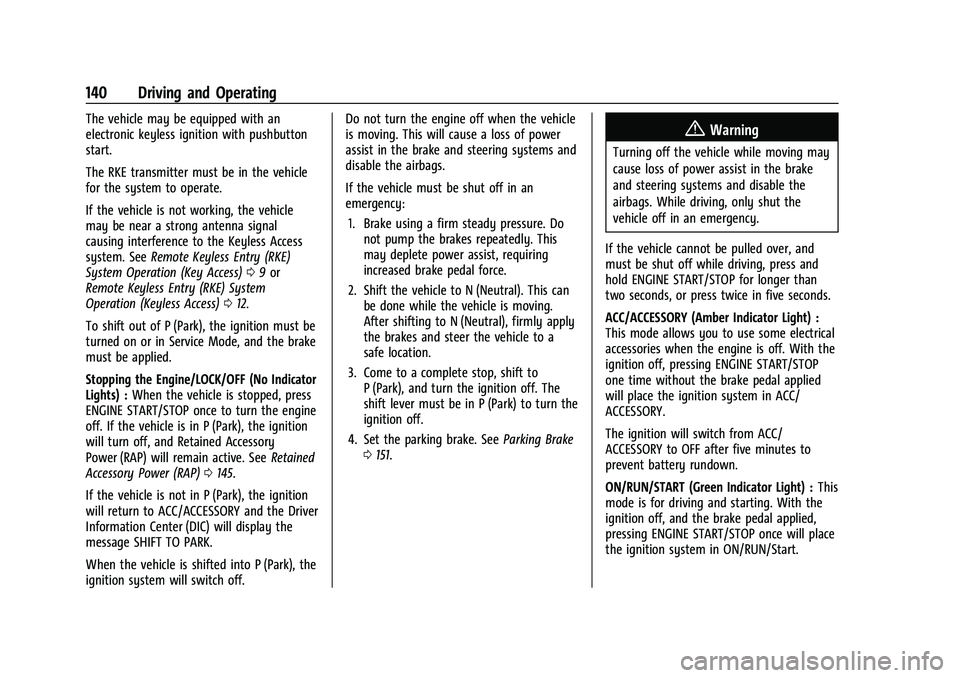
The vehicle may be equipped with an
electronic keyless ignition with pushbutton
start.
The RKE transmitter must be in the vehicle
for the system to operate.
If the vehicle is not working, the vehicle
may be near a strong antenna signal
causing interference to the Keyless Access
system. SeeRemote Keyless Entry (RKE)
System Operation (Key Access) 09or
Remote Keyless Entry (RKE) System
Operation (Keyless Access) 012.
To shift out of P (Park), the ignition must be
turned on or in Service Mode, and the brake
must be applied.
Stopping the Engine/LOCK/OFF (No Indicator
Lights) : When the vehicle is stopped, press
ENGINE START/STOP once to turn the engine
off. If the vehicle is in P (Park), the ignition
will turn off, and Retained Accessory
Power (RAP) will remain active. See Retained
Accessory Power (RAP) 0145.
If the vehicle is not in P (Park), the ignition
will return to ACC/ACCESSORY and the Driver
Information Center (DIC) will display the
message SHIFT TO PARK.
When the vehicle is shifted into P (Park), the
ignition system will switch off. Do not turn the engine off when the vehicle
is moving. This will cause a loss of power
assist in the brake and steering systems and
disable the airbags.
If the vehicle must be shut off in an
emergency:
1. Brake using a firm steady pressure. Do not pump the brakes repeatedly. This
may deplete power assist, requiring
increased brake pedal force.
2. Shift the vehicle to N (Neutral). This can be done while the vehicle is moving.
After shifting to N (Neutral), firmly apply
the brakes and steer the vehicle to a
safe location.
3. Come to a complete stop, shift to P (Park), and turn the ignition off. The
shift lever must be in P (Park) to turn the
ignition off.
4. Set the parking brake. See Parking Brake
0 151.{Warning
Turning off the vehicle while moving may
cause loss of power assist in the brake
and steering systems and disable the
airbags. While driving, only shut the
vehicle off in an emergency.
If the vehicle cannot be pulled over, and
must be shut off while driving, press and
hold ENGINE START/STOP for longer than
two seconds, or press twice in five seconds.
ACC/ACCESSORY (Amber Indicator Light) :
This mode allows you to use some electrical
accessories when the engine is off. With the
ignition off, pressing ENGINE START/STOP
one time without the brake pedal applied
will place the ignition system in ACC/
ACCESSORY.
The ignition will switch from ACC/
ACCESSORY to OFF after five minutes to
prevent battery rundown.
ON/RUN/START (Green Indicator Light) : This
mode is for driving and starting. With the
ignition off, and the brake pedal applied,
pressing ENGINE START/STOP once will place
the ignition system in ON/RUN/Start.
Page 142 of 280

Chevrolet TRAX Owner Manual (GMNA-Localizing-U.S./Canada-14609828) -
2021 - CRC - 8/21/20
Driving and Operating 141
Once engine cranking begins, release ENGINE
START/STOP. Engine cranking will continue
until the engine starts. SeeStarting the
Engine 0141.
The engine will then remain in ON/RUN.
Service Mode
This power mode is available for service and
diagnostics, and to verify the proper
operation of the malfunction indicator lamp
as may be required for emission inspection
purposes.
With the vehicle off, and the brake pedal
not applied, pressing and holding ENGINE
START/STOP for more than five seconds will
place the vehicle in Service Mode.
The instruments and audio system will
operate as they do in ON/RUN, but the
vehicle will not be able to be driven. The
engine will not start in Service Mode.
Press ENGINE START/STOP again to turn the
vehicle off.Starting the Engine
Place the transmission in the proper gear.
Caution
If you add electrical parts or accessories,
you could change the way the engine
operates. Any resulting damage would
not be covered by the vehicle warranty.
See Add-On Electrical Equipment 0164.
Caution
If the steering wheel is turned until it
reaches the end of its travel, and is held
in that position while starting the vehicle,
damage may occur to the hydraulic
power steering system and there may be
loss of power steering assist.
Move the shift lever to P (Park) or
N (Neutral). To restart the vehicle when it is
already moving, use N (Neutral) only.
Caution
Do not try to shift to P (Park) if the
vehicle is moving. If you do, you could
damage the transmission. Shift to P (Park)
only when the vehicle is stopped. Starting Procedure (Key Access)
1. With your foot off the accelerator pedal, turn the ignition key to START. When
the engine starts, let go of the ignition.
The idle speed will go down as the
engine gets warm. Do not race the
engine immediately after starting it.
Operate the engine and transmission
gently to allow the oil to warm up and
lubricate all moving parts.
Caution
Cranking the engine for long periods of
time, by returning the ignition to the
START position immediately after
cranking has ended, can overheat and
damage the cranking motor, and drain
the battery. Wait at least 15 seconds
between each try, to let the cranking
motor cool down.
2. If the engine does not start after five to 10 seconds, especially in very cold
weather (below −18 °C or 0 °F), it could
be flooded with too much gasoline. Try
pushing the accelerator pedal all the way
to the floor and holding it there as you
hold the key in START for up to a
maximum of 15 seconds. Wait at least
Page 146 of 280
Chevrolet TRAX Owner Manual (GMNA-Localizing-U.S./Canada-14609828) -
2021 - CRC - 8/21/20
Driving and Operating 145
Retained Accessory Power (RAP)
When the ignition is turned from on to off,
the following features (if equipped) will
continue to function for up to 10 minutes,
or until the driver door is opened. These
features will also work when the ignition is
in RUN or ACC/ACCESSORY:
.Infotainment System
.Power Windows (during RAP this
functionality will be lost when any door
is opened)
.Sunroof (during RAP this functionality will
be lost when any door is opened)
.Auxiliary Power Outlet
.Audio System
.OnStar System
Shifting Into Park
1. Hold the brake pedal down and set theparking brake. See Parking Brake0151.
2. Move the shift lever into P (Park) by pressing the button on the shift lever
and pushing the lever all the way
toward the front of the vehicle.
3. Push the ignition key in, towards the steering column and then turn the
ignition off. 4. Remove the key and take it with you.
If you can leave the vehicle with the
ignition key in your hand, the vehicle is
in P (Park).
Leaving the Vehicle with the Engine
Running
{Warning
It can be dangerous to leave the vehicle
with the engine running. It could
overheat and catch fire.
It is dangerous to get out of the vehicle
if the shift lever is not fully in P (Park)
with the parking brake firmly set. The
vehicle can roll.
Do not leave the vehicle when the engine
is running. If you have left the engine
running, the vehicle can move suddenly.
You or others could be injured. To be
sure the vehicle will not move, even
when you are on fairly level ground,
always set the parking brake and move
the shift lever to P (Park). See Shifting
Into Park 0145. If you have to leave the vehicle with the
engine running, be sure the vehicle is in
P (Park) and the parking brake is firmly set
before you leave it. After you have moved
the shift lever into P (Park), hold the brake
pedal down. Then see if you can move the
shift lever away from P (Park) without first
pushing the button on the shift lever. If you
can, it means that the shift lever was not
fully locked into P (Park).
Torque Lock
If you are parking on a hill and you do not
shift the transmission into P (Park) properly,
the weight of the vehicle may put too much
force on the parking pawl in the
transmission. You may find it difficult to pull
the shift lever out of P (Park). This is called
“torque lock.”
To prevent torque lock, set the
parking brake and then shift into P (Park)
properly before you leave the driver seat. To
find out how, see “Shifting Into Park”
previously in this section.
When you are ready to drive, move the
shift lever out of P (Park) before you release
the parking brake.
Page 147 of 280

Chevrolet TRAX Owner Manual (GMNA-Localizing-U.S./Canada-14609828) -
2021 - CRC - 8/21/20
146 Driving and Operating
If torque lock does occur, you may need to
have another vehicle push yours a little
uphill to take some of the pressure from the
parking pawl in the transmission, so you can
pull the shift lever out of P (Park).
Shifting out of Park
This vehicle is equipped with a shift lock
control. The shift lock control is designed to
prevent movement of the shift lever out of
P (Park) unless the ignition is on and the
brake pedal is applied.
The shift lock control is always functional
except in the case of an uncharged or low
voltage (less than 9-volt) battery.
If the vehicle has an uncharged battery or a
battery with low voltage, try charging or
jump starting the battery. SeeJump Starting
- North America 0221.
To shift out of P (Park): 1. Apply the brake pedal.
2. Turn the ignition on.
3. Press the shift lever button.
4. Move the shift lever to the desired position.
If still unable to shift out of P (Park): 1. Fully release the shift lever button. 2. Hold the brake pedal down and press the
shift lever button again.
3. Move the shift lever to the desired position.
If the shift lever still cannot be moved from
P (Park), see “Shift Lock Manual Release”
following.
Shift Lock Manual Release
The transmission has an electric park lock.
The ignition must be on, and the brake
pedal must be pressed so the shift lever can
be moved from the P (Park) position. If the
battery has lost power, the shift lever
cannot be moved from P (Park) unless the
shift lock manual release is disengaged
manually.
To access the shift lock manual release:
1. Turn the ignition off.
2. Hold the brake pedal down. Apply the parking brake.
3. Remove the cover on the console.
4. Insert and push the key into the slot.