engine CHEVROLET TRAX 2024 User Guide
[x] Cancel search | Manufacturer: CHEVROLET, Model Year: 2024, Model line: TRAX, Model: CHEVROLET TRAX 2024Pages: 328, PDF Size: 7.3 MB
Page 26 of 328

Chevrolet TRAX Owner Manual (GMNA-Localizing-U.S./Canada/Mexico-
17041293) - 2024 - CRC - 12/6/22
Keys, Doors, and Windows 25
.Always unlock a door with the RKE
transmitter or use the Keyless Access
system.
Unlocking the driver door with the key will
not disarm the system or turn off the alarm.
How to Detect a Tamper Condition
IfKis pressed and the horn chirps and the
lights flash three times, the alarm was
activated while the alarm system was
armed.
If the alarm system has been activated, a
message will appear on the DIC.
Immobilizer
See Radio Frequency Statement 0305.
Immobilizer Operation
This vehicle has a passive theft-deterrent
system.
The system does not have to be manually
armed or disarmed.
The vehicle is automatically immobilized
when the vehicle is turned off. The immobilization system is disarmed
when the ignition is on or in accessory
mode and a valid transmitter is present in
the vehicle.
The security light, in the instrument cluster,
comes on if there is a problem with arming
or disarming the theft-deterrent system.
The system has one or more RKE
transmitters matched to an immobilizer
control unit in your vehicle. Only a correctly
matched RKE transmitter will start the
vehicle. If the transmitter is ever damaged,
you may not be able to start your vehicle.
When trying to start the vehicle, the
security light may come on briefly when the
ignition is turned on.
If the engine does not start and the security
light stays on, there is a problem with the
system. Turn the ignition off and try again.If the vehicle will not change ignition
modes, and the RKE transmitter appears to
be undamaged, try another transmitter. Or,
you may try placing the transmitter in the
transmitter pocket located in the center
console.
If the ignition mode will not change with
the other transmitter or with a transmitter
in the transmitter pocket, your vehicle needs
service. If the ignition does change modes,
the first transmitter may be faulty. See your
dealer who can service the theft-deterrent
system and have a new RKE transmitter
programmed to the vehicle.
It is possible for the immobilizer system to
learn new or replacement RKE transmitters.
Up to eight transmitters can be
programmed for the vehicle. To program
additional transmitters, see
“Programming
Transmitters to the Vehicle” underRemote
Key Operation (Keyless Access) 010 or
Remote Key Operation (Key Access) 015.
Do not leave the transmitter or device that
disarms or deactivates the theft-deterrent
system in the vehicle.
Page 36 of 328

Chevrolet TRAX Owner Manual (GMNA-Localizing-U.S./Canada/Mexico-
17041293) - 2024 - CRC - 12/7/22
Seats and Restraints 35
Warning (Continued)
cause the seat heater to overheat. An
overheated seat heater may cause a burn
or may damage the seat.
If equipped, the controls are on the climate
control panel. The engine must be running
to operate the heated seats.
Press
MorLto heat the driver or
passenger seat cushion and seatback.
Press the control once for the highest
setting. With each press of the control, the
heated seat will change to the next lower setting, and then the off setting. Three
lights indicate the highest setting and one
light the lowest.
The passenger seat may take longer to
heat up.
Remote Start Heated Seats
During a remote start, the heated seats,
if equipped, can be turned on automatically.
When it is cold outside, the heated seats
will turn on. The heated seats are canceled
when the vehicle is turned on.
Press the heated seat button to use the
heated seats after the vehicle is started. The
heated seat indicator lights do not turn on
during a remote start.
The temperature performance of an
unoccupied seat may be reduced. This is
normal.
To enable or disable remote start heated
seats, select Settings > Vehicle > Remote
Lock, Unlock, and Start > Remote Start Auto
Heat Seats > ON or OFF.
Folding Seatback
The front passenger seatback may fold flat.
{Warning
If you fold the seatback forward to carry
longer objects, such as skis, be sure any
such cargo is not near an airbag. In a
crash, an inflating airbag might force that
object toward a person. This could cause
severe injury or even death. Secure
objects away from the area in which an
airbag would inflate.
Where Are the
Airbags? 046. Vehicle Load Limits 0171.
{Warning
Things you put on this seatback can
strike and injure people in a sudden stop
or turn, or in a crash. Remove or secure
all items before driving.
To fold the seatback: 1. Lower the head restraint all the way. See Head Restraints 030.
2. Move the seat as far back as possible. See Seat Adjustment 032 or
Power Seat Adjustment 032.
Page 50 of 328

Chevrolet TRAX Owner Manual (GMNA-Localizing-U.S./Canada/Mexico-
17041293) - 2024 - CRC - 12/7/22
Seats and Restraints 49
Warning (Continued)
vehicle after an airbag inflates, then get
fresh air by opening a window or a door.
If you experience breathing problems
following an airbag deployment, you
should seek medical attention.
The vehicle has a feature that may
automatically unlock the doors, turn on the
interior lamps and hazard warning flashers,
and shut off the fuel system after the
airbags inflate. The feature may also
activate, without airbag inflation, after an
event that exceeds a predetermined
threshold. After turning the vehicle off and
then on again, the fuel system will return to
normal operation; the doors can be locked,
the interior lamps can be turned off, and
the hazard warning flashers can be turned
off using the controls for those features.
If any of these systems are damaged in the
crash they may not operate as normal.
{Warning
A crash severe enough to inflate the
airbags may have also damaged
important functions in the vehicle, such (Continued)
Warning (Continued)
as the fuel system, brake and steering
systems, etc. Even if the vehicle appears
to be drivable after a moderate crash,
there may be concealed damage that
could make it difficult to safely operate
the vehicle.
Use caution if you should attempt to
restart the engine after a crash has
occurred.
In many crashes severe enough to inflate
the airbag, windshields are broken by
vehicle deformation. Additional windshield
breakage may also occur from the front
outboard passenger airbag.
.Airbags are designed to inflate only once.
After an airbag inflates, you will need
some new parts for the airbag system.
If you do not get them, the airbag
system will not be there to help protect
you in another crash. A new system will
include airbag modules and possibly other
parts. The service manual for the vehicle
covers the need to replace other parts.
.The vehicle has a crash sensing and
diagnostic module which records
information after a crash. See Vehicle
Data Recording and Privacy 0306 and
Event Data Recorders 0307.
.Let only qualified technicians work on the
airbag system. Improper service can mean
that an airbag system will not work
properly. See your dealer for service.
Passenger Sensing System
The vehicle has a passenger sensing system
for the front outboard passenger position.
The passenger airbag status indicator will
light on the overhead console when the
vehicle is started.
United States
Page 80 of 328
Chevrolet TRAX Owner Manual (GMNA-Localizing-U.S./Canada/Mexico-
17041293) - 2024 - CRC - 12/2/22
Instruments and Controls 79
Instruments and Controls
Controls
Steering Wheel Adjustment . . . . . . . . . . . . 80
Heated Steering Wheel . . . . . . . . . . . . . . . . . 80
Horn . . . . . . . . . . . . . . . . . . . . . . . . . . . . . . . . . . . 80
Windshield Wiper/Washer . . . . . . . . . . . . . 80
Rear Window Wiper/Washer . . . . . . . . . . . 81
Compass . . . . . . . . . . . . . . . . . . . . . . . . . . . . . . . . 82
Clock . . . . . . . . . . . . . . . . . . . . . . . . . . . . . . . . . . . 82
Power Outlets . . . . . . . . . . . . . . . . . . . . . . . . . . 82
Wireless Charging . . . . . . . . . . . . . . . . . . . . . . 83
Warning Lights, Gauges, and Indicators
Warning Lights, Gauges, andIndicators . . . . . . . . . . . . . . . . . . . . . . . . . . . . . 85
Instrument Cluster (Base Level) . . . . . . . . 86
Instrument Cluster (Uplevel) . . . . . . . . . . . . 87
Speedometer . . . . . . . . . . . . . . . . . . . . . . . . . . . 88
Odometer . . . . . . . . . . . . . . . . . . . . . . . . . . . . . . 88
Trip Odometer . . . . . . . . . . . . . . . . . . . . . . . . . 88
Tachometer . . . . . . . . . . . . . . . . . . . . . . . . . . . . 88
Fuel Gauge . . . . . . . . . . . . . . . . . . . . . . . . . . . . . 89
Engine Coolant Temperature Gauge . . . . 90
Seat Belt Reminders . . . . . . . . . . . . . . . . . . . . 91
Airbag Readiness Light . . . . . . . . . . . . . . . . . . 91
Passenger Airbag Status Indicator . . . . . . 92
Charging System Light . . . . . . . . . . . . . . . . . 92
Malfunction Indicator Lamp (Check Engine Light) . . . . . . . . . . . . . . . . . . . . . . . . . 93 Brake System Warning Light . . . . . . . . . . . 94
Electric Parking Brake Light . . . . . . . . . . . . . 95
Service Electric Parking Brake Light . . . . . 95
Antilock Brake System (ABS) Warning
Light . . . . . . . . . . . . . . . . . . . . . . . . . . . . . . . . . . 95
Lane Keep Assist (LKA) Light . . . . . . . . . . . 96
Automatic Emergency Braking (AEB) Disabled Light . . . . . . . . . . . . . . . . . . . . . . . . 96
Vehicle Ahead Indicator . . . . . . . . . . . . . . . . 96
Pedestrian Ahead Indicator . . . . . . . . . . . . . 96
Traction Off Light . . . . . . . . . . . . . . . . . . . . . . 97
Traction Control System (TCS)/Electronic Stability Control Light . . . . . . . . . . . . . . . . 97
Electronic Stability Control (ESC) Off Light . . . . . . . . . . . . . . . . . . . . . . . . . . . . . . . . . . 97
Engine Coolant Temperature Warning Light (Uplevel only) . . . . . . . . . . . . . . . . . . 98
Tire Pressure Light . . . . . . . . . . . . . . . . . . . . . 98
Engine Oil Pressure Light . . . . . . . . . . . . . . . 98
Low Fuel Warning Light . . . . . . . . . . . . . . . . 99
Auto Stop Indicator (Uplevel only) . . . . . 99
Security Light . . . . . . . . . . . . . . . . . . . . . . . . . . 99
High-Beam On Light . . . . . . . . . . . . . . . . . . . . 99
Lamps On Reminder . . . . . . . . . . . . . . . . . . . 100
Cruise Control Light . . . . . . . . . . . . . . . . . . . 100
Adaptive Cruise Control Light (Uplevel only) . . . . . . . . . . . . . . . . . . . . . . . 100
Door Ajar Light . . . . . . . . . . . . . . . . . . . . . . . . 100
Information Displays
Driver Information Center (DIC) (Base Level) . . . . . . . . . . . . . . . . . . . . . . . . . . . . . . . . 101
Driver Information Center (DIC) (Uplevel) . . . . . . . . . . . . . . . . . . . . . . . . . . . . . 103
Vehicle Status (Uplevel only) . . . . . . . . . . 104
Vehicle Messages
Vehicle Messages . . . . . . . . . . . . . . . . . . . . . 106
Engine Power Messages . . . . . . . . . . . . . . . 107
Vehicle Speed Messages . . . . . . . . . . . . . . . 107
Page 86 of 328

Chevrolet TRAX Owner Manual (GMNA-Localizing-U.S./Canada/Mexico-
17041293) - 2024 - CRC - 12/2/22
Instruments and Controls 85
OSS Notice Information
To obtain the source code that is
contained in this product, please visit
https://opensource.lge.com. In addition to
the source code, all referred license terms,
warranty disclaimers and copyright notices
are available for download. LG Electronics
will also provide open source code to you
on CD-ROM for a charge covering the cost of
performing such distribution (such as the
cost of media, shipping, and handling) upon
email request to [email protected]. This
offer is valid for three (3) years from the
date on which you purchased the product.
Freescale-WCT library
Copyright (c) 2012-2014 Freescale
Semiconductor, Inc.. All rights reserved.
Redistribution and use in source and binary
forms, with or without modification, are
permitted provided that the following
conditions are met:1. Redistributions of source code must retain the above copyright notice, this
list of conditions and the following
disclaimer.
2. Redistributions in binary form must reproduce the above copyright notice,
this list of conditions and the following disclaimer in the documentation and/or
other materials provided with the
distribution.
3. Neither the name of the copyright holder nor the names of its contributors may be
used to endorse or promote products
derived from this software without
specific prior written permission.
THIS SOFTWARE IS PROVIDED BY THE
COPYRIGHT HOLDERS AND CONTRIBUTORS
"AS IS" AND ANY EXPRESS OR IMPLIED
WARRANTIES, INCLUDING, BUT NOT LIMITED
TO, THE IMPLIED WARRANTIES OF
MERCHANTABILITY AND FITNESS FOR A
PARTICULAR PURPOSE ARE DISCLAIMED. IN
NO EVENT SHALL THE COPYRIGHT HOLDER
OR CONTRIBUTORS BE LIABLE FOR ANY
DIRECT, INDIRECT, INCIDENTAL, SPECIAL,
EXEMPLARY, OR CONSEQUENTIAL DAMAGES
(INCLUDING, BUT NOT LIMITED TO,
PROCUREMENT OF SUBSTITUTE GOODS OR
SERVICES; LOSS OF USE, DATA, OR PROFITS;
OR BUSINESS INTERRUPTION) HOWEVER
CAUSED AND ON ANY THEORY OF LIABILITY,
WHETHER IN CONTRACT, STRICT LIABILITY, OR
TORT (INCLUDING NEGLIGENCE OR
OTHERWISE) ARISING IN ANY WAY OUT OF
THE USE OF THIS SOFTWARE, EVEN IF
ADVISED OF THE POSSIBILITY OF SUCH
DAMAGE.Warning Lights, Gauges, and
Indicators
Warning lights and gauges can signal that
something is wrong before it becomes
serious enough to cause an expensive repair
or replacement. Paying attention to the
warning lights and gauges could prevent
injury.
Some warning lights come on briefly when
the engine is started to indicate they are
working. When one of the warning lights
comes on and stays on while driving,
or when one of the gauges shows there
may be a problem, check the section that
explains what to do. Waiting to do repairs
can be costly and even dangerous.
Page 87 of 328
Chevrolet TRAX Owner Manual (GMNA-Localizing-U.S./Canada/Mexico-
17041293) - 2024 - CRC - 12/2/22
86 Instruments and Controls
Instrument Cluster (Base Level)
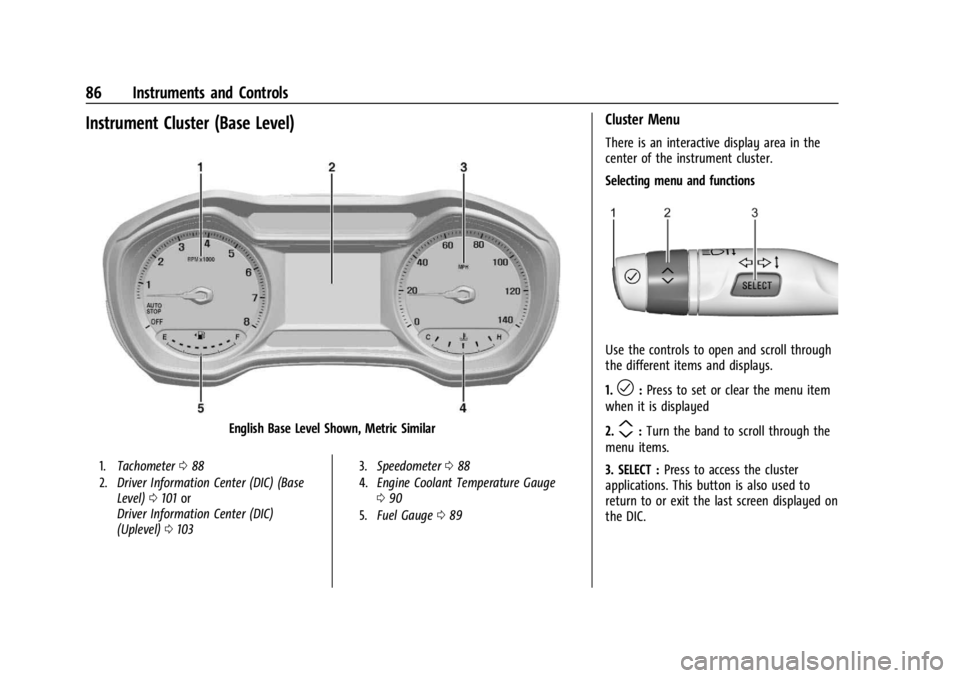
English Base Level Shown, Metric Similar
1.Tachometer 088
2. Driver Information Center (DIC) (Base
Level) 0101 or
Driver Information Center (DIC)
(Uplevel) 0103 3.
Speedometer 088
4. Engine Coolant Temperature Gauge
090
5. Fuel Gauge 089
Cluster Menu
There is an interactive display area in the
center of the instrument cluster.
Selecting menu and functions
Use the controls to open and scroll through
the different items and displays.
1.
l:Press to set or clear the menu item
when it is displayed
2.
m: Turn the band to scroll through the
menu items.
3. SELECT : Press to access the cluster
applications. This button is also used to
return to or exit the last screen displayed on
the DIC.
Page 88 of 328
Chevrolet TRAX Owner Manual (GMNA-Localizing-U.S./Canada/Mexico-
17041293) - 2024 - CRC - 12/2/22
Instruments and Controls 87
PressSELECT to access the cluster
applications. Use
mto scroll through the
list of available applications. Not all
applications will be available on all vehicles.
Some may be temporarily restricted when
the vehicle is off.
.TRIP
.VEHICLE
See Driver Information Center (DIC) (Base
Level) 0101 or
Driver Information Center (DIC) (Uplevel)
0 103.
Instrument Cluster (Uplevel)
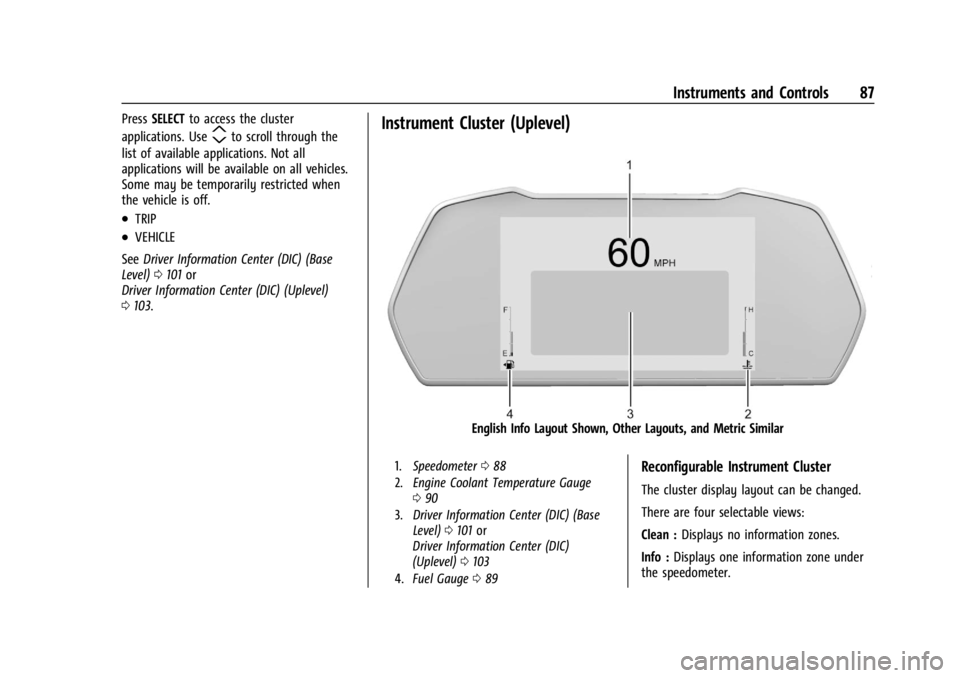
English Info Layout Shown, Other Layouts, and Metric Similar
1. Speedometer 088
2. Engine Coolant Temperature Gauge
090
3. Driver Information Center (DIC) (Base
Level) 0101 or
Driver Information Center (DIC)
(Uplevel) 0103
4. Fuel Gauge 089Reconfigurable Instrument Cluster
The cluster display layout can be changed.
There are four selectable views:
Clean : Displays no information zones.
Info : Displays one information zone under
the speedometer.
Page 89 of 328
Chevrolet TRAX Owner Manual (GMNA-Localizing-U.S./Canada/Mexico-
17041293) - 2024 - CRC - 12/2/22
88 Instruments and Controls
Infotainment :Displays one information
zone under the speedometer.
Gauge : Displays no information zones and
the gauges are located to the left and right
of the speedometer.
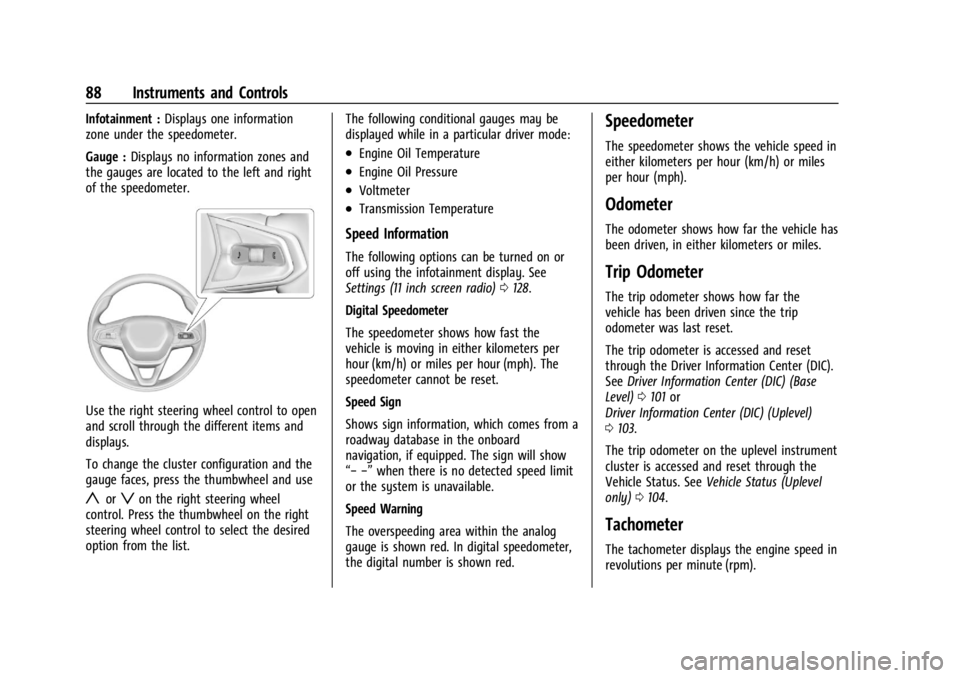
Use the right steering wheel control to open
and scroll through the different items and
displays.
To change the cluster configuration and the
gauge faces, press the thumbwheel and use
yorzon the right steering wheel
control. Press the thumbwheel on the right
steering wheel control to select the desired
option from the list. The following conditional gauges may be
displayed while in a particular driver mode:
.Engine Oil Temperature
.Engine Oil Pressure
.Voltmeter
.Transmission Temperature
Speed Information
The following options can be turned on or
off using the infotainment display. See
Settings (11 inch screen radio)
0128.
Digital Speedometer
The speedometer shows how fast the
vehicle is moving in either kilometers per
hour (km/h) or miles per hour (mph). The
speedometer cannot be reset.
Speed Sign
Shows sign information, which comes from a
roadway database in the onboard
navigation, if equipped. The sign will show
“− −” when there is no detected speed limit
or the system is unavailable.
Speed Warning
The overspeeding area within the analog
gauge is shown red. In digital speedometer,
the digital number is shown red.
Speedometer
The speedometer shows the vehicle speed in
either kilometers per hour (km/h) or miles
per hour (mph).
Odometer
The odometer shows how far the vehicle has
been driven, in either kilometers or miles.
Trip Odometer
The trip odometer shows how far the
vehicle has been driven since the trip
odometer was last reset.
The trip odometer is accessed and reset
through the Driver Information Center (DIC).
See Driver Information Center (DIC) (Base
Level) 0101 or
Driver Information Center (DIC) (Uplevel)
0 103.
The trip odometer on the uplevel instrument
cluster is accessed and reset through the
Vehicle Status. See Vehicle Status (Uplevel
only) 0104.
Tachometer
The tachometer displays the engine speed in
revolutions per minute (rpm).
Page 90 of 328
Chevrolet TRAX Owner Manual (GMNA-Localizing-U.S./Canada/Mexico-
17041293) - 2024 - CRC - 12/2/22
Instruments and Controls 89
For vehicles with the Stop/Start system,
when the ignition is on, the tachometer
indicates the vehicle status. When pointing
to AUTO STOP, the engine is off but the
vehicle is on and can move. The engine
could auto start at any time. When the
indicator points to OFF, the vehicle is off.
When the engine is on, the tachometer will
indicate the engine’s revolutions per minute
(rpm). The tachometer may vary by several
hundred rpm, during Auto Stop mode, when
the engine is shutting off and restarting.
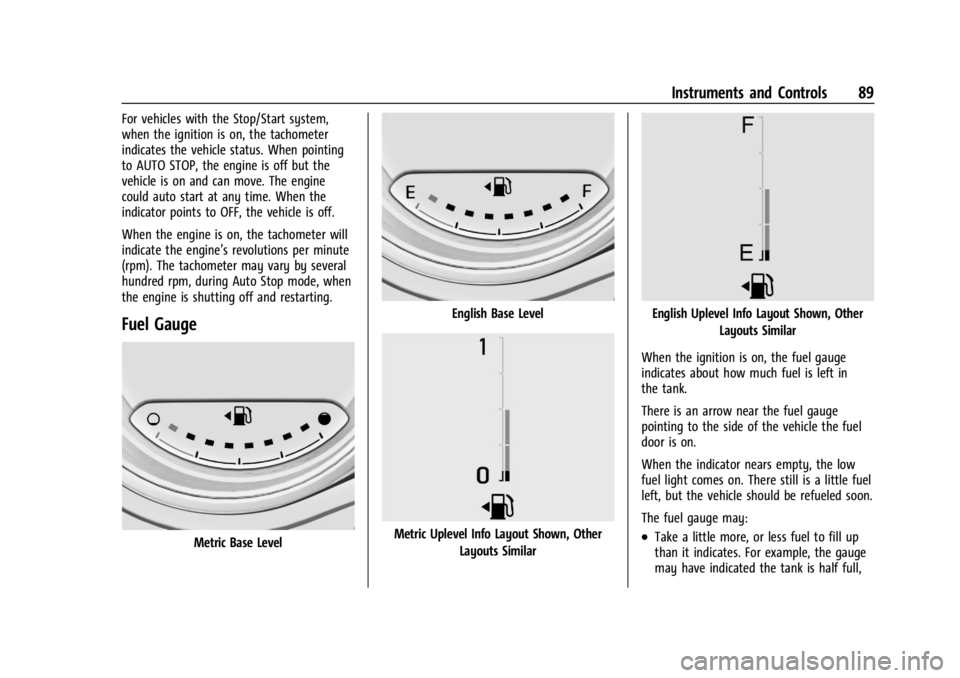
Fuel Gauge
Metric Base Level
English Base Level
Metric Uplevel Info Layout Shown, OtherLayouts Similar
English Uplevel Info Layout Shown, Other Layouts Similar
When the ignition is on, the fuel gauge
indicates about how much fuel is left in
the tank.
There is an arrow near the fuel gauge
pointing to the side of the vehicle the fuel
door is on.
When the indicator nears empty, the low
fuel light comes on. There still is a little fuel
left, but the vehicle should be refueled soon.
The fuel gauge may:
.Take a little more, or less fuel to fill up
than it indicates. For example, the gauge
may have indicated the tank is half full,
Page 91 of 328

Chevrolet TRAX Owner Manual (GMNA-Localizing-U.S./Canada/Mexico-
17041293) - 2024 - CRC - 12/2/22
90 Instruments and Controls
but it actually will take a little more,
or less than half the tank's capacity to fill
the tank.
.Moves a little while turning a corner,
speeding up, or braking.
.Take a few seconds to stabilize after the
ignition is turned on and goes back to
empty when the ignition is turned off.
These are normal conditions, none of which
indicate a problem with the fuel gauge.
Engine Coolant Temperature
Gauge
Metric Base Level
English Base Level
Metric Uplevel Info Layout Shown, Other Layouts Similar
English Uplevel Info Layout Shown, Other Layouts Similar
This gauge shows the engine coolant
temperature.
If the pointer moves toward the warning
area at the high end of the gauge, the
engine is too hot.
This reading indicates the same thing as the
warning light. It means that the engine
coolant has overheated. If the vehicle has
been operating under normal driving
conditions, pull off the road, stop the
vehicle, and turn off the engine as soon as
possible. See Engine Overheating 0227.