roof CHEVROLET TRAX 2024 User Guide
[x] Cancel search | Manufacturer: CHEVROLET, Model Year: 2024, Model line: TRAX, Model: CHEVROLET TRAX 2024Pages: 328, PDF Size: 7.3 MB
Page 78 of 328
Chevrolet TRAX Owner Manual (GMNA-Localizing-U.S./Canada/Mexico-
17041293) - 2024 - CRC - 12/2/22
Storage 77
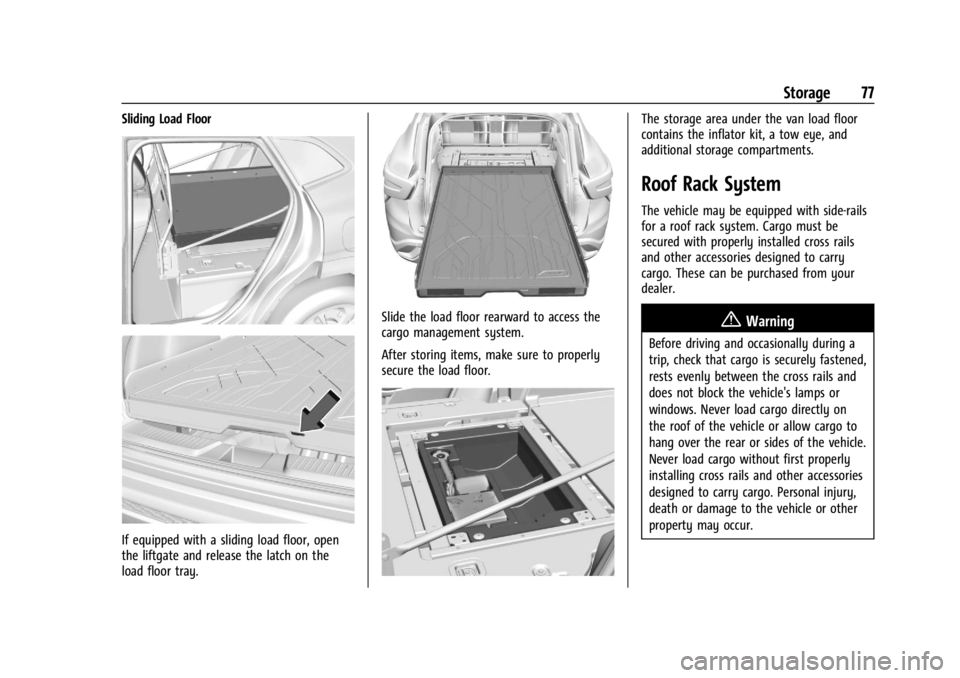
Sliding Load Floor
If equipped with a sliding load floor, open
the liftgate and release the latch on the
load floor tray.
Slide the load floor rearward to access the
cargo management system.
After storing items, make sure to properly
secure the load floor.
The storage area under the van load floor
contains the inflator kit, a tow eye, and
additional storage compartments.
Roof Rack System
The vehicle may be equipped with side-rails
for a roof rack system. Cargo must be
secured with properly installed cross rails
and other accessories designed to carry
cargo. These can be purchased from your
dealer.
{Warning
Before driving and occasionally during a
trip, check that cargo is securely fastened,
rests evenly between the cross rails and
does not block the vehicle's lamps or
windows. Never load cargo directly on
the roof of the vehicle or allow cargo to
hang over the rear or sides of the vehicle.
Never load cargo without first properly
installing cross rails and other accessories
designed to carry cargo. Personal injury,
death or damage to the vehicle or other
property may occur.
Page 79 of 328

Chevrolet TRAX Owner Manual (GMNA-Localizing-U.S./Canada/Mexico-
17041293) - 2024 - CRC - 12/2/22
78 Storage
If driving for a long distance, on rough
roads, or at high speeds, occasionally stop
the vehicle to make sure the cargo remains
in its place.
Cargo Weight Limits
Do not exceed the maximum cargo weight
for the roof rack system, including the
weight of the cross rails and any other
accessories used to carry the cargo such as
bike racks or roof boxes. The maximum
cargo weight that can be loaded onto the
roof rack system is 100 kg (220 lb) or the
weight designated in the instructions that
came with the cross rails or other roof rack
accessories, whichever is less.
{Warning
Never load the roof rack with more
weight than specified in this section.
Loading cargo on the roof rack will make
the vehicle's center of gravity higher. To
avoid losing control of the vehicle, avoid
overloading, high speeds, sudden starts,
sharp turns, sudden braking, or abrupt
maneuvers when carrying cargo on the
roof rack.The weight of any cargo carried on the roof
rack system must be included in calculating
the loaded weight of the vehicle. Do not
exceed the maximum vehicle capacity when
loading the vehicle, including cargo carried
on the roof rack system and passengers and
cargo carried in the vehicle. For more
information on vehicle capacity and loading,
see
Vehicle Load Limits 0171.
Page 122 of 328
Chevrolet TRAX Owner Manual (GMNA-Localizing-U.S./Canada/Mexico-
17041293) - 2024 - CRC - 12/2/22
Infotainment System 121
Satellite Radio (11 inch screen
radio)
SiriusXM Radio Service
If equipped, vehicles with a valid SiriusXM
radio subscription can receive SiriusXM
programming.
SiriusXM radio has a wide variety of
programming and commercial-free music,
coast to coast, in digital-quality sound. In
the U.S., see www.siriusxm.com or call
1-888-601-6296. In Canada, see
www.siriusxm.ca or call 1-877-438-9677.
When SiriusXM is active, the channel name,
number, song title, and artist appear on the
display.
Finding a Channel
From the SiriusXM now playing screen,
touch
oCH or CHp.
To directly tune to a channel, touch the
Tune icon to enter a channel number using
the keypad.
Browsing Content
Touch(to view different browsing
content. Browse will include available channels you
can select.
Radio Reception (11 inch screen
radio)
Unplug electronic devices from the accessory
power outlets if there is interference or
static in the radio.
FM
FM signals only reach about 16 to 65 km
(10 to 40 mi). Although the radio has a
built-in electronic circuit that automatically
works to reduce interference, some static
can occur, especially around tall buildings or
hills, causing the sound to fade in and out.
AM
The range for most AM stations is greater
than for FM, especially at night. The longer
range can cause station frequencies to
interfere with each other. Static can also
occur when things like storms and power
lines interfere with radio reception. When
this happens, try reducing the treble on the
radio.
SiriusXM Satellite Radio Service
If equipped, SiriusXM Satellite Radio Service
provides digital radio reception. Tall
buildings or hills can interfere with satellite
radio signals, causing the sound to fade in
and out. In addition, traveling or standing
under heavy foliage, bridges, garages,
or tunnels may cause loss of the SiriusXM
signal for a period of time. Some cellular
services may interfere with SXM reception
causing loss of signal.
Mobile Device Usage
Mobile device usage, such as making or
receiving calls, charging, or just having the
mobile device on may cause static
interference in the radio. Unplug the mobile
device or turn it off if this happens.
Multi-Band Antenna (11 inch
screen radio)
The multi-band roof antenna may be used
for radio, navigation, and other
communication systems, depending on the
equipped options. To ensure clear reception,
keep the antenna clear of obstructions, such
as snow and ice. If the vehicle has a
sunroof, and it is open, or a roof loaded
with cargo, reception may be affected.
Page 142 of 328
Chevrolet TRAX Owner Manual (GMNA-Localizing-U.S./Canada/Mexico-
17041293) - 2024 - CRC - 12/2/22
Infotainment System 141
FM
FM signals only reach about 16 to 65 km
(10 to 40 mi). Although the radio has a
built-in electronic circuit that automatically
works to reduce interference, some static
can occur, especially around tall buildings or
hills, causing the sound to fade in and out.
AM
The range for most AM stations is greater
than for FM, especially at night. The longer
range can cause station frequencies to
interfere with each other. Static can also
occur when things like storms and power
lines interfere with radio reception. When
this happens, try reducing the treble on the
radio.
SiriusXM Satellite Radio Service
If equipped, SiriusXM Satellite Radio Service
provides digital radio reception. Tall
buildings or hills can interfere with satellite
radio signals, causing the sound to fade in
and out. In addition, traveling or standing
under heavy foliage, bridges, garages,
or tunnels may cause loss of the SiriusXM
signal for a period of time. Some cellular
services may interfere with SXM reception
causing loss of signal.
Mobile Device Usage
Mobile device usage, such as making or
receiving calls, charging, or just having the
mobile device on may cause static
interference in the radio. Unplug the mobile
device or turn it off if this happens.
Multi-Band Antenna (8 inch
screen radio)
The multi-band roof antenna may be used
for radio, navigation, and other
communication systems, depending on the
equipped options. To ensure clear reception,
keep the antenna clear of obstructions, such
as snow and ice. If the vehicle has a
sunroof, and it is open, or a roof loaded
with cargo, reception may be affected.
Audio Players
Avoiding Untrusted Media Devices
(8 inch screen radio)
When using media devices such as USB and
mobile devices, consider the source.
Untrusted media devices could contain files
that affect system operation or performance
and should be avoided.
USB Port (8 inch screen radio)
Audio stored on a USB device may be
listened to.
Depending on your vehicle, it may be
equipped with two USB ports in the center
console under the armrest and another two
on the center stack. These ports are for data
and charging. There may also be two USB
ports at the rear of the center console and a
USB port on each side of the third row seats
for charging only.
Caution
To avoid vehicle damage, unplug all
accessories and disconnect all accessory
cables from the vehicle when not in use.
Accessory cables left plugged into the
vehicle, unconnected to a device, could be
damaged or cause an electrical short if
the unconnected end comes in contact
with liquids or another power source such
as the accessory power outlet.
Playing from a USB
A USB mass storage device can be connected
to the USB port.
Page 182 of 328
Chevrolet TRAX Owner Manual (GMNA-Localizing-U.S./Canada/Mexico-
17041293) - 2024 - CRC - 12/6/22
Driving and Operating 181
starting the vehicle. An internal thermostat
in the plug end of the cord will prevent
engine coolant heater operation at
temperatures above−18 °C (0 °F).
To Use the Engine Heater 1. Turn off the engine.
2. Remove the heater cord from the rear compartment.
3. Check the heater cord for damage. If it is damaged, do not use it. See your dealer
for a replacement. Inspect the cord for
damage yearly.
4. Plug the cord into the receptacle in the front fascia.
5. Plug the other end of the cord into a normal, grounded 110-volt AC outlet.
{Warning
Improper use of the heater cord or an
extension cord can damage the cord and
may result in overheating and fire.
.Plug the cord into a three-prong
electrical utility receptacle that is
protected by a ground fault detection
function. An ungrounded outlet could
cause an electric shock.
(Continued)
Warning (Continued)
.Use a weatherproof, heavy-duty,
15 amp-rated extension cord if needed.
Failure to use the recommended
extension cord in good operating
condition, or using a damaged heater
or extension cord, could make it
overheat and cause a fire, property
damage, electric shock, and injury.
.Do not operate the vehicle with the
heater cord permanently attached to
the vehicle. Possible heater cord and
thermostat damage could occur.
.While in use, do not let the heater
cord touch vehicle parts or sharp
edges. Never close the hood on the
heater cord.
.Before starting the vehicle, unplug the
cord, reattach the cover to the plug,
and securely fasten the cord. Keep the
cord away from any moving parts.
The length of time the heater should remain
plugged in depends on several factors. Ask a
dealer in the area where you will be parking
the vehicle for the best advice on this.
Retained Accessory Power (RAP)
When the vehicle is turned from on to off,
the following features (if equipped) will
continue to function for up to 10 minutes,
or until the driver door is opened. These
features will also work when the vehicle is
on or in accessory mode:
.Infotainment System
.Power Windows (during RAP this
functionality will be lost when any door
is opened)
.Sunroof (during RAP this functionality will
be lost when any door is opened)
.Auxiliary Power Outlet
.Audio System
.OnStar System
Shifting Into Park
{Warning
It is dangerous to get out of the vehicle
if the shift lever is not fully in P (Park)
with the parking brake set. The vehicle
can roll. (Continued)
Page 200 of 328
Chevrolet TRAX Owner Manual (GMNA-Localizing-U.S./Canada/Mexico-
17041293) - 2024 - CRC - 12/6/22
Driving and Operating 199
Do not use ACC when driving on steep hills
or when towing a trailer. ACC will not detect
a vehicle in the lane while driving on steep
hills. If the brakes are applied, ACC
disengages.
Disengaging ACC
There are three ways to disengage ACC:
.Step lightly on the brake pedal.
.Press*.
.Press5.
Erasing Speed Memory
The ACC set speed is erased from memory if
5is pressed or if the ignition is turned off.
Weather Conditions Affecting ACC
If the interior temperature is extremely
high, the instrument cluster may indicate
that ACC is temporarily unavailable. This can
be caused by extreme hot weather
conditions with direct sunlight on the front
camera. ACC will return to normal operation
once the cabin temperature is lower.
Conditions that are associated with low
visibility, such as fog, rain, snow, or road
spray, may limit ACC performance. Waterdroplets from rain or snow that remain on
the windshield may also limit ACC’s ability
to detect objects.
Lighting Conditions Affecting ACC
The ACC front camera can be affected by
poor lighting conditions, and ACC may have
limited performance when:
.There are changes in brightness, such as
entering and exiting tunnels, bridges, and
overpasses.
.Low sun angles cause the camera to not
detect objects, or it is more difficult to
detect objects in the same traffic lane.
.Lighting is poor in the evening or early
morning
.There are multiple changes in brightness
or shadows along the vehicle roadway.
.In a tunnel without the headlamps on,
or in a tunnel when there is a vehicle in
front that does not have its taillamps on.
.Subjected to strong light from opposing
lane traffic in the front of the vehicle,
such as high-beam headlamps from
oncoming traffic.
Accessory Installations and Vehicle
Modifications
Do not install or place any object around
the front camera windshield area that would
obstruct the front camera view.
Do not install objects on top of the vehicle
that overhang and obstruct the front
camera, such as a canoe, kayak, or other
items that can be transported on a roof rack
system. See
Roof Rack System 077.
Do not modify the hood, headlamps, or fog
lamps, as this may limit the camera’s ability
to detect an object.
Cleaning the Sensing System
The camera sensor on the windshield behind
the rearview mirror can become blocked by
snow, ice, dirt, mud, or debris. This area
needs to be cleaned for ACC to operate
properly.
The vehicle headlamps may need to be
cleaned due to dirt, snow, or ice. Objects
that are not illuminated correctly may be
difficult to detect.
Page 324 of 328

Chevrolet TRAX Owner Manual (GMNA-Localizing-U.S./Canada/Mexico-
17041293) - 2024 - CRC - 12/2/22
Index 323
Parking or BackingAssistance Systems . . . . . . . . . . . . . . . . . . . . 201
Passenger Airbag Status Indicator . . . . . . . . . . . . . . . . . 92
Compartment Air Filter . . . . . . . . . . . . . . . . 163
Sensing System . . . . . . . . . . . . . . . . . . . . . . . . . 49
Pedestrian Ahead Indicator . . . . . . . . . . . . . . . 96
Perchlorate Materials Requirements,
California . . . . . . . . . . . . . . . . . . . . . . . . . . . . . . 216
Phone Apple CarPlay and
Android Auto . . . . . . . . . . . . . . . . . . . . 127, 149
Bluetooth . . . . . . . . . . . . . . . . . . . . . . 122, 123, 145
Port USB . . . . . . . . . . . . . . . . . . . . . . . . . . . . . . . . 122, 141
Power
Door Locks . . . . . . . . . . . . . . . . . . . . . . . . . . . . . . . 21
Mirrors . . . . . . . . . . . . . . . . . . . . . . . . . . . . . . . . . 26
Outlets . . . . . . . . . . . . . . . . . . . . . . . . . . . . . . . . . 82
Protection, Battery . . . . . . . . . . . . . . . . . . . . . . 114
Retained Accessory (RAP) . . . . . . . . . . . . . . . 181
Seat Adjustment . . . . . . . . . . . . . . . . . . . . . . . . 32
Windows . . . . . . . . . . . . . . . . . . . . . . . . . . . . . . . 27
Pregnancy, Using Seat Belts . . . . . . . . . . . . . . 43
Privacy Vehicle Data Recording . . . . . . . . . . . . . . . . 306
Program Courtesy Transportation . . . . . . . . . . . . . . . 301 Prohibited Fuels . . . . . . . . . . . . . . . . . . . . . . . . . . 211
Proposition 65 Warning
California . . . . . . . . . . . . . . . . . . . . . . . . . . . . . . . . . 1
Proposition 65 Warning, California . . . . . . . 272
Publication Ordering Information . . . . . . . . 304
R
Radiator . . . . . . . . . . . . . . . . . . . . . . . . . . . . . . . . . 225
Radio AM-FM . . . . . . . . . . . . . . . . . . . . . . . . . . . . . . . . 138
AM-FM Radio . . . . . . . . . . . . . . . . . . . . . . . . . . . 119
Frequency Statement . . . . . . . . . . . . . . . . . . 305
Reception . . . . . . . . . . . . . . . . . . . . . . . . . . 121, 140
Satellite . . . . . . . . . . . . . . . . . . . . . . . . . . . . 121, 140
Rear Seats . . . . . . . . . . . . . . . . . . . . . . . . . . . . . . . . . . . 36
Window Washer/Wiper . . . . . . . . . . . . . . . . . 81
Rearview Mirrors . . . . . . . . . . . . . . . . . . . . . . . . . .27 Automatic Dimming . . . . . . . . . . . . . . . . . . . . 27
Reclining Seatbacks . . . . . . . . . . . . . . . . . . . . . . . .33
Recommended Fuel . . . . . . . . . . . . . . . . . . . . . . . . . . . . . . . . . . . . . 211
Recommended Fluids and Lubricants . . . . . 291
Records Maintenance . . . . . . . . . . . . . . . . . . . . . . . . . . . 293
Recreational Vehicle Towing . . . . . . . . . . . . . 275
Reimbursement Program, GM
Mobility . . . . . . . . . . . . . . . . . . . . . . . . . . . . . . . 299 Remote
Key . . . . . . . . . . . . . . . . . . . . . . . . . . . . . . . . . . . . . 10
Key Operation . . . . . . . . . . . . . . . . . . . . . . . 10, 15
Vehicle Start . . . . . . . . . . . . . . . . . . . . . . . . . . . . 18
Replacement Parts Airbags . . . . . . . . . . . . . . . . . . . . . . . . . . . . . . . . . 54
Maintenance . . . . . . . . . . . . . . . . . . . . . . . . . . . 292
Replacing Airbag System . . . . . . . . . . . . . . . . . . . . . . . . . . 54
LATCH System Parts After a Crash . . . . . . 68
Seat Belt System Parts after aCrash . . . . . . . . . . . . . . . . . . . . . . . . . . . . . . . . . 44
Reporting Safety Defects Canadian Government . . . . . . . . . . . . . . . . . 305
General Motors . . . . . . . . . . . . . . . . . . . . . . . . 306
U.S. Government . . . . . . . . . . . . . . . . . . . . . . . 305
Restraints Where to Put . . . . . . . . . . . . . . . . . . . . . . . . . . . 59
Retained Accessory Power (RAP) . . . . . . . . . . 181
Roads Driving, Wet . . . . . . . . . . . . . . . . . . . . . . . . . . . 169
Roadside Assistance Program . . . . . . . . . . . . 300
Roof Rack System . . . . . . . . . . . . . . . . . . . . . . . . . . . . 77
Sunroof . . . . . . . . . . . . . . . . . . . . . . . . . . . . . . . . . 28
Rotation, Tires . . . . . . . . . . . . . . . . . . . . . . . . . . . 254
Routing, Engine Drive Belt . . . . . . . . . . . . . . . 296
Running the Vehicle While Parked . . . . . . . .183
Page 325 of 328

Chevrolet TRAX Owner Manual (GMNA-Localizing-U.S./Canada/Mexico-
17041293) - 2024 - CRC - 12/2/22
324 Index
S
SafetyLocks . . . . . . . . . . . . . . . . . . . . . . . . . . . . . . . . . . . 22
Safety Defects Reporting Canadian Government . . . . . . . . . . . . . . . . . 305
General Motors . . . . . . . . . . . . . . . . . . . . . . . . 306
U.S. Government . . . . . . . . . . . . . . . . . . . . . . . 305
Safety System Check . . . . . . . . . . . . . . . . . . . . . 44
Satellite Radio . . . . . . . . . . . . . . . . . . . . . . . 121, 140
Scheduling Appointments . . . . . . . . . . . . . . . . 301
Sealant Kit, Tire . . . . . . . . . . . . . . . . . . . . . . . . . . 261
Seat Belts . . . . . . . . . . . . . . . . . . . . . . . . . . . . . . . . . 38 Buckle To Drive . . . . . . . . . . . . . . . . . . . . . . . . . 38
Care . . . . . . . . . . . . . . . . . . . . . . . . . . . . . . . . . . . . 44
Extender . . . . . . . . . . . . . . . . . . . . . . . . . . . . . . . . 43
How to Wear Seat Belts Properly . . . . . . . 39
Lap-Shoulder Belt . . . . . . . . . . . . . . . . . . . . . . . 41
Reminders . . . . . . . . . . . . . . . . . . . . . . . . . . . . . . 91
Replacing after a Crash . . . . . . . . . . . . . . . . . 44
Use During Pregnancy . . . . . . . . . . . . . . . . . . 43
Seats Adjustment, Front . . . . . . . . . . . . . . . . . . . . . . 32
Folding Seatback . . . . . . . . . . . . . . . . . . . . . . . . 35
Head Restraints . . . . . . . . . . . . . . . . . . . . . . . . . 30
Heated Front . . . . . . . . . . . . . . . . . . . . . . . . . . . 34
Lumbar Adjustment, Front . . . . . . . . . . . . . . 34
Power Adjustment, Front . . . . . . . . . . . . . . . 32
Rear . . . . . . . . . . . . . . . . . . . . . . . . . . . . . . . . . . . . 36 Seats (cont'd)
Reclining Seatbacks . . . . . . . . . . . . . . . . . . . . . 33
Securing Child Restraints . . . . . . . . . . . . . . 68, 70
Security Light . . . . . . . . . . . . . . . . . . . . . . . . . . . . . . . . . . . . 99
OnStar . . . . . . . . . . . . . . . . . . . . . . . . . . . . . . . . . 309
Vehicle . . . . . . . . . . . . . . . . . . . . . . . . . . . . . . . . . 24
Vehicle Alarm . . . . . . . . . . . . . . . . . . . . . . . . . . . 24
Service . . . . . . . . . . . . . . . . . . . . . . . . . . . . . . . . . . . 163 Accessories and Modifications . . . . . . . . . 216
Climate Control System . . . . . . . . . . . . . . . . 158
Doing Your Own Work . . . . . . . . . . . . . . . . . 216
Electric Parking Brake Light . . . . . . . . . . . . . 95
Maintenance Records . . . . . . . . . . . . . . . . . . 293
Maintenance, General Information . . . . . 286
Parts Identification . . . . . . . . . . . . . . . . . . . . . 294
Scheduling Appointments . . . . . . . . . . . . . . 301
Services Special Application . . . . . . . . . . . . . . . . . . . . . 290
Servicing the Airbag . . . . . . . . . . . . . . . . . . . . . . .53
Settings . . . . . . . . . . . . . . . . . . . . . . . . . . . . . . 128, 150
Shift Lock Control Function Check, Automatic Transmission . . . . . . . . . . . . . . . . . 231
Shifting Into Park . . . . . . . . . . . . . . . . . . . . . . . . . . . . . . . 181
Out of Park . . . . . . . . . . . . . . . . . . . . . . . . . . . . 182
Sidemarker Bulb Replacement . . . . . . . . . . . . . . . . . . . . . . 236 Signals, Turn and Lane-Change . . . . . . . . . . . . 111
Software Updates . . . . . . . . . . . . . . . . . . . . . . . . . 119
Spare Tire
Compact . . . . . . . . . . . . . . . . . . . . . . . . . . . . . . . . 271
Special Application Services . . . . . . . . . . . . . . 290
Specifications and Capacities . . . . . . . . . . . . . 295
Speedometer . . . . . . . . . . . . . . . . . . . . . . . . . . . . . 88
Start Assist, Hill . . . . . . . . . . . . . . . . . . . . . . . . . . 188
Start Vehicle, Remote . . . . . . . . . . . . . . . . . . . . . .18
Starter Switch Check . . . . . . . . . . . . . . . . . . . . . . 231
Starting the Engine . . . . . . . . . . . . . . . . . . . . . . .178
Status Vehicle . . . . . . . . . . . . . . . . . . . . . . . . . . . . . . . . 104
Steering . . . . . . . . . . . . . . . . . . . . . . . . . . . . . . . . . 167 Heated Wheel . . . . . . . . . . . . . . . . . . . . . . . . . . 80
Wheel Adjustment . . . . . . . . . . . . . . . . . . . . . . 80
Wheel Controls . . . . . . . . . . . . . . . . . . . . . . . . . 117
Steering Wheel Controls . . . . . . . . . . . . . . . . . 136
Stop/Start System . . . . . . . . . . . . . . . . . . . . . . . 179
Stoplamps and Back-Up Lamps Bulb Replacement . . . . . . . . . . . . . . . . . . . . . . 236
Storage Center Console . . . . . . . . . . . . . . . . . . . . . . . . . 75
Compartments . . . . . . . . . . . . . . . . . . . . . . . . . . 74
Cupholders . . . . . . . . . . . . . . . . . . . . . . . . . . . . . 75
Glove Box . . . . . . . . . . . . . . . . . . . . . . . . . . . . . . 74
Instrument Panel Areas . . . . . . . . . . . . . . . . . 74
Roof Rack System . . . . . . . . . . . . . . . . . . . . . . . 77
Page 326 of 328

Chevrolet TRAX Owner Manual (GMNA-Localizing-U.S./Canada/Mexico-
17041293) - 2024 - CRC - 12/2/22
Index 325
Storage AreasCargo Cover . . . . . . . . . . . . . . . . . . . . . . . . . . . . 75
Cargo Management System . . . . . . . . . . . . 76
Storing the Tire Sealant and Compressor Kit . . . . . . . . . . . . . . . . . . . . . . . . . 266
Struts Gas . . . . . . . . . . . . . . . . . . . . . . . . . . . . . . . . . . . . 233
Stuck Vehicle . . . . . . . . . . . . . . . . . . . . . . . . . . . . . 171
Sun Visors . . . . . . . . . . . . . . . . . . . . . . . . . . . . . . . . 28
Sunroof . . . . . . . . . . . . . . . . . . . . . . . . . . . . . . . . . . . 28
Symbols . . . . . . . . . . . . . . . . . . . . . . . . . . . . . . . . . . . .3
System Airbag . . . . . . . . . . . . . . . . . . . . . . . . . . . . . . . . . . 45
Engine Air Filter Life . . . . . . . . . . . . . . . . . . . 223
Roof Rack . . . . . . . . . . . . . . . . . . . . . . . . . . . . . . . 77
T
Tachometer . . . . . . . . . . . . . . . . . . . . . . . . . . . . . . . 88
TaillampsBulb Replacement . . . . . . . . . . . . . . . . . . . . . . 236
Teen Driver . . . . . . . . . . . . . . . . . . . . . . . . . . 129, 152
Text Telephone (TTY) Users . . . . . . . . . . . . . . 299
Theft-Deterrent Systems . . . . . . . . . . . . . . . . . . .25
Immobilizer . . . . . . . . . . . . . . . . . . . . . . . . . . . . . 25
Time . . . . . . . . . . . . . . . . . . . . . . . . . . . . . . . . . . . . . . 82
Tires . . . . . . . . . . . . . . . . . . . . . . . . . . . . . . . . . . . . . 243 All-Season . . . . . . . . . . . . . . . . . . . . . . . . . . . . . 243
Buying New Tires . . . . . . . . . . . . . . . . . . . . . . 256 Tires (cont'd)
Chains . . . . . . . . . . . . . . . . . . . . . . . . . . . . . . . . . 259
Changing . . . . . . . . . . . . . . . . . . . . . . . . . . . . . . 267
Compact Spare . . . . . . . . . . . . . . . . . . . . . . . . . 271
Designations . . . . . . . . . . . . . . . . . . . . . . . . . . . 246
Different Size . . . . . . . . . . . . . . . . . . . . . . . . . . 257
If a Tire Goes Flat . . . . . . . . . . . . . . . . . . . . . 260
Inspection . . . . . . . . . . . . . . . . . . . . . . . . . . . . . 254
Pressure . . . . . . . . . . . . . . . . . . . . . . . . . . 248, 249
Pressure Light . . . . . . . . . . . . . . . . . . . . . . . . . . 98
Pressure Monitor Operation . . . . . . . . . . . 250
Pressure Monitor System . . . . . . . . . . . . . . 249
Rotation . . . . . . . . . . . . . . . . . . . . . . . . . . . . . . . 254
Sealant and Compressor Kit . . . . . . . . . . . . 261
Sealant and Compressor Kit,
Storing . . . . . . . . . . . . . . . . . . . . . . . . . . . . . . . 266
Sidewall Labeling . . . . . . . . . . . . . . . . . . . . . . 244
Terminology and Definitions . . . . . . . . . . . 246
Uniform Tire Quality Grading . . . . . . . . . . 257
Wheel Alignment and Tire Balance . . . . 258
Wheel Replacement . . . . . . . . . . . . . . . . . . . . 258
When It Is Time for New Tires . . . . . . . . . 255
Winter . . . . . . . . . . . . . . . . . . . . . . . . . . . . . . . . . 244
Top Tier Fuel . . . . . . . . . . . . . . . . . . . . . . . . . . . . . 211
Towing General Information . . . . . . . . . . . . . . . . . . . 214
Recreational Vehicle . . . . . . . . . . . . . . . . . . . 275 Traction
Control System (TCS)/Electronic
Stability Control Light . . . . . . . . . . . . . . . . . 97
Control/Electronic Stability Control . . . . 188
Off Light . . . . . . . . . . . . . . . . . . . . . . . . . . . . . . . . 97
Trademarks and License Agreements . . . . . . . . . . . . . . . . . . . . . . . . 133, 155
Transmission Automatic . . . . . . . . . . . . . . . . . . . . . . . . . . . . . 184
Fluid, Automatic . . . . . . . . . . . . . . . . . . . . . . . 223
Transportation Program, Courtesy . . . . . . . 301
Transporting
a Disabled Vehicle . . . . . . . . . . . . . . . . . . . . . 274
Trip Odometer . . . . . . . . . . . . . . . . . . . . . . . . . . . . 88
TTY Users Customer Assistance . . . . . . . . . . . . . . . . . . . 299
Turn and Lane-Change Signals . . . . . . . . . . . . 111
Turn Signal Bulb Replacement . . . . . . . . . . . . . . . . . . . . . . 236
U
Uniform Tire Quality Grading . . . . . . . . . . . . 257
UpdatesSoftware . . . . . . . . . . . . . . . . . . . . . . . . . . . . . . . . 119
USB Port . . . . . . . . . . . . . . . . . . . . . . . . . . . . . 122, 141