Power start CHEVROLET TRAX 2024 Owner's Manual
[x] Cancel search | Manufacturer: CHEVROLET, Model Year: 2024, Model line: TRAX, Model: CHEVROLET TRAX 2024Pages: 328, PDF Size: 7.3 MB
Page 242 of 328
Chevrolet TRAX Owner Manual (GMNA-Localizing-U.S./Canada/Mexico-
17041293) - 2024 - CRC - 12/6/22
Vehicle Care 241
M-case Fuses UsageF38 EBCM_2
F39 COOLING FAN HIGH
F43 –
F60 POWER WINDOW LT F61 POWER WINDOW RT
Mini Relays Usage K04 COOLING FAN HIGH RELAY
Micro Relays Usage K01 STARTER SOL RELAY
K02 –
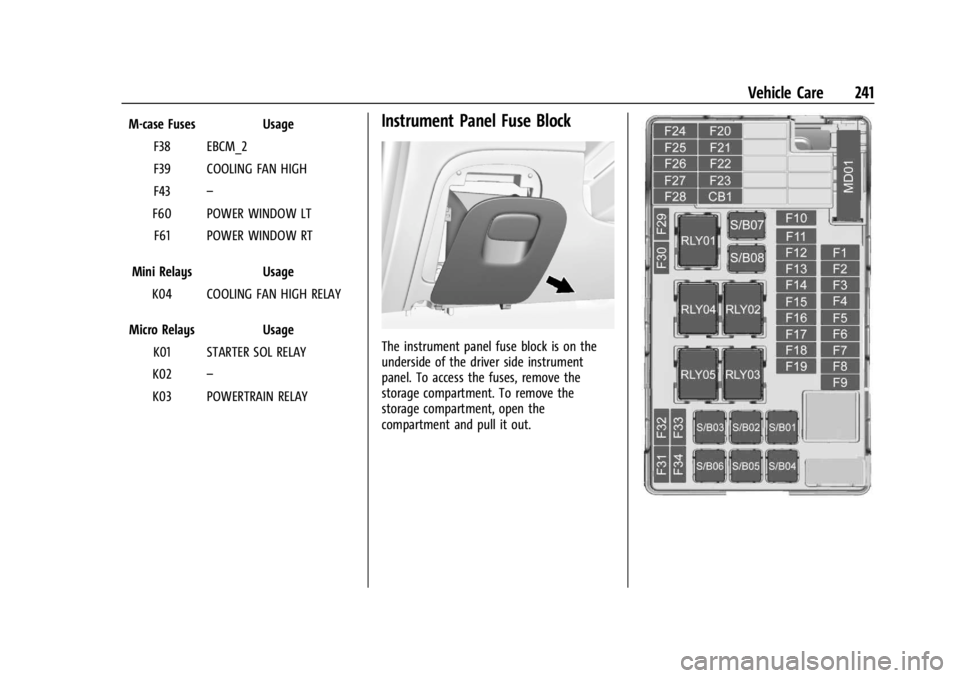
K03 POWERTRAIN RELAYInstrument Panel Fuse Block
The instrument panel fuse block is on the
underside of the driver side instrument
panel. To access the fuses, remove the
storage compartment. To remove the
storage compartment, open the
compartment and pull it out.
Page 243 of 328
Chevrolet TRAX Owner Manual (GMNA-Localizing-U.S./Canada/Mexico-
17041293) - 2024 - CRC - 12/6/22
242 Vehicle Care
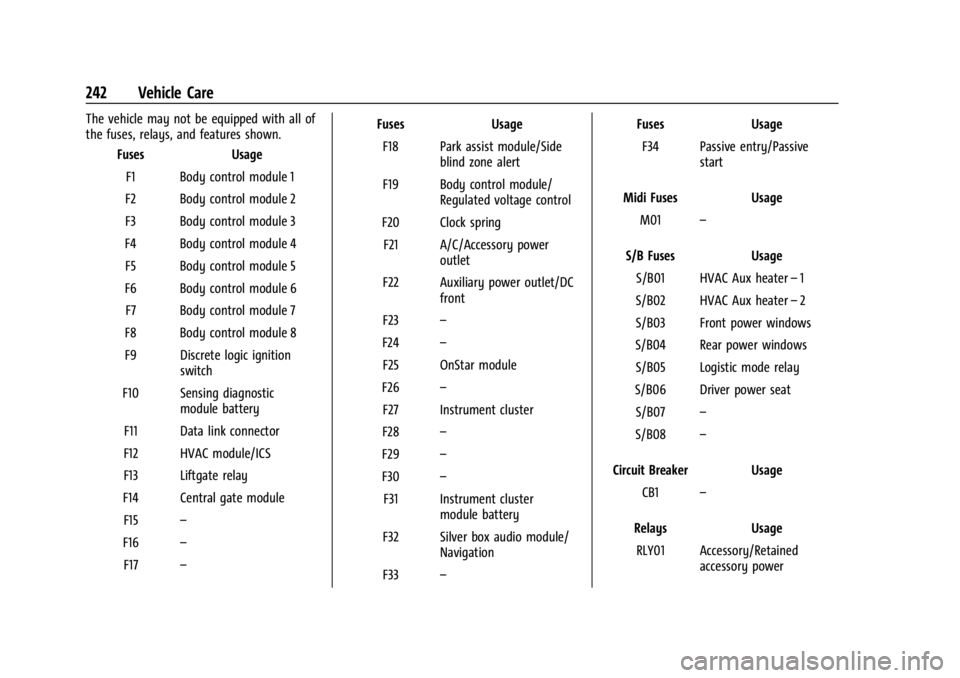
The vehicle may not be equipped with all of
the fuses, relays, and features shown.Fuses Usage
F1 Body control module 1
F2 Body control module 2
F3 Body control module 3
F4 Body control module 4 F5 Body control module 5
F6 Body control module 6 F7 Body control module 7
F8 Body control module 8
F9 Discrete logic ignition switch
F10 Sensing diagnostic module battery
F11 Data link connector
F12 HVAC module/ICS
F13 Liftgate relay
F14 Central gate module F15 –
F16 –
F17 – Fuses Usage
F18 Park assist module/Side blind zone alert
F19 Body control module/ Regulated voltage control
F20 Clock spring F21 A/C/Accessory power outlet
F22 Auxiliary power outlet/DC front
F23 –
F24 –
F25 OnStar module
F26 –
F27 Instrument cluster
F28 –
F29 –
F30 –
F31 Instrument cluster module battery
F32 Silver box audio module/ Navigation
F33 – Fuses Usage
F34 Passive entry/Passive start
Midi Fuses Usage M01 –
S/B Fuses Usage S/B01 HVAC Aux heater –1
S/B02 HVAC Aux heater –2
S/B03 Front power windows
S/B04 Rear power windows S/B05 Logistic mode relay
S/B06 Driver power seat S/B07 –
S/B08 –
Circuit Breaker Usage CB1 –
Relays Usage RLY01 Accessory/Retained accessory power
Page 264 of 328

Chevrolet TRAX Owner Manual (GMNA-Localizing-U.S./Canada/Mexico-
17041293) - 2024 - CRC - 12/6/22
Vehicle Care 263
4. Attach the air only hose (10) to thesealant canister inlet valve (1) by turning
it clockwise until tight.
5. Slide the base of the tire sealantcanister (3) into the slot on the top of
the compressor (6) to hold it upright.
Make sure the tire valve stem is
positioned close to the ground so the
hose will reach it.
6. Remove the valve stem cap from the flat tire by turning it counterclockwise.
7. Attach the sealant/air hose (2) to the tirevalve stem by turning it clockwise until
tight.
8. Plug the power plug (9) into the accessory power outlet in the vehicle.
Unplug all items from other accessory
power outlets. See Power Outlets082. If the vehicle has an accessory power
outlet, do not use the cigarette lighter.
If the vehicle only has a cigarette lighter,
use the cigarette lighter.
Do not pinch the power plug cord in the
door or window.
9. Start the vehicle. The vehicle must be running while using the air compressor.
10. Press the on/off button (5) to turn the tire sealant and compressor kit on.
The compressor will inject sealant and air
into the tire.
The pressure gauge (8) will initially show
a high pressure while the compressor
pushes the sealant into the tire. Once
the sealant is completely dispersed into
the tire, the pressure will quickly drop
and start to rise again as the tire inflates
with air only.
11. Inflate the tire to the recommended inflation pressure using the pressure
gauge (8). The recommended inflation
pressure can be found on the Tire and
Loading Information label. See Tire
Pressure 0248.
The pressure gauge (8) may read higher
than the actual tire pressure while the
compressor is on. Turn the compressor
Page 267 of 328

Chevrolet TRAX Owner Manual (GMNA-Localizing-U.S./Canada/Mexico-
17041293) - 2024 - CRC - 12/6/22
266 Vehicle Care
7. Start the vehicle. The vehicle must berunning while using the air compressor.
8. Press the on/off button (5) to turn the tire sealant and compressor kit on.
The compressor will inflate the tire with
air only.
9. Inflate the tire to the recommended inflation pressure using the pressure
gauge (8). The recommended inflation
pressure can be found on the Tire and
Loading Information label. See Tire
Pressure 0248.
The pressure gauge (8) may read higher
than the actual tire pressure while the
compressor is on. Turn the compressor
off to get an accurate pressure reading.
The compressor may be turned on/off
until the correct pressure is reached.
Caution
If the recommended pressure cannot be
reached after approximately 25 minutes,
the vehicle should not be driven farther.
The tire is too severely damaged and the
tire sealant and compressor kit cannot
inflate the tire. Remove the power plug
from the accessory power outlet and
(Continued)
Caution (Continued)
unscrew the inflating hose from the tire
valve. See Roadside Assistance Program
0 300.
10. Press the on/off button (5) to turn the tire sealant and compressor kit off.
Be careful while handling the compressor
as it could be warm after usage.
11. Unplug the power plug (9) from the accessory power outlet in the vehicle.
12. Turn the air only hose (10) counterclockwise to remove it from the
tire valve stem.
13. Replace the tire valve stem cap.
14. Return the air only hose (10) and power plug (9) back to their original storage
location.
15. Return the equipment to its original storage location in the vehicle.
The tire sealant and compressor kit has
accessory adapters located in a
compartment on the bottom of its housing
that can be used to inflate air mattresses,
balls, etc.
Storing the Tire Sealant and
Compressor Kit
The van model is equipped with a tire
sealant and compressor kit, which is stored
under the load floor in the rear
storage area.
To access the tire sealant and
compressor kit: 1. Open a rear door.
2. Lift the load floor using the handle, or if equipped with sliding load floor, open
the lift gate, release the latch on the
load floor tray, and slide the load floor
toward the rear of the vehicle. See Cargo
Management System 076.
3. Remove the tire sealant and compressor kit from its storage location.
To store the tire sealant and compressor kit,
reverse the steps.
Page 275 of 328

Chevrolet TRAX Owner Manual (GMNA-Localizing-U.S./Canada/Mexico-
17041293) - 2024 - CRC - 12/6/22
274 Vehicle Care
7. Connect one end of the blacknegative (–) cable to the good battery
negative (–) terminal.
8. Connect the other end of the black negative (–) cable to the discharged
battery negative (–) terminal.
9. Start the engine in the vehicle with the good battery and run the engine at idle
speed for at least four minutes.
10. Try to start the vehicle that had the discharged battery. If it will not start
after a few tries, it probably needs
service.
Jumper Cable Removal
Reverse the sequence exactly when
removing the jumper cables.
After starting the disabled vehicle and
removing the jumper cables, allow it to idle
for several minutes.Towing the Vehicle
Transporting a Disabled Vehicle
Caution
Incorrectly transporting a disabled vehicle
may cause damage to the vehicle. Use
proper tire straps to secure the vehicle to
the flatbed tow truck. Do not strap or
hook to any frame, underbody,
or suspension component not specified
below. Do not move vehicles with drive
axle tires on the ground. Damage is not
covered by the vehicle warranty.
Caution
The vehicle may be equipped with an
electric parking brake and/or a
mechanical transmission range select
shifter. In the event of a loss of 12-volt
battery power, the electric parking brake
cannot be released, and the vehicle
cannot be shifted to N (Neutral). Tire
skates or dollies must be used under the
non-rolling tires to prevent damage while
(Continued)
Caution (Continued)
loading/unloading the vehicle. Dragging
the vehicle will cause damage not
covered by the vehicle warranty.
Caution
The vehicle may be equipped with a tow
eye. Improper use of the tow eye may
cause damage to the vehicle and is not
covered by the vehicle warranty.
If equipped, use the tow eye to load the
vehicle onto a flatbed tow truck from a
flat road surface, or to move the vehicle
a very short distance at a walking pace.
The tow eye is not designed for off-road
recovery. The vehicle must be in
N (Neutral) with the electric parking
brake released when using the tow eye.
GM recommends a flatbed tow truck to
transport a disabled vehicle. Use ramps to
help reduce approach angles, if necessary.
A towed vehicle should have its drive wheels
off the ground. Contact Roadside Assistance
or a professional towing service if the
disabled vehicle must be towed.
Page 291 of 328
Chevrolet TRAX Owner Manual (GMNA-Localizing-U.S./Canada/Mexico-
17041293) - 2024 - CRC - 12/2/22
290 Service and Maintenance
Systems, Fluids, and Visible Leak
Inspection
.Engine oil
.Transmission
.Drive axle
.Transfer case
.Engine cooling system
.Power steering, if equipped
.Fuel system
.Windshield washer fluid
Tire Inspection
.Tire pressure, tread depth, and wear
.Rotation, if applicable
.Alignment check, optional
.Reset tire pressure monitor
.Check tire sealant expiration date,
if equipped
.Check spare tire, if equipped
Brakes
.Check brake system
Visible and Functional Inspections
.Seat belt components
.Exhaust system
.Accelerator pedal
.Passenger compartment air filter,
if equipped
.Engine air filter
.Hoses
.Belts
.Shocks and struts
.Steering components
.Axle boots or driveshaft and u-joints
.Compartment lift struts, if equipped
.Floor mats secured, no interference with
pedals
.Horn
.Ignition lock, if equipped
.Starter switch
.Evaporative control system
Lubricate
.Chassis components
Special Application Services
.Severe Commercial Use Vehicles Only:
Lubricate chassis components every oil
change.
.Have underbody flushing service
performed. See "Underbody Maintenance"
in Exterior Care 0277.
Page 301 of 328
Chevrolet TRAX Owner Manual (GMNA-Localizing-U.S./Canada/Mexico-
17041293) - 2024 - CRC - 12/2/22
300 Customer Information
adaptive equipment required for the vehicle,
such as hand controls or a wheelchair/
scooter lift for the vehicle.
To learn about the GM Mobility program,
see www.gmmobility.com or call the GM
Mobility Assistance Center at 1-800-323-9935.
Text Telephone (TTY) users, please dial the
national 711 relay service and contact
1-800-323-9935.
General Motors of Canada also has a
Mobility program. See www.gm.ca, or call
1-800-GM-DRIVE (800-463-7483) for details.
TTY users call 1-800-263-3830.
Roadside Assistance Program
For U.S.-purchased vehicles, call
1-800-243-8872. (Text Telephone (TTY):
1-888-889-2438.)
For Canadian-purchased vehicles, call
1-800-268-6800.
Service is available 24 hours a day, 365 days
a year.
Calling for Assistance
When calling Roadside Assistance, have the
following information ready:
.Your name, home address, and home
telephone number
.Telephone number of your location
.Location of the vehicle
.Model, year, color, and license plate
number of the vehicle
.Odometer reading and Vehicle
Identification Number (VIN)
.Description of the problem
Coverage
Services are provided for the duration of the
vehicle’s powertrain warranty.
In the U.S., anyone driving the vehicle is
covered. In Canada, a person driving the
vehicle without permission from the owner
is not covered.
Roadside Assistance is not a part of the New
Vehicle Limited Warranty. General Motors
North America and Chevrolet reserve the
right to make any changes or discontinue
the Roadside Assistance program at any
time without notification.
General Motors North America and Chevrolet
reserve the right to limit services or
payment to an owner or driver if they
decide the claims are made too often, or the
same type of claim is made many times.
Services Provided
.Emergency Fuel Delivery:Delivery of
enough fuel for the vehicle to get to the
nearest service station.
.Lock-Out Service: Service to unlock the
vehicle if you are locked out. A remote
unlock may be available if you have
OnStar. For security reasons, the driver
must present identification before this
service is given.
.Emergency Tow from a Public Road or
Highway: Tow to the nearest Chevrolet
dealer for warranty service, or if the
vehicle was in a crash and cannot be
driven. Assistance is not given when the
vehicle is stuck in the sand, mud,
or snow.
.Flat Tire Change: Service to change a flat
tire with the spare tire. The spare tire,
if equipped, must be in good condition
and properly inflated. It is the owner's
responsibility for the repair or
replacement of the tire if it is not covered
by the warranty.
.Battery Jump Start: Service to jump start
a dead battery.
.Trip Interruption Benefits and Assistance:
If your trip is interrupted due to a
warranty event, incidental expenses may
Page 302 of 328
Chevrolet TRAX Owner Manual (GMNA-Localizing-U.S./Canada/Mexico-
17041293) - 2024 - CRC - 12/2/22
Customer Information 301
be reimbursed within the Powertrain
warranty period. Items considered are
reasonable and customary hotel, meals,
rental car, or a vehicle being delivered
back to the customer, up to 500 miles.
Services Not Included in Roadside
Assistance
.Impound towing caused by violation of
any laws
.Legal fines
.Mounting, dismounting, or changing of
snow tires, chains, or other traction
devices
Service is not provided if a vehicle is in an
area that is not accessible to the service
vehicle or is not a regularly traveled or
maintained public road, which includes ice
and winter roads. Off-road use is not
covered.
Services Specific to Canadian-Purchased
Vehicles
.Fuel Delivery: Reimbursement is up to
7 liters. Propane and other fuels are not
provided through this service.
.Lock-Out Service: Vehicle registration is
required.
.Trip Interruption Benefits and Assistance:
Must be over 150 km from where your
trip was started to qualify.
Pre-authorization, original detailed
receipts, and a copy of the repair orders
are required. Once authorization has been
received, the Roadside Assistance advisor
will help to make arrangements and
explain how to receive payment.
.Alternative Service: If assistance cannot
be provided right away, the Roadside
Assistance advisor may give permission to
get local emergency road service. You will
receive payment, up to $100, after
sending the original receipt to Roadside
Assistance. Mechanical failures may be
covered, however any cost for parts and
labor for repairs not covered by the
warranty are the owner responsibility.
Scheduling Service Appointments
When the vehicle requires warranty service,
contact your dealer and request an
appointment. By scheduling a service
appointment and advising the service
consultant of your transportation needs,
your dealer can help minimize your
inconvenience. If the vehicle cannot be scheduled into the
service department immediately, keep
driving it until it can be scheduled for
service, unless, of course, the problem is
safety related. If it is, please call your
dealership, let them know this, and ask for
instructions.
If your dealer requests you to bring the
vehicle for service, you are urged to do so
as early in the work day as possible to
allow for same-day repair.
Courtesy Transportation Program
To enhance your ownership experience, we
and our participating dealers are proud to
offer Courtesy Transportation, a customer
support program for vehicles with the
Bumper-to-Bumper (Base Warranty Coverage
period in Canada), Federal Emission,
Extended Powertrain or Electric specific
warranties in both the U.S. and Canada.
Several Courtesy Transportation options are
available to assist in reducing inconvenience
when warranty repairs are required.
Courtesy Transportation is not a part of the
New Vehicle Limited Warranty. A separate
manual entitled
“Limited Warranty and
Page 316 of 328
Chevrolet TRAX Owner Manual (GMNA-Localizing-U.S./Canada/Mexico-
17041293) - 2024 - CRC - 12/2/22
Connected Services 315
Features are subject to change. For
myChevrolet mobile app information and
compatibility, see my.chevrolet.com.
An active OnStar or connected service plan
may be required. A compatible device,
factory-installed remote start, and power
locks are required. Data rates apply. See
www.onstar.com for details and system
limitations.
Remote Services
Contact an OnStar Advisor to unlock the
doors or sound the horn and flash the
lamps.
Marketplace
OnStar Advisors can provide offers from
restaurants and retailers on your route, help
locate hotels, or book a room. These services
vary by market.
Diagnostics
By monitoring and reporting on the vehicle's
key systems, OnStar Advanced Diagnostics,
if equipped, provides a way to keep up on
maintenance. Capabilities vary by model.
See www.onstar.com for details and system
limitations. Features are subject to change.
For updates on feature capabilities, see
my.chevrolet.com. Message and data rates
may apply.
Page 320 of 328

Chevrolet TRAX Owner Manual (GMNA-Localizing-U.S./Canada/Mexico-
17041293) - 2024 - CRC - 12/2/22
Index 319
Disabled VehicleTransporting . . . . . . . . . . . . . . . . . . . . . . . . . . . 274
Distracted Driving . . . . . . . . . . . . . . . . . . . . . . . . . . . . . . . . 166
Distracted Driving . . . . . . . . . . . . . . . . . . . . . . . . 166
Dome Lamps . . . . . . . . . . . . . . . . . . . . . . . . . . . . . . 112
Door Ajar Light . . . . . . . . . . . . . . . . . . . . . . . . . . . . . . 100
Delayed Locking . . . . . . . . . . . . . . . . . . . . . . . . . 21
Locks . . . . . . . . . . . . . . . . . . . . . . . . . . . . . . . . . . . 19
Power Locks . . . . . . . . . . . . . . . . . . . . . . . . . . . . . 21
Drive Belt Routing, Engine . . . . . . . . . . . . . . . 296
Driver Assistance Systems, Advanced . . . . . . . . . 200
Behavior . . . . . . . . . . . . . . . . . . . . . . . . . . . . . . . 165
Information Center (DIC) . . . . . . . . . . . 101, 103
Teen . . . . . . . . . . . . . . . . . . . . . . . . . . . . . . . 129, 152
Driving Assistance Systems . . . . . . . . . . . . . . . . . . . . 203
Better Fuel Economy . . . . . . . . . . . . . . . . . . . 165
Defensive . . . . . . . . . . . . . . . . . . . . . . . . . . . . . . 166
Environment . . . . . . . . . . . . . . . . . . . . . . . . . . . 165
Hill and Mountain Roads . . . . . . . . . . . . . . 169
If the Vehicle is Stuck . . . . . . . . . . . . . . . . . . 171
Impaired . . . . . . . . . . . . . . . . . . . . . . . . . . . . . . . 166
Loss of Control . . . . . . . . . . . . . . . . . . . . . . . . 168
Off-Road Recovery . . . . . . . . . . . . . . . . . . . . . 168
Vehicle Load Limits . . . . . . . . . . . . . . . . . . . . . 171 Driving (cont'd)
Wet Roads . . . . . . . . . . . . . . . . . . . . . . . . . . . . . 169
Winter . . . . . . . . . . . . . . . . . . . . . . . . . . . . . . . . . 170
Driving the Vehicle . . . . . . . . . . . . . . . . . . . . . . . . .2
E
Electric Brake Boost . . . . . . . . . . . . . . . . . . . . . . . . . . . . 186
Parking Brake . . . . . . . . . . . . . . . . . . . . . . . . . . 187
Parking Brake Light . . . . . . . . . . . . . . . . . . . . . 95
Electrical Equipment, Add-On . . . . . . . . . . . . . . . . . . . . 214
System Overload . . . . . . . . . . . . . . . . . . . . . . 237
Electrical System Engine Compartment Fuse Block . . . . . . . 239
Fuses and Circuit Breakers . . . . . . . . . . . . . 238
Instrument Panel Fuse Block . . . . . . . . . . . 241
Electronic Stability Control (ESC) Off Light . . . . . . . . . . . . . . . . . . . . . . . . . . . . . . . . . . . . 97
Emergency OnStar . . . . . . . . . . . . . . . . . . . . . . . . . . . . . . . . . 309
Engine
Air Cleaner/Filter . . . . . . . . . . . . . . . . . . . . . . 223
Air Filter Life System . . . . . . . . . . . . . . . . . . 223
Check Light (Malfunction Indicator) . . . . . 93
Compartment Overview . . . . . . . . . . . . . . . . 219
Coolant Temperature Gauge . . . . . . . . . . . . 90
Coolant Temperature Warning Light . . . . 98 Engine (cont'd)
Cooling System . . . . . . . . . . . . . . . . . . . . . . . . 225
Drive Belt Routing . . . . . . . . . . . . . . . . . . . . . 296
Exhaust . . . . . . . . . . . . . . . . . . . . . . . . . . . . . . . . 183
Heater . . . . . . . . . . . . . . . . . . . . . . . . . . . . . . . . . 180
Oil Life System . . . . . . . . . . . . . . . . . . . . . . . . 222
Oil Pressure Light . . . . . . . . . . . . . . . . . . . . . . . 98
Overheating . . . . . . . . . . . . . . . . . . . . . . . . . . . 227
Power Messages . . . . . . . . . . . . . . . . . . . . . . . 107
Running While Parked . . . . . . . . . . . . . . . . . 183
Starting . . . . . . . . . . . . . . . . . . . . . . . . . . . . . . . . 178
Entry Lighting . . . . . . . . . . . . . . . . . . . . . . . . . . . . 113
Event Data Recorders . . . . . . . . . . . . . . . . . . . . 307
Exit Lighting . . . . . . . . . . . . . . . . . . . . . . . . . . . . . . 113
Extended Parking . . . . . . . . . . . . . . . . . . . . . . . . .183
Extender, Seat Belt . . . . . . . . . . . . . . . . . . . . . . . 43
Exterior
Lamp Controls . . . . . . . . . . . . . . . . . . . . . . . . . 108
Lighting Battery Saver . . . . . . . . . . . . . . . . . . 114
F
FilterEngine Air Cleaner . . . . . . . . . . . . . . . . . . . . . 223
Flash-to-Pass . . . . . . . . . . . . . . . . . . . . . . . . . . . . . .110
Flashers, Hazard Warning . . . . . . . . . . . . . . . . . 111
Flat Tire . . . . . . . . . . . . . . . . . . . . . . . . . . . . . . . . . 260 Changing . . . . . . . . . . . . . . . . . . . . . . . . . . . . . . 267
Floor Mats . . . . . . . . . . . . . . . . . . . . . . . . . . . . . . . 284