remote start CHEVROLET TRAX 2024 Owner's Manual
[x] Cancel search | Manufacturer: CHEVROLET, Model Year: 2024, Model line: TRAX, Model: CHEVROLET TRAX 2024Pages: 328, PDF Size: 7.3 MB
Page 178 of 328

Chevrolet TRAX Owner Manual (GMNA-Localizing-U.S./Canada/Mexico-
17041293) - 2024 - CRC - 12/6/22
Driving and Operating 177
Ignition Positions (Keyless Access)
Vehicles equipped with Keyless Access have
pushbutton starting.
The Remote Key must be in the vehicle for
the system to operate. If the pushbutton
start is not working, the vehicle may be
near a strong radio antenna signal causing
interference to the Keyless Access system.
SeeRemote Key Operation (Keyless Access)
0 10 or
Remote Key Operation (Key Access) 015.
To shift out of P (Park), the ignition must be
on or in Service Mode, and the brake pedal
must be applied.
{Warning
Turning off the vehicle while moving may
cause loss of power assist in the brake
and steering systems and disable the
airbags. While driving, only shut the
vehicle off in an emergency.
Stopping the Engine/LOCK/OFF (No Indicator
Lights) : When the vehicle is stopped, press
ENGINE START/STOP once to turn the
engine off.
If the vehicle is in P (Park), the ignition will
turn off, and Retained Accessory Power (RAP)
will remain active. See Retained Accessory
Power (RAP) 0181.
If the vehicle is not in P (Park), the ignition
will return to accessory mode and display
the message SHIFT TO PARK in the Driver
Information Center (DIC). When the vehicle is
shifted into P (Park), the ignition system will
turn off.
The vehicle may have an electric steering
column lock. The lock is activated when the
ignition is turned off and either front door is
opened. A sound may be heard as the lock
actuates or releases. The steering column
lock may not release with the wheels turned
off center. If this happens, the vehicle may not start. Move the steering wheel from left
to right while attempting to start the
vehicle. If this does not work, the vehicle
needs service.
If the vehicle must be shut off in an
emergency:
1. Brake using a firm and steady pressure. Do not pump the brakes repeatedly. This
may deplete power assist, requiring
increased brake pedal force.
2. Shift the vehicle to N (Neutral). This can be done while the vehicle is moving.
After shifting to N (Neutral), firmly apply
the brakes and steer the vehicle to a
safe location.
3. Come to a complete stop. Hold the brake pedal down and shift to P (Park). The
vehicle must be in P (Park) to turn the
ignition off.
4. Continue to hold the brake pedal down.
5. Set the parking brake. See Electric
Parking Brake 0187.
6. Press ENGINE START/STOP once to turn the ignition off.
7. Release the brake pedal.
Page 180 of 328
Chevrolet TRAX Owner Manual (GMNA-Localizing-U.S./Canada/Mexico-
17041293) - 2024 - CRC - 12/6/22
Driving and Operating 179
15 seconds between each try, to allow
the cranking motor to cool down. When
the engine starts, let go of the key and
the accelerator. If the vehicle starts
briefly but then stops again, do the
same thing. This clears the extra gasoline
from the engine.
Do not race the engine immediately
after starting it.
Operate the engine and transmission
gently until the oil warms up and
lubricates all moving parts.
Starting Procedure (Keyless Access)
1. With the Keyless Access system, theremote key must be in the vehicle. Press
ENGINE START/STOPwith the brake pedal
applied. When the engine begins
cranking, let go of the button.
The idle speed will go down as the
engine gets warm. Do not race the
engine immediately after starting it.
If the remote key is not in the vehicle,
if there is interference, or if the remote
key battery is low, a Driver Information
Center (DIC) will display a message. See
Remote Key Operation (Keyless Access)
010 or
Remote Key Operation (Key Access) 015
Caution
Cranking the engine for long periods of
time, by returning the ignition to the
START position immediately after
cranking has ended, can overheat and
damage the cranking motor, and drain
the battery. Wait at least 15 seconds
between each try, to let the cranking
motor cool down.
2. If the engine does not start after five to 10 seconds, especially in very cold
weather (below −18 °C or 0 °F), it could
be flooded with too much gasoline. Try
pushing the accelerator pedal all the way
to the floor and holding it there as you
press ENGINE START/ STOP. Wait at least
15 seconds between each try, to allow
the cranking motor to cool down. When
the engine starts, release the accelerator.
If the vehicle starts briefly but then
stops again, do the same thing. This
clears the extra gasoline from the
engine. Do not race the engine
immediately after starting it. Operate
the engine and transmission gently until
the oil warms up and lubricates all
moving parts.
Stop/Start System
The Stop/Start system shuts off the engine
to help conserve fuel. The system is
designed to manage the increased number
of starts.
{Warning
The automatic engine Stop/Start feature
causes the engine to shut off while the
vehicle is still on. Do not exit the vehicle
before shifting to P (Park). The vehicle
may restart and move unexpectedly.
Always shift to P (Park), and then turn
the ignition off before exiting the vehicle.
Auto Engine Stop/Start
When the brakes are applied and the vehicle
is at a complete stop, the engine may turn
off. When stopped, the tachometer displays
AUTO STOP. See Tachometer088. When
the brake pedal is released or the
accelerator pedal is pressed, the engine will
restart.
To maintain vehicle performance, other
conditions may cause the engine to
automatically restart before the brake pedal
is released.
Page 218 of 328
Chevrolet TRAX Owner Manual (GMNA-Localizing-U.S./Canada/Mexico-
17041293) - 2024 - CRC - 12/6/22
Vehicle Care 217
This vehicle has an airbag system. Before
attempting to do your own service work,
seeServicing the Airbag-Equipped Vehicle
0 53.
If equipped with remote vehicle start, open
the hood before performing any service
work to prevent remote starting the vehicle
accidentally. See Remote Vehicle Start 018.
Keep a record with all parts receipts and list
the mileage and the date of any service
work performed. See Maintenance Records
0 293.
Caution
Even small amounts of contamination can
cause damage to vehicle systems. Do not
allow contaminants to contact the fluids,
reservoir caps, or dipsticks.
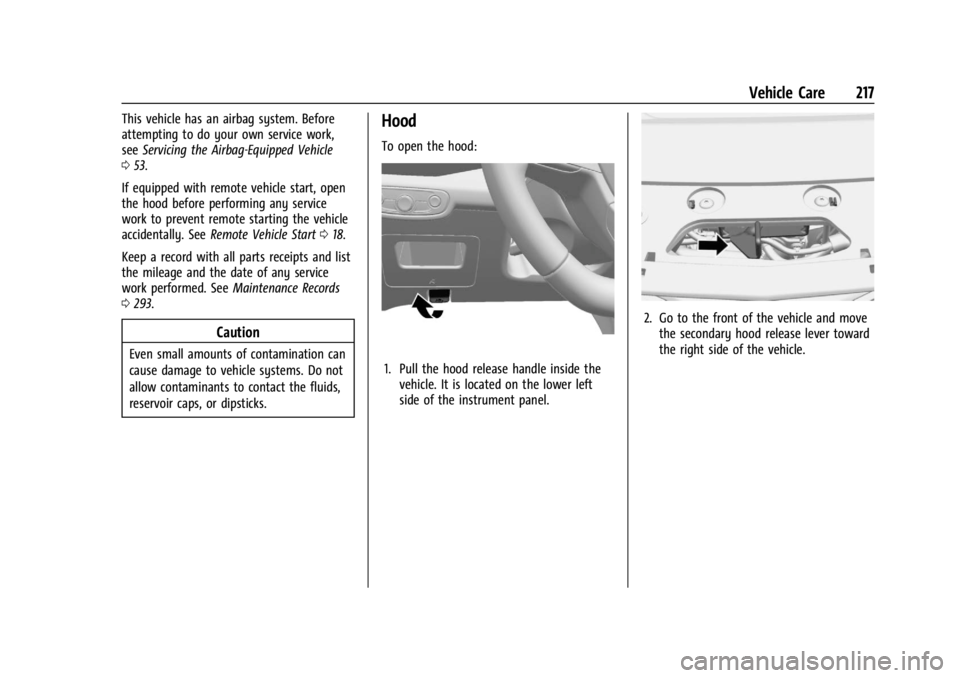
Hood
To open the hood:
1. Pull the hood release handle inside the
vehicle. It is located on the lower left
side of the instrument panel.
2. Go to the front of the vehicle and movethe secondary hood release lever toward
the right side of the vehicle.
Page 221 of 328
Chevrolet TRAX Owner Manual (GMNA-Localizing-U.S./Canada/Mexico-
17041293) - 2024 - CRC - 12/6/22
220 Vehicle Care
1. Windshield Washer Fluid Reservoir. SeeWasher Fluid 0228.
2. Engine Coolant Surge Tank and Pressure Cap. See Cooling System 0225.
3. Engine Oil Dipstick. See Engine Oil0220.
4. Engine Cooling Fan (Out of View). See Cooling System 0225.
5. Engine Oil Fill Cap. See Engine Oil0220.
6. Engine Air Filter. See Engine Air Cleaner/
Filter 0223.
7. Brake Fluid Reservoir. See Brakes0229.
8. Positive (+) Battery Terminal. See Jump
Starting - North America 0272.
9. Battery. See Battery - North America
0 230.
10. Fuse Block. See Engine Compartment
Fuse Block 0239.
11. Remote Negative (–) Battery Terminal. SeeJump Starting - North America 0272.Engine Oil
To ensure proper engine performance and
long life, careful attention must be paid to
engine oil. Following these simple, but
important steps will help protect your
investment:
.Use engine oil approved to the proper
specification and of the proper viscosity
grade. See “Selecting the Right Engine
Oil” in this section.
.Check the engine oil level regularly and
maintain the proper oil level. See
“Checking Engine Oil” and“When to Add
Engine Oil” in this section.
.Change the engine oil at the appropriate
time. SeeEngine Oil Life System 0222.
.Always dispose of engine oil properly. See
“What to Do with Used Oil” in this
section.
Checking Engine Oil
Check the engine oil level regularly, every
650 km (400 mi), especially prior to a long
trip. The engine oil dipstick handle is a loop.
See Engine Compartment Overview 0219 for
the location.
{Warning
The engine oil dipstick handle may be
hot; it could burn you. Use a towel or
glove to touch the dipstick handle.
If a low oil Driver Information Center (DIC)
message displays, check the oil level.
Follow these guidelines:
.To get an accurate reading, park the
vehicle on level ground. Check the engine
oil level after the engine has been off for
at least two hours. Checking the engine
oil level on steep grades or too soon after
engine shutoff can result in incorrect
readings. Accuracy improves when
checking a cold engine prior to starting.
Remove the dipstick and check the level.
.If unable to wait two hours, the engine
must be off for at least 15 minutes if the
engine is warm, or at least 30 minutes if
the engine is not warm. Pull out the
dipstick, wipe it with a clean paper towel
or cloth, then push it back in all the way.
Remove it again, keeping the tip down,
and check the level.
Page 301 of 328
Chevrolet TRAX Owner Manual (GMNA-Localizing-U.S./Canada/Mexico-
17041293) - 2024 - CRC - 12/2/22
300 Customer Information
adaptive equipment required for the vehicle,
such as hand controls or a wheelchair/
scooter lift for the vehicle.
To learn about the GM Mobility program,
see www.gmmobility.com or call the GM
Mobility Assistance Center at 1-800-323-9935.
Text Telephone (TTY) users, please dial the
national 711 relay service and contact
1-800-323-9935.
General Motors of Canada also has a
Mobility program. See www.gm.ca, or call
1-800-GM-DRIVE (800-463-7483) for details.
TTY users call 1-800-263-3830.
Roadside Assistance Program
For U.S.-purchased vehicles, call
1-800-243-8872. (Text Telephone (TTY):
1-888-889-2438.)
For Canadian-purchased vehicles, call
1-800-268-6800.
Service is available 24 hours a day, 365 days
a year.
Calling for Assistance
When calling Roadside Assistance, have the
following information ready:
.Your name, home address, and home
telephone number
.Telephone number of your location
.Location of the vehicle
.Model, year, color, and license plate
number of the vehicle
.Odometer reading and Vehicle
Identification Number (VIN)
.Description of the problem
Coverage
Services are provided for the duration of the
vehicle’s powertrain warranty.
In the U.S., anyone driving the vehicle is
covered. In Canada, a person driving the
vehicle without permission from the owner
is not covered.
Roadside Assistance is not a part of the New
Vehicle Limited Warranty. General Motors
North America and Chevrolet reserve the
right to make any changes or discontinue
the Roadside Assistance program at any
time without notification.
General Motors North America and Chevrolet
reserve the right to limit services or
payment to an owner or driver if they
decide the claims are made too often, or the
same type of claim is made many times.
Services Provided
.Emergency Fuel Delivery:Delivery of
enough fuel for the vehicle to get to the
nearest service station.
.Lock-Out Service: Service to unlock the
vehicle if you are locked out. A remote
unlock may be available if you have
OnStar. For security reasons, the driver
must present identification before this
service is given.
.Emergency Tow from a Public Road or
Highway: Tow to the nearest Chevrolet
dealer for warranty service, or if the
vehicle was in a crash and cannot be
driven. Assistance is not given when the
vehicle is stuck in the sand, mud,
or snow.
.Flat Tire Change: Service to change a flat
tire with the spare tire. The spare tire,
if equipped, must be in good condition
and properly inflated. It is the owner's
responsibility for the repair or
replacement of the tire if it is not covered
by the warranty.
.Battery Jump Start: Service to jump start
a dead battery.
.Trip Interruption Benefits and Assistance:
If your trip is interrupted due to a
warranty event, incidental expenses may
Page 310 of 328
Chevrolet TRAX Owner Manual (GMNA-Localizing-U.S./Canada/Mexico-
17041293) - 2024 - CRC - 12/2/22
OnStar 309
Or
.Give OnStar Turn-by-Turn Navigation voice
commands.
.Obtain and customize the Wi-Fi hotspot
name or SSID and password, if equipped.
Press
Qto connect to an Advisor to:
.Verify account information or update
contact information.
.Get driving directions.
.Receive a Diagnostic check of the vehicle's
key operating systems.
.Receive Roadside Assistance.
.Manage Wi-Fi Settings, if equipped.
Press
>to get a priority connection to an
OnStar Advisor available 24/7 to:
.Get help for an emergency.
.Be a Good Samaritan or respond to an
AMBER Alert.
.Get assistance in severe weather or other
crisis situations and find evacuation
routes.
OnStar Services
Emergency
Emergency Services require an active safety
and security plan. With Automatic Crash
Response, built-in sensors can automatically
alert a specially trained OnStar Advisor who
is immediately connected in to the vehicle
to help.
Press
>for a priority connection to an
OnStar Advisor who can contact emergency
service providers, direct them to your exact
location, and relay important information.
With OnStar Crisis Assist, specially trained
Advisors are available 24 hours a day, 7 days
a week, to provide a central point of
contact, assistance, and information during a
crisis.
With Roadside Assistance, Advisors can
locate a nearby service provider to help with
a flat tire, a battery jump, or an empty
gas tank.
Security
If equipped, OnStar provides these services:
.With Stolen Vehicle Assistance, OnStar
Advisors can use GPS to pinpoint the
vehicle and help authorities quickly
recover it.
.With Remote Ignition Block, if equipped,
OnStar can block the vehicle from being
restarted.
.With Stolen Vehicle Slowdown,
if equipped, OnStar can work with law
enforcement to gradually slow the
vehicle down.
Theft Alarm Notification
If equipped, if the doors are locked and the
vehicle alarm sounds, a notification by text,
e-mail, or phone call will be sent. If the
vehicle is stolen, an OnStar Advisor can work
with authorities to recover the vehicle.
Page 312 of 328
Chevrolet TRAX Owner Manual (GMNA-Localizing-U.S./Canada/Mexico-
17041293) - 2024 - CRC - 12/2/22
OnStar 311
TTY Users
OnStar has the ability to communicate to
deaf, hard-of-hearing, or speech-impaired
customers while in the vehicle. The available
TTY system can provide in-vehicle access to
all OnStar services, except Virtual Advisor
and OnStar Turn-by-Turn Navigation.
If equipped, TTY mode can be turned on or
off by touching Settings, then Apps, and
then Phone. When TTY mode is on, phone
calls can be made or received with OnStar
using the infotainment display.
OnStar Personal Identification
Number (PIN)
A PIN is needed to access some OnStar
services. The PIN will need to be changed
the first time when speaking with an
Advisor. To change the OnStar PIN, contact
an OnStar Advisor by pressing
Qor calling
1-888-4ONSTAR.
Warranty
OnStar equipment may be warranted as part
of the vehicle warranty.
Languages
The vehicle can be programmed to respond
in multiple languages. Press
Qand ask for
an Advisor. Advisors are available in English,
Spanish, and French. Available languages
may vary by country.
Potential Issues
OnStar cannot perform Remote Door Unlock
or Stolen Vehicle Assistance after the vehicle
has been off continuously for an extended
period of time without an ignition cycle. To
find out the duration of time that applies
for the vehicle, contact an OnStar Advisor by
pressing
Qor calling 1-888-4ONSTAR. If the
vehicle has not been started for an extended
period of time, OnStar can contact Roadside
Assistance or a locksmith to help gain access
to the vehicle.
Global Positioning System (GPS)
.Obstruction of the GPS can occur in a
large city with tall buildings; in parking
garages; around airports; in tunnels and
underpasses; or in an area with very
dense trees. If GPS signals are not
available, the OnStar system should still operate to call OnStar. However, OnStar
could have difficulty identifying the exact
location.
.In emergency situations, OnStar can use
the last stored GPS location to send to
emergency responders.
A temporary loss of GPS can cause loss of
the ability to send a Turn-by-Turn
Navigation route. The Advisor may give a
verbal route or may ask for a call back after
the vehicle is driven into an open area.
Cellular and GPS Antennas
Cellular reception is required for OnStar to
send remote signals to the vehicle. Do not
place items over or near the antenna to
prevent blocking cellular and GPS signal
reception.
Unable to Connect to OnStar Message
If there is limited cellular coverage or the
cellular network has reached maximum
capacity, this message may come on. Press
Qto try the call again or try again after
driving a few miles into another
cellular area.
Page 315 of 328
Chevrolet TRAX Owner Manual (GMNA-Localizing-U.S./Canada/Mexico-
17041293) - 2024 - CRC - 12/2/22
314 Connected Services
Ensuring Security
.Change the default passwords for the
Wi-Fi hotspot and myChevrolet mobile
application. Make these passwords
different from each other and use a
combination of letters and numbers to
increase the security.
.Change the default name of the SSID
(Service Set Identifier). This is your
network’s name that is visible to other
wireless devices. Choose a unique name
and avoid family names or vehicle
descriptions.
Wi-Fi Hotspot (If Equipped)
The vehicle may have a built-in Wi-Fi
hotspot that provides access to the Internet
and web content at 4G LTE speed. Up to
seven mobile devices can be connected.
A data plan is required. Use the in-vehicle
controls only when it is safe to do so. 1. To retrieve Wi-Fi hotspot information, press
=to open the OnStar app on the
infotainment display, then select Wi-Fi
Hotspot. On some vehicles, touch Wi-Fi
or Wi-Fi Settings on the screen. 2. The Wi-Fi settings will display the Wi-Fi
hotspot name (SSID), password, and on
some vehicles, the connection type (no
Internet connection, 3G, 4G, 4G LTE), and
signal quality (poor, good, excellent). The
LTE icon shows connection to Wi-Fi. It is
possible that the icon may not illuminate
even though the vehicle has an active
connection.
3. To change the SSID or password, press
Qor call 1-888-4ONSTAR to connect
with an Advisor. On some vehicles, the
SSID and password can be changed in
the Wi-Fi Hotspot menu.
After initial set-up, your vehicle’s Wi-Fi
hotspot will connect automatically to your
mobile devices. Manage data usage by
turning Wi-Fi on or off on your mobile
device, using the myChevrolet mobile app,
or by contacting an OnStar Advisor. On
some vehicles, Wi-Fi can also be managed
from the Wi-Fi Hotspot menu. MyChevrolet Mobile App (If Available)
Download the myChevrolet mobile app to
compatible Apple and Android smartphones.
Chevrolet users can access the following
services from a smartphone:
.Remotely start/stop the vehicle,
if factory-equipped.
.Lock/unlock doors, if equipped with
automatic locks.
.Activate the horn and lamps.
.Check the vehicle’s fuel level, oil life,
or tire pressure, if factory-equipped with
the Tire Pressure Monitor System.
.Send destinations to the vehicle.
.Locate the vehicle on a map (U.S.
market only).
.Turn the vehicle's Wi-Fi hotspot on/off,
manage settings, and monitor data
consumption, if equipped.
.Locate a dealer and schedule service.
.Request Roadside Assistance.
.Set a parking reminder with pin drop,
take a photo, make a note, and set a
timer.
.Connect with Chevrolet on social media.
Page 316 of 328
Chevrolet TRAX Owner Manual (GMNA-Localizing-U.S./Canada/Mexico-
17041293) - 2024 - CRC - 12/2/22
Connected Services 315
Features are subject to change. For
myChevrolet mobile app information and
compatibility, see my.chevrolet.com.
An active OnStar or connected service plan
may be required. A compatible device,
factory-installed remote start, and power
locks are required. Data rates apply. See
www.onstar.com for details and system
limitations.
Remote Services
Contact an OnStar Advisor to unlock the
doors or sound the horn and flash the
lamps.
Marketplace
OnStar Advisors can provide offers from
restaurants and retailers on your route, help
locate hotels, or book a room. These services
vary by market.
Diagnostics
By monitoring and reporting on the vehicle's
key systems, OnStar Advanced Diagnostics,
if equipped, provides a way to keep up on
maintenance. Capabilities vary by model.
See www.onstar.com for details and system
limitations. Features are subject to change.
For updates on feature capabilities, see
my.chevrolet.com. Message and data rates
may apply.
Page 322 of 328

Chevrolet TRAX Owner Manual (GMNA-Localizing-U.S./Canada/Mexico-
17041293) - 2024 - CRC - 12/2/22
Index 321
Indicator (cont'd)Vehicle Ahead . . . . . . . . . . . . . . . . . . . . . . . . . . 96
Indicators Warning Lights and Gauges . . . . . . . . . . . . . 85
Infants and Young Children, Restraints . . . . 56
Information Publication Ordering . . . . . . . . . . . . . . . . . . . 304
Infotainment Using the System . . . . . . . . . . . . . . . . . . . . . . . 118
Inspection Multi-Point Vehicle . . . . . . . . . . . . . . . . . . . . 289
Instrument Cluster . . . . . . . . . . . . . . . . . . . . 86, 87
Instrument Panel
Storage Area . . . . . . . . . . . . . . . . . . . . . . . . . . . . 74
Instrument Panel Overview . . . . . . . . . . . . . . . . .5
Interior Rearview Mirrors . . . . . . . . . . . . . . . . . .27
Introduction . . . . . . . . . . . . . . . . . . . . . . . 2, 116, 135
J
Jump Starting - North America . . . . . . . . . . . . . . . 272
K
Keys . . . . . . . . . . . . . . . . . . . . . . . . . . . . . . . . . . . . . 7, 8Remote . . . . . . . . . . . . . . . . . . . . . . . . . . . . . . . . . 10
Remote Operation . . . . . . . . . . . . . . . . . . . 10, 15
L
Labeling, Tire Sidewall . . . . . . . . . . . . . . . . . . . 244
LampsCourtesy . . . . . . . . . . . . . . . . . . . . . . . . . . . . . . . . 112
Daytime Running (DRL) . . . . . . . . . . . . . . . . 110
Dome . . . . . . . . . . . . . . . . . . . . . . . . . . . . . . . . . . . 112
Exterior Controls . . . . . . . . . . . . . . . . . . . . . . . 108
Exterior Lighting Battery Saver . . . . . . . . . 114
Flash-to-Pass . . . . . . . . . . . . . . . . . . . . . . . . . . . 110
High/Low Beam Changer . . . . . . . . . . . . . . 110
Malfunction Indicator (CheckEngine) . . . . . . . . . . . . . . . . . . . . . . . . . . . . . . . 93
On Reminder . . . . . . . . . . . . . . . . . . . . . . . . . . 100
Lane
Keep Assist Light . . . . . . . . . . . . . . . . . . . . . . . 96
Lap-Shoulder Belt . . . . . . . . . . . . . . . . . . . . . . . . . .41
LATCH System Replacing Parts after a Crash . . . . . . . . . . . 68
LATCH, Lower Anchors and Tethers for
Children . . . . . . . . . . . . . . . . . . . . . . . . . . . . . . . . . 60
LED Lighting . . . . . . . . . . . . . . . . . . . . . . . . . . . . . 235
Liftgate . . . . . . . . . . . . . . . . . . . . . . . . . . . . . . . . . . . .23
Lighting Entry . . . . . . . . . . . . . . . . . . . . . . . . . . . . . . . . . . . 113
Exit . . . . . . . . . . . . . . . . . . . . . . . . . . . . . . . . . . . . . 113
Illumination Control . . . . . . . . . . . . . . . . . . . . 112
LED . . . . . . . . . . . . . . . . . . . . . . . . . . . . . . . . . . . . 235 Lights
Adaptive Cruise Control . . . . . . . . . . . . . . . . 100
Airbag Readiness . . . . . . . . . . . . . . . . . . . . . . . 91
Antilock Brake System (ABS)
Warning . . . . . . . . . . . . . . . . . . . . . . . . . . . . . . 95
Automatic Emergency Braking (AEB) Disabled . . . . . . . . . . . . . . . . . . . . . . . . . . . . . . 96
Brake System Warning . . . . . . . . . . . . . . . . . 94
Charging System . . . . . . . . . . . . . . . . . . . . . . . 92
Check Engine (Malfunction Indicator) . . . . . . . . . . . . . . . . . . . . . . . . . . . . . 93
Cruise Control Light . . . . . . . . . . . . . . . . . . . . 100
Door Ajar . . . . . . . . . . . . . . . . . . . . . . . . . . . . . . 100
Electric Parking Brake . . . . . . . . . . . . . . . . . . . 95
Electronic Stability Control (ESC), Off . . . 97
Engine Coolant Temperature Warning . . . . . . . . . . . . . . . . . . . . . . . . . . . . . . 98
Engine Oil Pressure . . . . . . . . . . . . . . . . . . . . . 98
Gauges and Indicators . . . . . . . . . . . . . . . . . . 85
High-Beam On . . . . . . . . . . . . . . . . . . . . . . . . . . 99
Lane Keep Assist . . . . . . . . . . . . . . . . . . . . . . . . 96
Low Fuel Warning . . . . . . . . . . . . . . . . . . . . . . 99
Seat Belt Reminders . . . . . . . . . . . . . . . . . . . . 91
Security . . . . . . . . . . . . . . . . . . . . . . . . . . . . . . . . . 99
Service Electric Parking Brake . . . . . . . . . . . 95
Tire Pressure . . . . . . . . . . . . . . . . . . . . . . . . . . . . 98