transmission CHEVROLET TRAX 2024 Owner's Manual
[x] Cancel search | Manufacturer: CHEVROLET, Model Year: 2024, Model line: TRAX, Model: CHEVROLET TRAX 2024Pages: 328, PDF Size: 7.3 MB
Page 183 of 328
Chevrolet TRAX Owner Manual (GMNA-Localizing-U.S./Canada/Mexico-
17041293) - 2024 - CRC - 12/6/22
182 Driving and Operating
Warning (Continued)
Do not leave the vehicle when the engine
is running. If you have left the engine
running, the vehicle can move suddenly.
You or others could be injured. To be
sure the vehicle will not move, even
when you are on fairly level ground,
always set the parking brake and move
the shift lever to P (Park). SeeShifting
Into Park 0181 and
Electric Parking Brake 0187.
To shift into P (Park): 1. Hold the brake pedal down and set the parking brake. See Electric Parking Brake
0 187
2. Hold the button on the shift lever and push the lever toward the front of the
vehicle into P (Park).
3. Turn the ignition off.
Leaving the Vehicle with the Engine
Running
{Warning
It can be dangerous to leave the vehicle
with the engine running. It could
overheat and catch fire.
It is dangerous to get out of the vehicle
if the shift lever is not fully in P (Park)
with the parking brake firmly set. The
vehicle can roll.
Do not leave the vehicle when the engine
is running. If you have left the engine
running, the vehicle can move suddenly.
You or others could be injured. To be
sure the vehicle will not move, even
when you are on fairly level ground,
always set the parking brake and move
the shift lever to P (Park). See Shifting
Into Park 0181.
If you have to leave the vehicle with the
engine running, the vehicle must be in
P (Park) and the parking brake set.
Release the button and check that the shift
lever cannot be moved out of P (Park).
Torque Lock
Torque lock is when the weight of the
vehicle puts too much force on the parking
pawl in the transmission. This happens when
parking on a hill and shifting the
transmission into P (Park) is not done
properly and then it is difficult to shift out
of P (Park). To prevent torque lock, set the
parking brake and then shift into P (Park).
To find out how, see Shifting Into Park0181
listed previously.
If torque lock does occur, the vehicle may
need to be pushed uphill by another vehicle
to relieve the parking pawl pressure, so you
can shift out of P (Park).
Shifting out of Park
To shift out of P (Park):
1. Apply the brake pedal.
2. Turn the ignition on.
3. Press the shift lever button.
4. Move the shift lever.
If you still are unable to shift out of
P (Park): 1. Fully release the shift lever button.
2. Hold the brake pedal down and press the shift lever button again.
Page 185 of 328
Chevrolet TRAX Owner Manual (GMNA-Localizing-U.S./Canada/Mexico-
17041293) - 2024 - CRC - 12/6/22
184 Driving and Operating
Automatic Transmission
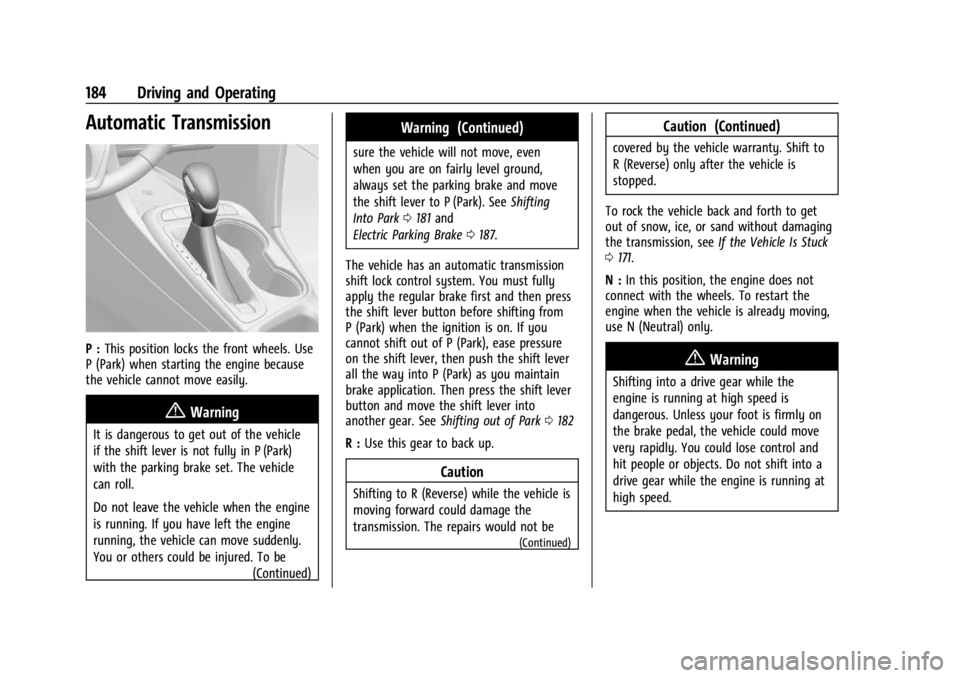
P :This position locks the front wheels. Use
P (Park) when starting the engine because
the vehicle cannot move easily.
{Warning
It is dangerous to get out of the vehicle
if the shift lever is not fully in P (Park)
with the parking brake set. The vehicle
can roll.
Do not leave the vehicle when the engine
is running. If you have left the engine
running, the vehicle can move suddenly.
You or others could be injured. To be
(Continued)
Warning (Continued)
sure the vehicle will not move, even
when you are on fairly level ground,
always set the parking brake and move
the shift lever to P (Park). SeeShifting
Into Park 0181 and
Electric Parking Brake 0187.
The vehicle has an automatic transmission
shift lock control system. You must fully
apply the regular brake first and then press
the shift lever button before shifting from
P (Park) when the ignition is on. If you
cannot shift out of P (Park), ease pressure
on the shift lever, then push the shift lever
all the way into P (Park) as you maintain
brake application. Then press the shift lever
button and move the shift lever into
another gear. See Shifting out of Park 0182
R : Use this gear to back up.
Caution
Shifting to R (Reverse) while the vehicle is
moving forward could damage the
transmission. The repairs would not be
(Continued)
Caution (Continued)
covered by the vehicle warranty. Shift to
R (Reverse) only after the vehicle is
stopped.
To rock the vehicle back and forth to get
out of snow, ice, or sand without damaging
the transmission, see If the Vehicle Is Stuck
0 171.
N : In this position, the engine does not
connect with the wheels. To restart the
engine when the vehicle is already moving,
use N (Neutral) only.
{Warning
Shifting into a drive gear while the
engine is running at high speed is
dangerous. Unless your foot is firmly on
the brake pedal, the vehicle could move
very rapidly. You could lose control and
hit people or objects. Do not shift into a
drive gear while the engine is running at
high speed.
Page 186 of 328
Chevrolet TRAX Owner Manual (GMNA-Localizing-U.S./Canada/Mexico-
17041293) - 2024 - CRC - 12/6/22
Driving and Operating 185
Caution
Shifting out of P (Park) or N (Neutral)
with the engine running at high speed
may damage the transmission. The
repairs would not be covered by the
vehicle warranty. Be sure the engine is
not running at high speed when shifting
the vehicle.
Caution
A transmission hot message may display
if the automatic transmission fluid is
too hot.
Driving under this condition can damage
the vehicle. Stop and idle the engine to
cool the automatic transmission fluid.
This message clears when the
transmission fluid has cooled sufficiently.
D : This position is for normal driving.
If more power is needed for passing, press
the accelerator pedal down.
Caution
If the vehicle does not shift gears, the
transmission could be damaged. Have the
vehicle serviced right away.
Caution
Spinning the tires or holding the vehicle
in one place on a hill using only the
accelerator pedal may damage the
transmission.
The repair will not be covered by the
vehicle warranty. If the vehicle is stuck,
do not spin the tires. When stopping on
a hill, use the brakes to hold the vehicle
in place.
L : Allows the driver to select the range of
gear positions. See Manual Mode0185.
Operating Modes
The transmission may operate in a lower
gear than normal to improve vehicle
performance. The engine speed may be
higher and there may be an increase in
noise during the following conditions:
.When climbing a grade.
.When driving downhill.
.When driving in hot temperatures or at
high altitude.
Manual Mode
Electronic Range Select (ERS) Mode
ERS or manual mode allows for the selection
of the range of gear positions. Use this
mode when driving downhill or towing a
trailer to limit the top gear and vehicle
speed. The shift position indicator within the
Driver Information Center (DIC) will display a
number next to the L indicating the highest
available gear under manual mode and the
driving conditions when manual mode was
selected.
Page 187 of 328
Chevrolet TRAX Owner Manual (GMNA-Localizing-U.S./Canada/Mexico-
17041293) - 2024 - CRC - 12/6/22
186 Driving and Operating
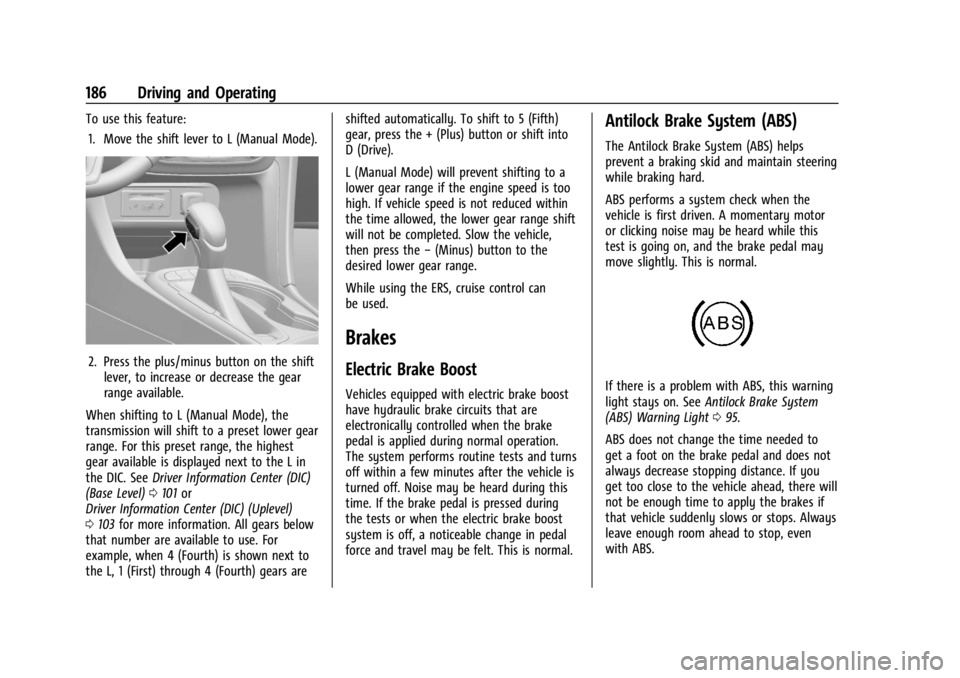
To use this feature:1. Move the shift lever to L (Manual Mode).
2. Press the plus/minus button on the shift lever, to increase or decrease the gear
range available.
When shifting to L (Manual Mode), the
transmission will shift to a preset lower gear
range. For this preset range, the highest
gear available is displayed next to the L in
the DIC. See Driver Information Center (DIC)
(Base Level) 0101 or
Driver Information Center (DIC) (Uplevel)
0 103 for more information. All gears below
that number are available to use. For
example, when 4 (Fourth) is shown next to
the L, 1 (First) through 4 (Fourth) gears are shifted automatically. To shift to 5 (Fifth)
gear, press the + (Plus) button or shift into
D (Drive).
L (Manual Mode) will prevent shifting to a
lower gear range if the engine speed is too
high. If vehicle speed is not reduced within
the time allowed, the lower gear range shift
will not be completed. Slow the vehicle,
then press the
−(Minus) button to the
desired lower gear range.
While using the ERS, cruise control can
be used.
Brakes
Electric Brake Boost
Vehicles equipped with electric brake boost
have hydraulic brake circuits that are
electronically controlled when the brake
pedal is applied during normal operation.
The system performs routine tests and turns
off within a few minutes after the vehicle is
turned off. Noise may be heard during this
time. If the brake pedal is pressed during
the tests or when the electric brake boost
system is off, a noticeable change in pedal
force and travel may be felt. This is normal.
Antilock Brake System (ABS)
The Antilock Brake System (ABS) helps
prevent a braking skid and maintain steering
while braking hard.
ABS performs a system check when the
vehicle is first driven. A momentary motor
or clicking noise may be heard while this
test is going on, and the brake pedal may
move slightly. This is normal.
If there is a problem with ABS, this warning
light stays on. See Antilock Brake System
(ABS) Warning Light 095.
ABS does not change the time needed to
get a foot on the brake pedal and does not
always decrease stopping distance. If you
get too close to the vehicle ahead, there will
not be enough time to apply the brakes if
that vehicle suddenly slows or stops. Always
leave enough room ahead to stop, even
with ABS.
Page 193 of 328
Chevrolet TRAX Owner Manual (GMNA-Localizing-U.S./Canada/Mexico-
17041293) - 2024 - CRC - 12/6/22
192 Driving and Operating
Using Cruise Control on Hills
How well cruise control works on a hill
depends on the vehicle speed, load, and the
steepness of the hill. When going up a steep
hill, you may need to apply the accelerator
pedal to maintain the set speed. When
going down a steep hill, you may need to
brake or shift to a lower gear to keep the
vehicle speed down. If the brake pedal is
applied, cruise control will disengage.
Ending Cruise Control
There are four ways to end cruise control:
.Lightly apply the brake pedal.
.Press*.
.Shift the transmission to N (Neutral).
.Press5.
Erasing Speed Memory
The cruise control set speed is erased from
memory if
5is pressed or if the ignition is
turned off.
Adaptive Cruise Control
If equipped, Adaptive Cruise Control (ACC)
allows the cruise control set speed and
following gap to be selected. Read this
entire section before using this system. The following gap is the following time between
your vehicle and a vehicle detected directly
ahead in your path, moving in the same
direction. If no vehicle is detected in your
path, ACC works like regular cruise control.
ACC uses a windshield mounted front
camera sensor.
If a vehicle is detected in your path, ACC can
apply acceleration or limited, moderate
braking to maintain the selected following
gap. To disengage ACC, apply the brake.
If ACC is controlling the vehicle speed when
the Traction Control System (TCS) or
StabiliTrak/ Electronic Stability Control (ESC)
system activates, ACC may automatically
disengage. See
Traction Control/Electronic
Stability Control 0188. When road
conditions allow ACC to be safely used, ACC
can be turned back on. Disabling the TCS or
StabiliTrak/ ESC system will disengage and
prevent engagement of ACC.
ACC can reduce the need for you to
frequently brake and accelerate, especially
when used on expressways, freeways, and
interstate highways. When used on other
roads, you may need to take over the
control of braking or acceleration more
often.
{Warning
ACC has limited braking ability and may
not have time to slow the vehicle down
enough to avoid a collision with another
vehicle you are following. This can occur
when vehicles suddenly slow or stop
ahead, or enter your lane. Also see
“Alerting the Driver” later in this section.
Complete attention is always required
while driving and you should be ready to
take action and apply the brakes. See
Defensive Driving 0166
{Warning
ACC will not detect or brake for children,
pedestrians, animals, or other objects.
Do not use ACC when:
.On winding and hilly roads or when
the camera sensor is blocked by snow,
ice, or dirt. The system may not
detect a vehicle ahead. Keep the
windshield and headlamps clean.
.When visibility is poor due to rain,
snow, fog, dirt, insect residue, or dust;
when other foreign objects obscure
(Continued)
Page 216 of 328
Chevrolet TRAX Owner Manual (GMNA-Localizing-U.S./Canada/Mexico-
17041293) - 2024 - CRC - 12/6/22
Vehicle Care 215
Vehicle Care
General Information
General Information . . . . . . . . . . . . . . . . . . . 216
California Perchlorate MaterialsRequirements . . . . . . . . . . . . . . . . . . . . . . . . 216
Accessories and Modifications . . . . . . . . . 216
Vehicle Checks
Doing Your Own Service Work . . . . . . . . . 216
Hood . . . . . . . . . . . . . . . . . . . . . . . . . . . . . . . . . . 217
Engine Compartment Overview . . . . . . . . 219
Engine Oil . . . . . . . . . . . . . . . . . . . . . . . . . . . . . 220
Engine Oil Life System . . . . . . . . . . . . . . . . . 222
Automatic Transmission Fluid . . . . . . . . . . 223
Engine Air Filter Life System . . . . . . . . . . . 223
Engine Air Cleaner/Filter . . . . . . . . . . . . . . . 223
Cooling System . . . . . . . . . . . . . . . . . . . . . . . . 225
Engine Overheating . . . . . . . . . . . . . . . . . . . . 227
Washer Fluid . . . . . . . . . . . . . . . . . . . . . . . . . . 228
Brakes . . . . . . . . . . . . . . . . . . . . . . . . . . . . . . . . . 229
Brake Fluid . . . . . . . . . . . . . . . . . . . . . . . . . . . . 230
Battery - North America . . . . . . . . . . . . . . . 230
Starter Switch Check . . . . . . . . . . . . . . . . . . . 231
Automatic Transmission Shift Lock Control Function Check . . . . . . . . . . . . . . . 231
Park Brake and P (Park) Mechanism Check . . . . . . . . . . . . . . . . . . . . . . . . . . . . . . . . 232
Wiper Blade Replacement . . . . . . . . . . . . . 232 Windshield Replacement . . . . . . . . . . . . . . . 233
Gas Strut(s) . . . . . . . . . . . . . . . . . . . . . . . . . . . . 233
Headlamp Aiming
Front Headlamp Aiming . . . . . . . . . . . . . . . 234
Bulb Replacement
Bulb Replacement . . . . . . . . . . . . . . . . . . . . . 234
Halogen Bulbs . . . . . . . . . . . . . . . . . . . . . . . . . 235
LED Lighting . . . . . . . . . . . . . . . . . . . . . . . . . . . 235
Headlamps, Front Turn Signal,
Sidemarker, and Parking Lamps . . . . . . 235
Taillamps, Turn Signal, Sidemarker, Stoplamps, and Back-Up Lamps . . . . . . 236
Electrical System
Electrical System Overload . . . . . . . . . . . . . 237
Fuses and Circuit Breakers . . . . . . . . . . . . . 238
Engine Compartment Fuse Block . . . . . . 239
Instrument Panel Fuse Block . . . . . . . . . . . 241
Wheels and Tires
Tires . . . . . . . . . . . . . . . . . . . . . . . . . . . . . . . . . . . 243
All-Season Tires . . . . . . . . . . . . . . . . . . . . . . . . 243
Winter Tires . . . . . . . . . . . . . . . . . . . . . . . . . . . 244
Tire Sidewall Labeling . . . . . . . . . . . . . . . . . 244
Tire Designations . . . . . . . . . . . . . . . . . . . . . . 246
Tire Terminology and Definitions . . . . . . 246
Tire Pressure . . . . . . . . . . . . . . . . . . . . . . . . . . 248
Tire Pressure for High-SpeedOperation . . . . . . . . . . . . . . . . . . . . . . . . . . . 249 Tire Pressure Monitor System . . . . . . . . . 249
Tire Pressure Monitor Operation . . . . . . 250
Tire Inspection . . . . . . . . . . . . . . . . . . . . . . . . 254
Tire Rotation . . . . . . . . . . . . . . . . . . . . . . . . . . 254
When It Is Time for New Tires . . . . . . . . 255
Buying New Tires . . . . . . . . . . . . . . . . . . . . . 256
Different Size Tires and Wheels . . . . . . . . 257
Uniform Tire Quality Grading . . . . . . . . . . 257
Wheel Alignment and Tire Balance . . . . 258
Wheel Replacement . . . . . . . . . . . . . . . . . . . 258
Tire Chains . . . . . . . . . . . . . . . . . . . . . . . . . . . . 259
If a Tire Goes Flat . . . . . . . . . . . . . . . . . . . . . 260
Tire Sealant and Compressor Kit . . . . . . . 261
Storing the Tire Sealant and
Compressor Kit . . . . . . . . . . . . . . . . . . . . . . 266
Tire Changing . . . . . . . . . . . . . . . . . . . . . . . . . 267
Compact Spare Tire . . . . . . . . . . . . . . . . . . . . 271
Jump Starting
Jump Starting - North America . . . . . . . . 272
Towing the Vehicle
Transporting a Disabled Vehicle . . . . . . . 274
Recreational Vehicle Towing . . . . . . . . . . . 275
Appearance Care
Exterior Care . . . . . . . . . . . . . . . . . . . . . . . . . . . 277
Interior Care . . . . . . . . . . . . . . . . . . . . . . . . . . . 281
Floor Mats . . . . . . . . . . . . . . . . . . . . . . . . . . . . 284
Page 224 of 328
Chevrolet TRAX Owner Manual (GMNA-Localizing-U.S./Canada/Mexico-
17041293) - 2024 - CRC - 12/6/22
Vehicle Care 223
Automatic Transmission Fluid
How to Check Automatic Transmission
Fluid
It is not necessary to check the transmission
fluid level. A transmission fluid leak is the
only reason for fluid loss. If a leak occurs,
take the vehicle to your dealer and have it
repaired as soon as possible.
There is a special procedure for checking and
changing the transmission fluid. Because this
procedure is difficult, you should have this
done at your dealer.
Change the fluid at the intervals listed in
Maintenance Schedule0287, and be sure to
use the fluid listed in Recommended Fluids
and Lubricants 0291.
Engine Air Filter Life System
If equipped, this feature provides an
indication of when to change the engine air
filter. The timing to change an engine air
filter depends on driving conditions. It is
possible an air filter change may not be
indicated for up to four years.
When to Change Engine Air Filter
When the REPLACE AT NEXT OIL CHANGE
message displays, the engine air filter
should be replaced at the time of the next
engine oil change. When the REPLACE
ENGINE AIR FILTER NOW message displays,
the engine air filter should be replaced as
soon as possible.
Reset the engine air filter life system after
the engine air filter is replaced. See your
dealer for service and to reset the system.
How to Reset Engine Air Filter Life
System
Reset the system whenever the engine air
filter is replaced so that the system can
calculate the next engine air filter change.
To reset:
1. Place the vehicle in P (Park).
2. Select Engine Air Filter Life on the DIC menu. See Driver Information Center
(DIC) (Base Level) 0101 or
Driver Information Center (DIC) (Uplevel)
0 103. 3. Press
lor the thumbwheel to move to
the Reset/Disable display area. Select
Reset then press
lor press the
thumbwheel. Press YES to confirm the
reset.
4. 100% AIR FILTER LIFE will be displayed when the Engine Air Filter Life System is
successfully reset.
Engine Air Cleaner/Filter
The engine air cleaner/filter is in the engine
compartment on the passenger side of the
vehicle. See Engine Compartment Overview
0 219.
When to Inspect the Engine Air
Cleaner/Filter
For intervals on inspecting and replacing the
engine air cleaner/filter, see Maintenance
Schedule 0287.
How to Inspect the Engine Air
Cleaner/Filter
Do not start the engine or have the engine
running with the engine air cleaner/filter
housing open. Before removing the engine
air cleaner/filter, make sure that the engine
air cleaner/filter housing and nearby
components are free of dirt and debris.
Page 229 of 328
Chevrolet TRAX Owner Manual (GMNA-Localizing-U.S./Canada/Mexico-
17041293) - 2024 - CRC - 12/6/22
228 Vehicle Care
Then check to see if the engine cooling fan
is running. If the engine is overheating, the
fan should be running. If it is not, do not
continue to run the engine. Have the vehicle
serviced.
Caution
Do not run the engine if there is a leak
in the engine cooling system. This can
cause a loss of all coolant and can
damage the system and vehicle. Have
any leaks fixed right away.
If Steam Is Coming from the Engine
Compartment
{Warning
Steam and scalding liquids from a hot
cooling system are under pressure.
Turning the pressure cap, even a little,
can cause them to come out at high
speed and you could be burned. Never
turn the cap when the cooling system,
including the pressure cap, is hot. Wait
for the cooling system and pressure cap
to cool.
If No Steam Is Coming from the Engine
Compartment
If an engine overheat warning is displayed
but no steam can be seen or heard, the
problem may not be too serious. Sometimes
the engine can get a little too hot when the
vehicle:
.Climbs a long hill on a hot day
.Stops after high-speed driving
.Idles for long periods in traffic
If the overheat warning is displayed with no
sign of steam: 1. Turn the air conditioning off.
2. Turn the heater on to the highest temperature and to the highest fan
speed. Open the windows as necessary.
3. When it is safe to do so, pull off the road, shift to P (Park) or N (Neutral) for
an automatic transmission and let the
engine idle.
If the overheat warning no longer displays,
the vehicle can be driven. Continue to drive
the vehicle slowly for about 10 minutes.
Keep a safe vehicle distance from the vehicle
in front. If the warning does not come back on, continue to drive normally and have the
cooling system checked for proper fill and
function.
If the warning continues, pull over, stop, and
park the vehicle right away.
If there is no sign of steam, idle the engine
for three minutes while parked. If the
warning is still displayed, turn off the
engine until it cools down.Washer Fluid
What to Use
When the vehicle needs windshield washer
fluid, be sure to read the manufacturer's
instructions before use. If operating the
vehicle in an area where the temperature
may fall below freezing, use a fluid that has
sufficient protection against freezing.
Adding Washer Fluid
Page 232 of 328
Chevrolet TRAX Owner Manual (GMNA-Localizing-U.S./Canada/Mexico-
17041293) - 2024 - CRC - 12/6/22
Vehicle Care 231
{Warning
WARNING:Battery posts, terminals and
related accessories can expose you to
chemicals including lead and lead
compounds, which are known to the
State of California to cause cancer and
birth defects or other reproductive harm.
Wash hands after handling. For more
information go to
www.P65Warnings.ca.gov.
See the warning on the back cover.
Vehicle Storage
{Warning
Batteries have acid that can burn you and
gas that can explode. You can be badly
hurt if you are not careful. See Jump
Starting - North America 0272 for tips on
working around a battery without
getting hurt.
Infrequent Usage: Remove the black,
negative (−) cable from the battery to keep
the battery from running down. Extended Storage: Remove the black,
negative (−) cable from the battery or use a
battery trickle charger.
Starter Switch Check
{Warning
When you are doing this inspection, the
vehicle could move suddenly. If the
vehicle moves, you or others could be
injured.
1. Before starting this check, be sure there is enough room around the vehicle.
2. Apply both the parking brake and the regular brake.
Do not use the accelerator pedal, and be
ready to turn off the engine immediately
if it starts.
3. Try to start the engine in each gear. The vehicle should start only in P (Park) or
N (Neutral). If the vehicle starts in any
other position, contact your dealer for
service.
Automatic Transmission Shift Lock
Control Function Check
{Warning
When you are doing this inspection, the
vehicle could move suddenly. If the
vehicle moves, you or others could be
injured.
1. Before starting this check, be sure there is enough room around the vehicle.
It should be parked on a level surface.
2. Apply the parking brake. Be ready to apply the regular brake immediately if
the vehicle begins to move.
3. With the engine off, turn the ignition on, but do not start the engine. Without
applying the regular brake, try to move
the shift lever out of P (Park) with
normal effort. If the shift lever moves
out of P (Park), contact your dealer for
service.
Page 233 of 328
Chevrolet TRAX Owner Manual (GMNA-Localizing-U.S./Canada/Mexico-
17041293) - 2024 - CRC - 12/6/22
232 Vehicle Care
Park Brake and P (Park)
Mechanism Check
{Warning
When you are doing this check, the
vehicle could begin to move. You or
others could be injured and property
could be damaged. Make sure there is
room in front of the vehicle in case it
begins to roll. Be ready to apply the
regular brake at once should the vehicle
begin to move.
Park on a fairly steep hill, with the vehicle
facing downhill. Keeping your foot on the
regular brake, set the parking brake.
.To check the parking brake's holding
ability: With the engine running and the
transmission in N (Neutral), slowly remove
foot pressure from the regular brake
pedal. Do this until the vehicle is held by
the parking brake only.
.To check the P (Park) mechanism's holding
ability: With the engine running, shift to
P (Park). Then release the parking brake
followed by the regular brake.
Contact your dealer if service is required.
Wiper Blade Replacement
Windshield wiper blades should be replaced
periodically. See Maintenance Schedule
0 287.
Replacement blades come in different types
and are removed in different ways. For
proper type and length, see Maintenance
Replacement Parts 0292.
Caution
Allowing the wiper arm to touch the
windshield when no wiper blade is
installed could damage the windshield.
Any damage that occurs would not be
covered by the vehicle warranty. Do not
allow the wiper arm to touch the
windshield.
Front Wiper Blade Replacement
To replace the front wiper blades:
1. Lift the wiper arm from the windshield until no further movement is possible.
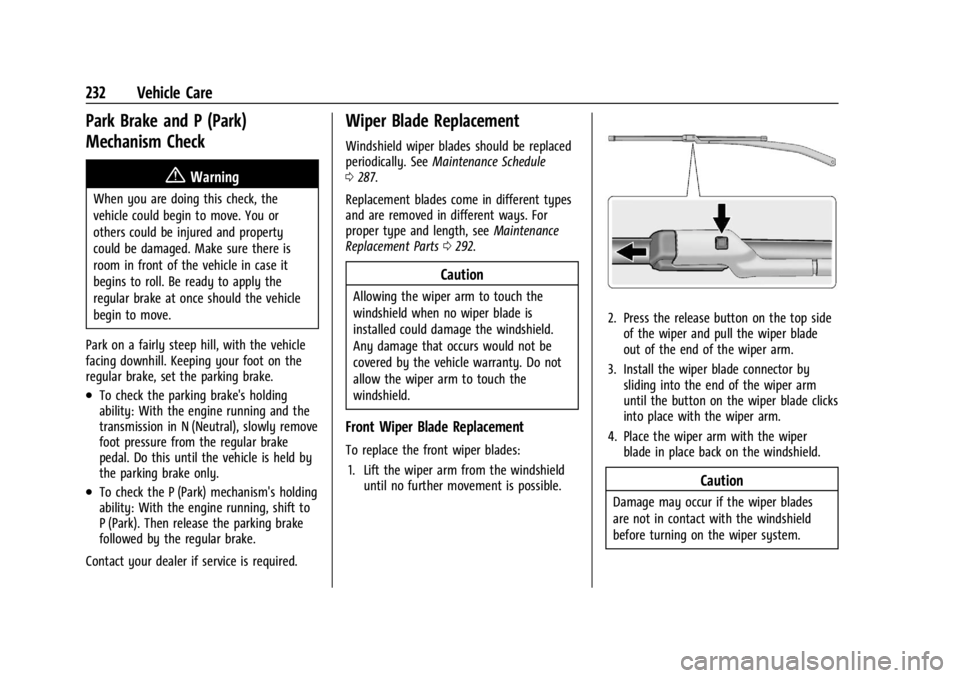
2. Press the release button on the top side
of the wiper and pull the wiper blade
out of the end of the wiper arm.
3. Install the wiper blade connector by sliding into the end of the wiper arm
until the button on the wiper blade clicks
into place with the wiper arm.
4. Place the wiper arm with the wiper blade in place back on the windshield.
Caution
Damage may occur if the wiper blades
are not in contact with the windshield
before turning on the wiper system.