buttons CHEVROLET UPLANDER 2005 1.G Owner's Guide
[x] Cancel search | Manufacturer: CHEVROLET, Model Year: 2005, Model line: UPLANDER, Model: CHEVROLET UPLANDER 2005 1.GPages: 460, PDF Size: 2.75 MB
Page 243 of 460
No Folder
When the CD contains only compressed les, the les will
be located under the root folder. The next and previous
folder functions will have no function on a CD that was
recorded without folders or playlists. When displaying the
name of the folder the radio will display ROOT.
When the CD contains only playlists and compressed
audio les, but no folders, all les will be located under
the root folder. The folder down and the folder up
buttons will search playlists (Px) rst and then go to the
root folder. When the radio displays the name of the
folder the radio will display ROOT.
Order of Play
Tracks will be played in the following order:
Play will begin from the rst track in the rst playlist
and will continue sequentially through all tracks in
each playlist. When the last track of the last playlist
has been played, play will continue from the rst
track of the rst playlist.
If the CD does not contain any playlists, then play
will begin from the rst track under the root
directory. When all tracks from the root directory
have been played, play will continue from les
according to their numerical listing. After playing the
last track from the last folder, play will begin
again at the rst track of the rst folder or root
directory.When play enters a new folder, the display will not
automatically show the new folder name unless
you have chosen the folder mode as the default display.
See the information button later in this section for
more information. The new track name will appear on
the display.
File System and Naming
The song name that will be displayed will be the song
name that is contained in the ID3 tag. If the song name is
not present in the ID3 tag, then the radio will display the
le name without the extension (such as .mp3) as the
track name.
Track names longer than 32 characters or four pages
will be shortened. The display will not show parts
of words on the last page of text and the extension of
the lename will not be displayed.
Preprogrammed Playlists
You can access preprogrammed playlists which were
created by WinAmp™, MusicMatch™, or Real
Jukebox™ software, however, you will not have editing
capability. These playlists will be treated as special
folders containing compressed audio song les.
3-91
Page 250 of 460
Wired Headphones
There is a right and left wired headphone jack. To
adjust the volume, do the following:
1. Plug the headphone into the corresponding jack,
located behind the video screen, next to the
auxiliary jacks.
2. Press the corresponding headphone button on the
DVD faceplate.
3. Press the right and left arrow buttons, on the DVD
faceplate, to increase or to decrease the volume.
The wired headphones work as follows:
DVD on / RSA off: The wired headphones will play
RSE audio.
DVD off / RSA on: The wired headphones will play
RSA audio.
DVD on / RSA on: The wired headphones will play
RSA audio.
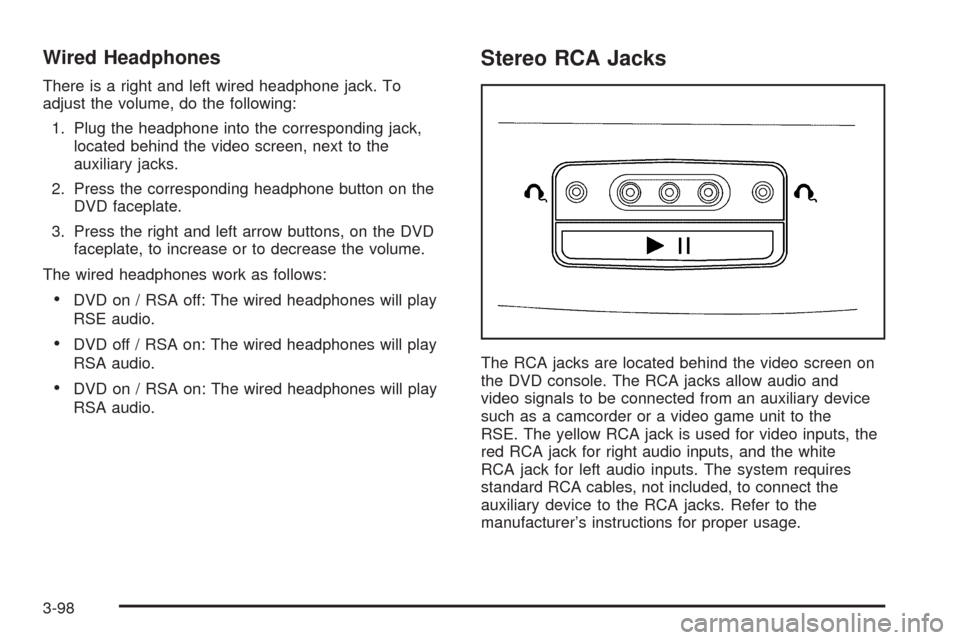
Stereo RCA Jacks
The RCA jacks are located behind the video screen on
the DVD console. The RCA jacks allow audio and
video signals to be connected from an auxiliary device
such as a camcorder or a video game unit to the
RSE. The yellow RCA jack is used for video inputs, the
red RCA jack for right audio inputs, and the white
RCA jack for left audio inputs. The system requires
standard RCA cables, not included, to connect the
auxiliary device to the RCA jacks. Refer to the
manufacturer’s instructions for proper usage.
3-98
Page 252 of 460
Video Screen
The video screen is located in the overhead console.
To use the video screen, do the following:
1. Push forward on the release button and the screen
will fold down.
2. Adjust its position as desired.
When the video screen is not in use, push it up into its
stowed and latched position.
Notice:Directly touching the video screen may
damage it. Do not touch the screen. See “Cleaning
the Video Screen” later in this section for more
information.
DVD Player
The DVD player is located in the overhead console.
The DVD player can be controlled by the buttons on the
DVD player and/or by the buttons on the remote
control. See “Remote Control” later in this section for
more information.
The RSE system DVD player is only compatible with
DVDs of the appropriate region code for the country that
the vehicle was sold. The DVD region code is printed
on the jacket of most DVDs.
Standard audio CDs, CD-R, CD-RW, enhanced CDs,
video CDs, and CD-ROM with MP3 media are supported
by this DVD player. DVD+R, DVD+RW, and copy
protected CDs may or may not be supported by the
DVD player. The DVD player does not support
DVD-RAM, DVD-ROM, DVD-R, DVD-R/W, and DVD
audio media. An error message will appear on the
display if this type of media is inserted into the DVD
player.
If an error message appears on the video screen, see
“DVD Messages” later in this section.
3-100
Page 253 of 460
DVD Player Buttons
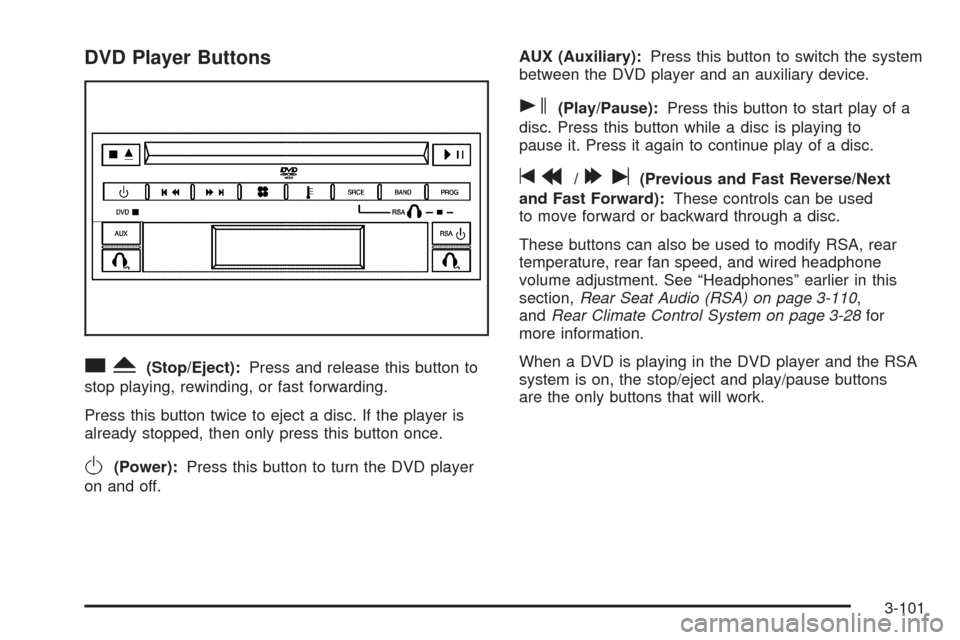
cY(Stop/Eject):Press and release this button to
stop playing, rewinding, or fast forwarding.
Press this button twice to eject a disc. If the player is
already stopped, then only press this button once.
O(Power):Press this button to turn the DVD player
on and off.AUX (Auxiliary):Press this button to switch the system
between the DVD player and an auxiliary device.
s(Play/Pause):Press this button to start play of a
disc. Press this button while a disc is playing to
pause it. Press it again to continue play of a disc.
tr/[u(Previous and Fast Reverse/Next
and Fast Forward):These controls can be used
to move forward or backward through a disc.
These buttons can also be used to modify RSA, rear
temperature, rear fan speed, and wired headphone
volume adjustment. See “Headphones” earlier in this
section,Rear Seat Audio (RSA) on page 3-110,
andRear Climate Control System on page 3-28for
more information.
When a DVD is playing in the DVD player and the RSA
system is on, the stop/eject and play/pause buttons
are the only buttons that will work.
3-101
Page 255 of 460
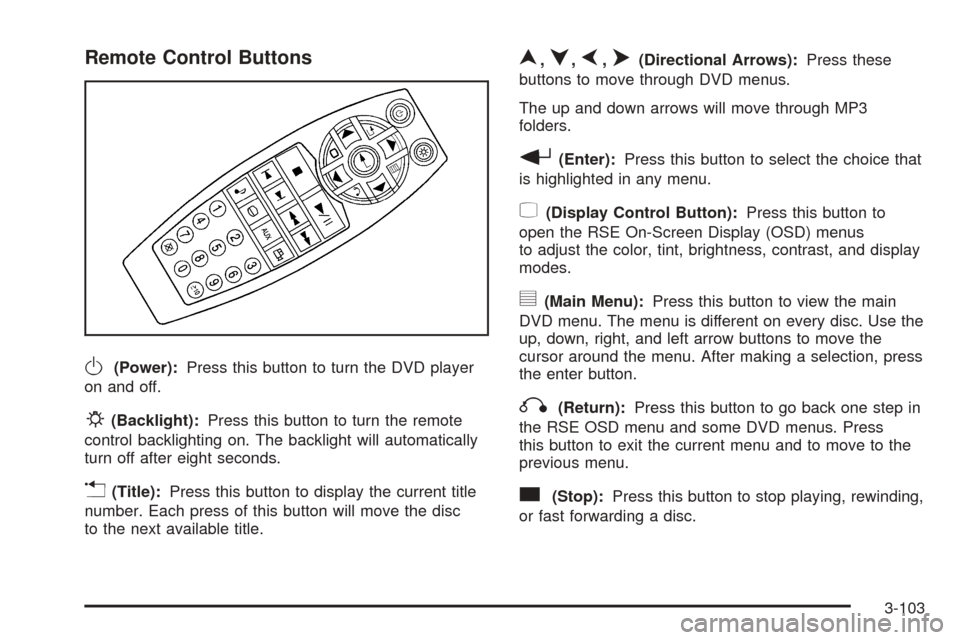
Remote Control Buttons
O(Power):Press this button to turn the DVD player
on and off.
P(Backlight):Press this button to turn the remote
control backlighting on. The backlight will automatically
turn off after eight seconds.
v(Title):Press this button to display the current title
number. Each press of this button will move the disc
to the next available title.
n,q,p,o(Directional Arrows):Press these
buttons to move through DVD menus.
The up and down arrows will move through MP3
folders.
r(Enter):Press this button to select the choice that
is highlighted in any menu.
z(Display Control Button):Press this button to
open the RSE On-Screen Display (OSD) menus
to adjust the color, tint, brightness, contrast, and display
modes.
y(Main Menu):Press this button to view the main
DVD menu. The menu is different on every disc. Use the
up, down, right, and left arrow buttons to move the
cursor around the menu. After making a selection, press
the enter button.
q(Return):Press this button to go back one step in
the RSE OSD menu and some DVD menus. Press
this button to exit the current menu and to move to the
previous menu.
c(Stop):Press this button to stop playing, rewinding,
or fast forwarding a disc.
3-103
Page 259 of 460
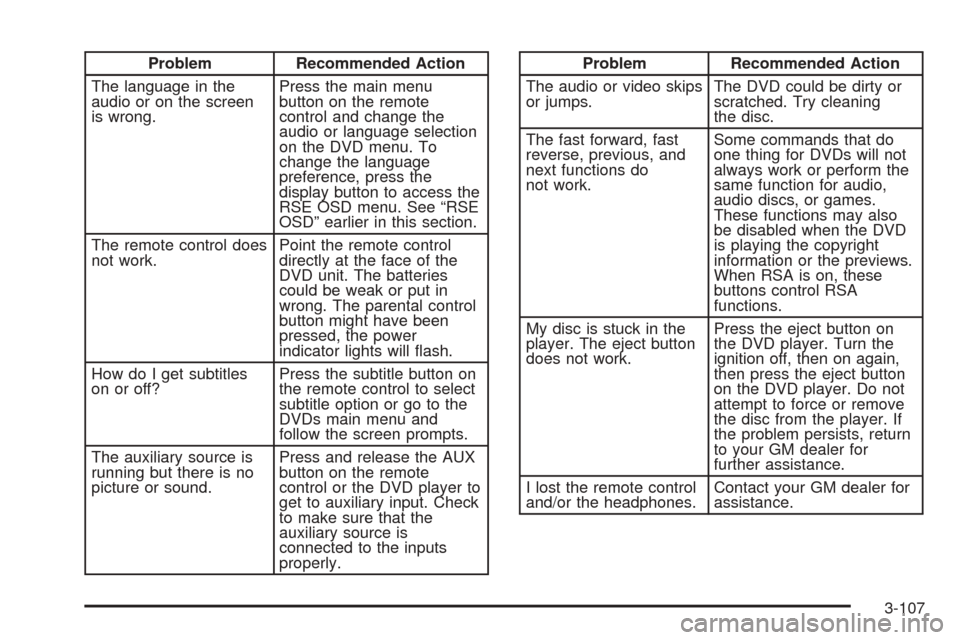
Problem Recommended Action
The language in the
audio or on the screen
is wrong.Press the main menu
button on the remote
control and change the
audio or language selection
on the DVD menu. To
change the language
preference, press the
display button to access the
RSE OSD menu. See “RSE
OSD” earlier in this section.
The remote control does
not work.Point the remote control
directly at the face of the
DVD unit. The batteries
could be weak or put in
wrong. The parental control
button might have been
pressed, the power
indicator lights will ash.
How do I get subtitles
on or off?Press the subtitle button on
the remote control to select
subtitle option or go to the
DVDs main menu and
follow the screen prompts.
The auxiliary source is
running but there is no
picture or sound.Press and release the AUX
button on the remote
control or the DVD player to
get to auxiliary input. Check
to make sure that the
auxiliary source is
connected to the inputs
properly.Problem Recommended Action
The audio or video skips
or jumps.The DVD could be dirty or
scratched. Try cleaning
the disc.
The fast forward, fast
reverse, previous, and
next functions do
not work.Some commands that do
one thing for DVDs will not
always work or perform the
same function for audio,
audio discs, or games.
These functions may also
be disabled when the DVD
is playing the copyright
information or the previews.
When RSA is on, these
buttons control RSA
functions.
My disc is stuck in the
player. The eject button
does not work.Press the eject button on
the DVD player. Turn the
ignition off, then on again,
then press the eject button
on the DVD player. Do not
attempt to force or remove
the disc from the player. If
the problem persists, return
to your GM dealer for
further assistance.
I lost the remote control
and/or the headphones.Contact your GM dealer for
assistance.
3-107
Page 261 of 460
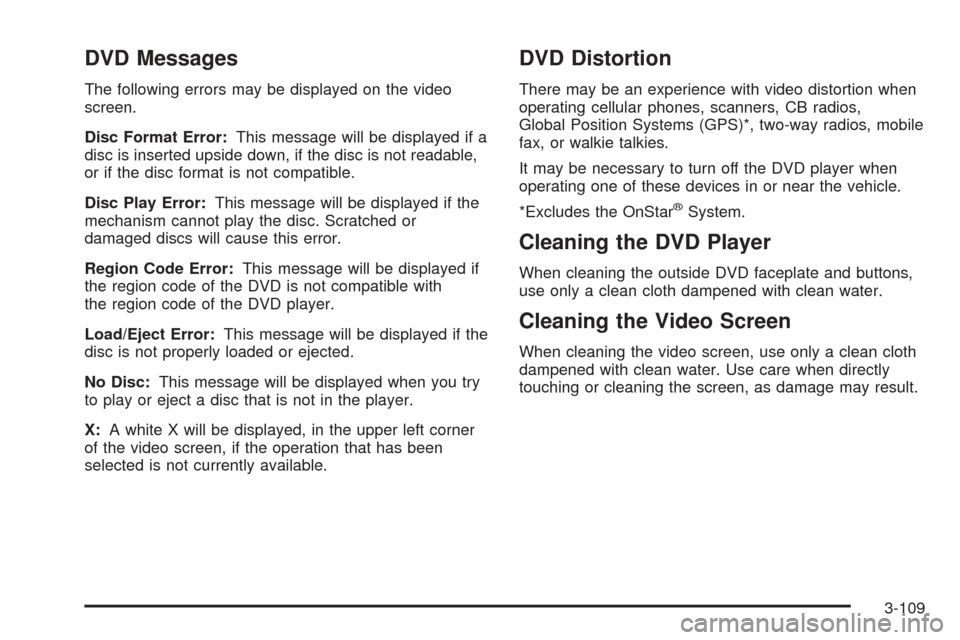
DVD Messages
The following errors may be displayed on the video
screen.
Disc Format Error:This message will be displayed if a
disc is inserted upside down, if the disc is not readable,
or if the disc format is not compatible.
Disc Play Error:This message will be displayed if the
mechanism cannot play the disc. Scratched or
damaged discs will cause this error.
Region Code Error:This message will be displayed if
the region code of the DVD is not compatible with
the region code of the DVD player.
Load/Eject Error:This message will be displayed if the
disc is not properly loaded or ejected.
No Disc:This message will be displayed when you try
to play or eject a disc that is not in the player.
X:A white X will be displayed, in the upper left corner
of the video screen, if the operation that has been
selected is not currently available.
DVD Distortion
There may be an experience with video distortion when
operating cellular phones, scanners, CB radios,
Global Position Systems (GPS)*, two-way radios, mobile
fax, or walkie talkies.
It may be necessary to turn off the DVD player when
operating one of these devices in or near the vehicle.
*Excludes the OnStar
®System.
Cleaning the DVD Player
When cleaning the outside DVD faceplate and buttons,
use only a clean cloth dampened with clean water.
Cleaning the Video Screen
When cleaning the video screen, use only a clean cloth
dampened with clean water. Use care when directly
touching or cleaning the screen, as damage may result.
3-109
Page 263 of 460
When a CD is playing, press the left arrow to go to the
start of the current track or to the previous track. Press
the right arrow to go to the next track on the CD. This
function is inactive if the front seat passengers are
listening to a CD.
PROG (Program):Press this button to select the next
preset station stored on the radio. Each press of
this button will take you to the next preset station. This
function is inactive if the front seat passengers are
listening to the radio.
When a CD is playing in the single CD player, press this
button to select the next track. This function is inactive if
the front seat passengers are listening to a CD.
When a CD is playing in the six-disc CD changer, press
this button to select the next CD, if multiple CDs are
loaded. This function is inactive if the front seat
passengers are listening to a CD.
SRCE (Source):Press this button to switch between
playing the AM/FM tuner, front CD player, and XM™
Satellite Radio Service (if equipped). If one of the
sources are not loaded, the system will skip over the
source when this button is pressed.
X(Headphone):Press the right or the left headphone
button to enable volume control of the wired headphone
connected to the corresponding jack. Press the right
and left arrow buttons to change the volume.
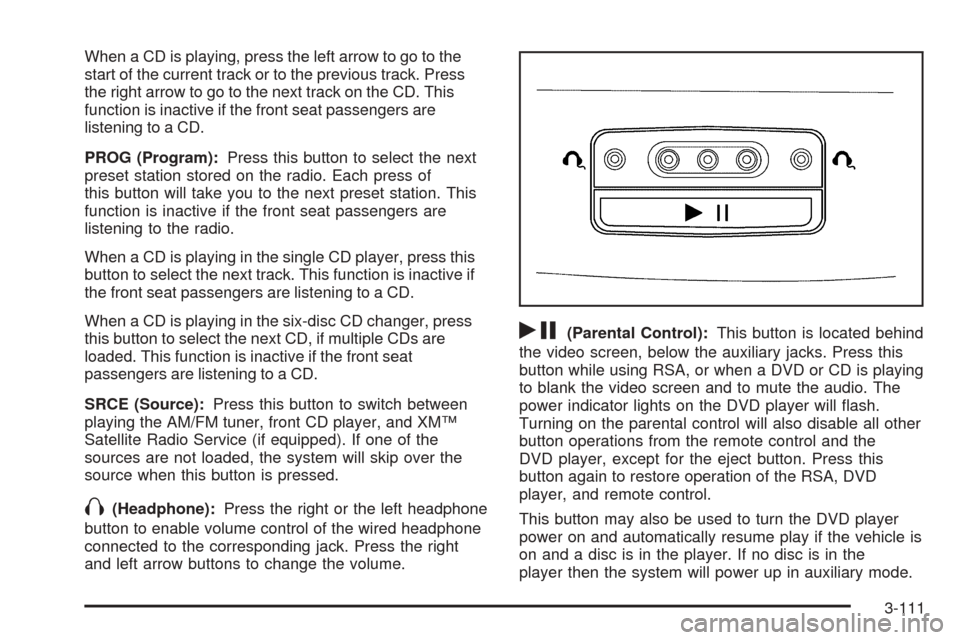
rj(Parental Control):This button is located behind
the video screen, below the auxiliary jacks. Press this
button while using RSA, or when a DVD or CD is playing
to blank the video screen and to mute the audio. The
power indicator lights on the DVD player will ash.
Turning on the parental control will also disable all other
button operations from the remote control and the
DVD player, except for the eject button. Press this
button again to restore operation of the RSA, DVD
player, and remote control.
This button may also be used to turn the DVD player
power on and automatically resume play if the vehicle is
on and a disc is in the player. If no disc is in the
player then the system will power up in auxiliary mode.
3-111
Page 265 of 460
BAND:Press this button to switch between FM1, FM2,
AM, or XM1 or XM2 (if equipped).
1-6:Press this button to scan the stations that are
programmed on the radio preset pushbuttons. The radio
will go to the next preset station stored on the
pushbuttons, play for a few seconds, then go on to the
next preset station. Press this button again to stop
scanning. The radio will only scan preset stations with a
strong signal that are in the selected band.
$(Mute):Press this button to silence the system.
Press this button again, to turn the sound on.
r(Play):When listening to the radio, press this
button to play a cassette tape or CD.
wux(Volume):Press the up or down arrow to
increase or decrease the volume.
Radio Reception
AM
The range for most AM stations is greater than for FM,
especially at night. The longer range can cause
station frequencies to interfere with each other. Static
can occur on AM stations caused by things like
storms and power lines. Try reducing the treble to
reduce this noise.
FM Stereo
FM stereo will give the best sound, but FM signals will
reach only about 10 to 40 miles (16 to 65 km). Tall
buildings or hills can interfere with FM signals, causing
the sound to fade in and out.
XM™ Satellite Radio Service
XM™ Satellite Radio Service gives digital radio
reception from coast to coast. Just as with FM, tall
buildings or hills can interfere with satellite radio signals,
causing the sound to fade in and out. The radio may
display NO SIGNAL to indicate interference.
3-113
Page 402 of 460
Cleaning the Inside of Your Vehicle
Your vehicle’s interior will continue to look its best if
it is cleaned often. Although not always visible, dust and
dirt can accumulate on your upholstery. Dirt can
damage carpet, fabric, leather, and plastic surfaces.
Regular vacuuming is recommended to remove particles
from your upholstery. It is important to keep your
upholstery from becoming and remaining heavily soiled.
Soils should be removed as quickly as possible. Your
vehicle’s interior may experience extremes of heat
that could cause stains to set rapidly.
Lighter colored interiors may require more frequent
cleaning. Use care because newspapers and garments
that transfer color to your home furnishings may also
transfer color to your vehicle’s interior.
When cleaning your vehicle’s interior, only use cleaners
specically designed for the surfaces being cleaned.
Permanent damage may result from using cleaners on
surfaces for which they were not intended. Use glass
cleaner only on glass. Remove any accidental over-spray
from other surfaces immediately. To prevent over-spray,
apply cleaner directly to the cleaning cloth.Notice:If you use abrasive cleaners when cleaning
glass surfaces on your vehicle, you could scratch
the glass and/or cause damage to the rear window
defogger. When cleaning the glass on your
vehicle, use only a soft cloth and glass cleaner.
Many cleaners contain solvents that may become
concentrated in your vehicle’s breathing space. Before
using cleaners, read and adhere to all safety
instructions on the label. While cleaning your vehicle’s
interior, maintain adequate ventilation by opening
your vehicle’s doors and windows.
Dust may be removed from small buttons and knobs
using a small brush with soft bristles.
Your GM dealer has a product for cleaning your
vehicle’s glass. Should it become necessary, you can
also obtain a product from your GM dealer to remove
odors from your vehicle’s upholstery.
5-86