tow CHEVROLET UPLANDER 2006 User Guide
[x] Cancel search | Manufacturer: CHEVROLET, Model Year: 2006, Model line: UPLANDER, Model: CHEVROLET UPLANDER 2006Pages: 458, PDF Size: 3.19 MB
Page 126 of 458
To program the new key, do the following:
1. Verify the new key has PK3 stamped on it.
2. Insert the original, already programmed key into the
ignition lock cylinder and start the engine. If the
engine will not start, see your dealer for service.
3. After the engine has started, turn the key to OFF
and remove the key.
4. Insert the key to be programmed and turn it to RUN
within 10 seconds of removing the previous key.
5. The security message will turn off once the key has
been programmed. It may not be apparent that the
security message went on due to how quickly
the key is programmed.
6. Repeat Steps 1 through 4 if additional keys are to
be programmed.
If you are ever driving and the security message comes
on and stays on, you will be able to restart your
engine if you turn it off. Your PASS-Key
®III system,
however, is not working properly and must be serviced
by your dealer. Your vehicle is not protected by the
PASS-Key
®III system at this time.
If you lose or damage a PASS-Key
®III key, see your
dealer or a locksmith who can service PASS-Key®III to
have a new key made.
Starting and Operating Your
Vehicle
New Vehicle Break-In
Notice:Your vehicle does not need an elaborate
break-in. But it will perform better in the long run if
you follow these guidelines:
Do not drive at any one constant speed, fast or
slow, for the rst 500 miles (805 km). Do not
make full-throttle starts. Avoid downshifting to
brake, or slow, the vehicle.
Avoid making hard stops for the rst 200 miles
(322 km) or so. During this time your new
brake linings are not yet broken in. Hard stops
with new linings can mean premature wear
and earlier replacement. Follow this breaking-in
guideline every time you get new brake
linings.
Do not tow a trailer during break-in. SeeTowing
a Trailer on page 4-37for the trailer towing
capabilities of your vehicle and more
information.
Following break-in, engine speed and load can be
gradually increased.
2-30
ProCarManuals.com
Page 130 of 458
Automatic Transaxle Operation
Maximum engine speed is limited when the vehicle is in
PARK (P) or NEUTRAL (N), to protect driveline
components from improper operation.
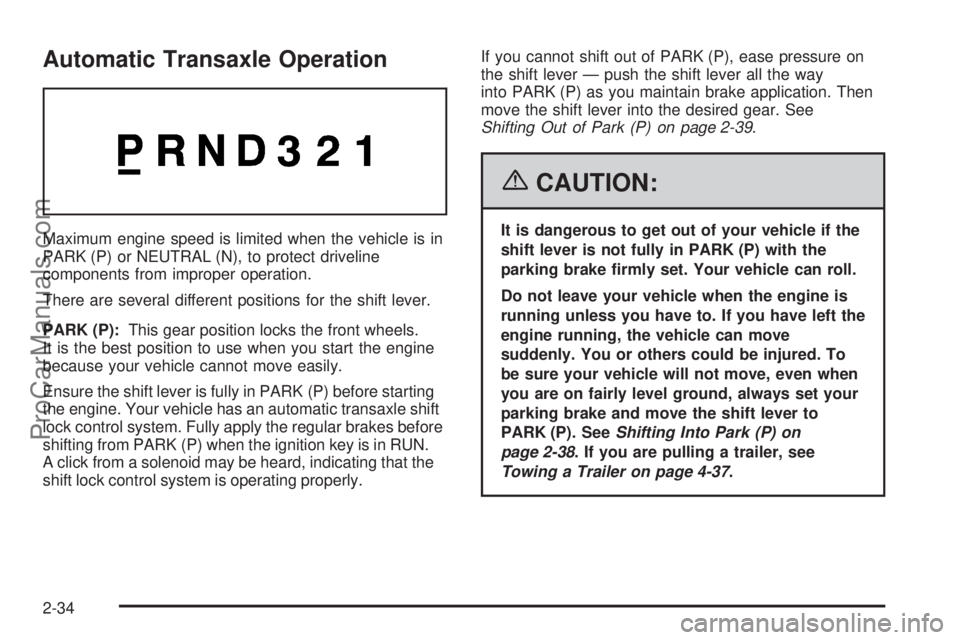
There are several different positions for the shift lever.
PARK (P):This gear position locks the front wheels.
It is the best position to use when you start the engine
because your vehicle cannot move easily.
Ensure the shift lever is fully in PARK (P) before starting
the engine. Your vehicle has an automatic transaxle shift
lock control system. Fully apply the regular brakes before
shifting from PARK (P) when the ignition key is in RUN.
A click from a solenoid may be heard, indicating that the
shift lock control system is operating properly.If you cannot shift out of PARK (P), ease pressure on
the shift lever — push the shift lever all the way
into PARK (P) as you maintain brake application. Then
move the shift lever into the desired gear. See
Shifting Out of Park (P) on page 2-39.
{CAUTION:
It is dangerous to get out of your vehicle if the
shift lever is not fully in PARK (P) with the
parking brake rmly set. Your vehicle can roll.
Do not leave your vehicle when the engine is
running unless you have to. If you have left the
engine running, the vehicle can move
suddenly. You or others could be injured. To
be sure your vehicle will not move, even when
you are on fairly level ground, always set your
parking brake and move the shift lever to
PARK (P). SeeShifting Into Park (P) on
page 2-38. If you are pulling a trailer, see
Towing a Trailer on page 4-37.
2-34
ProCarManuals.com
Page 131 of 458
REVERSE (R):Use this gear to back up.
Notice:Shifting to REVERSE (R) while your vehicle
is moving forward could damage the transaxle.
The repairs would not be covered by your warranty.
Shift to REVERSE (R) only after your vehicle is
stopped.
To rock your vehicle back and forth to get out of snow,
ice or sand without damaging your transaxle, seeIf
Your Vehicle is Stuck in Sand, Mud, Ice or Snow
on page 4-29.
NEUTRAL (N):In this position, the engine does not
connect with the wheels. To restart the vehicle when it
is already moving, use NEUTRAL (N) only. Also,
use NEUTRAL (N) when your vehicle is being towed.
{CAUTION:
Shifting into a drive gear while your engine is
running at high speed is dangerous. Unless
your foot is rmly on the brake pedal, your
vehicle could move very rapidly. You could
lose control and hit people or objects. Do not
shift into a drive gear while your engine is
running at high speed.Notice:Shifting out of PARK (P) or NEUTRAL (N)
while the engine is running at high speed may
damage the transaxle. The repairs would not be
covered by your warranty. Be sure the engine is not
running at high speeds when shifting your vehicle.
AUTOMATIC OVERDRIVE (D):This position is for
normal driving. If you need more power for passing, and
you are:
Going less than 35 mph (55 km/h), push the
accelerator pedal about halfway down.
Going about 35 mph (55 km/h) or more, push the
accelerator all the way down.
The vehicle will shift down to the next gear and have
more power.
Notice:If your vehicle seems to start up rather
slowly or not shift gears when you go faster, and
you continue to drive your vehicle that way, you
could damage the transaxle. Have your vehicle
serviced right away. You can drive in SECOND (2)
when you are driving less than 35 mph (55 km/h) and
AUTOMATIC OVERDRIVE (D) for higher speeds
until then.
2-35
ProCarManuals.com
Page 132 of 458
Warm-Up Shift
Your vehicle has a computer controlled transaxle
designed to warm up the engine faster when the outside
temperature is 35°F (2°C) or colder. You may notice
that the transaxle will shift at a higher vehicle speed until
the engine is warmed up. This is a normal condition
designed to provide heat to the passenger compartment
and defrost the windows more quickly. SeeClimate
Control System on page 3-24for more information.
THIRD (3):This position is also used for normal driving,
but it offers more power and lower fuel economy than
AUTOMATIC OVERDRIVE (D).
Here are some times you might choose THIRD (3)
instead of AUTOMATIC OVERDRIVE (D):
When driving on hilly, winding roads
When towing a trailer, so there is less shifting
between gears
When going down a steep hill
SECOND (2):This position gives you more power but
lower fuel economy than THIRD (3). You can use
SECOND (2) on hills. It can help control the vehicles
speed while going down steep mountain roads, but then
you would also want to use the brakes off and on.Notice:Driving in SECOND (2) for more than
25 miles (40 km) or at speeds over 55 mph (90 km/h)
may damage the transaxle. Also, shifting into
SECOND (2) at speeds above 65 mph (105 km/h) can
cause damage. Drive in THIRD (3) or AUTOMATIC
OVERDRIVE (D) instead of SECOND (2).
Notice:If your vehicle seems to start up rather
slowly, or if it seems not to shift gears as you go
faster, something may be wrong with a transaxle
system sensor. If you drive very far that way, your
vehicle can be damaged. So, if this happens,
have your vehicle serviced right away. Until then,
you can use SECOND (2) when you are driving less
than 35 mph (55 km/h) and THIRD (3) for higher
speeds.
FIRST (1):This position gives you even more power
but lower fuel economy than SECOND (2). You can use
it on very steep hills, or in deep snow or mud. If the
shift lever is put in FIRST (1), the transaxle will
not downshift into rst gear until the vehicle is going
slow enough.
Notice:Spinning the tires or holding the vehicle in
one place on a hill using only the accelerator
pedal may damage the transaxle. If you are stuck,
do not spin the tires. When stopping on a hill,
use the brakes, or parking brake to hold the vehicle
in place.
2-36
ProCarManuals.com
Page 133 of 458
Parking Brake
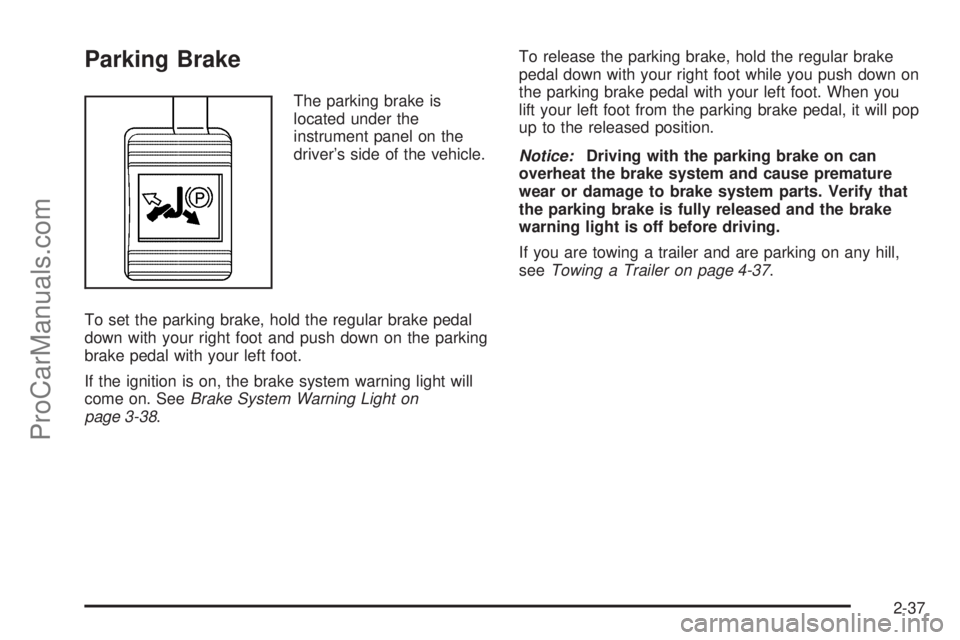
The parking brake is
located under the
instrument panel on the
driver’s side of the vehicle.
To set the parking brake, hold the regular brake pedal
down with your right foot and push down on the parking
brake pedal with your left foot.
If the ignition is on, the brake system warning light will
come on. SeeBrake System Warning Light on
page 3-38.To release the parking brake, hold the regular brake
pedal down with your right foot while you push down on
the parking brake pedal with your left foot. When you
lift your left foot from the parking brake pedal, it will pop
up to the released position.
Notice:Driving with the parking brake on can
overheat the brake system and cause premature
wear or damage to brake system parts. Verify that
the parking brake is fully released and the brake
warning light is off before driving.
If you are towing a trailer and are parking on any hill,
seeTowing a Trailer on page 4-37.
2-37
ProCarManuals.com
Page 134 of 458
Shifting Into Park (P)
{CAUTION:
It can be dangerous to get out of your vehicle
if the shift lever is not fully in PARK (P) with
the parking brake rmly set. Your vehicle can
roll. If you have left the engine running, the
vehicle can move suddenly. You or others
could be injured. To be sure your vehicle will
not move, even when you are on fairly level
ground, use the steps that follow. If you are
pulling a trailer, seeTowing a Trailer on
page 4-37.
1. Hold the brake pedal down with your right foot and
set the parking brake with your left foot.
2. Move the shift lever into PARK (P) by pulling the
shift lever toward you and moving it up as far as it
will go.
3. Turn the ignition key to LOCK.
4. Remove the key and take it with you. If you can
leave your vehicle with the ignition key in your
hand, your vehicle is in PARK (P).
Leaving Your Vehicle With the Engine
Running
{CAUTION:
It can be dangerous to leave your vehicle with
the engine running. Your vehicle could move
suddenly if the shift lever is not fully in
PARK (P) with the parking brake rmly set.
And, if you leave the vehicle with the engine
running, it could overheat and even catch re.
You or others could be injured. Do not leave
your vehicle with the engine running.
If you have to leave your vehicle with the engine
running, be sure your vehicle is in PARK (P) and the
parking brake is rmly set before you leave it. After you
move the shift lever into PARK (P), hold the regular
brake pedal down. Then, see if you can move the shift
lever away from PARK (P) without rst pulling it
toward you. If you can, it means that the shift lever was
not fully locked into PARK (P).
2-38
ProCarManuals.com
Page 137 of 458
{CAUTION:
It can be dangerous to get out of your vehicle
if the shift lever is not fully in PARK (P) with
the parking brake rmly set. Your vehicle can
roll. Do not leave your vehicle when the engine
is running unless you have to. If you have left
the engine running, the vehicle can move
suddenly. You or others could be injured. To
be sure your vehicle will not move, even when
you are on fairly level ground, always set your
parking brake and move the shift lever to
PARK (P).
Follow the proper steps to be sure your vehicle will not
move. SeeShifting Into Park (P) on page 2-38.
If you are pulling a trailer, seeTowing a Trailer on
page 4-37.
Mirrors
Outside Power Mirrors
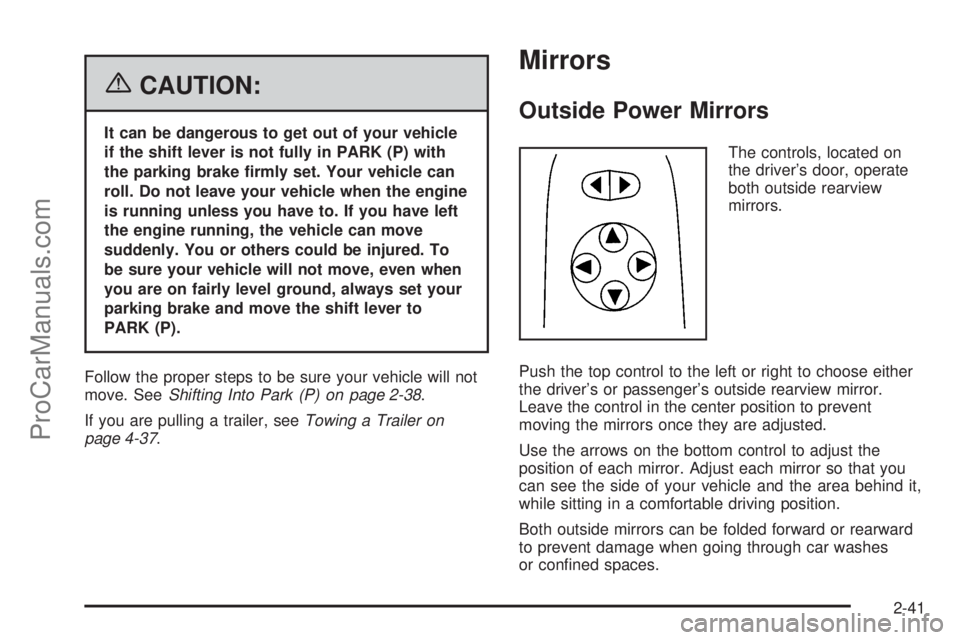
The controls, located on
the driver’s door, operate
both outside rearview
mirrors.
Push the top control to the left or right to choose either
the driver’s or passenger’s outside rearview mirror.
Leave the control in the center position to prevent
moving the mirrors once they are adjusted.
Use the arrows on the bottom control to adjust the
position of each mirror. Adjust each mirror so that you
can see the side of your vehicle and the area behind it,
while sitting in a comfortable driving position.
Both outside mirrors can be folded forward or rearward
to prevent damage when going through car washes
or conned spaces.
2-41
ProCarManuals.com
Page 144 of 458
Reprogramming a Single Universal
Home Remote Button
To program a device to Universal Home Remote using
a Universal Home Remote button previously trained,
follow these steps:
1. Press and hold the desired Universal Home
Remote button. Do not release the button.
2. The indicator light will begin to ash after
20 seconds. While still holding the Universal Home
Remote button, proceed with Step 2 under
“Programming Universal Home Remote” shown
earlier in this section.
For additional information on Universal Home Remote,
seeCustomer Assistance Offices on page 7-4.
Storage Areas
Your vehicle’s large carrying capacity can store many
items. If the vehicle has an extended wheelbase, it can
carry even larger items. The oor pins that are used
to attach the seats, can be used to secure larger loads.
There may be additional storage areas behind the
seats. Pull the lid towards you to open the storage.
Glove Box
If the glove box has a lock, put your key into the lock
and turn the key counterclockwise. To open the
glove box, pull the latch release.
The glove box door has a detent to prevent the door
from lowering too far. Open the glove box until the door
is partway open, then pull the door down if you need
it fully opened.
To close the glove box, the door must be pushed up
past the detent. To lock the glove box, put your key into
the lock and turn the key clockwise.
Cupholder(s)
There are cupholders located below the center
instrument panel switchbank. The cupholders have a
rubber liner that can be removed, so that larger cups can
t into the cupholders. You can also remove the liner
to clean it.
To use the cupholders, pull the tray out. Push the tray
back when not in use.
Your vehicle may be equipped with cupholders in the
second row.
2-48
ProCarManuals.com
Page 149 of 458
Convenience Net (Without Rear
Convenience Center)
Your vehicle may have a convenience net. The
convenience net is designed to help keep small loads,
like grocery bags, from falling over. Install the
convenience net at the rear of your vehicle, inside
the liftgate.
To use the convenience net, do the following:
1. Attach the upper loops to the posts on both sides of
the liftgate opening. The label on the net should be
in the upper left corner.
2. Attach the lower hooks to the metal rings
on the oor.
3. Once you have loaded items into the net, stretch
the higher side of the net up and over the top of
the load to hold it rmly in place.
The convenience net has a maximum capacity of
100 lbs (45 kg). It is not designed to hold larger, heavier
loads. Store such loads on the oor of your vehicle,
as far forward as you can.
When not in use, it is recommended that you take down
the convenience net to extend the life of the net and
to help retain its elasticity, and to keep the rear
exit clear.
Convenience Center
{CAUTION:
If any removable convenience item is not
secured properly, it can move around in a
collision or sudden stop. People in the vehicle
could be injured. Be sure to secure any such
item properly.
Your vehicle may have a convenience center. It provides
extra storage space for the rear of the vehicle.
To open the convenience center, pull up on the door
latch located on the front of the cover. The convenience
center cover has two automatic prop rods to hold it
up and in place.
To close the convenience center cover, you must pull
one of the prop rod linkages toward you while holding
onto the door latch and lower the convenience
center cover to close it.
2-53
ProCarManuals.com
Page 158 of 458
Turn and Lane-Change Signals
The turn signal has two upward (for right) and
two downward (for left) positions. These positions
allow you to signal a turn or a lane change.
To signal a turn, move the lever all the way up or down.
When the turn is nished, the lever will return
automatically.
An arrow on the instrument
panel cluster will ash in
the direction of the
turn or lane change.
To signal a lane change, just raise or lower the lever
until the arrow starts to ash. Hold it there until you
complete your lane change. The lever will return by itself
when you release it.
As you signal a turn or a lane change, if the arrow
ashes faster than normal, a signal bulb may be burned
out and other drivers will not see your turn signal.
If a bulb is burned out, replace it to help avoid an
accident. If the arrows do not go on at all when you
signal a turn, check for burned-out bulbs and check the
fuse. SeeBulb Replacement on page 5-45andFuses
and Circuit Breakers on page 5-94.If you have a trailer towing option with added wiring for
the trailer lamps, the signal indicator will ash at a
normal rate even if a turn signal bulb is burned
out. Check the front and rear turn signal lamps regularly
to make sure they are working.
Turn Signal On Chime
If either turn signal is left on for more than 3/4 mile
(1.2 km), a chime will sound to let the driver know to
turn it off. If you need to leave the signal on for more
than 3/4 mile (1.2 km), turn off the signal and then
turn it back on.
Headlamp High/Low-Beam Changer
To change the headlamps from low beam to high
beam, push the turn signal/multifunction lever away
from you.
When the high beams are
on, this light will appear on
the instrument panel
cluster.
To change the headlamps from high beam to low beam,
pull the turn signal/multifunction lever toward you.
3-8
ProCarManuals.com