display CHEVROLET UPLANDER 2006 Manual PDF
[x] Cancel search | Manufacturer: CHEVROLET, Model Year: 2006, Model line: UPLANDER, Model: CHEVROLET UPLANDER 2006Pages: 458, PDF Size: 3.19 MB
Page 265 of 458
Radio Reception
You may experience frequency interference and static
during normal radio reception if items such as cellphone
chargers, vehicle convenience accessories, and
external electronic devices are plugged into the
accessory power outlet. If there is interference or static,
unplug the item from the accessory power outlet.
AM
The range for most AM stations is greater than for FM,
especially at night. The longer range can cause
station frequencies to interfere with each other. For
better radio reception, most AM radio stations will boost
the power levels during the day, and then reduce
these levels during the night. Static can also occur when
things like storms and power lines interfere with radio
reception. When this happens, try reducing the treble on
your radio.
FM Stereo
FM stereo will give the best sound, but FM signals will
reach only about 10 to 40 miles (16 to 65 km). Tall
buildings or hills can interfere with FM signals, causing
the sound to fade in and out.
XM™ Satellite Radio Service
XM™ Satellite Radio Service gives digital radio
reception from coast-to-coast in the 48 contiguous
United States, and in Canada (if available). Just as with
FM, tall buildings or hills can interfere with satellite
radio signals, causing the sound to fade in and out. In
addition, traveling or standing under heavy foliage,
bridges, garages, or tunnels may cause loss of the XM™
signal for a period of time. The radio may display NO
SIGNAL to indicate interference.
Care of Your CDs and DVDs
Handle CDs carefully. Store them in their original cases
or other protective cases and away from direct
sunlight and dust. The CD player scans the bottom
surface of the disc. If the surface of a CD is damaged,
such as cracked, broken, or scratched, the CD will
not play properly or not at all. If the surface of a CD is
soiled, take a soft, lint free cloth or dampen a clean, soft
cloth in a mild, neutral detergent solution mixed with
water, and clean it. Make sure the wiping process starts
from the center to the edge.
Do not touch the bottom side of a CD while handling it;
this could damage the surface. Pick up CDs by
grasping the outer edges or the edge of the hole and
the outer edge.
3-115
ProCarManuals.com
Page 266 of 458
Care of the CD and DVD Player
The use of CD lens cleaners for CDs is not advised,
due to the risk of contaminating the lens of the CD optics
with lubricants internal to the CD mechanism.
Fixed Mast Antenna
The xed mast antenna can withstand most car washes
without being damaged. If the mast should ever
become slightly bent, straighten it out by hand. If the
mast is badly bent, replace it.
Check occasionally to make sure the mast is still
tightened to the antenna base located on the hood of
the vehicle. If tightening is required, tighten by hand.
XM™ Satellite Radio Antenna
System
The XM™ Satellite Radio antenna is located on the roof
of your vehicle. Keep this antenna clear of snow and
ice build up for clear radio reception.
Loading items onto the roof of your vehicle can interfere
with the performance of the XM™ system. Make sure
that the XM™ satellite antenna is not obstructed.
Chime Level Adjustment
The radio is used to adjust the vehicle’s chime level.
To change the volume level of the chime, press and hold
pushbutton 6 with the ignition on and the radio power
off. The volume level will change from the normal
level to loud, and LOUD will appear on the radio display.
To change back to the default or normal setting,
press and hold pushbutton 6 again. The volume level
will change from the loud level to normal, and NORMAL
will appear on the radio display. Removing the radio
and not replacing it with a factory radio or chime module
will disable vehicle chimes.
3-116
ProCarManuals.com
Page 275 of 458
When this warning message is on, the TRACTION
CONTROL OFF message in the DIC will come on to
remind you that the system will not limit wheel spin.
Adjust your driving accordingly.
The traction control system automatically comes on
whenever you start your vehicle. To limit wheel
spin, especially in slippery road conditions, you should
always leave the system on. But you can turn the
traction control system off if you ever need to. You
should turn the system off if your vehicle ever gets
stuck in sand, mud or snow and rocking the vehicle is
required. SeeRocking Your Vehicle to Get It Out
on page 4-30andIf Your Vehicle is Stuck in Sand, Mud,
Ice or Snow on page 4-29.
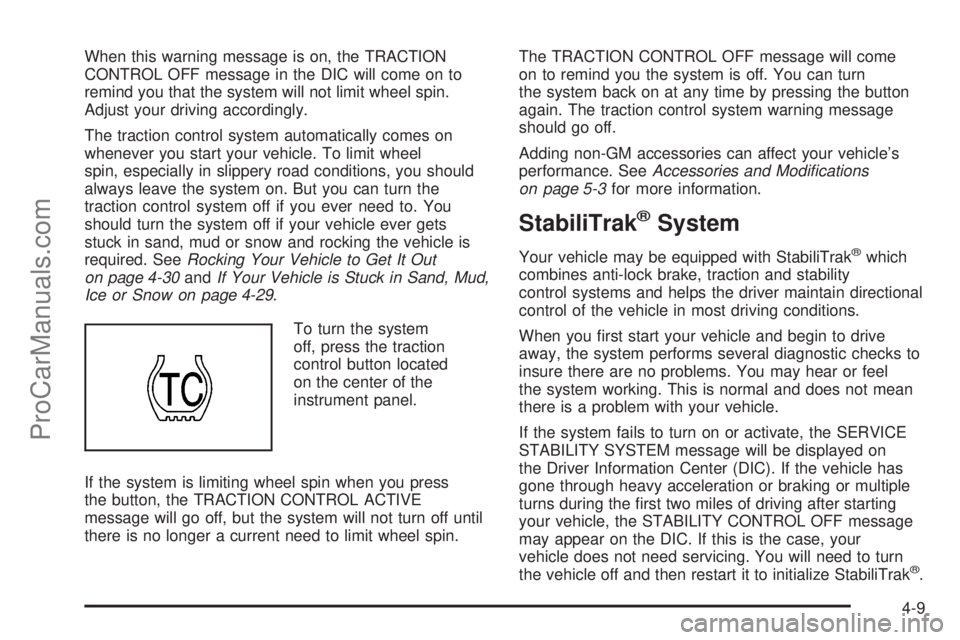
To turn the system
off, press the traction
control button located
on the center of the
instrument panel.
If the system is limiting wheel spin when you press
the button, the TRACTION CONTROL ACTIVE
message will go off, but the system will not turn off until
there is no longer a current need to limit wheel spin.The TRACTION CONTROL OFF message will come
on to remind you the system is off. You can turn
the system back on at any time by pressing the button
again. The traction control system warning message
should go off.
Adding non-GM accessories can affect your vehicle’s
performance. SeeAccessories and Modications
on page 5-3for more information.
StabiliTrak®System
Your vehicle may be equipped with StabiliTrak®which
combines anti-lock brake, traction and stability
control systems and helps the driver maintain directional
control of the vehicle in most driving conditions.
When you rst start your vehicle and begin to drive
away, the system performs several diagnostic checks to
insure there are no problems. You may hear or feel
the system working. This is normal and does not mean
there is a problem with your vehicle.
If the system fails to turn on or activate, the SERVICE
STABILITY SYSTEM message will be displayed on
the Driver Information Center (DIC). If the vehicle has
gone through heavy acceleration or braking or multiple
turns during the rst two miles of driving after starting
your vehicle, the STABILITY CONTROL OFF message
may appear on the DIC. If this is the case, your
vehicle does not need servicing. You will need to turn
the vehicle off and then restart it to initialize StabiliTrak
®.
4-9
ProCarManuals.com
Page 276 of 458
If either message appears on the DIC, and your vehicle
has not gone through hard acceleration, braking or
multiple turns in the rst two miles of driving, your
vehicle should be taken in for service.
The STABILITY CONTROL ACTIVE message will appear
on the DIC only when the system is both on and
activated. It means that an advanced computer-controlled
system has come on to help your vehicle continue to go
in the direction in which you are steering. StabiliTrak
®
activates when the computer senses that your vehicle is
just starting to spin, as it might if you hit a patch of ice or
other slippery spot on the road. When the system
activates, you may hear a noise or feel a vibration in the
brake pedal. This is normal. When the STABILITY
CONTROL ACTIVE message is on, you should continue
to steer in the direction you want to go. The system is
designed to help you in bad weather or other difficult
driving situations by making the most of whatever road
conditions will permit. For more information on the
stability messages, seeDriver Information Center (DIC)
on page 3-46.
If the StabiliTrak
®system turns off, the traction control
system warning light will illuminate, and the STABILITY
CONTROL OFF message will appear on the DIC to
warn the driver that StabiliTrak
®is no longer available
to assist you with directional control of the vehicle.
Adjust your driving accordingly.To limit wheel spin and realize the full benets of the
stability enhancement system, you should normally
leave traction control on, but it may be necessary to turn
the system off if your vehicle is stuck in sand, mud,
ice or snow, and you want to “rock” your vehicle
to attempt to free it. SeeRocking Your Vehicle to Get It
Out on page 4-30andIf Your Vehicle is Stuck in
Sand, Mud, Ice or Snow on page 4-29.
Traction Control Operation
The traction control system is part of the StabiliTrak®
system. Traction control limits wheel spin by reducing
engine power to the wheels (engine speed
management) and by applying brakes.
The traction control system is enabled automatically
when you start your vehicle. It will activate and display
the TRACTION CONTROL ACTIVE message in the
DIC if it senses that one or both of the front wheels are
spinning or beginning to lose traction while driving.
If the brake traction-control system activates constantly or
if the brakes have heated up due to high-speed braking,
brake traction-control will be disabled and the TRACTION
CONTROL ACTIVE message will be displayed.
4-10
ProCarManuals.com
Page 321 of 458
{CAUTION:
If you spill fuel and then something ignites it,
you could be badly burned. Fuel can spray out
on you if you open the fuel cap too quickly.
This spray can happen if your tank is nearly
full, and is more likely in hot weather. Open
the fuel cap slowly and wait for any hiss noise
to stop. Then unscrew the cap all the way.
Be careful not to spill fuel. Do not top off or overll the
tank and wait a few seconds after you have nished
pumping before removing the nozzle. Clean fuel
from painted surfaces as soon as possible. See
Washing Your Vehicle on page 5-87.
When replacing the fuel cap, turn it clockwise until it
clicks. Make sure the cap is fully installed. The
diagnostic system can determine if the fuel cap has
been left off or improperly installed. This would allow fuel
to evaporate into the atmosphere. SeeMalfunction
Indicator Lamp on page 3-41.The CHECK GAS CAP message will be displayed in the
Driver Information Center (DIC) if the fuel cap is not
properly installed. SeeDIC Warnings and Messages on
page 3-53for more information.
{CAUTION:
If a re starts while you are refueling, do not
remove the nozzle. Shut off the ow of fuel by
shutting off the pump or by notifying the
station attendant. Leave the area immediately.
Notice:If you need a new fuel cap, be sure to get
the right type. Your dealer can get one for you.
If you get the wrong type, it may not t properly.
This may cause your malfunction indicator lamp to
light and may damage your fuel tank and emissions
system. SeeMalfunction Indicator Lamp on
page 3-41.
5-9
ProCarManuals.com
Page 331 of 458
How to Reset the Engine Oil Life
System
The Engine Oil Life System calculates when to change
your engine oil and lter based on vehicle use.
Anytime your oil is changed, reset the system so it can
calculate when the next oil change is required. If a
situation occurs where you change your oil prior to a
CHANGE OIL SOON message being turned on,
reset the system.
1. With the ignition key in RUN but the engine off,
repeatedly push the set/reset button until OIL is
displayed on the Driver Information Center (DIC).
2. Once OIL is displayed, push and hold the set/reset
button for ve seconds. The number will disappear
and be replaced by 100 (indicating 100% oil life
remaining).
3. Turn the key to LOCK.
If the CHANGE OIL SOON message comes back on
when you start your vehicle, the engine oil life system
has not reset. Repeat the procedure.
What to Do with Used Oil
Used engine oil contains certain elements that may be
unhealthy for your skin and could even cause cancer.
Do not let used oil stay on your skin for very long. Clean
your skin and nails with soap and water, or a good
hand cleaner. Wash or properly dispose of clothing or
rags containing used engine oil. See the manufacturer’s
warnings about the use and disposal of oil products.
Used oil can be a threat to the environment. If you
change your own oil, be sure to drain all the oil from the
lter before disposal. Never dispose of oil by putting it
in the trash, pouring it on the ground, into sewers, or into
streams or bodies of water. Instead, recycle it by
taking it to a place that collects used oil. If you have a
problem properly disposing of your used oil, ask
your dealer, a service station, or a local recycling center
for help.
5-19
ProCarManuals.com
Page 338 of 458
Radiator Pressure Cap
Notice:The radiator cap on your vehicle is a
pressure-type cap and must be tightly installed to
prevent coolant loss and possible engine damage
from overheating. Be sure the arrows on the cap line
up with the overow tube on the radiator ller neck.
SeeEngine Compartment Overview on page 5-12for
more information on location.
Engine Overheating
You will nd an engine coolant temperature gage on
your vehicle’s instrument panel. SeeEngine Coolant
Temperature Gage on page 3-40.
Your vehicle may also have an ENGINE COOLANT
HOT message displayed in the Driver Information
Center (DIC). SeeDIC Warnings and Messages on
page 3-53.
If Steam Is Coming From Your Engine
{CAUTION:
Steam from an overheated engine can burn you
badly, even if you just open the hood. Stay away
from the engine if you see or hear steam coming
from it. Just turn it off and get everyone away
from the vehicle until it cools down. Wait until
there is no sign of steam or coolant before you
open the hood.
If you keep driving when your engine is
overheated, the liquids in it can catch re. You
or others could be badly burned. Stop your
engine if it overheats, and get out of the vehicle
until the engine is cool.
SeeOverheated Engine Protection Operating
Mode on page 5-27for information on driving to
a safe place in an emergency.
Notice:If your engine catches re because you keep
driving with no coolant, your vehicle can be badly
damaged. The costly repairs would not be covered by
your warranty. SeeOverheated Engine Protection
Operating Mode on page 5-27for information on
driving to a safe place in an emergency.
5-26
ProCarManuals.com
Page 424 of 458
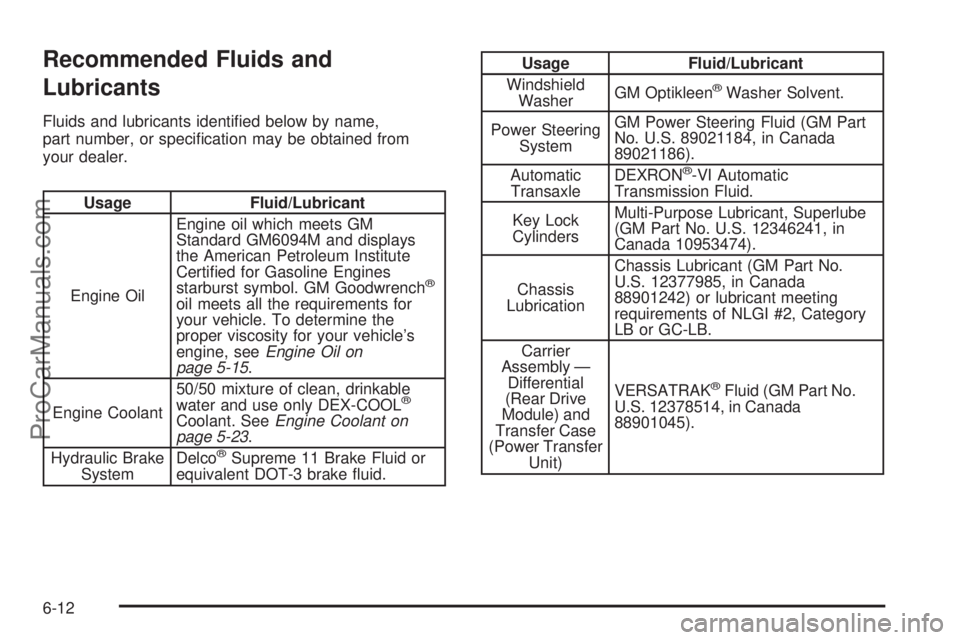
Recommended Fluids and
Lubricants
Fluids and lubricants identied below by name,
part number, or specication may be obtained from
your dealer.
Usage Fluid/Lubricant
Engine OilEngine oil which meets GM
Standard GM6094M and displays
the American Petroleum Institute
Certied for Gasoline Engines
starburst symbol. GM Goodwrench
®
oil meets all the requirements for
your vehicle. To determine the
proper viscosity for your vehicle’s
engine, seeEngine Oil on
page 5-15.
Engine Coolant50/50 mixture of clean, drinkable
water and use only DEX-COOL
®
Coolant. SeeEngine Coolant on
page 5-23.
Hydraulic Brake
SystemDelco
®Supreme 11 Brake Fluid or
equivalent DOT-3 brake uid.
Usage Fluid/Lubricant
Windshield
WasherGM Optikleen
®Washer Solvent.
Power Steering
SystemGM Power Steering Fluid (GM Part
No. U.S. 89021184, in Canada
89021186).
Automatic
TransaxleDEXRON
®-VI Automatic
Transmission Fluid.
Key Lock
CylindersMulti-Purpose Lubricant, Superlube
(GM Part No. U.S. 12346241, in
Canada 10953474).
Chassis
LubricationChassis Lubricant (GM Part No.
U.S. 12377985, in Canada
88901242) or lubricant meeting
requirements of NLGI #2, Category
LB or GC-LB.
Carrier
Assembly —
Differential
(Rear Drive
Module) and
Transfer Case
(Power Transfer
Unit)VERSATRAK
®Fluid (GM Part No.
U.S. 12378514, in Canada
88901045).
6-12
ProCarManuals.com
Page 448 of 458
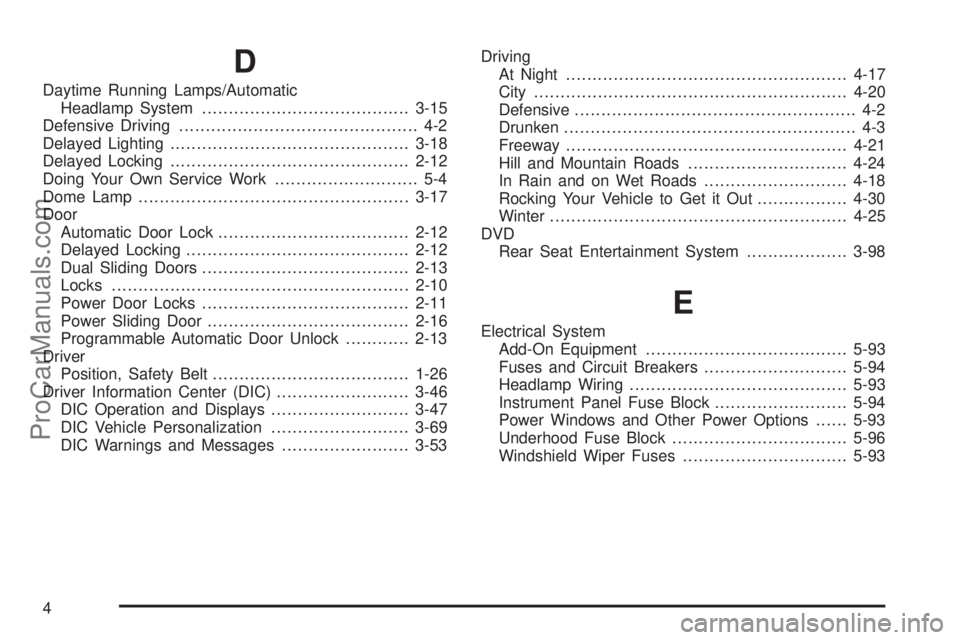
D
Daytime Running Lamps/Automatic
Headlamp System.......................................3-15
Defensive Driving............................................. 4-2
Delayed Lighting.............................................3-18
Delayed Locking.............................................2-12
Doing Your Own Service Work........................... 5-4
Dome Lamp...................................................3-17
Door
Automatic Door Lock....................................2-12
Delayed Locking..........................................2-12
Dual Sliding Doors.......................................2-13
Locks........................................................2-10
Power Door Locks.......................................2-11
Power Sliding Door......................................2-16
Programmable Automatic Door Unlock............2-13
Driver
Position, Safety Belt.....................................1-26
Driver Information Center (DIC).........................3-46
DIC Operation and Displays..........................3-47
DIC Vehicle Personalization..........................3-69
DIC Warnings and Messages........................3-53Driving
At Night.....................................................4-17
City...........................................................4-20
Defensive..................................................... 4-2
Drunken....................................................... 4-3
Freeway.....................................................4-21
Hill and Mountain Roads..............................4-24
In Rain and on Wet Roads...........................4-18
Rocking Your Vehicle to Get it Out.................4-30
Winter........................................................4-25
DVD
Rear Seat Entertainment System...................3-98
E
Electrical System
Add-On Equipment......................................5-93
Fuses and Circuit Breakers...........................5-94
Headlamp Wiring.........................................5-93
Instrument Panel Fuse Block.........................5-94
Power Windows and Other Power Options......5-93
Underhood Fuse Block.................................5-96
Windshield Wiper Fuses...............................5-93
4
ProCarManuals.com