remote start CHEVROLET UPLANDER 2007 1.G User Guide
[x] Cancel search | Manufacturer: CHEVROLET, Model Year: 2007, Model line: UPLANDER, Model: CHEVROLET UPLANDER 2007 1.GPages: 592, PDF Size: 3.04 MB
Page 268 of 592
REMOTE START DISABLED
If your vehicle has the remote start feature, this
message displays if a remote start attempt is
unsuccessful. This may be caused if any of the
following conditions are true when a remote
start attempt is made:
The remote start system is disabled through
the DIC.
The key is in the ignition.
The hood or the doors are not closed.
There is an emission control system
malfunction.
The engine coolant temperature is too high.
The oil pressure is low.
The hazard warning ashers are turned on.
The maximum number of remote starts
or remote start attempts between ignition
cycles has been reached.
The content theft-deterrent alarm is on while
attempting to remote start the vehicle.See “REMOTE START” underDIC Vehicle
Personalization (Uplevel Only) on page 275and
“Remote Vehicle Start” underRemote Keyless
Entry System Operation on page 121for
more information.
REMOTE START ON
If your vehicle has the remote start feature, this
message displays when a remote start is initiated.
See “Remote Vehicle Start” underRemote
Keyless Entry System Operation on page 121for
more information.
RIGHT FRONT TURN LAMP OUT
This message displays when the right front turn
signal bulb needs to be replaced. SeeHeadlamps
and Sidemarker Lamps on page 471.
This message displays while the ignition is in RUN.
Press any of the DIC buttons to acknowledge this
message and to clear it from the screen.
268
Page 275 of 592
DIC Vehicle Personalization
(Uplevel Only)
Your vehicle may have customization capabilities
that allow you to program certain features to
one preferred setting. Customization features can
only be programmed to one setting on the
vehicle and cannot be programmed to a preferred
setting for two different drivers. The customization
features include the following:
Exterior lighting delay
Interior lighting delay
Delayed locking
Content theft
Remote keyless entry feedback
Remote start
Rear park chime
Your vehicle may also have personalization
capabilities that allow you to program certain
features to a preferred setting for up to two drivers.
The rst personalized key corresponds to
driver 1 and the second personalized keycorresponds to driver 2. The driver number also
corresponds to the numbers, 1 or 2, on the back of
the remote keyless entry transmitters.
The personalization features include the following:
Radio station presets
Auto door unlock preferences
Remote keyless entry unlock preferences
All of the customization and personalization options
may not be available on your vehicle. Only the
options available will be displayed on your DIC.
The default settings for the customization and
personalization features were set when your
vehicle left the factory, but may have been
changed from their default setting since then.
The customization preferences are automatically
recalled.
The driver’s personalization preferences are
recalled by using the key programmed for
driver 1 or 2. The driver number also corresponds
to the numbers, 1 or 2, on the back of the
remote keyless entry transmitters.
To change customization and personalization
preferences, use the following procedure.
275
Page 280 of 592
FOB LOCK FEEDBACK
This feature allows you to select the type of
feedback you will receive when locking the vehicle
with the remote keyless entry transmitter.
Press the menu button until FOB LOCK
FEEDBACK appears on the DIC display. Press
the set/reset button to scroll through the following
choices:
OFF:There will be no feedback when locking the
vehicle.
LIGHTS:The exterior lamps will ash when you
press the lock button on the remote keyless
entry transmitter.
LIGHTS and HORN (default):The exterior lamps
will ash when you press the lock button on the
remote keyless entry transmitter, and the horn will
sound when the lock button is pressed again
within ve seconds of the previous command.
Choose one of the available settings and press the
menu button while it is displayed on the DIC to
select it and move on to the next feature.
REMOTE START
If your vehicle has remote start, this feature allows
the remote start to be turned OFF or ON. The
remote start feature allows you to start the engine
from outside of the vehicle using the remote
keyless entry transmitter. See “Remote Vehicle
Start” underRemote Keyless Entry System
Operation on page 121for more information.
Press the menu button until REMOTE START
appears on the DIC display. Press the set/reset
button to scroll through the following choices:
OFF:The remote start feature will be disabled.
ON (default):The remote start feature will
be enabled.
Choose one of the available settings and press
the menu button while it is displayed on the DIC to
select it and move on to the next feature.
REAR PARK CHIME
If your vehicle has the Ultrasonic Rear Parking
Assist (URPA) system, this feature allows
the URPA system’s chime to be turned OFF or
ON. SeeUltrasonic Rear Parking Assist (URPA)
on page 212for more information.
280
Page 295 of 592
tSEEKu:Press the left arrow to go to the
start of the current track if more than eight seconds
have played. Press the right arrow to go to the
start of the next track. If either arrow is held
or pressed more than once, the player continues
moving backward or forward through the CD.
BAND:Press this button to listen to the radio
when a CD is playing. The inactive CD remains
safely inside the radio for future listening.
CD AUX (Auxiliary):Press this button to play a
CD when listening to the radio. CD appears on the
display when a CD is in the player. If the system
has a remote playback device, pressing this button
a second time allows the remote device to play.
AUTO EQ (Automatic Equalization):Press
AUTO EQ to select the equalization setting while
playing a CD. The equalization is stored
whenever a CD is played. For more information on
AUTO EQ, see “AUTO EQ” listed previously in
this section.
X(Eject):Press this button to eject the CD.
EJECT may be activated with either the ignition or
radio off.
Playing a CD(s) (Six-Disc CD Player)
If the ignition or radio is turned off, with a CD in the
player, it stays in the player. When the ignition
or radio is turned on, the CD starts playing where
it stopped, if it was the last selected audio
source.
When a CD is inserted, the CD symbol appears
on the CD. As each new track starts to play,
the track number appears on the display.
The CD player can play the smaller 3 inch (8 cm)
single CDs with an adapter ring. Full-size CDs
and the smaller CDs are loaded in the same
manner.
If playing a CD-R, the sound quality (and playback
performance) may be reduced due to the CD-R
quality, method of recording, the quality of
the music that has been recorded, and the way
the CD-R has been handled. For better playback
performance when home burning audio discs,
use brand named CD media showing the Compact
Disc™, and a burn rate no faster than 12X.
295
Page 316 of 592
Playing a Disc
To play a disc, gently insert the disc, with the label
side up, into the loading slot. The DVD player
will continue loading the disc and the player will
automatically start if the vehicle is in
ACCESSORY, RUN, or RAP.
If a disc is already in the player, make sure that
the DVD player is on, then press the play/pause
button on the player faceplate or on the remote
control. You can also, press the CD AUX button on
the radio faceplate, until RSE appears on the
display, to start playing a disc.
Some DVDs will not allow fast forwarding or
skipping of the copyright information or previews.
Some DVDs will begin playing after the previews
have nished. If the DVD does not begin playing at
the main title, refer to the on-screen instructions.
Stopping and Resuming Playback
To stop playing a disc, press and release the stop
button on the DVD player faceplate or the
remote control.
To resume playback, press the play/pause button
on the DVD player faceplate or the remote control.
The movie should resume play from where it was
last stopped if the disc has not been ejected.
If the disc has been ejected, the disc will resume
play at the beginning of the disc.
Ejecting a Disc
Press the eject button on the DVD player
faceplate, when the disc is stopped, to eject the
disc. There is not an eject button on the
remote control.
If a disc is ejected from the player, but not
removed, the DVD player will reload the disc after
a short period of time.
316
Page 331 of 592
l(Fast Forward):Press this button to fast
forward the DVD and CD. To stop forwarding,
press the play or stop button. This button may not
work when the DVD is playing the copyright
information or the previews.
MENU (Disc):Press this button to view the main
DVD menu. The menu is different on every
disc. Use the up, down, right, and left arrow
buttons to move the cursor around the menu. After
making a selection, press the enter button.
r(Enter/Select):Press this button to select
the choice that is highlighted in any menu.
z(Display Control Button):For vehicles
without rear seat climate control, this button will
take the place of the fan/temp button. For vehicles
with rear seat climate control, this button is also
found on the remote control. Press this button
to open the RSE On-Screen Display (OSD) menus
to adjust the color, tint, brightness, contrast, and
display modes.
Playing a Disc
To play a disc, gently insert the disc, with the label
side up, into the loading slot. The DVD player
will continue loading the disc and the player will
automatically start if the vehicle is in
ACCESSORY, RUN, or RAP.
If a disc is already in the player, make sure that
the DVD player is on, then press the play/pause
button on the player faceplate or on the remote
control. You can also press the DVD AUX button
on the player faceplate, or the CD AUX button
on the radio faceplate until RSE appears on
the display, to start playing a disc.
Some DVDs will not allow fast forwarding or
skipping of the copyright information or previews.
Some DVDs will begin playing after the previews
have nished. If the DVD does not begin playing at
the main title, refer to the on-screen instructions.
331
Page 342 of 592
tr/[u(Tune):When listening to the
radio, press the right or the left arrow to go to the
next or the previous station and stay there.
This function is inactive if the front seat
passengers are listening to the radio.
When a CD is playing, press the left arrow to go
to the start of the current track or to the previous
track. Press the right arrow to go to the next
track on the CD. This function is inactive if the front
seat passengers are listening to a CD.
PROG (Program):Press this button to select the
next preset station stored on the radio. Each
press of this button will take you to the next preset
station. This function is inactive if the front seat
passengers are listening to the radio.
When a CD is playing in the single CD player,
press this button to select the next track.
This function is inactive if the front seat
passengers are listening to a CD.
When a CD is playing in the six-disc CD changer,
press this button to select the next CD, if
multiple CDs are loaded. This function is inactive if
the front seat passengers are listening to a CD.SRCE (Source):Press this button to switch
between playing the AM/FM tuner, front CD player,
and XM™ Satellite Radio Service (if equipped). If
one of the sources are not loaded, the system will
skip over the source when this button is pressed.
X(Headphone):Press the right or the left
headphone button to enable volume control of the
wired headphone connected to the corresponding
jack. Press the right and left arrow buttons to
change the volume.
rj(Parental Control):This button is located
behind the video screen, below the auxiliary jacks.
Press this button while using RSA, or when a
DVD or CD is playing to blank the video screen
and to mute the audio. The power indicator
lights on the DVD player will ash. Turning on the
parental control will also disable all other button
operations from the remote control and the
DVD player, except for the eject button. Press this
button again to restore operation of the RSA,
DVD player, and remote control.
This button may also be used to turn the DVD
player power on and automatically resume play if
the vehicle is on and a disc is in the player. If
no disc is in the player then the system will power
up in auxiliary mode.
342
Page 348 of 592
Selecting Your Mobile Digital Media as the
Active Source
Your radio and rear seat entertainment system
communicate with the GM Mobile Digital
Media system, as one compact unit that can be
accessed by everyone seated inside the vehicle.
The GM Mobile Digital Media system can hold
thousands of songs, hours of videos, and
hundreds of games.
To help use this system, see the following “Quick
Start” information:
Front seat driver and passenger, use the radio
and steering wheel controls to access the
music collection with PhatNoise Voice Index™
technology. The preset buttons can be used
to select the browsing category. The Next,
Previous, and Seek buttons can be used to
browse within a browsing category. Browse the
music collection by artist, album, genre, or
custom playlist as the system uses the voice
mode to announce these selections. See
“Using the GM Mobile Digital Media System
for Front Seat Audio Entertainment” later
in this manual.
Rear seat passengers, use the wireless DVD
remote control to navigate the menu displayed
on the overhead DVD video screen, then select
to play music, videos, or games. A dedicated
game controller is included with the Mobile
Digital Media package. See “Using the GM
Mobile Digital Media System for Rear Seat
Entertainment” later in this manual.
Your vehicle may have audio steering wheel
controls. Some audio controls can be adjusted at
the steering wheel. SeeAudio Steering Wheel
Controls on page 367in your owner manual.
If your vehicle has the OnStar
®/Mute audio
steering wheel control, read the following
instructions.
348
Page 354 of 592
Starting the System for Rear Seat
Entertainment
The GM Mobile Digital Media system is available
through the auxiliary mode of the DVD player.
To begin using the system, follow the instruction
list below:
1. Insert the DMS cartridge into the GM Mobile
Digital Media player.
2. Turn on your video screen by pressing the
power button.
3. Switch to the DMS mode by pressing the AUX
button.
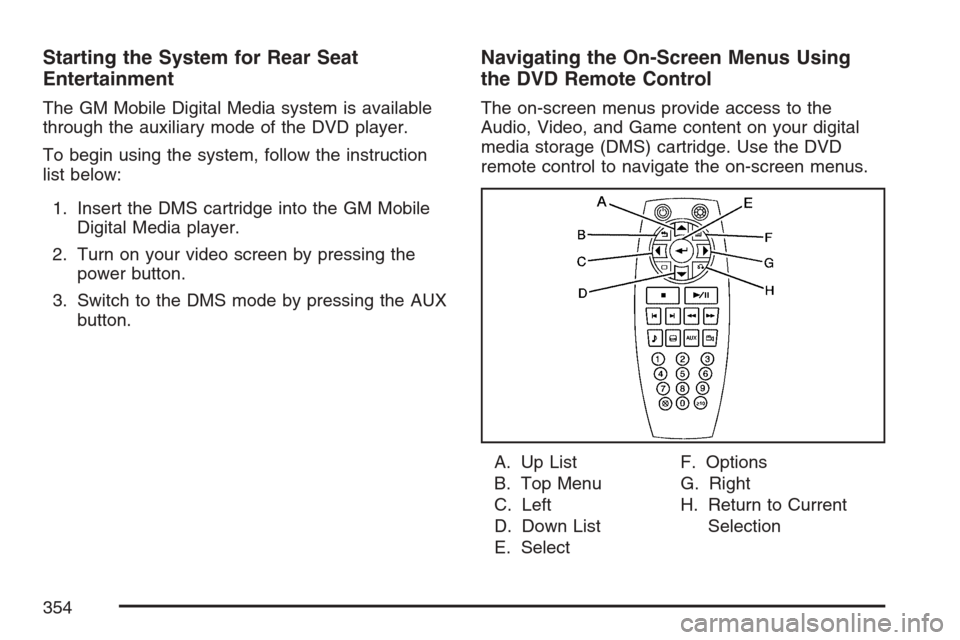
Navigating the On-Screen Menus Using
the DVD Remote Control
The on-screen menus provide access to the
Audio, Video, and Game content on your digital
media storage (DMS) cartridge. Use the DVD
remote control to navigate the on-screen menus.
A. Up List
B. Top Menu
C. Left
D. Down List
E. SelectF. Options
G. Right
H. Return to Current
Selection
354
Page 355 of 592
n,q,p,o(Up List, Down List, Right, and
Left Directional Arrows):For the GM Mobile
Digital Media system, press the up list or down list
directional arrows (A, D) to move the highlight
area up or down the list of items.
Press the right directional arrow (G) to go further
into the selected item, or press the left directional
arrow (C) to go back one menu level.
r(Enter/Select):For the GM Mobile Digital
Media system, press the enter/select button (E) to
go into any selected menu item.
v(Title/Top Menu):For the GM Mobile Digital
Media system, press the title/top menu button (B) to
jump to the start screen.
q(Return/Current Selection):For the GM
Mobile Digital Media system, if audio is playing or
in the pause mode, press the return/current
selection button (H) to go back to the current
selection.
y(Menu/Options):For the GM Mobile Digital
Media system, press the menu/options button (F)
to display the options list.
c(Stop):For the GM Mobile Digital Media
system, press this button to stop playback of the
selected option.
r/j(Play/Pause):For the GM Mobile Digital
Media system, press this button to start playback
of a selected option. Press this button while
an option is in the play mode to pause it. Press it
again to continue playback of the current
option.
DVD Remote Control Batteries
If the remote control does not seem to be working,
the batteries may need to be replaced. See
Remote Control, “Battery Replacement” in your
vehicle’s owner manual.
355