ECO mode CHEVROLET UPLANDER 2008 1.G User Guide
[x] Cancel search | Manufacturer: CHEVROLET, Model Year: 2008, Model line: UPLANDER, Model: CHEVROLET UPLANDER 2008 1.GPages: 476, PDF Size: 5.77 MB
Page 228 of 476
REDUCED POWER STOP WHEN SAFE
This message displays when your vehicle is in an
overheated engine operating mode. This operating mode
allows your vehicle to be driven to a safe place in an
emergency. In this mode, you will notice a signicant
loss in power and engine performance. SeeOverheated
Engine Protection Operating Mode on page 5-25for
more information. Anytime this message is on, the
vehicle should be taken to your dealer/retailer for
service as soon as possible.
This message displays and a chime sounds only
when the ignition is in ON/RUN. Press any of the
DIC buttons to acknowledge this message and to
clear it from the screen.
This message continues to display for two seconds
if it has not been acknowledged when the engine
is turned off. It also re-displays for two seconds if the
message has been acknowledged, but the condition
still exists when the engine is turned off.
If the condition still exists, the message re-appears
when the engine is turned on.
REMOTE START DISABLED
If your vehicle has the remote start feature, this message
displays if a remote start attempt is unsuccessful. This
may be caused if any of the following conditions are true
when a remote start attempt is made:
The remote start system is disabled through the DIC.
The key is in the ignition.
The hood or the doors are not closed.
There is an emission control system malfunction.
The engine coolant temperature is too high.
The oil pressure is low.
The hazard warning ashers are turned on.
The maximum number of remote starts or remote
start attempts between ignition cycles has been
reached.
The content theft-deterrent alarm is on while
attempting to remote start the vehicle.
See “REMOTE START” underDIC Vehicle
Personalization (Uplevel Only) on page 3-76and
“Remote Vehicle Start” underRemote Keyless Entry
(RKE) System Operation on page 2-5for more
information.
3-68
Page 237 of 476
Entering the Personal Program Menu
1. Turn the ignition on and place the vehicle in
PARK (P).
To avoid excessive drain on the battery, it is
recommended that the headlamps are turned off.
2. Press the menu button until PERSONAL
PROGRAM displays.
If the vehicle is not in PARK (P), PERSONAL
PROGRAM ONLY IN PARK will display.
If the vehicle is not able to enter the personal
program menu, PERSONAL PROGRAM NOT
AVAILABLE will display.
3. Press the set/reset button to begin.
4. The DIC will then display an instruction screen.
Press the menu button to display the modes that
are available to program.
Press the set/reset button to change the setting of
each mode.
Customization Menu Items
The following are customization features that allow you
to program settings to the vehicle:
FACTORY DEFAULTS
This feature allows you to set all of the customization
and personalization features back to their factory default
settings.
Press the menu button until FACTORY DEFAULTS
appears on the DIC display. Press the set/reset button
to scroll through the following choices:
NO (default):The customization and personalization
features will not be set to their factory default settings.
YES:The customization and personalization features
will be set to their factory default settings.
If YES is selected, the keys will need to be
personalized again to be recognized as key 1 or 2.
See “PERSONALIZE KEY” later in this section for
more information.
To select a setting and move on to the next feature,
press the menu button while the desired setting is
displayed on the DIC.
3-77
Page 247 of 476
Playing the Radio
Top Knob (Power/Volume):Press to turn the system
on and off. Turn clockwise or counterclockwise to
increase or to decrease the volume.
4(Information):For RDS, press to change what
displays while using RDS. The display options are
station name, RDS station frequency, PTY (program
type), and the name of the program (if available).
For XM™ (if equipped), press while in XM™ mode to
retrieve four different categories of information related
to the current song or channel: Artist, Song Title,
Category or PTY, Channel Number/Channel Name.
To change the default on the display, press until the
desired display appears, then hold for two seconds.
The radio produces one beep and the selected display
becomes the default.
AUTO
n(Automatic Volume):Automatic volume
adjusts the audio system automatically to make up
for road and wind noise while driving, by increasing
the volume as the vehicle speed increases.
Set the volume at the desired level. Press this button to
select AUTO VOLUME MIN (minimum), AUTO VOLUME
MED (medium), or AUTO VOLUME MAX (maximum).
Each higher setting provides more volume compensation
at faster vehicle speeds. To turn automatic volume off,
press this button until AUTO VOLUME OFF displays.MUTE:Press to silence the system. Press again to turn
the sound on.
This button is not available on the Radio with
Six-Disc CD.
Finding a Station
BAND:Press to switch between FM1, FM2, AM, or
XM1 or XM2 (if equipped). The selection displays.
O/e(Tune):Turn to select radio stations.
tSEEKu:Press the arrows to go to the previous
or to the next station and stay there.
The radio seeks stations only with a strong signal that
are in the selected band.
tSCANu:Press and hold either arrow for
two seconds until FREQUENCY SCAN displays.
The radio goes to a station, plays for a few seconds,
then goes to the next station. Press either arrow again
to stop scanning.
To scan preset stations, press and hold either arrow for
four seconds until PRESET SCAN displays. The radio
goes to the next preset station, plays for a few seconds,
then goes to the next preset station. Press either arrow
again or one of the pushbuttons to stop scanning presets.
The radio scans stations only with a strong signal that are
in the selected band.
3-87
Page 255 of 476
tSCANu:To scan one CD, press and hold either
arrow for more than two seconds until SCAN displays and
a beep sounds. The radio goes to the next track, plays for
10 seconds, then goes to the next track. Press either
arrow again, to stop scanning.
To scan all loaded CDs, press and hold either arrow for
more than four seconds until DISC SCAN displays and a
beep sounds. Use this feature to listen to 10 seconds of
the rst track of each loaded CD. Press either arrow
again, to stop scanning.
BAND:Press to listen to the radio when a CD is
playing. The inactive CD(s) remains inside the radio
for future listening.
CD/AUX (CD/Auxiliary):Press to play a CD when
listening to the radio. The CD icon and track number
appears on the display when a CD is in the player.
Press again and the system automatically searches
for an auxiliary input device, such as a portable audio
player. If a portable audio player is connected the “AUX
INPUT DEVICE” displays. If the portable audio player
is not connected, the “AUX INPUT DEVICE” message
does not display.
AUTO EQ (Automatic Equalization):Press to
select the equalization setting while playing a CD.
The equalization is stored while a CD is played.
For more information on AUTO EQ, see “AUTO EQ”
listed previously in this section.Playing an MP3 CD-R Disc
The vehicle’s radio system has the MP3 feature that
is capable of playing an MP3 CD-R disc. For more
information on how to play an MP3 CD-R disc,
seeUsing an MP3 on page 3-98later in this section.
UsingR(Song List) Mode
(Single CD and Six-Disc CD)
This feature is capable of saving 20 track selections.
To save tracks into the song list feature, perform
the following steps:
1. Turn the CD player on and load it with at least
one CD.
2. Check to see that the CD player is not in song
list mode. S-LIST (sound list) should not display.
If S-LIST is present, press the song list button
to turn it off.
3. Select the desired CD by pressing the numbered
pushbutton and then use the left SEEK arrow or
turn the
O/eknob to locate the track to
be saved. The track begins to play.
4. Press and hold the
Rbutton to save the track
into memory. When song list is pressed,
one beep sounds. ADDED SONG displays.
5. Repeat Steps 3 and 4 for saving other selections.
3-95
Page 256 of 476
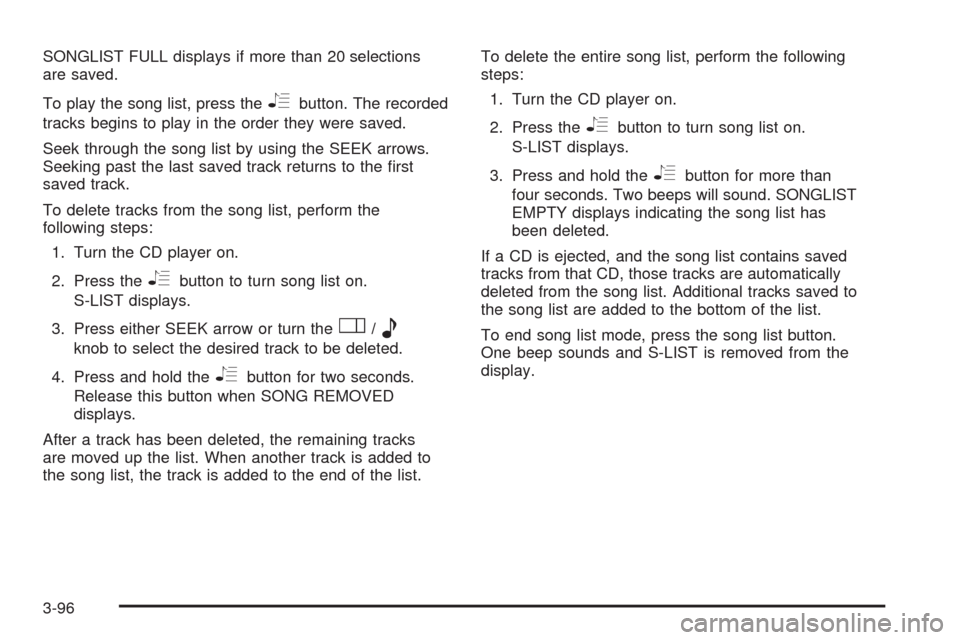
SONGLIST FULL displays if more than 20 selections
are saved.
To play the song list, press the
Rbutton. The recorded
tracks begins to play in the order they were saved.
Seek through the song list by using the SEEK arrows.
Seeking past the last saved track returns to the rst
saved track.
To delete tracks from the song list, perform the
following steps:
1. Turn the CD player on.
2. Press the
Rbutton to turn song list on.
S-LIST displays.
3. Press either SEEK arrow or turn the
O/e
knob to select the desired track to be deleted.
4. Press and hold the
Rbutton for two seconds.
Release this button when SONG REMOVED
displays.
After a track has been deleted, the remaining tracks
are moved up the list. When another track is added to
the song list, the track is added to the end of the list.To delete the entire song list, perform the following
steps:
1. Turn the CD player on.
2. Press the
Rbutton to turn song list on.
S-LIST displays.
3. Press and hold the
Rbutton for more than
four seconds. Two beeps will sound. SONGLIST
EMPTY displays indicating the song list has
been deleted.
If a CD is ejected, and the song list contains saved
tracks from that CD, those tracks are automatically
deleted from the song list. Additional tracks saved to
the song list are added to the bottom of the list.
To end song list mode, press the song list button.
One beep sounds and S-LIST is removed from the
display.
3-96
Page 259 of 476
Empty Directory or Folder
If a root directory or a folder exists somewhere in the le
structure that contains only folders/subfolders and no
compressed les directly beneath them, the player
advances to the next folder in the le structure that
contains compressed audio les. The empty folder
does not display.
No Folder
When the CD contains only compressed les, the les
will be located under the root folder. The next and
previous folder functions do not function on a CD
that was recorded without folders or playlists.
When displaying the name of the folder the radio
displays ROOT.
When the CD contains only playlists and compressed
audio les, but no folders, all les are located under the
root folder. The folder down and the folder up buttons
search playlists (Px) rst and then go to the root folder.
When the radio displays the name of the folder the
radio displays ROOT.
Order of Play
Tracks are played in the following order:
Play begins from the rst track in the rst playlist
and continues sequentially through all tracks in
each playlist. When the last track of the last playlist
has played, play continues from the rst track of
the rst playlist.
If the CD does not contain any playlists, then play
begins from the rst track under the root directory.
When all tracks from the root directory have played,
play continues from les according to their numerical
listing. After playing the last track from the last folder,
play begins again at the rst track of the rst folder or
root directory.
When play enters a new folder, the display does
not automatically show the new folder name unless
the folder mode was chosen as the default display.
See the information button later in this section for
more information. The new track name displays.
3-99
Page 272 of 476

To use the RSE OSD menu when using a CD or an
MP3, do the following:
Make sure that a CD or an MP3 is loaded in the RSE
system and that the system is not in auxiliary, then press
the
zbutton on the remote control, or faceplate if there
is no rear seat climate control. Once the menu is on the
screen, use the
q,Q,r,Rnavigation arrows and
the
rbutton to navigate the screen. This menu lets
you select default preferences for language and playback
settings. To exit this menu, press the
zbutton, or
the
qbutton on the remote control, or faceplate if
there is no rear seat climate control, or wait for the menu
to time out.
Battery Replacement
To change the remote control batteries, do the following:
1. Slide the rear cover back on the remote control.
2. Replace the two batteries in the compartment. Make
sure that they are installed correctly, using the
diagram on the inside of the battery compartment.
3. Replace the battery cover.
If the remote control is to be stored for a long period of
time, remove the batteries and keep them in a cool,
dry place.
Tips and Troubleshooting Chart
Problem Recommended Action
No power. The ignition might not be
in ACC/ACCESSORY,
ON/RUN, or Retained
Accessory Power (RAP).
Disc will not play. The system might be off.
The parental control
button might have been
pressed. The power
indicator lights ash.
The system might be in
auxiliary source mode.
Press the DVD AUX
button on the player
faceplate or the AUX
button on the remote to
switch between the DVD
player and the auxiliary
sources. The disc is
upside down or is not
compatible.
3-112
Page 273 of 476
Tips and Troubleshooting Chart (cont’d)
Problem Recommended Action
No sound — Wireless
HeadphonesTurn the headphones on.
Make sure the correct
channel is selected on
the wireless headphones.
Check the batteries.
The volume on the
headphones could be too
low, adjust the volume.
No sound — Wired
HeadphonesMake sure the wired
headphones are plugged
in. Adjust the volume.
If RSA is on, DVD audio
is not heard.
No sound — Vehicle
SpeakersIf the DVD system is
being heard through the
vehicle speakers, adjust
the volume on the radio.
Press the CD AUX button
on the radio to make sure
that RSE is enabled.
The rear speakers mute
when RSA is on.
The picture is distorted
during fast forward or
reverse.This is normal for this
operation.
Tips and Troubleshooting Chart (cont’d)
Problem Recommended Action
The picture does not ll
the screen. There are
black borders on the top
and bottom or on both
sides or it looks
stretched out.Video mode might not be
correctly set. See “RSE
OSD” earlier in this
section.
I ejected the disc and tried
to take it out, but it was
pulled back into the slot.Press the eject button
once.
The language in the audio
or on the screen is wrong.Press the main menu
button on the remote
control and change the
audio or language
selection on the DVD
menu. To change the
language preference,
press the display button
to access the RSE OSD
menu. See “RSE OSD”
earlier in this section.
3-113
Page 275 of 476
Tips and Troubleshooting Chart (cont’d)
Problem Recommended Action
DVD System inoperable. In severe or extreme
temperatures the DVD
system might not be
operable. Temperatures
below−4°F (−20°C) or
above 140°F (60°C) could
damage the DVD system.
Operate the DVD system
under normal or
comfortable cabin
temperature ranges.
See your dealer/retailer
if the problem persists.
Tips and Troubleshooting Chart (cont’d)
Problem Recommended Action
The wireless headphones
have audio distortion.Verify that the
headphones are facing
to the front of the vehicle,
left and right sides
are indicated on the
headphones to ensure
that the signal is received
properly.
Verify that there is no
obstruction between the
headphone(s) and the
transmitter.
Verify that the batteries
have a full charge.
In auxiliary mode, the
picture moves or scrolls.Check the signal coming
from the auxiliary device
and make sure that the
connection and the signal
is good.
3-115
Page 344 of 476
Occasionally check the coolant level in the radiator.
For information on how to add coolant to the radiator,
seeCooling System on page 5-26.
Radiator Pressure Cap
Notice:The radiator cap on your vehicle is a
pressure-type cap and must be tightly installed to
prevent coolant loss and possible engine damage
from overheating. Be sure the cap is properly
closed.
SeeEngine Compartment Overview on page 5-12
for more information on location.
Engine Overheating
You will nd an engine coolant temperature gage on
your vehicle’s instrument panel. SeeEngine Coolant
Temperature Gage on page 3-43.
Your vehicle may also have an ENGINE COOLANT
HOT message displayed in the Driver Information
Center (DIC). SeeDIC Warnings and Messages on
page 3-58.
If Steam Is Coming From Your Engine
{CAUTION:
Steam from an overheated engine can burn
you badly, even if you just open the hood.
Stay away from the engine if you see or hear
steam coming from it. Turn it off and get
everyone away from the vehicle until it cools
down. Wait until there is no sign of steam or
coolant before you open the hood.
If you keep driving when the vehicles engine
is overheated, the liquids in it can catch re.
You or others could be badly burned. Stop
your engine if it overheats, and get out of the
vehicle until the engine is cool.
SeeOverheated Engine Protection Operating
Mode on page 5-25for information on driving
to a safe place in an emergency.
Notice:If your engine catches re because you keep
driving with no coolant, your vehicle can be badly
damaged. The costly repairs would not be covered by
your warranty. SeeOverheated Engine Protection
Operating Mode on page 5-25for information on
driving to a safe place in an emergency.
5-24