remote start CHEVROLET UPLANDER 2008 1.G User Guide
[x] Cancel search | Manufacturer: CHEVROLET, Model Year: 2008, Model line: UPLANDER, Model: CHEVROLET UPLANDER 2008 1.GPages: 476, PDF Size: 5.77 MB
Page 223 of 476
HOOD AJAR
If your vehicle has the remote start feature, this
message displays when the hood is not closed
properly. Make sure that the hood is closed completely.
SeeHood Release on page 5-11.
This message displays while the ignition is in ON/RUN.
Press any of the DIC buttons to acknowledge this
message and to clear it from the screen.
This message continues to display for two seconds
if it has not been acknowledged when the engine
is turned off. It also re-displays for two seconds if the
message has been acknowledged, but the condition
still exists when the engine is turned off.
If the condition still exists, the message re-appears
when the engine is turned on.
KEY FOB BATTERY LOW
This message displays when the battery in the Remote
Keyless Entry (RKE) transmitter needs to be replaced.
To replace the battery, see “Battery Replacement” under
Remote Keyless Entry (RKE) System Operation on
page 2-5.This message displays while the ignition is in ON/RUN.
Press any of the DIC buttons to acknowledge this
message and to clear it from the screen.
This message continues to display for two seconds
if it has not been acknowledged when the engine
is turned off. It also re-displays for two seconds if the
message has been acknowledged, but the condition
still exists when the engine is turned off.
If the condition still exists, the message re-appears
when the engine is turned on.
KEY IN IGNITION
This message displays and a chime sounds
continuously when the driver’s door is open and
the key is in ACC/ACCESSORY or LOCK/OFF.
This message cannot be acknowledged.
This message disappears and the chiming stops when
the key is removed from the ignition.
3-63
Page 228 of 476
REDUCED POWER STOP WHEN SAFE
This message displays when your vehicle is in an
overheated engine operating mode. This operating mode
allows your vehicle to be driven to a safe place in an
emergency. In this mode, you will notice a signicant
loss in power and engine performance. SeeOverheated
Engine Protection Operating Mode on page 5-25for
more information. Anytime this message is on, the
vehicle should be taken to your dealer/retailer for
service as soon as possible.
This message displays and a chime sounds only
when the ignition is in ON/RUN. Press any of the
DIC buttons to acknowledge this message and to
clear it from the screen.
This message continues to display for two seconds
if it has not been acknowledged when the engine
is turned off. It also re-displays for two seconds if the
message has been acknowledged, but the condition
still exists when the engine is turned off.
If the condition still exists, the message re-appears
when the engine is turned on.
REMOTE START DISABLED
If your vehicle has the remote start feature, this message
displays if a remote start attempt is unsuccessful. This
may be caused if any of the following conditions are true
when a remote start attempt is made:
The remote start system is disabled through the DIC.
The key is in the ignition.
The hood or the doors are not closed.
There is an emission control system malfunction.
The engine coolant temperature is too high.
The oil pressure is low.
The hazard warning ashers are turned on.
The maximum number of remote starts or remote
start attempts between ignition cycles has been
reached.
The content theft-deterrent alarm is on while
attempting to remote start the vehicle.
See “REMOTE START” underDIC Vehicle
Personalization (Uplevel Only) on page 3-76and
“Remote Vehicle Start” underRemote Keyless Entry
(RKE) System Operation on page 2-5for more
information.
3-68
Page 229 of 476
REMOTE START ON
If your vehicle has the remote start feature, this
message displays when a remote start is initiated. See
“Remote Vehicle Start” underRemote Keyless Entry
(RKE) System Operation on page 2-5for more
information.
RIGHT FRONT TURN LAMP OUT
This message displays when the right front turn signal
bulb needs to be replaced. SeeHeadlamps and
Sidemarker Lamps on page 5-42.
This message displays while the ignition is in ON/RUN.
Press any of the DIC buttons to acknowledge this
message and to clear it from the screen.
This message continues to display for two seconds
if it has not been acknowledged when the engine
is turned off. It also re-displays for two seconds if the
message has been acknowledged, but the condition
still exists when the engine is turned off.
If the condition still exists, the message re-appears
when the engine is turned on.
RIGHT REAR TURN LAMP OUT
This message displays when the right rear turn signal
bulb needs to be replaced. SeeTaillamps, Turn Signal,
Stoplamps and Back-up Lamps on page 5-44.
This message displays while the ignition is in ON/RUN.
Press any of the DIC buttons to acknowledge this
message and to clear it from the screen.
This message continues to display for two seconds
if it has not been acknowledged when the engine
is turned off. It also re-displays for two seconds if the
message has been acknowledged, but the condition
still exists when the engine is turned off.
If the condition still exists, the message re-appears
when the engine is turned on.
3-69
Page 236 of 476
DIC Vehicle Personalization
(Uplevel Only)
Your vehicle may have customization capabilities that
allow you to program certain features to one preferred
setting. Customization features can only be programmed
to one setting on the vehicle and cannot be programmed
to a preferred setting for two different drivers.
The customization features include the following:
Exterior lighting delay
Interior lighting delay
Delayed locking
Content theft
Remote keyless entry feedback
Remote start
Rear park chime
Your vehicle may also have personalization capabilities
that allow you to program certain features to a preferred
setting for up to two drivers. The rst personalized key
corresponds to driver 1 and the second personalized
key corresponds to driver 2. The driver number also
corresponds to the numbers, 1 or 2, on the back of
the Remote Keyless Entry (RKE) transmitters.The personalization features include the following:
Radio station presets
Auto door unlock preferences
Remote keyless entry unlock preferences
All of the customization and personalization options
may not be available on your vehicle. Only the options
available will be displayed on your DIC.
The default settings for the customization and
personalization features were set when your vehicle left
the factory, but may have been changed from their
default setting since then.
The customization preferences are automatically
recalled.
The driver’s personalization preferences are recalled
by using the key programmed for driver 1 or 2. The
driver number also corresponds to the numbers, 1 or 2,
on the back of the RKE transmitters.
To change customization and personalization
preferences, use the following procedure.
3-76
Page 241 of 476
REMOTE START
If your vehicle has remote start, this feature allows
the remote start to be turned OFF or ON. The remote
start feature allows you to start the engine from outside
of the vehicle using the RKE transmitter. SeeRemote
Vehicle Start on page 2-8for more information.
Press the menu button until REMOTE START appears
on the DIC display. Press the set/reset button to
scroll through the following choices:
OFF:The remote start feature will be disabled.
ON (default):The remote start feature will be enabled.
To select a setting and move on to the next feature,
press the menu button while the desired setting is
displayed on the DIC.
REAR PARK CHIME
If your vehicle has the Ultrasonic Rear Parking Assist
(URPA) system, this feature allows the URPA system’s
chime to be turned OFF or ON. SeeUltrasonic Rear
Parking Assist (URPA) on page 2-44for more
information.
Press the option button until REAR PARK CHIME
appears on the DIC display. Press the set/reset button
to scroll through the following choices:
OFF:The URPA system’s chime will be disabled.
ON (default):The URPA system’s chime will be
enabled.
To select a setting and move on to the next feature,
press the menu button while the desired setting is
displayed on the DIC.
3-81
Page 268 of 476
MENU (Disc):Press this button to view the main DVD
menu. The menu is different on every disc. Use the up,
down, right, and left arrow buttons to move the cursor
around the menu. After making a selection, press the
enter button.
r(Enter/Select):Press this button to select the
choice that is highlighted in any menu.
z(Display Control Button):For vehicles without rear
seat climate control, this button can take the place of the
fan/temp button. For vehicles with rear seat climate
control, this button is also found on the remote control.
Press this button to open the RSE On-Screen Display
(OSD) menus to adjust the color, tint, brightness,
contrast, and display modes.
Playing a Disc
To play a disc, gently insert the disc, with the label side
up, into the loading slot. The DVD player continues
loading the disc and the player automatically starts if
the vehicle is in ACC/ACCESSORY, ON/RUN, or RAP.
If a disc is already in the player, make sure that the
DVD player is on, then press the
r/jbutton on
the player faceplate or on the remote control. Press
the DVD AUX button on the player faceplate, or the CD
AUX button on the radio faceplate until RSE displays,
to start playing a disc.Some DVDs do not allow fast forwarding or skipping
of the copyright information or previews. Some
DVDs begins playing after the previews have nished.
If the DVD does not begin playing at the main title, refer
to the on-screen instructions.
To stop playing a disc, press and release
the
c/Ybutton on the DVD player faceplate
or the remote control.
To resume playback, press the
r/jbutton on
the DVD player faceplate or the remote control.
The movie should resume play from where it was
last stopped if the disc has not been ejected.
If the disc has been ejected, the disc resumes play at
the beginning of the disc.
Ejecting a Disc
Press thec/Ybutton on the DVD player faceplate,
when the disc is stopped, to eject the disc. There is
no eject button on the remote control.
If a disc is ejected from the player, but not removed,
the DVD player reloads the disc after a short period
of time.
3-108
Page 333 of 476
A. Underhood Fuse Block. SeeUnderhood Fuse Block
on page 5-102.
B. Remote Positive (+) Terminal. SeeJump Starting on
page 5-37.
C. Windshield Washer Fluid Reservoir. See “Adding
Washer Fluid” underWindshield Washer Fluid
on page 5-32.
D. Radiator Pressure Cap. SeeRadiator Pressure Cap
on page 5-24.
E. Power Steering Fluid Reservoir. SeePower Steering
Fluid on page 5-31.
F. Engine Oil Fill Cap. See “When to Add Engine Oil”
underEngine Oil on page 5-13.
G. Engine Oil Dipstick. See “Checking Engine Oil”
underEngine Oil on page 5-13.
H. Automatic Transmission Fluid Dipstick. See
“Checking the Fluid Level” underAutomatic
Transmission Fluid on page 5-20.
I. Brake Master Cylinder Reservoir. See “Brake Fluid”
underBrakes on page 5-33.
J. Engine Air Cleaner/Filter. SeeEngine Air
Cleaner/Filter on page 5-18.
K. Engine Coolant Recovery Tank. SeeCooling System
on page 5-26.Engine Oil
Checking Engine Oil
It is a good idea to check the engine oil every time you
get fuel. In order to get an accurate reading, the oil
must be warm and the vehicle must be on level ground.
The engine oil dipstick handle is a yellow loop.
SeeEngine Compartment Overview on page 5-12
for the location of the engine oil dipstick.
1. Turn off the engine and give the oil several minutes
to drain back into the oil pan. If you do not do this,
the oil dipstick might not show the actual level.
2. Pull out the dipstick and clean it with a paper towel
or cloth, then push it back in all the way. Remove it
again, keeping the tip down, and check the level.
5-13
Page 358 of 476
Notice:If you leave your radio or other accessories
on during the jump starting procedure, they could
be damaged. The repairs would not be covered
by your warranty. Always turn off your radio and
other accessories when jump starting your vehicle.
3. Turn off the ignition on both vehicles. Unplug
unnecessary accessories plugged into the cigarette
lighter or the accessory power outlet. Turn off
the radio and all lamps that are not needed.
This will avoid sparks and help save both batteries.
And it could save the radio!
4. Open the hoods and locate the batteries. Find the
positive (+) and negative (−) terminal locations on
each vehicle.
You will not need to access your battery for jump
starting. Your vehicle has a remote positive (+) jump
starting terminal for that purpose.The terminal is located
under the fuse block cover.
Remove the cover to
access the remote
positive (+) terminal.
SeeEngine Compartment Overview on page 5-12
for more information on the location of the
remote positive (+) terminal. You should always
use the remote positive (+) terminal instead of the
positive (+) terminal on your battery.
{CAUTION:
An electric fan can start up even when the
engine is not running and can injure you.
Keep hands, clothing and tools away from any
underhood electric fan.
5-38
Page 360 of 476
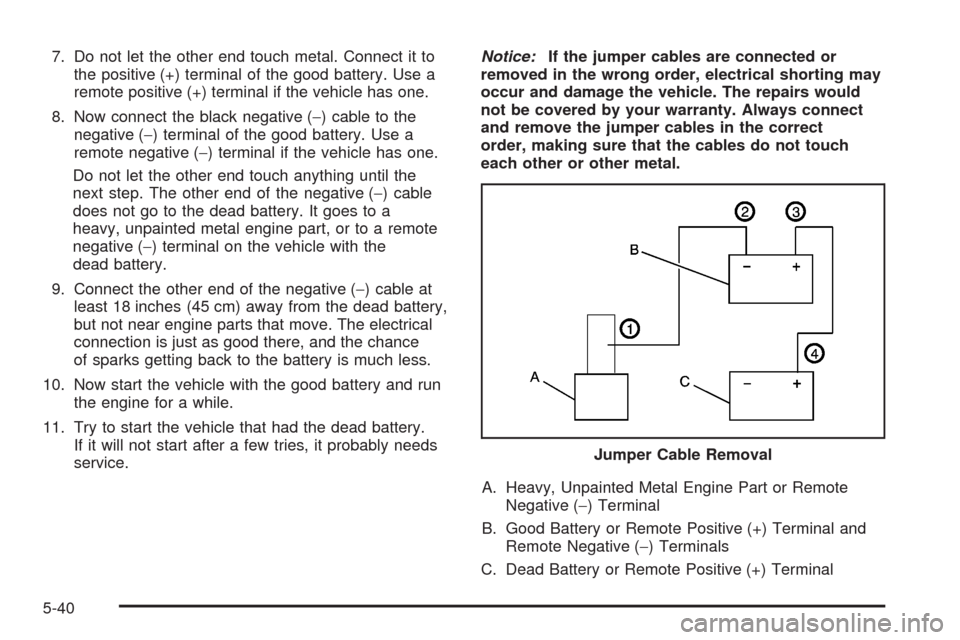
7. Do not let the other end touch metal. Connect it to
the positive (+) terminal of the good battery. Use a
remote positive (+) terminal if the vehicle has one.
8. Now connect the black negative (−) cable to the
negative (−) terminal of the good battery. Use a
remote negative (−) terminal if the vehicle has one.
Do not let the other end touch anything until the
next step. The other end of the negative (−) cable
does not go to the dead battery. It goes to a
heavy, unpainted metal engine part, or to a remote
negative (−) terminal on the vehicle with the
dead battery.
9. Connect the other end of the negative (−) cable at
least 18 inches (45 cm) away from the dead battery,
but not near engine parts that move. The electrical
connection is just as good there, and the chance
of sparks getting back to the battery is much less.
10. Now start the vehicle with the good battery and run
the engine for a while.
11. Try to start the vehicle that had the dead battery.
If it will not start after a few tries, it probably needs
service.Notice:If the jumper cables are connected or
removed in the wrong order, electrical shorting may
occur and damage the vehicle. The repairs would
not be covered by your warranty. Always connect
and remove the jumper cables in the correct
order, making sure that the cables do not touch
each other or other metal.
A. Heavy, Unpainted Metal Engine Part or Remote
Negative (−) Terminal
B. Good Battery or Remote Positive (+) Terminal and
Remote Negative (−) Terminals
C. Dead Battery or Remote Positive (+) TerminalJumper Cable Removal
5-40
Page 381 of 476
TPMS Sensor Matching Process
Each TPMS sensor has a unique identication code.
Any time you rotate your vehicle’s tires or replace one or
more of the TPMS sensors, the identication codes
will need to be matched to the new tire/wheel position.
The sensors are matched to the tire/wheel positions
in the following order: driver side front tire, passenger
side front tire, passenger side rear tire, and driver
side rear tire using a TPMS diagnostic tool. See your
dealer/retailer for service.
The TPMS sensors can also be matched to each
tire/wheel position by increasing or decreasing the tire’s
air pressure. If increasing the tire’s air pressure, do
not exceed the maximum ination pressure indicated on
the tire’s sidewall.
To decrease air-pressure out of a tire you can use the
pointed end of the valve cap, a pencil-style air pressure
gage, or a key.You will have two minutes to match the rst tire/wheel
position, and ve minutes overall to match all four
tire/wheel positions. If it takes longer than two minutes,
to match the rst tire and wheel, or more than ve
minutes to match all four tire and wheel positions the
matching process stops and you will need to start over.
The TPMS sensor matching process is outlined
below:
1. Set the parking brake.
2. Turn the ignition switch to RUN with the engine off.
3. Using the Remote Keyless Entry (RKE) transmitter,
lock and unlock the vehicle’s doors.
4. Press and hold the RKE transmitter’s LOCK and
UNLOCK buttons at the same time, for about
three seconds. The horn chirps two times indicating
the receiver is ready for the sensor matching
process to begin.
5. Start with the driver side front tire. The driver side
turn signal lamp comes on.
5-61