stop start CHEVROLET UPLANDER 2008 1.G User Guide
[x] Cancel search | Manufacturer: CHEVROLET, Model Year: 2008, Model line: UPLANDER, Model: CHEVROLET UPLANDER 2008 1.GPages: 476, PDF Size: 5.77 MB
Page 205 of 476
This light comes on, as a check to show it is working,
when the ignition is turned ON/RUN but the engine is not
running. If the light does not come on, have it repaired.
This light also comes on during a malfunction in
one of two ways:
Light Flashing— A misre condition has been
detected. A misre increases vehicle emissions
and could damage the emission control system
on your vehicle. Diagnosis and service might
be required.
Light On Steady— An emission control system
malfunction has been detected on your vehicle.
Diagnosis and service might be required.
If the Light is Flashing
The following can prevent more serious damage to your
vehicle:
Reduce vehicle speed.
Avoid hard accelerations.
Avoid steep uphill grades.
If you are towing a trailer, reduce the amount of
cargo being hauled as soon as it is possible.
If the light stops ashing and remains on steady,
see “If the Light Is On Steady” following.
If the light continues to ash, when it is safe to do so,
stop the vehicle. Find a safe place to park the vehicle.
Turn the ignition off, wait at least 10 seconds, and restart
the engine. If the light remains on steady, see “If the
Light Is On Steady” following. If the light is still ashing,
follow the previous steps and see your dealer/retailer
for service as soon as possible.
3-45
Page 212 of 476
There is also a retroactive trip odometer function that
performs the following for each trip odometer:
If the vehicle’s speed has exceeded 3 mph (5 km/h)
during the current ignition cycle, this function will
set the trip odometer to the distance driven
during the current ignition cycle.
If the vehicle’s speed has not exceeded 3 mph
(5 km/h), this function will set the trip odometer
to the distance driven during the previous ignition
cycle plus the distance driven during the current
ignition cycle.
Press and hold the set/reset button for three seconds,
then release the button. The retroactive trip odometer
value will be set into the currently displayed trip
odometer.
Time Elapsed
Press the information button until TIME ELAPSED :00
displays. This mode is like a stopwatch, in that you can
clock the time it takes to get from one point to another.
Each of the elds for the hours, minutes, and seconds
are two numeric digits.Once TIME ELAPSED :00 is displayed, press the
set/reset button to start the timing feature. Press the
set/reset button again to stop it. If you will be starting
and stopping your vehicle, during a trip for instance, the
TIME ELAPSED feature will automatically start timing
where it left off when you last stopped. To reset it, press
and hold the set/reset button for about 1.5 seconds.
The display will return to zero.
Average Speed
Press the information button until AVERAGE SPEED
displays. This mode shows the average speed of the
vehicle in miles per hour (mph) or kilometers per hour
(km/h). This average is calculated based on the various
vehicle speed recorded since the last reset of this value.
To reset the value, press the information button to display
AVERAGE SPEED, then press and hold the set/reset
button. The display will return to zero.
3-52
Page 219 of 476
BATTERY SAVER ACTIVE
This message displays when the system detects that
the battery voltage is dropping beyond a reasonable
level. The battery saver system starts reducing certain
features of the vehicle that you may be able to notice.
At the point that the features are disabled, this message
is displayed. It means that the vehicle is trying to
save the charge in the battery.
Turn off all unnecessary accessories to allow the battery
to recharge.
The normal battery voltage range is 11.5 to 15.5 volts.
You can monitor the battery voltage by pressing the
information button until BATTERY displays.
CHANGE OIL SOON
This message displays when service is required for the
vehicle. See your dealer/retailer. SeeEngine Oil on
page 5-13andScheduled Maintenance on page 6-4
for more information.
The CHANGE OIL SOON message is reset by
acknowledging the message. The OIL LIFE screen
under the gages menu on the DIC must also be reset.
See “Oil Life” underDIC Operation and Displays on
page 3-50andEngine Oil Life System on page 5-16.
This message displays while the ignition is in ON/RUN.
Press any of the DIC buttons to acknowledge this
message and to clear it from the screen.This message continues to display for two seconds if it
has not been acknowledged when the engine is turned
off. It also re-displays for two seconds if the message has
been acknowledged, but the condition still exists when
the engine is turned off.
If the condition still exists, the message re-appears
when the engine is turned on.
CHARGING SYSTEM FAILURE
This message displays when there is a problem with the
generator and battery charging systems. Driving with this
problem could drain the battery. Turn off all unnecessary
accessories. Stop and turn off the vehicle as soon as it is
safe to do so. Have the electrical system checked by your
dealer/retailer immediately.
This message displays and a chime sounds while the
ignition is in ON/RUN. Press any of the DIC buttons
to acknowledge this message and to clear it from the
screen.
This message continues to display for two seconds if it
has not been acknowledged when the engine is turned
off. It also re-displays for two seconds if the message has
been acknowledged, but the condition still exists when
the engine is turned off.
If the condition still exists, the message re-appears
when the engine is turned on.
3-59
Page 223 of 476
HOOD AJAR
If your vehicle has the remote start feature, this
message displays when the hood is not closed
properly. Make sure that the hood is closed completely.
SeeHood Release on page 5-11.
This message displays while the ignition is in ON/RUN.
Press any of the DIC buttons to acknowledge this
message and to clear it from the screen.
This message continues to display for two seconds
if it has not been acknowledged when the engine
is turned off. It also re-displays for two seconds if the
message has been acknowledged, but the condition
still exists when the engine is turned off.
If the condition still exists, the message re-appears
when the engine is turned on.
KEY FOB BATTERY LOW
This message displays when the battery in the Remote
Keyless Entry (RKE) transmitter needs to be replaced.
To replace the battery, see “Battery Replacement” under
Remote Keyless Entry (RKE) System Operation on
page 2-5.This message displays while the ignition is in ON/RUN.
Press any of the DIC buttons to acknowledge this
message and to clear it from the screen.
This message continues to display for two seconds
if it has not been acknowledged when the engine
is turned off. It also re-displays for two seconds if the
message has been acknowledged, but the condition
still exists when the engine is turned off.
If the condition still exists, the message re-appears
when the engine is turned on.
KEY IN IGNITION
This message displays and a chime sounds
continuously when the driver’s door is open and
the key is in ACC/ACCESSORY or LOCK/OFF.
This message cannot be acknowledged.
This message disappears and the chiming stops when
the key is removed from the ignition.
3-63
Page 228 of 476
REDUCED POWER STOP WHEN SAFE
This message displays when your vehicle is in an
overheated engine operating mode. This operating mode
allows your vehicle to be driven to a safe place in an
emergency. In this mode, you will notice a signicant
loss in power and engine performance. SeeOverheated
Engine Protection Operating Mode on page 5-25for
more information. Anytime this message is on, the
vehicle should be taken to your dealer/retailer for
service as soon as possible.
This message displays and a chime sounds only
when the ignition is in ON/RUN. Press any of the
DIC buttons to acknowledge this message and to
clear it from the screen.
This message continues to display for two seconds
if it has not been acknowledged when the engine
is turned off. It also re-displays for two seconds if the
message has been acknowledged, but the condition
still exists when the engine is turned off.
If the condition still exists, the message re-appears
when the engine is turned on.
REMOTE START DISABLED
If your vehicle has the remote start feature, this message
displays if a remote start attempt is unsuccessful. This
may be caused if any of the following conditions are true
when a remote start attempt is made:
The remote start system is disabled through the DIC.
The key is in the ignition.
The hood or the doors are not closed.
There is an emission control system malfunction.
The engine coolant temperature is too high.
The oil pressure is low.
The hazard warning ashers are turned on.
The maximum number of remote starts or remote
start attempts between ignition cycles has been
reached.
The content theft-deterrent alarm is on while
attempting to remote start the vehicle.
See “REMOTE START” underDIC Vehicle
Personalization (Uplevel Only) on page 3-76and
“Remote Vehicle Start” underRemote Keyless Entry
(RKE) System Operation on page 2-5for more
information.
3-68
Page 229 of 476
REMOTE START ON
If your vehicle has the remote start feature, this
message displays when a remote start is initiated. See
“Remote Vehicle Start” underRemote Keyless Entry
(RKE) System Operation on page 2-5for more
information.
RIGHT FRONT TURN LAMP OUT
This message displays when the right front turn signal
bulb needs to be replaced. SeeHeadlamps and
Sidemarker Lamps on page 5-42.
This message displays while the ignition is in ON/RUN.
Press any of the DIC buttons to acknowledge this
message and to clear it from the screen.
This message continues to display for two seconds
if it has not been acknowledged when the engine
is turned off. It also re-displays for two seconds if the
message has been acknowledged, but the condition
still exists when the engine is turned off.
If the condition still exists, the message re-appears
when the engine is turned on.
RIGHT REAR TURN LAMP OUT
This message displays when the right rear turn signal
bulb needs to be replaced. SeeTaillamps, Turn Signal,
Stoplamps and Back-up Lamps on page 5-44.
This message displays while the ignition is in ON/RUN.
Press any of the DIC buttons to acknowledge this
message and to clear it from the screen.
This message continues to display for two seconds
if it has not been acknowledged when the engine
is turned off. It also re-displays for two seconds if the
message has been acknowledged, but the condition
still exists when the engine is turned off.
If the condition still exists, the message re-appears
when the engine is turned on.
3-69
Page 252 of 476
Playing a CD (Single CD Player)
Insert a CD partway into the slot, label side up. The
player pulls it in and the CD should begin playing.
If the ignition or radio is turned off with a CD in the
player, it stays in the player. When the ignition or radio
is turned on, the CD starts playing where it stopped,
if it was the last selected audio source.
When a CD is inserted, CD and the CD symbol displays.
As each new track starts to play the track number
displays.
The CD player can play the smaller 3 inch (8 cm) single
CDs with an adapter ring. Full-size CDs and the
smaller CDs are loaded in the same manner.
Playing a CD(s) (Six-Disc CD Player)
M
(Load):Press to load CDs into the CD player.
This CD player holds up to six CDs.
To insert one CD, do the following:
1. Turn the ignition on.
2. Press and release the load button.
3. When INSERT CD # displays, load a CD. Insert the
CD partway into the slot, label side up. The player
pulls the CD in.To insert multiple CDs, do the following:
1. Turn the ignition on.
2. Press and hold the load button for two seconds.
A beep sounds and LOAD ALL DISC displays.
3. When INSERT CD # displays, load a CD. Insert the
CD partway into the slot, label side up. The player
pulls the CD in.
Once the CD is loaded, wait for INSERT CD # to
display, then load the next CD. The CD player takes
up to six CDs. Do not try to load more than six.
To load more than one CD but less than six, complete
Steps 1 through 3. When nished loading CDs, press this
button to cancel the loading function. The radio begins to
play the last CD loaded.
If more than one CD has been loaded, a number for
each CD displays.
Playing a Specic Loaded CD
A number displays for every CD that is loaded into the
player. To play a specic CD press the numbered
pushbutton that corresponds to the CD.
3-92
Page 254 of 476
To eject multiple CDs, do the following:
1. Press and hold eject for two seconds. A beep
sounds and EJECT ALL DISCS displays.
2. When REMOVE DISC displays, the CD ejects and
can be removed.
To stop ejecting the CDs, press the load or the
eject button.
If the CD is not removed, after 25 seconds, the CD
automatically pulls it back into the player. If CD
is pushed back into the player, before 25 seconds,
the player senses an error and tries to eject the
CD several times before stopping.
Do not repeatedly press the
Xbutton to eject a CD
after pushing it in manually because the eject timer
resets to 25 seconds after each press of the button.
The CD will eject only after an uninterrupted 25 seconds
occurs.
O/e(Tune):Turn to go to the next or previous
track.
{(Fast Reverse):Press and hold to reverse within
the current track.
|(Fast Forward):Press and hold to fast forward
through the current track.
RDM (Random):Press to hear the tracks in random,
rather than sequential order, on one CD or all of
the loaded CDs.To use random, do one of the following:
Press and release this button until RANDOM DISC
PLAY displays, to play the tracks on a CD in
random order.
Press and release this button until RANDOM ALL
DISCS displays, to play the tracks on all of the
CDs that are loaded in random order.
To turn off random play, press and release the RDM
button until RANDOM OFF displays.
RPT (Repeat):Press to hear a track or depending on
your radio, an entire CD.
To use repeat, do one of the following:
Press and release until REPEAT displays, to repeat
a track.
Press and release, depending on the radio,
until REPEAT ONE DISC displays, to repeat
an entire CD.
To turn off repeated play, press and release until
REPEAT OFF displays.
tSEEKu:Press the left arrow to go to the start of
the current track, if more than eight seconds have played.
Press the right arrow to go to the next track. If either
arrow is held or pressed more than once, the player
continues moving backward or forward through the CD.
3-94
Page 267 of 476
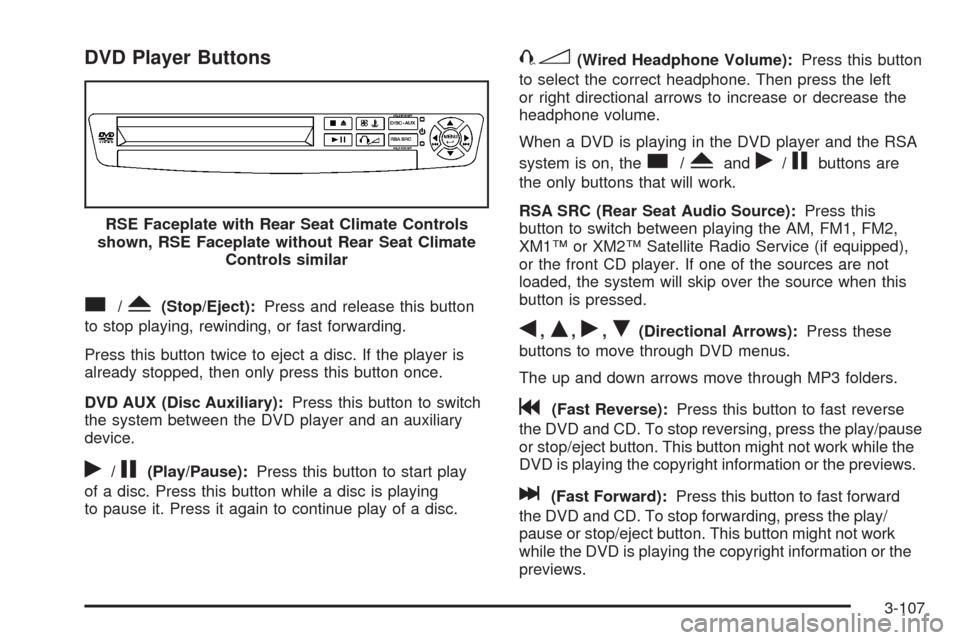
DVD Player Buttons
c/Y(Stop/Eject):Press and release this button
to stop playing, rewinding, or fast forwarding.
Press this button twice to eject a disc. If the player is
already stopped, then only press this button once.
DVD AUX (Disc Auxiliary):Press this button to switch
the system between the DVD player and an auxiliary
device.
r/j(Play/Pause):Press this button to start play
of a disc. Press this button while a disc is playing
to pause it. Press it again to continue play of a disc.
43(Wired Headphone Volume):Press this button
to select the correct headphone. Then press the left
or right directional arrows to increase or decrease the
headphone volume.
When a DVD is playing in the DVD player and the RSA
system is on, the
c/Yandr/jbuttons are
the only buttons that will work.
RSA SRC (Rear Seat Audio Source):Press this
button to switch between playing the AM, FM1, FM2,
XM1™ or XM2™ Satellite Radio Service (if equipped),
or the front CD player. If one of the sources are not
loaded, the system will skip over the source when this
button is pressed.
q,Q,r,R(Directional Arrows):Press these
buttons to move through DVD menus.
The up and down arrows move through MP3 folders.
g(Fast Reverse):Press this button to fast reverse
the DVD and CD. To stop reversing, press the play/pause
or stop/eject button. This button might not work while the
DVD is playing the copyright information or the previews.
l(Fast Forward):Press this button to fast forward
the DVD and CD. To stop forwarding, press the play/
pause or stop/eject button. This button might not work
while the DVD is playing the copyright information or the
previews. RSE Faceplate with Rear Seat Climate Controls
shown, RSE Faceplate without Rear Seat Climate
Controls similar
3-107
Page 268 of 476
MENU (Disc):Press this button to view the main DVD
menu. The menu is different on every disc. Use the up,
down, right, and left arrow buttons to move the cursor
around the menu. After making a selection, press the
enter button.
r(Enter/Select):Press this button to select the
choice that is highlighted in any menu.
z(Display Control Button):For vehicles without rear
seat climate control, this button can take the place of the
fan/temp button. For vehicles with rear seat climate
control, this button is also found on the remote control.
Press this button to open the RSE On-Screen Display
(OSD) menus to adjust the color, tint, brightness,
contrast, and display modes.
Playing a Disc
To play a disc, gently insert the disc, with the label side
up, into the loading slot. The DVD player continues
loading the disc and the player automatically starts if
the vehicle is in ACC/ACCESSORY, ON/RUN, or RAP.
If a disc is already in the player, make sure that the
DVD player is on, then press the
r/jbutton on
the player faceplate or on the remote control. Press
the DVD AUX button on the player faceplate, or the CD
AUX button on the radio faceplate until RSE displays,
to start playing a disc.Some DVDs do not allow fast forwarding or skipping
of the copyright information or previews. Some
DVDs begins playing after the previews have nished.
If the DVD does not begin playing at the main title, refer
to the on-screen instructions.
To stop playing a disc, press and release
the
c/Ybutton on the DVD player faceplate
or the remote control.
To resume playback, press the
r/jbutton on
the DVD player faceplate or the remote control.
The movie should resume play from where it was
last stopped if the disc has not been ejected.
If the disc has been ejected, the disc resumes play at
the beginning of the disc.
Ejecting a Disc
Press thec/Ybutton on the DVD player faceplate,
when the disc is stopped, to eject the disc. There is
no eject button on the remote control.
If a disc is ejected from the player, but not removed,
the DVD player reloads the disc after a short period
of time.
3-108