climate control CHEVROLET UPLANDER 2008 1.G Owner's Manual
[x] Cancel search | Manufacturer: CHEVROLET, Model Year: 2008, Model line: UPLANDER, Model: CHEVROLET UPLANDER 2008 1.GPages: 476, PDF Size: 5.77 MB
Page 271 of 476
{(Subtitles):Press this button to display the current
subtitles. Each press of this button moves the DVD
to the next available subtitle option (English, Spanish,
French, etc., if available). The format and content of this
function vary for each disc.
AUX (Auxiliary):Press this button to switch the system
between the DVD player and an auxiliary source.
d(Camera):Press this button to display the current
camera angle on DVDs that have this feature. Each
press moves the DVD to the next available camera
angle. The format and content of this function vary
for each disc.
0 through 9 (Numeric Keypad):The numeric keypad
provides the capability of direct chapter or track number
selection.
\(Clear):Press this button within two seconds after
entering a numeric selection, to clear all numeric inputs.
}10 (Multiple Digit Entries):Press this button
to select chapter or track numbers greater than 9.
Press this button before entering the number.
RSE On-Screen Display (OSD) Menu
To use the RSE OSD menu when using a DVD or an
auxiliary device, do the following:
To access this menu, press the
zbutton on the remote
control or on the DVD faceplate, if the vehicle does not
have rear seat climate control. Once the menu is on the
screen, use the
q,Q,r,Rnavigation arrows and
the
rbutton to navigate the screen. This menu lets
you select default preferences for video format, language
preference, brightness, color, contrast, and tint. Not all
DVDs support all the feature defaults in the setup menus.
If a feature is not supported, the defaults are provided by
the DVD media. To exit this menu, press the
zbutton,
or the
qbutton on the remote control, or faceplate if
there is no rear seat climate control, or wait for the menu
to time out.
The default language selection applies to all
future DVDs.
3-111
Page 272 of 476

To use the RSE OSD menu when using a CD or an
MP3, do the following:
Make sure that a CD or an MP3 is loaded in the RSE
system and that the system is not in auxiliary, then press
the
zbutton on the remote control, or faceplate if there
is no rear seat climate control. Once the menu is on the
screen, use the
q,Q,r,Rnavigation arrows and
the
rbutton to navigate the screen. This menu lets
you select default preferences for language and playback
settings. To exit this menu, press the
zbutton, or
the
qbutton on the remote control, or faceplate if
there is no rear seat climate control, or wait for the menu
to time out.
Battery Replacement
To change the remote control batteries, do the following:
1. Slide the rear cover back on the remote control.
2. Replace the two batteries in the compartment. Make
sure that they are installed correctly, using the
diagram on the inside of the battery compartment.
3. Replace the battery cover.
If the remote control is to be stored for a long period of
time, remove the batteries and keep them in a cool,
dry place.
Tips and Troubleshooting Chart
Problem Recommended Action
No power. The ignition might not be
in ACC/ACCESSORY,
ON/RUN, or Retained
Accessory Power (RAP).
Disc will not play. The system might be off.
The parental control
button might have been
pressed. The power
indicator lights ash.
The system might be in
auxiliary source mode.
Press the DVD AUX
button on the player
faceplate or the AUX
button on the remote to
switch between the DVD
player and the auxiliary
sources. The disc is
upside down or is not
compatible.
3-112
Page 316 of 476
Driving with a Trailer
{CAUTION:
If you have a rear-most window open and you
pull a trailer with your vehicle, carbon
monoxide (CO) could come into your vehicle.
You cannot see or smell CO. It can cause
unconsciousness or death. SeeEngine
Exhaust on page 2-41. To maximize your safety
when towing a trailer:
Have your exhaust system inspected for
leaks, and make necessary repairs before
starting on your trip.
Keep the rear-most windows closed.
CAUTION: (Continued)
CAUTION: (Continued)
If exhaust does come into your vehicle
through a window in the rear or another
opening, drive with your front, main
heating or cooling system on and with the
fan on any speed. This will bring fresh,
outside air into your vehicle. Do not use
the climate control setting for maximum air
because it only recirculates the air inside
your vehicle. SeeClimate Control System
on page 3-24orDual Climate Control
System on page 3-27.
4-34
Page 387 of 476
Uniform Tire Quality Grading
Quality grades can be found where applicable on
the tire sidewall between tread shoulder and
maximum section width. For example:
Treadwear 200 Traction AA Temperature A
The following information relates to the system
developed by the United States National Highway
Traffic Safety Administration (NHTSA), which
grades tires by treadwear, traction, and
temperature performance. This applies only to
vehicles sold in the United States. The grades are
molded on the sidewalls of most passenger car
tires. The Uniform Tire Quality Grading (UTQG)
system does not apply to deep tread, winter-type
snow tires, space-saver, or temporary use
spare tires, tires with nominal rim diameters of
10 to 12 inches (25 to 30 cm), or to some
limited-production tires.
While the tires available on General Motors
passenger cars and light trucks may vary with
respect to these grades, they must also conform
to federal safety requirements and additional
General Motors Tire Performance Criteria (TPC)
standards.
Treadwear
The treadwear grade is a comparative rating
based on the wear rate of the tire when tested
under controlled conditions on a specied
government test course. For example, a tire
graded 150 would wear one and a half (1.5) times
as well on the government course as a tire
graded 100. The relative performance of tires
depends upon the actual conditions of their use,
however, and may depart signicantly from
the norm due to variations in driving habits, service
practices, and differences in road characteristics
and climate.
Traction – AA, A, B, C
The traction grades, from highest to lowest, are
AA, A, B, and C. Those grades represent the tire’s
ability to stop on wet pavement as measured
under controlled conditions on specied
government test surfaces of asphalt and concrete.
A tire marked C may have poor traction
performance.
Warning:The traction grade assigned to this tire is
based on straight-ahead braking traction tests,
and does not include acceleration, cornering,
hydroplaning, or peak traction characteristics.
5-67
Page 423 of 476
Fuses Usage
1 Right High-Beam
2 Fuel Pump
3 Diode
BLANK Not Used
BLANK Not Used
4 Left High-Beam
BLANK Not Used
BLANK Not Used
BLANK Not Used
5 Not Used
6 Air Conditioning Clutch
7 Horn
8 Left Low-Beam
9Powertrain Control Module,
Electronic Throttle Control
10 Not Used
11 Transmission Solenoid
12 Right Low-BeamFuses Usage
13 Antilock Brake System
14 Powertrain Control Module Ignition
15 Electronic Ignition
16 Fuel Injector
17Climate Control, RPA, Cruise
Control
18 Electronic Throttle Control
19 Engine Sensor, Evaporator
20 Airbag
21 Not Used
22 Not Used
23 Auxiliary Power
24 Front Windshield Washer
25 AC/DC Inverter
26 Rear Blower
27 Front Blower
28 Front Windshield Wiper
5-103
Page 425 of 476
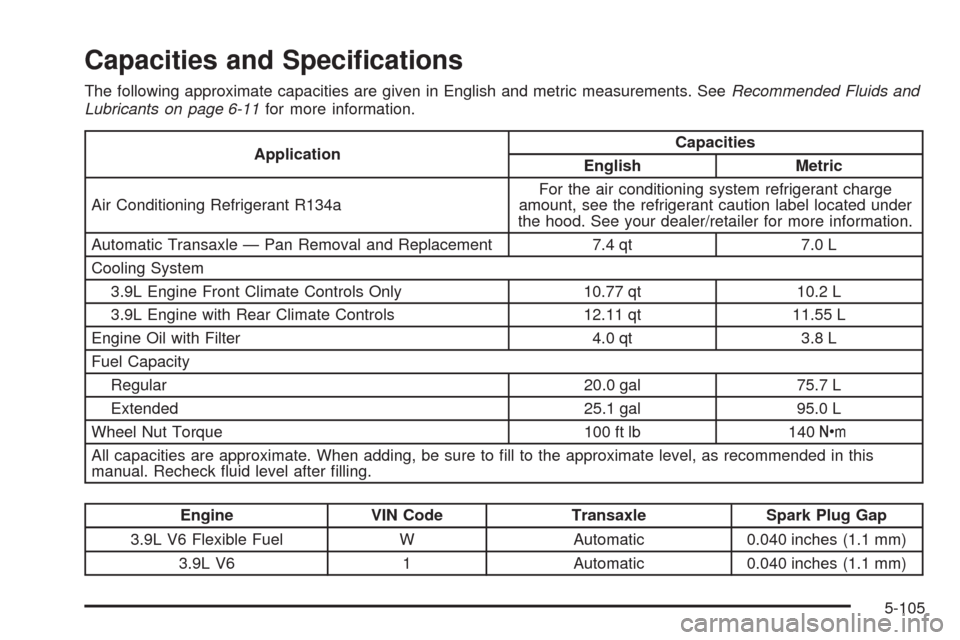
Capacities and Specications
The following approximate capacities are given in English and metric measurements. SeeRecommended Fluids and
Lubricants on page 6-11for more information.
ApplicationCapacities
English Metric
Air Conditioning Refrigerant R134aFor the air conditioning system refrigerant charge
amount, see the refrigerant caution label located under
the hood. See your dealer/retailer for more information.
Automatic Transaxle — Pan Removal and Replacement 7.4 qt 7.0 L
Cooling System
3.9L Engine Front Climate Controls Only 10.77 qt 10.2 L
3.9L Engine with Rear Climate Controls 12.11 qt 11.55 L
Engine Oil with Filter 4.0 qt 3.8 L
Fuel Capacity
Regular 20.0 gal 75.7 L
Extended 25.1 gal 95.0 L
Wheel Nut Torque 100 ft lb 140Y
All capacities are approximate. When adding, be sure to ll to the approximate level, as recommended in this
manual. Recheck uid level after lling.
Engine VIN Code Transaxle Spark Plug Gap
3.9L V6 Flexible Fuel W Automatic 0.040 inches (1.1 mm)
3.9L V6 1 Automatic 0.040 inches (1.1 mm)
5-105
Page 465 of 476
Check
Engine Light...............................................3-44
Checking Things Under the Hood......................5-10
Chemical Paint Spotting...................................5-96
Child Restraints
Built-In Child Restraint..................................1-68
Child Restraint Systems...............................1-49
Infants and Young Children...........................1-46
Lower Anchors and Tethers for Children..........1-53
Older Children.............................................1-42
Securing a Child Restraint in a Rear Seat
Position..................................................1-61
Securing a Child Restraint in the Right
Front Seat Position...................................1-64
Where to Put the Restraint...........................1-52
Chime Level Adjustment.................................3-121
Cigarette Lighter.............................................3-24
Cleaning
Aluminum Wheels........................................5-95
Child Restraint Pad......................................5-92
Exterior Lamps/Lenses.................................5-94
Fabric/Carpet..............................................5-91
Finish Care.................................................5-94
Instrument Panel, Vinyl, and Other Plastic
Surfaces.................................................5-92
Interior.......................................................5-90
Leather......................................................5-92
Tires..........................................................5-96
Underbody Maintenance...............................5-96
Washing Your Vehicle...................................5-93Cleaning (cont.)
Weatherstrips..............................................5-93
Windshield, Backglass, and Wiper Blades.......5-95
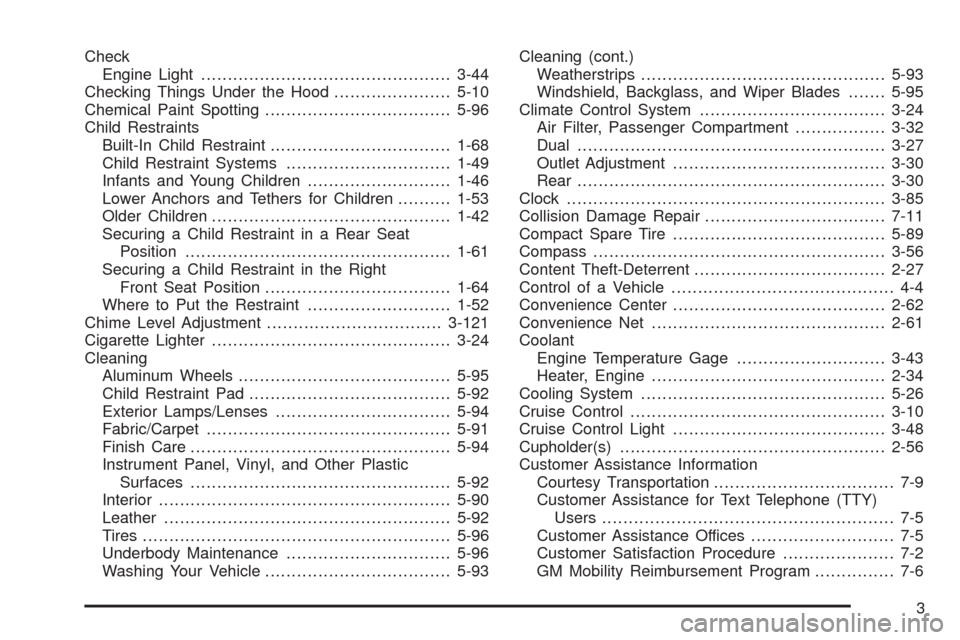
Climate Control System...................................3-24
Air Filter, Passenger Compartment.................3-32
Dual..........................................................3-27
Outlet Adjustment........................................3-30
Rear..........................................................3-30
Clock
............................................................3-85
Collision Damage Repair..................................7-11
Compact Spare Tire........................................5-89
Compass.......................................................3-56
Content Theft-Deterrent....................................2-27
Control of a Vehicle.......................................... 4-4
Convenience Center........................................2-62
Convenience Net............................................2-61
Coolant
Engine Temperature Gage............................3-43
Heater, Engine............................................2-34
Cooling System..............................................5-26
Cruise Control................................................3-10
Cruise Control Light........................................3-48
Cupholder(s)..................................................2-56
Customer Assistance Information
Courtesy Transportation.................................. 7-9
Customer Assistance for Text Telephone (TTY)
Users....................................................... 7-5
Customer Assistance Offices........................... 7-5
Customer Satisfaction Procedure..................... 7-2
GM Mobility Reimbursement Program............... 7-6
3
Page 466 of 476
Customer Assistance Information (cont.)
Reporting Safety Defects to General Motors....7-14
Reporting Safety Defects to the Canadian
Government............................................7-14
Reporting Safety Defects to the
United States Government.........................7-14
Roadside Assistance Program......................... 7-6
Service Publications Ordering Information........7-15
D
Daytime Running Lamps/Automatic Headlamp
System......................................................3-16
Defensive Driving............................................. 4-2
Delayed Lighting.............................................3-18
Delayed Locking.............................................2-12
DIC Compass.................................................3-56
Disc, MP3......................................................3-98
Doing Your Own Service Work........................... 5-4
Dome Lamp...................................................3-18
Door
Automatic Door Lock....................................2-12
Delayed Locking..........................................2-12
Dual Sliding Doors.......................................2-13
Locks........................................................2-10
Power Door Locks.......................................2-11
Power Sliding Door......................................2-16
Programmable Automatic Door Unlock............2-13Driver Information Center (DIC).........................3-50
DIC Operation and Displays..........................3-50
DIC Vehicle Personalization..........................3-76
DIC Warnings and Messages........................3-58
Driving
At Night.....................................................4-13
Before a Long Trip......................................4-15
Defensive..................................................... 4-2
Drunken....................................................... 4-3
Highway Hypnosis.......................................4-15
Hill and Mountain Roads..............................4-16
In Rain and on Wet Roads...........................4-14
Rocking Your Vehicle to Get it Out.................4-21
Winter........................................................4-17
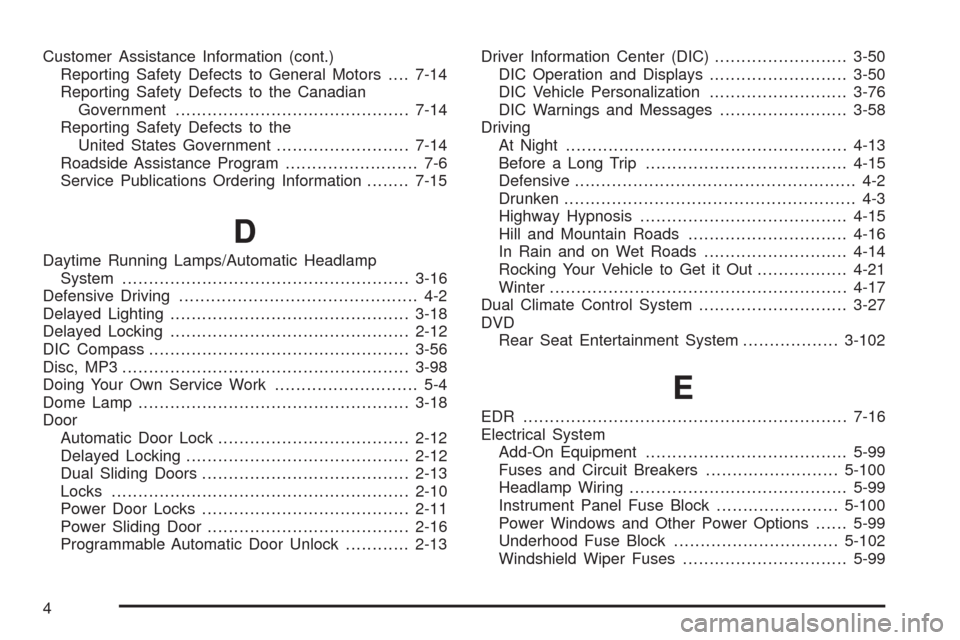
Dual Climate Control System............................3-27
DVD
Rear Seat Entertainment System..................3-102
E
EDR .............................................................7-16
Electrical System
Add-On Equipment......................................5-99
Fuses and Circuit Breakers.........................5-100
Headlamp Wiring.........................................5-99
Instrument Panel Fuse Block.......................5-100
Power Windows and Other Power Options......5-99
Underhood Fuse Block...............................5-102
Windshield Wiper Fuses...............................5-99
4
Page 472 of 476
R
Radiator Pressure Cap....................................5-24
Radio Frequency Identication (RFID), Privacy....7-17
Radios..........................................................3-84
Radio(s)........................................................3-86
Radios
Navigation/Radio System, see Navigation
Manual.................................................3-102
Rear Seat Audio........................................3-117
Reception.................................................3-120
Setting the Time..........................................3-85
Theft-Deterrent..........................................3-118
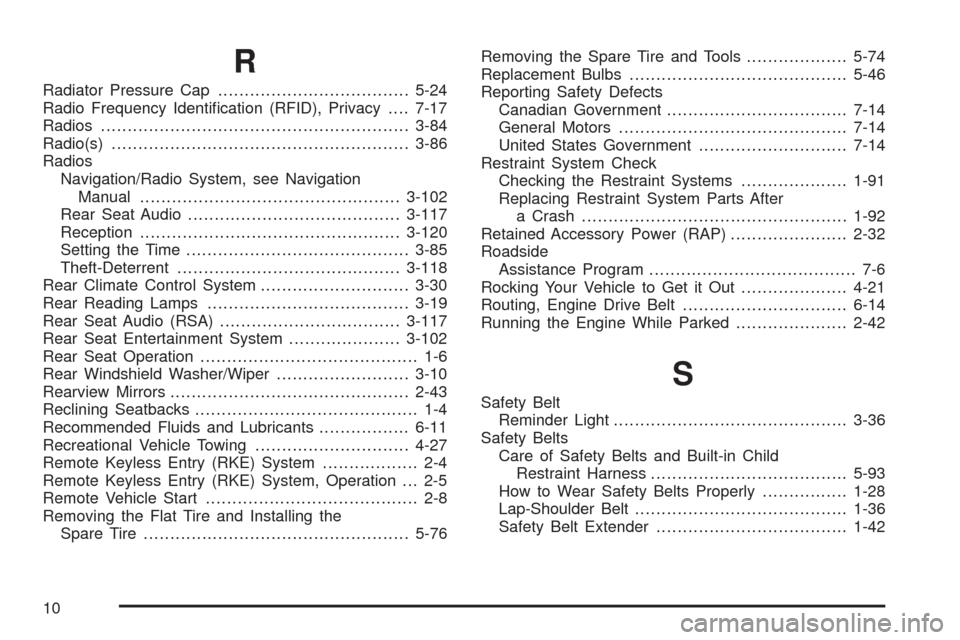
Rear Climate Control System............................3-30
Rear Reading Lamps......................................3-19
Rear Seat Audio (RSA)..................................3-117
Rear Seat Entertainment System.....................3-102
Rear Seat Operation......................................... 1-6
Rear Windshield Washer/Wiper.........................3-10
Rearview Mirrors.............................................2-43
Reclining Seatbacks.......................................... 1-4
Recommended Fluids and Lubricants.................6-11
Recreational Vehicle Towing.............................4-27
Remote Keyless Entry (RKE) System.................. 2-4
Remote Keyless Entry (RKE) System, Operation . . . 2-5
Remote Vehicle Start........................................ 2-8
Removing the Flat Tire and Installing the
Spare Tire..................................................5-76Removing the Spare Tire and Tools...................5-74
Replacement Bulbs.........................................5-46
Reporting Safety Defects
Canadian Government..................................7-14
General Motors...........................................7-14
United States Government............................7-14
Restraint System Check
Checking the Restraint Systems....................1-91
Replacing Restraint System Parts After
a Crash..................................................1-92
Retained Accessory Power (RAP)......................2-32
Roadside
Assistance Program....................................... 7-6
Rocking Your Vehicle to Get it Out....................4-21
Routing, Engine Drive Belt...............................6-14
Running the Engine While Parked.....................2-42
S
Safety Belt
Reminder Light............................................3-36
Safety Belts
Care of Safety Belts and Built-in Child
Restraint Harness.....................................5-93
How to Wear Safety Belts Properly................1-28
Lap-Shoulder Belt........................................1-36
Safety Belt Extender....................................1-42
10