headlamp CHEVROLET UPLANDER 2008 1.G Owner's Manual
[x] Cancel search | Manufacturer: CHEVROLET, Model Year: 2008, Model line: UPLANDER, Model: CHEVROLET UPLANDER 2008 1.GPages: 476, PDF Size: 5.77 MB
Page 363 of 476
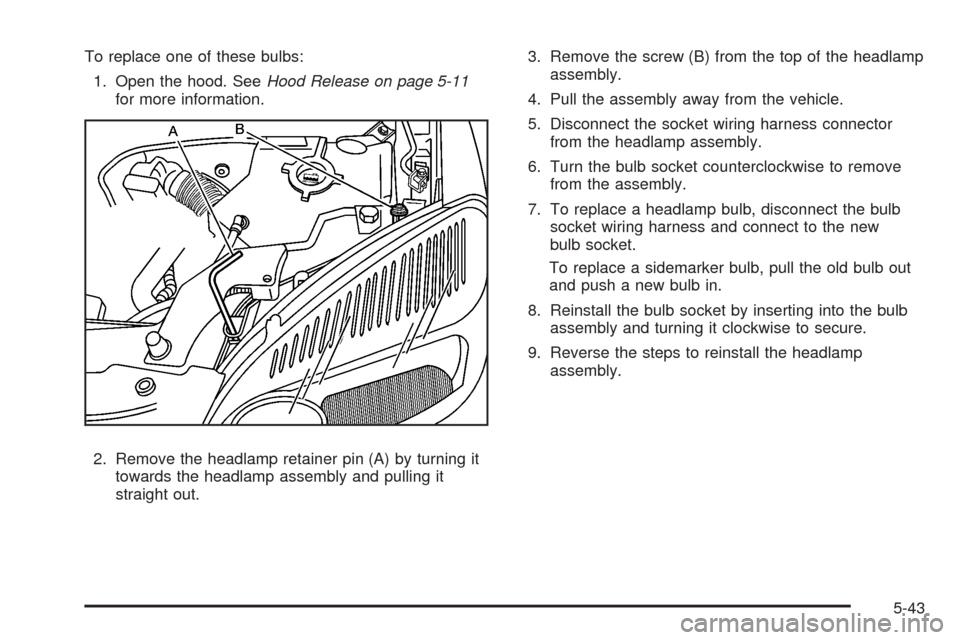
To replace one of these bulbs:
1. Open the hood. SeeHood Release on page 5-11
for more information.
2. Remove the headlamp retainer pin (A) by turning it
towards the headlamp assembly and pulling it
straight out.3. Remove the screw (B) from the top of the headlamp
assembly.
4. Pull the assembly away from the vehicle.
5. Disconnect the socket wiring harness connector
from the headlamp assembly.
6. Turn the bulb socket counterclockwise to remove
from the assembly.
7. To replace a headlamp bulb, disconnect the bulb
socket wiring harness and connect to the new
bulb socket.
To replace a sidemarker bulb, pull the old bulb out
and push a new bulb in.
8. Reinstall the bulb socket by inserting into the bulb
assembly and turning it clockwise to secure.
9. Reverse the steps to reinstall the headlamp
assembly.
5-43
Page 364 of 476
Front Turn Signal, Parking and
Daytime Running Lamps (DRL)
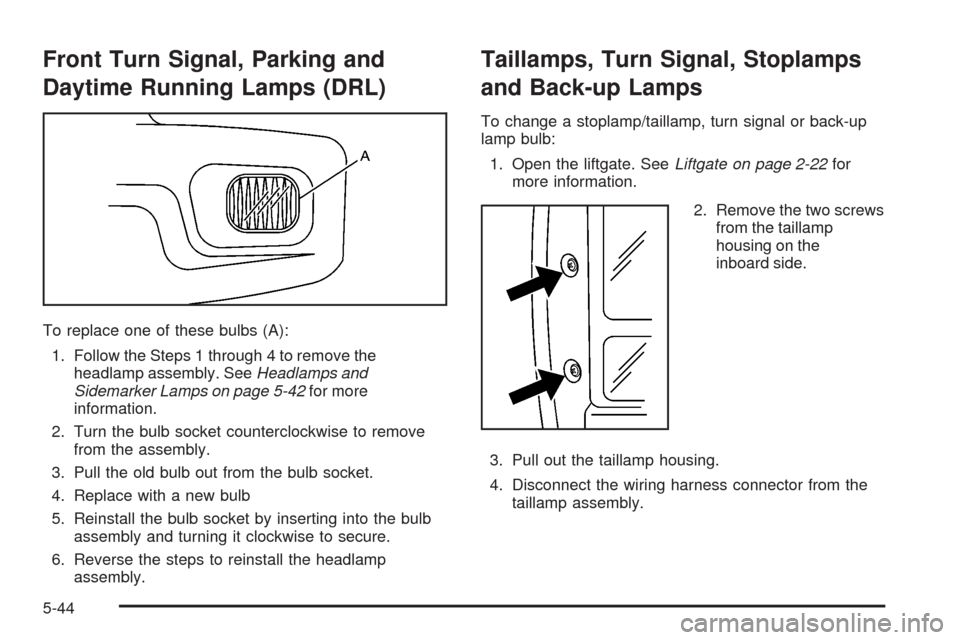
To replace one of these bulbs (A):
1. Follow the Steps 1 through 4 to remove the
headlamp assembly. SeeHeadlamps and
Sidemarker Lamps on page 5-42for more
information.
2. Turn the bulb socket counterclockwise to remove
from the assembly.
3. Pull the old bulb out from the bulb socket.
4. Replace with a new bulb
5. Reinstall the bulb socket by inserting into the bulb
assembly and turning it clockwise to secure.
6. Reverse the steps to reinstall the headlamp
assembly.
Taillamps, Turn Signal, Stoplamps
and Back-up Lamps
To change a stoplamp/taillamp, turn signal or back-up
lamp bulb:
1. Open the liftgate. SeeLiftgate on page 2-22for
more information.
2. Remove the two screws
from the taillamp
housing on the
inboard side.
3. Pull out the taillamp housing.
4. Disconnect the wiring harness connector from the
taillamp assembly.
5-44
Page 366 of 476
License Plate Lamp
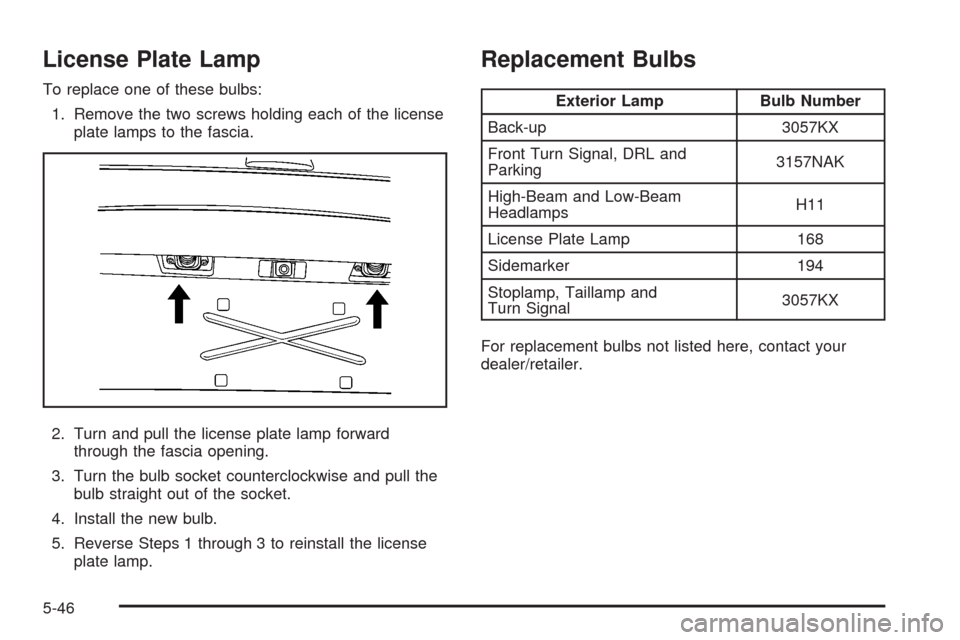
To replace one of these bulbs:
1. Remove the two screws holding each of the license
plate lamps to the fascia.
2. Turn and pull the license plate lamp forward
through the fascia opening.
3. Turn the bulb socket counterclockwise and pull the
bulb straight out of the socket.
4. Install the new bulb.
5. Reverse Steps 1 through 3 to reinstall the license
plate lamp.
Replacement Bulbs
Exterior Lamp Bulb Number
Back-up 3057KX
Front Turn Signal, DRL and
Parking3157NAK
High-Beam and Low-Beam
HeadlampsH11
License Plate Lamp 168
Sidemarker 194
Stoplamp, Taillamp and
Turn Signal3057KX
For replacement bulbs not listed here, contact your
dealer/retailer.
5-46
Page 389 of 476
If you need to replace any of your wheels, wheel bolts,
wheel nuts, or Tire Pressure Monitor System (TPMS)
sensors, replace them only with new GM original
equipment parts. This way, you will be sure to have the
right wheel, wheel bolts, wheel nuts, and TPMS
sensors for your vehicle.
{CAUTION:
Using the wrong replacement wheels, wheel
bolts, or wheel nuts on your vehicle can be
dangerous. It could affect the braking and
handling of your vehicle, make your tires lose
air and make you lose control. You could have
a collision in which you or others could be
injured. Always use the correct wheel, wheel
bolts, and wheel nuts for replacement.Notice:The wrong wheel can also cause problems
with bearing life, brake cooling, speedometer or
odometer calibration, headlamp aim, bumper height,
vehicle ground clearance, and tire or tire chain
clearance to the body and chassis.
SeeChanging a Flat Tire on page 5-73for more
information.
Used Replacement Wheels
{CAUTION:
Putting a used wheel on your vehicle is
dangerous. You cannot know how it has been
used or how far it has been driven. It could fail
suddenly and cause a crash. If you have to
replace a wheel, use a new GM original
equipment wheel.
5-69
Page 419 of 476
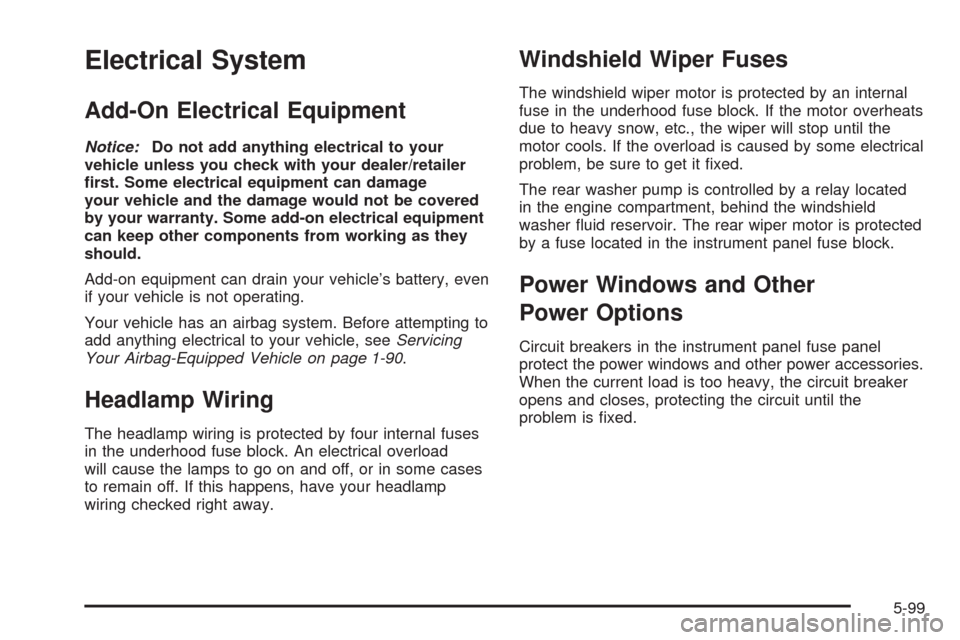
Electrical System
Add-On Electrical Equipment
Notice:Do not add anything electrical to your
vehicle unless you check with your dealer/retailer
rst. Some electrical equipment can damage
your vehicle and the damage would not be covered
by your warranty. Some add-on electrical equipment
can keep other components from working as they
should.
Add-on equipment can drain your vehicle’s battery, even
if your vehicle is not operating.
Your vehicle has an airbag system. Before attempting to
add anything electrical to your vehicle, seeServicing
Your Airbag-Equipped Vehicle on page 1-90.
Headlamp Wiring
The headlamp wiring is protected by four internal fuses
in the underhood fuse block. An electrical overload
will cause the lamps to go on and off, or in some cases
to remain off. If this happens, have your headlamp
wiring checked right away.
Windshield Wiper Fuses
The windshield wiper motor is protected by an internal
fuse in the underhood fuse block. If the motor overheats
due to heavy snow, etc., the wiper will stop until the
motor cools. If the overload is caused by some electrical
problem, be sure to get it xed.
The rear washer pump is controlled by a relay located
in the engine compartment, behind the windshield
washer uid reservoir. The rear wiper motor is protected
by a fuse located in the instrument panel fuse block.
Power Windows and Other
Power Options
Circuit breakers in the instrument panel fuse panel
protect the power windows and other power accessories.
When the current load is too heavy, the circuit breaker
opens and closes, protecting the circuit until the
problem is xed.
5-99
Page 464 of 476
Audio System (cont.)
Navigation/Radio System, see Navigation
Manual.................................................3-102
Radio Reception........................................3-120
Rear Seat Audio (RSA)...............................3-117
Setting the Time..........................................3-85
Theft-Deterrent Feature...............................3-118
XM™ Satellite Radio Antenna System...........3-121
Audio System(s).............................................3-86
Automatic Door Lock.......................................2-12
Automatic Transmission
Fluid..........................................................5-20
Operation...................................................2-35
B
Battery..........................................................5-36
Electric Power Management..........................3-20
Run-Down Protection...................................3-21
Brake
Emergencies................................................ 4-6
Brakes..........................................................5-33
System Warning Light..................................3-41
Braking........................................................... 4-4
Braking in Emergencies..................................... 4-6
Break-In, New Vehicle.....................................2-31
Bucket Seats, Rear........................................... 1-6
Built-in Child Restraint.....................................1-68Bulb Replacement...........................................5-42
Front Turn Signal, Parking and Daytime
Running Lamps........................................5-44
Halogen Bulbs............................................5-42
Headlamp Aiming........................................5-41
License Plate Lamps....................................5-46
Replacement Bulbs......................................5-46
Taillamps, Turn Signal, Stoplamps and
Back-up Lamps........................................5-44
Buying New Tires...........................................5-65
C
Calibration.....................................................3-56
California Fuel.................................................. 5-5
California Perchlorate Materials Requirements....... 5-4
California Proposition 65 Warning....................... 5-3
Canadian Owners................................................ ii
Capacities and Specications..........................5-105
Captain Chairs, Rear.......................................1-14
Carbon Monoxide...........................2-41, 4-17, 4-28
Care of
Safety Belts and Built-in Child Restraint
Harness..................................................5-93
Cargo Lamp...................................................3-19
CD, MP3 .......................................................3-98
Chains, Tire...................................................5-70
Charging System Light....................................3-40
2
Page 466 of 476
Customer Assistance Information (cont.)
Reporting Safety Defects to General Motors....7-14
Reporting Safety Defects to the Canadian
Government............................................7-14
Reporting Safety Defects to the
United States Government.........................7-14
Roadside Assistance Program......................... 7-6
Service Publications Ordering Information........7-15
D
Daytime Running Lamps/Automatic Headlamp
System......................................................3-16
Defensive Driving............................................. 4-2
Delayed Lighting.............................................3-18
Delayed Locking.............................................2-12
DIC Compass.................................................3-56
Disc, MP3......................................................3-98
Doing Your Own Service Work........................... 5-4
Dome Lamp...................................................3-18
Door
Automatic Door Lock....................................2-12
Delayed Locking..........................................2-12
Dual Sliding Doors.......................................2-13
Locks........................................................2-10
Power Door Locks.......................................2-11
Power Sliding Door......................................2-16
Programmable Automatic Door Unlock............2-13Driver Information Center (DIC).........................3-50
DIC Operation and Displays..........................3-50
DIC Vehicle Personalization..........................3-76
DIC Warnings and Messages........................3-58
Driving
At Night.....................................................4-13
Before a Long Trip......................................4-15
Defensive..................................................... 4-2
Drunken....................................................... 4-3
Highway Hypnosis.......................................4-15
Hill and Mountain Roads..............................4-16
In Rain and on Wet Roads...........................4-14
Rocking Your Vehicle to Get it Out.................4-21
Winter........................................................4-17
Dual Climate Control System............................3-27
DVD
Rear Seat Entertainment System..................3-102
E
EDR .............................................................7-16
Electrical System
Add-On Equipment......................................5-99
Fuses and Circuit Breakers.........................5-100
Headlamp Wiring.........................................5-99
Instrument Panel Fuse Block.......................5-100
Power Windows and Other Power Options......5-99
Underhood Fuse Block...............................5-102
Windshield Wiper Fuses...............................5-99
4
Page 468 of 476
G
Gage
Engine Coolant Temperature.........................3-43
Fuel..........................................................3-49
Speedometer..............................................3-36
Tachometer.................................................3-36
Garage Door Opener.......................................2-51
Gasoline
Octane........................................................ 5-5
Specications............................................... 5-5
Glove Box.....................................................2-56
GM Mobility Reimbursement Program.................. 7-6
H
Hazard Warning Flashers................................... 3-6
Head Restraints............................................... 1-6
Headlamp
Aiming.......................................................5-41
Headlamp Wiring............................................5-99
Headlamps
Bulb Replacement.......................................5-42
Daytime Running Lamps/Automatic Headlamp
System...................................................3-16
Exterior Lamps............................................3-14
Flash-to-Pass............................................... 3-8
Halogen Bulbs............................................5-42
Headlamps and Sidemarker Lamps................5-42Headlamps (cont.)
High/Low Beam Changer................................ 3-8
On Reminder..............................................3-15
Wiper Activated...........................................3-15
Headlamps and Sidemarker Lamps...................5-42
Heated Seats................................................... 1-3
Heater...................................................3-24, 3-27
Highbeam On Light.........................................3-48
High-Speed Operation, Tires.............................5-56
Highway Hypnosis...........................................4-15
Hill and Mountain Roads..................................4-16
Hood
Checking Things Under................................5-10
Release.....................................................5-11
Horn............................................................... 3-6
How to Wear Safety Belts Properly...................1-28
I
Ignition Positions.............................................2-31
Infants and Young Children, Restraints...............1-46
Ination - Tire Pressure...................................5-54
Instrument Panel
Overview..................................................... 3-4
Instrument Panel (I/P)
Brightness..................................................3-17
Cluster.......................................................3-35
Interior Lamps
Control.......................................................3-17
6
Page 476 of 476
W
Warning Lights, Gages and Indicators................3-34
Warnings
DIC Warnings and Messages........................3-58
Hazard Warning Flashers............................... 3-6
Other Warning Devices.................................. 3-6
Safety and Symbols......................................... iii
Vehicle Damage.............................................. iv
Wheels
Alignment and Tire Balance..........................5-68
Different Size..............................................5-66
Replacement...............................................5-68
Where to Put the Restraint...............................1-52
Windows.......................................................2-24
Manual Rear Quarter...................................2-26
Power........................................................2-25
Power Rear Quarter.....................................2-26Windshield
Backglass, and Wiper Blades, Cleaning..........5-95
Washer........................................................ 3-9
Washer Fluid..............................................5-32
Wiper Blade Replacement.............................5-47
Wiper Fuses...............................................5-99
Wipers......................................................... 3-9
Windshield, Rear Washer/Wiper........................3-10
Winter Driving................................................4-17
Wiper Activated Headlamps..............................3-15
X
XM Radio Messages.....................................3-101
XM™ Satellite Radio Antenna System..............3-121
Y
Your Vehicle and the Environment....................... 6-2
14