change time CHEVROLET UPLANDER 2009 1.G User Guide
[x] Cancel search | Manufacturer: CHEVROLET, Model Year: 2009, Model line: UPLANDER, Model: CHEVROLET UPLANDER 2009 1.GPages: 464, PDF Size: 2.59 MB
Page 207 of 464
Oil Life
Press the information button until OIL LIFE displays.
This mode shows an estimate of the oil’s remaining
useful life. If you see OIL LIFE 99% on the display, that
means 99% of the current oil life remains. The engine
oil life system will alert you to change the oil on a
schedule consistent with your driving conditions.
When the remaining oil life is low, the CHANGE OIL
SOON message will appear on the display. You should
change the oil as soon as possible. SeeEngine Oil
on page 5-15. In addition to the engine oil life system
monitoring the oil life, additional maintenance is
recommended in the Maintenance Schedule in this
manual. SeeScheduled Maintenance on page 6-4for
more information.
Remember, you must reset the OIL LIFE yourself after
each oil change. It will not reset itself. Also, be careful not
to reset the OIL LIFE accidentally at any time other than
when the oil has just been changed. It cannot be reset
accurately until the next oil change. To reset the engine
oil life system, seeEngine Oil Life System on page 5-18.
The display will show 100% when the system is reset.
Tire Pressure
Press the information button until FRONT TIRE
PRESSURE displays. This mode shows the pressure
for the front tires. To view the pressure for the rear tires,
press the information button again until REAR TIRE
PRESSURE displays. The tire pressure will be shown in
either pounds per square inch (psi) or kilopascals (kPa).
If a low tire pressure condition is detected by the system
while driving, a message advising you to check the
pressure in a specic tire will appear in the display. The
tire pressure light will also ash and then remain on
during the same ignition cycle. SeeInflation - Tire
Pressure on page 5-54andDIC Warnings and Messages
on page 3-51for more information.
If the tire pressure display shows dashes or blanks
instead of a value, there may be a problem with your
vehicle. If this consistently occurs, see your dealer
for service.
3-47
Page 226 of 464
This message continues to display for two seconds if it
has not been acknowledged when the engine is
turned off. It also re-displays for two seconds if the
message has been acknowledged, but the condition still
exists when the engine is turned off.
If the condition still exists, the message re-appears
when the engine is turned on.
STABILITY CONTROL ACTIVE
If your vehicle has StabiliTrak, this message displays
when StabiliTrak is actively assisting you with directional
control of the vehicle. Slippery road conditions may exist
when this message is displayed, so adjust your driving
accordingly. SeeStabiliTrak
®System on page 4-7.
This message displays only while the ignition is in
ON/RUN. This message stays on until road conditions
change and StabiliTrak
®is not active.
This message cannot be acknowledged and cleared
from the screen.
STABILITY CONTROL OFF
If your vehicle has StabiliTrak, this message displays
any time the system turns off. When this message has
been displayed, StabiliTrak is no longer available to
assist you with directional control of the vehicle. Adjust
your driving accordingly. SeeStabiliTrak
®System
on page 4-7.This message displays only while the ignition is in
ON/RUN.
Any of the following conditions may cause the
StabiliTrak system to turn off:
The battery is low.
There is a StabiliTrak system failure. See your
dealer/retailer for service.
STARTING DISABLED
This message displays if the starting of the engine is
disabled due to the electronic throttle control system or
vehicle theft-deterrent system. Have your vehicle
serviced by your dealer/retailer immediately.
This message only appears while the ignition is in
ON/RUN and will not disappear until the problem is
resolved.
This message cannot be acknowledged.
TRACTION CONTROL ACTIVE
If your vehicle has the Traction Control System (TCS),
this message displays when the system is on.
Slippery road conditions may exist if this message is
displayed, so adjust your driving accordingly. See
Traction Control System (TCS) on page 4-6for more
information.
3-66
Page 237 of 464
Setting the Clock
Adjusting the Hours and Minutes
1. Press H or M to enter the clock mode.
2. To adjust the hours, press and hold H until the
correct hour appears on the display.
3. To adjust the minutes, press and hold M until the
correct minute appears on the display.
Selecting the Display Format
1. Press H or M to enter the clock mode.
2. Press
O/eto select between the 12 or 24 hour
display format.
The clock mode automatically times out with the
changed display format set as the current default setting.
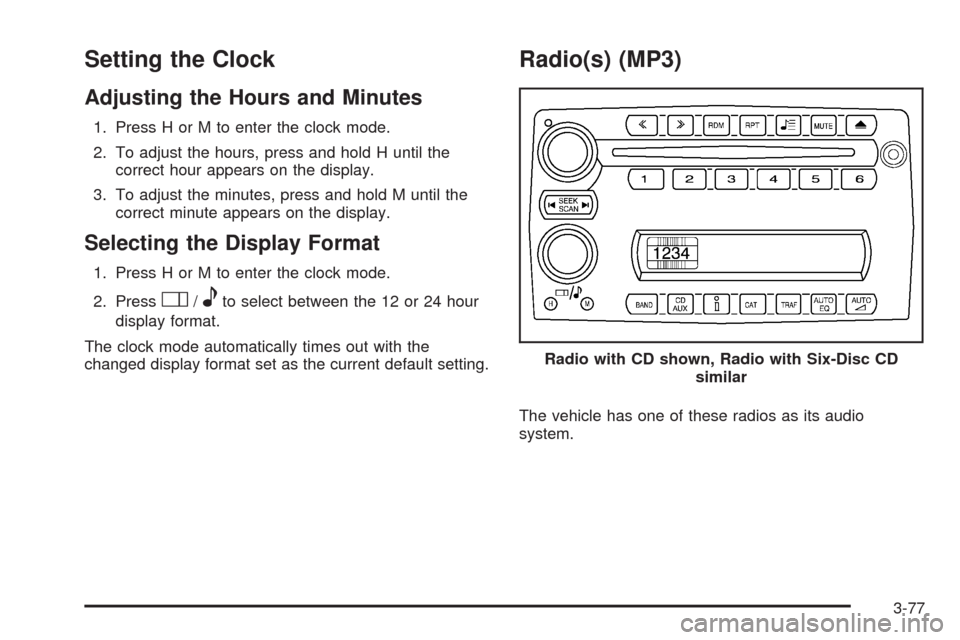
Radio(s) (MP3)
The vehicle has one of these radios as its audio
system.Radio with CD shown, Radio with Six-Disc CD
similar
3-77
Page 238 of 464
Radio Data System (RDS)
The audio system has a Radio Data System (RDS).
RDS features are available for use only on FM stations
that broadcast RDS information.
With RDS, the radio can do the following:
Seek to stations broadcasting the selected type of
programming
Receive announcements concerning local and
national emergencies
Display messages from radio stations
Seek to stations with traffic announcements
This system relies upon receiving specic information
from these stations and only works when the information
is available. In rare cases, a radio station can broadcast
incorrect information that causes the radio features
to work improperly. If this happens, contact the radio
station.
While the radio is tuned to an RDS station, the station
name or call letters display. RDS stations can also
provide the time of day, a program type (PTY) for current
programming, and the name of the program being
broadcast.
Playing the Radio
Top Knob (Power/Volume):Press to turn the system
on and off. Turn clockwise or counterclockwise to
increase or to decrease the volume.
4(Information):For RDS, press to change what
displays while using RDS. The display options are
station name, RDS station frequency, PTY (program
type), and the name of the program (if available).
For XM™ (if equipped), press while in XM mode to
retrieve four different categories of information related to
the current song or channel: Artist, Song Title,
Category or PTY, Channel Number/Channel Name.
To change the default on the display, press until the
desired display appears, then hold for two seconds.
The radio produces one beep and the selected display
becomes the default.
AUTO
n(Automatic Volume):Automatic volume
adjusts the audio system automatically to make up
for road and wind noise while driving, by increasing the
volume as the vehicle speed increases.
3-78
Page 257 of 464
Battery Replacement
To change the batteries on the headphones:
1. Turn the screw to loosen the battery door located
on the left side of the headphones, then slide the
battery door open.
2. Replace the two batteries in the compartment.
Make sure that they are installed correctly using the
diagram on the inside of the battery compartment.
3. Replace the battery door and tighten the door
screw.
If the headphones are to be stored for a long period of
time, remove the batteries, and keep them in a cool,
dry place.
Wired Headphones
There is a right and left wired headphone jack located
behind the video screen next to the auxiliary jacks.
The wired headphones work as follows:
DVD on / RSA off: The wired headphones plays
RSE audio.
DVD off / RSA on: The wired headphones plays
RSA audio.
DVD on / RSA on: The wired headphones plays
RSA audio.
DVD Player
The DVD player is located in the overhead console and
can be controlled by the buttons on the DVD player
and/or by the buttons on the remote control. See “Remote
Control” later in this section for more information.
The RSE system DVD player is only compatible with
DVDs of the appropriate region code for the country that
the vehicle was sold. The DVD region code is printed
on the jacket of most DVDs.
The player is capable of playing the following media
formats:
DVD (single and dual layer)
DVD+R/RW
DVD-R/RW
DVD-ROM with MP3
DVD-ROM with WMA
CD-DA
CD-R/RW
CD-ROM with MP3
CD-ROM with WMA
Enhanced CD
SACD (CD player only)
3-97
Page 263 of 464
RSE On-Screen Display (OSD) Menu
To use the RSE OSD menu when using a DVD or an
auxiliary device:
1. Press
zon the remote control or on the DVD
faceplate, if the vehicle does not have rear seat
climate control.
2. Use
q,Q,r,Randrto navigate the
screen.
This menu lets you select default preferences for video
format, language preference, brightness, color, contrast,
and tint. Not all DVDs support all the feature defaults in
the setup menus. If a feature is not supported, the
defaults are provided by the DVD media. To exit this
menu press
z,orqon the remote control, or
faceplate if there is no rear seat climate control, or wait
for the menu to time out.
The default language selection applies to all
future DVDs.To use the RSE OSD menu when using a CD or
an MP3:
1. Press
zon the remote control or on the DVD
faceplate, if the vehicle does not have rear seat
climate control.
2. Use
q,Q,r,Randrto navigate the
screen.
This menu lets you select default preferences for
language and playback settings. To exit this menu press
z,orqon the remote control, or faceplate if there
is no rear seat climate control, or wait for the menu
to time out.
Battery Replacement
To change the remote control batteries, do the following:
1. Slide the rear cover back on the remote control.
2. Replace the two batteries in the compartment. Make
sure that they are installed correctly using the
diagram on the inside of the battery compartment.
3. Replace the battery cover.
If the remote control is to be stored for a long period of
time, remove the batteries and keep them in a cool,
dry place.
3-103
Page 279 of 464
Antilock Brake System (ABS)
Your vehicle has the Antilock Brake System (ABS), an
advanced electronic braking system that will help
prevent a braking skid.
When you start the engine and begin to drive away,
ABS will check itself. You might hear a momentary
motor or clicking noise while this test is going on, and
you might even notice that the brake pedal moves
or pulses a little. This is normal.
If there is a problem with
ABS, this warning light will
stay on. SeeAntilock Brake
System (ABS) Warning
Light on page 3-36.Let us say the road is wet and you are driving safely.
Suddenly, an animal jumps out in front of you. You slam
on the brakes and continue braking. Here is what
happens with ABS:
A computer senses that the wheels are slowing down.
If one of the wheels is about to stop rolling, the computer
will separately work the brakes at each wheel.
ABS can change the brake pressure to each wheel, as
required, faster than any driver could. This can help
you steer around the obstacle while braking hard.
As you brake, the computer keeps receiving updates on
wheel speed and controls braking pressure accordingly.
Remember: ABS does not change the time you need to
get your foot up to the brake pedal or always decrease
stopping distance. If you get too close to the vehicle in
front of you, you will not have time to apply the brakes
if that vehicle suddenly slows or stops. Always leave
enough room up ahead to stop, even though you
have ABS.
4-5
Page 299 of 464
Dinghy Towing
Your vehicle was not designed to be towed with all of its
wheels on the ground. It can be towed with the two
rear wheels on the ground. See “Dolly Towing” following
for more information.
Dolly Towing
To dolly tow your vehicle, do the following:
1. Put the front wheels on a dolly.
2. Put the vehicle in PARK (P).
3. Set the parking brake.
4. Clamp the steering wheel in a straight-ahead
position with a clamping device designed for towing.
5. Remove the key from the ignition.
6. Secure the vehicle to the dolly.
7. Release the parking brake.
Level Control
On vehicles equipped with automatic level control, the
rear of the vehicle is automatically kept level as you load
or unload your vehicle. However, you should still not
exceed the GVWR or the GAWR. SeeLoading the
Vehicle on page 4-19.
You may hear the compressor operating when you load
or unload your vehicle, and periodically as the system
self-adjusts. This is normal. The compressor should
operate for brief periods of time. If the sound continues
for an extended period of time, your vehicle needs
service.
Using heavier suspension components to get added
durability might not change your weight ratings. Ask your
dealer to help you load your vehicle the right way.
4-25
Page 300 of 464
Towing a Trailer
{CAUTION:
The driver can lose control when pulling a trailer if
the correct equipment is not used or the vehicle is
not driven properly. For example, if the trailer is
too heavy, the brakes may not work well — or
even at all. The driver and passengers could be
seriously injured. The vehicle may also be
damaged; the resulting repairs would not be
covered by the vehicle warranty. Pull a trailer only
if all the steps in this section have been followed.
Ask your dealer/retailer for advice and information
about towing a trailer with the vehicle.
Notice:Pulling a trailer improperly can damage the
vehicle and result in costly repairs not covered
by the vehicle warranty. To pull a trailer correctly,
follow the advice in this section and see your
dealer/retailer for important information about
towing a trailer with the vehicle.Your vehicle can tow a trailer. To identify the trailering
capacity of vehicle, you should read the information
in “Weight of the Trailer” that appears later in this
section. Trailering is different than just driving your
vehicle by itself. Trailering means changes in handling,
acceleration, braking, durability, and fuel economy.
Successful, safe trailering takes correct equipment, and
it has to be used properly.
That is the reason for this section. In it are many
time-tested, important trailering tips and safety rules.
Many of these are important for your safety and that of
your passengers. So please read this section carefully
before you pull a trailer.
Load-pulling components such as the engine,
transmission, wheel assemblies, and tires are forced to
work harder against the drag of the added weight.
The engine is required to operate at relatively higher
speeds and under greater loads, generating extra heat.
The trailer also adds considerably to wind resistance,
increasing the pulling requirements.
4-26
Page 328 of 464
Engine Oil Additives / Engine Oil
Flushes
Do not add anything to the oil. The recommended
oils with the starburst symbol that meet GM
Standard GM6094M are all you need for good
performance and engine protection.
Engine oil system ushes are not recommended and
could cause engine damage not covered by the vehicle
warranty.
Engine Oil Life System
When to Change Engine Oil
This vehicle has a computer system that lets you know
when to change the engine oil and lter. This is based
on engine revolutions and engine temperature, and not
on mileage. Based on driving conditions, the mileage
at which an oil change will be indicated can vary
considerably. For the oil life system to work properly,
you must reset the system every time the oil is changed.When the system has calculated that oil life has been
diminished, it will indicate that an oil change is necessary.
A CHANGE OIL SOON message will come on. SeeDIC
Warnings and Messages on page 3-51. Change the oil
as soon as possible within the next 600 miles (1 000 km).
It is possible that, if you are driving under the best
conditions, the oil life system might not indicate that an oil
change is necessary for over a year. However, the engine
oil and lter must be changed at least once a year and at
this time the system must be reset. Your dealer/retailer
has trained people who will perform this work using
genuine parts and reset the system. It is also important
to check the oil regularly and keep it at the proper level.
If the system is ever reset accidentally, you must
change the oil at 3,000 miles (5 000 km) since the last oil
change. Remember to reset the oil life system whenever
the oil is changed.
5-18