instrument panel CHEVROLET UPLANDER 2009 1.G Owner's Manual
[x] Cancel search | Manufacturer: CHEVROLET, Model Year: 2009, Model line: UPLANDER, Model: CHEVROLET UPLANDER 2009 1.GPages: 464, PDF Size: 2.59 MB
Page 167 of 464
Turn Signal/Multifunction Lever
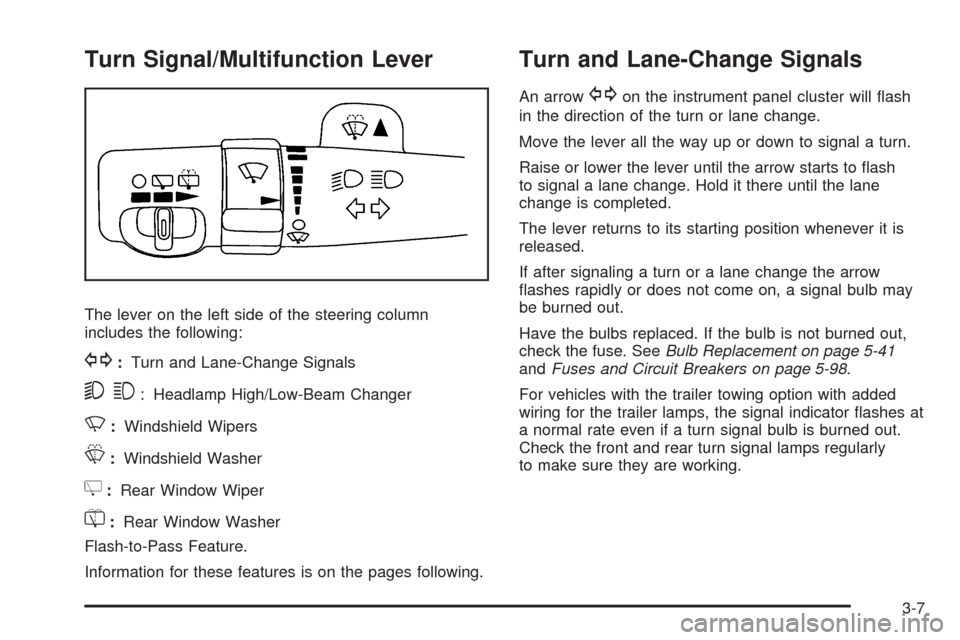
The lever on the left side of the steering column
includes the following:
G:Turn and Lane-Change Signals
53: Headlamp High/Low-Beam Changer
N:Windshield Wipers
L:Windshield Washer
Z:Rear Window Wiper
=:Rear Window Washer
Flash-to-Pass Feature.
Information for these features is on the pages following.
Turn and Lane-Change Signals
An arrowGon the instrument panel cluster will ash
in the direction of the turn or lane change.
Move the lever all the way up or down to signal a turn.
Raise or lower the lever until the arrow starts to ash
to signal a lane change. Hold it there until the lane
change is completed.
The lever returns to its starting position whenever it is
released.
If after signaling a turn or a lane change the arrow
ashes rapidly or does not come on, a signal bulb may
be burned out.
Have the bulbs replaced. If the bulb is not burned out,
check the fuse. SeeBulb Replacement on page 5-41
andFuses and Circuit Breakers on page 5-98.
For vehicles with the trailer towing option with added
wiring for the trailer lamps, the signal indicator ashes at
a normal rate even if a turn signal bulb is burned out.
Check the front and rear turn signal lamps regularly
to make sure they are working.
3-7
Page 168 of 464
Turn Signal On Chime
If either turn signal is left on for more than 3/4 mile
(1.2 km), a chime sounds to let the driver know to turn it
off. If the signal needs to be left on for more than 3/4 mile
(1.2 km), turn the signal off and then turn it back on.
Headlamp High/Low-Beam Changer
The headlamps must be on for this feature to work.
Push the turn signal lever away from you to turn the high
beams on.
This instrument panel cluster light
3comes on while
the high beam headlamps are on.
Pull the lever towards you to return to low beams.
Flash-to-Pass
This feature is used to signal the vehicle ahead that you
want to pass. When the headlamps are off, pull the
lever toward you to momentarily turn on the high beams.
Release the lever, to turn the high beams off.
Windshield Wipers
The windshield wiper/washer switch is on the
multifunction lever located on the left side of the
steering column.
Turn the band with
Non it to control the wipers.
8(Mist):Turn to mist, for a single wiping cycle and
then release. The wipers stop after one wipe. Hold
longer for additional wipes.
9(Off):Move the band to this position to turn the
wipers off.
N(Delay):Turn the band to choose the delay time
between wipes. Turn towards the top or bottom of
the lever, for a shorter or longer delay.
6(Low Speed):Use for steady wiping at low
speed.
1(High Speed):Use for steady wiping at high
speed.
Be sure to clear ice and snow from the wiper blades
before using them. If they are frozen to the windshield,
carefully loosen or thaw them. If your blades do become
worn or damaged, get new blades or blade inserts.
3-8
Page 171 of 464
Setting Cruise Control
{CAUTION:
If you leave your cruise control on when you are
not using cruise, you might hit a button and go
into cruise when you do not want to. You could be
startled and even lose control. Keep the cruise
control switch off until you want to use cruise
control.
1. Push
Iat the end of the cruise control lever to
turn the cruise control on.
2. Accelerate to the desired speed.
3. Push down on
RSET —and release it. This sets
the speed in cruise control.
4. Remove your foot from the accelerator pedal.
Jappears on the instrument panel cluster when the
cruise control is set. This symbol disappears when
the brakes are applied or the cruise control is cancelled.
It will reappear when the set cruise speed is resumed.
Resuming a Set Speed
If the brakes are applied after the cruise control is set,
the cruise control is disengaged. But the cruise control
does not need to be reset.
Once the vehicle is speed is 25 mph (40 km/h) or
greater, push the lever up toward the
QRES +position
to return to the previously set speed.
Do not continue to hold the lever in the
QRES +
position, unless a faster speed is desired.
Increasing Speed While Using Cruise
Control
There are two ways to go to a higher speed:
Use the accelerator pedal to get to the higher
speed. Push the lever up toward
QRES +,
then release the lever and the accelerator pedal.
Push the lever up toQRES +. Hold it there until
the vehicle reaches the desired speed, and then
release the lever. To increase the vehicle speed in
very small amounts, push up briey on the lever
and release it. Each time this is done, the vehicle
goes about 1 mph (1.6 km/h) faster.
The acceleration feature only works after the cruise
control speed has been set by pushing the cruise control
lever to the
RSET —position.
3-11
Page 173 of 464
Exterior Lamps
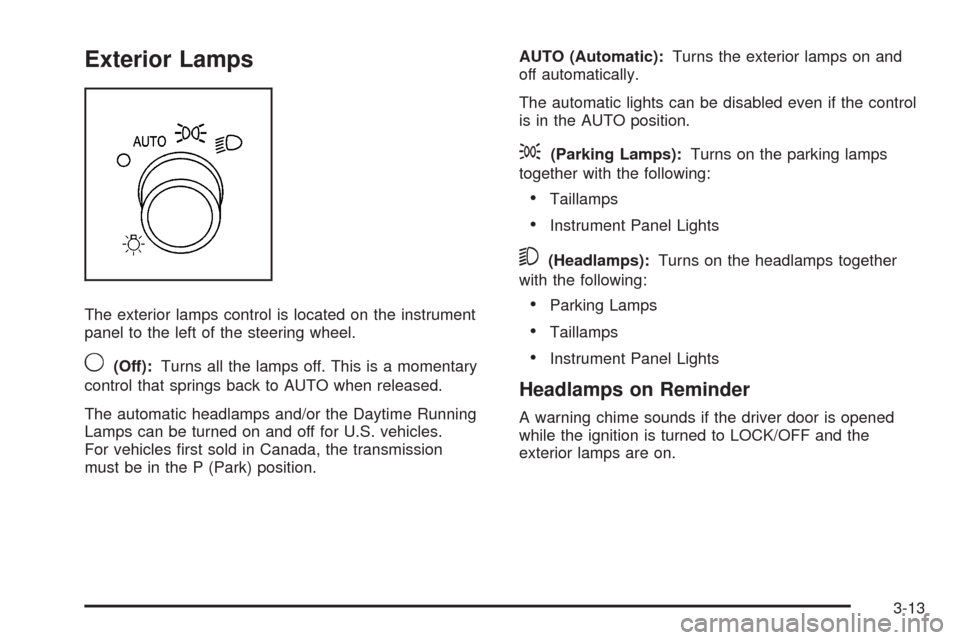
The exterior lamps control is located on the instrument
panel to the left of the steering wheel.
9(Off):Turns all the lamps off. This is a momentary
control that springs back to AUTO when released.
The automatic headlamps and/or the Daytime Running
Lamps can be turned on and off for U.S. vehicles.
For vehicles rst sold in Canada, the transmission
must be in the P (Park) position.AUTO (Automatic):Turns the exterior lamps on and
off automatically.
The automatic lights can be disabled even if the control
is in the AUTO position.
;(Parking Lamps):Turns on the parking lamps
together with the following:
Taillamps
Instrument Panel Lights
5(Headlamps):Turns on the headlamps together
with the following:
Parking Lamps
Taillamps
Instrument Panel Lights
Headlamps on Reminder
A warning chime sounds if the driver door is opened
while the ignition is turned to LOCK/OFF and the
exterior lamps are on.
3-13
Page 174 of 464
Wiper Activated Headlamps
For vehicles with this feature, the headlamps and
parking lamps are automatically activated after the
windshield wipers have been in use for about 30 seconds
and when all of the following conditions are met.
The exterior lamp control is in AUTO.
The headlamps have not already been activated by
automatic lighting.
The automatic lighting feature has not been disabled
using the exterior lamp control.
SeeExterior Lamps on page 3-13for additional
information.
If the wipers are activated for over 30 seconds and the
exterior lamp control is in the parking lamps position, or
the automatic lighting feature has been disabled using
the exterior lamp control, a HEADLAMPS SUGGESTED
message appears on the Driver Information Center, if
equipped.
Daytime Running Lamps (DRL)/
Automatic Headlamp System
Daytime Running Lamps (DRL) can make it easier for
others to see the front of your vehicle during the
day. Fully functional Daytime Running Lamps are
required on all vehicles rst sold in Canada.
A light sensor on top of the instrument panel makes the
DRL work, so be sure it is not covered. The DRL
system makes the front turn signal lamps come on in
daylight when the following conditions are met:
The ignition is on.
The exterior lamps control is off.
When the DRL are on, only the front turn signal lamps
will be on. The instrument panel will not be lit up.
The exterior lamps automatically switch from DRL to
regular headlamps depending on the darkness of
the surroundings.
If vehicle is started in a dark garage, the automatic
headlamp system comes on immediately. Once the
vehicle leaves the garage, it takes approximately
30 seconds for the automatic headlamp system to
change to DRL if it is light outside. During that delay, the
instrument panel cluster may not be as bright as usual.
Make sure the instrument panel brightness control is in
the full bright position. SeeInstrument Panel Brightness
on page 3-15.
3-14
Page 175 of 464
To idle the vehicle with the DRL and automatic
headlamps off, toggle the exterior lamp control
to off after starting the vehicle.
The regular headlamp system should be turned on
when needed.
Instrument Panel Brightness
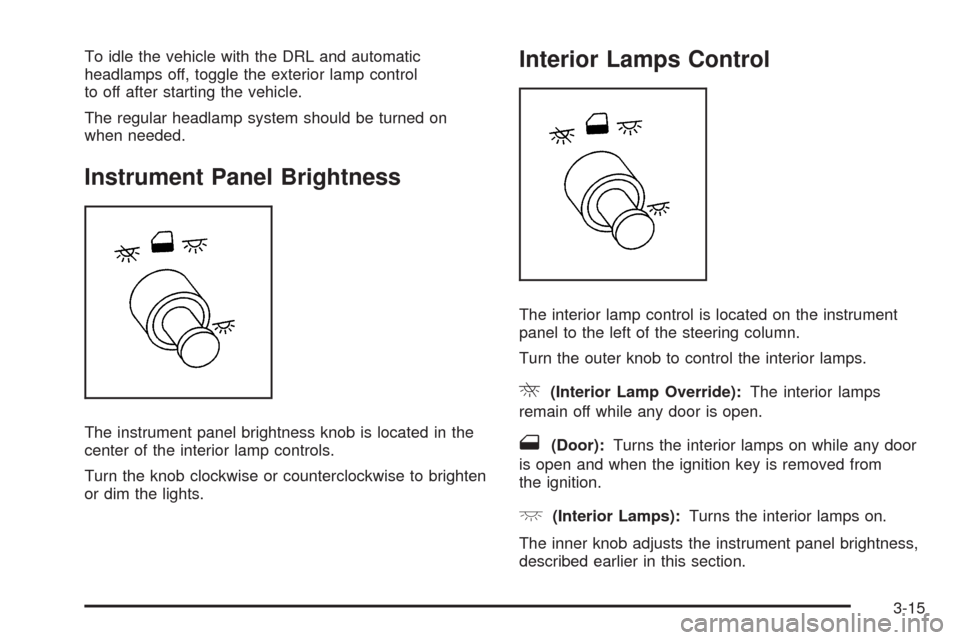
The instrument panel brightness knob is located in the
center of the interior lamp controls.
Turn the knob clockwise or counterclockwise to brighten
or dim the lights.
Interior Lamps Control
The interior lamp control is located on the instrument
panel to the left of the steering column.
Turn the outer knob to control the interior lamps.
R(Interior Lamp Override):The interior lamps
remain off while any door is open.
1(Door):Turns the interior lamps on while any door
is open and when the ignition key is removed from
the ignition.
+(Interior Lamps):Turns the interior lamps on.
The inner knob adjusts the instrument panel brightness,
described earlier in this section.
3-15
Page 180 of 464
Accessory Power Outlet(s)
The accessory power outlets can be used to plug in
electrical equipment, such as a cellular phone.
The vehicle may have two accessory power outlets.
There may be one outlet located below the climate
controls on the instrument panel and one outlet
located in the rear compartment on the driver side.
Pull the cover down to use the accessory power outlet.
When not in use, keep the cover on.
To remove the rear accessory power outlet cover, pull
the tab on the cover. To put the cover back on, line up the
tabs at the back of the cover and put the cover in place.
Push down the tab to secure the cover. When not in use,
always cover the rear accessory power outlet with the
protective cap.
Notice:Leaving electrical equipment on for
extended periods will drain the battery. Always
unplug electrical equipment when not in use and do
not plug in equipment that exceeds the maximum
amperage rating of 20 amperes.Certain electrical accessories may not be compatible
with the accessory power outlet and could result in blown
vehicle or adapter fuses. If you experience a problem
see your dealer/retailer for additional information on
accessory power outlets.
Notice:Adding any electrical equipment to the
vehicle can damage it or keep other components
from working as they should. The repairs would not
be covered by the vehicle warranty. Do not use
equipment exceeding maximum amperage rating of
20 amperes. Check with your dealer/retailer before
adding electrical equipment.
When adding electrical equipment, be sure to follow
the proper installation instructions included with
the equipment.
Notice:Improper use of the power outlet can cause
damage not covered by your warranty. Do not hang
any type of accessory or accessory bracket from the
plug because the power outlets are designed for
accessory power plugs only.
3-20
Page 182 of 464
Cigarette Lighter
For vehicles with a cigarette lighter, it is located on the
instrument panel below the climate controls. Push
the lighter in all the way and let go. It pops back out
when it is ready to be used.
Notice:Holding a cigarette lighter in while it is
heating does not let the lighter back away from the
heating element when it is hot. Damage from
overheating can occur to the lighter or heating
element, or a fuse could be blown. Do not hold a
cigarette lighter in while it is heating.
Notice:If papers, pins, or other ammable items
are put in the ashtray, hot cigarettes or other
smoking materials could ignite them and possibly
damage your vehicle. Never put ammable items in
the ashtray.
Climate Controls
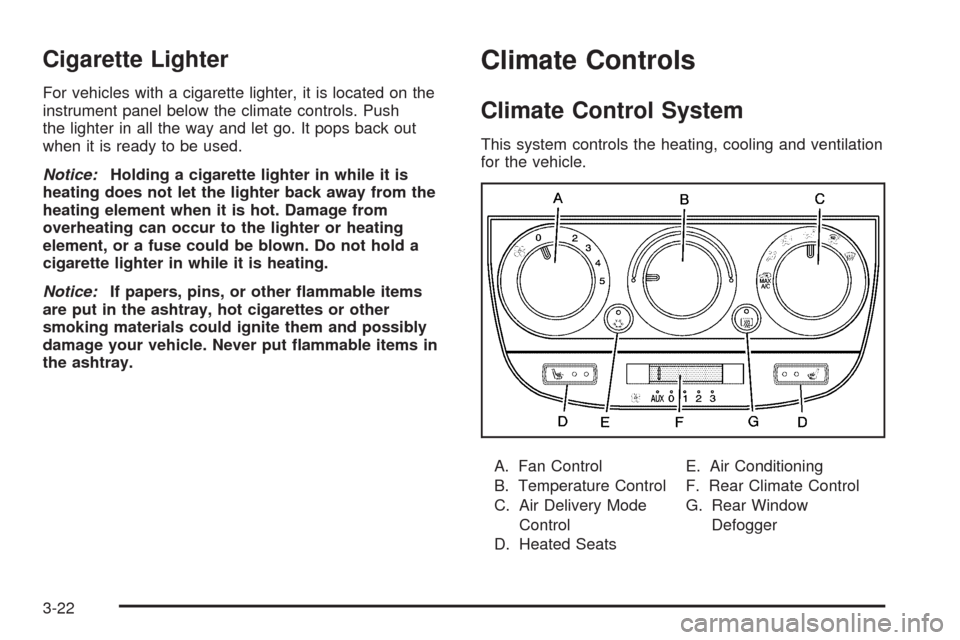
Climate Control System
This system controls the heating, cooling and ventilation
for the vehicle.
A. Fan Control
B. Temperature Control
C. Air Delivery Mode
Control
D. Heated SeatsE. Air Conditioning
F. Rear Climate Control
G. Rear Window
Defogger
3-22
Page 183 of 464
9(Off):Turn the fan control all the way
counterclockwise to turn the front system off.
A(Fan Control):Turn clockwise or counterclockwise
to increase or decrease the fan speed.
Temperature Control:Turn clockwise or
counterclockwise to increase or decrease the air
temperature inside the vehicle.
Air Delivery Mode Control:Turn clockwise or
counterclockwise to change the current airow mode.
To change the current mode, select one of the following:
@MAX A/C (Maximum Air Conditioning):Turn
the air delivery mode knob to this position for maximum
air conditioning. This selects the air conditioning and
recirculation modes for maximum cooling of the vehicle.
Air is directed to the instrument panel outlets.
Recirculation:This mode recirculates and helps to
quickly cool the air inside the vehicle. It can be used to
prevent outside air and odors from entering the vehicle.
This mode is automatically selected when MAX A/C is
turned on.
H(Vent):Air is directed to the instrument panel
outlets.
)(Bi-Level):Air is divided between the instrument
panel and oor outlets. Some air is directed towards the
windshield and side window outlets.
6(Floor):Air is directed to the oor outlets. Use this
mode to send air to the rear of the vehicle. Keep the area
under the front seats free of objects that could obstruct
airow to the rear of the vehicle.
-(Defog):This mode clears the windows of fog or
moisture. Air is directed to the windshield and the oor
outlets. When this mode is selected, the system runs
the air-conditioning compressor unless the outside
temperature is at or below freezing. The recirculation
mode cannot be selected while in the defog mode.
0(Defrost):This mode clears the windshield of fog
or frost more quickly. Air is directed to the windshield
and the side window outlets, with some air directed to
the oor outlets. In this mode, the system automatically
runs the air-conditioning system, unless the outside
temperature is at or below freezing. Recirculation cannot
be selected while in the defrost mode.
Do not drive the vehicle until all the windows are clear.
3-23
Page 185 of 464
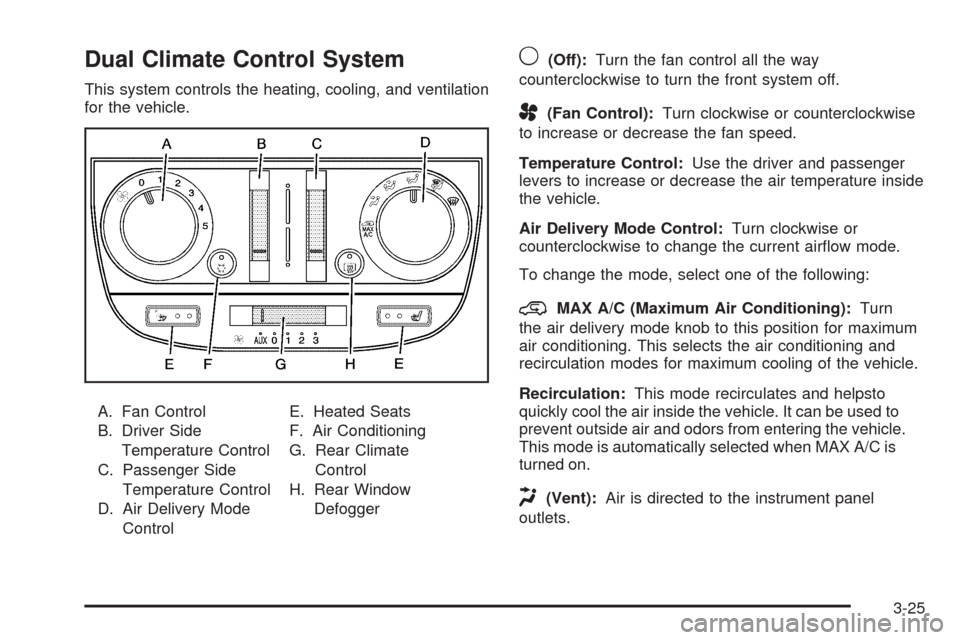
Dual Climate Control System
This system controls the heating, cooling, and ventilation
for the vehicle.
A. Fan Control
B. Driver Side
Temperature Control
C. Passenger Side
Temperature Control
D. Air Delivery Mode
ControlE. Heated Seats
F. Air Conditioning
G. Rear Climate
Control
H. Rear Window
Defogger
9(Off):Turn the fan control all the way
counterclockwise to turn the front system off.
A(Fan Control):Turn clockwise or counterclockwise
to increase or decrease the fan speed.
Temperature Control:Use the driver and passenger
levers to increase or decrease the air temperature inside
the vehicle.
Air Delivery Mode Control:Turn clockwise or
counterclockwise to change the current airow mode.
To change the mode, select one of the following:
@MAX A/C (Maximum Air Conditioning):Turn
the air delivery mode knob to this position for maximum
air conditioning. This selects the air conditioning and
recirculation modes for maximum cooling of the vehicle.
Recirculation:This mode recirculates and helpsto
quickly cool the air inside the vehicle. It can be used to
prevent outside air and odors from entering the vehicle.
This mode is automatically selected when MAX A/C is
turned on.
H(Vent):Air is directed to the instrument panel
outlets.
3-25