ECO mode CHEVROLET VENTURE 1998 User Guide
[x] Cancel search | Manufacturer: CHEVROLET, Model Year: 1998, Model line: VENTURE, Model: CHEVROLET VENTURE 1998Pages: 474, PDF Size: 25.26 MB
Page 228 of 474
Ventilation Tips
0
a
0
0
Keep the hood and front air inlet free of ice, snow or
any other obstruction (such as leaves). This will
allow the heater and defroster to work much better,
reducing the chance of fogging the inside of
your windows.
When you enter a vehicle in cold weather,
turn the
blower fan to
“5” for a few moments before driving
off. This helps clear the intake ducts of snow and
moisture, and reduces the chance of fogging the
inside of your windows.
Keep the area around the base
of the center
instrument panel console and the air path under the
front seats clear
of objects. This helps air to circulate
throughout your vehicle.
In cold weather, operating the system in the
OUTSIDE
AIR mode will improve the time it takes
to warm the vehicle.
Audio Systems
Your Delco Electronics audio system has been designed
to operate easily and give years of listening pleasure.
You will get the most enjoyment out of it if you acquaint
yourself with it first. Find out what your Delco
Electronics system can do and how to operate all its
controls, to be sure you’re getting the most
out of the
advanced engineering that went into it.
Setting the Clock for Systems without
Automatic Tone Control
Press SET. SET will appear on the display for five
seconds. Within five seconds, press and hold the right
arrow on the SEEK button until the correct minute
appears. Press and hold the left
arrow on the SEEK
button until the correct
hour appears.
Setting the Clock for Systems with
Automatic Tone Control
Press and hold HR until the correct hour appears. Press
and hold
MN until the correct minute appears.
3-9
ProCarManuals.com
Page 235 of 474
SCAN: Press one of the SEEK arrows for two seconds,
and
SCAN will appear in the display. Use SCAN to
listen to stations for a few seconds. The radio will go to
a station, stop for a few seconds, then go on to the next
station. Press
SEEK again to stop scanning. The sound
will mute while scanning.
PUSHBUTTONS: The six numbered pushbuttons let
you return to your favorite stations. You can set up to
18 stations (six AM, six FMl and six FM2). Just:
1. Turn the radio on.
2. Press AM-FM to select the band.
3. Tune in the desired station.
4. Press AUTO TONE to select the equalization that
best suits the type
of station selected.
5. Press and hold one of the six numbered buttons. The
sound will mute. When it returns, release the button.
Whenever you press that numbered button, the station
you set will return and the AUTO TONE
equalization that you selected will also be automatically selected for that button.
6. Repeat the steps for each pushbutton.
P.SCAN: Press this button to listen to each of your
favorite stations stored on your pushbuttons for a few
seconds. The radio will scan through each
of the stations
stored
on your pushbuttons, except those stations with
weak reception. The AUTO TONE setting stored for
that pushbutton will be automatically chosen. Press PSCAN or one of the pushbuttons again to stop
scanning. P.SCAN will be displayed whenever the tuner
is in the P.SCAN mode. The channel number (Pl-P6)
will appear momentarily just before the frequency
is
displayed. In FM mode, this function will scan through
both FM1 and FM2 preset stations and
FM1 or FM2 will
appear
on the display.
Setting the Tone
BASS: Press this knob lightly so it extends. Turn the
knob
to the right to increase bass and to the left to
decrease bass. When you use this control, the radio's
AUTO TONE setting will switch to manual and the
AUTO TONE display will go blank.
TREB: Press this knob lightly so it extends. Turn the
knob
to the right to increase treble and to the left to
decrease treble. When you use this control, the radio's
AUTO TONE setting will switch to manual and the
AUTO TONE display will go blank.
If a station is weak
or noisy,
you may want to decrease the treble.
3-16
ProCarManuals.com
Page 240 of 474
P.SCAN: Press this button to listen to each of your
favorite stations stored on your pushbuttons for a few
seconds. The radio will scan through each of the stations
stored on your pushbuttons, except those stations with
weak reception. The AUTO TONE setting stored for
that pushbutton will be automatically chosen. Press
P.SCAN or one
of the pushbuttons again to stop
scanning. P.SCAN will be displayed whenever the tuner
is in the P.SCAN mode. The channel number
(Pl-P6)
will appear momentarily just before the frequency is
displayed. In
FM mode, this function will scan through
both
FM1 and FM2 preset stations and FMl or FM2 will
appear
on the display.
Setting the Tone
BASS: Press this knob lightly so it extends. Turn the
knob to the right to increase bass and to the left to
decrease bass. When you use this control, the radio’s
AUTO TONE setting will switch to manual
and the
AUTO TONE display will go blank.
TREB: Press this knob lightly so it extends. Turn the
knob to the right to increase treble and to the
left to
decrease treble. When you use this control, the radio’s
AUTO TONE setting will switch to manual and the
AUTO TONE display will
go blank. If a station is weak
or noisy, you may want to decrease the treble. Push these knobs back into their stored positions when
you’re not using them.
AUTO TONE: This
feature allows you to choose preset
bass and treble equalization settings designed for
country/western, classical, news, rock, pop and jazz
stations.
C/W will appear on the display when you first
press AUTO TONE. Each time you press it, another
setting will appear
on the display. Press it again after
JAZZ appears and the AUTO TONE display will go
blank. Tone control will return to the BASS and TREB
knobs. Also,
if you use the BASS and TREB knobs,
control will return to them and the AUTO
TONE
display will go blank. Use PUSHBUTTONS to program
AUTO
TONE.
Adjusting the Speakers
BAL: Press this knob lightly so it extends. Turn the
knob to the right for the right speakers and to the left for
the
left speakers. The middle position balances the
sound between the speakers.
FADE: Press this knob lightly so it extends. Turn the
knob to the right to adjust the sound to the front
speakers and to the left for the rear speakers.
The middle
position balances the sound between the speakers.
Push these
knobs back into their stored positions when
you’re not using them.
ProCarManuals.com
Page 245 of 474
PREV (1): Press this button to go back to the
start
of the current track if more than eight seconds have
played. Press PREV again to go to the previous track on
the disc.
NEXT (3): Press this button to advance to the next track
on the disc.
REV (4): Press and hold this button to quickly reverse
within a track. As the CD reverses, elapsed time will be
displayed to help you find the correct passage.
FWD (6): Press and hold this button to quickly advance
within a track. As the
CD advances, elapsed time will be
displayed to help you find the correct passage.
SEEK: Press the left arrow while playing a CD to go
back to
the start of the current track. It will go back to
the current track if more than eight seconds have played.
Press the left arrow again
to go to previous tracks. Press
the right arrow to go to the next higher track on the disc.
RANDOM: Press P.SCAN to enter the random play
mode. RANDOM will appear on the display. While in
this mode, the tracks on the discs will be played in
random order.
If you press SEEK, PREV or NEXT
while in the random mode, the PREV or NEXT track
will be scanned randomly. Press P.SCAN again to turn
off RANDOM and return to normal operation.
RECALL: Press this button to see what track is
currently playing. Press
RECALL again within five
seconds to see how long the track has been playing.
When a new track starts to play, the track number will
also appear. Press RECALL a third time and the time of
day will be displayed.
TAPE AUX: With a disc loaded in the player and the
radio playing, press this button once to play the compact
disc. To return to playing the radio, press AM-FM.
If
both a cassette tape and CD are loaded, press TAPE
AUX to switch between the tape and compact disc.
EJECT Press this button on the remote player to eject a
compact disc.
Theft-Deterrent Feature (If Equipped)
THEFTLOCK@ is designed to discourage theft of your
radio.
It works by using a secret code to disable all radio
functions whenever battery power is removed. Your
audio system is equipped with THEFTLOCK
if
THEFTLOCK is displayed on the front of the radio.
The THEFTLOCK feature for the radio may be used or
ignored. If ignored, the system plays normally and the
radio is not protected by the feature. If
THEFTLOCK is
activated, your radio will not operate if stolen.
3-26
ProCarManuals.com
Page 365 of 474
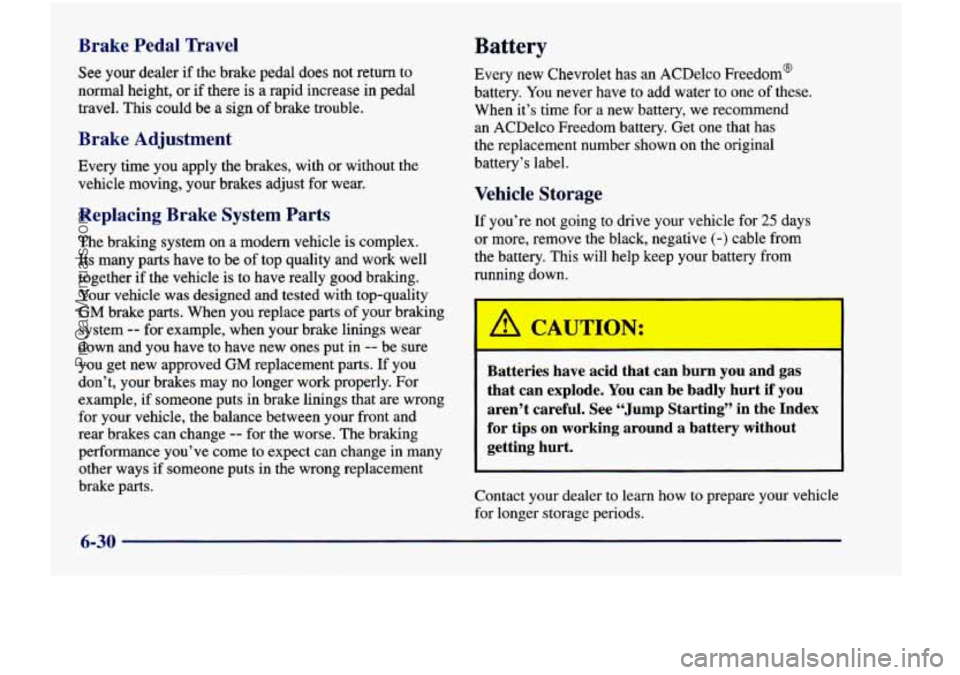
Brake Pedal Travel
See your dealer if the brake pedal does not return to
normal height, or
if there is a rapid increase in pedal
travel. This could be a sign of brake trouble.
Brake Adjustment
Every time you apply the brakes, with or without the
vehicle moving, your brakes adjust for wear.
Replacing Brake System Parts
The braking system on a modern vehicle is complex.
Its many parts have to be of top quality and work well
together if the vehicle is to have really good bralung.
Your vehicle was designed and tested with top-quality
GM brake parts. When you replace parts of your braking
system
-- for example, when your brake linings wear
down and you have to have new ones put in
-- be sure
you get new approved GM replacement parts. If you
don’t, your brakes may no longer work properly. For
example, if someone puts
in brake linings that are wrong
for your vehicle, the balance between your front and
rear brakes can change
-- for the worse. The braking
performance you’ve come to expect can change in many
other ways
if someone puts in the wrong replacement
brake parts.
Battery
Every new Chevrolet has an ACDelco Freedom@
battery. You never have to add water to one
of these.
When it’s time for a new battery, we recommend an ACDelco Freedom battery. Get one that has
the replacement number shown on the original
battery’s label.
Vehicle Storage
If you’re not going to drive your vehicle for 25 days
or more, remove the black, negative
(-) cable from
the battery. This will help keep your battery from
running down.
b I
1 Ihl CAUTIO -
Batteries have acid that can burn you and gas
that can explode. You can be badly hurt if
you
aren’t careful. See “Jump Starting” in the Index
for tips on working around a battery without getting hurt.
Contact your dealer to learn how to prepare your vehicle
for longer storage periods.
I
6-30
ProCarManuals.com
Page 464 of 474
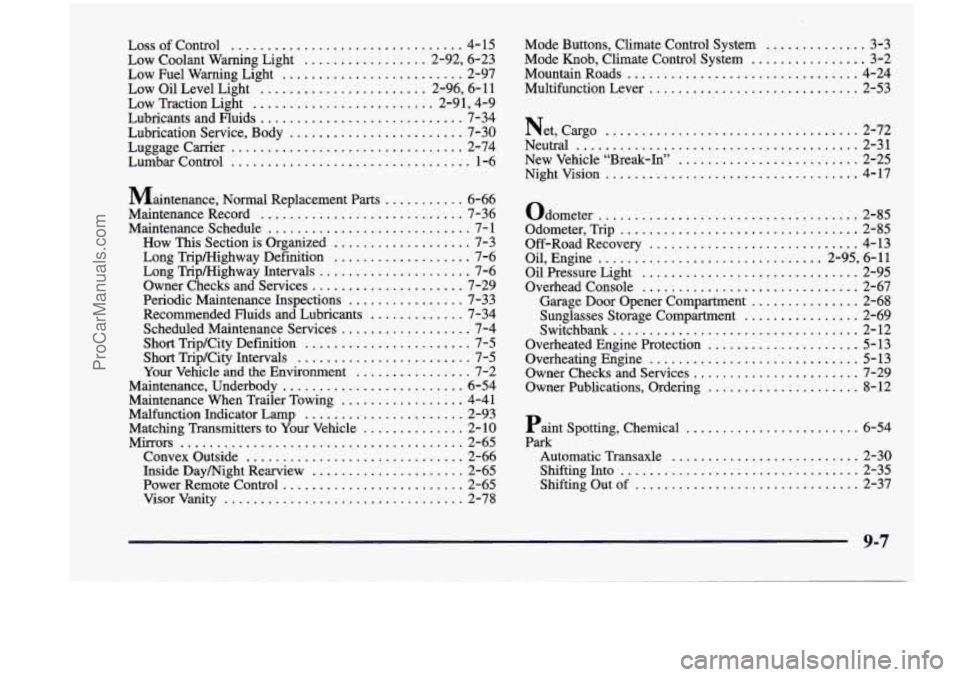
LossofControl ................................ 4-15
Low Coolant Warning Light
................. 2.92. 6.23
Low Fuel Warning Light
......................... 2-97
Low Oil Level Light
....................... 2.96. 6.11
Low Traction Light
......................... 2.91. 4.9
Lubricants and Fluids
............................ 7-34
Lubrication Service. Body
........................ 7-30
Luggage Carrier
................................ 2-74
Lumbar Control
................................. 1-6
Maintenance. Normal Replacement Parts
........... 6-66
Maintenance Record
............................ 7-36
Maintenance Schedule
............................ 7- 1
How This Section is Organized ................... 7-3
Long Tiip/Highway Definition
................... 7-6
Long Tripklighway Intervals
..................... 7-6
Owner Checks and Services
..................... 7-29
Periodic Maintenance Inspections
................ 7-33
Recommended Fluids and Lubricants
............. 7-34
Scheduled Maintenance Services
.................. 7-4
Short Trip/City Definition
....................... 7-5
Short Trip/City Intervals
........................ 7-5
Your Vehicle and the Environment
................ 7-2
Maintenance. Underbody
......................... 6-54
Maintenance When Trailer Towing
................. 4-41
Malfunction Indicator Lamp
...................... 2-93
Matching Transmitters to
Your Vehicle .............. 2- 10
Mirrors
....................................... 2-65
Convex Outside
.............................. 2-66
Inside Daymight Rearview
..................... 2-65
Power Remote Control
......................... 2-65
Visorvanity
................................. 2-78 Mode Buttons. Climate Control System
. .......... 3-3
Mode
Knob. Climate Control System ................ 3-2
Mountain Roads
................................ 4-24
Multifunction Lever
........................... 2-53
Net. cargo
................................... 2-72
Neutral
....................................... 2-31
New Vehicle “Break-In”
......................... 2-25
Nightvision
................................... 4-17
Odometer
.................................... 2-85
Odometer. Trip
................................. 2-85
Off-RoadRecovery
............................. 4-13
Oil. Engine
............................... 2.95. 6.11
Oil Pressure Light
.............................. 2-95
Overhead Console
.............................. 2-67
Garage
Door Opener Compartment ............... 2-68
Sunglasses Storage Compartment
................ 2-69
Switchb
ank .................................. 2-12
Overheated Engine Protection
..................... 5-13
Overheating Engine
............................. 5-13
Owner Checks and Services
....................... 7-29
Owner Publications, Ordering
..................... 8-12
Paint Spotting. Chemical
........................ 6-54
Park
Automatic Transaxle
.......................... 2-30
Shifting Into
................................. 2-35
Shifting Out of
............................... 2-37
9-7
ProCarManuals.com