audio CHEVROLET VENTURE 1998 Owners Manual
[x] Cancel search | Manufacturer: CHEVROLET, Model Year: 1998, Model line: VENTURE, Model: CHEVROLET VENTURE 1998Pages: 474, PDF Size: 25.26 MB
Page 6 of 474
a The 1998 Chevrolet Venture Owner’s Manual
1-1
2-1
3-1
4- 1
5-1
6-1
7-1
8-1
9- 1
Seats and Restraint Systems
This section tells you how to use your seats and safety belts\
properly. It also explains the “SIR’ system.
Features and Controls
This section explains how to start and operate your vehicle.
Comfort Controls and Audio Systems
This section tells you how to adjust the ventilation and comfort co\
ntrols and how to operate your audio system.
Your Driving and the Road
Here you’ll find helpful information and tips about the road\
and how to drive under different conditions.
Problems on the Road
This section tells what to do if you have a problem while driving,\
such as a flat tire or overheated engine, etc.
Service and Appearance Care
Here the manual tells you how to keep your vehicle running pr\
operly and looking good.
Maintenance Schedule
This section tells you when to perform vehicle maintenance and \
what fluids and lubricants to use.
Customer Assistance Information
This section tells you how to contact Chevrolet for assistance \
and how to get service and owner publications.
It also gives you information on “Reporting Safety Defects” on page 8- 10.
Index
Here’s an alphabetical listing of almost every subject in this manual. You can use it to quickly find
something
you want to read.
i
ProCarManuals.com
Page 200 of 474
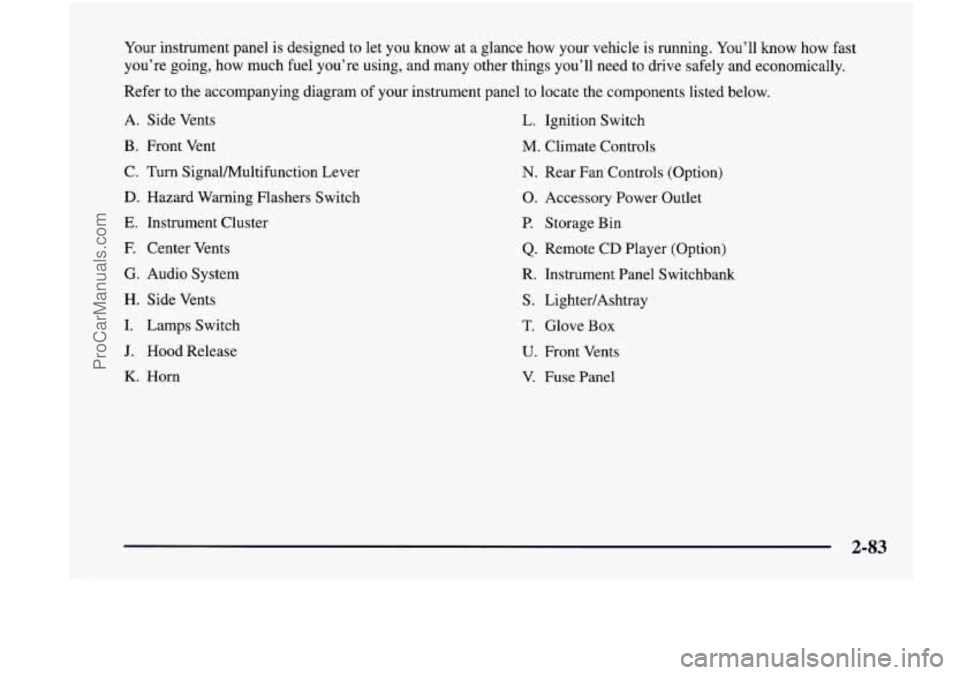
Your instrument panel is designed to let you know at a glance how your vehicle is running. You’ll know how fast
you’re going, how much fuel you’re using, and many other things you’ll need
to drive safely and economically.
Refer to the accompanying diagram
of your instrument panel to locate the components listed below.
A. Side Vents L. Ignition Switch
B. Front Vent
M. Climate Controls
C. Turn Signalhlultifunction Lever N. Rear Fan Controls (Option)
D. Hazard Warning Flashers Switch 0. Accessory Power Outlet
E. Instrument Cluster P. Storage Bin
E Center Vents Q. Remote CD Player (Option)
G. Audio System R. Instrument Panel Switchbank
H. Side Vents
S. LightedAshtray
I. Lamps Switch T. Glove Box
J. Hood Release U. Front Vents
K. Horn V. Fuse Panel
2-83
ProCarManuals.com
Page 220 of 474
0 Section 3 Comfort Controls and Audio Systems
In this section, you’ll find out how to operate the comfort control and audio systems offered with your vehicle. Be
sure to read about the particular systems supplied with your vehicle.
3-2 3-3
3-4
3-4
3-5
3-6
3-8
3-9
3-9 3- 10 3-12 Comfort
Controls
Air Conditioning
Heating Defogging and Defrosting
Rear Window Defogger (If Equipped)
Rear Climate Control (If Equipped)
Ventilation System
Setting the Clock for Systems without
Automatic Tone Control
Setting the Clock for Systems with Automatic
Tone Control
AM-FM Stereo
AM-FM Stereo with Cassette Tape Player
(If Equipped) 3-15
3- 19 3-23 3-25
3
-26
3-29
3-39
3-30
3-3 1
3-32
3-32
AM-FM Stereo with Cassette Tape Player and
Automatic Tone Control (If Equipped)
AM-FM Stereo with Compact Disc Player and
Automatic Tone Control
(If Equipped)
Rear Seat Audio
(If Equipped)
Remote Compact Disc Player (If Equipped)
Theft-Deterrent Feature
(If Equipped)
Understanding Radio Reception
Tips About Your Audio System
Care of Your Cassette Tape Player
Care
of Your Compact Discs
Care
of Your Compact Disc Player
Integrated Windshield Antenna
3-1
ProCarManuals.com
Page 228 of 474
Ventilation Tips
0
a
0
0
Keep the hood and front air inlet free of ice, snow or
any other obstruction (such as leaves). This will
allow the heater and defroster to work much better,
reducing the chance of fogging the inside of
your windows.
When you enter a vehicle in cold weather,
turn the
blower fan to
“5” for a few moments before driving
off. This helps clear the intake ducts of snow and
moisture, and reduces the chance of fogging the
inside of your windows.
Keep the area around the base
of the center
instrument panel console and the air path under the
front seats clear
of objects. This helps air to circulate
throughout your vehicle.
In cold weather, operating the system in the
OUTSIDE
AIR mode will improve the time it takes
to warm the vehicle.
Audio Systems
Your Delco Electronics audio system has been designed
to operate easily and give years of listening pleasure.
You will get the most enjoyment out of it if you acquaint
yourself with it first. Find out what your Delco
Electronics system can do and how to operate all its
controls, to be sure you’re getting the most
out of the
advanced engineering that went into it.
Setting the Clock for Systems without
Automatic Tone Control
Press SET. SET will appear on the display for five
seconds. Within five seconds, press and hold the right
arrow on the SEEK button until the correct minute
appears. Press and hold the left
arrow on the SEEK
button until the correct
hour appears.
Setting the Clock for Systems with
Automatic Tone Control
Press and hold HR until the correct hour appears. Press
and hold
MN until the correct minute appears.
3-9
ProCarManuals.com
Page 234 of 474
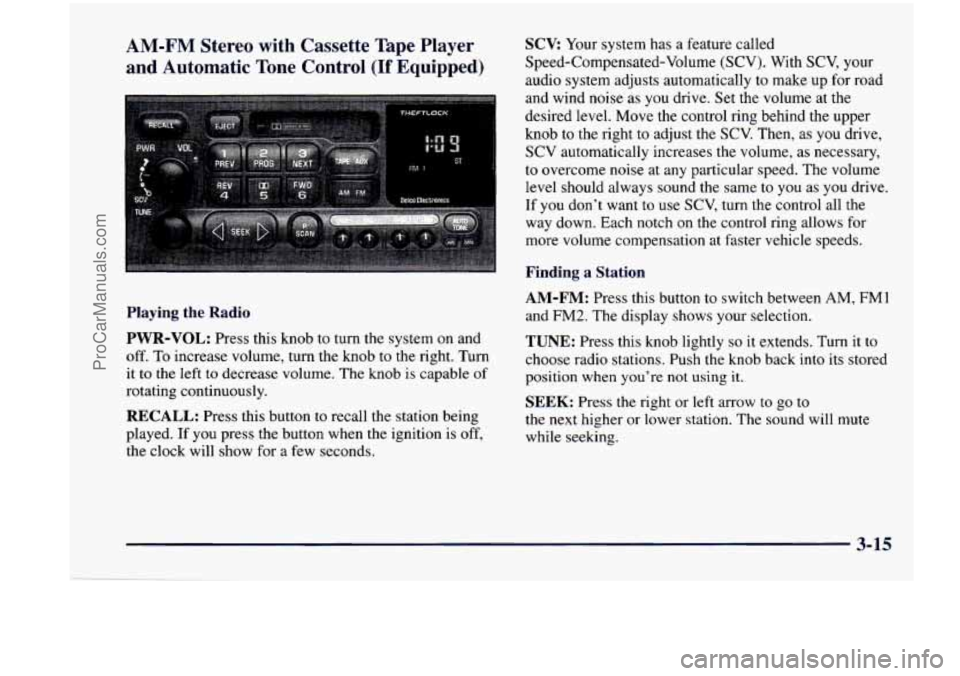
AM-FM Stereo with Cassette Tape Player
and Automatic Tone Control
(If Equipped)
SCV Your system has a feature called
Speed-Compensated-Volume (SCV). With
SCV, your
audio system adjusts automatically to make
up for road
and wind noise as you drive. Set the volume at the
desired level. Move the control ring behind the upper
knob to the right to adjust the SCV. Then, as you drive,
SCV automatically increases the volume,
as necessary,
to overcome noise at any particular speed. The volume
level should always sound the same to you as
you drive.
If you don’t want to use SCV,
turn the control all the
way down. Each notch on the control ring allows for
more volume compensation at faster vehicle speeds.
Finding a Station
Playing the Radio
PWR-VOL:
Press this knob to turn the system on and
off. To increase volume, turn the knob to the right. Turn
it to the left to decrease volume. The knob is capable
of
rotating continuously.
RECALL: Press this button to recall the station being
played. If you press the button when the ignition is off,
the clock will show for a few seconds.
AM-FM: Press this button to switch between AM, FM1
and FM2. The display shows your selection.
TUNE: Press this knob lightly so it extends. Turn it to
choose radio stations. Push the knob back into its stored
position when you’re
not using it.
SEEK: Press the right or left arrow to go to
the next higher or lower station. The sound will mute
while seeking.
3-15
ProCarManuals.com
Page 239 of 474
SCV: Your system has a feature called
Speed-Compensated-Volume (SCV). With SCV, your
audio system adjusts automatically
to make up for road
and wind noise as you drive. Set the volume
at the
desired level. Move the control ring behind the upper
knob to the right to adjust the SCV. Then, as you drive,
SCV automatically increases the volume, as necessary,
to overcome noise
at any particular speed. The volume
level should always sound the same to you as you drive.
If you don’t want to use SCV, turn the control all the
way down. Each notch on the control ring allows for
more volume compensation at faster vehicle speeds.
Finding a Station
AM-FM: Press this button to switch between AM, FM1
and FM2. The display shows your selection.
TUNE: Press this knob lightly so it extends. Turn it to
choose radio stations. Push the knob back into its stored
position when you’re not using it.
SEEK: Press the right or left arrow to go to
the next higher or lower station. The sound
will mute
while seeking.
SCAN: Press one of the SEEK arrows for two seconds,
and SCAN will appear on the display. Use SCAN to
listen to stations for
a few seconds. The radio will go to
a station, stop for a few seconds, then go on to the next
station. Press
SEEK again to stop scanning. The sound
will mute while scanning.
PUSHBUTTONS: The six numbered pushbuttons let
you return to your favorite stations. You can set up to
18 stations (six AM, six FM1 and six FMZ). Just:
1.
2.
3.
4.
5.
6.
Turn the radio on.
Press
AM-FM to select the band.
Tune
in the desired station.
Press AUTO TONE to select the equalization that
best suits the type
of station selected.
Press and hold one of the six numbered buttons. The
sound will mute. When it returns, release the button.
Whenever you press that numbered button, the
station you set will return and the
AUTO TONE
equalization that you selected will also be
automatically selected for that button.
Repeat the steps for each pushbutton.
3-20
-
ProCarManuals.com
Page 242 of 474
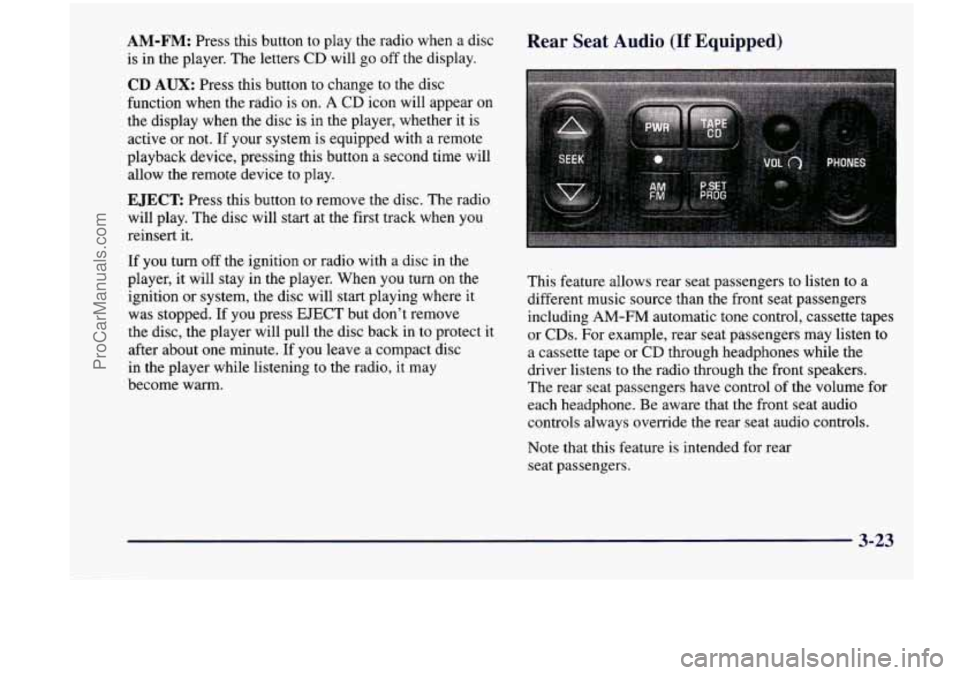
AM-FM: Press this button to play the radio when a disc
is in the player. The letters CD will go off the display.
CD AUX: Press this button to change to the disc
function when the radio is on.
A CD icon will appear on
the display when the disc is in the player, whether
it is
active or not. If your system is equipped with a remote
playback device, pressing this button a second
time will
allow the remote device to play.
EJECT Press this button to remove the disc. The radio
will play. The disc will start at the first track when you
reinsert it.
If
you turn off the ignition or radio with a disc in the
player, it will stay in the player. When you turn on the
ignition or system, the disc will start playing where
it
was stopped. If you press EJECT but don’t remove
the disc, the player will pull the disc back in to protect
it
after about one minute. If you leave a compact disc
in the player while listening to the radio,
it may
become warm.
Rear Seat Audio (If Equipped)
This feature allows rear seat passengers to listen to a
different music source than the front seat passengers
including AM-FM automatic tone control, cassette tapes
or CDs. For example, rear seat passengers may listen to
a cassette tape or CD through headphones while the
driver listens
to the radio through the front speakers.
The rear seat passengers have control of the volume for
each headphone. Be aware that the front seat audio
controls always override the rear seat audio controls.
Note that this feature is intended for rear
seat passengers.
3-23
ProCarManuals.com
Page 243 of 474
PWR: Press this button to turn the rear seat audio system
on or
off. The rear speakers will be muted when the power
is turned on. You may operate the rear seat audio functions
even when the primary radio power is
off.
VOL: Press this knob lightly so it extends. Turn the
knob to the right to increase volume and to the left to
decrease volume. Push the knob back into its stored
position when you're not using it. The upper
VOL knob
controls the upper headphone and the lower
VOL knob
controls the lower headphone.
AM-FM: Press this button to switch between AM, FM1
and FM2. If the front passengers are already listening to
AM-FM, the rear seat audio controller will not switch
between the bands and cannot change the frequency.
SEEK: Press the up arrow to tune to the next higher
station and stay there. Press the down arrow to tune to
the next lower station and stay there. The sound will
mute while seeking. The
SEEK button is inactive if the
AM-FM mode on the front radio is in use.
If your vehicle
is equipped with the AM-FM Stereo with
Cassette Tape Player and Automatic Tone Control, while
listening to a cassette tape, press the up arrow to hear the \
next selection on the tape. Press the down arrow to
go
back to the previous selection. The SEEK button is
inactive
if the cassette mode on the front radio is in use.
If your vehicle is equipped with the AM-FM Stereo with
Compact Disc Player and Automatic Tone Control or the
Remote Compact Disc Player, while listening to
a
compact disc, press the up arrow to hear the next
selection on the compact disc. Press the down
arrow to
go back to the previous selection. The SEEK button is
inactive if the
CD mode on the front radio is in use.
P.SET PROG: The front passengers must be listening
to something different for each of these functions
to work:
Press this button to seek through your preset radio
stations set on your primary radio pushbuttons.
When a cassette tape is playing, press this button to
go to the other side of the tape.
TAPE CD: With a cassette tape in the player and the
radio playing, press this button
to play a cassette tape.
Press TAPE CD to switch between the tape and compact
disc
if both are loaded. Press AM-FM to return to the
radio when a cassette tape or compact disc is playing.
The inactive tape or CD will remain safely inside the
radio for future listening.
3-24
ProCarManuals.com
Page 245 of 474
PREV (1): Press this button to go back to the
start
of the current track if more than eight seconds have
played. Press PREV again to go to the previous track on
the disc.
NEXT (3): Press this button to advance to the next track
on the disc.
REV (4): Press and hold this button to quickly reverse
within a track. As the CD reverses, elapsed time will be
displayed to help you find the correct passage.
FWD (6): Press and hold this button to quickly advance
within a track. As the
CD advances, elapsed time will be
displayed to help you find the correct passage.
SEEK: Press the left arrow while playing a CD to go
back to
the start of the current track. It will go back to
the current track if more than eight seconds have played.
Press the left arrow again
to go to previous tracks. Press
the right arrow to go to the next higher track on the disc.
RANDOM: Press P.SCAN to enter the random play
mode. RANDOM will appear on the display. While in
this mode, the tracks on the discs will be played in
random order.
If you press SEEK, PREV or NEXT
while in the random mode, the PREV or NEXT track
will be scanned randomly. Press P.SCAN again to turn
off RANDOM and return to normal operation.
RECALL: Press this button to see what track is
currently playing. Press
RECALL again within five
seconds to see how long the track has been playing.
When a new track starts to play, the track number will
also appear. Press RECALL a third time and the time of
day will be displayed.
TAPE AUX: With a disc loaded in the player and the
radio playing, press this button once to play the compact
disc. To return to playing the radio, press AM-FM.
If
both a cassette tape and CD are loaded, press TAPE
AUX to switch between the tape and compact disc.
EJECT Press this button on the remote player to eject a
compact disc.
Theft-Deterrent Feature (If Equipped)
THEFTLOCK@ is designed to discourage theft of your
radio.
It works by using a secret code to disable all radio
functions whenever battery power is removed. Your
audio system is equipped with THEFTLOCK
if
THEFTLOCK is displayed on the front of the radio.
The THEFTLOCK feature for the radio may be used or
ignored. If ignored, the system plays normally and the
radio is not protected by the feature. If
THEFTLOCK is
activated, your radio will not operate if stolen.
3-26
ProCarManuals.com
Page 248 of 474
Understanding Radio Reception
AM
The range for most AM stations is greater than for FM,
especially at night. The longer range, however, can
cause stations to interfere with each other. AM can pick
up noise from things like storms and power lines. Try
reducing the treble to reduce this noise if you ever get
it.
FM Stereo
FM stereo will give you the best sound, but FM signals
will reach only about
10 to 40 miles (16 to 65 km). Tall
buildings or hills can interfere with
FM signals, causing
the sound to come and go.
Tips About Your Audio System
Hearing damage from loud noise is almost undetectable
until it is
too late. Your hearing can adapt to higher
volumes
of sound. Sound that seems normal can be loud
and harmful to your hearing. Take precautions by
adjusting the volume control
on your radio to a safe
sound level before your hearing adapts to
it.
To help avoid hearing loss or damage:
0 Adjust the volume control to the lowest setting.
0 Increase volume slowly until you hear comfortably
and clearly.
NOTICE:
I
Before you add any sound equipment to your
vehicle
-- like a tape player, CB radio, mobile
telephone or two-way radio
-- be sure you can
add what you want.
If you can, it’s very
important to do it properly. Added sound
equipment may interfere with the operation
of
your vehicle’s engine, Delco Electronics radio or
other systems, and even damage them. Your
vehicle’s systems may interfere with the
operation of sound equipment that
has been
added improperly.
So, before adding sound equipment, check with
your dealer and be sure to check Federal rules
covering mobile radio and telephone units.
3-29
ProCarManuals.com