dead battery CHEVROLET VENTURE 1998 Owners Manual
[x] Cancel search | Manufacturer: CHEVROLET, Model Year: 1998, Model line: VENTURE, Model: CHEVROLET VENTURE 1998Pages: 474, PDF Size: 25.26 MB
Page 136 of 474
Resetting the Power Sliding Door
The power sliding door may operate incorrectly or not
at all because of the following conditions:
A low voltage or dead battery,
Disconnecting the battery or
If the IGN 1, B/U LAMP, RADIO or PWR
SEAT/PSD fuse is removed or blown.
See “Fuse Panel” in the Index for more information
about your fuse panel.
If any of these conditions occur, the power sliding door
will need to be reset.
To do this, follow the directions
listed here. It will be easier if you read through them
once before beginning this procedure.
1. Check to be sure the power sliding door is unlocked
2. Turn the ignition switch to OFF.
and securely closed.
3. Enable the power sliding door override feature.
4. RI .ove the RADIO fuse from the underhood fuse
anu relay center. Leave
it out for 30 seconds.
5. Reinstall the fuse and wait 10 seconds.
6. Disable the power sliding door override feature.
7. Push either of the power door buttons to open the
8. Wait five seconds and close the door by pushing
9. Wait five seconds and repeat Steps 7 and 8.
If the door does not rest in the fully open position
after repeating Step
7, repeat Steps 7 and 8 again. If
the door still does not operate correctly, see your
dealer for service. power sliding door.
either power door button.
Sliding Door Security Lock
Your vehicle is equipped with a sliding door security
lock that helps prevent young children or other
passengers from opening the sliding door by using the
inside door handle. This lock is on both doors if your
vehicle has the dual sliding doors.
If
you have the optional power sliding door, you can
override the security lock by pressing either power
door switch when
the power sliding door override
feature
is disabled. See “Power Sliding Door” earlier
in the section.
The security lock lever
1s located on the inside of the
sliding door, on the front edge of the door. To access the
lever, open the sliding door. Use the security lock label
on the edge of the door as a guide.
ProCarManuals.com
Page 303 of 474
A CAUTION:
3
Fans or other moving engine parts can injure you
badly.
Keep your hands away from moving parts
once the engine
is running.
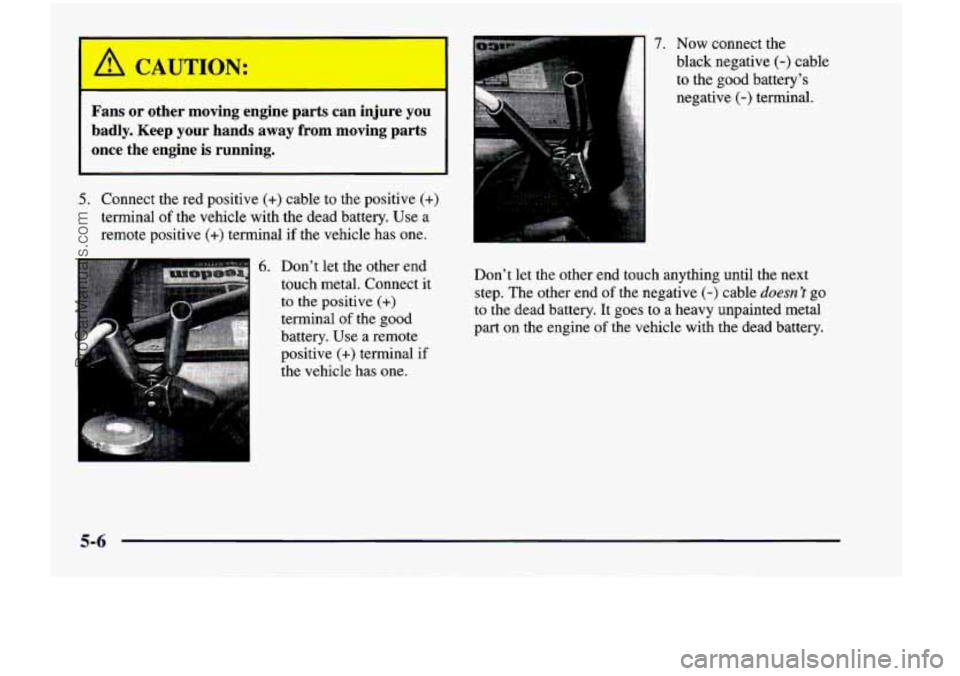
5. Connect the red positive (+) cable to the positive (+)
terminal of the vehicle with the dead battery. Use a
remote positive
(+) terminal if the vehicle has one.
6. Don’t let the other end
touch metal. Connect it
to the positive
(+)
terminal of the good
battery. Use a remote
positive
(+) terminal if
the vehicle has one.
... ,
7. Now connect the
black negative
(-) cable
to the good battery’s
negative
(-) terminal.
Don’t let the other end touch anything until the next step. The other end
of the negative (-) cable doesn 1 go
to the dead battery. It goes to a heavy unpainted metal
part on the engine
of the vehicle with the dead battery.
5-6
ProCarManuals.com
Page 304 of 474
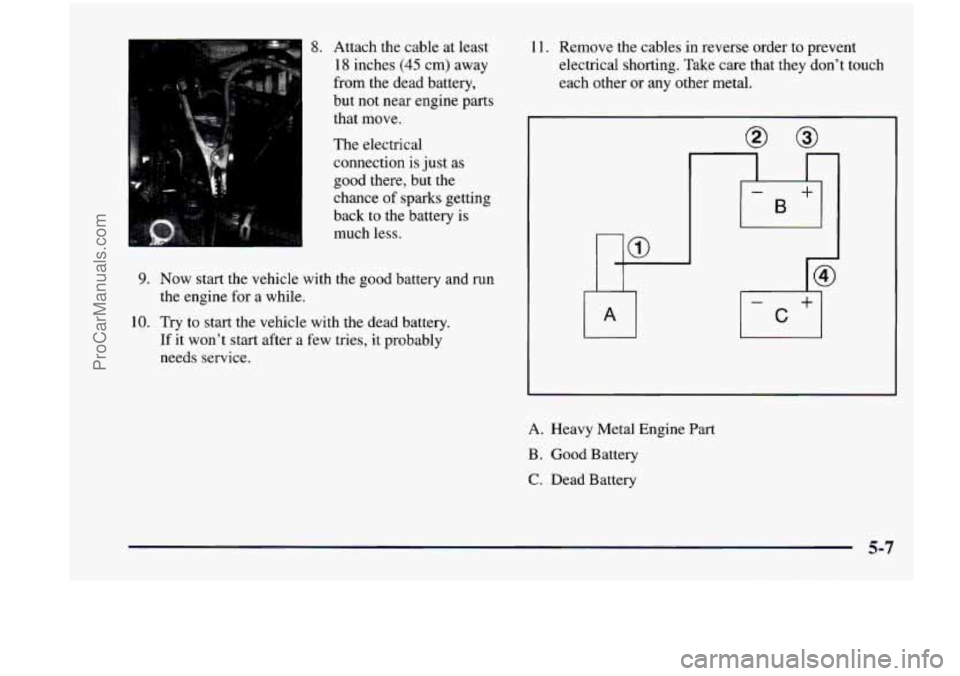
8. Attach the cable at least
18 inches
(45 cm) away
from the dead battery,
but not near engine parts
that move.
The electrical
connection is just
as
good there, but the
chance of sparks getting
back to the battery is
much less.
9. Now start the vehicle with the good battery and run
the engine for
a while.
If it won’t start after a few tries, it probably
needs service.
10.
Try to start the vehicle with
the dead battery.
11. Remove the cables in reverse order to prevent
electrical shorting. Take care that
they don’t touch
each other or
any other metal.
A. Heavy Metal Engine Part
B . Good Battery
C. Dead Battery
5-7
ProCarManuals.com
Page 460 of 474
Glass ................................... 6-51
Inside
of Your Vehicle ......................... 6-48
InstrumentPanel
............................. 6-50
Outside of
Your Vehicle ........................ 6-52
Special Problems
............................. 6-49
Stains
...................................... 6-49
Tires
....................................... 6-53
Vinyl
....................................... 6-50
Wheels
..................................... 6-53
Windshield, Backglass and Wiper Blades
.......... 6-51
WiperBlades
................................ 6-51
Climate Control System
........................... 3-2
Clock, Settingthe
................................ 3-9
Coinholder
.................................... 2-70
Comfort Controls
................................ 3-2
Compact Disc Care
............................. 3-31
Compact Disc Player
............................ 3-19
Care
....................................... 3-32
Errors
................................. 3-22, 3-25
Remote
..................................... 3-25
Compact Overhead Console
...................... 2-67
Compact Spare Tire
............................. 5-34
Content Theft-Deterrent
......................... 2-23
Control of a Vehicle
.............................. 4-6
Convenience Net Side
....................................... 2-73
Convex Outside Mirror
.......................... 2-66
Coolant
....................................... 6-21
Adding
..................................... 6-23
Checking
................................... 6-23
Heater, Engine
............................... 2-29
RecoveryTank
............................... 5-18
Whattouse
................................. 6-22 Courtesy Transportation
........................... 8-8
Cruise Control ................................. 2-56
Cupholders
.................................... 2-70
Customer Assistance Information
................... 8-1
Customer Satisfaction Procedure
.................... 8-2
Customer Assistance for Text Telephone Users ......... 8-4
Damage. Finish
............................... 6-54
Damage. Sheet Metal
............................ 6-53
Damme Running Lamps
......................... 2-61
Dead Battery
................................... 5-3
Defects. Reporting Safety
........................ 8-10
Defensive Driving ............................... 4-2
Defogger. Rear Window
.......................... 3-5
Defrosting
..................................... 3-4
Delayed Illumination
............................ 2-63
Dimensions, Vehicle
............................ 6-66
Door AjarLight
................................... 2-96
Locks
....................................... 2-4
Power Sliding
................................ 2-14
Sliding
..................................... 2-13
Driver Information Center
........................ 2-98
DriverPosition
................................. 1-41
Driver’s Four-Way Manual Seat
.................... 1-2
Driving
City
........................................ 4-21
Defensive
.................................... 4-2
Drunken
..................................... 4-3
Freeway
.................................... 4-22
InaBlizzard
................................. 4-28
In Foreign Countries
........................... 6-5
Defogging
..................................... 3-4
9-3
ProCarManuals.com