lights CHEVROLET VENTURE 2000 1.G User Guide
[x] Cancel search | Manufacturer: CHEVROLET, Model Year: 2000, Model line: VENTURE, Model: CHEVROLET VENTURE 2000 1.GPages: 429, PDF Size: 3.04 MB
Page 192 of 429

2-88
Retro-Active Reset
Each of the two trip odometers has a feature called
retro
-active reset. This feature can be used to set either
(or both) trip odometer(s) to the number of miles
(kilometers) driven since the ignition was last turned on.
This can be used if you forget to reset your trip
odometer at the beginning of a trip. To use the
retro
-active reset feature, push and hold the trip/reset
button for at least 3 seconds. The trip odometer will then
display the number of miles (kilometers) driven since
the ignition was last turned on and you began driving.
(If you use the retro
-active reset feature after you have
started the vehicle, but before you begin moving, the
display will show the number of miles (kilometers) you
drove during the last ignition cycle.) Once you begin
driving, the trip odometer will accumulate mileage.
For example, if you have driven 5.0 miles (8.0 km)
since you started your vehicle, and then activate the
retro
-active reset feature, the display will show
5.0 miles (8.0 km). As you drive, the display will then
increase to 5.1 miles (8.2 km), 5.2 miles (8.4 km), etc.
Only the trip odometer that is displayed will be effected
by the retro
-active reset so that both trip odometers can
be used separately.
Warning Lights, Gages, Messages
and Indicators
This part describes the warning lights and gages that
may be on your vehicle. The pictures will help you
locate them.
Warning lights and gages can signal that something is
wrong before it becomes serious enough to cause an
expensive repair or replacement. Paying attention to
your warning lights and gages could also save you or
others from injury.
Warning lights come on when there may be or is a
problem with one of your vehicle's functions. As you
will see in the details on the next few pages, some
warning lights come on briefly when you start the
engine just to let you know they're working. If you are
familiar with this section, you should not be alarmed
when this happens.
Gages can indicate when there may be or is a problem
with one of your vehicle's functions. Often gages and
warning lights work together to let you know when
there's a problem with your vehicle.
Page 193 of 429
2-89
When one of the warning lights comes on and stays on
when you are driving, or when one of the gages shows
there may be a problem, check the section that tells you
what to do about it. Please follow this manual's advice.
Waiting to do repairs can be costly
-- and even
dangerous. So please get to know your warning lights
and gages. They're a big help.
Your vehicle also has a message center that works along
with the warning lights and gages. See ªMessage
Centerº in the Index.
Safety Belt Reminder Light
When the key is turned to RUN or START, a chime will
come on for about eight seconds to remind people to
fasten their safety belts.
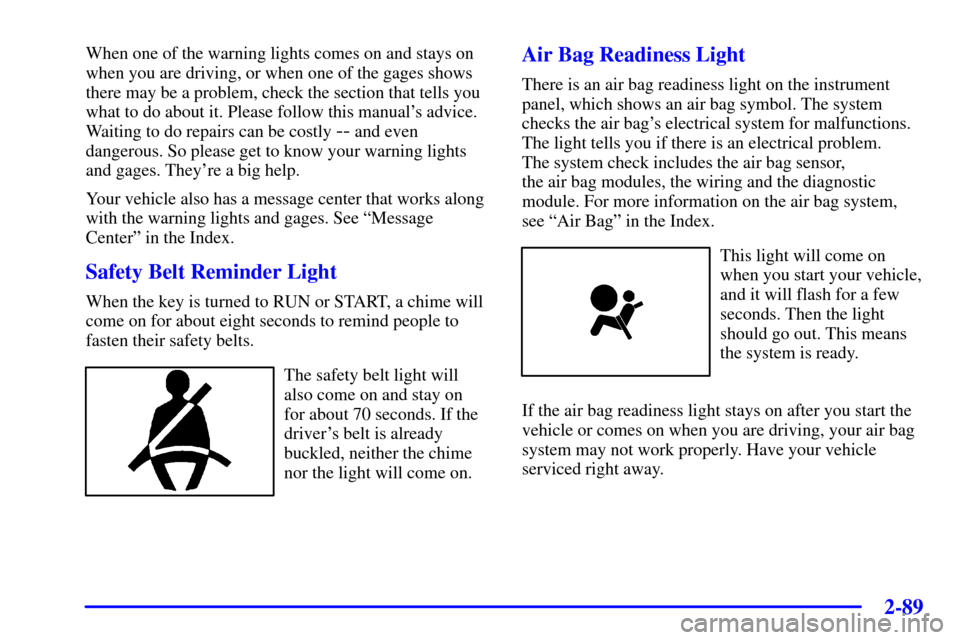
The safety belt light will
also come on and stay on
for about 70 seconds. If the
driver's belt is already
buckled, neither the chime
nor the light will come on.
Air Bag Readiness Light
There is an air bag readiness light on the instrument
panel, which shows an air bag symbol. The system
checks the air bag's electrical system for malfunctions.
The light tells you if there is an electrical problem.
The system check includes the air bag sensor,
the air bag modules, the wiring and the diagnostic
module. For more information on the air bag system,
see ªAir Bagº in the Index.
This light will come on
when you start your vehicle,
and it will flash for a few
seconds. Then the light
should go out. This means
the system is ready.
If the air bag readiness light stays on after you start the
vehicle or comes on when you are driving, your air bag
system may not work properly. Have your vehicle
serviced right away.
Page 211 of 429
3-3
DEFOG: This setting directs air to the
windshield and through the floor ducts. This mode is
useful during cold or inclement weather because of your
vehicle's larger windshield area.
DEFROST: This setting directs most of the air to
the windshield and side window vents.
Mode Buttons
OUTSIDE AIR: Press this button
(the light will glow) to send outside air into your
vehicle. Using this setting while trying to defrost or
defog the windows will help clear the vents of moisture.
Press the RECIRCULATION button (the light on the
OUTSIDE AIR button will go off) to limit outside air
entering the vehicle. When the DEFOG or DEFROST
setting is selected, the system will automatically go to
OUTSIDE AIR mode.
RECIRCULATION: Press this button
(the light will glow) to limit the amount of fresh air
entering your vehicle by recirculating much of the air
inside your vehicle. You may use this setting to limit
odors entering your vehicle. Press the OUTSIDE AIR
button (the light on the RECIRCULATION button will
go off) to let outside air circulate into the vehicle.Operating the Heating/Ventilation/Air Conditioning
(HVAC) system in the RECIRCULATION mode may
cause fogging of the vehicle's windows when the
weather is cold and damp. To clear the fog, switch the
HVAC system to either the DEFOG or DEFROST mode
and increase the fan speed. To avoid re
-fogging of
the windows, operate the HVAC system in the
OUTSIDE AIR mode.
Air Conditioning
On very hot days, your vehicle will cool down more
quickly and economically if you open the windows long
enough to let hot, inside air escape. For all settings,
adjust the temperature control knob and fan speed
as desired.
To get maximum cooling or a quick cool
-down on very
hot days, press the A/C and RECIRCULATION buttons
(the lights will glow) and turn the temperature knob
counterclockwise (toward the blue area). Adjust the
mode knob to direct the air to the desired location.
This setting should not be used for long periods of time
because the air may become too cold and dry. Push the
A/C button again (the light will go off) to turn off the
air conditioning.
Page 267 of 429

4-17
You can be temporarily blinded by approaching
headlamps. It can take a second or two, or even several
seconds, for your eyes to readjust to the dark. When you
are faced with severe glare (as from a driver who
doesn't lower the high beams, or a vehicle with
misaimed headlamps), slow down a little. Avoid staring
directly into the approaching headlamps.
Keep your windshield and all the glass on your vehicle
clean
-- inside and out. Glare at night is made much
worse by dirt on the glass. Even the inside of the glass
can build up a film caused by dust. Dirty glass makes
lights dazzle and flash more than clean glass would,
making the pupils of your eyes contract repeatedly.
Remember that your headlamps light up far less of a
roadway when you are in a turn or curve. Keep your
eyes moving; that way, it's easier to pick out dimly
lighted objects. Just as your headlamps should be
checked regularly for proper aim, so should your eyes
be examined regularly. Some drivers suffer from night
blindness
-- the inability to see in dim light -- and
aren't even aware of it.
Driving in Rain and on Wet Roads
Rain and wet roads can mean driving trouble. On a wet
road, you can't stop, accelerate or turn as well because
your tire
-to-road traction isn't as good as on dry roads.
And, if your tires don't have much tread left, you'll get
even less traction. It's always wise to go slower and be
cautious if rain starts to fall while you are driving. The
surface may get wet suddenly when your reflexes are
tuned for driving on dry pavement.
Page 384 of 429

6-60
Fuses Usage
SWC
BACKLIGHTSteering Wheel Radio Control
Switches (Illumination)
PCM/PASS
KEY/CLUSTERInstrument Cluster to
PRNDL Indicators
PWR MIRROR Power Remote Control
Mirror Switch
CRUISE Cruise Control Module, Switch and
Release Switch
PCM/CRANK Power Control Module (PCM),
Ignition Crank
PASS KEY PASS
-Key III System
PWR LOCK Body Control Module (BCM)
HTD MIRROR Heated Mirrors
RH T/LP Not Used
RR FOG LP Not Used
CIGAR/DLC Cigarette Lighter and Data Link
Connector (DLC)
T/SIG Turn Signal Switch
PWR
QTR VENTInterior Lamp and Multifunction
Switch (Power Vent Switch)
FRT
WPR/WSHRWindshield Wiper/Washer
Motor and SwitchFuses Usage
HAZARD Turn Signal Switch
RR PWR SCKT Rear Electric Accessory
Plug Housing
DRL Daytime Running Lamps (DRL)
Control Module
LH T/LP Not Used
RR
DEFOG/HTD
MIRRORSRear Window Defogger Relay,
Heated Mirrors
FRT PWR SCKT Front Electric Accessory
Plug Housing
SIR Inflatable Restraint Control Module
HVAC
BLOWERHeater
-A/C Control
MALL/
CLUSTERInstrument Cluster, BCM,
Electronic Level Control (ELC)
Sensor and Relay
STOP LAMP Stoplamp Switch
CLUSTER
BATTModule/Electronic Brake Control
Module/Electronic Brake Traction
Control Module (EBCM/EBTCM)