ECU CHEVROLET VENTURE 2001 1.G Workshop Manual
[x] Cancel search | Manufacturer: CHEVROLET, Model Year: 2001, Model line: VENTURE, Model: CHEVROLET VENTURE 2001 1.GPages: 460, PDF Size: 3.26 MB
Page 368 of 460
6-17
The engine air cleaner/filter is located at the front of the
engine compartment, on the driver's side of the vehicle,
under the engine coolant reservoir. See ªEngine
Compartment Overviewº in the Index for more
information on location.
Checking or Replacing the Engine Air Cleaner/Filter
1. Unlatch the two hooks on top of the engine air
cleaner/filter housing.
2. Turn back the air inlet panel and rest it on top of the
housing. The air intake tube is designed to flex back;
you do not need to disconnect it.
3. After replacing the engine air cleaner/filter, seat the
tabs on the bottom of the panel into the slots on
the housing.
4. Latch the hooks to secure the panel in place. If the
panel moves easily, check that the tabs are seated
correctly in the slots.
CAUTION:
Operating the engine with the air cleaner/filter
off can cause you or others to be burned. The air
cleaner not only cleans the air, it stops flame if
the engine backfires. If it isn't there, and the
engine backfires, you could be burned. Don't
drive with it off, and be careful working on the
engine with the air cleaner/filter off.
NOTICE:
If the air cleaner/filter is off, a backfire can
cause a damaging engine fire. And, dirt can easily
get into your engine, which will damage it.
Always have the air cleaner/filter in place when
you're driving.
Page 391 of 460
6-40
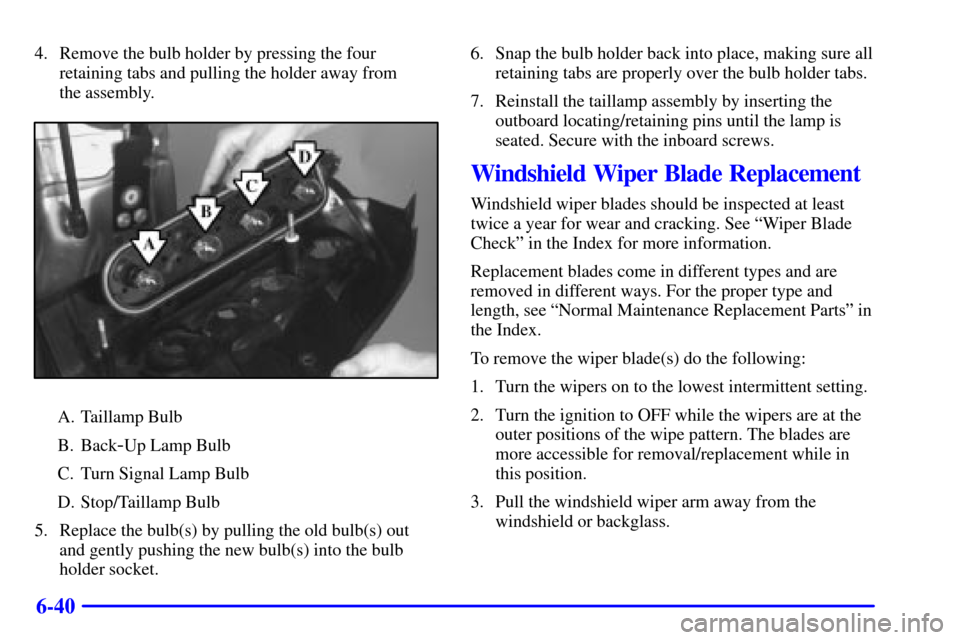
4. Remove the bulb holder by pressing the four
retaining tabs and pulling the holder away from
the assembly.
A. Taillamp Bulb
B. Back
-Up Lamp Bulb
C. Turn Signal Lamp Bulb
D. Stop/Taillamp Bulb
5. Replace the bulb(s) by pulling the old bulb(s) out
and gently pushing the new bulb(s) into the bulb
holder socket.6. Snap the bulb holder back into place, making sure all
retaining tabs are properly over the bulb holder tabs.
7. Reinstall the taillamp assembly by inserting the
outboard locating/retaining pins until the lamp is
seated. Secure with the inboard screws.
Windshield Wiper Blade Replacement
Windshield wiper blades should be inspected at least
twice a year for wear and cracking. See ªWiper Blade
Checkº in the Index for more information.
Replacement blades come in different types and are
removed in different ways. For the proper type and
length, see ªNormal Maintenance Replacement Partsº in
the Index.
To remove the wiper blade(s) do the following:
1. Turn the wipers on to the lowest intermittent setting.
2. Turn the ignition to OFF while the wipers are at the
outer positions of the wipe pattern. The blades are
more accessible for removal/replacement while in
this position.
3. Pull the windshield wiper arm away from the
windshield or backglass.
Page 392 of 460

6-41
4. While holding the
wiper arm away from
the glass, push the
release clip from under
the blade.
5. Push the release clip at the connecting point of the
blade and the arm up and pull the blade assembly
down toward the glass to remove it from the
wiper arm.
6. Push the new wiper blade securely on the wiper arm
until you hear the release clip ªclickº into place.
7. Push the release clip, from Step 4, down to secure
the wiper blade into place.
Page 395 of 460

6-44 Tire Inspection and Rotation
Tires should be rotated every 6,000 to 8,000 miles
(10 000 to 13 000 km). Any time you notice unusual
wear, rotate your tires as soon as possible and check
wheel alignment. Also check for damaged tires or
wheels. See ªWhen It's Time for New Tiresº and
ªWheel Replacementº later in this section for more
information. Make sure the spare tire is stored securely.
Push, pull, and then try to rotate or turn the tire. If it
moves, use the folding wrench to tighten the cable. See
ªStoring a Flat or Spare Tire and Toolsº in the Index.
The purpose of regular rotation is to achieve more
uniform wear for all tires on the vehicle. The first
rotation is the most important. See ªScheduled
Maintenance Servicesº in the Index for scheduled
rotation intervals.
When rotating your tires, always use the correct rotation
pattern shown here.
Don't include the compact spare tire in your
tire rotation.
Page 401 of 460
6-50 Tire Chains
NOTICE:
If your vehicle has P225/60R16 size tires, don't
use tire chains. They can damage your vehicle
because there's not enough clearance.
Use another type of traction device only if its
manufacturer recommends it for use on your
vehicle and tire size combination and road
conditions. Follow that manufacturer's
instructions. To help avoid damage to your
vehicle, drive slowly, readjust or remove the
device if it's contacting your vehicle, and don't
spin your wheels.
NOTICE: (Continued)
NOTICE: (Continued)
If you do find traction devices that will fit, install
them on the front tires.
If you have other tires, use tire chains only where
legal and only when you must. Use only SAE
Class ªSº type chains that are the proper size for
your tires. Install them on the front tires and
tighten them as tightly as possible with the ends
securely fastened. Drive slowly and follow the
chain manufacturer's instructions. If you can
hear the chains contacting your vehicle, stop and
retighten them. If the contact continues, slow
down until it stops. Driving too fast or spinning
the wheels with chains on will damage
your vehicle.
Page 418 of 460

6-67
Mini Relays Usage
9 COOL FAN RH FAN 1, LH FAN 2
10 COOL FAN 2 LH FAN 2
11 IGN MAIN FUSES: A/C CLU, IGN 1
-U/H,
INS, ELEK IGN, TCC
12 COOL FAN 1 RH FAN 1, LH FAN 2
Micro Relays Usage
13 A/C CLU A/C Clutch
14 FUEL PUMP Fuel Pump
15 Not Used
16 HORN Horn
17 FOG LAMP LH Fog Lamp, RH Fog Lamp,
Fog Lamp Indicator
Mini Fuse Usage
18 INJ Fuel Injectors 1
-6
19 SPARE Not Used
20 SPARE Not UsedMini Fuse Usage
21 IGN1
-UH Evaporative Emissions (EVAP)
Canister Purge Valve, Heated
Oxygen Sensors 1 and 2, Mass Air
Flow (MAF) Sensor
22 SPARE Not Used
23 SPARE Not Used
24 SPARE Not Used
25 ELEK IGN Ignition Control Module (ICM)
26 SPARE Not Used
27 B/U LAMP Transaxle Range Switch to
Back
-up Lamps
28 A/C CLU A/C CLU Relay to A/C
Compressor Clutch Oil
29 RADIO Driver Information Display,
Heater A/C Control, Radio, Rear
Side Door Actuator Control
Motor, Remote Control Door Lock
Receiver (RCDLR), Security
Indicator Lamp and
Theft
-Deterrent Shock Sensor
Page 437 of 460

7-16 At Least Twice a Year
Restraint System Check
Make sure the safety belt reminder light and all your
belts, buckles, latch plates, retractors and anchorages are
working properly. If your vehicle has a built
-in child
restraint, also periodically make sure the harness straps,
latch plates, buckle, clip, child head restraint and
anchorages are working properly. Look for any other
loose or damaged safety belt and built
-in child restraint
system parts. If you see anything that might keep a
safety belt or built
-in child restraint system from doing
its job, have it repaired. Have any torn or frayed safety
belts or harness straps replaced.
Also look for any opened or broken air bag coverings,
and have them repaired or replaced. (The air bag system
does not need regular maintenance.)
Wiper Blade Check
Inspect wiper blades for wear or cracking. Replace blade
inserts that appear worn or damaged or that streak or
miss areas of the windshield. Also see ªWiper Blades,
Cleaningº in the Index.Spare Tire Check
At least twice a year, after the monthly inflation check
of the spare tire determines that the spare is inflated to
the correct tire inflation pressure, make sure that the
spare tire is stored securely. Push, pull, and then try to
rotate or turn the tire. If it moves, use the folding wrench
to tighten the cable. See ªStoring the Spare Tire and
Toolsº in the Index.
Weatherstrip Lubrication
Silicone grease on weatherstrips will make them last
longer, seal better, and not stick or squeak. Apply
silicone grease with a clean cloth. During very cold,
damp weather more frequent application may be
required. See ªRecommended Fluids and Lubricantsº
in the Index.
Automatic Transaxle Check
Check the transaxle fluid level; add if needed.
See ªAutomatic Transaxle Fluidº in the Index.
A fluid loss may indicate a problem. Check the system
and repair if needed.