ABS CHEVROLET VENTURE 2002 1.G User Guide
[x] Cancel search | Manufacturer: CHEVROLET, Model Year: 2002, Model line: VENTURE, Model: CHEVROLET VENTURE 2002 1.GPages: 486, PDF Size: 3.19 MB
Page 367 of 486

5-34
Storing the Spare Tire and Tools
1. Lay the tire near the rear of the vehicle with the
valve stem down.
2. If the vehicle has aluminum wheels, remove the
small center cap by tapping the back of the cap with
the extension of the shaft.
3. Slide the cable retainer through the center of the
wheel and start to raise the tire.
Make sure the retainer is fully seated across the
underside of the wheel.
4. When the tire is almost in the stored position,
turn the tire so the valve is towards the rear of
the vehicle.
This will help when you check and maintain tire
pressure in the spare.
5. Raise the tire fully against the underside of the
vehicle. Continue turning the folding wrench until
you feel more than two clicks. This indicates that the
compact spare tire is secure and the cable is tight.
The spare tire hoist cannot be overtightened.
6. Make sure the tire is stored securely. Push, pull, and
then try to rotate or turn the tire. If the tire moves,
use the folding wrench to tighten the cable.
Put back all jacking tools as they were stored in the jack
storage compartment and put the compartment cover
back on.
To put the cover back on, line up the tabs on the right of
the cover with the slots in the cover opening. Push the
cover in place and push down the tab so that it rests in
the groove. This secures the cover in place.
Page 390 of 486
6-18
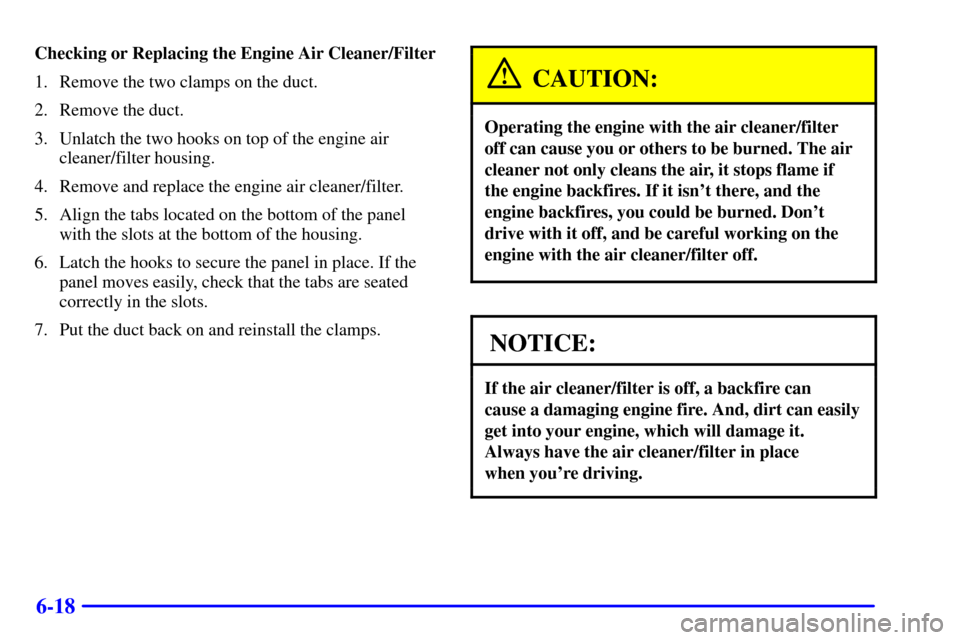
Checking or Replacing the Engine Air Cleaner/Filter
1. Remove the two clamps on the duct.
2. Remove the duct.
3. Unlatch the two hooks on top of the engine air
cleaner/filter housing.
4. Remove and replace the engine air cleaner/filter.
5. Align the tabs located on the bottom of the panel
with the slots at the bottom of the housing.
6. Latch the hooks to secure the panel in place. If the
panel moves easily, check that the tabs are seated
correctly in the slots.
7. Put the duct back on and reinstall the clamps.
CAUTION:
Operating the engine with the air cleaner/filter
off can cause you or others to be burned. The air
cleaner not only cleans the air, it stops flame if
the engine backfires. If it isn't there, and the
engine backfires, you could be burned. Don't
drive with it off, and be careful working on the
engine with the air cleaner/filter off.
NOTICE:
If the air cleaner/filter is off, a backfire can
cause a damaging engine fire. And, dirt can easily
get into your engine, which will damage it.
Always have the air cleaner/filter in place
when you're driving.
Page 409 of 486
6-37 Headlamps
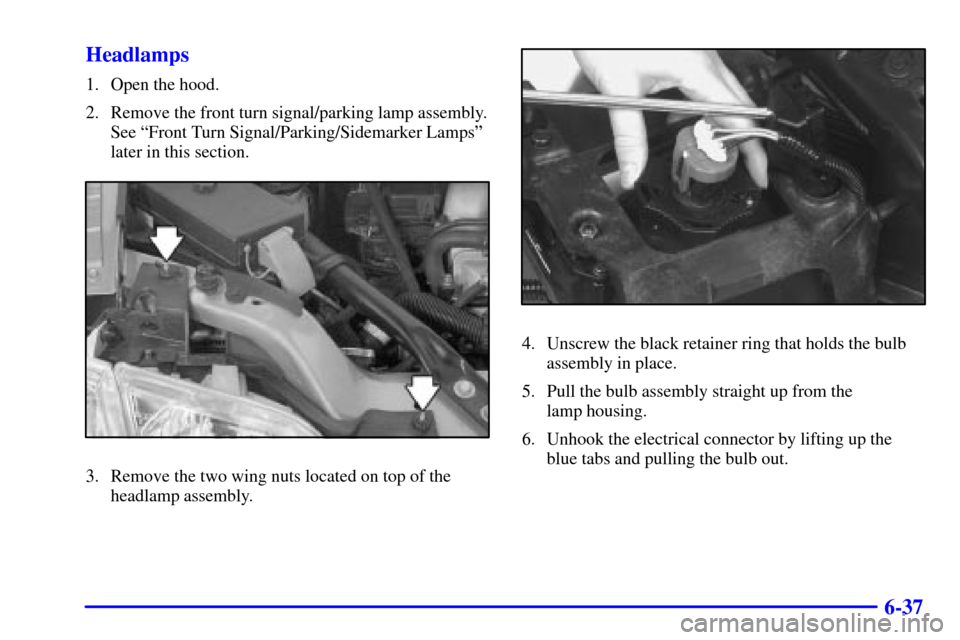
1. Open the hood.
2. Remove the front turn signal/parking lamp assembly.
See ªFront Turn Signal/Parking/Sidemarker Lampsº
later in this section.
3. Remove the two wing nuts located on top of the
headlamp assembly.
4. Unscrew the black retainer ring that holds the bulb
assembly in place.
5. Pull the bulb assembly straight up from the
lamp housing.
6. Unhook the electrical connector by lifting up the
blue tabs and pulling the bulb out.
Page 410 of 486
6-38
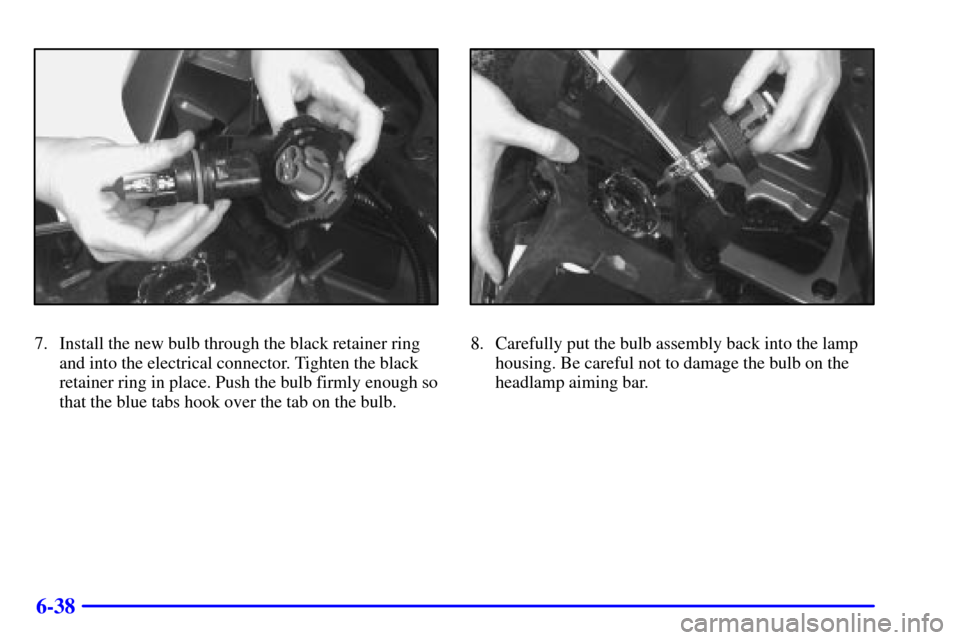
7. Install the new bulb through the black retainer ring
and into the electrical connector. Tighten the black
retainer ring in place. Push the bulb firmly enough so
that the blue tabs hook over the tab on the bulb.8. Carefully put the bulb assembly back into the lamp
housing. Be careful not to damage the bulb on the
headlamp aiming bar.
Page 412 of 486
6-40
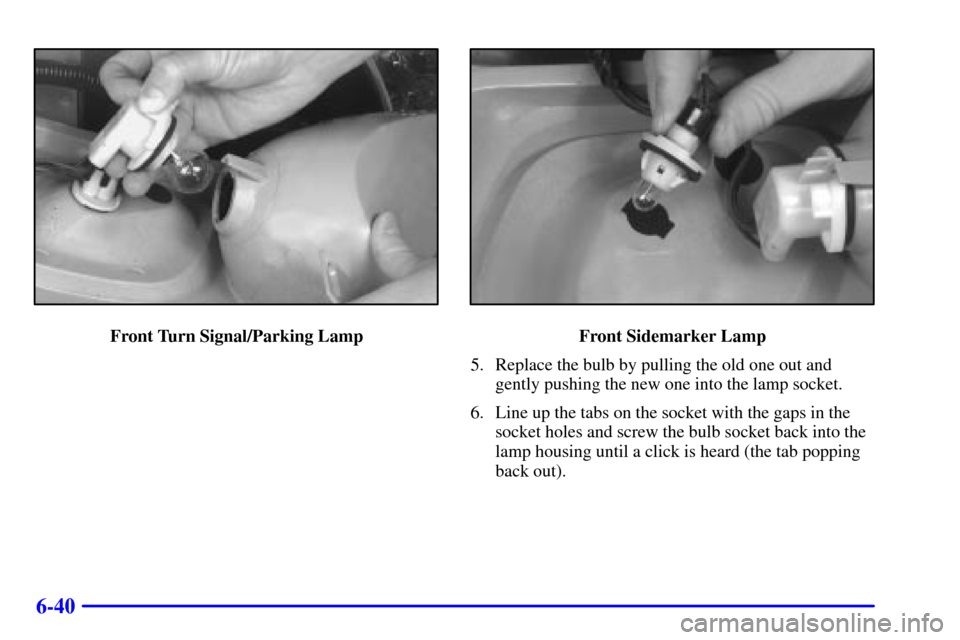
Front Turn Signal/Parking LampFront Sidemarker Lamp
5. Replace the bulb by pulling the old one out and
gently pushing the new one into the lamp socket.
6. Line up the tabs on the socket with the gaps in the
socket holes and screw the bulb socket back into the
lamp housing until a click is heard (the tab popping
back out).
Page 413 of 486

6-41
7. To reinstall the lamp assembly, line up and insert the
tabs on the back of the assembly in the slots in the
fender. Engage the lower clip on the back of the
lamp assembly into the fender, keeping the upper tab
on the front turn signal/parking lamp assembly
inboard of the headlamp bracket tab.
8. To align the front turn signal/parking lamp assembly
with the headlamp assembly, lift up the front turn
signal/parking lamp assembly until the upper edge is
contacting the fender.
9. Fasten the front turn signal/parking lamp assembly to
the headlamp assembly with the thumbscrew
removed in Step 2.
Page 414 of 486
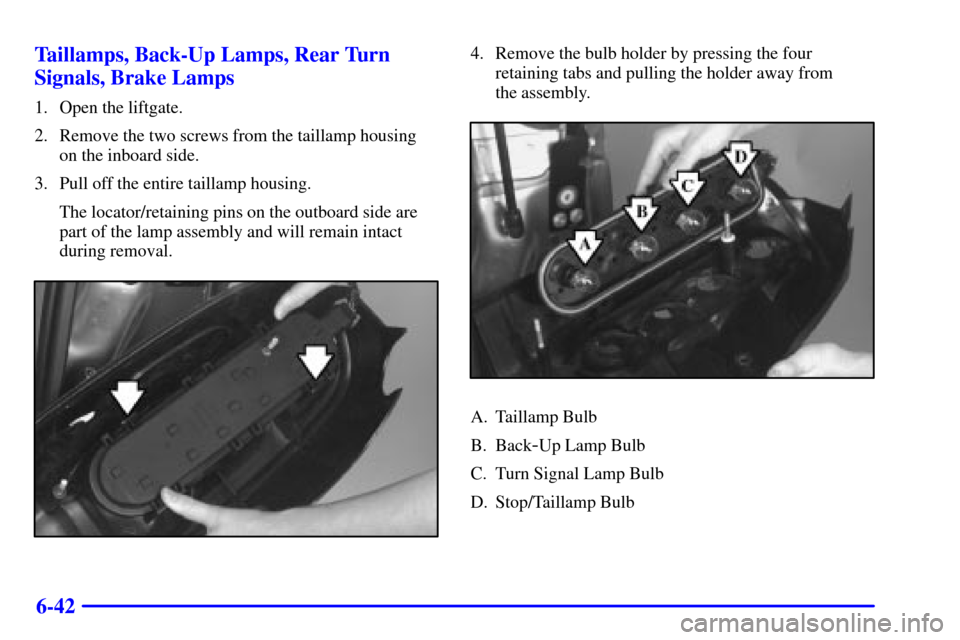
6-42 Taillamps, Back-Up Lamps, Rear Turn
Signals, Brake Lamps
1. Open the liftgate.
2. Remove the two screws from the taillamp housing
on the inboard side.
3. Pull off the entire taillamp housing.
The locator/retaining pins on the outboard side are
part of the lamp assembly and will remain intact
during removal.
4. Remove the bulb holder by pressing the four
retaining tabs and pulling the holder away from
the assembly.
A. Taillamp Bulb
B. Back
-Up Lamp Bulb
C. Turn Signal Lamp Bulb
D. Stop/Taillamp Bulb
Page 415 of 486

6-43
5. Replace the bulb by pulling the old bulb out
and gently pushing the new bulb into the bulb
holder socket.
6. Snap the bulb holder back into place, making sure all
retaining tabs are properly over the bulb holder tabs.
7. Reinstall the taillamp assembly by inserting the
outboard locating/retaining pins until the lamp is
seated. Secure with the inboard screws.Windshield Wiper Blade Replacement
Windshield wiper blades should be inspected at least
twice a year for wear or cracking. See ªWiper Blade
Checkº in the Index for more information.
Replacement blades come in different types and are
removed in different ways. For proper type and length,
see ªNormal Maintenance Replacement Partsº in
the Index.
To remove the windshield wiper blade(s) do
the following:
1. Turn the wipers on to the lowest intermittent setting.
2. Turn the ignition to OFF while the wipers are at the
outer position of the wipe pattern. The blades are
more accessible for removal/replacement while in
this position.
3. Pull the windshield wiper arm away from the
windshield or backglass.
Page 440 of 486

6-68
Fuses Usage
CTSY LAMP Courtesy Lamp
IGN 1 BCM, Electronic Brake Control
Indicator Lamp Driver Module,
Instrument Panel Cluster, Rear
Side Door Actuator Control
Module, Rear Windows
RR HVAC
TEMP CONTRear HVAC
-A/C Control
RR WPR/WSHR Rear Window Wiper Motor, Rear
Window Wiper/Washer and
Multifunction Switch (Rear
Window Wiper/Washer Switch)
LH
HEADLP LOWPassenger's Side Low
Beam Headlamp
LH
HEADLP HIGHPassenger's Side High
Beam Headlamp
Blank Not UsedFuses Usage
Blank Not Used
Blank Not Used
RAP RELAY Retained Accessory
Power (RAP) Relay
Blank Not Used
HVAC/DIC/DRL/
HEATED SEATAir Inlet Actuator, DIC Display,
DRL Control Module,
Heater
-A/C Control, Temperature
Door Actuator (Front) and Rear
Window Defogger Relay
BCM PRGRAM BCM Programming
RH HEAD LP
LOWDriver's Side Low
Beam Headlamp
RH HEAD LP
HIGHDriver's Side High
Beam Headlamp
PCM/ABS IGN MAIN Relay and PCM,
Electronic Brake Control Module
Page 442 of 486

6-70
Maxi Fuse Usage
5 Ignition Switch to Fuses
(Instrument Panel): ABS/TCS
Ignition, Cruise, DRL, Electronic
PRNDL, Ignition 1, PSD, Air Bag,
Turn Signal and Powertrain
Control Module [IGN MAIN
Relay (Underhood Fuse Block:
A/C Clutch, Electronic Ignition,
Ignition 1
-U/H, INJ, TCC)]
6 Coolant Fans
7 Fuses (Instrument Panel): ABS
Module Battery, Cigarette Lighter,
Courtesy Lamps, Front Power
Socket, Power Locks, Power
Mirrors and Right Rear
Power SocketMaxi Fuse Usage
8 Ignition Switch to Fuses (I/P):
Body Control Module Program,
Front Comfort Controls
Low/Medium Blower, Front
Wiper/Washer, HVAC/DRL,
MALL/Radio/DIC, Power
Quarter Vent, Rear HVAC,
Rear Wiper/Washer. SWC
Accessory and Power Window
Circuit Breaker
Mini Relays Usage
9 Right Fan 1, Left Fan 2
10 Left Fan 2
11 Fuses: A/C Clutch, Ignition
1
-U/H, INS, Electronic
Ignition, TCC
12 Right Fan 1, Left Fan 2