remote control CHEVROLET VENTURE 2004 1.G User Guide
[x] Cancel search | Manufacturer: CHEVROLET, Model Year: 2004, Model line: VENTURE, Model: CHEVROLET VENTURE 2004 1.GPages: 516, PDF Size: 3.33 MB
Page 296 of 516
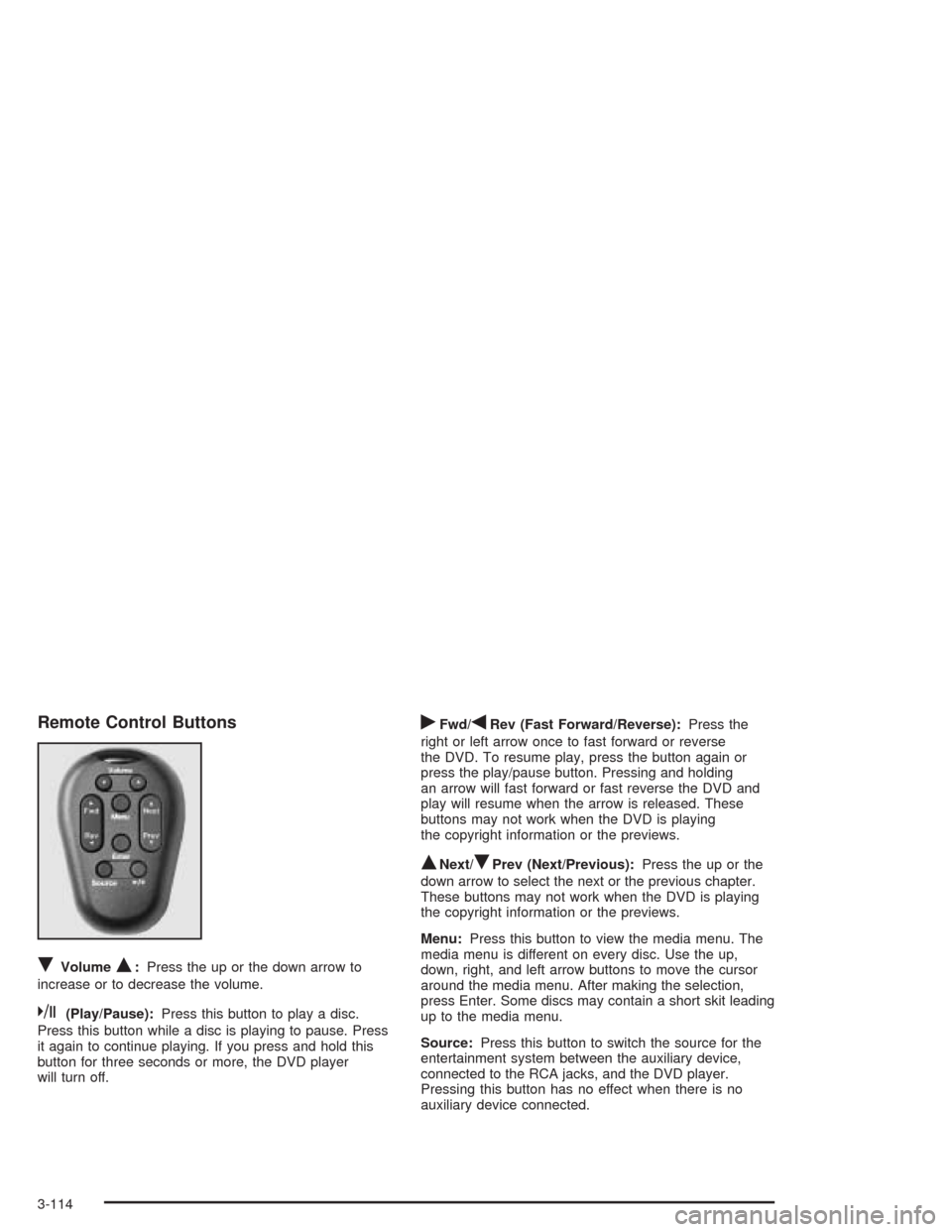
Remote Control Buttons
RVolumeQ:Press the up or the down arrow to
increase or to decrease the volume.
k(Play/Pause):Press this button to play a disc.
Press this button while a disc is playing to pause. Press
it again to continue playing. If you press and hold this
button for three seconds or more, the DVD player
will turn off.
rFwd/qRev (Fast Forward/Reverse):Press the
right or left arrow once to fast forward or reverse
the DVD. To resume play, press the button again or
press the play/pause button. Pressing and holding
an arrow will fast forward or fast reverse the DVD and
play will resume when the arrow is released. These
buttons may not work when the DVD is playing
the copyright information or the previews.
QNext/RPrev (Next/Previous):Press the up or the
down arrow to select the next or the previous chapter.
These buttons may not work when the DVD is playing
the copyright information or the previews.
Menu:Press this button to view the media menu. The
media menu is different on every disc. Use the up,
down, right, and left arrow buttons to move the cursor
around the media menu. After making the selection,
press Enter. Some discs may contain a short skit leading
up to the media menu.
Source:Press this button to switch the source for the
entertainment system between the auxiliary device,
connected to the RCA jacks, and the DVD player.
Pressing this button has no effect when there is no
auxiliary device connected.
3-114
Page 297 of 516
Battery Replacement
To change the batteries, do the following:
1. Remove the screw and open the battery door
located on the back of the remote control.
2. Replace the two AAA batteries in the compartment.
Make sure that they are installed correctly.
3. Replace the battery door and screw.
If the remote control is to be stored for a long period of
time, remove the batteries and keep them in a cool,
dry place.
DVD Distortion
There may be an experience with video distortion when
operating cellular phones, scanners, CB radios,
Global Position Systems (GPS)*, two-way radios, mobile
fax, or walkie talkies.
It may be necessary to turn off the DVD player when
operating one of these devices in or near the vehicle.
*Excludes the OnStar
®System.
Cleaning the DVD Player
When cleaning the outside DVD faceplate and buttons,
use only a clean cloth dampened with clean water.
Cleaning the Video Screen
When cleaning the video screen, use only a clean cloth
dampened with clean water. Use care when directly
touching or cleaning the screen, as damage may result.
3-115
Page 298 of 516
Rear Seat Audio (RSA)
(Without Entertainment System)
This feature allows rear seat passengers to listen to and
control any of the sources: radio and CDs. However,
the rear seat passengers can only control the sources
that the front seat passengers are not listening to.
For example, rear seat passengers may listen to and
control a CD through headphones, while the driver
listens to the radio through the front speakers. The rear
seat passengers have control of the volume for each
set of headphones.
The front seat audio controls always have priority over
the RSA controls. If the front seat passengers switch
the source for the main radio to a remote source,
the RSA will not be able to control the remote source.
You can operate the RSA when the main radio is off.
Primary Radio Controls
The following function is controlled by the main radio:
PWR (Power):Press this knob twice to turn RSA off.
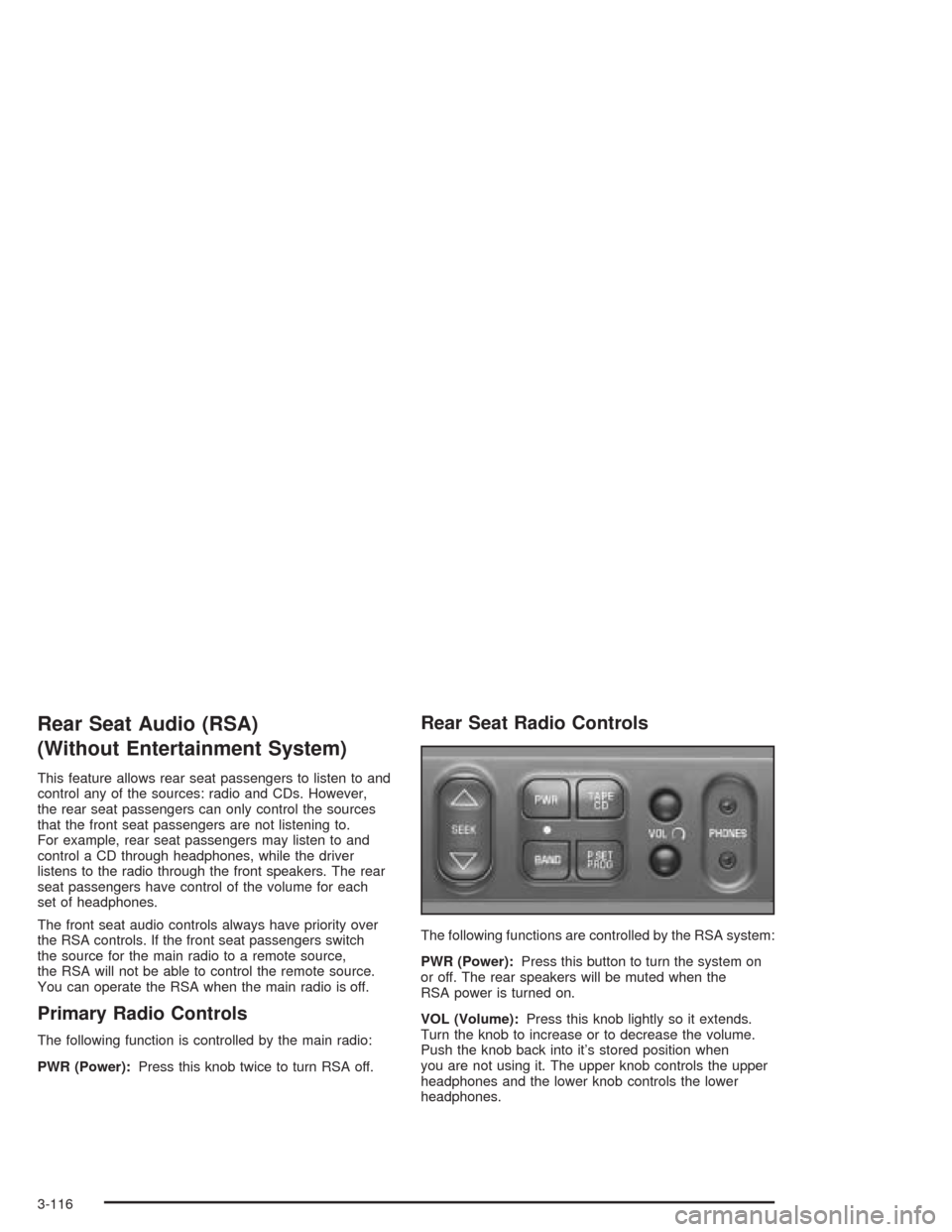
Rear Seat Radio Controls
The following functions are controlled by the RSA system:
PWR (Power):Press this button to turn the system on
or off. The rear speakers will be muted when the
RSA power is turned on.
VOL (Volume):Press this knob lightly so it extends.
Turn the knob to increase or to decrease the volume.
Push the knob back into it’s stored position when
you are not using it. The upper knob controls the upper
headphones and the lower knob controls the lower
headphones.
3-116
Page 300 of 516
Rear Seat Audio (RSA)
(With Entertainment System)
This feature allows rear seat passengers to listen to and
control any of the sources: radio, CDs, DVD, and
auxiliary device. However, the rear seat passengers can
only control the sources that the front seat passengers
are not listening to. For example, rear seat passengers
may listen to and control a CD through headphones
while the driver listens to the radio through the
front speakers. The rear seat passengers have control
of the volume for each set of headphones.
The front seat audio controls always have priority over
the RSA controls. If the front seat passengers switch
the source for the main radio to a remote source,
the RSA will not be able to control the remote source.
You can operate the RSA when the main radio is off.
The DVD or auxiliary device will always be available on
channel A of the headphones. All other sources are
available on channel B. You will not be able to listen to
XM, on channel B, if you are listening to a DVD or
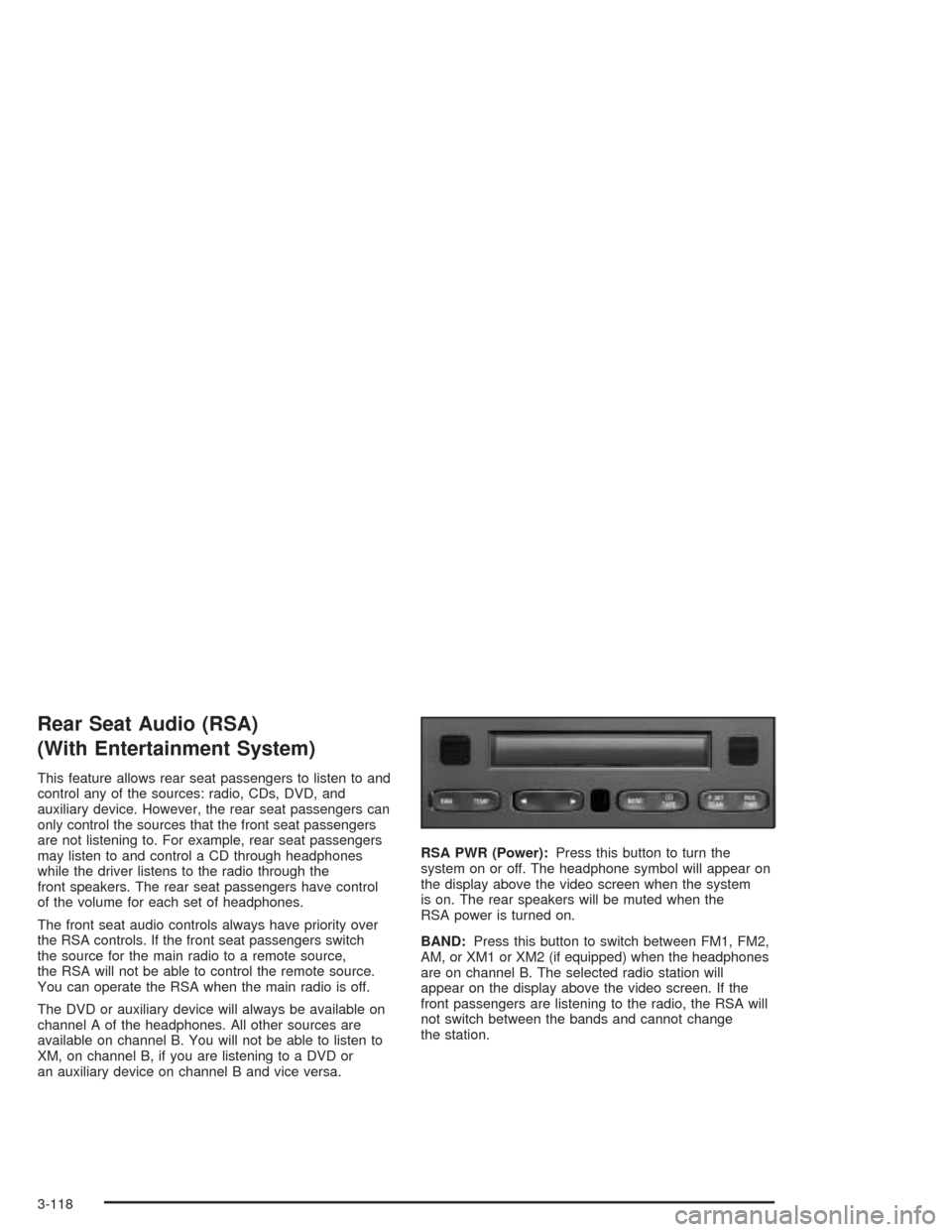
an auxiliary device on channel B and vice versa.RSA PWR (Power):Press this button to turn the
system on or off. The headphone symbol will appear on
the display above the video screen when the system
is on. The rear speakers will be muted when the
RSA power is turned on.
BAND:Press this button to switch between FM1, FM2,
AM, or XM1 or XM2 (if equipped) when the headphones
are on channel B. The selected radio station will
appear on the display above the video screen. If the
front passengers are listening to the radio, the RSA will
not switch between the bands and cannot change
the station.
3-118
Page 459 of 516
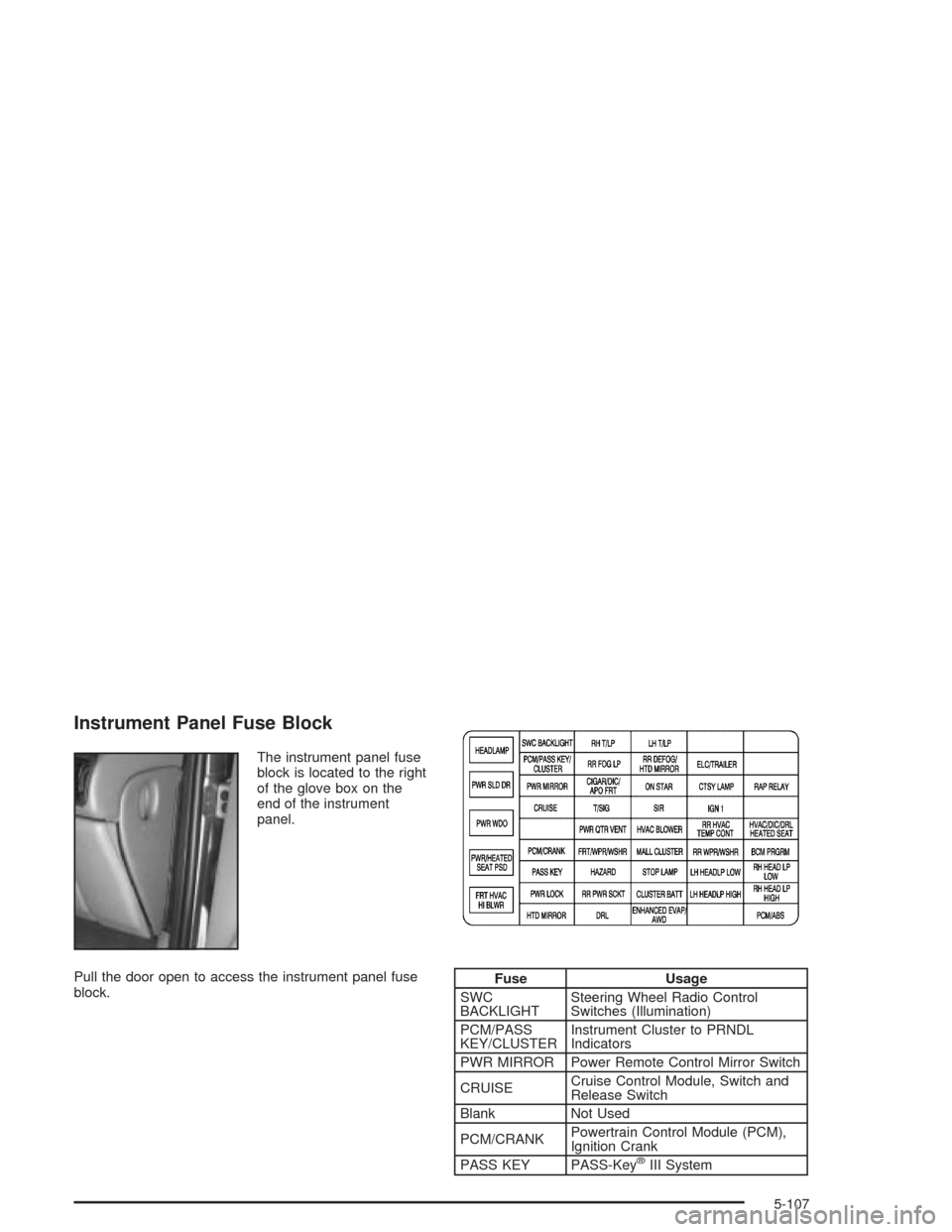
Instrument Panel Fuse Block
The instrument panel fuse
block is located to the right
of the glove box on the
end of the instrument
panel.
Pull the door open to access the instrument panel fuse
block.
Fuse Usage
SWC
BACKLIGHTSteering Wheel Radio Control
Switches (Illumination)
PCM/PASS
KEY/CLUSTERInstrument Cluster to PRNDL
Indicators
PWR MIRROR Power Remote Control Mirror Switch
CRUISECruise Control Module, Switch and
Release Switch
Blank Not Used
PCM/CRANKPowertrain Control Module (PCM),
Ignition Crank
PASS KEY PASS-Key
®III System
5-107
Page 462 of 516
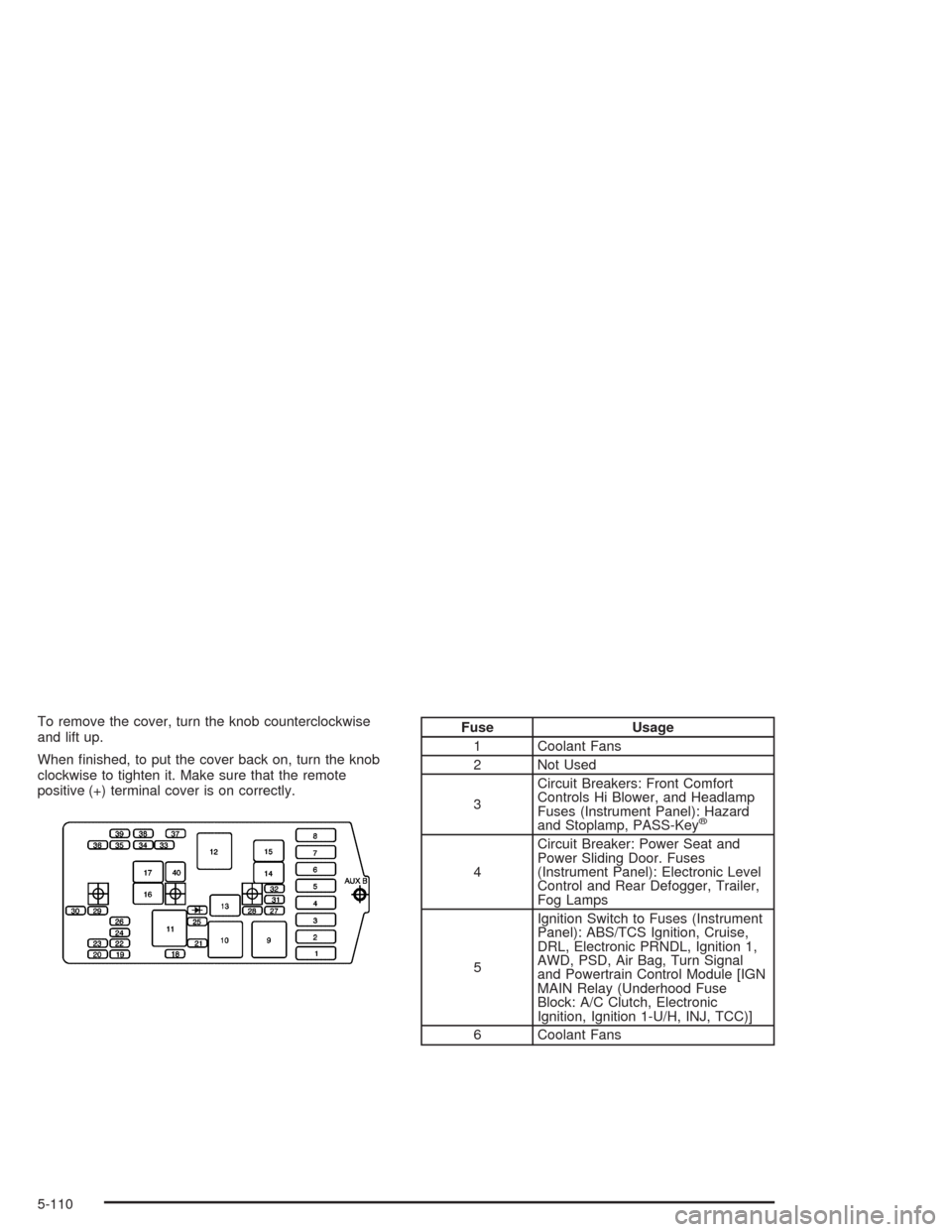
To remove the cover, turn the knob counterclockwise
and lift up.
When nished, to put the cover back on, turn the knob
clockwise to tighten it. Make sure that the remote
positive (+) terminal cover is on correctly.Fuse Usage
1 Coolant Fans
2 Not Used
3Circuit Breakers: Front Comfort
Controls Hi Blower, and Headlamp
Fuses (Instrument Panel): Hazard
and Stoplamp, PASS-Key
®
4Circuit Breaker: Power Seat and
Power Sliding Door. Fuses
(Instrument Panel): Electronic Level
Control and Rear Defogger, Trailer,
Fog Lamps
5Ignition Switch to Fuses (Instrument
Panel): ABS/TCS Ignition, Cruise,
DRL, Electronic PRNDL, Ignition 1,
AWD, PSD, Air Bag, Turn Signal
and Powertrain Control Module [IGN
MAIN Relay (Underhood Fuse
Block: A/C Clutch, Electronic
Ignition, Ignition 1-U/H, INJ, TCC)]
6 Coolant Fans
5-110
Page 463 of 516
Fuse Usage
7Fuses (Instrument Panel): ABS
Module Battery, Cigarette Lighter,
Courtesy Lamps, Front Power
Socket, Power Locks, Power Mirrors
and Right Rear Power Socket,
OnStar, RAP
8Ignition Switch to Fuses (I/P): Body
Control Module Program, Front
Comfort Controls Low/Medium
Blower, Front Wiper/Washer,
HVAC/DRL, MALL/Radio/DIC,
Power Quarter Vent, Rear HVAC,
Rear Wiper/Washer. SWC
Accessory and Power Window
Circuit Breaker, RAP
18 Fuel Injectors 1–6
19 Not Used
20 Not Used
21Evaporative Emissions (EVAP)
Canister Purge Valve, Heated
Oxygen Sensors 1 and 2, Mass Air
Flow (MAF) SensorFuse Usage
22 Not Used
23 Not Used
24 Not Used
25 Ignition Control Module (ICM)
26 Not Used
27Transaxle Range Switch to Back-up
Lamps
28A/C Clutch Relay to A/C
Compressor Clutch Oil
29Driver Information Display, Heater
A/C Control, Radio, Rear (LH and
RH) Side Door Actuator Control
Motor, Remote Control Door Lock
Receiver (RCDLR), Security
Indicator Lamp and Theft-Deterrent
Shock Sensor
30 Generator
31Automatic Transaxle (Torque
Converter Clutch Solenoids)
Stoplamp Switch to Powertrain
Control Module
5-111
Page 499 of 516
A
Accessory Inator...........................................5-76
Accessory Power Outlets.................................3-25
Adding Washer Fluid.......................................5-38
Additional Program Information.........................7-10
Additives, Fuel................................................. 5-6
Add-On Electrical Equipment...........................5-105
Adjusting the Bucket Seats...............................1-14
Adjusting the Captain’s Chairs (Second Row)......1-20
Adjusting the Speakers
(Balance/Fade)....................3-64, 3-68, 3-80, 3-96
Adjusting the Split Bench Seats (Second Row)..... 1-8
Air Bag
Readiness Light..........................................3-41
Air Bag Systems.............................................1-92
How Does an Air Bag Restrain?....................1-99
Servicing Your Air Bag-Equipped Vehicle.......1-102
What Makes an Air Bag Inate?....................1-99
What Will You See After an Air Bag Inates?.....1-100
When Should an Air Bag Inate?...................1-98
Where Are the Air Bags?..............................1-95
Air Cleaner/Filter, Engine.................................5-18
Airbag Sensing and Diagnostic Module (SDM)....7-10
All-Wheel Drive......................................5-48, 5-96
All-Wheel Drive Disable Warning Message..........3-57
All-Wheel-Drive (AWD) System.........................4-11
AM .............................................................3-121AM-FM Radio.................................................3-62
Antenna, Fixed Mast......................................3-122
Antenna, XM™ Satellite Radio Antenna System . . . 3-122
Anti-lock Brake System (ABS)............................ 4-7
Anti-Lock Brake, System Warning Light..............3-43
Appearance Care............................................5-97
Care of Safety Belts and Built-in Child
Restraint Harness...................................5-100
Chemical Paint Spotting..............................5-103
Cleaning the Inside of Your Vehicle................5-97
Cleaning the Outside of Your Vehicle............5-100
Finish Damage..........................................5-102
Sheet Metal Damage..................................5-102
Underbody Maintenance.............................5-103
Vehicle Care/Appearance Materials...............5-103
Weatherstrips............................................5-100
Arming and Disarming the Content
Theft-Deterrent System.................................2-69
Arming Conrmation........................................2-28
Arming with the Power Lock Switch...................2-27
Arming with the Remote Keyless Entry
Transmitter.................................................2-28
Arming with Your Key......................................2-28
Audio Speakers............................................3-110
Audio System(s).............................................3-61
AM-FM Radio.............................................3-62
Audio Steering Wheel Controls....................3-120
Care of Your CD and DVD Player................3-122
1
Page 511 of 516
RDS Messages..............................3-70, 3-82, 3-98
Rear Climate Control System...................3-29, 3-32
Rear Hatch Ajar Warning Message....................3-56
Rear Reading Lamps......................................3-20
Rear Safety Belt Comfort Guides......................1-50
Rear Seat Audio (RSA)........................3-116, 3-118
Rear Seat Operation......................................... 1-6
Rear Seat Outside Passenger Positions.............1-46
Rear Seat Passengers, Safety Belts..................1-46
Rear Seat Radio Controls...............................3-116
Rear Storage Area..........................................2-58
Rear Window Defogger....................................3-28
Rearview Mirrors.............................................2-45
Reclining Seatbacks.......................................... 1-4
Recommended Fluids and Lubricants.................6-12
Recreational Vehicle Towing.............................4-34
Remote Alarm.................................................. 2-6
Remote Control.............................................3-113
Remote Driver Unlock Control...........................2-66
Remote Keyless Entry System............................ 2-4
Remote Keyless Entry System, Operation............ 2-5
Remote Lock and Unlock Conrmation...............2-67
Remote Power Sliding Door Operation................. 2-7
Removing the Bucket Seats.............................1-16Removing the Captain’s Chairs.........................1-21
Removing the Child from the Built-In Child
Restraint....................................................1-89
Removing the Convenience Center....................2-60
Removing the Flat Tire and Installing
the Spare Tire.............................................5-85
Removing the Spare Tire and Tools...................5-80
Removing the Split Bench Seat........................1-10
Removing the Stowable Seat............................1-25
Removing the Wheel Covers............................5-85
Replacement Bulbs.........................................5-56
Replacing Brake System Parts..........................5-42
Replacing the Bucket Seats..............................1-18
Replacing the Captain’s Chairs.........................1-22
Replacing the Convenience Center....................2-60
Replacing the Split Bench Seats.......................1-12
Replacing the Stowable Seat............................1-26
Reporting Safety Defects
Canadian Government..................................7-12
General Motors...........................................7-12
United States Government............................7-12
Reprogramming a Single HomeLink
®Button.......2-52
Resetting Defaults...........................................2-52
Resetting the Power Sliding Door......................2-21
13
Page 515 of 516
Trailer Brakes.................................................4-44
Trailer Wiring Harness.....................................4-48
Transaxle
Fluid, Automatic...........................................5-20
Transaxle Operation, Automatic.........................2-36
Transfer Case (Power Transfer Unit)..................5-48
Transmission, Transaxle, Transfer Case Unit
Repair Manual............................................7-13
Transportation Options...................................... 7-8
Trip Computer................................................3-60
Turn and Lane-Change Signals.......................... 3-8
Turn Signal/Multifunction Lever........................... 3-8
Turn Signals When Towing a Trailer..................4-46
U
Ultrasonic Rear Parking Assist (URPA)...............3-22
Underhood Fuse Block...................................5-109
Understanding Radio Reception.......................3-121
Uniform Tire Quality Grading............................5-72
United States – Customer Assistance.................. 7-5
Used Replacement Wheels..............................5-75
Using an MP3 CD..........................................3-88
Using Cleaner on Fabric..................................5-98
Using HomeLink
®...........................................2-51
Using Song List Mode...................................3-106
V
Vehicle
Control........................................................ 4-6
Damage Warnings........................................... iv
Loading......................................................4-35
Symbols......................................................... iv
Vehicle Data Collection and Event Data
Recorders..................................................7-10
Vehicle Identication
Number (VIN)............................................5-104
Service Parts Identication Label..................5-105
Vehicle Personalization....................................2-62
Arming and Disarming the Content
Theft-Deterrent System.............................2-69
Automatic Door Locks..................................2-64
Content Theft-Deterrent System.....................2-68
Delayed Illumination and Exit Lighting.............2-63
Entering Programming Mode.........................2-62
Exiting Programming Mode...........................2-71
Last Door Locking and Lockout Deterrent........2-65
Remote Driver Unlock Control.......................2-66
Remote Lock and Unlock Conrmation...........2-67
Vehicle Storage..............................................5-42
Ventilation Adjustment......................................3-29
Video Screen................................................3-111
Visor Vanity Mirror..........................................2-26
Visors...........................................................2-26
17