fuse CHEVROLET VENTURE 2004 1.G Owners Manual
[x] Cancel search | Manufacturer: CHEVROLET, Model Year: 2004, Model line: VENTURE, Model: CHEVROLET VENTURE 2004 1.GPages: 516, PDF Size: 3.33 MB
Page 9 of 516
Front Seats
Manual Seats
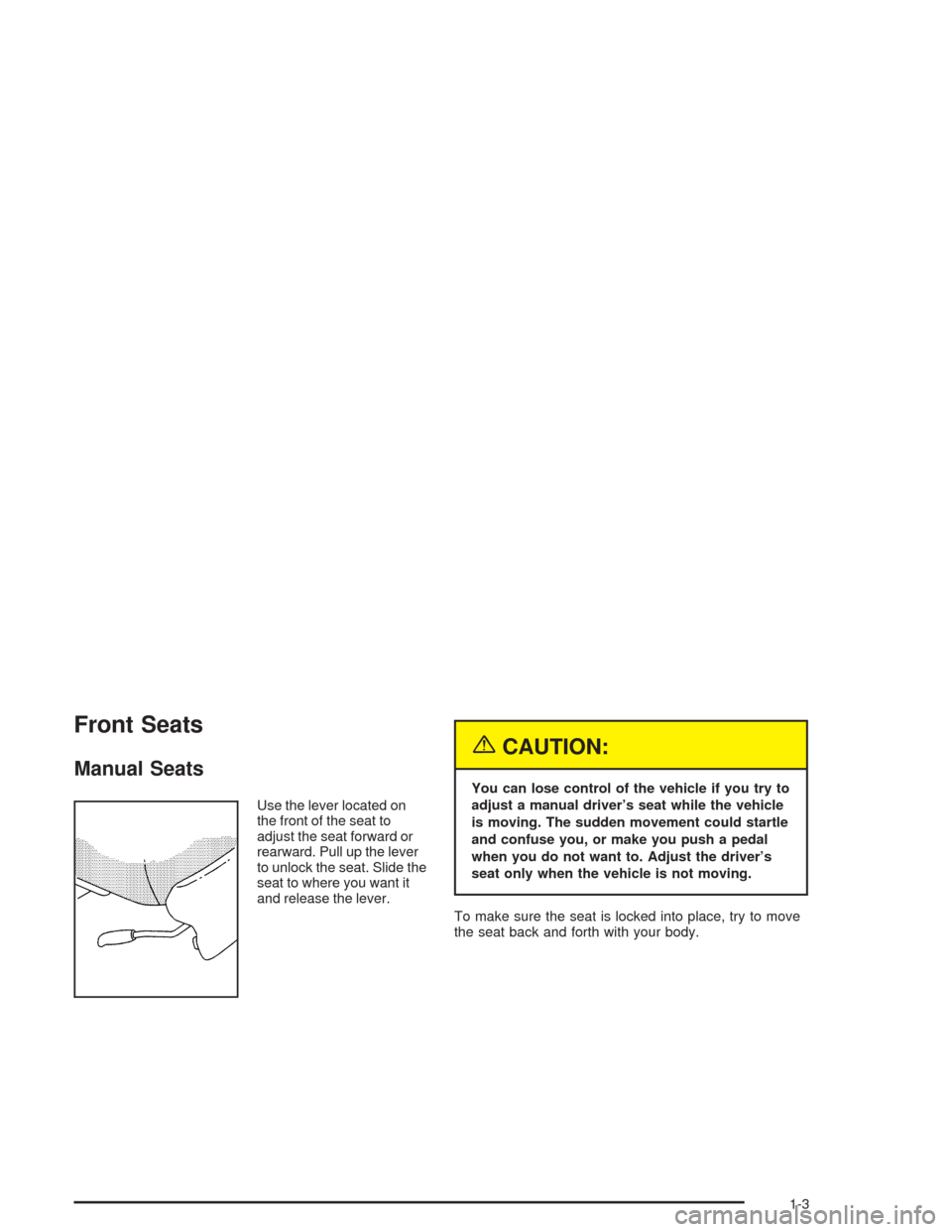
Use the lever located on
the front of the seat to
adjust the seat forward or
rearward. Pull up the lever
to unlock the seat. Slide the
seat to where you want it
and release the lever.
{CAUTION:
You can lose control of the vehicle if you try to
adjust a manual driver’s seat while the vehicle
is moving. The sudden movement could startle
and confuse you, or make you push a pedal
when you do not want to. Adjust the driver’s
seat only when the vehicle is not moving.
To make sure the seat is locked into place, try to move
the seat back and forth with your body.
1-3
Page 131 of 516
Resetting the Power Sliding Door
The power sliding door may operate incorrectly or not at
all because of the following conditions:
A low voltage or dead battery
A disconnected battery
If the instrument panel PWR/HEATED SEAT PSD
fuse or the underhood fuse 8, 27, or 29 are
removed or blown.
SeeFuses and Circuit Breakers on page 5-96for more
information about your fuse panel.
If any of these conditions occur, the power sliding door
will need to be reset. If your vehicle has the dual power
sliding doors, both doors will have to be reset. To reset a
door, do the following:
1. Check to be sure the power sliding door is unlocked
and securely closed.
2. Turn the ignition key to OFF.3. If the power sliding door override is on, press the
textured end of the power sliding door override
switch to turn it off.
4. Remove fuse 29 from the underhood fuse block.
Leave it out for 30 seconds.
5. Reinstall the fuse and wait 10 seconds.
6. Turn the power sliding door override on by pressing
the end of the switch with the override symbol on it.
7. Press the power sliding door switch(es) to open the
power sliding door.
8. Open the door all of the way.
9. Wait ve seconds and close the door by pressing
the power sliding door switch(es).
10. Wait ve seconds and repeat Steps 7 through 9.
If the door does not rest in the fully open position after
repeating Step 7, repeat Steps 7 through 9 again. If
the door still does not operate correctly, see your dealer
for service.
2-21
Page 140 of 516
If the engine still does not start, and the key appears to
be undamaged, try another ignition key. At this time,
you may also want to check the instrument panel PASS
KEY fuse. If the engine still does not start with the
other key, your vehicle needs service. If your vehicle
does start, the rst key may be faulty. See your dealer or
a locksmith who can service the PASS-Key
®III to
have a new key made. SeeFuses and Circuit Breakers
on page 5-96.
It is possible for the PASS-Key
®III decoder to learn the
transponder value of a new or replacement key. Up
to 10 additional keys may be programmed for the
vehicle. This procedure is for learning additional keys
only. If all the currently programmed keys are lost or do
not operate, you must see your dealer or a locksmith
who can service PASS-Key
®III to have keys made and
programmed to the system.
See your dealer or a locksmith who can service
PASS-Key
®III to get a new key blank that is cut exactly
as the ignition key that operates the system.
Canadian Owners:If you lose or damage your keys,
only a GM dealer can service PASS-Key
®III to
have new keys made. To program additional keys you
will need two current driver’s keys, black in color.
You must add a step to the following procedure. After
Step 3, repeat Steps 1 through 3 with the second current
driver’s key. Then continue with Step 4.To program the new key, do the following:
1. Verify the new key has PK3 stamped on it.
2. Insert the ignition key in the ignition and start the
engine. If the engine will not start, see your dealer
for service.
3. After the engine has started, turn the key to OFF
and remove the key.
4. Insert the key to be programmed and turn it to RUN
within 10 seconds of removing the previous key.
5. The security message will turn off once the key has
been programmed. It may not be apparent that the
security message went on due to how quickly
the key is programmed.
6. Repeat Steps 1 through 4 if additional keys are to
be programmed.
If you are ever driving and the security message comes
on and stays on, you will be able to restart your
engine if you turn it off. Your PASS-Key
®III system,
however, is not working properly and must be serviced
by your dealer. Your vehicle is not protected by the
PASS-Key
®III system at this time.
If you lose or damage a PASS-Key
®III key, see your
dealer or a locksmith who can service PASS-Key®III to
have a new key made.
2-30
Page 172 of 516
Vehicle Personalization
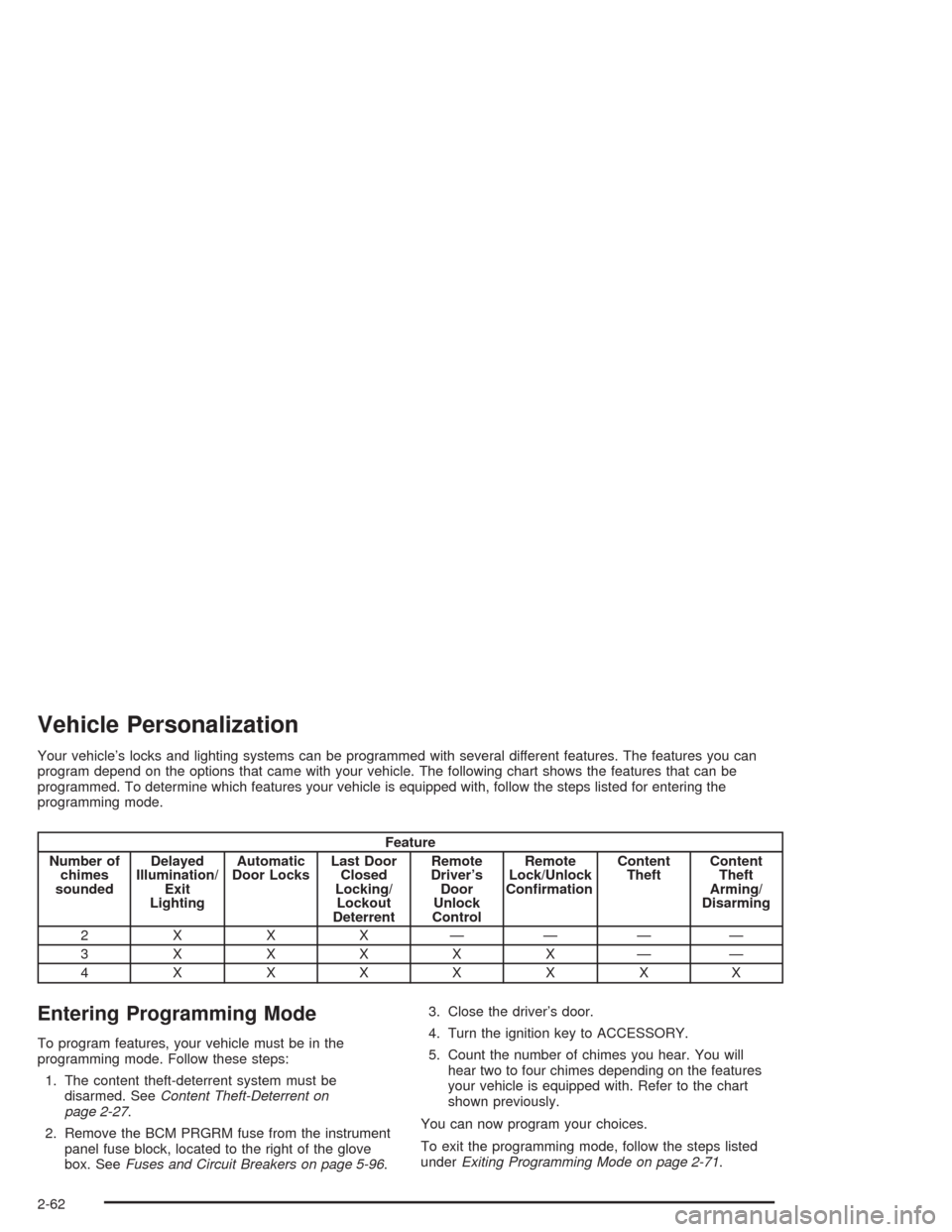
Your vehicle’s locks and lighting systems can be programmed with several different features. The features you can
program depend on the options that came with your vehicle. The following chart shows the features that can be
programmed. To determine which features your vehicle is equipped with, follow the steps listed for entering the
programming mode.
Feature
Number of
chimes
soundedDelayed
Illumination/
Exit
LightingAutomatic
Door LocksLast Door
Closed
Locking/
Lockout
DeterrentRemote
Driver’s
Door
Unlock
ControlRemote
Lock/Unlock
ConrmationContent
TheftContent
Theft
Arming/
Disarming
2 X X X ————
3XXXXX——
4XXXXXXX
Entering Programming Mode
To program features, your vehicle must be in the
programming mode. Follow these steps:
1. The content theft-deterrent system must be
disarmed. SeeContent Theft-Deterrent on
page 2-27.
2. Remove the BCM PRGRM fuse from the instrument
panel fuse block, located to the right of the glove
box. SeeFuses and Circuit Breakers on page 5-96.3. Close the driver’s door.
4. Turn the ignition key to ACCESSORY.
5. Count the number of chimes you hear. You will
hear two to four chimes depending on the features
your vehicle is equipped with. Refer to the chart
shown previously.
You can now program your choices.
To exit the programming mode, follow the steps listed
underExiting Programming Mode on page 2-71.
2-62
Page 181 of 516
3. Press the button with the horn symbol on the
remote keyless entry transmitter.
4. Count the number of chimes you hear. The number
of chimes indicates the vehicle’s current
programmed mode. If you do not wish to change
the current mode, you can either exit the
programming mode by following the instructions
later in this section or program the next feature
available on your vehicle.
5. Press the panic button to change the current mode.
6. Press the panic button until you hear the number
of chimes corresponding to the mode selection
you want.
7. Remove your key from the door key cylinder.
The mode you selected is now set. You can either exit
the programming mode by following the instructions
next in this section or program the next feature available
on your vehicle.Exiting Programming Mode
To exit programming mode, turn the key from
ACCESSORY to OFF and put the BCM PRGRM fuse
back into the instrument panel fuse block.
After programming a feature, you can exit the
programming mode at anytime. Also, if your vehicle is
equipped with the content theft-deterrent system,
remember to arm the system before exiting.
2-71
Page 187 of 516
The main components of the instrument panel are the
following:
A. Side Outlets. SeeOutlet Adjustment on page 3-29.
B. Front Outlets. SeeOutlet Adjustment on page 3-29.
C. Turn Signal/Multifunction Lever. SeeTurn
Signal/Multifunction Lever on page 3-8.
D. Hazard Warning Flasher Switch. SeeHazard
Warning Flashers on page 3-6.
E. Instrument Panel Cluster. SeeInstrument Panel
Cluster on page 3-37.
F. Center Outlets. SeeOutlet Adjustment on page 3-29.
G. Audio System. SeeAudio System(s) on page 3-61.
H. Side Outlets. SeeOutlet Adjustment on page 3-29.
I. Exterior Lamps Control. SeeExterior Lamps on
page 3-16.
J. Hood Release. SeeHood Release on page 5-11.
K. Horn. SeeHorn on page 3-7.L. Ignition Switch. SeeIgnition Positions on page 2-32.
M. Climate Controls. SeeClimate Control System on
page 3-26.
N. Rear Fan Controls. SeeRear Climate Control
System (Without Entertainment System) on
page 3-29orRear Climate Control System (With
Entertainment System) on page 3-32.
O. Cupholder Tray. SeeCupholder(s) on page 2-53.
P. Accessory Power Outlet. SeeAccessory Power
Outlets on page 3-25.
Q. Instrument Panel Switchbank. SeeInstrument Panel
Switchbank on page 3-21.
R. Glove Box. SeeGlove Box on page 2-52.
S. Front Outlets. SeeOutlet Adjustment on page 3-29.
T. Instrument Panel Fuse Block. SeeFuses and
Circuit Breakers on page 5-106.
3-5
Page 191 of 516
If a bulb is burned out, replace it to help avoid an
accident. If the arrows do not go on at all when you
signal a turn, check for burned-out bulbs and check the
fuse. SeeBulb Replacement on page 5-50andFuses
and Circuit Breakers on page 5-106.
If you have a trailer towing option with added wiring for
the trailer lamps, the signal indicator will ash at a
normal rate even if a turn signal bulb is burned
out. Check the front and rear turn signal lamps regularly
to make sure they are working.
Turn Signal On Chime
If either turn signal is left on for more than 3/4 mile
(1.2 km), a chime will sound to let the driver know
to turn it off. If you need to leave the signal on for more
than 3/4 mile (1.2 km), turn off the signal and then
turn it back on.
Headlamp High/Low-Beam Changer
To change the headlamps from high to low beam or
from low to high, pull the turn signal lever all the
way toward you and release it.When the high beams are
on, this light on the
instrument panel cluster
will also be on.
Your fog lamps will turn off when you switch to high
beams. Using your high beams in fog is not
recommended.
Flash-to-Pass
When the headlamps are off, pull the lever toward you
to momentarily switch on the high beams. This will
signal that you are going to pass. When you release the
lever, they will turn off.
3-9
Page 207 of 516
Accessory Power Outlets
With accessory power outlets you can plug in electrical
equipment such as a cellular telephone or CB radio.
The front accessory power outlet is located below
the cupholder drawer.
Pull the cover down to use the accessory power outlet.
When not in use, keep the cover on.
The rear accessory power outlet is located in the rear
compartment on the driver’s side next to the air
inator system.
To remove the cover, pull the tab on the cover and pull
it off. To put the cover back on, line up the tabs at
the back of the cover and put the cover in place. Push
down the tab to secure the cover. When not in use,
always cover the rear accessory power outlet with the
protective cap.
Notice:Leaving electrical equipment on for
extended periods will drain the battery. Always turn
off electrical equipment when not in use and do
not plug in equipment that exceeds the maximum
amperage rating.Certain electrical accessories may not be compatible
with the accessory power outlet and could result
in blown vehicle or adapter fuses. If you experience a
problem see your dealer for additional information
on accessory power outlets.
Notice:Adding any electrical equipment to your
vehicle may damage it or keep other components
from working as they should. The repairs would not
be covered by your warranty. Check with your
dealer before adding electrical equipment.
When adding electrical equipment, be sure to follow the
proper installation instructions included with the
equipment.
Notice:Improper use of the power outlet can cause
damage not covered by your warranty. Do not
hang any type of accessory or accessory bracket
from the plug because the power outlets are
designed for accessory power plugs only.
3-25
Page 354 of 516
Appearance Care............................................5-97
Cleaning the Inside of Your Vehicle.................5-97
Care of Safety Belts and Built-in Child
Restraint Harness....................................5-100
Weatherstrips.............................................5-100
Cleaning the Outside of Your Vehicle.............5-100
Sheet Metal Damage...................................5-102
Finish Damage...........................................5-102
Underbody Maintenance...............................5-103
Chemical Paint Spotting...............................5-103
Vehicle Care/Appearance Materials................5-103Vehicle Identication.....................................5-104
Vehicle Identication Number (VIN)................5-104
Service Parts Identication Label...................5-105
Electrical System..........................................5-105
Add-On Electrical Equipment.........................5-105
Headlamp Wiring........................................5-105
Windshield Wiper Fuses...............................5-106
Power Windows and Other Power Options......5-106
Fuses and Circuit Breakers..........................5-106
Capacities and Specications........................5-113
Section 5 Service and Appearance Care
5-2
Page 356 of 516
Your vehicle has an air bag system. Before attempting
to do your own service work, seeServicing Your Air
Bag-Equipped Vehicle on page 1-91.
You should keep a record with all parts receipts and list
the mileage and the date of any service work you
perform. SeeMaintenance Record on page 6-14.
{CAUTION:
You can be injured and your vehicle could be
damaged if you try to do service work on a
vehicle without knowing enough about it.
Be sure you have sufficient knowledge,
experience, the proper replacement parts
and tools before you attempt any vehicle
maintenance task.
Be sure to use the proper nuts, bolts and
other fasteners. “English” and “metric”
fasteners can be easily confused. If you
use the wrong fasteners, parts can later
break or fall off. You could be hurt.
Adding Equipment to the Outside of
Your Vehicle
Things you might add to the outside of your vehicle can
affect the airow around it. This may cause wind
noise and affect windshield washer performance. Check
with your dealer before adding equipment to the
outside of your vehicle.
Fuel
Use of the recommended fuel is an important part of the
proper maintenance of your vehicle.
Gasoline Octane
Use regular unleaded gasoline with a posted octane of 87
or higher. If the octane is less than 87, you may get a
heavy knocking noise when you drive. If this occurs, use
a gasoline rated at 87 octane or higher as soon as
possible. Otherwise, you might damage your engine.
A little pinging noise when you accelerate or drive uphill is
considered normal. This does not indicate a problem
exists or that a higher-octane fuel is necessary. If you are
using 87 octane or higher-octane fuel and hear heavy
knocking, your engine needs service.
5-4