electrical CHEVROLET VENTURE 2005 1.G User Guide
[x] Cancel search | Manufacturer: CHEVROLET, Model Year: 2005, Model line: VENTURE, Model: CHEVROLET VENTURE 2005 1.GPages: 470, PDF Size: 2.76 MB
Page 204 of 470
Have you recently changed brands of fuel?
If so, be sure to fuel your vehicle with quality fuel. See
Gasoline Octane on page 5-5. Poor fuel quality will
cause your engine not to run as efficiently as designed.
You may notice this as stalling after start-up, stalling
when you put the vehicle into gear, misring, hesitation
on acceleration, or stumbling on acceleration. (These
conditions may go away once the engine is warmed up.)
This will be detected by the system and cause the
light to turn on.
If you experience one or more of these conditions,
change the fuel brand you use. It will require at least
one full tank of the proper fuel to turn the light off.
If none of the above steps have made the light turn off,
your dealer can check the vehicle. Your dealer has
the proper test equipment and diagnostic tools to x any
mechanical or electrical problems that may have
developed.Emissions Inspection and Maintenance
Programs
Some state/provincial and local governments have or
may begin programs to inspect the emission control
equipment on your vehicle. Failure to pass this
inspection could prevent you from getting a vehicle
registration.
Here are some things you need to know in order to help
your vehicle pass an inspection:
Your vehicle will not pass this inspection if the SERVICE
ENGINE SOON or check engine light is on or not
working properly.
Your vehicle will not pass this inspection if the OBD
(on-board diagnostic) system determines that critical
emission control systems have not been completely
diagnosed by the system. The vehicle would be
considered not ready for inspection. This can happen if
you have recently replaced your battery or if your
battery has run down. The diagnostic system is
designed to evaluate critical emission control systems
during normal driving. This may take several days
of routine driving. If you have done this and your vehicle
still does not pass the inspection for lack of OBD
system readiness, your GM dealer can prepare the
vehicle for inspection.
3-44
Page 208 of 470
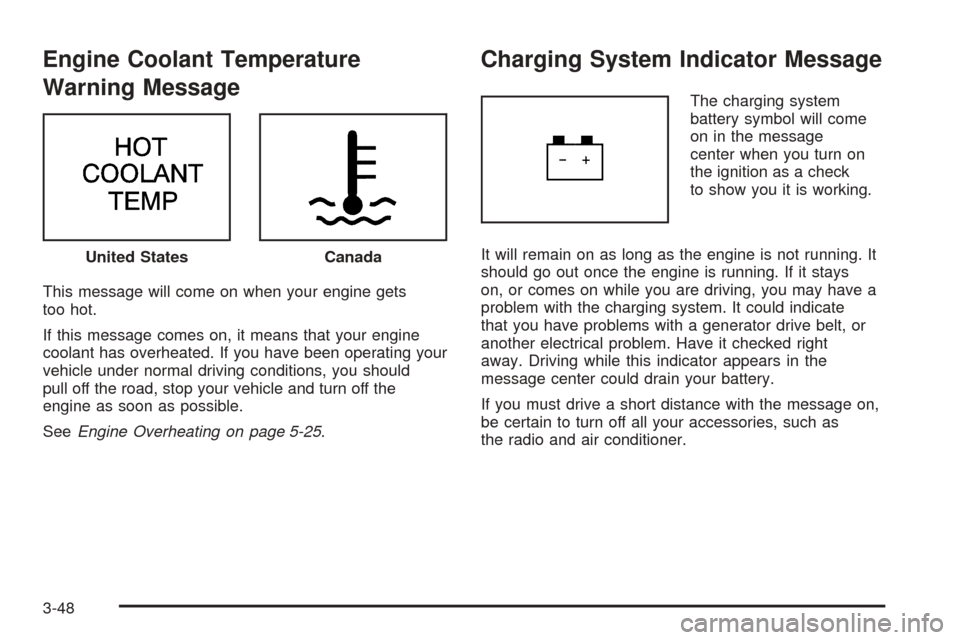
Engine Coolant Temperature
Warning Message
This message will come on when your engine gets
too hot.
If this message comes on, it means that your engine
coolant has overheated. If you have been operating your
vehicle under normal driving conditions, you should
pull off the road, stop your vehicle and turn off the
engine as soon as possible.
SeeEngine Overheating on page 5-25.
Charging System Indicator Message
The charging system
battery symbol will come
on in the message
center when you turn on
the ignition as a check
to show you it is working.
It will remain on as long as the engine is not running. It
should go out once the engine is running. If it stays
on, or comes on while you are driving, you may have a
problem with the charging system. It could indicate
that you have problems with a generator drive belt, or
another electrical problem. Have it checked right
away. Driving while this indicator appears in the
message center could drain your battery.
If you must drive a short distance with the message on,
be certain to turn off all your accessories, such as
the radio and air conditioner. United States
Canada
3-48
Page 322 of 470
Driving with a Trailer
{CAUTION:
If you have a rear-most window open and you
pull a trailer with your vehicle, carbon
monoxide (CO) could come into your vehicle.
You cannot see or smell CO. It can cause
unconsciousness or death. SeeEngine
Exhaust on page 2-39. To maximize your safety
when towing a trailer:
Have your exhaust system inspected for
leaks, and make necessary repairs before
starting on your trip.
Keep the rear-most windows closed.
If exhaust does come into your vehicle
through a window in the rear or another
opening, drive with your front, main
heating or cooling system on and with the
fan on any speed. This will bring fresh,
outside air into your vehicle. Do not use
the climate control setting for maximum air
because it only recirculates the air inside
your vehicle. SeeClimate Control System
on page 3-24.Towing a trailer requires a certain amount of experience.
Before setting out for the open road, you will want to
get to know your rig. Acquaint yourself with the feel of
handling and braking with the added weight of the trailer.
And always keep in mind that the vehicle you are
driving is now a good deal longer and not nearly as
responsive as your vehicle is by itself.
Before you start, check all trailer hitch parts and
attachments, safety chains, electrical connector, lamps,
tires, and mirror adjustment. If the trailer has electric
brakes, start your vehicle and trailer moving and
then apply the trailer brake controller by hand to be sure
the brakes are working. This lets you check your
electrical connection at the same time.
During your trip, check occasionally to be sure that the
load is secure, and that the lamps and any trailer
brakes are still working.
4-40
Page 328 of 470
Removing the Spare Tire and Tools................5-70
Removing the Flat Tire and Installing
the Spare Tire..........................................5-73
Secondary Latch System...............................5-78
Storing a Flat or Spare Tire and Tools............5-80
Compact Spare Tire......................................5-82
Appearance Care............................................5-83
Fabric/Carpet...............................................5-83
Vinyl...........................................................5-85
Leather.......................................................5-85
Instrument Panel..........................................5-85
Interior Plastic Components............................5-85
Child Restraint Pad.......................................5-85
Glass Surfaces.............................................5-85
Care of Safety Belts and Built-in Child
Restraint Harness......................................5-86
Weatherstrips...............................................5-86
Washing Your Vehicle...................................5-86
Cleaning Exterior Lamps/Lenses.....................5-86
Finish Care..................................................5-87
Windshield, Backglass, and Wiper Blades.........5-87Aluminum Wheels.........................................5-88
Tires...........................................................5-88
Sheet Metal Damage.....................................5-89
Finish Damage.............................................5-89
Underbody Maintenance................................5-89
Chemical Paint Spotting.................................5-89
Vehicle Care/Appearance Materials..................5-90
Vehicle Identication......................................5-91
Vehicle Identication Number (VIN).................5-91
Service Parts Identication Label.....................5-91
Electrical System............................................5-92
Add-On Electrical Equipment..........................5-92
Headlamp Wiring..........................................5-92
Windshield Wiper Fuses................................5-92
Power Windows and Other Power Options.......5-92
Fuses and Circuit Breakers............................5-92
Instrument Panel Fuse Block..........................5-93
Underhood Fuse Block..................................5-96
Capacities and Specications..........................5-99
Section 5 Service and Appearance Care
5-2
Page 367 of 470
Notice:Ignoring these steps could result in costly
damage to your vehicle that would not be covered
by your warranty.
Trying to start your vehicle by pushing or pulling it
will not work, and it could damage your vehicle.
1. Check the other vehicle. It must have a 12-volt
battery with a negative ground system.
Notice:If the other vehicle’s system is not a 12-volt
system with a negative ground, both vehicles can
be damaged. Only use vehicles with 12-volt systems
with negative grounds to jump start your vehicle.
2. Get the vehicles close enough so the jumper cables
can reach, but be sure the vehicles are not touching
each other. If they are, it could cause a ground
connection you do not want. You would not be able
to start your vehicle, and the bad grounding
could damage the electrical systems.
To avoid the possibility of the vehicles rolling, set
the parking brake rmly on both vehicles involved in
the jump start procedure. Put an automatic
transaxle in PARK (P) or a manual transaxle in
NEUTRAL before setting the parking brake.Notice:If you leave your radio or other accessories
on during the jump starting procedure, they could
be damaged. The repairs would not be covered
by your warranty. Always turn off your radio and
other accessories when jump starting your vehicle.
3. Turn off the ignition on both vehicles. Unplug
unnecessary accessories plugged into the cigarette
lighter or the accessory power outlet. Turn off
the radio and all lamps that are not needed. This
will avoid sparks and help save both batteries. And
it could save the radio!
4. Open the hoods and locate the batteries. Find the
positive (+) and negative (−) terminal locations on
each vehicle.
You will not need to access your battery for jump
starting. Your vehicle has a remote positive (+) jump
starting terminal for that purpose.
5-41
Page 370 of 470
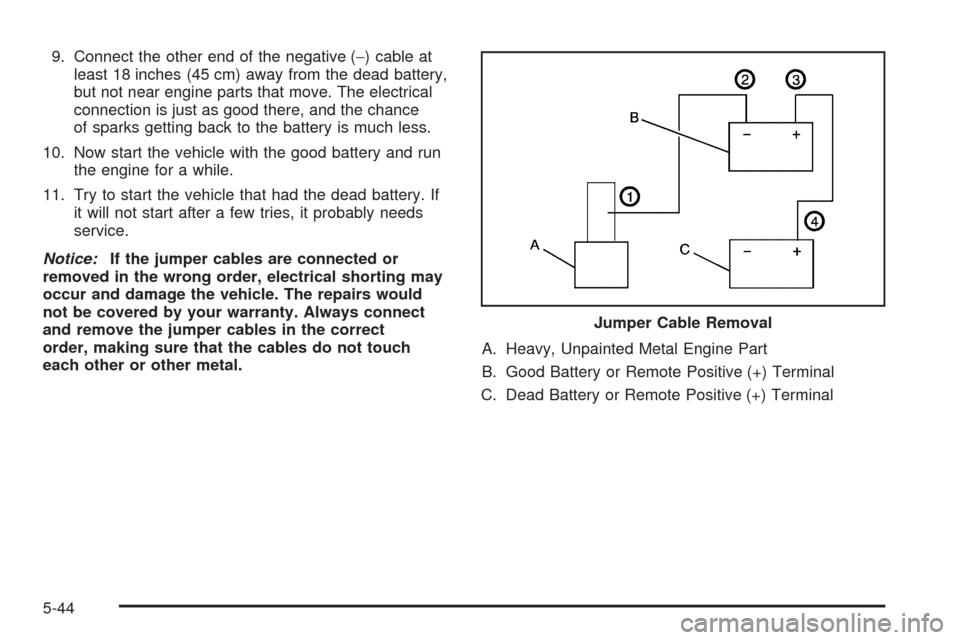
9. Connect the other end of the negative (−) cable at
least 18 inches (45 cm) away from the dead battery,
but not near engine parts that move. The electrical
connection is just as good there, and the chance
of sparks getting back to the battery is much less.
10. Now start the vehicle with the good battery and run
the engine for a while.
11. Try to start the vehicle that had the dead battery. If
it will not start after a few tries, it probably needs
service.
Notice:If the jumper cables are connected or
removed in the wrong order, electrical shorting may
occur and damage the vehicle. The repairs would
not be covered by your warranty. Always connect
and remove the jumper cables in the correct
order, making sure that the cables do not touch
each other or other metal.A. Heavy, Unpainted Metal Engine Part
B. Good Battery or Remote Positive (+) Terminal
C. Dead Battery or Remote Positive (+) TerminalJumper Cable Removal
5-44
Page 372 of 470
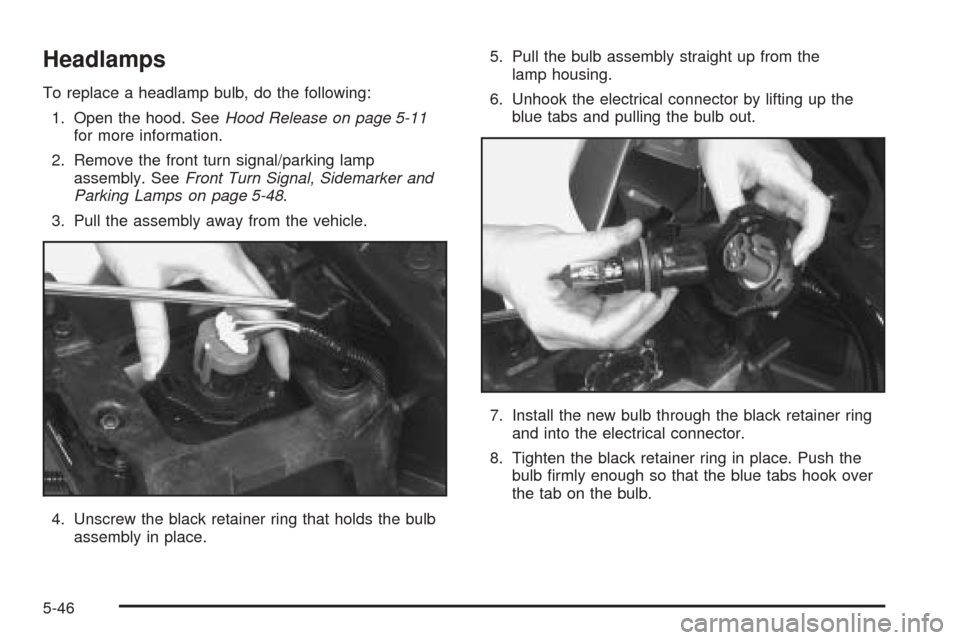
Headlamps
To replace a headlamp bulb, do the following:
1. Open the hood. SeeHood Release on page 5-11
for more information.
2. Remove the front turn signal/parking lamp
assembly. SeeFront Turn Signal, Sidemarker and
Parking Lamps on page 5-48.
3. Pull the assembly away from the vehicle.
4. Unscrew the black retainer ring that holds the bulb
assembly in place.5. Pull the bulb assembly straight up from the
lamp housing.
6. Unhook the electrical connector by lifting up the
blue tabs and pulling the bulb out.
7. Install the new bulb through the black retainer ring
and into the electrical connector.
8. Tighten the black retainer ring in place. Push the
bulb rmly enough so that the blue tabs hook over
the tab on the bulb.
5-46
Page 418 of 470
Electrical System
Add-On Electrical Equipment
Notice:Don’t add anything electrical to your vehicle
unless you check with your dealer rst. Some
electrical equipment can damage your vehicle and
the damage wouldn’t be covered by your warranty.
Some add-on electrical equipment can keep other
components from working as they should.
Your vehicle has an airbag system. Before attempting to
add anything electrical to your vehicle, seeServicing
Your Airbag-Equipped Vehicle on page 1-88.
Headlamp Wiring
The headlamp wiring is protected by an internal circuit
breaker in the instrument panel fuse panel. An electrical
overload will cause the lamps to go on and off, or in
some cases to remain off. If this happens, have
your headlamp wiring checked right away.
Windshield Wiper Fuses
The windshield wiper motor is protected by an internal
circuit breaker and a fuse. If the motor overheats due to
heavy snow, etc., the wiper will stop until the motor
cools. If the overload is caused by some electrical
problem, be sure to get it xed.
Power Windows and Other Power
Options
Circuit breakers in the instrument panel fuse panel
protect the power windows and other power accessories.
When the current load is too heavy, the circuit breaker
opens and closes, protecting the circuit until the
problem is xed.
Fuses and Circuit Breakers
The wiring circuits in your vehicle are protected from
short circuits by a combination of fuses, circuit breakers,
and fusible thermal links.
Look at the silver-colored band inside the fuse. If the
band is broken or melted, replace the fuse. Be sure you
replace a bad fuse with a new one of the identical
size and rating.
5-92
Page 455 of 470
Reporting Safety Defects to the
Canadian Government
If you live in Canada, and you believe that your vehicle
has a safety defect, you should immediately notify
Transport Canada, in addition to notifying General
Motors of Canada Limited. You may write to:
Transport Canada
330 Sparks Street
Tower C
Ottawa, Ontario K1A 0N5
Reporting Safety Defects to
General Motors
In addition to notifying NHTSA (or Transport Canada) in
a situation like this, we certainly hope you will notify
General Motors. Please call the Chevrolet Customer
Assistance Center at 1-800-222-1020, or write:
Chevrolet Motor Division
Chevrolet Customer Assistance Center
P.O. Box 33170
Detroit, MI 48232-5170In Canada, please call us at 1-800-263-3777 (English)
or 1-800-263-7854 (French). Or, write:
General Motors of Canada Limited
Customer Communication Centre, 163-005
1908 Colonel Sam Drive
Oshawa, Ontario L1H 8P7
Service Publications Ordering
Information
Service Manuals
Service Manuals have the diagnosis and repair
information on engines, transmission, axle suspension,
brakes, electrical, steering, body, etc.
Transmission, Transaxle, Transfer
Case Unit Repair Manual
This manual provides information on unit repair service
procedures, adjustments, and specications for GM
transmissions, transaxles, and transfer cases.
7-11
Page 457 of 470
A
Accessory Inator...........................................5-66
Accessory Power Outlets.................................3-23
Additives, Fuel................................................. 5-6
Add-On Electrical Equipment............................5-92
Air Cleaner/Filter, Engine.................................5-17
Air Conditioning..............................................3-24
Airbag
Readiness Light..........................................3-38
Airbag Sensing and Diagnostic Module (SDM)...... 7-9
Airbag System................................................1-78
How Does an Airbag Restrain?......................1-85
Servicing Your Airbag-Equipped Vehicle..........1-88
What Makes an Airbag Inate?......................1-85
What Will You See After an Airbag Inates?....1-86
When Should an Airbag Inate?....................1-83
Where Are the Airbags?...............................1-81
AM-FM Radio.................................................3-57
Antenna, Fixed Mast......................................3-121
Antenna, XM™ Satellite Radio Antenna System . . . 3-121
Anti-Lock Brake System (ABS)........................... 4-6
Anti-Lock Brake, System Warning Light..............3-40
Appearance Care............................................5-83
Aluminum Wheels........................................5-88
Care of Safety Belts and Built-in Child
Restraint Harness.....................................5-86
Chemical Paint Spotting...............................5-89
Child Restraint Pad......................................5-85
Cleaning Exterior Lamps/Lenses....................5-86Appearance Care (cont.)
Fabric/Carpet..............................................5-83
Finish Care.................................................5-87
Finish Damage............................................5-89
Glass Surfaces............................................5-85
Instrument Panel.........................................5-85
Interior Plastic Components...........................5-85
Leather......................................................5-85
Sheet Metal Damage...................................5-89
Tires..........................................................5-88
Underbody Maintenance...............................5-89
Vehicle Care/Appearance Materials................5-90
Vinyl..........................................................5-85
Washing Your Vehicle...................................5-86
Weatherstrips..............................................5-86
Windshield, Backglass, and Wiper Blades.......5-87
Arming and Disarming the Content
Theft-Deterrent System.................................2-62
Audio System(s).............................................3-56
AM-FM Radio.............................................3-57
Audio Steering Wheel Controls....................3-118
Care of Your Cassette Tape Player...............3-120
Care of Your CD and DVD Player................3-121
Care of Your CDs and DVDs.......................3-121
Fixed Mast Antenna...................................3-121
Radio with Cassette and CD.........................3-84
Radio with CD....................................3-59, 3-69
Radio with Six-Disc CD................................3-94
Rear Seat Audio (RSA).....................3-114, 3-116
1