remote control CHEVROLET VENTURE 2005 1.G User Guide
[x] Cancel search | Manufacturer: CHEVROLET, Model Year: 2005, Model line: VENTURE, Model: CHEVROLET VENTURE 2005 1.GPages: 470, PDF Size: 2.76 MB
Page 274 of 470
Battery Replacement
To change the batteries, do the following:
1. Remove the screw and open the battery door
located on the back of the remote control.
2. Replace the two AAA batteries in the compartment.
Make sure that they are installed correctly.
3. Replace the battery door and screw.
If the remote control is to be stored for a long period of
time, remove the batteries and keep them in a cool,
dry place.
DVD Distortion
There may be an experience with video distortion when
operating cellular phones, scanners, CB radios,
Global Position Systems (GPS)*, two-way radios, mobile
fax, or walkie talkies.
It may be necessary to turn off the DVD player when
operating one of these devices in or near the vehicle.
*Excludes the OnStar
®System.
Cleaning the DVD Player
When cleaning the outside DVD faceplate and buttons,
use only a clean cloth dampened with clean water.
Cleaning the Video Screen
When cleaning the video screen, use only a clean cloth
dampened with clean water. Use care when directly
touching or cleaning the screen, as damage may result.
Rear Seat Audio (RSA) (Without
Entertainment System)
This feature allows rear seat passengers to listen to and
control any of the sources: radio and CDs. However,
the rear seat passengers can only control the sources
that the front seat passengers are not listening to.
For example, rear seat passengers may listen to and
control a CD through headphones, while the driver
listens to the radio through the front speakers. The rear
seat passengers have control of the volume for each
set of headphones.
The front seat audio controls always have priority over
the RSA controls. If the front seat passengers switch
the source for the main radio to a remote source,
the RSA will not be able to control the remote source.
You can operate the RSA when the main radio is off.
Primary Radio Controls
The following function is controlled by the main radio:
PWR (Power):Press this knob twice to turn RSA off.
3-114
Page 276 of 470
P.SET PROG (Preset Program):Press this button to
scan the preset radio stations set on the pushbuttons on
the main radio. The radio will go to a preset station
stored on the pushbuttons, play for a few seconds, then
go on to the next preset station. Press this button
again to stop scanning presets. This function is inactive
if the front seat passengers are listening to the radio.
When a CD is playing in the six-disc CD changer, press
this button to select the next CD, if multiple CDs are
loaded. This function is inactive if the front seat
passengers are listening to a CD.
When an MP3 CD is playing, press this button to go to
the next folder. This function is inactive if the front
seat passengers are listening to a CD.
TAPE CD:Press this button to play a CD when
listening to the radio.Rear Seat Audio (RSA) (With
Entertainment System)
This feature allows rear seat passengers to listen to and
control any of the sources: radio, CDs, DVD, and
auxiliary device. However, the rear seat passengers can
only control the sources that the front seat passengers
are not listening to. For example, rear seat passengers
may listen to and control a CD through headphones
while the driver listens to the radio through the
front speakers. The rear seat passengers have control
of the volume for each set of headphones.
The front seat audio controls always have priority over
the RSA controls. If the front seat passengers switch
the source for the main radio to a remote source,
the RSA will not be able to control the remote source.
You can operate the RSA when the main radio is off.
The DVD or auxiliary device will always be available on
channel A of the headphones. All other sources are
available on channel B. You will not be able to listen to
XM, on channel B, if you are listening to a DVD or
an auxiliary device on channel B and vice versa.
3-116
Page 419 of 470
If you ever have a problem on the road and do not have
a spare fuse, you can borrow one that has the same
amperage or use one of the spare fuses in the
underhood fuse block. Just pick some feature of your
vehicle that you can get along without – like the radio or
cigarette lighter – and use its fuse, if it is the right
amperage. Replace it as soon as you can.
There are two fuse blocks in your vehicle, the instrument
panel fuse block and the underhood fuse block.
Instrument Panel Fuse Block
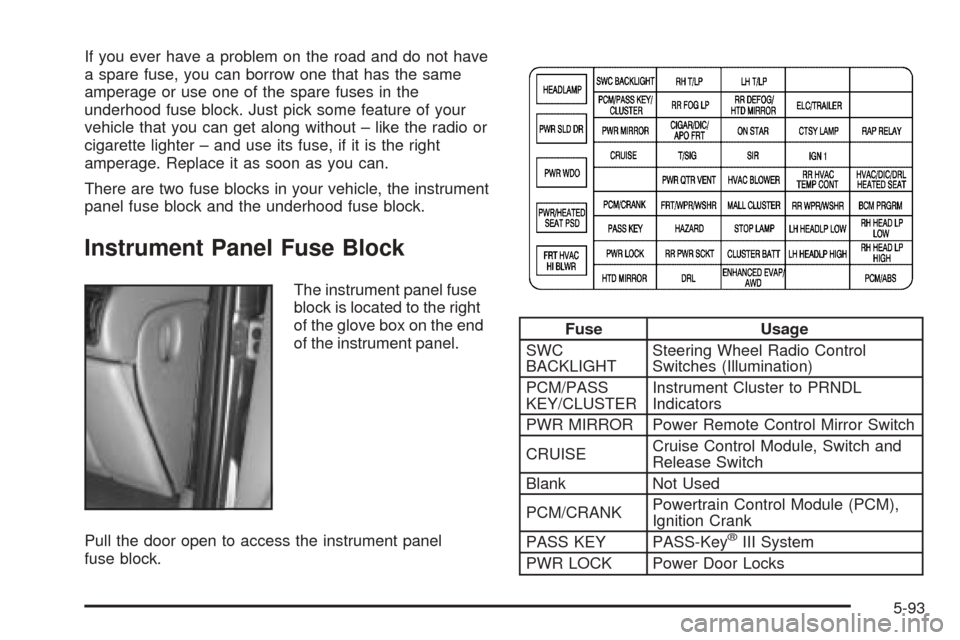
The instrument panel fuse
block is located to the right
of the glove box on the end
of the instrument panel.
Pull the door open to access the instrument panel
fuse block.
Fuse Usage
SWC
BACKLIGHTSteering Wheel Radio Control
Switches (Illumination)
PCM/PASS
KEY/CLUSTERInstrument Cluster to PRNDL
Indicators
PWR MIRROR Power Remote Control Mirror Switch
CRUISECruise Control Module, Switch and
Release Switch
Blank Not Used
PCM/CRANKPowertrain Control Module (PCM),
Ignition Crank
PASS KEY PASS-Key
®III System
PWR LOCK Power Door Locks
5-93
Page 422 of 470
Underhood Fuse Block
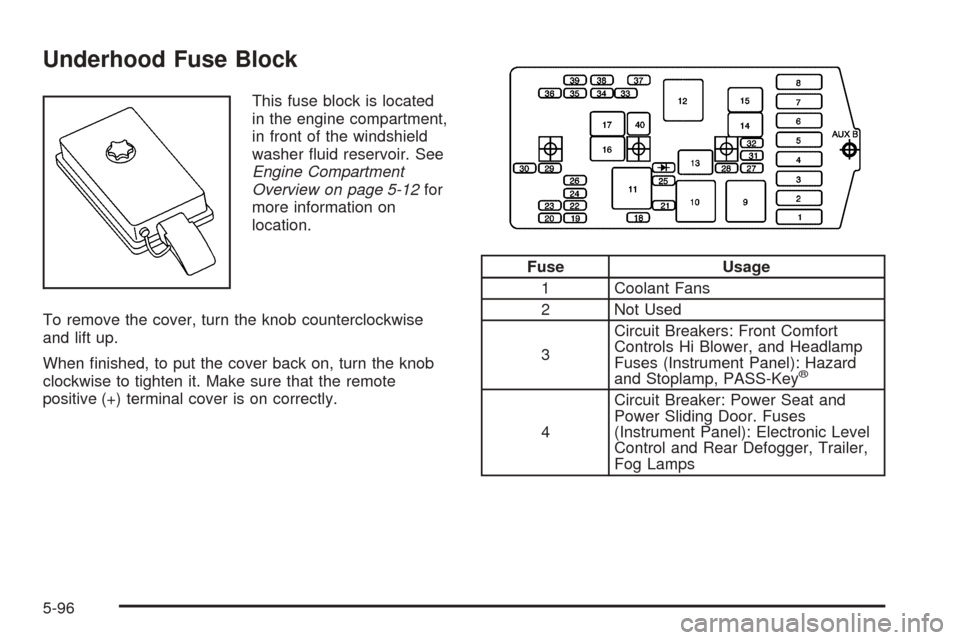
This fuse block is located
in the engine compartment,
in front of the windshield
washer uid reservoir. See
Engine Compartment
Overview on page 5-12for
more information on
location.
To remove the cover, turn the knob counterclockwise
and lift up.
When nished, to put the cover back on, turn the knob
clockwise to tighten it. Make sure that the remote
positive (+) terminal cover is on correctly.
Fuse Usage
1 Coolant Fans
2 Not Used
3Circuit Breakers: Front Comfort
Controls Hi Blower, and Headlamp
Fuses (Instrument Panel): Hazard
and Stoplamp, PASS-Key
®
4Circuit Breaker: Power Seat and
Power Sliding Door. Fuses
(Instrument Panel): Electronic Level
Control and Rear Defogger, Trailer,
Fog Lamps
5-96
Page 423 of 470
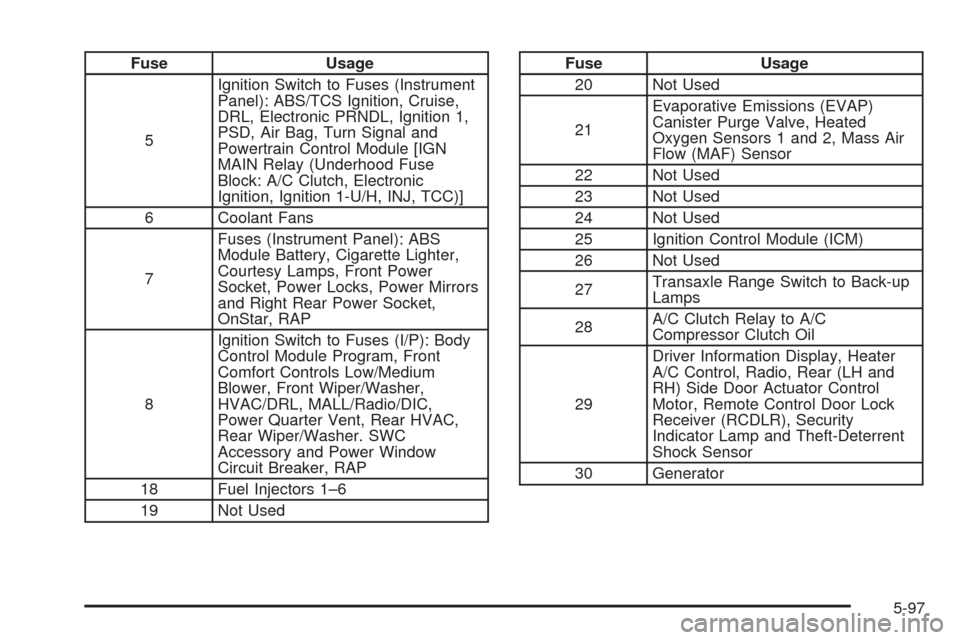
Fuse Usage
5Ignition Switch to Fuses (Instrument
Panel): ABS/TCS Ignition, Cruise,
DRL, Electronic PRNDL, Ignition 1,
PSD, Air Bag, Turn Signal and
Powertrain Control Module [IGN
MAIN Relay (Underhood Fuse
Block: A/C Clutch, Electronic
Ignition, Ignition 1-U/H, INJ, TCC)]
6 Coolant Fans
7Fuses (Instrument Panel): ABS
Module Battery, Cigarette Lighter,
Courtesy Lamps, Front Power
Socket, Power Locks, Power Mirrors
and Right Rear Power Socket,
OnStar, RAP
8Ignition Switch to Fuses (I/P): Body
Control Module Program, Front
Comfort Controls Low/Medium
Blower, Front Wiper/Washer,
HVAC/DRL, MALL/Radio/DIC,
Power Quarter Vent, Rear HVAC,
Rear Wiper/Washer. SWC
Accessory and Power Window
Circuit Breaker, RAP
18 Fuel Injectors 1–6
19 Not UsedFuse Usage
20 Not Used
21Evaporative Emissions (EVAP)
Canister Purge Valve, Heated
Oxygen Sensors 1 and 2, Mass Air
Flow (MAF) Sensor
22 Not Used
23 Not Used
24 Not Used
25 Ignition Control Module (ICM)
26 Not Used
27Transaxle Range Switch to Back-up
Lamps
28A/C Clutch Relay to A/C
Compressor Clutch Oil
29Driver Information Display, Heater
A/C Control, Radio, Rear (LH and
RH) Side Door Actuator Control
Motor, Remote Control Door Lock
Receiver (RCDLR), Security
Indicator Lamp and Theft-Deterrent
Shock Sensor
30 Generator
5-97
Page 466 of 470
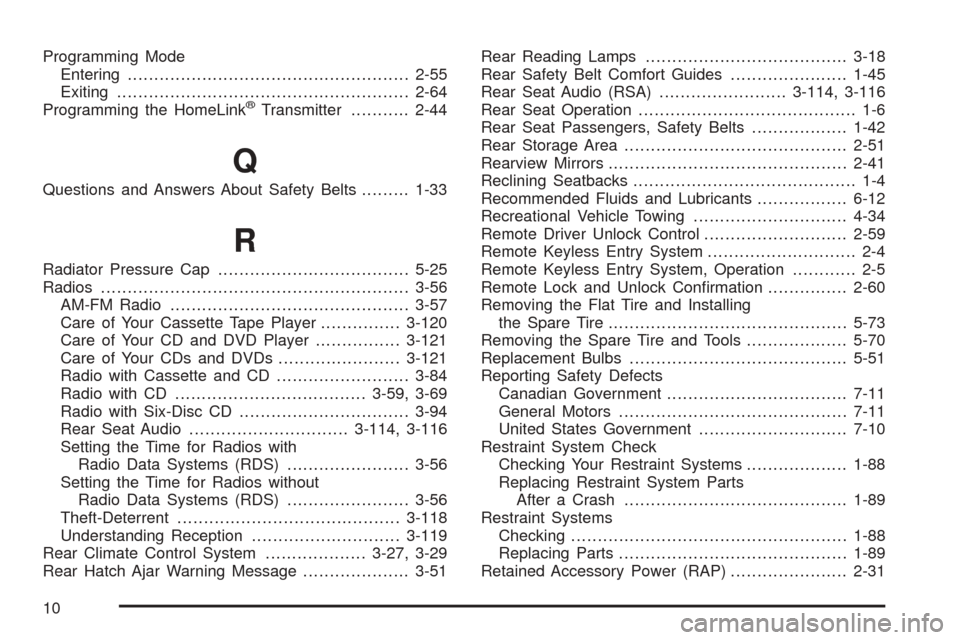
Programming Mode
Entering.....................................................2-55
Exiting.......................................................2-64
Programming the HomeLink
®Transmitter...........2-44
Q
Questions and Answers About Safety Belts.........1-33
R
Radiator Pressure Cap....................................5-25
Radios..........................................................3-56
AM-FM Radio.............................................3-57
Care of Your Cassette Tape Player...............3-120
Care of Your CD and DVD Player................3-121
Care of Your CDs and DVDs.......................3-121
Radio with Cassette and CD.........................3-84
Radio with CD....................................3-59, 3-69
Radio with Six-Disc CD................................3-94
Rear Seat Audio..............................3-114, 3-116
Setting the Time for Radios with
Radio Data Systems (RDS).......................3-56
Setting the Time for Radios without
Radio Data Systems (RDS).......................3-56
Theft-Deterrent..........................................3-118
Understanding Reception............................3-119
Rear Climate Control System...................3-27, 3-29
Rear Hatch Ajar Warning Message....................3-51Rear Reading Lamps......................................3-18
Rear Safety Belt Comfort Guides......................1-45
Rear Seat Audio (RSA)........................3-114, 3-116
Rear Seat Operation......................................... 1-6
Rear Seat Passengers, Safety Belts..................1-42
Rear Storage Area..........................................2-51
Rearview Mirrors.............................................2-41
Reclining Seatbacks.......................................... 1-4
Recommended Fluids and Lubricants.................6-12
Recreational Vehicle Towing.............................4-34
Remote Driver Unlock Control...........................2-59
Remote Keyless Entry System............................ 2-4
Remote Keyless Entry System, Operation............ 2-5
Remote Lock and Unlock Conrmation...............2-60
Removing the Flat Tire and Installing
the Spare Tire.............................................5-73
Removing the Spare Tire and Tools...................5-70
Replacement Bulbs.........................................5-51
Reporting Safety Defects
Canadian Government..................................7-11
General Motors...........................................7-11
United States Government............................7-10
Restraint System Check
Checking Your Restraint Systems...................1-88
Replacing Restraint System Parts
After a Crash..........................................1-89
Restraint Systems
Checking....................................................1-88
Replacing Parts...........................................1-89
Retained Accessory Power (RAP)......................2-31
10
Page 469 of 470
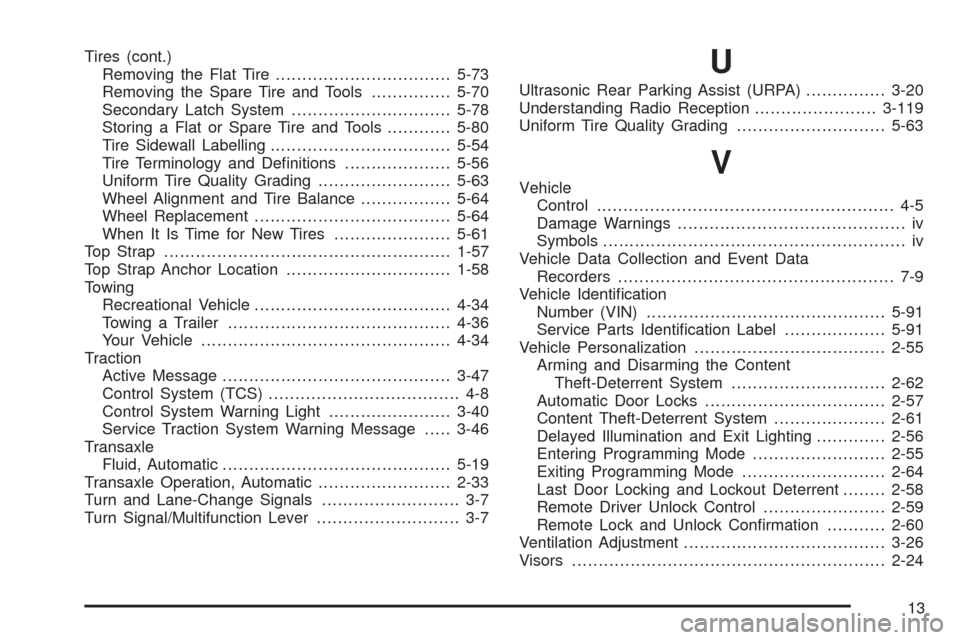
Tires (cont.)
Removing the Flat Tire.................................5-73
Removing the Spare Tire and Tools...............5-70
Secondary Latch System..............................5-78
Storing a Flat or Spare Tire and Tools............5-80
Tire Sidewall Labelling..................................5-54
Tire Terminology and Denitions....................5-56
Uniform Tire Quality Grading.........................5-63
Wheel Alignment and Tire Balance.................5-64
Wheel Replacement.....................................5-64
When It Is Time for New Tires......................5-61
Top Strap......................................................1-57
Top Strap Anchor Location...............................1-58
Towing
Recreational Vehicle.....................................4-34
Towing a Trailer..........................................4-36
Your Vehicle...............................................4-34
Traction
Active Message...........................................3-47
Control System (TCS).................................... 4-8
Control System Warning Light.......................3-40
Service Traction System Warning Message.....3-46
Transaxle
Fluid, Automatic...........................................5-19
Transaxle Operation, Automatic.........................2-33
Turn and Lane-Change Signals.......................... 3-7
Turn Signal/Multifunction Lever........................... 3-7U
Ultrasonic Rear Parking Assist (URPA)...............3-20
Understanding Radio Reception.......................3-119
Uniform Tire Quality Grading............................5-63
V
Vehicle
Control........................................................ 4-5
Damage Warnings........................................... iv
Symbols......................................................... iv
Vehicle Data Collection and Event Data
Recorders.................................................... 7-9
Vehicle Identication
Number (VIN).............................................5-91
Service Parts Identication Label...................5-91
Vehicle Personalization....................................2-55
Arming and Disarming the Content
Theft-Deterrent System.............................2-62
Automatic Door Locks..................................2-57
Content Theft-Deterrent System.....................2-61
Delayed Illumination and Exit Lighting.............2-56
Entering Programming Mode.........................2-55
Exiting Programming Mode...........................2-64
Last Door Locking and Lockout Deterrent........2-58
Remote Driver Unlock Control.......................2-59
Remote Lock and Unlock Conrmation...........2-60
Ventilation Adjustment......................................3-26
Visors...........................................................2-24
13