start stop button CHEVROLET VENTURE 2005 1.G User Guide
[x] Cancel search | Manufacturer: CHEVROLET, Model Year: 2005, Model line: VENTURE, Model: CHEVROLET VENTURE 2005 1.GPages: 470, PDF Size: 2.76 MB
Page 272 of 470
Some DVDs will not allow fast forwarding or skipping of
the copyright information or the previews. Some
DVDs will begin playing the movie automatically after
the previews have nished, there may be a delay of up
to 30 seconds. If the DVD does not begin playing
the movie automatically, press the play/pause button on
the DVD player faceplate or the remote control. If the
DVD still does not play, refer to the on-screen
instructions.
Stopping and Resuming Playback
To stop playing a disc, press the stop/eject button on
the DVD player.
To resume playback, press the play/pause button. The
movie will start playing from where it was last stopped
if the disc has not been ejected. If the disc has
been ejected, the player will start playing at the
beginning.
Ejecting a Disc
Press the stop/eject button on the DVD player once to
stop and a second time to eject the disc.
If a disc is ejected from the player, but not removed,
the DVD player will reload the disc after a short
period of time.
Remote Control
To use the remote control, aim it at the display above
the video screen and press the desired button.
Direct sunlight or very bright light may affect the ability
of the entertainment system to receive signals from
the remote control. Be sure the remote’s batteries are
not discharged, as this will also affect the function of the
remote control. Objects blocking the line of sight may
also affect the function of the remote control.
Notice:Storing the remote control in a hot area or
in direct sunlight may damage it, and the repairs
would not be covered by your warranty. Keep
the remote control stored in a cool, dry place.
3-112
Page 275 of 470
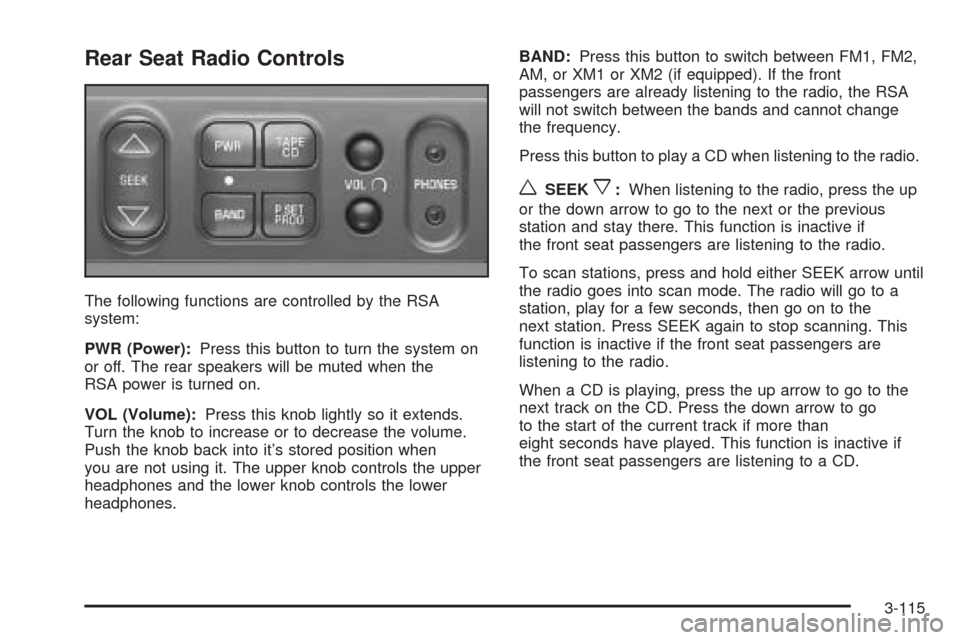
Rear Seat Radio Controls
The following functions are controlled by the RSA
system:
PWR (Power):Press this button to turn the system on
or off. The rear speakers will be muted when the
RSA power is turned on.
VOL (Volume):Press this knob lightly so it extends.
Turn the knob to increase or to decrease the volume.
Push the knob back into it’s stored position when
you are not using it. The upper knob controls the upper
headphones and the lower knob controls the lower
headphones.BAND:Press this button to switch between FM1, FM2,
AM, or XM1 or XM2 (if equipped). If the front
passengers are already listening to the radio, the RSA
will not switch between the bands and cannot change
the frequency.
Press this button to play a CD when listening to the radio.
wSEEKx:When listening to the radio, press the up
or the down arrow to go to the next or the previous
station and stay there. This function is inactive if
the front seat passengers are listening to the radio.
To scan stations, press and hold either SEEK arrow until
the radio goes into scan mode. The radio will go to a
station, play for a few seconds, then go on to the
next station. Press SEEK again to stop scanning. This
function is inactive if the front seat passengers are
listening to the radio.
When a CD is playing, press the up arrow to go to the
next track on the CD. Press the down arrow to go
to the start of the current track if more than
eight seconds have played. This function is inactive if
the front seat passengers are listening to a CD.
3-115
Page 277 of 470
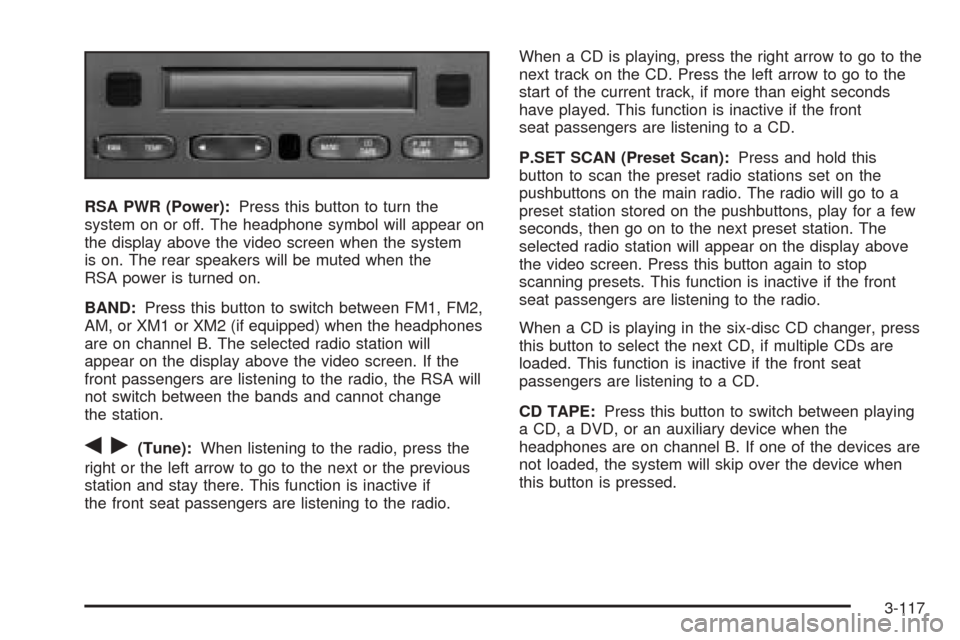
RSA PWR (Power):Press this button to turn the
system on or off. The headphone symbol will appear on
the display above the video screen when the system
is on. The rear speakers will be muted when the
RSA power is turned on.
BAND:Press this button to switch between FM1, FM2,
AM, or XM1 or XM2 (if equipped) when the headphones
are on channel B. The selected radio station will
appear on the display above the video screen. If the
front passengers are listening to the radio, the RSA will
not switch between the bands and cannot change
the station.
qr(Tune):When listening to the radio, press the
right or the left arrow to go to the next or the previous
station and stay there. This function is inactive if
the front seat passengers are listening to the radio.When a CD is playing, press the right arrow to go to the
next track on the CD. Press the left arrow to go to the
start of the current track, if more than eight seconds
have played. This function is inactive if the front
seat passengers are listening to a CD.
P.SET SCAN (Preset Scan):Press and hold this
button to scan the preset radio stations set on the
pushbuttons on the main radio. The radio will go to a
preset station stored on the pushbuttons, play for a few
seconds, then go on to the next preset station. The
selected radio station will appear on the display above
the video screen. Press this button again to stop
scanning presets. This function is inactive if the front
seat passengers are listening to the radio.
When a CD is playing in the six-disc CD changer, press
this button to select the next CD, if multiple CDs are
loaded. This function is inactive if the front seat
passengers are listening to a CD.
CD TAPE:Press this button to switch between playing
a CD, a DVD, or an auxiliary device when the
headphones are on channel B. If one of the devices are
not loaded, the system will skip over the device when
this button is pressed.
3-117