brakes CHEVROLET VOLT 2011 User Guide
[x] Cancel search | Manufacturer: CHEVROLET, Model Year: 2011, Model line: VOLT, Model: CHEVROLET VOLT 2011Pages: 516, PDF Size: 6.61 MB
Page 321 of 516
Black plate (19,1)Chevrolet Volt Owner Manual - 2011
Driving and Operating 9-19
on. The flashing light will eventually
time out. The POWER
Obutton
light is on steady when in ON/RUN
power mode. When the vehicle is
turned off, the POWER
Obutton
light will turn off.
The Remote Keyless Entry (RKE)
transmitter must be in the vehicle
for the system to operate. If the
vehicle will not start, place the RKE
transmitter in the transmitter slot.
See Remote Keyless Entry (RKE)
System Operation on page 2‑3.
ON/RUN: This position is for
driving and starting. With the vehicle
off, and the brake pedal applied,
pressing the POWER
Obutton once
will place the vehicle in ON/RUN.
The instrument cluster displays an
active fuel or battery gauge, along
with an audio startup cue, when
the vehicle is ready to be driven.
This could take up to 15 seconds
at extremely cold temperatures. The engine will only start if needed.
If the vehicle did not start, the
instrument cluster will display a
screen with inactive fuel and battery
gauges. See
Starting and Stopping
the Vehicle on page 9‑20.
Service Only Mode
This power mode is available for
service and diagnostics, and to
verify the proper operation of
the MIL as may be required for
emission inspection purposes.
With the vehicle off, and the brake
pedal not applied, pressing and
holding the POWER
Obutton for
more than 5 seconds will place
the vehicle in Service Only Mode.
The instruments and audio systems
will operate as they do in ON/RUN,
but the vehicle will not be able to be
driven. The propulsion system will
not start in Service Only Mode. STOPPING THE VEHICLE/OFF:
To turn the vehicle off, push the
POWER
Obutton with the vehicle
in P (Park). Retained Accessory
Power (RAP) will remain active
until the driver door is opened.
See Retained Accessory Power
(RAP) on page 9‑22. When turning
off the vehicle, if the vehicle is not
in P (Park), the vehicle will go to
ACC/ACCESSORY and display the
message SHIFT TO PARK in the
Driver Information Center (DIC).
See Electric Drive Unit Messages
on page 5‑47.
In an emergency, if the vehicle must
be stopped while driving:
1. Brake using a firm and steady pressure. Do not pump the
brakes repeatedly. This may
deplete power assist, requiring
increased brake pedal force.
Page 322 of 516
Black plate (20,1)Chevrolet Volt Owner Manual - 2011
9-20 Driving and Operating
2. Shift the vehicle to N (Neutral).This can be done while the
vehicle is moving. After shifting
to N (Neutral), firmly apply the
brakes and steer the vehicle
to a safe location.
3. Come to a complete stop, shift to P (Park), and turn the
vehicle to OFF by pushing the
POWER
Obutton.
4. Set the parking brake. See Electric Parking Brake on
page 9‑35.
{WARNING
Turning off the vehicle while
moving may disable the airbags.
While driving, only shut the
propulsion system off in an
emergency. 5. If the vehicle must be stopped
while driving, press and hold
the POWER
Obutton for
either longer than two seconds,
or press twice in five seconds.
Starting and Stopping the
Vehicle
Starting Procedure
Move the shift lever to P (Park) or
N (Neutral). The propulsion system
will not start in any other position.
Notice: Do not try to shift to
P (Park) if the vehicle is moving
or the electric drive unit could be
damaged. Shift to P (Park) only
when the vehicle is stopped. Notice:
The vehicle is designed
to work with the electronics in
the vehicle. If you add electrical
parts or accessories, you could
change the way the vehicle
operates. Before adding electrical
equipment, check with your
dealer. If you do not, the vehicle
might not perform properly. Any
resulting damage would not be
covered by the vehicle warranty.
Page 326 of 516
Black plate (24,1)Chevrolet Volt Owner Manual - 2011
9-24 Driving and Operating
If the console shift lever cannot be
moved out of P (Park):
1. Apply and maintain the regularbrakes.
2. Turn the vehicle on using the POWER
Obutton. See Power
Button on page 9‑18.
3. Let up on the shift lever and make sure the shift lever is
pushed all the way into P (Park).
4. Press the shift lever button.
5. Move the shift lever into the desired gear.
If you still cannot move the shift
lever from P (Park), see your dealer
or a professional towing service.
Parking over Things
That Burn
{WARNING
Things that can burn could touch
hot exhaust parts under the
vehicle and ignite. Do not park
over papers, leaves, dry grass,
or other things that can burn.
Electric Vehicle
Operating Modes
System Operation
This vehicle is an Extended Range
Electric Vehicle (EREV). It uses an
electric propulsion system to drive
the vehicle at all times. Electricity
is the vehicle's primary source of
energy, while gasoline is the
secondary source.
The vehicle has two modes of
operation: Electric and Extended
Range. In both modes, the vehicle
is propelled by its electric drive unit.
It converts electrical energy into
mechanical energy to drive the
wheels. The vehicle's performance
remains the same in either mode.
See Driving for Better Energy
Efficiency on page 9‑2.
Page 335 of 516
Black plate (33,1)Chevrolet Volt Owner Manual - 2011
Driving and Operating 9-33
N (Neutral):In this position, the
propulsion system does not connect
with the wheels.
D (Drive): This position is for
normal driving. It provides the
best fuel economy. If more power
is needed for passing, and the
vehicle is:
.Going less than 56 km/h
(35 mph), push the accelerator
pedal about halfway down.
.Going about 56 km/h (35 mph)
or more, push the accelerator
all the way down.
Notice: If the vehicle seems to
accelerate slowly or not respond
when you go faster, and you
continue to drive the vehicle
that way, you could damage
the electric drive unit. Have the
vehicle serviced right away. L (Low):
This position reduces
vehicle speed without using the
brakes. You can use L (Low) on
hills. It can help control vehicle
speed going down steep mountain
roads along with using the brakes
off and on. You can use L (Low)
on very steep hills, in deep snow,
or in mud.
Notice: Spinning the tires or
holding the vehicle in one
place on a hill using only the
accelerator pedal may damage
the electric drive unit. The repair
will not be covered by the vehicle
warranty. If you are stuck, do not
spin the tires. When stopping on
a hill, use the brakes to hold the
vehicle in place.
Brakes
Antilock Brake
System (ABS)
This vehicle has the Antilock
Brake System (ABS), an advanced
electronic braking system that helps
prevent a braking skid.
When propulsion is active and
the vehicle begins to drive away,
ABS checks itself. A momentary
motor or clicking noise might be
heard while this test is going on,
and it might even be noticed that
the brake pedal moves a little.
This is normal.
Page 336 of 516
Black plate (34,1)Chevrolet Volt Owner Manual - 2011
9-34 Driving and Operating
If there is a problem with ABS, this
warning light stays on. SeeAntilock
Brake System (ABS) Warning Light
on page 5‑26.
If driving safely on a wet road
and it becomes necessary to
slam on the brakes and continue
braking to avoid a sudden obstacle,
a computer senses that the wheels
are slowing down. If one of the
wheels is about to stop rolling, the
computer will separately work the
brakes at each wheel. ABS can change the brake pressure
to each wheel, as required, faster
than any driver could. This can help
the driver steer around the obstacle
while braking hard.
As the brakes are applied, the
computer keeps receiving updates
on wheel speed and controls
braking pressure accordingly.
Remember: ABS does not change
the time needed to get a foot up to
the brake pedal or always decrease
stopping distance. If you get too
close to the vehicle in front of you,
there will not be enough time to
apply the brakes if that vehicle
suddenly slows or stops. Always
leave enough room up ahead to
stop, even with ABS.
Using ABS
Do not pump the brakes. Just hold
the brake pedal down firmly and let
ABS work. You might hear the ABS
pump or motor operating and feel
the brake pedal pulsate, but this is
normal.
Braking in Emergencies
ABS allows the driver to steer and
brake at the same time. In many
emergencies, steering can help
more than even the very best
braking.
Page 339 of 516
Black plate (37,1)Chevrolet Volt Owner Manual - 2011
Driving and Operating 9-37
Regenerative Braking
Regenerative braking takes some of
the energy from the moving vehicle
and turns it back into electrical
energy. This energy is then stored
back into the high voltage battery
system, contributing to increased
energy efficiency.
The hydraulic disc brakes work with
the regenerative braking to ensure
effective braking, such as when a
high braking demand is requested.
The braking system is
computer controlled and
blends the regenerative braking
with the conventional hydraulic disc
brakes to meet any requirements
for deceleration. The controllerinterprets the braking request
and uses regenerative braking,
conventional hydraulic braking, or a
combination of both as necessary.
Because the controller applies the
hydraulic brakes through its high
pressure accumulator, you may
occasionally hear the motor‐driven
pump when it recharges the system.
This is normal.
See
Warning Lights, Gauges,
and Indicators on page 5‑9 and
Driver Information Center (DIC) on
page 5‑43. In the event of a
controller problem, the brake pedal
may be harder to push and the
stopping distance may be longer.
Ride Control Systems
Traction Control
System (TCS)
The vehicle has a Traction Control
System (TCS) that limits wheel
spin. The system operates if it
senses that one or both of the drive
wheels are spinning or beginning to
lose traction. When this happens,
the system brakes the spinning
wheel(s) and/or reduces power
to limit wheel spin.
The system may be heard or felt
while it is working, but this is
normal.
To assist with directional control
of the vehicle, TCS comes on
automatically whenever the vehicle
is started and cannot be turned off.
Page 343 of 516
Black plate (41,1)Chevrolet Volt Owner Manual - 2011
Driving and Operating 9-41
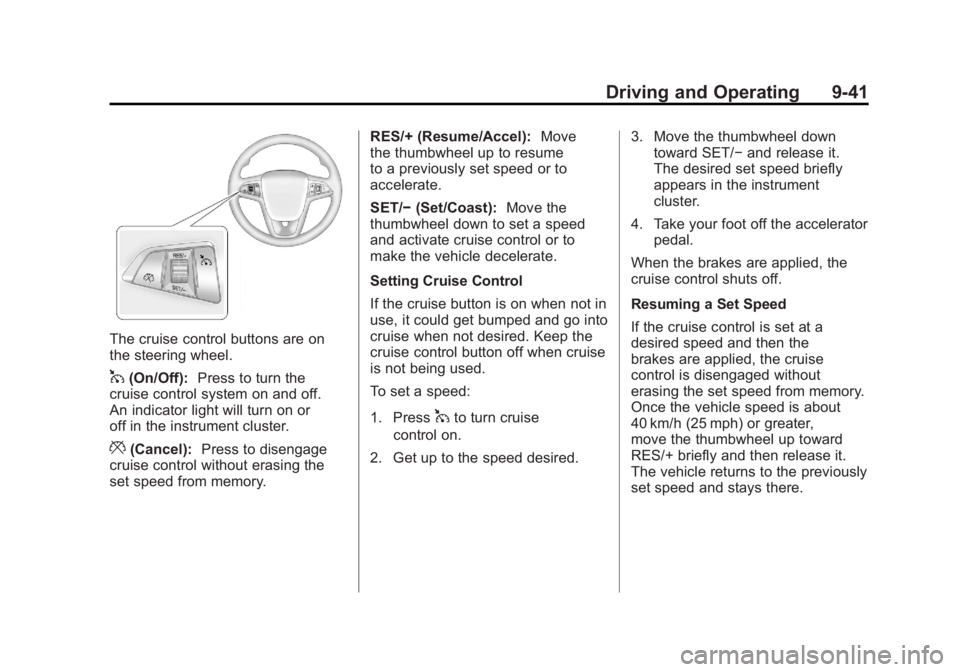
The cruise control buttons are on
the steering wheel.
1(On/Off):Press to turn the
cruise control system on and off.
An indicator light will turn on or
off in the instrument cluster.
*(Cancel): Press to disengage
cruise control without erasing the
set speed from memory. RES/+ (Resume/Accel):
Move
the thumbwheel up to resume
to a previously set speed or to
accelerate.
SET/− (Set/Coast): Move the
thumbwheel down to set a speed
and activate cruise control or to
make the vehicle decelerate.
Setting Cruise Control
If the cruise button is on when not in
use, it could get bumped and go into
cruise when not desired. Keep the
cruise control button off when cruise
is not being used.
To set a speed:
1. Press
1to turn cruise
control on.
2. Get up to the speed desired. 3. Move the thumbwheel down
toward SET/− and release it.
The desired set speed briefly
appears in the instrument
cluster.
4. Take your foot off the accelerator pedal.
When the brakes are applied, the
cruise control shuts off.
Resuming a Set Speed
If the cruise control is set at a
desired speed and then the
brakes are applied, the cruise
control is disengaged without
erasing the set speed from memory.
Once the vehicle speed is about
40 km/h (25 mph) or greater,
move the thumbwheel up toward
RES/+ briefly and then release it.
The vehicle returns to the previously
set speed and stays there.
Page 344 of 516
Black plate (42,1)Chevrolet Volt Owner Manual - 2011
9-42 Driving and Operating
Increasing Speed While Using
Cruise Control
If the cruise control system is
already activated:
.Move the thumbwheel up
toward RES/+ and hold it until
the vehicle accelerates to the
desired speed, then release it.
.To increase the speed in small
amounts, move the thumbwheel
up toward RES/+ briefly and
then release it. Each time this
is done, the vehicle goes about
1.6 km/h (1 mph) faster.Reducing Speed While Using
Cruise Control
If the cruise control system is
already activated:
.Move the thumbwheel toward
SET/−
and hold until the desired
lower speed is reached, then
release it.
.To slow down in very small
amounts, move the thumbwheel
toward SET/− briefly. Each time
this is done, the vehicle goes
about 1.6 km/h (1 mph) slower.
Passing Another Vehicle While
Using Cruise Control
Use the accelerator pedal to
increase vehicle speed. When
you take your foot off the pedal,
the vehicle will slow down to the
previously set cruise control speed. Using Cruise Control on Hills
How well the cruise control works
on hills depends upon the vehicle
speed, load, and the steepness
of the hills. When going up steep
hills, you might have to step on
the accelerator pedal to maintain
the vehicle speed. When going
downhill, you might have to brake
or shift to a lower gear to maintain
the vehicle speed. When the brakes
are applied the cruise control is
disengaged.
Page 347 of 516
Black plate (45,1)Chevrolet Volt Owner Manual - 2011
Driving and Operating 9-45
Turning the System On and Off
The UFRPA system can be turned
on and off by pressing the park
assist button in the overhead
console.
The park assist button lights up
when the system is on and turns
off when it has been disabled.
When the System Does Not
Seem to Work Properly
If UFRPA does not turn on due to a
temporary condition, the message
PARK ASSIST OFF displays on the
DIC, and the light on the park assist
button turns off. This can occur
under the following conditions:
.The ultrasonic sensors are not
clean. Keep the sensors free of
mud, dirt, snow, ice, and slush.
For cleaning instructions, see
Exterior Care on page 10‑89.
.The vehicle was washed in cold
weather. This may cause frost
or ice to form in the park assist
sensors. Keep the sensors free
of frost or ice.
.An object was hanging out of the
hatch during the last drive cycle.
Once the attached object is
removed, UFRPA will return to
normal operation.
.The bumper is damaged.
Take the vehicle to your
dealer to repair the system.
.Other conditions may affect
system performance, such as
vibrations from a jackhammer or
the compression of air brakes
on a very large truck.
Page 367 of 516

Black plate (1,1)Chevrolet Volt Owner Manual - 2011
Vehicle Care 10-1
Vehicle Care
General Information
General Information . . . . . . . . . . 10-3
California Proposition65 Warning . . . . . . . . . . . . . . . . . 10-3
California Perchlorate Materials Requirements . . . . 10-3
Accessories and Modifications . . . . . . . . . . . . . . . 10-4
Lifting the Vehicle . . . . . . . . . . . . 10-5
Vehicle Checks
Doing Your Own Service Work . . . . . . . . . . . . . . . 10-8
Hood . . . . . . . . . . . . . . . . . . . . . . . . 10-9
Engine Compartment Overview . . . . . . . . . . . . . . . . . . 10-10
Engine Oil . . . . . . . . . . . . . . . . . . 10-12
Engine Oil Life System . . . . . 10-15
Engine Air Cleaner/Filter . . . . 10-16 Cooling System (Engine) . . . 10-18
Cooling System (High
Voltage Battery) . . . . . . . . . . . 10-19
Cooling System (Power Electronics and Charger
Modules) . . . . . . . . . . . . . . . . . . 10-20
Engine Coolant . . . . . . . . . . . . . 10-21
Engine Overheating . . . . . . . . 10-23
Power Steering Fluid . . . . . . . 10-24
Washer Fluid . . . . . . . . . . . . . . . 10-24
Brakes . . . . . . . . . . . . . . . . . . . . . 10-25
Brake Fluid . . . . . . . . . . . . . . . . . 10-26
Battery . . . . . . . . . . . . . . . . . . . . . 10-28
Propulsion System Start Check . . . . . . . . . . . . . . . . . . . . . 10-29
Electrical Drive Unit Shift Lock Control Function
Check . . . . . . . . . . . . . . . . . . . . . 10-30
Park Brake and P (Park) Mechanism Check . . . . . . . . 10-30
Wiper Blade Replacement . . . . . . . . . . . . . . 10-31
Headlamp Aiming
Headlamp Aiming . . . . . . . . . . 10-32
Bulb Replacement
Bulb Replacement . . . . . . . . . . 10-34
Halogen Bulbs . . . . . . . . . . . . . . 10-34
Headlamps . . . . . . . . . . . . . . . . . 10-34
Back-Up Lamps . . . . . . . . . . . . 10-35
License Plate Lamp . . . . . . . . 10-36
Replacement Bulbs . . . . . . . . . 10-37
Electrical System
High Voltage Devices andWiring . . . . . . . . . . . . . . . . . . . . . 10-37
Electrical System Overload . . . . . . . . . . . . . . . . . . 10-37
Engine Compartment Fuse Block . . . . . . . . . . . . . . . . . . . . . 10-38
Instrument Panel Fuse Block (Left Side) . . . . . . . . . . . . . . . . 10-42
Instrument Panel Fuse Block (Right Side) . . . . . . . . . . . . . . . 10-43
Rear Compartment Fuse Block . . . . . . . . . . . . . . . . . . . . . 10-45