cruise control CHEVROLET VOLT 2011 User Guide
[x] Cancel search | Manufacturer: CHEVROLET, Model Year: 2011, Model line: VOLT, Model: CHEVROLET VOLT 2011Pages: 516, PDF Size: 6.61 MB
Page 149 of 516

Black plate (29,1)Chevrolet Volt Owner Manual - 2011
Instruments and Controls 5-29
Security Light
This light comes on briefly when the
vehicle is started.
If the light remains on while driving,
there is a problem with the security
system. See your dealer for service.
For more information, seeVehicle
Security on page 2‑13.
High-Beam On Light
The high-beam on light comes on
when the high-beam headlamps are
in use.
See Headlamp High/Low-Beam
Changer on page 6‑2 for more
information.
Lamps On Reminder
This light comes on when the
parking lamps, headlamps,
or taillamps are on.
Cruise Control Light
The cruise control light comes on
when the cruise control is turned on
and turns green when cruise control
is engaged.
See Cruise Control on page 9‑40 for
more information.
Page 166 of 516
Black plate (46,1)Chevrolet Volt Owner Manual - 2011
5-46 Instruments and Controls
SERVICE HIGH VOLTAGE
CHARGING SYSTEM
This message displays when there
is a problem with the high voltage
charging system. See your dealer
for service.
Brake System Messages
BRAKE FLUID LOW
This message displays when the
brake fluid level is low. SeeBrake
Fluid on page 10‑26.
RELEASE PARKING BRAKE
This message displays if the electric
parking brake is on while the vehicle
is in motion. Release it before
attempting to drive. See Electric
Parking Brake on page 9‑35 for
more information.
SERVICE BRAKE ASSIST
This message displays when there
is a problem with the brake boost
assist system. When this message
displays, the brake boost assist
motor might be heard operating
and a pulsation may be felt in the
brake pedal. Take the vehicle to
your dealer for service.
SERVICE PARKING BRAKE
This message displays when there
is a problem with the parking brake.
Take the vehicle to your dealer for
service.
STEP ON BRAKE TO
RELEASE PARK BRAKE
This message displays when
attempting to release the electric
parking brake without the brake
pedal applied. See Electric Parking
Brake on page 9‑35 for more
information.
Cruise Control Messages
CRUISE SET TO XXX
This message displays when the
cruise control is set and shows the
speed it was set to. See Cruise
Control on page 9‑40 for more
information.
Door Ajar Messages
DOOR(S) OPEN, HOOD OPEN,
HATCH OPEN
A symbol will appear on the display
showing the area that is open.
See Door, Hood, or Hatch Open
Light on page 5‑30.
Page 303 of 516
Black plate (1,1)Chevrolet Volt Owner Manual - 2011
Driving and Operating 9-1
Driving and
Operating
Driving Information
Driving for Better EnergyEfficiency . . . . . . . . . . . . . . . . . . . . 9-2
Defensive Driving . . . . . . . . . . . . . 9-4
Drunk Driving . . . . . . . . . . . . . . . . . 9-4
Control of a Vehicle . . . . . . . . . . . 9-5
Braking . . . . . . . . . . . . . . . . . . . . . . . 9-5
Steering . . . . . . . . . . . . . . . . . . . . . . . 9-6
Off-Road Recovery . . . . . . . . . . . . 9-8
Loss of Control . . . . . . . . . . . . . . . . 9-8
Driving on Wet Roads . . . . . . . . . 9-9
Highway Hypnosis . . . . . . . . . . . 9-10
Hill and Mountain Roads . . . . . 9-10
Winter Driving . . . . . . . . . . . . . . . . 9-11
If the Vehicle Is Stuck . . . . . . . . 9-13
Vehicle Load Limits . . . . . . . . . . 9-14
Starting and Operating
New Vehicle Break-In . . . . . . . . 9-18
Power Button . . . . . . . . . . . . . . . . 9-18
Starting and Stopping the Vehicle . . . . . . . . . . . . . . . . . . . . . 9-20
Retained Accessory Power (RAP) . . . . . . . . . . . . . . . 9-22 Shifting Into Park . . . . . . . . . . . . 9-22
Shifting out of Park . . . . . . . . . . 9-23
Parking over Things
That Burn . . . . . . . . . . . . . . . . . . 9-24
Electric Vehicle Operating
Modes
System Operation . . . . . . . . . . . 9-24
Electric Mode . . . . . . . . . . . . . . . . 9-25
Extended Range Mode . . . . . . 9-25
Driver Selected OperatingModes . . . . . . . . . . . . . . . . . . . . . . 9-26
Out of Fuel/Engine Unavailable . . . . . . . . . . . . . . . . 9-28
Maintenance Modes . . . . . . . . . 9-28
Engine Exhaust
Engine Exhaust . . . . . . . . . . . . . . 9-30
Running the Vehicle While Parked . . . . . . . . . . . . . . . . . . . . . 9-31
Electric Drive Unit
Electric Drive Unit . . . . . . . . . . . 9-32
Brakes
Antilock BrakeSystem (ABS) . . . . . . . . . . . . . . 9-33
Electric Parking Brake . . . . . . . 9-35
Regenerative Braking . . . . . . . . 9-37
Ride Control Systems
Traction Control System (TCS) . . . . . . . . . . . . . . 9-37
Electronic Stability Control (ESC) . . . . . . . . . . . . . . 9-39
Cruise Control
Cruise Control . . . . . . . . . . . . . . . 9-40
Object Detection Systems
Ultrasonic Parking Assist . . . . 9-43
Rear VisionCamera (RVC) . . . . . . . . . . . . . 9-46
Charging
Plug-In Charging . . . . . . . . . . . . . 9-49
Delayed ChargingOverride . . . . . . . . . . . . . . . . . . . . 9-52
Charging Status Feedback . . . . . . . . . . . . . . . . . . 9-52
Charge Cord . . . . . . . . . . . . . . . . . 9-54
Electrical Requirements for Battery Charging . . . . . . . . . . . 9-56
Page 304 of 516
Black plate (2,1)Chevrolet Volt Owner Manual - 2011
9-2 Driving and Operating
Fuel
Fuel . . . . . . . . . . . . . . . . . . . . . . . . . 9-57
Gasoline Specifications (U.S.and Canada Only) . . . . . . . . . . 9-58
California Fuel Requirements . . . . . . . . . . . . . . 9-58
Fuels in Foreign Countries . . . 9-58
Fuel Additives . . . . . . . . . . . . . . . 9-59
Filling the Tank . . . . . . . . . . . . . . 9-60
Filling a Portable Fuel Container . . . . . . . . . . . . . . . . . . . 9-62
Towing
General TowingInformation . . . . . . . . . . . . . . . . . 9-62
Conversions and Add-Ons
Add-On ElectricalEquipment . . . . . . . . . . . . . . . . . 9-63
Driving Information
Driving for Better Energy
Efficiency
Use the following tips to help
maximize energy efficiency
and range.
Driving Style
Efficiency Gauge
(Instrument Cluster)
The ball indicator should be kept
green and in the center of the
gauge.
Inefficient acceleration is indicated
when the ball turns yellow and
travels above the center of the
gauge.
Aggressive braking is indicated
when the ball turns yellow and
travels below the center of the
gauge. Acceleration/Braking/Coasting
Avoid unnecessary rapid
accelerations and decelerations.
Electric range is maximized at
80 km/h (50 mph) and below.
Higher speeds use more energy
and can significantly reduce
electric range.
Use cruise control when
appropriate.
Plan ahead for decelerations
and coast whenever possible.
For example, do not rush to
traffic signals.
Do not shift to N (Neutral) to coast.
The vehicle recovers energy while
coasting and braking in D (Drive)
or L (Low).
Page 312 of 516
Black plate (10,1)Chevrolet Volt Owner Manual - 2011
9-10 Driving and Operating
Other Rainy Weather Tips
Besides slowing down, other wet
weather driving tips include:
.Allow extra following distance.
.Pass with caution.
.Keep windshield wiping
equipment in good shape.
.Keep the windshield washer fluid
reservoir filled.
.Have good tires with proper
tread depth. SeeTires on
page 10‑48.
.Turn off cruise control.
Highway Hypnosis
Always be alert and pay attention
to your surroundings while driving.
If you become tired or sleepy, find
a safe place to park the vehicle
and rest.
Other driving tips include:
.Keep the vehicle well ventilated.
.Keep interior temperature cool.
.Keep your eyes moving —scan
the road ahead and to the sides.
.Check the rearview mirror and
vehicle instruments often.
Hill and Mountain Roads
Driving on steep hills or through
mountains is different than
driving on flat or rolling terrain.
See “Mountain Mode” underDriver
Selected Operating Modes on
page 9‑26. Tips for driving in
these conditions include:
.Keep the vehicle serviced and in
good shape.
.Check all fluid levels and brakes,
tires, cooling system, and
electric drive unit.
.Keep the vehicle in gear when
going down steep or long hills.
{WARNING
Coasting downhill in N (Neutral)
or with the vehicle turned off is
dangerous. The brakes will have
to do all the work of slowing down
the vehicle and could become too
hot. Hot brakes may not be able
(Continued)
Page 313 of 516
Black plate (11,1)Chevrolet Volt Owner Manual - 2011
Driving and Operating 9-11
WARNING (Continued)
to slow the vehicle enough to
maintain speed and control.
You could crash. Always have
the vehicle running and in gear
(preferably LOW range) when
going downhill. This will allow
the electric drive unit to assist in
slowing and maintaining speed.
.Stay in your own lane. Do not
swing wide or cut across the
center of the road. Drive at
speeds that let you stay in
your own lane.
.Top of hills: Be
alert—something could
be in your lane (stalled car,
accident).
.Pay attention to special road
signs (falling rocks area, winding
roads, long grades, passing or
no-passing zones) and take
appropriate action.
Winter Driving
Driving on Snow or Ice
Drive carefully when there is
snow or ice between the tires
and the road, creating less traction
or grip. Wet ice can occur at about
0°C (32°F) when freezing rain
begins to fall, resulting in even less
traction. Avoid driving on wet ice or
in freezing rain until roads can be
treated with salt or sand.
Drive with caution, whatever the
condition. Accelerate gently so
traction is not lost. Accelerating
too quickly causes the wheels to
spin and makes the surface under
the tires slick, so there is even less
traction.
Try not to break the fragile traction.
If you accelerate too fast, the drive
wheels will spin and polish the
surface under the tires even more. The Antilock Brake System (ABS)
improves vehicle stability during
hard stops on slippery roads, but
apply the brakes sooner than when
on dry pavement.
Allow greater following distance
on any slippery road and watch
for slippery spots. Icy patches can
occur on otherwise clear roads in
shaded areas. The surface of a
curve or an overpass can remain
icy when the surrounding roads
are clear. Avoid sudden steering
maneuvers and braking while
on ice.
Turn off cruise control on slippery
surfaces.
Page 342 of 516
Black plate (40,1)Chevrolet Volt Owner Manual - 2011
9-40 Driving and Operating
Ifdcomes on and stays on, reset
the system:
1. Stop the vehicle.
2. Turn the vehicle off and wait 15 seconds.
3. Start the vehicle.
If
dstill comes on and stays on,
the vehicle needs service.
If cruise control is being used when
StabiliTrak activates, the cruise
control will automatically disengage.
Press the cruise control button to
reengage when road conditions
allow. See Cruise Control on
page 9‑40 for more information.
Cruise Control
The cruise control lets the vehicle
maintain a speed of about 40 km/h
(25 mph) or more without keeping
your foot on the accelerator. Cruise
control does not work at speeds
below 40 km/h (25 mph).
With the Traction Control
System (TCS) or Electronic
Stability Control (ESC), the system
may begin to limit wheel spin
while you are using cruise control.
If this happens, the cruise control
will automatically disengage.
SeeTraction Control System (TCS)
on page 9‑37 orElectronic Stability
Control (ESC) on page 9‑39.
{WARNING
Cruise control can be dangerous
where you cannot drive safely at
a steady speed. So, do not use
the cruise control on winding
roads or in heavy traffic.
Cruise control can be dangerous
on slippery roads. On such roads,
fast changes in tire traction can
cause excessive wheel slip, and
you could lose control. Do not use
cruise control on slippery roads.
Page 343 of 516
Black plate (41,1)Chevrolet Volt Owner Manual - 2011
Driving and Operating 9-41
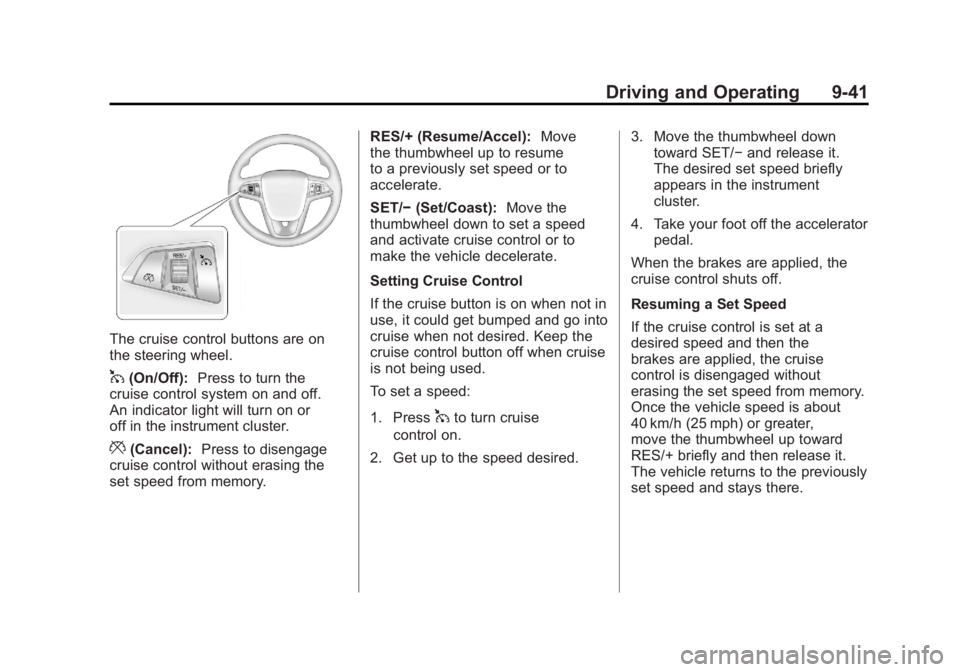
The cruise control buttons are on
the steering wheel.
1(On/Off):Press to turn the
cruise control system on and off.
An indicator light will turn on or
off in the instrument cluster.
*(Cancel): Press to disengage
cruise control without erasing the
set speed from memory. RES/+ (Resume/Accel):
Move
the thumbwheel up to resume
to a previously set speed or to
accelerate.
SET/− (Set/Coast): Move the
thumbwheel down to set a speed
and activate cruise control or to
make the vehicle decelerate.
Setting Cruise Control
If the cruise button is on when not in
use, it could get bumped and go into
cruise when not desired. Keep the
cruise control button off when cruise
is not being used.
To set a speed:
1. Press
1to turn cruise
control on.
2. Get up to the speed desired. 3. Move the thumbwheel down
toward SET/− and release it.
The desired set speed briefly
appears in the instrument
cluster.
4. Take your foot off the accelerator pedal.
When the brakes are applied, the
cruise control shuts off.
Resuming a Set Speed
If the cruise control is set at a
desired speed and then the
brakes are applied, the cruise
control is disengaged without
erasing the set speed from memory.
Once the vehicle speed is about
40 km/h (25 mph) or greater,
move the thumbwheel up toward
RES/+ briefly and then release it.
The vehicle returns to the previously
set speed and stays there.
Page 344 of 516
Black plate (42,1)Chevrolet Volt Owner Manual - 2011
9-42 Driving and Operating
Increasing Speed While Using
Cruise Control
If the cruise control system is
already activated:
.Move the thumbwheel up
toward RES/+ and hold it until
the vehicle accelerates to the
desired speed, then release it.
.To increase the speed in small
amounts, move the thumbwheel
up toward RES/+ briefly and
then release it. Each time this
is done, the vehicle goes about
1.6 km/h (1 mph) faster.Reducing Speed While Using
Cruise Control
If the cruise control system is
already activated:
.Move the thumbwheel toward
SET/−
and hold until the desired
lower speed is reached, then
release it.
.To slow down in very small
amounts, move the thumbwheel
toward SET/− briefly. Each time
this is done, the vehicle goes
about 1.6 km/h (1 mph) slower.
Passing Another Vehicle While
Using Cruise Control
Use the accelerator pedal to
increase vehicle speed. When
you take your foot off the pedal,
the vehicle will slow down to the
previously set cruise control speed. Using Cruise Control on Hills
How well the cruise control works
on hills depends upon the vehicle
speed, load, and the steepness
of the hills. When going up steep
hills, you might have to step on
the accelerator pedal to maintain
the vehicle speed. When going
downhill, you might have to brake
or shift to a lower gear to maintain
the vehicle speed. When the brakes
are applied the cruise control is
disengaged.
Page 345 of 516
Black plate (43,1)Chevrolet Volt Owner Manual - 2011
Driving and Operating 9-43
Ending Cruise Control
There are three ways to end cruise
control:
.Step lightly on the brake pedal;
when cruise control disengages,
the indicator light will not be lit.
.Press*.
.Press1to turn the cruise
control system off completely.
The cruise control cannot be
resumed.
Erasing Speed Memory
The cruise control set speed
is erased from memory by
pressing
1or if the vehicle
is turned off.
Object Detection
Systems
Ultrasonic Parking Assist
For vehicles with the Ultrasonic
Front and Rear Parking Assist
(UFRPA) system, it assists the
driver with parking and avoiding
objects. UFRPA operates at
speeds less than 8 km/h (5 mph).
The sensors on the front and rear
bumper detect objects up to 1.2 m
(4 ft) in front of the vehicle, 2.5 m
(8 ft) behind the vehicle, and at
least 25.4 cm (10 in) off the ground.
{WARNING
The Ultrasonic Front and Rear
Parking Assist (UFRPA) system
does not replace driver vision.
It cannot detect:
.Objects that are below the
bumper, underneath the
vehicle, or if they are too
close or far from the vehicle.
.Children, pedestrians,
bicyclists, or pets.
If you do not use proper care
before moving forward and while
backing; vehicle damage, injury,
or death could occur. Even with
UFRPA, always check in front of
the vehicle before moving forward
and behind the vehicle before
backing up. While moving forward
and backing, be sure to look for
objects and check the vehicle
mirrors.