stop start CHEVROLET VOLT 2011 User Guide
[x] Cancel search | Manufacturer: CHEVROLET, Model Year: 2011, Model line: VOLT, Model: CHEVROLET VOLT 2011Pages: 516, PDF Size: 6.61 MB
Page 218 of 516
Black plate (28,1)Chevrolet Volt Owner Manual - 2011
7-28 Infotainment System
Duplicate Content
When the record function starts,
there is a check to verify that the
content does not already exist on
the hard drive. If the entire content
of the CD exists on the hard drive,
it will not record the content.
If it is determined that some or none
of the content exists, then only that
missing content will be copied to the
hard drive.
If the same file is recorded from the
USB and CD, it is possible to have
duplicate tracks.
CD Eject
If the CD ejects before the recording
process completes, only tracks that
have been completely recorded are
stored to the hard drive. Incomplete
tracks are discarded.
Power Mode
If the system is turned off during
a CD or USB recording process,
it stops. When the radio is turned
back on, the recording process
does not resume automatically.
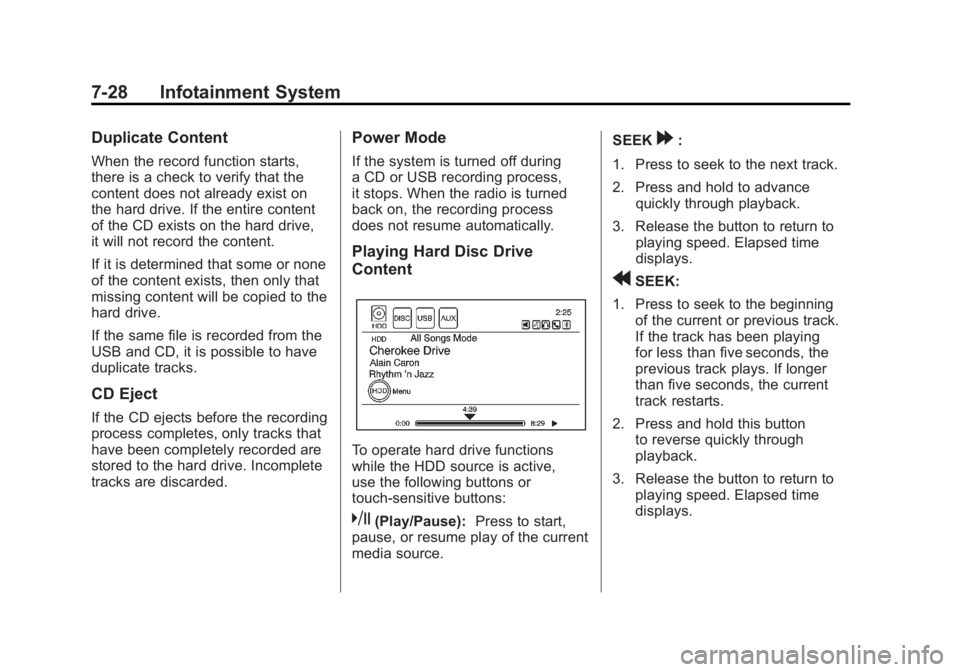
Playing Hard Disc Drive
Content
To operate hard drive functions
while the HDD source is active,
use the following buttons or
touch-sensitive buttons:
k(Play/Pause):Press to start,
pause, or resume play of the current
media source. SEEK
[:
1. Press to seek to the next track.
2. Press and hold to advance quickly through playback.
3. Release the button to return to playing speed. Elapsed time
displays.
rSEEK:
1. Press to seek to the beginning of the current or previous track.
If the track has been playing
for less than five seconds, the
previous track plays. If longer
than five seconds, the current
track restarts.
2. Press and hold this button to reverse quickly through
playback.
3. Release the button to return to playing speed. Elapsed time
displays.
Page 222 of 516
Black plate (32,1)Chevrolet Volt Owner Manual - 2011
7-32 Infotainment System
rSEEK:
1. Press to seek to the beginning of the current or previous track.
If the track has been playing
for less than five seconds, the
previous track plays. If playing
longer than five seconds, the
current track restarts.
2. Press and hold to reverse quickly through playback.
3. Release the button to return to playing speed. Elapsed time
displays.
TUNE/MENU:
1. Turn to the right or left to display the track list.
2. Turn it again to cycle through the list.
3. Press the TUNE/MENU knob to select the track. The system
plays the selected track and
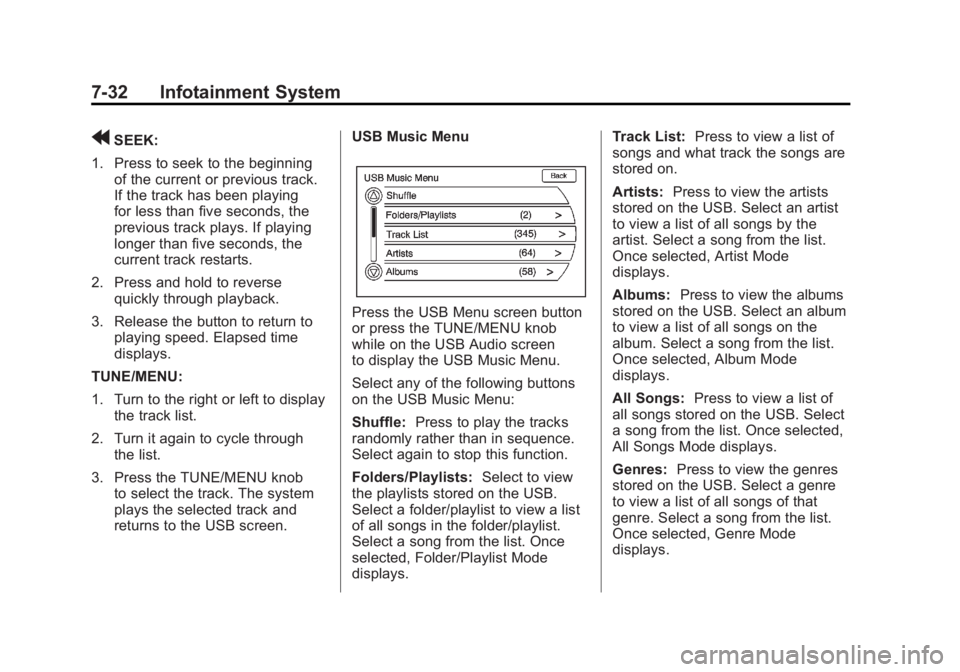
returns to the USB screen. USB Music Menu
Press the USB Menu screen button
or press the TUNE/MENU knob
while on the USB Audio screen
to display the USB Music Menu.
Select any of the following buttons
on the USB Music Menu:
Shuffle:
Press to play the tracks
randomly rather than in sequence.
Select again to stop this function.
Folders/Playlists: Select to view
the playlists stored on the USB.
Select a folder/playlist to view a list
of all songs in the folder/playlist.
Select a song from the list. Once
selected, Folder/Playlist Mode
displays. Track List:
Press to view a list of
songs and what track the songs are
stored on.
Artists: Press to view the artists
stored on the USB. Select an artist
to view a list of all songs by the
artist. Select a song from the list.
Once selected, Artist Mode
displays.
Albums: Press to view the albums
stored on the USB. Select an album
to view a list of all songs on the
album. Select a song from the list.
Once selected, Album Mode
displays.
All Songs: Press to view a list of
all songs stored on the USB. Select
a song from the list. Once selected,
All Songs Mode displays.
Genres: Press to view the genres
stored on the USB. Select a genre
to view a list of all songs of that
genre. Select a song from the list.
Once selected, Genre Mode
displays.
Page 253 of 516
Black plate (63,1)Chevrolet Volt Owner Manual - 2011
Infotainment System 7-63
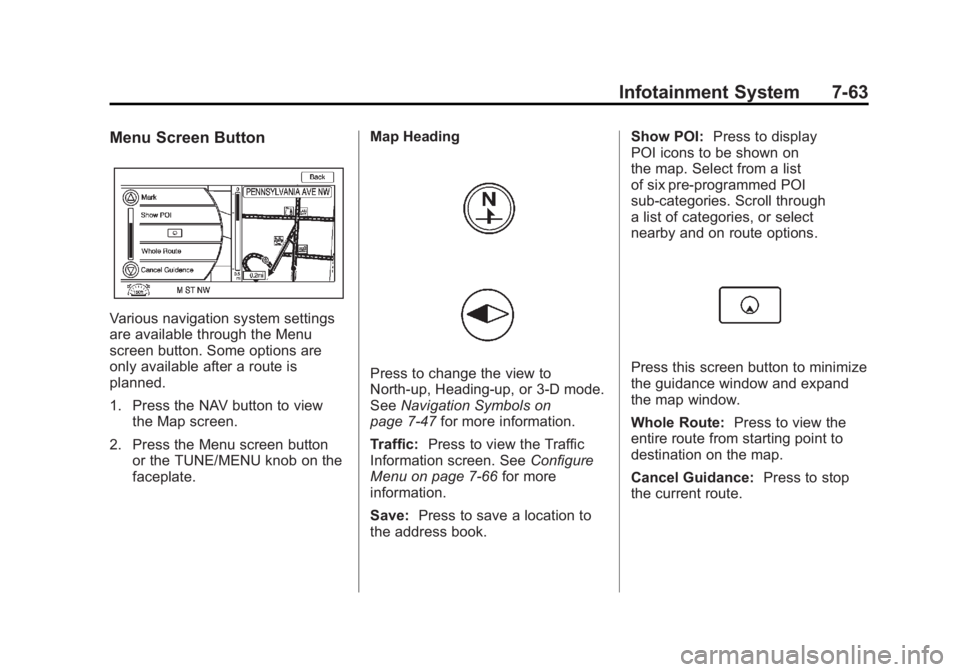
Menu Screen Button
Various navigation system settings
are available through the Menu
screen button. Some options are
only available after a route is
planned.
1. Press the NAV button to viewthe Map screen.
2. Press the Menu screen button or the TUNE/MENU knob on the
faceplate. Map Heading
Press to change the view to
North-up, Heading-up, or 3-D mode.
See
Navigation Symbols on
page 7‑47 for more information.
Traffic: Press to view the Traffic
Information screen. See Configure
Menu on page 7‑66 for more
information.
Save: Press to save a location to
the address book. Show POI:
Press to display
POI icons to be shown on
the map. Select from a list
of six pre-programmed POI
sub-categories. Scroll through
a list of categories, or select
nearby and on route options.Press this screen button to minimize
the guidance window and expand
the map window.
Whole Route: Press to view the
entire route from starting point to
destination on the map.
Cancel Guidance: Press to stop
the current route.
Page 265 of 516

Black plate (75,1)Chevrolet Volt Owner Manual - 2011
Infotainment System 7-75
When the vehicle is not receiving
signals from the satellites, a symbol
appears on the map screen. See
Navigation Symbols on page 7‑47.
This system might not be available
or interferences can occur if any of
the following is true:
.Signals are obstructed by tall
buildings, trees, large trucks,
or a tunnel.
.Satellites are being repaired or
improved.
For more information if the GPS
is not functioning properly, see
“If the System Needs Service” and
“Problems with Route Guidance.”
Vehicle Positioning
At times, the position of the vehicle
on the map could be inaccurate
due to one or more of the following
reasons:
.The road system has changed.
.The vehicle is driving on slippery
road surfaces such as in sand,
gravel, and/or snow.
.The vehicle is traveling on
winding roads or long straight
roads.
.Approaching a tall building or a
large vehicle.
.The surface streets run parallel
to a freeway.
.The vehicle has been transferred
by a vehicle carrier or a ferry.
.The current position calibration
is set incorrectly.
.The vehicle is traveling at high
speed.
.The vehicle changes directions
more than once, or the vehicle
is turning on a turn table in a
parking lot.
.The vehicle is entering and/or
exiting a parking lot, garage,
or a lot with a roof.
.The GPS signal is not received.
.A roof carrier is installed on the
vehicle.
.Tire chains have been installed.
.The tires are replaced or worn.
.The tire pressure for the tires is
incorrect.
.This is the first navigation use
after the map data is updated.
.The 12-volt battery is
disconnected for several days.
.The vehicle is driving in heavy
traffic where driving is at low
speeds, and the vehicle is
stopped and started repeatedly.
Page 303 of 516
Black plate (1,1)Chevrolet Volt Owner Manual - 2011
Driving and Operating 9-1
Driving and
Operating
Driving Information
Driving for Better EnergyEfficiency . . . . . . . . . . . . . . . . . . . . 9-2
Defensive Driving . . . . . . . . . . . . . 9-4
Drunk Driving . . . . . . . . . . . . . . . . . 9-4
Control of a Vehicle . . . . . . . . . . . 9-5
Braking . . . . . . . . . . . . . . . . . . . . . . . 9-5
Steering . . . . . . . . . . . . . . . . . . . . . . . 9-6
Off-Road Recovery . . . . . . . . . . . . 9-8
Loss of Control . . . . . . . . . . . . . . . . 9-8
Driving on Wet Roads . . . . . . . . . 9-9
Highway Hypnosis . . . . . . . . . . . 9-10
Hill and Mountain Roads . . . . . 9-10
Winter Driving . . . . . . . . . . . . . . . . 9-11
If the Vehicle Is Stuck . . . . . . . . 9-13
Vehicle Load Limits . . . . . . . . . . 9-14
Starting and Operating
New Vehicle Break-In . . . . . . . . 9-18
Power Button . . . . . . . . . . . . . . . . 9-18
Starting and Stopping the Vehicle . . . . . . . . . . . . . . . . . . . . . 9-20
Retained Accessory Power (RAP) . . . . . . . . . . . . . . . 9-22 Shifting Into Park . . . . . . . . . . . . 9-22
Shifting out of Park . . . . . . . . . . 9-23
Parking over Things
That Burn . . . . . . . . . . . . . . . . . . 9-24
Electric Vehicle Operating
Modes
System Operation . . . . . . . . . . . 9-24
Electric Mode . . . . . . . . . . . . . . . . 9-25
Extended Range Mode . . . . . . 9-25
Driver Selected OperatingModes . . . . . . . . . . . . . . . . . . . . . . 9-26
Out of Fuel/Engine Unavailable . . . . . . . . . . . . . . . . 9-28
Maintenance Modes . . . . . . . . . 9-28
Engine Exhaust
Engine Exhaust . . . . . . . . . . . . . . 9-30
Running the Vehicle While Parked . . . . . . . . . . . . . . . . . . . . . 9-31
Electric Drive Unit
Electric Drive Unit . . . . . . . . . . . 9-32
Brakes
Antilock BrakeSystem (ABS) . . . . . . . . . . . . . . 9-33
Electric Parking Brake . . . . . . . 9-35
Regenerative Braking . . . . . . . . 9-37
Ride Control Systems
Traction Control System (TCS) . . . . . . . . . . . . . . 9-37
Electronic Stability Control (ESC) . . . . . . . . . . . . . . 9-39
Cruise Control
Cruise Control . . . . . . . . . . . . . . . 9-40
Object Detection Systems
Ultrasonic Parking Assist . . . . 9-43
Rear VisionCamera (RVC) . . . . . . . . . . . . . 9-46
Charging
Plug-In Charging . . . . . . . . . . . . . 9-49
Delayed ChargingOverride . . . . . . . . . . . . . . . . . . . . 9-52
Charging Status Feedback . . . . . . . . . . . . . . . . . . 9-52
Charge Cord . . . . . . . . . . . . . . . . . 9-54
Electrical Requirements for Battery Charging . . . . . . . . . . . 9-56
Page 305 of 516
Black plate (3,1)Chevrolet Volt Owner Manual - 2011
Driving and Operating 9-3
Drive Mode and PRNDL Selection
Use Normal Mode when possible.
Sport Mode provides more
responsive acceleration than
Normal Mode but can reduce
efficiency.
Use Mountain Mode prior to
climbing long, steep grades in
mountainous areas. Be sure to
engage Mountain Mode before
starting to climb. Mountain Mode
reduces electric range and power
but may be needed to maintain
speeds above 96 km/h (60 mph)
when climbing grades of 5% or
greater.
Use L (Low) in heavy stop‐and‐go
traffic or when traveling downhill.
L (Low) requires less brake
pedal application and provides
a controlled, efficient way to
slow the vehicle down.Climate Setting
Using the heat and air conditioning
systems decreases the energy
available for electric driving.
Optimal energy efficiency is
achieved with the heat, air
conditioning, and fan turned off.
Less energy is used at low fan
speeds. When using the fan:
.Fan Only is the most energy
efficient climate setting as long
as
0is not selected.
.ECO is for moderate air
conditioning and heater
operation and is the next
most energy efficient setting as
long as
0is not selected.
.Comfort provides the most
comfort but is the least energy
efficient.
Use the auto heated seat feature
instead of climate settings. Heating
the seat uses less energy than
heating the vehicle interior. Use remote start to heat or cool the
interior when the vehicle is plugged
in to maximize the electric range by
utilizing electricity from the electrical
outlet.
In hot weather, avoid parking in
direct sunlight or use sunshades
inside the vehicle.
Turn off the front and rear window
defog/defrost when they are no
longer needed.
Avoid driving with the windows open
at highway speeds.
Vehicle Charging/Maintenance
Charging
Keep the vehicle plugged in, even
when fully charged, to keep the
battery temperature ready for the
next drive. This is important when
outside temperatures are extremely
hot or cold.
Page 320 of 516
Black plate (18,1)Chevrolet Volt Owner Manual - 2011
9-18 Driving and Operating
If you put things inside the
vehicle—like suitcases,
tools, packages, or anything
else —they will go as fast as
the vehicle goes. If you have to
stop or turn quickly, or if there is
a crash, they will keep going.
{WARNING
Things inside the vehicle can
strike and injure people in a
sudden stop or turn, or in a
crash.
.Put things in the cargo
area of the vehicle. In the
cargo area, put them as
far forward as possible.
Try to spread the weight
evenly.
(Continued)
WARNING (Continued)
.Never stack heavier
things, like suitcases,
inside the vehicle so that
some of them are above
the tops of the seats.
.Do not leave an
unsecured child restraint
in the vehicle.
.Secure loose items in the
vehicle.
.Do not leave a seat folded
down unless needed.
Starting and
Operating
New Vehicle Break-In
Notice: The vehicle does not
require a break-in period. Vehicle
break‐in is performed during
manufacturing.
Power Button
The vehicle has an electronic
push‐button start. The POWER
O
button light flashes when the driver
door is open and the vehicle is not
Page 321 of 516
Black plate (19,1)Chevrolet Volt Owner Manual - 2011
Driving and Operating 9-19
on. The flashing light will eventually
time out. The POWER
Obutton
light is on steady when in ON/RUN
power mode. When the vehicle is
turned off, the POWER
Obutton
light will turn off.
The Remote Keyless Entry (RKE)
transmitter must be in the vehicle
for the system to operate. If the
vehicle will not start, place the RKE
transmitter in the transmitter slot.
See Remote Keyless Entry (RKE)
System Operation on page 2‑3.
ON/RUN: This position is for
driving and starting. With the vehicle
off, and the brake pedal applied,
pressing the POWER
Obutton once
will place the vehicle in ON/RUN.
The instrument cluster displays an
active fuel or battery gauge, along
with an audio startup cue, when
the vehicle is ready to be driven.
This could take up to 15 seconds
at extremely cold temperatures. The engine will only start if needed.
If the vehicle did not start, the
instrument cluster will display a
screen with inactive fuel and battery
gauges. See
Starting and Stopping
the Vehicle on page 9‑20.
Service Only Mode
This power mode is available for
service and diagnostics, and to
verify the proper operation of
the MIL as may be required for
emission inspection purposes.
With the vehicle off, and the brake
pedal not applied, pressing and
holding the POWER
Obutton for
more than 5 seconds will place
the vehicle in Service Only Mode.
The instruments and audio systems
will operate as they do in ON/RUN,
but the vehicle will not be able to be
driven. The propulsion system will
not start in Service Only Mode. STOPPING THE VEHICLE/OFF:
To turn the vehicle off, push the
POWER
Obutton with the vehicle
in P (Park). Retained Accessory
Power (RAP) will remain active
until the driver door is opened.
See Retained Accessory Power
(RAP) on page 9‑22. When turning
off the vehicle, if the vehicle is not
in P (Park), the vehicle will go to
ACC/ACCESSORY and display the
message SHIFT TO PARK in the
Driver Information Center (DIC).
See Electric Drive Unit Messages
on page 5‑47.
In an emergency, if the vehicle must
be stopped while driving:
1. Brake using a firm and steady pressure. Do not pump the
brakes repeatedly. This may
deplete power assist, requiring
increased brake pedal force.
Page 322 of 516
Black plate (20,1)Chevrolet Volt Owner Manual - 2011
9-20 Driving and Operating
2. Shift the vehicle to N (Neutral).This can be done while the
vehicle is moving. After shifting
to N (Neutral), firmly apply the
brakes and steer the vehicle
to a safe location.
3. Come to a complete stop, shift to P (Park), and turn the
vehicle to OFF by pushing the
POWER
Obutton.
4. Set the parking brake. See Electric Parking Brake on
page 9‑35.
{WARNING
Turning off the vehicle while
moving may disable the airbags.
While driving, only shut the
propulsion system off in an
emergency. 5. If the vehicle must be stopped
while driving, press and hold
the POWER
Obutton for
either longer than two seconds,
or press twice in five seconds.
Starting and Stopping the
Vehicle
Starting Procedure
Move the shift lever to P (Park) or
N (Neutral). The propulsion system
will not start in any other position.
Notice: Do not try to shift to
P (Park) if the vehicle is moving
or the electric drive unit could be
damaged. Shift to P (Park) only
when the vehicle is stopped. Notice:
The vehicle is designed
to work with the electronics in
the vehicle. If you add electrical
parts or accessories, you could
change the way the vehicle
operates. Before adding electrical
equipment, check with your
dealer. If you do not, the vehicle
might not perform properly. Any
resulting damage would not be
covered by the vehicle warranty.
Page 323 of 516
Black plate (21,1)Chevrolet Volt Owner Manual - 2011
Driving and Operating 9-21
The Remote Keyless Entry (RKE)
transmitter must be in the vehicle.
Press the brake pedal and push
and release the POWER
Obutton.
If the RKE transmitter is not in the
vehicle or something is interfering
with the transmitter, a message
displays in the Driver Information
Center (DIC). See Key and Lock
Messages on page 5‑48.
If the vehicle will not start due
to a low RKE transmitter battery,
the vehicle can still be driven.
See “Starting the Vehicle with
a Low Transmitter Battery” in
Remote Keyless Entry (RKE)
System Operation on page 2‑3.
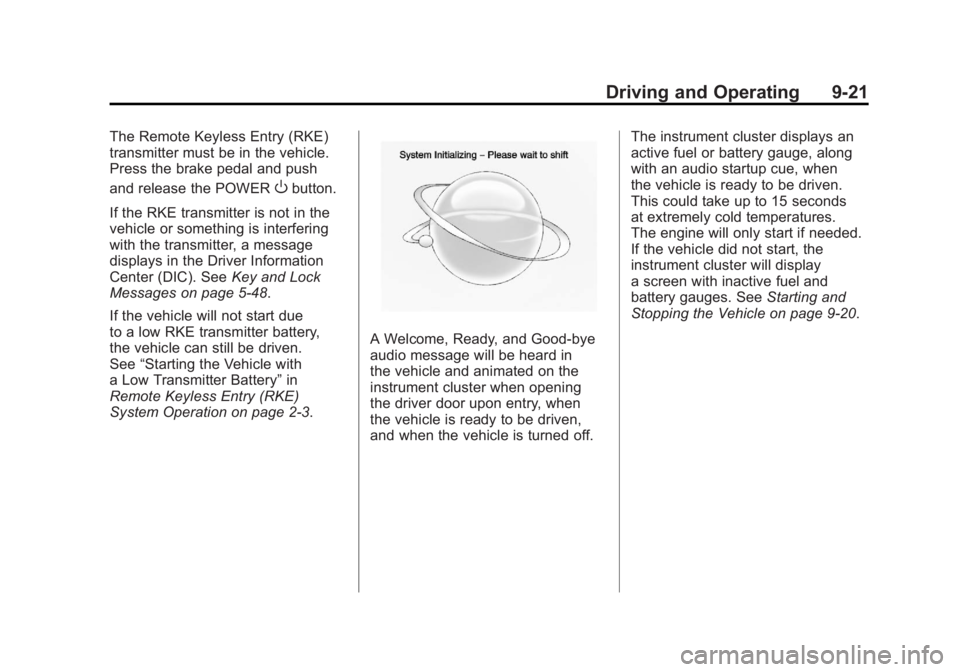
A Welcome, Ready, and Good‐bye
audio message will be heard in
the vehicle and animated on the
instrument cluster when opening
the driver door upon entry, when
the vehicle is ready to be driven,
and when the vehicle is turned off. The instrument cluster displays an
active fuel or battery gauge, along
with an audio startup cue, when
the vehicle is ready to be driven.
This could take up to 15 seconds
at extremely cold temperatures.
The engine will only start if needed.
If the vehicle did not start, the
instrument cluster will display
a screen with inactive fuel and
battery gauges. See
Starting and
Stopping the Vehicle on page 9‑20.