power steering CHEVROLET VOLT 2011 Owner's Manual
[x] Cancel search | Manufacturer: CHEVROLET, Model Year: 2011, Model line: VOLT, Model: CHEVROLET VOLT 2011Pages: 516, PDF Size: 6.61 MB
Page 5 of 516
Black plate (5,1)Chevrolet Volt Owner Manual - 2011
Introduction v
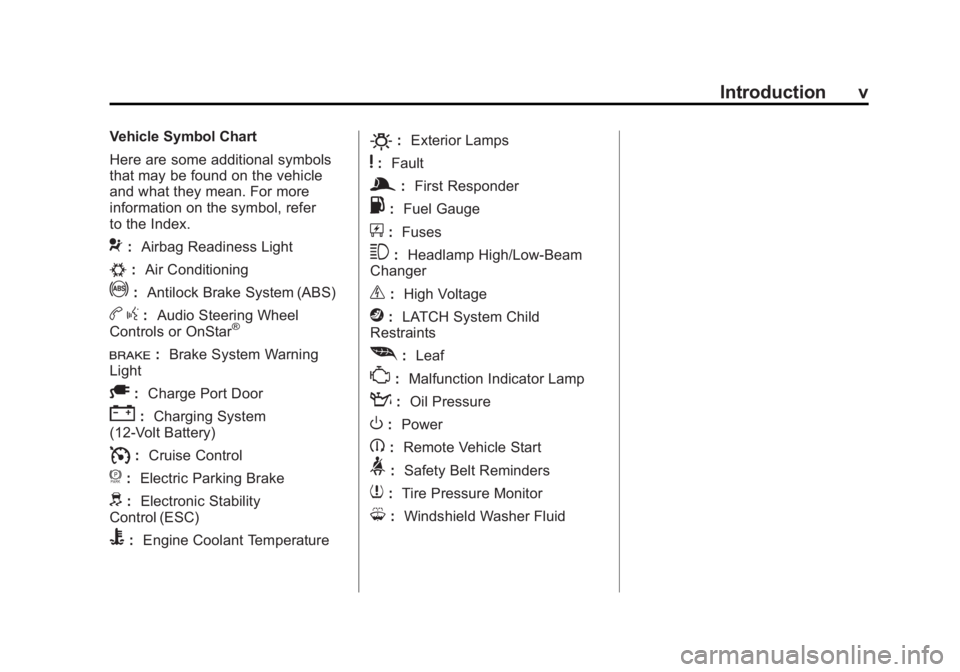
Vehicle Symbol Chart
Here are some additional symbols
that may be found on the vehicle
and what they mean. For more
information on the symbol, refer
to the Index.
9:Airbag Readiness Light
#:Air Conditioning
!:Antilock Brake System (ABS)
bg: Audio Steering Wheel
Controls or OnStar®
I: Brake System Warning
Light
A: Charge Port Door
":Charging System
(12‐Volt Battery)
I: Cruise Control
f: Electric Parking Brake
d:Electronic Stability
Control (ESC)
B: Engine Coolant Temperature
O:Exterior Lamps
y:Fault
g:First Responder
.: Fuel Gauge
+:Fuses
3: Headlamp High/Low-Beam
Changer
_: High Voltage
j:LATCH System Child
Restraints
[: Leaf
*:Malfunction Indicator Lamp
::Oil Pressure
O:Power
B:Remote Vehicle Start
>:Safety Belt Reminders
7:Tire Pressure Monitor
M:Windshield Washer Fluid
Page 7 of 516
Black plate (1,1)Chevrolet Volt Owner Manual - 2011
In Brief 1-1
In Brief
Instrument Panel
Instrument Panel . . . . . . . . . . . . . . 1-2
Initial Drive Information
Initial Drive Information . . . . . . . . 1-4
Remote Keyless Entry (RKE)System . . . . . . . . . . . . . . . . . . . . . . 1-4
Remote Start . . . . . . . . . . . . . . . . . . 1-5
Door Locks . . . . . . . . . . . . . . . . . . . 1-5
Windows . . . . . . . . . . . . . . . . . . . . . . 1-6
Seat Adjustment . . . . . . . . . . . . . . 1-6
Heated Seats . . . . . . . . . . . . . . . . . 1-8
Head Restraint Adjustment . . . . 1-9
Safety Belts . . . . . . . . . . . . . . . . . . . 1-9
Sensing System for Passenger Airbag . . . . . . . . . . 1-10
Mirror Adjustment . . . . . . . . . . . . 1-10
Steering Wheel Adjustment . . . . . . . . . . . . . . . . . 1-11 Interior Lighting . . . . . . . . . . . . . . 1-11
Exterior Lighting . . . . . . . . . . . . . 1-11
Windshield Wiper/Washer . . . . 1-12
Climate Controls . . . . . . . . . . . . . 1-13
Vehicle Features
Radio(s) . . . . . . . . . . . . . . . . . . . . . 1-15
Satellite Radio . . . . . . . . . . . . . . . 1-15
Portable Audio Devices . . . . . . 1-15
Bluetooth
®. . . . . . . . . . . . . . . . . . . 1-16
Steering Wheel Controls . . . . . 1-16
Cruise Control . . . . . . . . . . . . . . . 1-17
Navigation System . . . . . . . . . . . 1-17
Power Outlets . . . . . . . . . . . . . . . 1-17
Battery and Efficiency
High Voltage Safety Information . . . . . . . . . . . . . . . . . 1-18
Charging . . . . . . . . . . . . . . . . . . . . . 1-18
Fueling . . . . . . . . . . . . . . . . . . . . . . 1-21
Total Vehicle Range . . . . . . . . . 1-22
Regenerative Braking . . . . . . . . 1-22
Service . . . . . . . . . . . . . . . . . . . . . . 1-23
Performance and Maintenance
Traction Control System (TCS) . . . . . . . . . . . . . . 1-23
Electronic Stability Control (ESC) . . . . . . . . . . . . . . 1-23
Tire Pressure Monitor . . . . . . . . 1-23
Tire Sealant and
Compressor Kit . . . . . . . . . . . . . 1-24
Engine Oil Life System . . . . . . 1-24
Driving for Better Energy Efficiency . . . . . . . . . . . . . . . . . . . 1-25
Roadside Assistance Program . . . . . . . . . . . . . . . . . . . . 1-27
OnStar
®. . . . . . . . . . . . . . . . . . . . . 1-27
Page 9 of 516
Black plate (3,1)Chevrolet Volt Owner Manual - 2011
In Brief 1-3
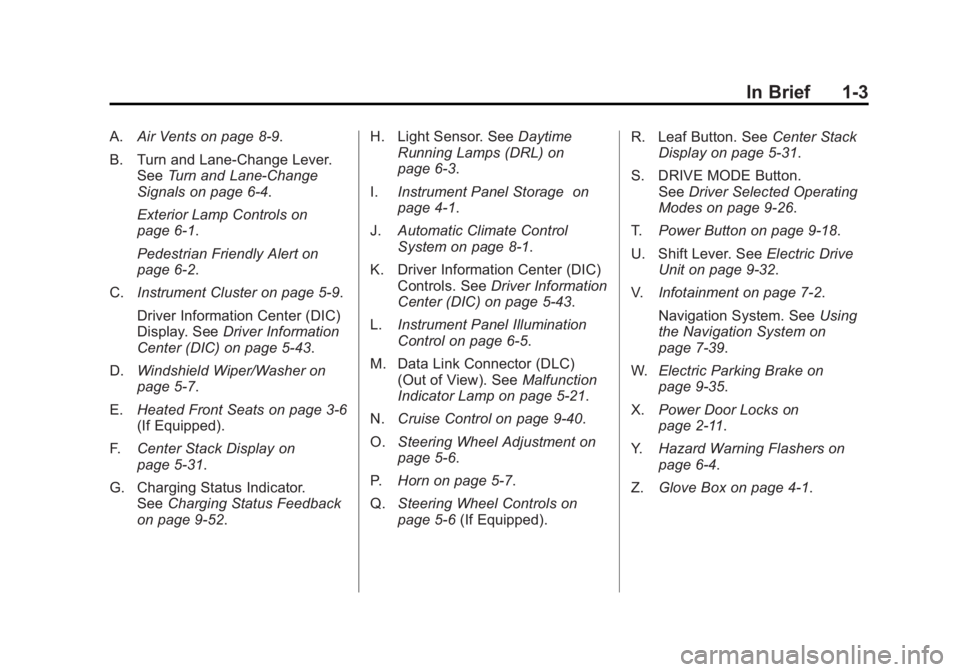
A.Air Vents on page 8‑9.
B. Turn and Lane‐Change Lever. See Turn and Lane-Change
Signals on page 6‑4.
Exterior Lamp Controls on
page 6‑1.
Pedestrian Friendly Alert on
page 6‑2.
C. Instrument Cluster on page 5‑9.
Driver Information Center (DIC)
Display. See Driver Information
Center (DIC) on page 5‑43.
D. Windshield Wiper/Washer on
page 5‑7.
E. Heated Front Seats on page 3‑6
(If Equipped).
F. Center Stack Display on
page 5‑31.
G. Charging Status Indicator. See Charging Status Feedback
on page 9‑52. H. Light Sensor. See
Daytime
Running Lamps (DRL) on
page 6‑3.
I. Instrument Panel Storage on
page 4‑1.
J. Automatic Climate Control
System on page 8‑1.
K. Driver Information Center (DIC) Controls. See Driver Information
Center (DIC) on page 5‑43.
L. Instrument Panel Illumination
Control on page 6‑5.
M. Data Link Connector (DLC) (Out of View). See Malfunction
Indicator Lamp on page 5‑21.
N. Cruise Control on page 9‑40.
O. Steering Wheel Adjustment on
page 5‑6.
P. Horn on page 5‑7.
Q. Steering Wheel Controls on
page 5‑6 (If Equipped). R. Leaf Button. See
Center Stack
Display on page 5‑31.
S. DRIVE MODE Button. See Driver Selected Operating
Modes on page 9‑26.
T. Power Button on page 9‑18.
U. Shift Lever. See Electric Drive
Unit on page 9‑32.
V. Infotainment on page 7‑2.
Navigation System. See Using
the Navigation System on
page 7‑39.
W. Electric Parking Brake on
page 9‑35.
X. Power Door Locks on
page 2‑11.
Y. Hazard Warning Flashers on
page 6‑4.
Z. Glove Box on page 4‑1.
Page 23 of 516
Black plate (17,1)Chevrolet Volt Owner Manual - 2011
In Brief 1-17
Cruise Control
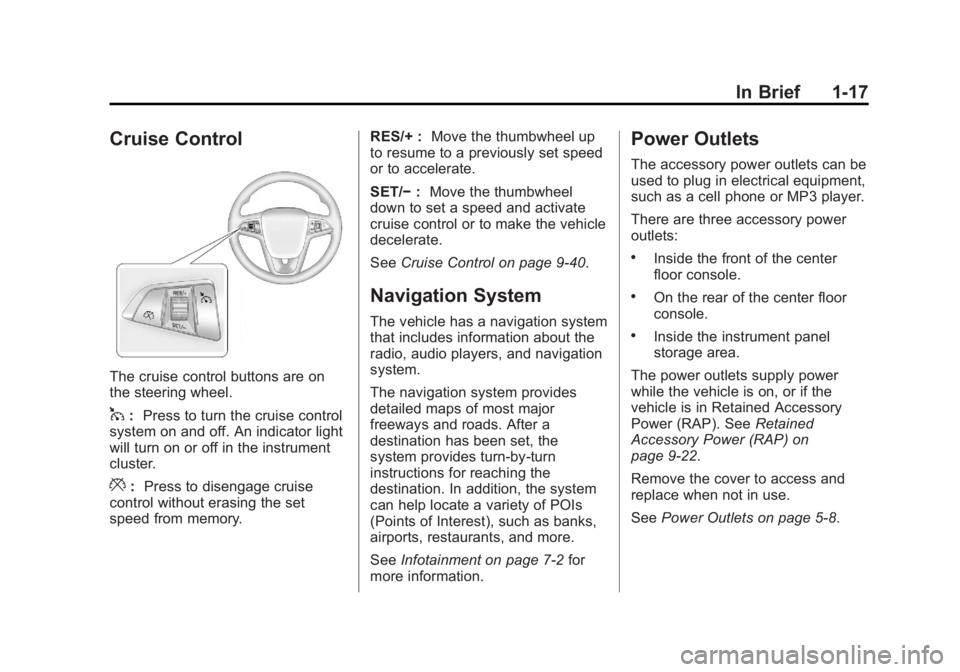
The cruise control buttons are on
the steering wheel.
1:Press to turn the cruise control
system on and off. An indicator light
will turn on or off in the instrument
cluster.
*: Press to disengage cruise
control without erasing the set
speed from memory. RES/+ :
Move the thumbwheel up
to resume to a previously set speed
or to accelerate.
SET/− :Move the thumbwheel
down to set a speed and activate
cruise control or to make the vehicle
decelerate.
See Cruise Control on page 9‑40.
Navigation System
The vehicle has a navigation system
that includes information about the
radio, audio players, and navigation
system.
The navigation system provides
detailed maps of most major
freeways and roads. After a
destination has been set, the
system provides turn-by-turn
instructions for reaching the
destination. In addition, the system
can help locate a variety of POIs
(Points of Interest), such as banks,
airports, restaurants, and more.
SeeInfotainment on page 7‑2 for
more information.
Power Outlets
The accessory power outlets can be
used to plug in electrical equipment,
such as a cell phone or MP3 player.
There are three accessory power
outlets:
.Inside the front of the center
floor console.
.On the rear of the center floor
console.
.Inside the instrument panel
storage area.
The power outlets supply power
while the vehicle is on, or if the
vehicle is in Retained Accessory
Power (RAP). See Retained
Accessory Power (RAP) on
page 9‑22.
Remove the cover to access and
replace when not in use.
See Power Outlets on page 5‑8.
Page 121 of 516
Black plate (1,1)Chevrolet Volt Owner Manual - 2011
Instruments and Controls 5-1
Instruments and
Controls
Instrument Panel Overview
Instrument Panel Overview . . . . 5-4
Controls
Steering Wheel Adjustment . . . 5-6
Steering Wheel Controls . . . . . . 5-6
Horn . . . . . . . . . . . . . . . . . . . . . . . . . . 5-7
Windshield Wiper/Washer . . . . . 5-7
Power Outlets . . . . . . . . . . . . . . . . . 5-8
Warning Lights, Gauges, and
Indicators
Warning Lights, Gauges, andIndicators . . . . . . . . . . . . . . . . . . . . 5-9
Instrument Cluster . . . . . . . . . . . . 5-9
Speedometer . . . . . . . . . . . . . . . . 5-15
Odometer . . . . . . . . . . . . . . . . . . . . 5-15
Trip Odometer . . . . . . . . . . . . . . . 5-15
Compass . . . . . . . . . . . . . . . . . . . . 5-16 Battery Gauge (High
Voltage) . . . . . . . . . . . . . . . . . . . . 5-16
Fuel Gauge . . . . . . . . . . . . . . . . . . 5-16
Driver Efficiency Gauge . . . . . . 5-17
Total Vehicle Range . . . . . . . . . 5-17
Safety Belt Reminders . . . . . . . 5-18
Airbag Readiness Light . . . . . . 5-19
Passenger Airbag Status Indicator . . . . . . . . . . . . . . . . . . . . 5-20
Charging System Light (12-Volt Battery) . . . . . . . . . . . . 5-21
Malfunction Indicator Lamp . . . . . . . . . . . . . 5-21
Brake System Warning Light . . . . . . . . . . . . . . . . . . . . . . . 5-24
Electric Parking Brake Light . . . . . . . . . . . . . . . . . . . . . . . 5-25
Service Electric Parking Brake Light . . . . . . . . . . . . . . . . . . . . . . . 5-25
Antilock Brake System (ABS) Warning Light . . . . . . . . . . . . . . 5-26
Sport Mode Light . . . . . . . . . . . . 5-26
Mountain Mode Light . . . . . . . . 5-26 Traction Control System
(TCS)/StabiliTrak
®Light . . . . 5-27
Engine Coolant Temperature Warning Light . . . . . . . . . . . . . . 5-27
Tire Pressure Light . . . . . . . . . . 5-27
Engine Oil Pressure Light . . . . 5-28
Low Fuel Warning Light . . . . . . 5-28
Security Light . . . . . . . . . . . . . . . . 5-29
High-Beam On Light . . . . . . . . . 5-29
Lamps On Reminder . . . . . . . . . 5-29
Cruise Control Light . . . . . . . . . 5-29
Door, Hood, or Hatch Open
Light . . . . . . . . . . . . . . . . . . . . . . . 5-30
Information Displays
Center Stack Display . . . . . . . . 5-31
Power Flows . . . . . . . . . . . . . . . . . 5-31
Charging . . . . . . . . . . . . . . . . . . . . . 5-33
Energy Information . . . . . . . . . . 5-41
Clock . . . . . . . . . . . . . . . . . . . . . . . . 5-42
Driver InformationCenter (DIC) . . . . . . . . . . . . . . . 5-43
Page 125 of 516
Black plate (5,1)Chevrolet Volt Owner Manual - 2011
Instruments and Controls 5-5
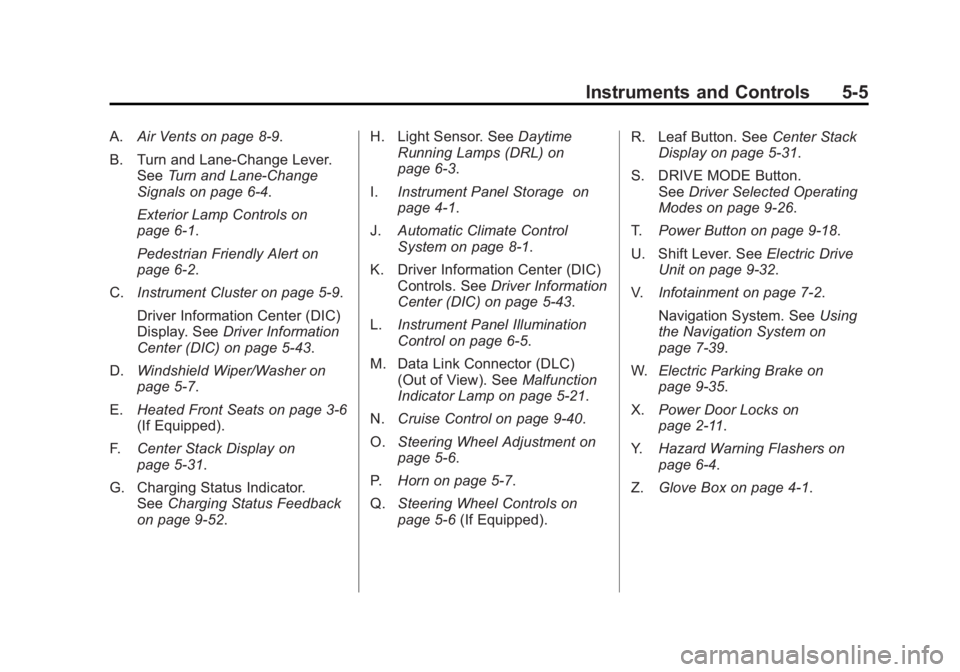
A.Air Vents on page 8‑9.
B. Turn and Lane‐Change Lever. See Turn and Lane-Change
Signals on page 6‑4.
Exterior Lamp Controls on
page 6‑1.
Pedestrian Friendly Alert on
page 6‑2.
C. Instrument Cluster on page 5‑9.
Driver Information Center (DIC)
Display. See Driver Information
Center (DIC) on page 5‑43.
D. Windshield Wiper/Washer on
page 5‑7.
E. Heated Front Seats on page 3‑6
(If Equipped).
F. Center Stack Display on
page 5‑31.
G. Charging Status Indicator. See Charging Status Feedback
on page 9‑52. H. Light Sensor. See
Daytime
Running Lamps (DRL) on
page 6‑3.
I. Instrument Panel Storage on
page 4‑1.
J. Automatic Climate Control
System on page 8‑1.
K. Driver Information Center (DIC) Controls. See Driver Information
Center (DIC) on page 5‑43.
L. Instrument Panel Illumination
Control on page 6‑5.
M. Data Link Connector (DLC) (Out of View). See Malfunction
Indicator Lamp on page 5‑21.
N. Cruise Control on page 9‑40.
O. Steering Wheel Adjustment on
page 5‑6.
P. Horn on page 5‑7.
Q. Steering Wheel Controls on
page 5‑6 (If Equipped). R. Leaf Button. See
Center Stack
Display on page 5‑31.
S. DRIVE MODE Button. See Driver Selected Operating
Modes on page 9‑26.
T. Power Button on page 9‑18.
U. Shift Lever. See Electric Drive
Unit on page 9‑32.
V. Infotainment on page 7‑2.
Navigation System. See Using
the Navigation System on
page 7‑39.
W. Electric Parking Brake on
page 9‑35.
X. Power Door Locks on
page 2‑11.
Y. Hazard Warning Flashers on
page 6‑4.
Z. Glove Box on page 4‑1.
Page 172 of 516
Black plate (52,1)Chevrolet Volt Owner Manual - 2011
5-52 Instruments and Controls
SERVICE POWER STEERING
This message displays if there is a
problem with the power steering
system. Take the vehicle to your
dealer for service.
SERVICE VEHICLE SOON
This message displays if there is a
problem with the vehicle. Take the
vehicle to your dealer for service.
Depending on the severity of a
crash, this message may come
on along with the airbag readiness
light.
Starting the Vehicle
Messages
PRESS BRAKE TO START
VEHICLE
This message displays when
attempting to start the vehicle
without first pressing the brake
pedal.
PRESS BUTTON AGAIN TO
TURN OFF
This message displays as a
reminder to press the POWER
O
button to turn the vehicle off when
an attempt is made to turn off the
vehicle while it is in motion.
Tire Messages
SERVICE TIRE MONITOR
SYSTEM
This message displays if there is
a problem with the Tire Pressure
Monitor System (TPMS). SeeTire
Pressure Monitor Operation on
page 10‑57 for more information.
TIRE LEARNING ACTIVE
This message displays when
the system is learning new tires.
SeeTire Pressure Monitor
Operation on page 10‑57 for
more information.
TIRE LOW ADD AIR TO TIRE
This message displays when the
pressure in one or more of the tires
is low.
This message also displays
LEFT FRONT, RIGHT FRONT,
LEFT REAR, or RIGHT REAR to
indicate the location of the low tire.
The low tire pressure warning
light will also come on. See Tire
Pressure Light on page 5‑27.
If a tire pressure message appears
on the DIC, stop as soon as you
can. Inflate the tires by adding air
until the tire pressure is equal to
the values shown on the Tire and
Loading Information label. See Tires
on page 10‑48, Vehicle Load Limits
on page 9‑14, and Tire Pressure on
page 10‑54.
You can receive more than one
tire pressure message at a time.
The DIC also shows the tire
pressure values. See Driver
Information Center (DIC) on
page 5‑43.
Page 189 of 516

Black plate (5,1)Chevrolet Volt Owner Manual - 2011
Lighting 6-5
Interior Lighting
Instrument Panel
Illumination Control
The brightness of the instrument
panel cluster display, infotainment
display and controls, steering wheel
controls, and all other illuminated
controls, as well as feature status
indicators can be adjusted.The thumbwheel is on the
instrument panel to the left
of the steering column.
Move the thumbwheel up or down to
brighten or dim the lights.
Dome Lamps
The dome lamp controls are in the
overhead console.
To operate, press the following
buttons:
+(On):
Press to turn on the
dome lamps.
1(Door): Press to turn the lamps
on automatically when a door is
opened.
*(Off): Press to turn the lamps
off, even when a door is open.
Reading Lamps
The front reading lamps are in the
overhead console.
# $: Press to turn each lamp on
or off.
Lighting Features
Entry Lighting
The headlamps, parking lamps,
taillamps, back‐up lamps, and the
interior lights turn on briefly, when
the Remote Keyless Entry (RKE)
transmitter
Kis pressed. The lights
turn off immediately when the
POWER
Obutton is pressed or
automatically after a brief period.
Page 200 of 516

Black plate (10,1)Chevrolet Volt Owner Manual - 2011
7-10 Infotainment System
Radio
AM-FM Radio
Playing the Radio
Audio Source Menu
VOL/
O(Volume/Power):
1. Press to turn the radio on or off.
2. Turn to increase or decrease the volume. The volume is
adjusted for the current audio
source, active navigation voice
guidance, voice prompts,
or audio cues.
The steering wheel controls can
also be used to adjust the volume.
See Steering Wheel Controls on
page 5‑6 for more information.
TUNE/MENU: Turn to change
the radio station. See “Finding a
Station” in this section for more
information. RADIO BAND:
Press to select the
AM, FM, and XM (if equipped) band.
The audio sources can also be
changed by using the steering
wheel controls. See Steering
Wheel Controls on page 5‑6
for more information.
HDD/DVD/AUX: Change to the
Hard Drive, CD, DVD, USB, or AUX
by pressing the HDD/DVD/AUX
button until the desired source is
selected.
If the audio source is on while
viewing a map screen, a source
indicator button displays at the
top of the map screen.
Press the source indicator button
to display the current audio source
screen. The display shows a split
screen with the audio source screen
on the left side and the map or
guidance screen on the right side.
Press the Full Map button to exit the
split screen.
Page 267 of 516
Black plate (77,1)Chevrolet Volt Owner Manual - 2011
Infotainment System 7-77
Database Coverage
Explanations
Coverage areas vary with respect to
the level of map detail available for
any given area. Some areas feature
greater levels of detail than others.
If this happens, it does not mean
there is a problem with the system.
As the map data is updated, more
detail can become available for
areas which previously had limited
detail. SeeOrdering Map DVDs on
page 7‑76 for more information.
Voice Recognition
The navigation system's voice
recognition allows for hands-free
operation of the navigation system
and the audio system features.
Voice recognition only works if the
map database is installed in the
system.
If the radio is off, the only
commands would be Hands
Free and Help.
Navigation voice commands are not
available until the I Agree button
has been selected.
Voice recognition can be used when
the vehicle is on or when Retained
Accessory Power (RAP) is active.
SeeRetained Accessory Power
(RAP) on page 9‑22 for more
information.
Using Voice Recognition
1. Press and release theb g
steering wheel button. The audio
system mutes, and a beep is
heard. A voice prompt stating,
“Please start speaking after the
beep” might be heard.
If there is no beep, make sure
that the voice volume setting is
not turned down. See Configure
Menu on page 7‑66 for more
information.
While voice recognition is active,
the system displays a
gsymbol.
2. Clearly speak one of the commands listed later in this
section.