seats CHEVROLET VOLT 2011 Owner's Manual
[x] Cancel search | Manufacturer: CHEVROLET, Model Year: 2011, Model line: VOLT, Model: CHEVROLET VOLT 2011Pages: 516, PDF Size: 6.61 MB
Page 1 of 516
Black plate (1,1)Chevrolet Volt Owner Manual - 2011
2011 Chevrolet Volt Owner ManualM
In Brief. . . . . . . . . . . . . . . . . . . . . . . . 1-1
Instrument Panel . . . . . . . . . . . . . . 1-2
Initial Drive Information . . . . . . . . 1-4
Vehicle Features . . . . . . . . . . . . . 1-15
Battery and Efficiency . . . . . . . . 1-18
Performance and
Maintenance . . . . . . . . . . . . . . . . 1-23
Keys, Doors and Windows . . . 2-1
Keys and Locks . . . . . . . . . . . . . . . 2-2
Doors . . . . . . . . . . . . . . . . . . . . . . . . 2-12
Vehicle Security . . . . . . . . . . . . . . 2-13
Exterior Mirrors . . . . . . . . . . . . . . . 2-15
Interior Mirrors . . . . . . . . . . . . . . . . 2-16
Windows . . . . . . . . . . . . . . . . . . . . . 2-16
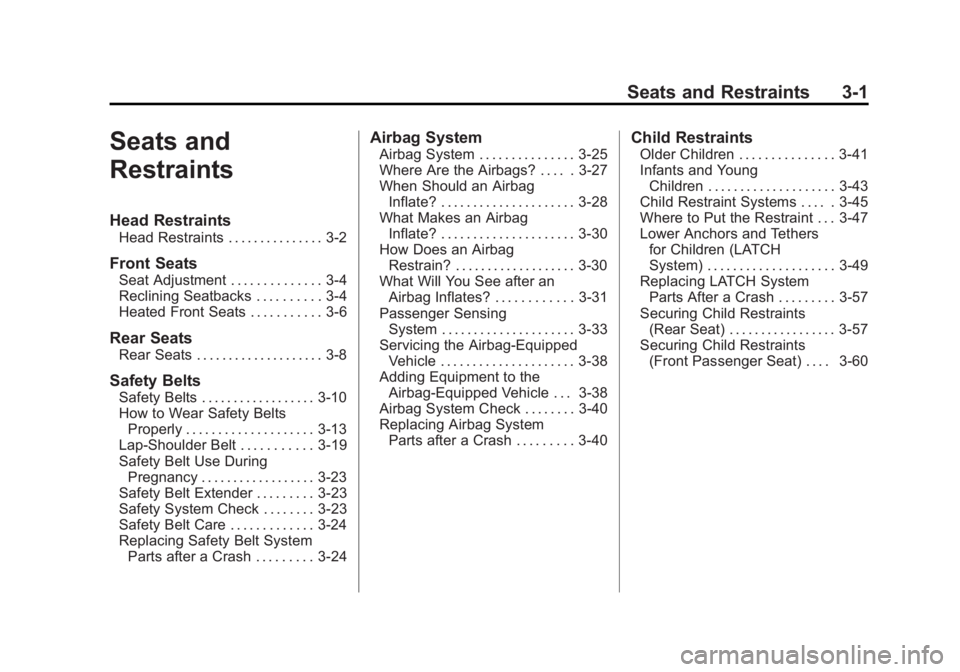
Seats and Restraints . . . . . . . . . 3-1
Head Restraints . . . . . . . . . . . . . . . 3-2
Front Seats . . . . . . . . . . . . . . . . . . . . 3-4
Rear Seats . . . . . . . . . . . . . . . . . . . . 3-8
Safety Belts . . . . . . . . . . . . . . . . . . 3-10
Airbag System . . . . . . . . . . . . . . . . 3-25
Child Restraints . . . . . . . . . . . . . . 3-41 Storage
. . . . . . . . . . . . . . . . . . . . . . . 4-1
Storage Compartments . . . . . . . . 4-1
Additional Storage Features . . . 4-2
Instruments and Controls . . . . 5-1
Instrument Panel Overview . . . . 5-4
Controls . . . . . . . . . . . . . . . . . . . . . . . 5-6
Warning Lights, Gauges, and
Indicators . . . . . . . . . . . . . . . . . . . . 5-9
Information Displays . . . . . . . . . . 5-31
Vehicle Messages . . . . . . . . . . . . 5-45
Vehicle Personalization . . . . . . . 5-53
Universal Remote System . . . . 5-60
Lighting . . . . . . . . . . . . . . . . . . . . . . . 6-1
Exterior Lighting . . . . . . . . . . . . . . . 6-1
Interior Lighting . . . . . . . . . . . . . . . . 6-5
Lighting Features . . . . . . . . . . . . . . 6-5
Infotainment System . . . . . . . . . 7-1
Introduction . . . . . . . . . . . . . . . . . . . . 7-2
Radio . . . . . . . . . . . . . . . . . . . . . . . . . 7-10
Audio Players . . . . . . . . . . . . . . . . 7-18 Navigation . . . . . . . . . . . . . . . . . . . . 7-39
Voice Recognition . . . . . . . . . . . . 7-77
Phone . . . . . . . . . . . . . . . . . . . . . . . . 7-85
Climate Controls . . . . . . . . . . . . . 8-1
Climate Control Systems . . . . . . 8-1
Air Vents . . . . . . . . . . . . . . . . . . . . . . . 8-9
Driving and Operating . . . . . . . . 9-1
Driving Information . . . . . . . . . . . . . 9-2
Starting and Operating . . . . . . . 9-18
Electric Vehicle Operating Modes . . . . . . . . . . . . . . . . . . . . . . 9-24
Engine Exhaust . . . . . . . . . . . . . . 9-30
Electric Drive Unit . . . . . . . . . . . . 9-32
Brakes . . . . . . . . . . . . . . . . . . . . . . . 9-33
Ride Control Systems . . . . . . . . 9-37
Cruise Control . . . . . . . . . . . . . . . . 9-40
Object Detection Systems . . . . 9-43
Charging . . . . . . . . . . . . . . . . . . . . . 9-49
Fuel . . . . . . . . . . . . . . . . . . . . . . . . . . 9-57
Towing . . . . . . . . . . . . . . . . . . . . . . . 9-62
Conversions and Add-Ons . . . 9-63
Page 7 of 516
Black plate (1,1)Chevrolet Volt Owner Manual - 2011
In Brief 1-1
In Brief
Instrument Panel
Instrument Panel . . . . . . . . . . . . . . 1-2
Initial Drive Information
Initial Drive Information . . . . . . . . 1-4
Remote Keyless Entry (RKE)System . . . . . . . . . . . . . . . . . . . . . . 1-4
Remote Start . . . . . . . . . . . . . . . . . . 1-5
Door Locks . . . . . . . . . . . . . . . . . . . 1-5
Windows . . . . . . . . . . . . . . . . . . . . . . 1-6
Seat Adjustment . . . . . . . . . . . . . . 1-6
Heated Seats . . . . . . . . . . . . . . . . . 1-8
Head Restraint Adjustment . . . . 1-9
Safety Belts . . . . . . . . . . . . . . . . . . . 1-9
Sensing System for Passenger Airbag . . . . . . . . . . 1-10
Mirror Adjustment . . . . . . . . . . . . 1-10
Steering Wheel Adjustment . . . . . . . . . . . . . . . . . 1-11 Interior Lighting . . . . . . . . . . . . . . 1-11
Exterior Lighting . . . . . . . . . . . . . 1-11
Windshield Wiper/Washer . . . . 1-12
Climate Controls . . . . . . . . . . . . . 1-13
Vehicle Features
Radio(s) . . . . . . . . . . . . . . . . . . . . . 1-15
Satellite Radio . . . . . . . . . . . . . . . 1-15
Portable Audio Devices . . . . . . 1-15
Bluetooth
®. . . . . . . . . . . . . . . . . . . 1-16
Steering Wheel Controls . . . . . 1-16
Cruise Control . . . . . . . . . . . . . . . 1-17
Navigation System . . . . . . . . . . . 1-17
Power Outlets . . . . . . . . . . . . . . . 1-17
Battery and Efficiency
High Voltage Safety Information . . . . . . . . . . . . . . . . . 1-18
Charging . . . . . . . . . . . . . . . . . . . . . 1-18
Fueling . . . . . . . . . . . . . . . . . . . . . . 1-21
Total Vehicle Range . . . . . . . . . 1-22
Regenerative Braking . . . . . . . . 1-22
Service . . . . . . . . . . . . . . . . . . . . . . 1-23
Performance and Maintenance
Traction Control System (TCS) . . . . . . . . . . . . . . 1-23
Electronic Stability Control (ESC) . . . . . . . . . . . . . . 1-23
Tire Pressure Monitor . . . . . . . . 1-23
Tire Sealant and
Compressor Kit . . . . . . . . . . . . . 1-24
Engine Oil Life System . . . . . . 1-24
Driving for Better Energy Efficiency . . . . . . . . . . . . . . . . . . . 1-25
Roadside Assistance Program . . . . . . . . . . . . . . . . . . . . 1-27
OnStar
®. . . . . . . . . . . . . . . . . . . . . 1-27
Page 9 of 516
Black plate (3,1)Chevrolet Volt Owner Manual - 2011
In Brief 1-3
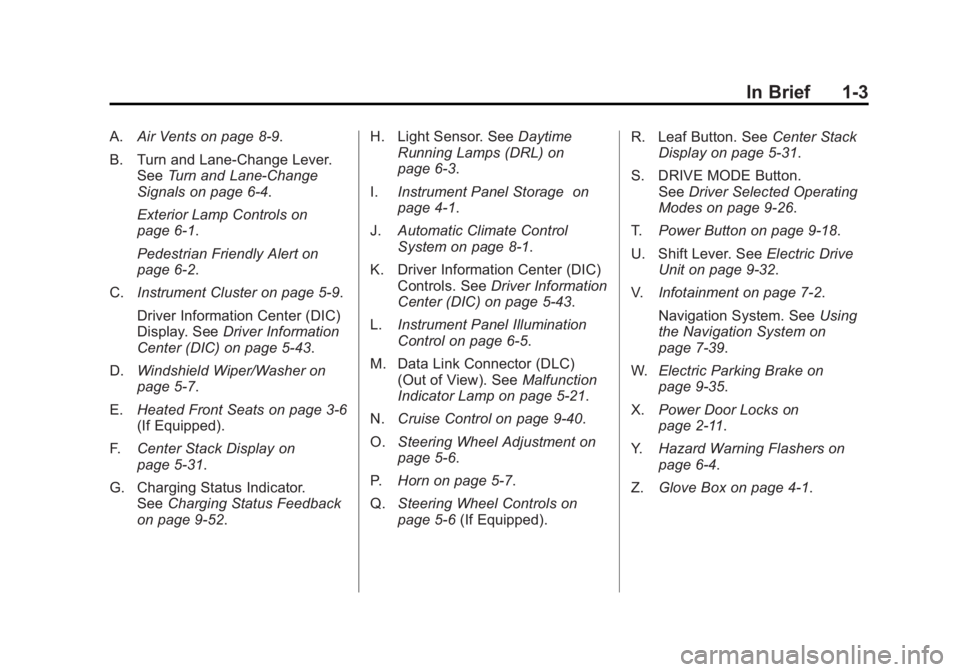
A.Air Vents on page 8‑9.
B. Turn and Lane‐Change Lever. See Turn and Lane-Change
Signals on page 6‑4.
Exterior Lamp Controls on
page 6‑1.
Pedestrian Friendly Alert on
page 6‑2.
C. Instrument Cluster on page 5‑9.
Driver Information Center (DIC)
Display. See Driver Information
Center (DIC) on page 5‑43.
D. Windshield Wiper/Washer on
page 5‑7.
E. Heated Front Seats on page 3‑6
(If Equipped).
F. Center Stack Display on
page 5‑31.
G. Charging Status Indicator. See Charging Status Feedback
on page 9‑52. H. Light Sensor. See
Daytime
Running Lamps (DRL) on
page 6‑3.
I. Instrument Panel Storage on
page 4‑1.
J. Automatic Climate Control
System on page 8‑1.
K. Driver Information Center (DIC) Controls. See Driver Information
Center (DIC) on page 5‑43.
L. Instrument Panel Illumination
Control on page 6‑5.
M. Data Link Connector (DLC) (Out of View). See Malfunction
Indicator Lamp on page 5‑21.
N. Cruise Control on page 9‑40.
O. Steering Wheel Adjustment on
page 5‑6.
P. Horn on page 5‑7.
Q. Steering Wheel Controls on
page 5‑6 (If Equipped). R. Leaf Button. See
Center Stack
Display on page 5‑31.
S. DRIVE MODE Button. See Driver Selected Operating
Modes on page 9‑26.
T. Power Button on page 9‑18.
U. Shift Lever. See Electric Drive
Unit on page 9‑32.
V. Infotainment on page 7‑2.
Navigation System. See Using
the Navigation System on
page 7‑39.
W. Electric Parking Brake on
page 9‑35.
X. Power Door Locks on
page 2‑11.
Y. Hazard Warning Flashers on
page 6‑4.
Z. Glove Box on page 4‑1.
Page 14 of 516
Black plate (8,1)Chevrolet Volt Owner Manual - 2011
1-8 In Brief
Heated Seats
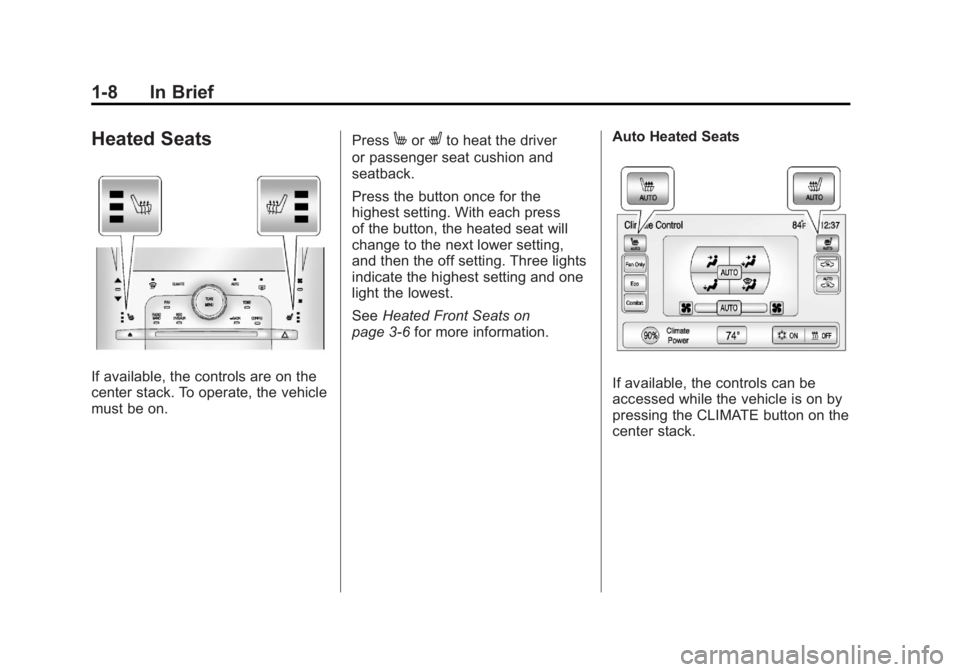
If available, the controls are on the
center stack. To operate, the vehicle
must be on.Press
MorLto heat the driver
or passenger seat cushion and
seatback.
Press the button once for the
highest setting. With each press
of the button, the heated seat will
change to the next lower setting,
and then the off setting. Three lights
indicate the highest setting and one
light the lowest.
See Heated Front Seats on
page 3‑6 for more information. Auto Heated Seats
If available, the controls can be
accessed while the vehicle is on by
pressing the CLIMATE button on the
center stack.
Page 15 of 516
Black plate (9,1)Chevrolet Volt Owner Manual - 2011
In Brief 1-9
Press the touch screenMAUTO or
LAUTO button. The button color
will change to green when this
feature is on.
When the vehicle is on, this feature
will automatically activate the
heated seats at the level required
by the vehicle's interior temperature.
The active high, medium, low, or off
heated seat level will be indicated
by the manual heated seat button
lights on the center stack. Use the
touch screen buttons or the manual
heated seat buttons on the center
stack to turn auto heated seats off.
See Heated Front Seats on
page 3‑6 for more information.
The heated seats can also be
programmed to come on during a
remote start. See “Remote Start
Auto Heat Seats” underVehicle
Personalization on page 5‑53 for
more information.
Head Restraint
Adjustment
Do not drive until the head restraints
for all occupants are installed and
adjusted properly.
To achieve a comfortable seating
position, change the seatback
recline angle as little as necessary
while keeping the seat and the
head restraint height in the proper
position.
For more information see Head
Restraints on page 3‑2 andSeat
Adjustment on page 3‑4.
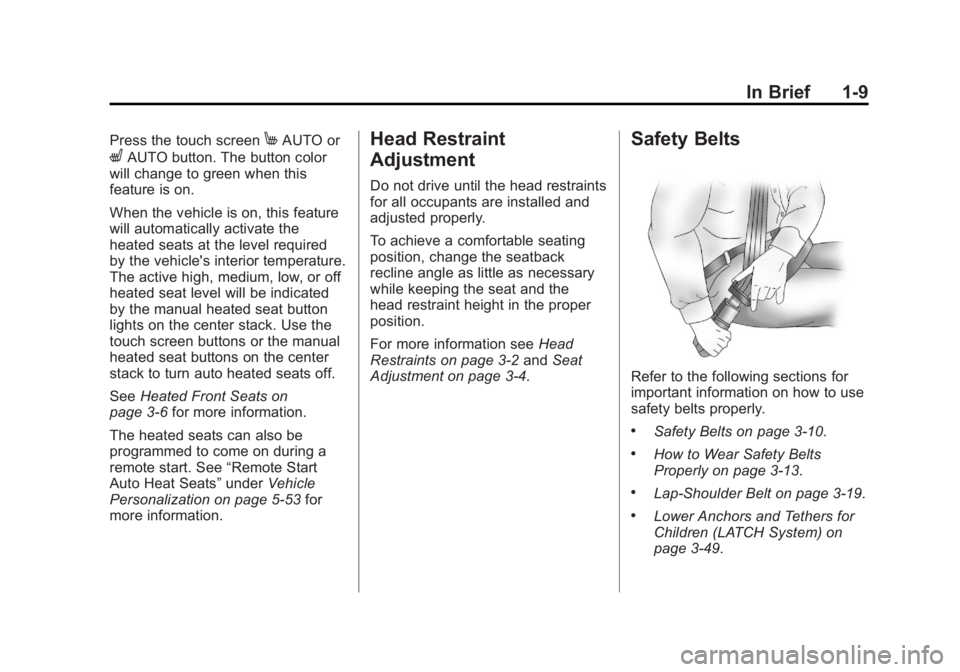
Safety Belts
Refer to the following sections for
important information on how to use
safety belts properly.
.Safety Belts on page 3‑10.
.How to Wear Safety Belts
Properly on page 3‑13.
.Lap-Shoulder Belt on page 3‑19.
.Lower Anchors and Tethers for
Children (LATCH System) on
page 3‑49.
Page 19 of 516
Black plate (13,1)Chevrolet Volt Owner Manual - 2011
In Brief 1-13
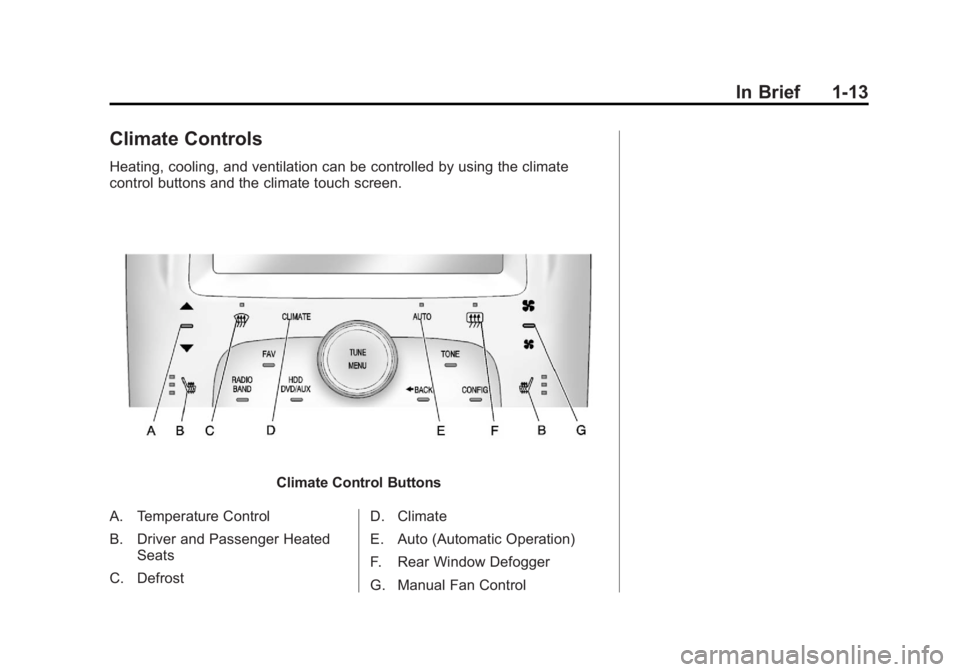
Climate Controls
Heating, cooling, and ventilation can be controlled by using the climate
control buttons and the climate touch screen.
Climate Control Buttons
A. Temperature Control
B. Driver and Passenger Heated Seats
C. Defrost D. Climate
E. Auto (Automatic Operation)
F. Rear Window Defogger
G. Manual Fan Control
Page 20 of 516
Black plate (14,1)Chevrolet Volt Owner Manual - 2011
1-14 In Brief
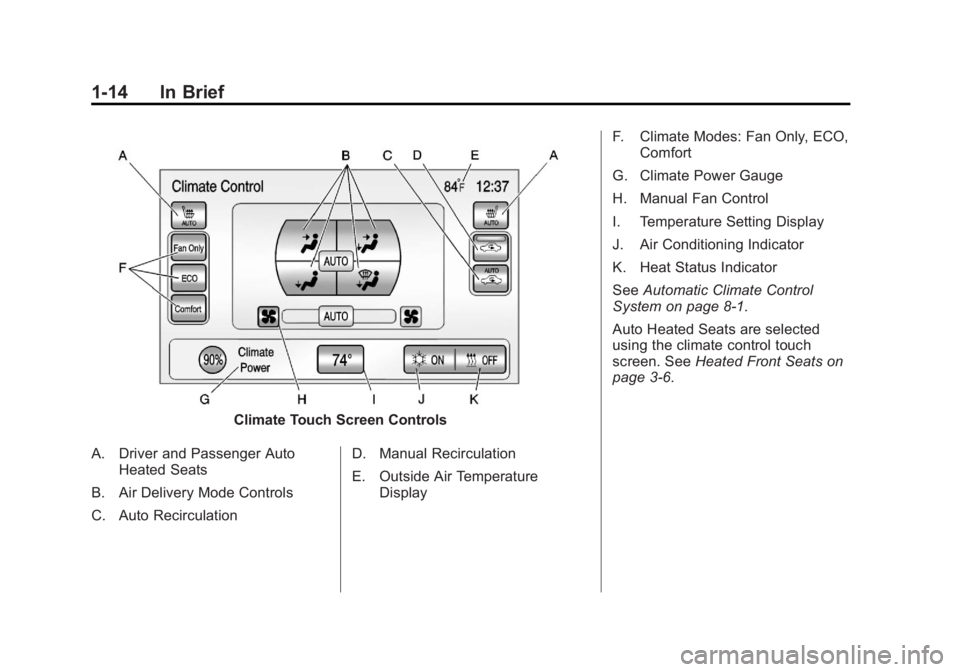
Climate Touch Screen Controls
A. Driver and Passenger Auto Heated Seats
B. Air Delivery Mode Controls
C. Auto Recirculation D. Manual Recirculation
E. Outside Air Temperature
Display F. Climate Modes: Fan Only, ECO,
Comfort
G. Climate Power Gauge
H. Manual Fan Control
I. Temperature Setting Display
J. Air Conditioning Indicator
K. Heat Status Indicator
See Automatic Climate Control
System on page 8‑1.
Auto Heated Seats are selected
using the climate control touch
screen. See Heated Front Seats on
page 3‑6.
Page 40 of 516
Black plate (4,1)Chevrolet Volt Owner Manual - 2011
2-4 Keys, Doors and Windows
7(Panic Alarm):Press and
release one time to locate the
vehicle. The exterior lamps flash
and the horn chirps three times.
Press and hold for three seconds
to sound the panic alarm. The horn
sounds and the turn signals flash for
30 seconds. Press again to cancel
the panic alarm.
B(Remote Start): PressQand
then press and hold
Bwithin
five seconds to start the vehicle's
heating or air conditioning systems
and rear window defogger from
outside the vehicle using the RKE
transmitter. See Remote Start on
page 2‑8 for more information.
The auto heated seats, if equipped,
can be programmed to come
on when the vehicle is remotely
started. See Vehicle Personalization
on page 5‑53 for more information.
Also see “Auto Heated Seats” under
Heated Front Seats on page 3‑6.
A(Charge Port Door): Press
to open the charge port door.
See Plug-In Charging on page 9‑49
for more information.
Programming Transmitters to
the Vehicle
Only RKE transmitters
programmed to this vehicle
will work. If a transmitter is lost
or stolen, a replacement can be
purchased and programmed through
your dealer. When the replacement
transmitter is programmed to this
vehicle, all remaining transmitters
must also be reprogrammed.
Any lost or stolen transmitters
will no longer work once the
new transmitter is programmed.
Each vehicle can have up to
five transmitters matched to it. Programming with a Recognized
Transmitter
A new transmitter can be
programmed to the vehicle
when there is one recognized
transmitter. For vehicles sold
in Canada, two recognized
transmitters are required to program
a new transmitter. To program,
the vehicle must be off and all
of the transmitters, both currently
recognized and new, must be in
the vehicle.
1. Place the recognized
transmitter(s) in the cupholder.
2. Insert the vehicle key of the new transmitter into the key lock
cylinder on the outside of the
driver door and turn the key to
the unlock position five times
within 10 seconds.
The Driver Information Center
(DIC) displays READY FOR
REMOTE #2, 3, 4 OR 5.
Page 44 of 516

Black plate (8,1)Chevrolet Volt Owner Manual - 2011
2-8 Keys, Doors and Windows
Remote Start
This feature starts the heating or
air conditioning systems and rear
window defogger from outside the
vehicle. Use remote start to heat or
cool the interior when the vehicle
plugged in to maximize the electric
range by utilizing electricity from the
electrical outlet. Normal operation
of the system will return after the
vehicle has been turned on.
B(Remote Start):This button is
on the RKE transmitter.
During remote start:
.The climate control system
will typically default to the last
climate settings. If Fan Off or
Fan Only were selected, the
air conditioning or heat will turn
on as needed. See Automatic
Climate Control System on
page 8‑1 for more information.
.If the vehicle has heated
seats, and this feature has
been enabled through vehicle
personalization, the heated
seats will turn on during
colder outside temperatures.
See“Remote Start Heated
Seats” underHeated Front
Seats on page 3‑6 andVehicle
Personalization on page 5‑53
for additional information.
.The rear defogger will turn
on during colder outside
temperatures.
.Selecting1during colder
outside temperatures before
shutting the vehicle off will
help windshield clearing.
.Shutting the vehicle off in ECO
Mode without
1selected will
minimize the impact to electric
range. Shutting the vehicle off
in other modes will maximize
heating or air conditioning.
.The engine may start to provide
energy for heating and cooling,
independent of the vehicle being
plugged in or completely
charged.
.Vehicle range may decrease
if the vehicle is not plugged
into an electrical outlet. If the
vehicle is plugged in, much of
the energy needed to support
this feature will be provided from
the utility, not from the high
voltage battery.
Laws in some communities
may restrict the use of features
that remotely start the engine.
For example, some laws may
require a person using the remote
start feature to have the vehicle in
view when doing so. Check local
regulations for any requirements
on remote starting of vehicles.
Page 57 of 516
Black plate (1,1)Chevrolet Volt Owner Manual - 2011
Seats and Restraints 3-1
Seats and
Restraints
Head Restraints
Head Restraints . . . . . . . . . . . . . . . 3-2
Front Seats
Seat Adjustment . . . . . . . . . . . . . . 3-4
Reclining Seatbacks . . . . . . . . . . 3-4
Heated Front Seats . . . . . . . . . . . 3-6
Rear Seats
Rear Seats . . . . . . . . . . . . . . . . . . . . 3-8
Safety Belts
Safety Belts . . . . . . . . . . . . . . . . . . 3-10
How to Wear Safety BeltsProperly . . . . . . . . . . . . . . . . . . . . 3-13
Lap-Shoulder Belt . . . . . . . . . . . 3-19
Safety Belt Use During Pregnancy . . . . . . . . . . . . . . . . . . 3-23
Safety Belt Extender . . . . . . . . . 3-23
Safety System Check . . . . . . . . 3-23
Safety Belt Care . . . . . . . . . . . . . 3-24
Replacing Safety Belt System Parts after a Crash . . . . . . . . . 3-24
Airbag System
Airbag System . . . . . . . . . . . . . . . 3-25
Where Are the Airbags? . . . . . 3-27
When Should an AirbagInflate? . . . . . . . . . . . . . . . . . . . . . 3-28
What Makes an Airbag
Inflate? . . . . . . . . . . . . . . . . . . . . . 3-30
How Does an Airbag Restrain? . . . . . . . . . . . . . . . . . . . 3-30
What Will You See after an Airbag Inflates? . . . . . . . . . . . . 3-31
Passenger Sensing System . . . . . . . . . . . . . . . . . . . . . 3-33
Servicing the Airbag-Equipped Vehicle . . . . . . . . . . . . . . . . . . . . . 3-38
Adding Equipment to the Airbag-Equipped Vehicle . . . 3-38
Airbag System Check . . . . . . . . 3-40
Replacing Airbag System Parts after a Crash . . . . . . . . . 3-40
Child Restraints
Older Children . . . . . . . . . . . . . . . 3-41
Infants and YoungChildren . . . . . . . . . . . . . . . . . . . . 3-43
Child Restraint Systems . . . . . 3-45
Where to Put the Restraint . . . 3-47
Lower Anchors and Tethers for Children (LATCH
System) . . . . . . . . . . . . . . . . . . . . 3-49
Replacing LATCH System Parts After a Crash . . . . . . . . . 3-57
Securing Child Restraints (Rear Seat) . . . . . . . . . . . . . . . . . 3-57
Securing Child Restraints (Front Passenger Seat) . . . . 3-60