brakes CHEVROLET VOLT 2012 1.G User Guide
[x] Cancel search | Manufacturer: CHEVROLET, Model Year: 2012, Model line: VOLT, Model: CHEVROLET VOLT 2012 1.GPages: 454, PDF Size: 7.89 MB
Page 271 of 454
Black plate (33,1)Chevrolet Volt Owner Manual - 2012
Driving and Operating 9-33
Brakes
Antilock Brake
System (ABS)
This vehicle has the Antilock Brake
System (ABS), an advanced
electronic braking system that helps
prevent a braking skid.
When propulsion is active and the
vehicle begins to drive away, ABS
checks itself. A momentary motor or
clicking noise might be heard while
this test is going on, and it might
even be noticed that the brake
pedal moves a little. This is normal.
If there is a problem with ABS, this
warning light stays on. SeeAntilock
Brake System (ABS) Warning Light
on page 5‑23. If driving safely on a wet road and it
becomes necessary to slam on the
brakes and continue braking to
avoid a sudden obstacle, a
computer senses that the wheels
are slowing down. If one of the
wheels is about to stop rolling, the
computer will separately work the
brakes at each wheel.
ABS can change the brake pressure
to each wheel, as required, faster
than any driver could. This can help
the driver steer around the obstacle
while braking hard.
As the brakes are applied, the
computer keeps receiving updates
on wheel speed and controls
braking pressure accordingly.
Remember: ABS does not change
the time needed to get a foot up to
the brake pedal or always decrease
stopping distance. If you get too
close to the vehicle in front of you,
there will not be enough time to
apply the brakes if that vehicle
suddenly slows or stops. Always
leave enough room up ahead to
stop, even with ABS.
Using ABS
Do not pump the brakes. Just hold
the brake pedal down firmly and let
ABS work. You might hear the ABS
pump or motor operating and feel
the brake pedal pulsate, but this is
normal.
Braking in Emergencies
ABS allows the driver to steer and
brake at the same time. In many
emergencies, steering can help
more than even the very best
braking.
Page 274 of 454
Black plate (36,1)Chevrolet Volt Owner Manual - 2012
9-36 Driving and Operating
Regenerative Braking
Regenerative braking takes some of
the energy from the moving vehicle
and turns it back into electrical
energy. This energy is then stored
back into the high voltage battery
system, contributing to increased
energy efficiency.
The hydraulic disc brakes work with
the regenerative braking to ensure
effective braking, such as when a
high braking demand is requested.
The braking system is computer
controlled and blends the
regenerative braking with the
conventional hydraulic disc brakes
to meet any requirements for
deceleration. The controllerinterprets the braking request and
uses regenerative braking,
conventional hydraulic braking, or a
combination of both as necessary.
Because the controller applies the
hydraulic brakes through its high
pressure accumulator, you may
occasionally hear the motor‐driven
pump when it recharges the system.
This is normal.
See
Warning Lights, Gauges, and
Indicators on page 5‑8 andDriver
Information Center (DIC) on
page 5‑45. In the event of a
controller problem, the brake pedal
may be harder to push and the
stopping distance may be longer.
Ride Control Systems
Traction Control
System (TCS)
The vehicle has a Traction Control
System (TCS) that limits wheel spin.
The system operates if it senses
that one or both of the drive wheels
are slipping or beginning to lose
traction. When this happens, the
system brakes the spinning wheel(s)
and/or reduces power to limit
wheel spin.
The system may be heard or felt
while it is working, but this is
normal.
To assist with directional control of
the vehicle, TCS automatically
comes on whenever the vehicle is
turned on. To limit wheel spin,
especially in slippery road
conditions, the system should
always be left on. But, TCS can be
turned off if needed.
Page 276 of 454
Black plate (38,1)Chevrolet Volt Owner Manual - 2012
9-38 Driving and Operating
Driving should be adjusted
accordingly. SeeTraction Off Light
on page 5‑24 for more information.
Press and release the TCS/ESC
button again to turn the system
back on.
It may be necessary to turn the
system off if the vehicle gets stuck
in sand, mud, or snow and rocking
the vehicle is required. See If the
Vehicle Is Stuck on page 9‑12 for
more information. See also Winter
Driving on page 9‑10 for information
on using TCS when driving in snowy
or icy conditions.
Adding non‐GM accessories can
affect vehicle performance. See
Accessories and Modifications on
page 10‑3 for more information.Electronic Stability
Control (ESC)
The vehicle has an Electronic
Stability Control system called
StabiliTrak. It is an advanced
computer-controlled system that
assists with directional control of the
vehicle in difficult driving conditions.
StabiliTrak comes on automatically
whenever the vehicle is turned on.
To assist with directional control of
the vehicle, the system should
always be left on.
The system may be heard or felt
while it is working, but this is
normal.
StabiliTrak activates when the
computer senses a difference
between the intended path and the
direction the vehicle is actually
traveling. StabiliTrak selectively
applies braking pressure to the
vehicle brakes to help steer the
vehicle in the intended direction. When the vehicle is started and
begins to move, the system
performs several diagnostic checks
to ensure there are no problems.
The system may be heard or felt
while it is working. This is normal
and does not mean there is a
problem with the vehicle. The
system should initialize before the
vehicle reaches 32 km/h (20 mph).
In some cases, it may take
approximately 3.2 km (2 mi) of
driving before the system initializes.
When StabiliTrak activates,
d
flashes on the instrument cluster.
This also occurs when traction
control is activated. This is normal.
Continue to steer the vehicle in the
intended direction. A noise may be
heard or vibration may be felt in the
brake pedal. This is normal.
Continue to steer the vehicle in the
intended direction. See
Traction
Control System (TCS)/StabiliTrak
®
Light on page 5‑25 for more
information.
Page 279 of 454
Black plate (41,1)Chevrolet Volt Owner Manual - 2012
Driving and Operating 9-41
SET/−(Set/Coast): Move the
thumbwheel down to set a speed
and activate cruise control or to
make the vehicle decelerate.
Setting Cruise Control
If the cruise button is on when not in
use, it could get bumped and go into
cruise when not desired. Keep the
cruise control button off when cruise
is not being used.
To set a speed:
1. Press
1to turn cruise
control on.
2. Get up to the speed desired.
3. Move the thumbwheel down toward SET/− and release it.
The desired set speed briefly
appears in the instrument
cluster.
4. Take your foot off the accelerator pedal.
When the brakes are applied, the
cruise control shuts off. Resuming a Set Speed
If the cruise control is set at a
desired speed and then the brakes
are applied, the cruise control is
disengaged without erasing the set
speed from memory. Once the
vehicle speed is about 40 km/h
(25 mph) or greater, move the
thumbwheel up toward RES/+
briefly and then release it. The
vehicle returns to the previously set
speed and stays there.
Increasing Speed While Using
Cruise Control
If the cruise control system is
already activated:
.Move the thumbwheel up toward
RES/+ and hold it until the
vehicle accelerates to the
desired speed, then release it.
.To increase the speed in small
amounts, move the thumbwheel
up toward RES/+ briefly and
then release it. Each time this is
done, the vehicle goes about
1.6 km/h (1 mph) faster.Reducing Speed While Using
Cruise Control
If the cruise control system is
already activated:
.Move the thumbwheel toward
SET/−
and hold until the desired
lower speed is reached, then
release it.
.To slow down in very small
amounts, move the thumbwheel
toward SET/− briefly. Each time
this is done, the vehicle goes
about 1.6 km/h (1 mph) slower.
Passing Another Vehicle While
Using Cruise Control
Use the accelerator pedal to
increase vehicle speed. When you
take your foot off the pedal, the
vehicle will slow down to the
previously set cruise control speed.
Page 280 of 454
Black plate (42,1)Chevrolet Volt Owner Manual - 2012
9-42 Driving and Operating
Using Cruise Control on Hills
How well the cruise control works
on hills depends upon the vehicle
speed, load, and the steepness of
the hills. When going up steep hills,
you might have to step on the
accelerator pedal to maintain the
vehicle speed. When going
downhill, you might have to brake or
shift to a lower gear to maintain the
vehicle speed. When the brakes are
applied the cruise control is
disengaged.Ending Cruise Control
There are three ways to end cruise
control:
.Step lightly on the brake pedal;
when cruise control disengages,
the indicator light will not be lit.
.Press*.
.Press1to turn the cruise
control system off completely.
The cruise control cannot be
resumed.
Erasing Speed Memory
The cruise control set speed is
erased from memory by pressing
1
or if the vehicle is turned off.
Object Detection
Systems
Ultrasonic Parking Assist
If available, the Ultrasonic Front and
Rear Parking Assist (UFRPA)
system assists the driver with
parking and avoiding objects.
UFRPA operates at speeds less
than 8 km/h (5 mph). The sensors
on the front and rear bumper detect
objects up to 1.2 m (4 ft) in front of
the vehicle, 2.5 m (8 ft) behind the
vehicle, and at least 25 cm (10 in)
off the ground.
Page 283 of 454
Black plate (45,1)Chevrolet Volt Owner Manual - 2012
Driving and Operating 9-45
.The park assist sensors are
covered by frost or ice. Frost or
ice can form around and behind
the sensors and may not always
be seen; this can occur after
washing the vehicle in cold
weather. The message may not
clear until the frost or ice has
melted.
.An object was hanging out of the
hatch during the last drive cycle.
Once the object is removed,
UFRPA will return to normal
operation.
.An object or cover is attached to
the front of the vehicle.
.The bumper is damaged. Take
the vehicle to your dealer to
repair the system.
.Other conditions, such as
vibrations from a jackhammer or
the compression of air brakes on
a very large truck, are affecting
system performance.
Rear Vision
Camera (RVC)
The vehicle may have a Rear Vision
Camera (RVC) system. Read this
entire section before using it.
The RVC system can assist the
driver when backing up by
displaying a view of the area behind
the vehicle.
{WARNING
The RVC system does not display
pedestrians, bicyclists, animals,
or any other object located
outside the camera's field of view,
below the bumper, or under the
vehicle.(Continued)
WARNING (Continued)
Do not back the vehicle using
only the RVC screen or by using
the screen during longer, higher
speed backing maneuvers,
or where there could be
cross-traffic. Perceived distances
may be different from actual
distances.
Failure to use proper care before
backing may result in injury,
death, or vehicle damage. Always
check before backing by checking
behind and around the vehicle.
Page 305 of 454
Black plate (1,1)Chevrolet Volt Owner Manual - 2012
Vehicle Care 10-1
Vehicle Care
General Information
General Information . . . . . . . . . . 10-2
California Proposition65 Warning . . . . . . . . . . . . . . . . . 10-2
California Perchlorate Materials Requirements . . . . 10-2
Accessories and Modifications . . . . . . . . . . . . . . . 10-3
Lifting the Vehicle . . . . . . . . . . . . 10-3
Vehicle Checks
Doing Your Own Service Work . . . . . . . . . . . . . . . 10-6
Hood . . . . . . . . . . . . . . . . . . . . . . . . 10-7
Engine Compartment Overview . . . . . . . . . . . . . . . . . . . 10-8
Engine Oil . . . . . . . . . . . . . . . . . . . 10-9
Engine Oil Life System . . . . . 10-12
Engine Air Cleaner/Filter . . . . 10-13
Cooling System (Engine) . . . 10-15
Cooling System (High Voltage Battery) . . . . . . . . . . . 10-16
Cooling System (Power Electronics and Charger
Modules) . . . . . . . . . . . . . . . . . . 10-17
Engine Coolant . . . . . . . . . . . . . 10-18 Engine Overheating . . . . . . . . 10-21
Washer Fluid . . . . . . . . . . . . . . . 10-21
Brakes . . . . . . . . . . . . . . . . . . . . . 10-22
Brake Fluid . . . . . . . . . . . . . . . . . 10-23
Battery . . . . . . . . . . . . . . . . . . . . . 10-25
Electric Drive Unit Shift Lock
Control Function Check . . . 10-27
Park Brake and P (Park) Mechanism Check . . . . . . . . 10-27
Wiper Blade Replacement . . . . . . . . . . . . . . 10-28
Headlamp Aiming
Headlamp Aiming . . . . . . . . . . 10-28
Bulb Replacement
Bulb Replacement . . . . . . . . . . 10-29
Halogen Bulbs . . . . . . . . . . . . . . 10-29
LED Lighting . . . . . . . . . . . . . . . 10-29
Headlamps . . . . . . . . . . . . . . . . . 10-29
Back-Up Lamps . . . . . . . . . . . . 10-31
License Plate Lamp . . . . . . . . 10-31
Replacement Bulbs . . . . . . . . . 10-32
Electrical System
High Voltage Devices andWiring . . . . . . . . . . . . . . . . . . . . . 10-32
Electrical System Overload . . . . . . . . . . . . . . . . . . 10-33 Engine Compartment Fuse
Block . . . . . . . . . . . . . . . . . . . . . 10-34
Instrument Panel Fuse Block (Left Side) . . . . . . . . . . . . . . . . 10-38
Instrument Panel Fuse Block
(Right Side) . . . . . . . . . . . . . . . 10-40
Rear Compartment Fuse Block . . . . . . . . . . . . . . . . . . . . . 10-42
Wheels and Tires
Tires . . . . . . . . . . . . . . . . . . . . . . . . 10-44
Winter Tires . . . . . . . . . . . . . . . . 10-45
Tire Sidewall Labeling . . . . . . 10-45
Tire Designations . . . . . . . . . . . 10-46
Tire Terminology andDefinitions . . . . . . . . . . . . . . . . 10-47
Tire Pressure . . . . . . . . . . . . . . . 10-50
Tire Pressure Monitor
System . . . . . . . . . . . . . . . . . . . 10-51
Tire Pressure Monitor Operation . . . . . . . . . . . . . . . . . 10-53
Tire Inspection . . . . . . . . . . . . . . 10-57
Tire Rotation . . . . . . . . . . . . . . . 10-57
When It Is Time for New Tires . . . . . . . . . . . . . . . . . . . . . . 10-58
Buying New Tires . . . . . . . . . . . 10-59
Different Size Tires and Wheels . . . . . . . . . . . . . . . . . . . 10-61
Page 307 of 454
Black plate (3,1)Chevrolet Volt Owner Manual - 2012
Vehicle Care 10-3
Accessories and
Modifications
Adding non‐dealer accessories or
making modifications to the vehicle
can affect vehicle performance and
safety, including such things as
airbags, braking, stability, ride and
handling, emissions systems,
aerodynamics, durability, and
electronic systems like antilock
brakes, traction control, and stability
control. These accessories or
modifications could even cause
malfunction or damage not covered
by the vehicle warranty.
Damage to vehicle components
resulting from modifications or the
installation or use of non‐GM
certified parts, including control
module or software modifications, is
not covered under the terms of the
vehicle warranty and may affect
remaining warranty coverage for
affected parts.GM Accessories are designed to
complement and function with other
systems on the vehicle. See your
dealer to accessorize the vehicle
using genuine GM Accessories
installed by a dealer technician.
Also, see
Adding Equipment to the
Airbag-Equipped Vehicle on
page 3‑31.
Lifting the Vehicle
This vehicle can be lifted with a
hoist or a service jack. Do not use
any other type of jack to lift the
vehicle.
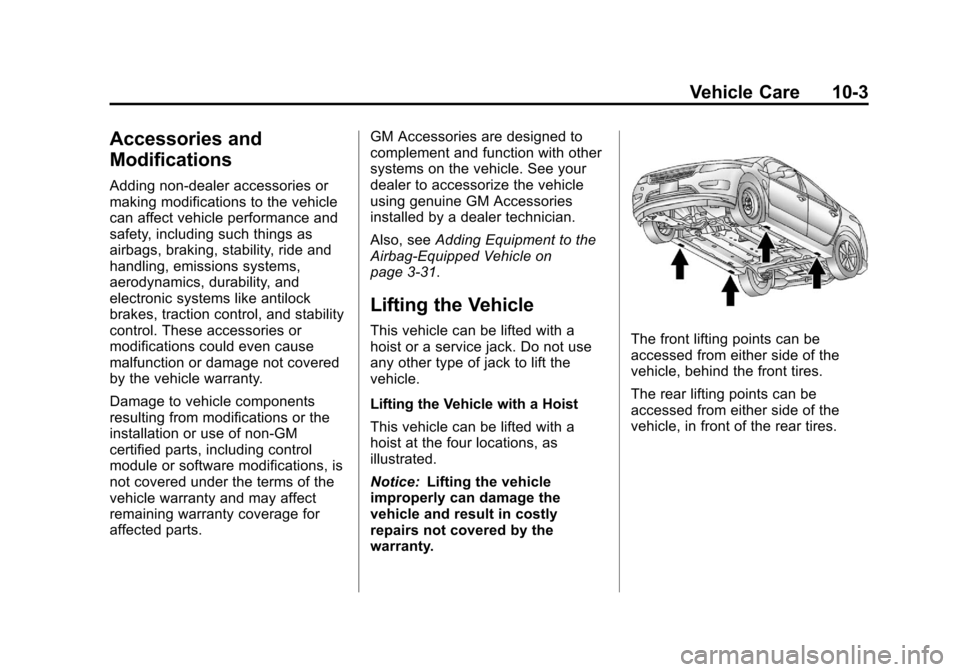
Lifting the Vehicle with a Hoist
This vehicle can be lifted with a
hoist at the four locations, as
illustrated.
Notice: Lifting the vehicle
improperly can damage the
vehicle and result in costly
repairs not covered by the
warranty.The front lifting points can be
accessed from either side of the
vehicle, behind the front tires.
The rear lifting points can be
accessed from either side of the
vehicle, in front of the rear tires.
Page 313 of 454
Black plate (9,1)Chevrolet Volt Owner Manual - 2012
Vehicle Care 10-9
A. Engine Coolant Surge Tank andPressure Cap. See Engine
Coolant on page 10‑18.
B. Engine Air Cleaner/Filter on
page 10‑13.
C. Engine Oil Dipstick. See Engine
Oil on page 10‑9.
D. High Voltage Battery Coolant Reservoir and Pressure Cap.
See Cooling System (Engine)
on page 10‑15 orCooling
System (High Voltage Battery)
on page 10‑16 orCooling
System (Power Electronics and
Charger Modules) on
page 10‑17.
E. Engine Cover.
F. Engine Oil Fill Cap. See Engine
Oil on page 10‑9.
G. Power Electronics Coolant Reservoir and Pressure Cap.
See Cooling System (Engine)
on page 10‑15 orCooling
System (High Voltage Battery)
on page 10‑16 orCooling System (Power Electronics and
Charger Modules) on
page 10‑17.
H. Brake Fluid Reservoir. See “Brake Fluid” underBrakes on
page 10‑22.
I. High Voltage Cables (Orange Color).
J. Remote Positive (+) Terminal. See Jump Starting on
page 10‑75.
K. Power Electronics Module.
L. Windshield Washer Fluid Reservoir. See “Adding Washer
Fluid” under Washer Fluid on
page 10‑21.
M. Remote Negative (−) Terminal. See Jump Starting on
page 10‑75.
N. Engine Compartment Fuse
Block on page 10‑34.Engine Oil
To ensure proper engine
performance and long life, careful
attention must be paid to engine oil.
Following these simple, but
important steps will help protect
your investment:
.Always use engine oil approved
to the proper specification and of
the proper viscosity grade. See
“Selecting the Right Engine Oil”
in this section.
.Check the engine oil level
regularly and maintain the
proper oil level. See “Checking
Engine Oil” and“When to Add
Engine Oil” in this section.
.Change the engine oil at the
appropriate time. See Engine Oil
Life System on page 10‑12.
.Always dispose of engine oil
properly. See “What to Do with
Used Oil” in this section.
Page 326 of 454
Black plate (22,1)Chevrolet Volt Owner Manual - 2012
10-22 Vehicle Care
Notice
.When using concentrated
washer fluid, follow the
manufacturer's instructions
for adding water.
.Do not mix water with
ready-to-use washer fluid.
Water can cause the solution
to freeze and damage the
washer fluid tank and other
parts of the washer system.
Also, water does not clean as
well as washer fluid.
.Fill the washer fluid tank only
three-quarters full when it is
very cold. This allows for
fluid expansion if freezing
occurs, which could damage
the tank if it is
completely full.
.Do not use engine coolant
(antifreeze) in the windshield
washer. It can damage the
windshield washer system
and paint.
Brakes
This vehicle has disc brakes. Disc
brake pads have built-in wear
indicators that make a high-pitched
warning sound when the brake pads
are worn and new pads are needed.
The sound can come and go or be
heard all the time the vehicle is
moving, except when applying the
brake pedal firmly.
{WARNING
The brake wear warning sound
means that soon the brakes will
not work well. That could lead to
a crash. When the brake wear
warning sound is heard, have the
vehicle serviced.
Notice: Continuing to drive with
worn-out brake pads could result
in costly brake repair. Some driving conditions or climates
can cause a brake squeal when the
brakes are first applied or lightly
applied. This does not mean
something is wrong with the brakes.
Properly torqued wheel nuts are
necessary to help prevent brake
pulsation. When tires are rotated,
inspect brake pads for wear and
evenly tighten wheel nuts in the
proper sequence to torque
specifications in
Capacities and
Specifications on page 12‑2.
Brake linings should always be
replaced as complete axle sets.