climate control CHEVROLET VOLT 2012 1.G User Guide
[x] Cancel search | Manufacturer: CHEVROLET, Model Year: 2012, Model line: VOLT, Model: CHEVROLET VOLT 2012 1.GPages: 454, PDF Size: 7.89 MB
Page 53 of 454
Black plate (17,1)Chevrolet Volt Owner Manual - 2012
Keys, Doors, and Windows 2-17
Exterior Mirrors
Convex Mirrors
{WARNING
A convex mirror can make things,
like other vehicles, look farther
away than they really are. If you
cut too sharply into the right lane,
you could hit a vehicle on the
right. Check the inside mirror or
glance over your shoulder before
changing lanes.
The passenger side mirror is convex
shaped. A convex mirror's surface is
curved so more can be seen from
the driver seat.
Power Mirrors
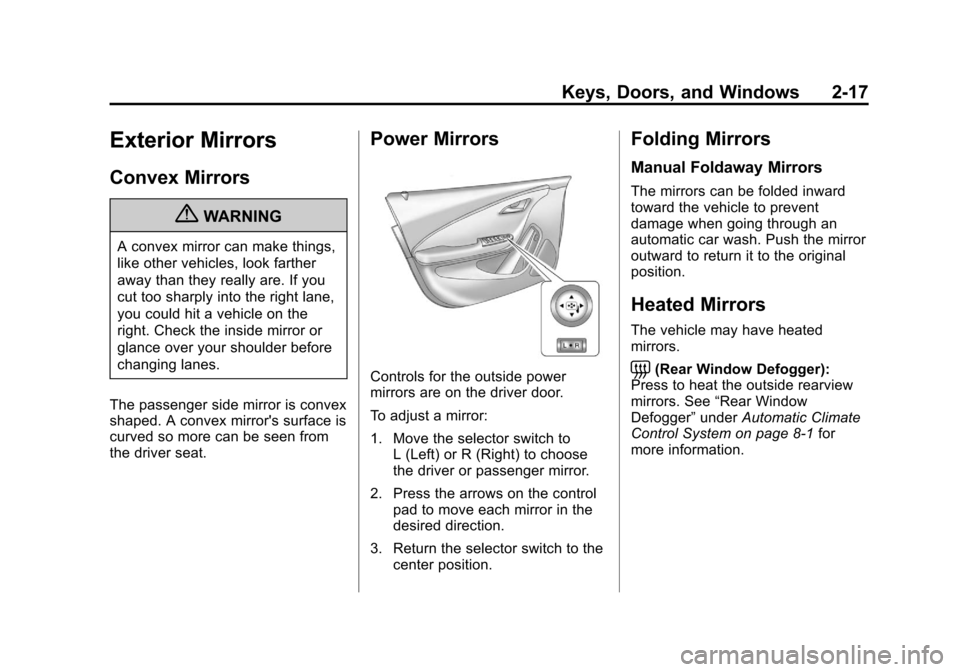
Controls for the outside power
mirrors are on the driver door.
To adjust a mirror:
1. Move the selector switch to L (Left) or R (Right) to choose
the driver or passenger mirror.
2. Press the arrows on the control pad to move each mirror in the
desired direction.
3. Return the selector switch to the center position.
Folding Mirrors
Manual Foldaway Mirrors
The mirrors can be folded inward
toward the vehicle to prevent
damage when going through an
automatic car wash. Push the mirror
outward to return it to the original
position.
Heated Mirrors
The vehicle may have heated
mirrors.
=(Rear Window Defogger):
Press to heat the outside rearview
mirrors. See “Rear Window
Defogger” underAutomatic Climate
Control System on page 8‑1 for
more information.
Page 65 of 454
Black plate (7,1)Chevrolet Volt Owner Manual - 2012
Seats and Restraints 3-7
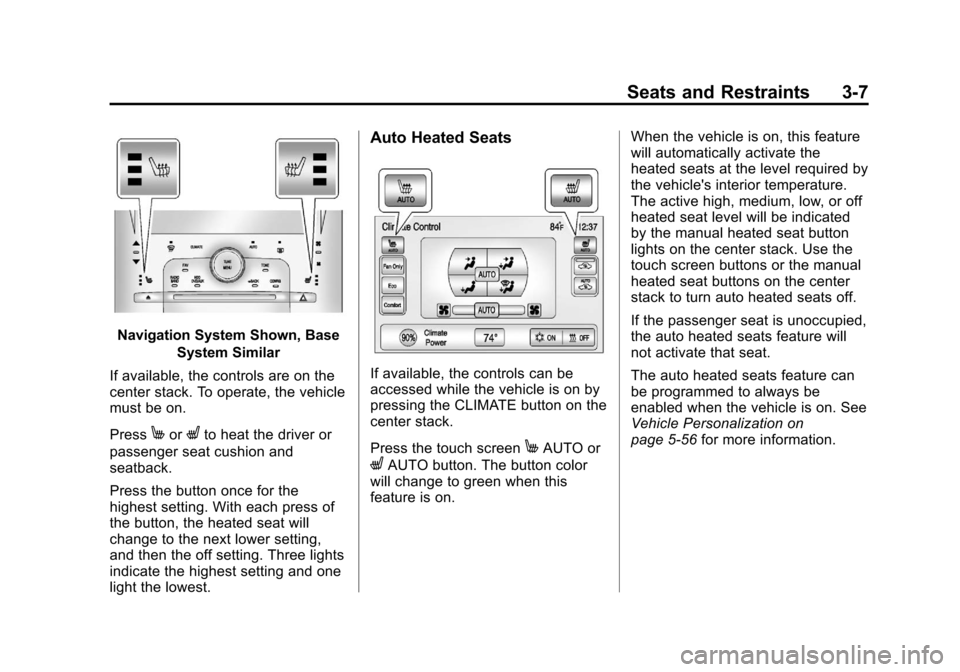
Navigation System Shown, BaseSystem Similar
If available, the controls are on the
center stack. To operate, the vehicle
must be on.
Press
MorLto heat the driver or
passenger seat cushion and
seatback.
Press the button once for the
highest setting. With each press of
the button, the heated seat will
change to the next lower setting,
and then the off setting. Three lights
indicate the highest setting and one
light the lowest.
Auto Heated Seats
If available, the controls can be
accessed while the vehicle is on by
pressing the CLIMATE button on the
center stack.
Press the touch screen
MAUTO or
LAUTO button. The button color
will change to green when this
feature is on. When the vehicle is on, this feature
will automatically activate the
heated seats at the level required by
the vehicle's interior temperature.
The active high, medium, low, or off
heated seat level will be indicated
by the manual heated seat button
lights on the center stack. Use the
touch screen buttons or the manual
heated seat buttons on the center
stack to turn auto heated seats off.
If the passenger seat is unoccupied,
the auto heated seats feature will
not activate that seat.
The auto heated seats feature can
be programmed to always be
enabled when the vehicle is on. See
Vehicle Personalization on
page 5‑56
for more information.
Page 120 of 454

Black plate (4,1)Chevrolet Volt Owner Manual - 2012
5-4 Instruments and Controls
A.Air Vents on page 8‑8.
B. Turn and Lane‐Change Lever. See Turn and Lane-Change
Signals on page 6‑4.
Exterior Lamp Controls on
page 6‑1.
Pedestrian Friendly Alert on
page 5‑6.
C. Instrument Cluster on page 5‑9.
Driver Information Center (DIC)
Display. See Driver Information
Center (DIC) on page 5‑45.
D. Windshield Wiper/Washer on
page 5‑6.
E. Heated Front Seats on page 3‑6
(If Equipped).
F. Center Stack Display on
page 5‑29.
G. Charging Status Indicator. See Charging Status Feedback on
page 9‑52. H. Light Sensor. See
Daytime
Running Lamps (DRL) on
page 6‑2.
I. Instrument Panel Storage on
page 4‑1.
J. Automatic Climate Control
System on page 8‑1.
K. Driver Information Center (DIC) Controls. See Driver Information
Center (DIC) on page 5‑45.
L. Instrument Panel Illumination
Control on page 6‑4.
M. Data Link Connector (DLC) (Out of View). See Malfunction
Indicator Lamp on page 5‑19.
N. Cruise Control on page 9‑40.
O. Steering Wheel Adjustment on
page 5‑5.
P. Horn on page 5‑6. Q.
Steering Wheel Controls on
page 5‑5 (If Equipped).
R. Leaf Button. See Center Stack
Display on page 5‑29.
S. DRIVE MODE Button. See Driver Selected Operating
Modes on page 9‑25.
T. Power Button on page 9‑18.
U. Shift Lever. See Electric Drive
Unit on page 9‑31.
V. Infotainment on page 7‑1.
Navigation System. See the
separate navigation system
manual.
W. Electric Parking Brake on
page 9‑34.
X. Power Door Locks on
page 2‑12.
Y. Hazard Warning Flashers on
page 6‑3.
Page 145 of 454
Black plate (29,1)Chevrolet Volt Owner Manual - 2012
Instruments and Controls 5-29
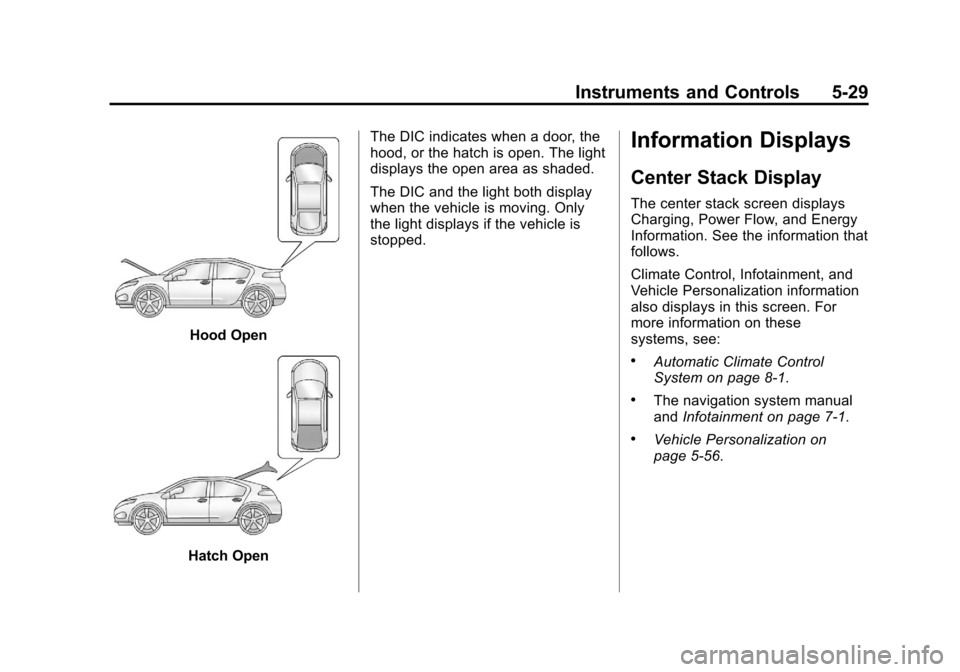
Hood Open
Hatch OpenThe DIC indicates when a door, the
hood, or the hatch is open. The light
displays the open area as shaded.
The DIC and the light both display
when the vehicle is moving. Only
the light displays if the vehicle is
stopped.
Information Displays
Center Stack Display
The center stack screen displays
Charging, Power Flow, and Energy
Information. See the information that
follows.
Climate Control, Infotainment, and
Vehicle Personalization information
also displays in this screen. For
more information on these
systems, see:
.Automatic Climate Control
System on page 8‑1.
.The navigation system manual
and
Infotainment on page 7‑1.
.Vehicle Personalization on
page 5‑56.
Page 160 of 454
Black plate (44,1)Chevrolet Volt Owner Manual - 2012
5-44 Instruments and Controls
Energy Efficiency
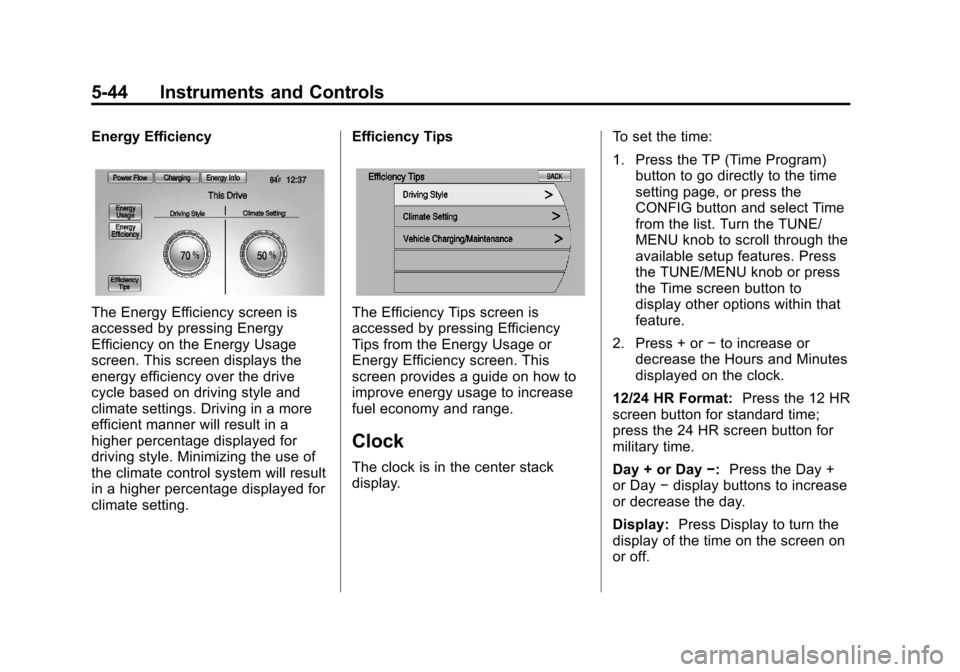
The Energy Efficiency screen is
accessed by pressing Energy
Efficiency on the Energy Usage
screen. This screen displays the
energy efficiency over the drive
cycle based on driving style and
climate settings. Driving in a more
efficient manner will result in a
higher percentage displayed for
driving style. Minimizing the use of
the climate control system will result
in a higher percentage displayed for
climate setting.Efficiency TipsThe Efficiency Tips screen is
accessed by pressing Efficiency
Tips from the Energy Usage or
Energy Efficiency screen. This
screen provides a guide on how to
improve energy usage to increase
fuel economy and range.
Clock
The clock is in the center stack
display.
To set the time:
1. Press the TP (Time Program)
button to go directly to the time
setting page, or press the
CONFIG button and select Time
from the list. Turn the TUNE/
MENU knob to scroll through the
available setup features. Press
the TUNE/MENU knob or press
the Time screen button to
display other options within that
feature.
2. Press + or −to increase or
decrease the Hours and Minutes
displayed on the clock.
12/24 HR Format: Press the 12 HR
screen button for standard time;
press the 24 HR screen button for
military time.
Day + or Day −:Press the Day +
or Day −display buttons to increase
or decrease the day.
Display: Press Display to turn the
display of the time on the screen on
or off.
Page 173 of 454
Black plate (57,1)Chevrolet Volt Owner Manual - 2012
Instruments and Controls 5-57
Selecting a Menu Option
Touch any one of the available
menu options on the touch screen
to select the option. A checkmark
next to the option indicates the
selected option.
Turning a Function On or Off
Touch the screen where the
available function is listed to turn it
on or off. A checkmark next to the
function indicates that the function
is on.Entering the
Personalization Menu
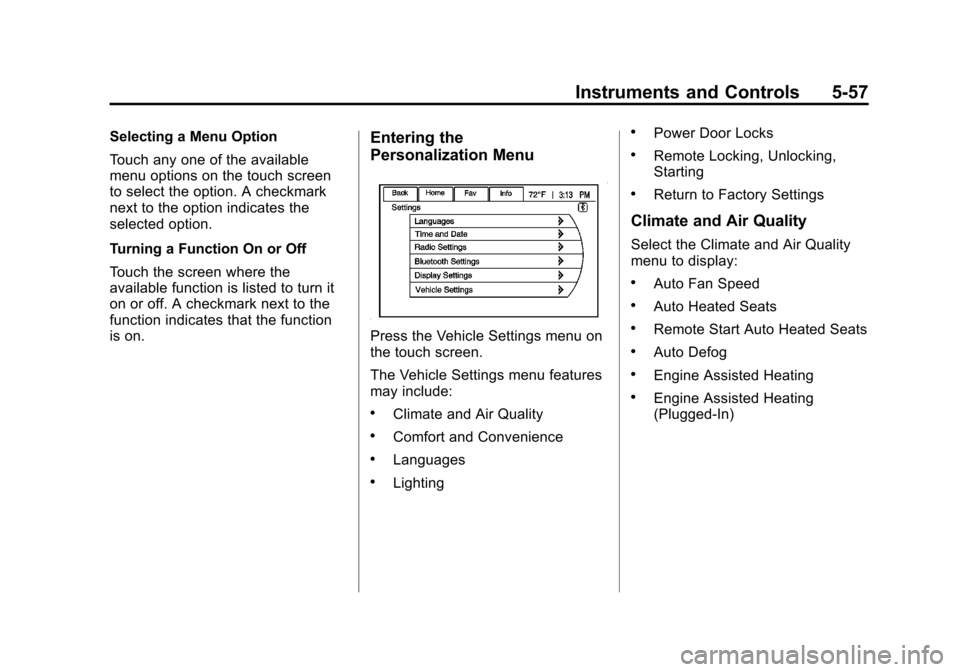
Press the Vehicle Settings menu on
the touch screen.
The Vehicle Settings menu features
may include:
.Climate and Air Quality
.Comfort and Convenience
.Languages
.Lighting
.Power Door Locks
.Remote Locking, Unlocking,
Starting
.Return to Factory Settings
Climate and Air Quality
Select the Climate and Air Quality
menu to display:
.Auto Fan Speed
.Auto Heated Seats
.Remote Start Auto Heated Seats
.Auto Defog
.Engine Assisted Heating
.Engine Assisted Heating
(Plugged‐In)
Page 174 of 454

Black plate (58,1)Chevrolet Volt Owner Manual - 2012
5-58 Instruments and Controls
Auto Fan Speed
This feature sets the automatic fan
speed to maintain the desired
interior temperature. This selection
is available on vehicles with the
automatic climate control system.
Choose a blower setting:
High:Increased speed.
Medium: Moderate speed.
Low: Reduced speed.
To select the auto fan speed:
1. Press the Vehicle Settings menu.
2. Select Climate and Air Quality.
3. Select Auto Fan Speed.
4. Select the fan speed.
5. Press Back to return to the previous menu. Auto Heated Seats
When enabled, the auto heated seat
buttons on the touch screen will be
highlighted. This feature will
automatically activate heated seats
at the level required by the interior
temperature. The auto heated seats
can be turned off by using the
heated seat buttons on the center
stack.
To turn the auto heated seats on
or off:
1. Press the Vehicle
Settings menu.
2. Select Climate and Air Quality.
3. Turn the auto heated seats feature on or off.
4. Press Back to return to the previous menu. Remote Start Auto Heated Seats
When on, this feature will turn the
heated seats on when using remote
start.
To turn the remote start auto heated
seats on or off:
1. Press the Vehicle
Settings menu.
2. Select Climate and Air Quality.
3. Turn the remote start auto heated seats feature on or off.
4. Press Back to return to the previous menu.
Auto Defog
When on and high humidity is
detected, the climate control system
will adjust the outside air, air
conditioner, or heat to decrease
fogging. The fan speed may
increase. When high humidity is no
longer detected, the system will
return to previous operation.
Page 175 of 454
Black plate (59,1)Chevrolet Volt Owner Manual - 2012
Instruments and Controls 5-59
To turn the auto defog on or off:
1. Press the VehicleSettings menu.
2. Select Climate and Air Quality.
3. Turn the auto defog feature on or off.
4. Press Back to return to the previous menu.
Engine Assisted Heating
If equipped, this feature selects the
outside temperature level at which
the engine may run to assist heating
in Electric Mode. A change in
selection will not take affect until
after the vehicle is first
powered down.
The Engine Assisted Heating
options are:
.At Cold Outside Temperatures
.At Very Cold Outside
Temperatures To select the outside temperature
level:
1. Press the Vehicle menu.
2. Select Climate and Air Quality.
3. Select the temperature level.
4. Press Back to return to the
previous menu.
Engine Assisted Heating
(Plugged‐In)
If equipped, this feature will enable
or disable Engine Assisted Heating
whenever the vehicle is plugged in.
A change in setting will not take
affect until after the vehicle is first
powered down.
The Engine Assisted Heating
options are:
.At Cold Outside Temperatures
.At Very Cold Outside
Temperatures To turn the Engine Assisted Heating
(Plugged‐In) on or off:
1. Press the Vehicle menu.
2. Select Climate and Air Quality.
3. Turn the Engine Assisted
Heating (Plugged‐In) feature on
or off.
4. Press Back to return to the previous menu.
Comfort and Convenience
Select the Comfort and
Convenience menu and the
following will be displayed:
.Chime Volume
.Button Chime
.Energy Summary Exit Pop‐up
.Charge Cord Theft Alert
.Charge Power Loss Alert
Page 231 of 454
Black plate (1,1)Chevrolet Volt Owner Manual - 2012
Climate Controls 8-1
Climate Controls
Climate Control Systems
Automatic Climate ControlSystem . . . . . . . . . . . . . . . . . . . . . . 8-1
Air Vents
Air Vents . . . . . . . . . . . . . . . . . . . . . . 8-8
Climate Control
Systems
Automatic Climate
Control System
The climate control buttons and the
touch screen are used to adjust the
heating, cooling, and ventilation. The vehicle may require the use of
an auxiliary heat source under
certain cold conditions. This
provides additional heating and
defrost capability obtained by
running the engine, even if the high
voltage battery is adequately
charged. Under these conditions,
the engine will start and use fuel.
Make sure there is fuel in the tank.
Do not allow the vehicle to remain in
extreme temperatures for long
periods without being driven or
being plugged in.
Page 232 of 454
Black plate (2,1)Chevrolet Volt Owner Manual - 2012
8-2 Climate Controls
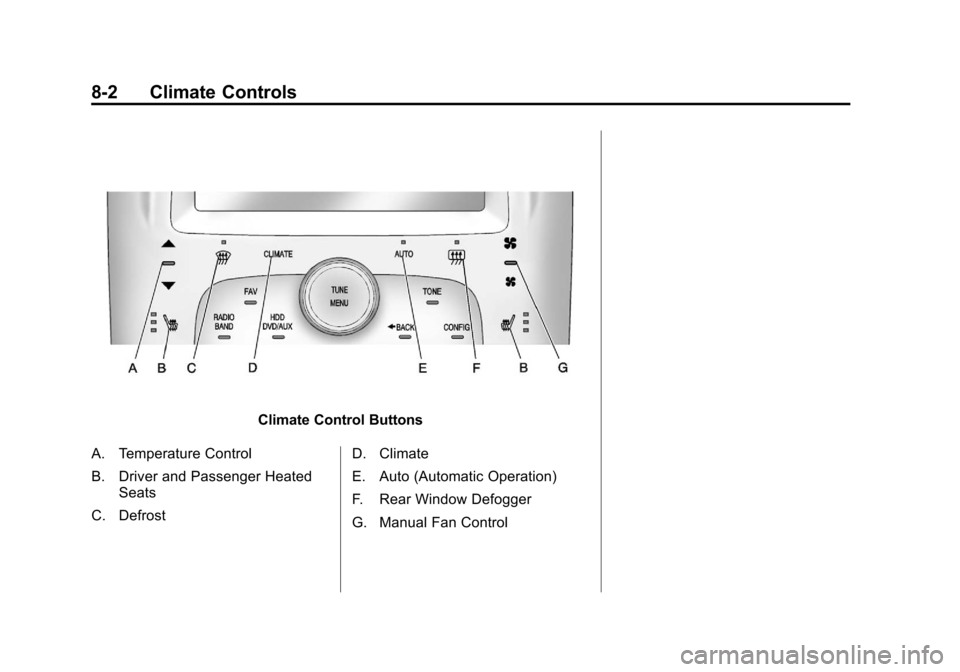
Climate Control Buttons
A. Temperature Control
B. Driver and Passenger Heated Seats
C. Defrost D. Climate
E. Auto (Automatic Operation)
F. Rear Window Defogger
G. Manual Fan Control