keyless entry CHEVROLET VOLT 2014 1.G User Guide
[x] Cancel search | Manufacturer: CHEVROLET, Model Year: 2014, Model line: VOLT, Model: CHEVROLET VOLT 2014 1.GPages: 394, PDF Size: 5.86 MB
Page 53 of 394
(19,1)Chevrolet VOLT Owner Manual (GMNA-Localizing-U.S./Canada-6014139) -
2014 - CRC - 9/16/13
Keys, Doors, and Windows 2-19
Express-Down/Up Windows
Windows with an express-down or
up feature allow the window to be
lowered or raised without holding
the switch. The driver window has
express-down and up; the
passenger and rear windows have
only express-down.
Pull a window switch up or press it
down all the way and release it. The
window will go up or down
automatically. Stop the window by
pressing or pulling the switch.
Express Window Anti-Pinch
Feature
If any object is in the path of the
window when the express-up is
active, the window will stop at the
obstruction and auto-reverse to a
preset factory position. Weather
conditions such as severe icing may
also cause the window to
auto-reverse. The window will return
to normal operation once the
obstruction or condition is removed.
Express Window Anti-Pinch
Override
In an emergency, the anti-pinch
feature can be overridden in a
supervised mode. Hold the window
switch all the way up to the second
position. The window will rise for as
long as the switch is held. Once the
switch is released, the express
mode is reactivated.
In this mode, the window can still
close on an object in its path. Use
care when using the override mode.
Programming the Power
Windows
Programming the power windows
may be necessary if the 12-volt
battery has been disconnected or
discharged.
To program the window:
1. Close all doors with the vehicleon, or when Retained Accessory
Power (RAP) is active. See
Retained Accessory Power
(RAP) on page 9-19. 2. Pull the window switch to
completely close the window.
Continue to hold the window
switch two seconds after the
window is closed.
3. Repeat for each window.
Remote Window Operation
The vehicle may have remote
operating windows that will open all
the windows from outside the
vehicle by pressing and holding
K
on the Remote Keyless Entry (RKE)
transmitter.
This feature can be disabled by a
dealer technician.
Page 105 of 394
(1,1)Chevrolet VOLT Owner Manual (GMNA-Localizing-U.S./Canada-6014139) -
2014 - CRC - 9/16/13
Storage 4-1
Storage
Storage Compartments
Storage Compartments . . . . . . . 4-1
Instrument Panel Storage . . . . . 4-1
Glove Box . . . . . . . . . . . . . . . . . . . . 4-2
Floor Console Storage . . . . . . . . 4-2
Umbrella Storage . . . . . . . . . . . . . 4-4
Additional Storage Features
Cargo Cover . . . . . . . . . . . . . . . . . . 4-4
Storage
Compartments
{Warning
Do not store heavy or sharp
objects in storage compartments.
In a crash, these objects may
cause the cover to open and
could result in injury.
Instrument Panel Storage
There is a storage compartment on
top of the instrument panel that
includes an auxiliary power outlet.
Inside is a transmitter slot for the
Remote Keyless Entry (RKE)
transmitter. SeeRemote Keyless
Entry (RKE) System Operation on
page 2-2.
Page 157 of 394
(49,1)Chevrolet VOLT Owner Manual (GMNA-Localizing-U.S./Canada-6014139) -
2014 - CRC - 9/16/13
Instruments and Controls 5-49
Key and Lock Messages
When programming new Remote
Keyless Entry (RKE) transmitters,
DIC messages display. SeeRemote
Keyless Entry (RKE) System
Operation on page 2-2.
NO REMOTE DETECTED
This message displays when the
RKE transmitter is not detected
while attempting to start the vehicle.
The transmitter battery may be
weak. See “Starting the Vehicle with
a Low Transmitter Battery” under
Remote Keyless Entry (RKE)
System Operation on page 2-2.
NO REMOTE DETECTED,
PRESS BRAKE TO RESTART
This message displays if the RKE
transmitter is no longer detected in
the vehicle. Press the brake pedal
and the POWER
Obutton to restart
the vehicle, or press the POWER
O
button without pressing the brake pedal to turn the vehicle off. If the
vehicle is turned off and a valid
transmitter is not available, the
vehicle will not restart.
REMINDER: KEY LEFT IN
VEHICLE
This message displays when
leaving the vehicle with the RKE
transmitter still inside.
REPLACE BATTERY IN
REMOTE KEY
This message displays when the
battery in the RKE transmitter needs
to be replaced.
SERVICE KEYLESS START
SYSTEM
This message displays when the
keyless start system needs service.
Take the vehicle to your dealer.
USE TRANSMITTER POCKET
TO START
This message displays when trying
to start the vehicle if an RKE
transmitter is not detected. The
transmitter battery may be weak.
See
“Starting the Vehicle with a Low
Transmitter Battery” underRemote
Keyless Entry (RKE) System
Operation on page 2-2.
Lamp Messages
AUTOMATIC LIGHT CONTROL
ON/OFF
A message will display when the
automatic light control has been
turned on or off.
CHECK LAMP or LAMP
FAILURE
Depending on the lamp, one of
these messages may display. See
Bulb Replacement on page 10-27.
Page 177 of 394
(5,1)Chevrolet VOLT Owner Manual (GMNA-Localizing-U.S./Canada-6014139) -
2014 - CRC - 9/16/13
Lighting 6-5
Reading Lamps
There are front and rear reading
lamps.
The front reading lamps are in the
overhead console.
#or$:Press to turn each lamp
on or off.
The rear reading lamps are in the
headliner.
Lighting Features
Entry Lighting
The headlamps, parking lamps,
taillamps, and the interior lights turn
on briefly at night when the Remote
Keyless Entry (RKE) transmitter
K
is pressed. The lights turn off
immediately when the POWER
O
button is pressed or automatically
after a brief period.
Exit Lighting
The headlamps, parking lamps,
taillamps, back-up lamps, and
license plate lamps come on when
the vehicle is turned off and the
driver door is opened. Some interior
lights also come on when the
vehicle is turned off. The exterior
lamps and interior lights remain on
after the door is closed for a brief
period and then turn off.
Page 187 of 394
(7,1)Chevrolet VOLT Owner Manual (GMNA-Localizing-U.S./Canada-6014139) -
2014 - CRC - 9/16/13
Climate Controls 8-7
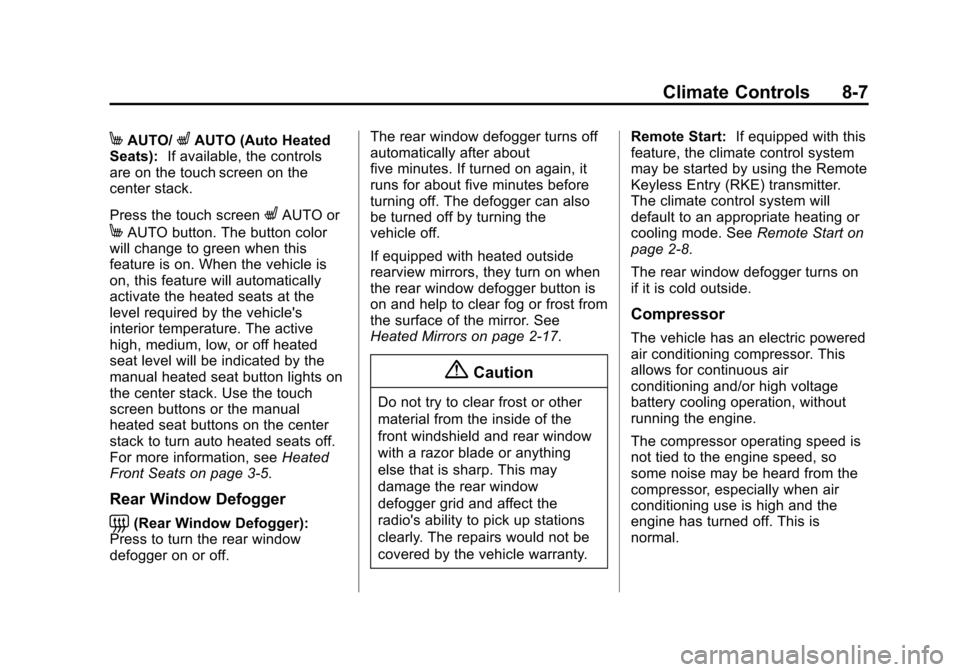
MAUTO/LAUTO (Auto Heated
Seats): If available, the controls
are on the touch screen on the
center stack.
Press the touch screen
LAUTO or
MAUTO button. The button color
will change to green when this
feature is on. When the vehicle is
on, this feature will automatically
activate the heated seats at the
level required by the vehicle's
interior temperature. The active
high, medium, low, or off heated
seat level will be indicated by the
manual heated seat button lights on
the center stack. Use the touch
screen buttons or the manual
heated seat buttons on the center
stack to turn auto heated seats off.
For more information, see Heated
Front Seats on page 3-5.
Rear Window Defogger
=(Rear Window Defogger):
Press to turn the rear window
defogger on or off. The rear window defogger turns off
automatically after about
five minutes. If turned on again, it
runs for about five minutes before
turning off. The defogger can also
be turned off by turning the
vehicle off.
If equipped with heated outside
rearview mirrors, they turn on when
the rear window defogger button is
on and help to clear fog or frost from
the surface of the mirror. See
Heated Mirrors on page 2-17.
{Caution
Do not try to clear frost or other
material from the inside of the
front windshield and rear window
with a razor blade or anything
else that is sharp. This may
damage the rear window
defogger grid and affect the
radio's ability to pick up stations
clearly. The repairs would not be
covered by the vehicle warranty.
Remote Start:
If equipped with this
feature, the climate control system
may be started by using the Remote
Keyless Entry (RKE) transmitter.
The climate control system will
default to an appropriate heating or
cooling mode. See Remote Start on
page 2-8.
The rear window defogger turns on
if it is cold outside.
Compressor
The vehicle has an electric powered
air conditioning compressor. This
allows for continuous air
conditioning and/or high voltage
battery cooling operation, without
running the engine.
The compressor operating speed is
not tied to the engine speed, so
some noise may be heard from the
compressor, especially when air
conditioning use is high and the
engine has turned off. This is
normal.
Page 204 of 394
(16,1)Chevrolet VOLT Owner Manual (GMNA-Localizing-U.S./Canada-6014139) -
2014 - CRC - 9/16/13
9-16 Driving and Operating
Warning (Continued)
.Never stack heavier
things, like suitcases,
inside the vehicle so that
some of them are above
the tops of the seats.
.Do not leave an
unsecured child restraint
in the vehicle.
.Secure loose items in the
vehicle.
.Do not leave a seat folded
down unless needed.
Starting and
Operating
New Vehicle Break-In
The vehicle does not require a
break-in period. Vehicle break-in is
performed during manufacturing.
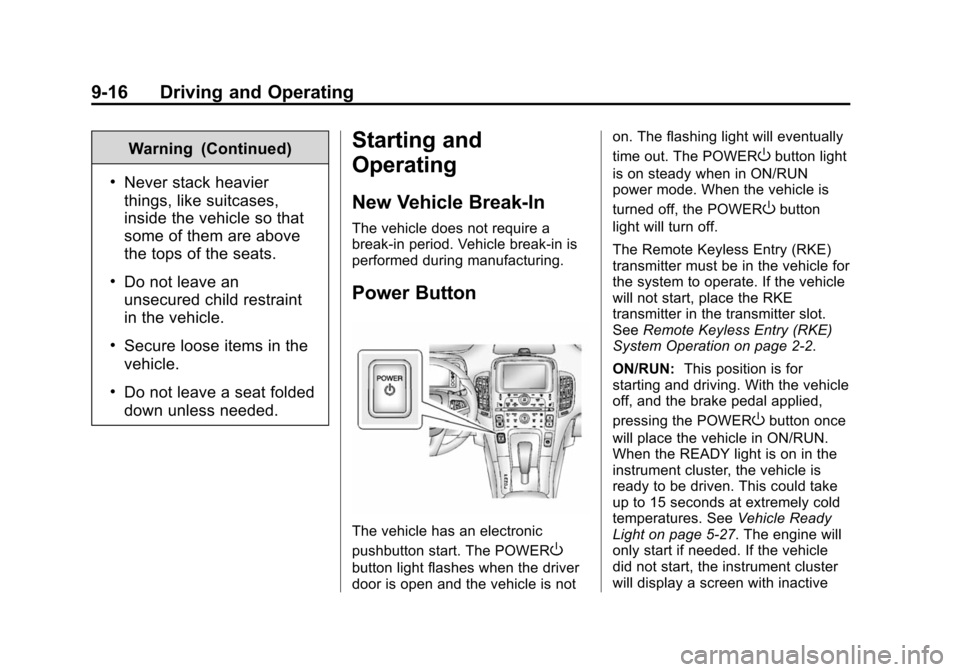
Power Button
The vehicle has an electronic
pushbutton start. The POWER
O
button light flashes when the driver
door is open and the vehicle is noton. The flashing light will eventually
time out. The POWER
Obutton light
is on steady when in ON/RUN
power mode. When the vehicle is
turned off, the POWER
Obutton
light will turn off.
The Remote Keyless Entry (RKE)
transmitter must be in the vehicle for
the system to operate. If the vehicle
will not start, place the RKE
transmitter in the transmitter slot.
See Remote Keyless Entry (RKE)
System Operation on page 2-2.
ON/RUN: This position is for
starting and driving. With the vehicle
off, and the brake pedal applied,
pressing the POWER
Obutton once
will place the vehicle in ON/RUN.
When the READY light is on in the
instrument cluster, the vehicle is
ready to be driven. This could take
up to 15 seconds at extremely cold
temperatures. See Vehicle Ready
Light on page 5-27. The engine will
only start if needed. If the vehicle
did not start, the instrument cluster
will display a screen with inactive
Page 206 of 394
(18,1)Chevrolet VOLT Owner Manual (GMNA-Localizing-U.S./Canada-6014139) -
2014 - CRC - 9/16/13
9-18 Driving and Operating
{Warning
Turning off the vehicle while
moving may disable the airbags.
While driving, only shut the
propulsion system off in an
emergency.
If the vehicle cannot be pulled over,
and must be shut off while driving,
press and hold the POWER
O
button for longer than two seconds,
or press twice in five seconds.
Starting and Stopping the
Vehicle
Starting Procedure
Move the shift lever to P (Park) or
N (Neutral). The propulsion system
will not start in any other position.
{Caution
Do not try to shift to P (Park) if the
vehicle is moving or the electric
drive unit could be damaged.
Shift to P (Park) only when the
vehicle is stopped.
{Caution
If you add electrical parts or
accessories, you could change
the way the vehicle operates. Any
resulting damage would not be
covered by the vehicle warranty.
See Add-On Electrical Equipment
on page 9-60.
The Remote Keyless Entry (RKE)
transmitter must be in the vehicle.
Press the brake pedal and press
and release the POWER
Obutton.
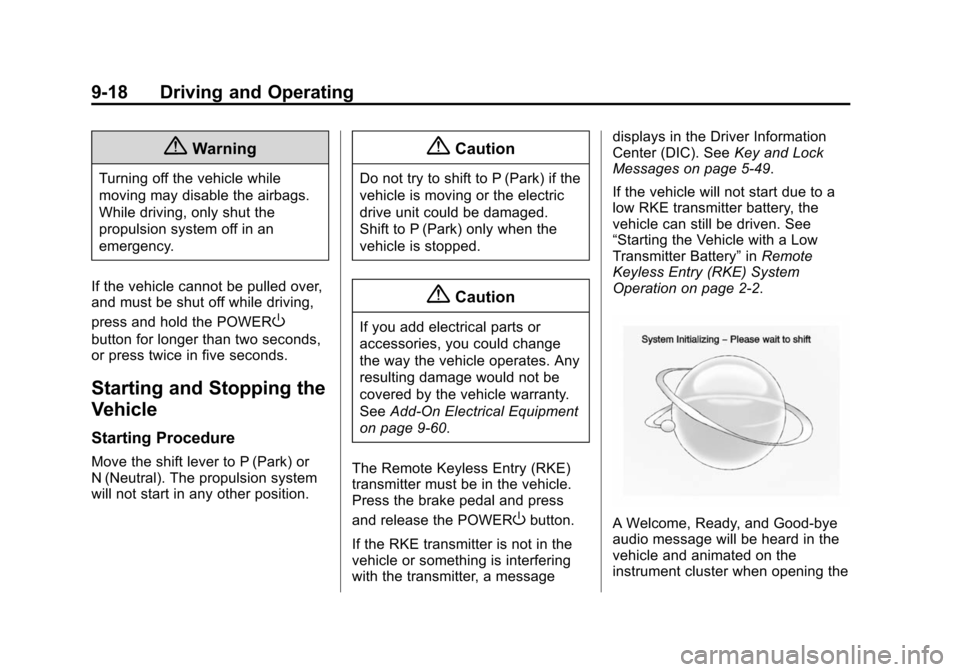
If the RKE transmitter is not in the
vehicle or something is interfering
with the transmitter, a message displays in the Driver Information
Center (DIC). See
Key and Lock
Messages on page 5-49.
If the vehicle will not start due to a
low RKE transmitter battery, the
vehicle can still be driven. See
“Starting the Vehicle with a Low
Transmitter Battery” inRemote
Keyless Entry (RKE) System
Operation on page 2-2.A Welcome, Ready, and Good-bye
audio message will be heard in the
vehicle and animated on the
instrument cluster when opening the
Page 250 of 394
(2,1)Chevrolet VOLT Owner Manual (GMNA-Localizing-U.S./Canada-6014139) -
2014 - CRC - 9/16/13
10-2 Vehicle Care
Different Size Tires andWheels . . . . . . . . . . . . . . . . . . . 10-57
Uniform Tire Quality Grading . . . . . . . . . . . . . . . . . . . 10-57
Wheel Alignment and Tire
Balance . . . . . . . . . . . . . . . . . . . 10-59
Wheel Replacement . . . . . . . . 10-59
Tire Chains . . . . . . . . . . . . . . . . . 10-60
If a Tire Goes Flat . . . . . . . . . . 10-61
Tire Sealant and Compressor Kit . . . . . . . . . . . 10-62
Storing the Tire Sealant and Compressor Kit . . . . . . . . . . . 10-69
Jump Starting
Jump Starting . . . . . . . . . . . . . . 10-69
Towing the Vehicle
Towing the Vehicle . . . . . . . . . 10-75
Recreational VehicleTowing . . . . . . . . . . . . . . . . . . . . 10-78
Appearance Care
Exterior Care . . . . . . . . . . . . . . . 10-80
Interior Care . . . . . . . . . . . . . . . . 10-85
Floor Mats . . . . . . . . . . . . . . . . . . 10-88
General Information
For service and parts needs, visit
your dealer. You will receive
genuine GM parts and GM-trained
and supported service people.
Genuine GM parts have one of
these marks:
California Proposition
65 Warning
Most motor vehicles, including this
one, contain and/or emit chemicals
known to the State of California to cause cancer and birth defects or
other reproductive harm. Engine
exhaust, many parts and systems,
many fluids, and some component
wear by-products contain and/or
emit these chemicals.
California Perchlorate
Materials Requirements
Certain types of automotive
applications, such as airbag
initiators, safety belt pretensioners,
and lithium batteries contained in
Remote Keyless Entry transmitters,
may contain perchlorate materials.
Special handling may be necessary.
For additional information, see
www.dtsc.ca.gov/hazardouswaste/
perchlorate.
Accessories and
Modifications
Adding non‐dealer accessories or
making modifications to the vehicle
can affect vehicle performance and
safety, including such things as
airbags, braking, stability, ride and
Page 284 of 394
(36,1)Chevrolet VOLT Owner Manual (GMNA-Localizing-U.S./Canada-6014139) -
2014 - CRC - 9/16/13
10-36 Vehicle Care
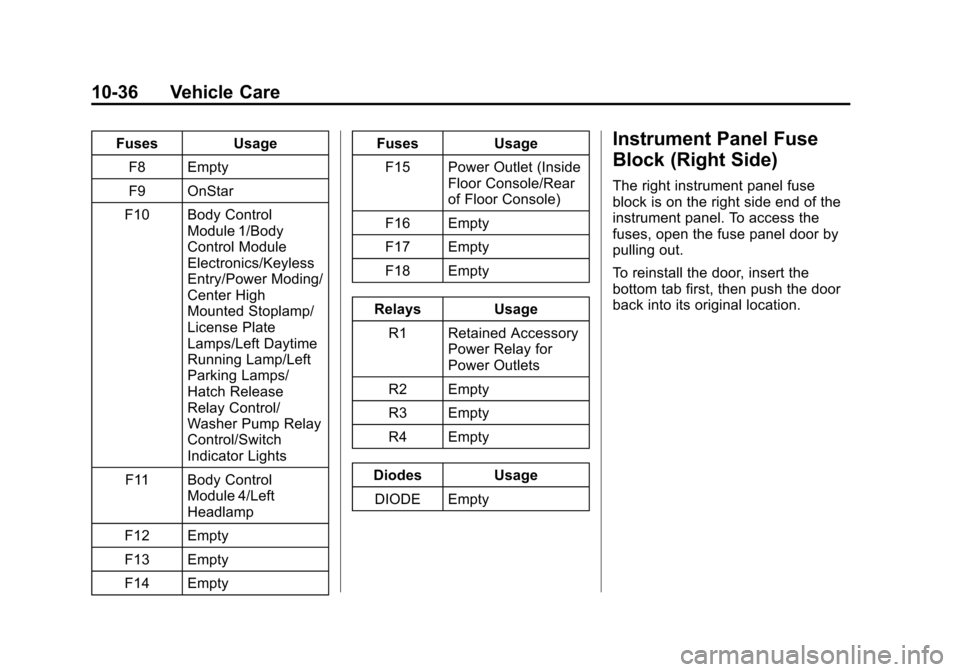
FusesUsage
F8 Empty
F9 OnStar
F10 Body Control Module 1/Body
Control Module
Electronics/Keyless
Entry/Power Moding/
Center High
Mounted Stoplamp/
License Plate
Lamps/Left Daytime
Running Lamp/Left
Parking Lamps/
Hatch Release
Relay Control/
Washer Pump Relay
Control/Switch
Indicator Lights
F11 Body Control Module 4/Left
Headlamp
F12 Empty
F13 Empty
F14 Empty Fuses
Usage
F15 Power Outlet (Inside Floor Console/Rear
of Floor Console)
F16 Empty
F17 Empty
F18 Empty
Relays Usage
R1 Retained Accessory Power Relay for
Power Outlets
R2 Empty
R3 Empty
R4 Empty
Diodes Usage DIODE EmptyInstrument Panel Fuse
Block (Right Side)
The right instrument panel fuse
block is on the right side end of the
instrument panel. To access the
fuses, open the fuse panel door by
pulling out.
To reinstall the door, insert the
bottom tab first, then push the door
back into its original location.
Page 371 of 394
(15,1)Chevrolet VOLT Owner Manual (GMNA-Localizing-U.S./Canada-6014139) -
2014 - CRC - 9/16/13
Customer Information 13-15
GM will not access this data or
share it with others except: with the
consent of the vehicle owner or,
if the vehicle is leased, with the
consent of the lessee; in response
to an official request by police or
similar government office; as part of
GM's defense of litigation through
the discovery process; or, as
required by law. Data that GM
collects or receives may also be
used for GM research needs or may
be made available to others for
research purposes, where a need is
shown and the data is not tied to a
specific vehicle or vehicle owner.
OnStar®
If the vehicle is equipped with
OnStar®and has an active
subscription, additional data may be
collected through the OnStar
system. This includes information
about the vehicle’s operation;
collisions involving the vehicle; the
use of the vehicle and its features;
and, in certain situations, the
location and approximate GPS speed of the vehicle. Refer to the
OnStar Terms and Conditions and
Privacy Statement on the OnStar
website.
Infotainment System
If the vehicle is equipped with a
navigation system as part of the
infotainment system, use of the
system may result in the storage of
destinations, addresses, telephone
numbers, and other trip information.
See the infotainment manual for
information on stored data and for
deletion instructions.
Radio Frequency
Identification (RFID)
RFID technology is used in some
vehicles for functions such as tire
pressure monitoring and ignition
system security, as well as in
connection with conveniences such
as Remote Keyless Entry (RKE)
transmitters for remote door locking/
unlocking and starting, and
in-vehicle transmitters for garage
door openers. RFID technology in
GM vehicles does not use or record
personal information or link with any
other GM system containing
personal information.
Radio Frequency
Statement
This vehicle has systems that
operate on a radio frequency that
comply with Part 15 of the Federal
Communications Commission (FCC)
rules and with Industry Canada
Standards RSS‐GEN/210/220/310.
Operation is subject to the following
two conditions:
1. The device may not cause
harmful interference.
2. The device must accept any interference received, including
interference that may cause
undesired operation of the
device.