steering wheel CHEVROLET VOLT 2014 1.G User Guide
[x] Cancel search | Manufacturer: CHEVROLET, Model Year: 2014, Model line: VOLT, Model: CHEVROLET VOLT 2014 1.GPages: 394, PDF Size: 5.86 MB
Page 109 of 394
(1,1)Chevrolet VOLT Owner Manual (GMNA-Localizing-U.S./Canada-6014139) -
2014 - CRC - 9/16/13
Instruments and Controls 5-1
Instruments and
Controls
Instrument Panel Overview
Instrument Panel Overview . . . . 5-3
Controls
Steering Wheel Adjustment . . . 5-5
Steering Wheel Controls . . . . . . 5-5
Horn . . . . . . . . . . . . . . . . . . . . . . . . . . 5-6
Pedestrian Friendly Alert . . . . . . 5-6
Windshield Wiper/Washer . . . . . 5-6
Power Outlets . . . . . . . . . . . . . . . . . 5-8
Warning Lights, Gauges, and
Indicators
Warning Lights, Gauges, andIndicators . . . . . . . . . . . . . . . . . . . . 5-8
Instrument Cluster . . . . . . . . . . . . 5-9
Speedometer . . . . . . . . . . . . . . . . 5-14
Odometer . . . . . . . . . . . . . . . . . . . . 5-14
Trip Odometer . . . . . . . . . . . . . . . 5-14
Compass . . . . . . . . . . . . . . . . . . . . 5-14
Battery Gauge (High Voltage) . . . . . . . . . . . . . . . . . . . . 5-14
Fuel Gauge . . . . . . . . . . . . . . . . . . 5-15
Driver Efficiency Gauge . . . . . . 5-15 Total Vehicle Range . . . . . . . . . 5-15
Safety Belt Reminders . . . . . . . 5-16
Airbag Readiness Light . . . . . . 5-17
Passenger Airbag Status
Indicator . . . . . . . . . . . . . . . . . . . . 5-17
Charging System Light (12-Volt Battery) . . . . . . . . . . . . 5-18
Malfunction Indicator Lamp . . . . . . . . . . . . . 5-19
Brake System Warning Light . . . . . . . . . . . . . . . . . . . . . . . 5-21
Electric Parking Brake Light . . . . . . . . . . . . . . . . . . . . . . . 5-22
Service Electric Parking Brake Light . . . . . . . . . . . . . . . . . . . . . . . 5-22
Antilock Brake System (ABS) Warning Light . . . . . . . . . . . . . . 5-22
Sport Mode Light . . . . . . . . . . . . 5-23
Mountain Mode Light . . . . . . . . 5-23
Hold Mode Light . . . . . . . . . . . . . 5-23
Lane Departure Warning (LDW) Light . . . . . . . . . . . . . . . . 5-24
Forward Collision Alert (FCA) Warning Light . . . . . . . . . . . . . . 5-24
Vehicle Ahead Indicator . . . . . . 5-24
Traction Off Light . . . . . . . . . . . . 5-24
StabiliTrak
®OFF Light . . . . . . . 5-25
Traction Control System (TCS)/StabiliTrak
®Light . . . . 5-25 Engine Coolant Temperature
Warning Light . . . . . . . . . . . . . . 5-25
Tire Pressure Light . . . . . . . . . . 5-26
Engine Oil Pressure Light . . . . 5-26
Low Fuel Warning Light . . . . . . 5-27
Security Light . . . . . . . . . . . . . . . . 5-27
Vehicle Ready Light . . . . . . . . . 5-27
High-Beam On Light . . . . . . . . . 5-27
Lamps On Reminder . . . . . . . . . 5-27
Cruise Control Light . . . . . . . . . 5-28
Door, Hood, or Hatch Open Light . . . . . . . . . . . . . . . . . . . . . . . 5-28
Information Displays
Center Stack Display . . . . . . . . 5-29
Power Flows . . . . . . . . . . . . . . . . . 5-29
Programmable Charging . . . . . 5-31
Energy Information . . . . . . . . . . 5-41
Clock . . . . . . . . . . . . . . . . . . . . . . . . 5-42
Driver InformationCenter (DIC) . . . . . . . . . . . . . . . 5-43
Vehicle Messages
Vehicle Messages . . . . . . . . . . . 5-45
Battery and ChargingMessages . . . . . . . . . . . . . . . . . . 5-45
Brake System Messages . . . . 5-46
Cruise Control Messages . . . . 5-47
Door Ajar Messages . . . . . . . . . 5-47
Page 112 of 394
(4,1)Chevrolet VOLT Owner Manual (GMNA-Localizing-U.S./Canada-6014139) -
2014 - CRC - 9/16/13
5-4 Instruments and Controls
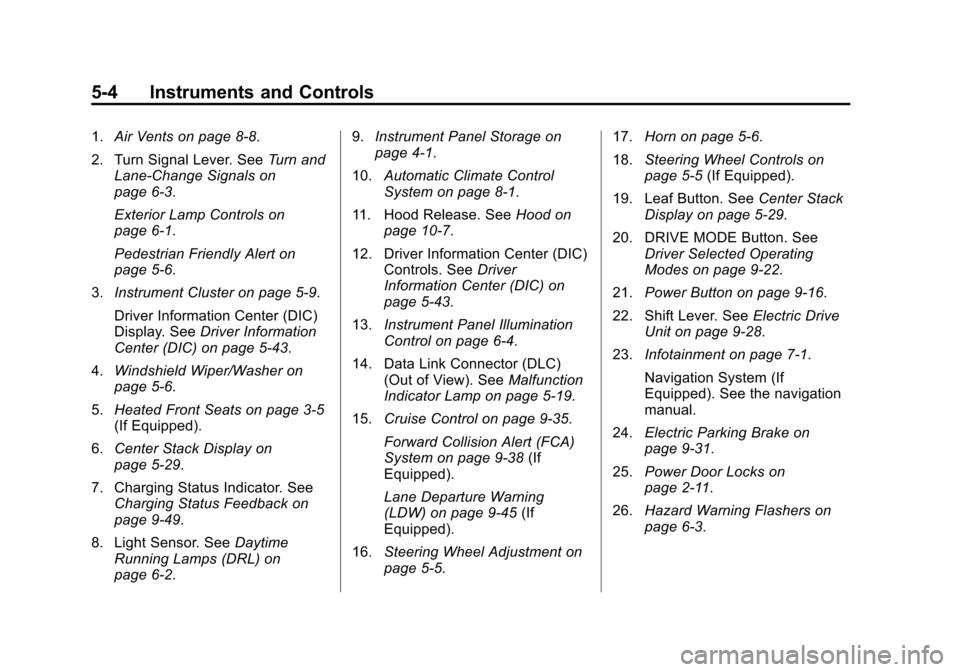
1.Air Vents on page 8-8.
2. Turn Signal Lever. See Turn and
Lane-Change Signals on
page 6-3.
Exterior Lamp Controls on
page 6-1.
Pedestrian Friendly Alert on
page 5-6.
3. Instrument Cluster on page 5-9.
Driver Information Center (DIC)
Display. See Driver Information
Center (DIC) on page 5-43.
4. Windshield Wiper/Washer on
page 5-6.
5. Heated Front Seats on page 3-5
(If Equipped).
6. Center Stack Display on
page 5-29.
7. Charging Status Indicator. See Charging Status Feedback on
page 9-49.
8. Light Sensor. See Daytime
Running Lamps (DRL) on
page 6-2. 9.
Instrument Panel Storage on
page 4-1.
10. Automatic Climate Control
System on page 8-1.
11. Hood Release. See Hood on
page 10-7.
12. Driver Information Center (DIC) Controls. See Driver
Information Center (DIC) on
page 5-43.
13. Instrument Panel Illumination
Control on page 6-4.
14. Data Link Connector (DLC) (Out of View). See Malfunction
Indicator Lamp on page 5-19.
15. Cruise Control on page 9-35.
Forward Collision Alert (FCA)
System on page 9-38 (If
Equipped).
Lane Departure Warning
(LDW) on page 9-45 (If
Equipped).
16. Steering Wheel Adjustment on
page 5-5. 17.
Horn on page 5-6.
18. Steering Wheel Controls on
page 5-5 (If Equipped).
19. Leaf Button. See Center Stack
Display on page 5-29.
20. DRIVE MODE Button. See Driver Selected Operating
Modes on page 9-22.
21. Power Button on page 9-16.
22. Shift Lever. See Electric Drive
Unit on page 9-28.
23. Infotainment on page 7-1.
Navigation System (If
Equipped). See the navigation
manual.
24. Electric Parking Brake on
page 9-31.
25. Power Door Locks on
page 2-11.
26. Hazard Warning Flashers on
page 6-3.
Page 113 of 394
(5,1)Chevrolet VOLT Owner Manual (GMNA-Localizing-U.S./Canada-6014139) -
2014 - CRC - 9/16/13
Instruments and Controls 5-5
Controls
Steering Wheel
Adjustment
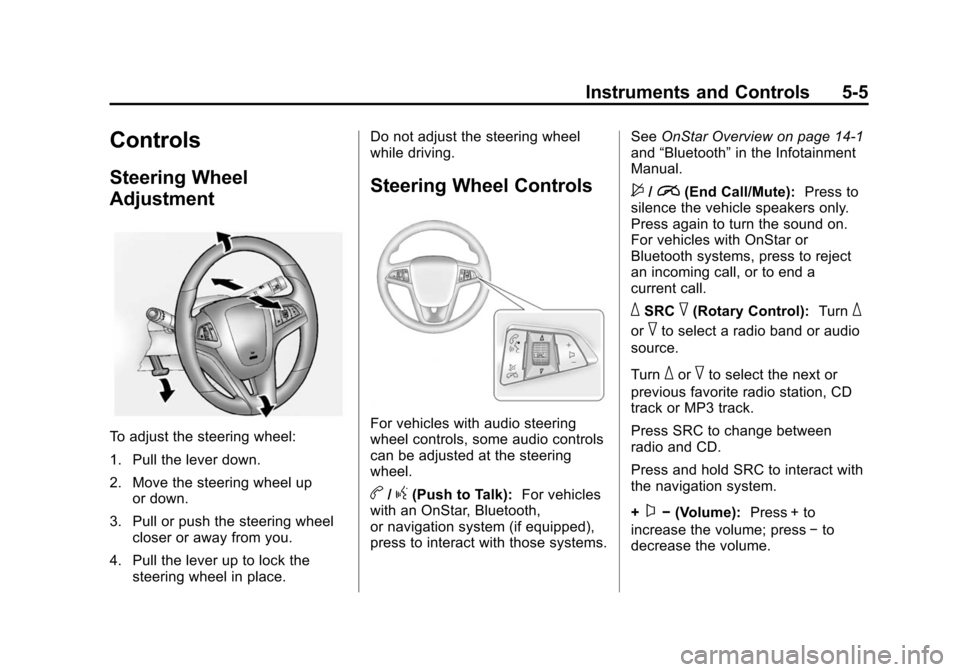
To adjust the steering wheel:
1. Pull the lever down.
2. Move the steering wheel upor down.
3. Pull or push the steering wheel closer or away from you.
4. Pull the lever up to lock the steering wheel in place. Do not adjust the steering wheel
while driving.
Steering Wheel Controls
For vehicles with audio steering
wheel controls, some audio controls
can be adjusted at the steering
wheel.
b/g(Push to Talk):
For vehicles
with an OnStar, Bluetooth,
or navigation system (if equipped),
press to interact with those systems. See
OnStar Overview on page 14-1
and “Bluetooth” in the Infotainment
Manual.
$/i(End Call/Mute): Press to
silence the vehicle speakers only.
Press again to turn the sound on.
For vehicles with OnStar or
Bluetooth systems, press to reject
an incoming call, or to end a
current call.
_SRC^(Rotary Control): Turn_
or^to select a radio band or audio
source.
Turn
_or^to select the next or
previous favorite radio station, CD
track or MP3 track.
Press SRC to change between
radio and CD.
Press and hold SRC to interact with
the navigation system.
+
x− (Volume): Press + to
increase the volume; press −to
decrease the volume.
Page 114 of 394
(6,1)Chevrolet VOLT Owner Manual (GMNA-Localizing-U.S./Canada-6014139) -
2014 - CRC - 9/16/13
5-6 Instruments and Controls
Horn
Pressaon the steering wheel pad
to sound the horn.
The pedestrian friendly alert
provides momentary soft-note horn
sound. See Pedestrian Friendly
Alert on page 5-6 for more
information.
Pedestrian Friendly Alert
Use this feature to alert people who
may not hear your vehicle
approaching.
The pedestrian friendly alert is only
available when the vehicle is not in
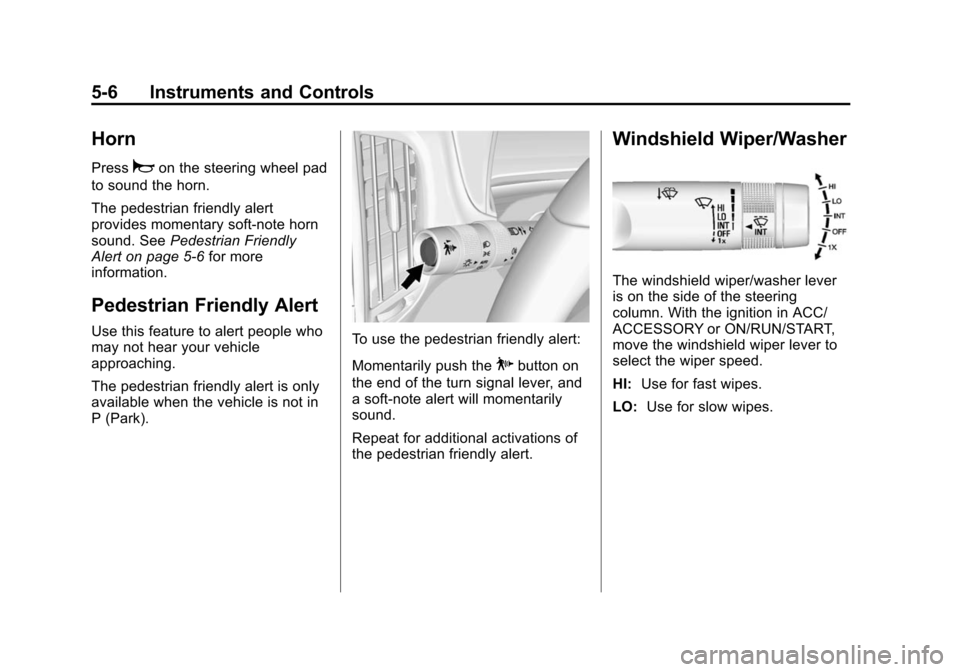
P (Park).To use the pedestrian friendly alert:
Momentarily push the
Pbutton on
the end of the turn signal lever, and
a soft-note alert will momentarily
sound.
Repeat for additional activations of
the pedestrian friendly alert.
Windshield Wiper/Washer
The windshield wiper/washer lever
is on the side of the steering
column. With the ignition in ACC/
ACCESSORY or ON/RUN/START,
move the windshield wiper lever to
select the wiper speed.
HI: Use for fast wipes.
LO: Use for slow wipes.
Page 121 of 394
(13,1)Chevrolet VOLT Owner Manual (GMNA-Localizing-U.S./Canada-6014139) -
2014 - CRC - 9/16/13
Instruments and Controls 5-13
34.Traction Control System (TCS)/
StabiliTrak®Light on
page 5-25.
35. Tire Pressure Light on
page 5-26.
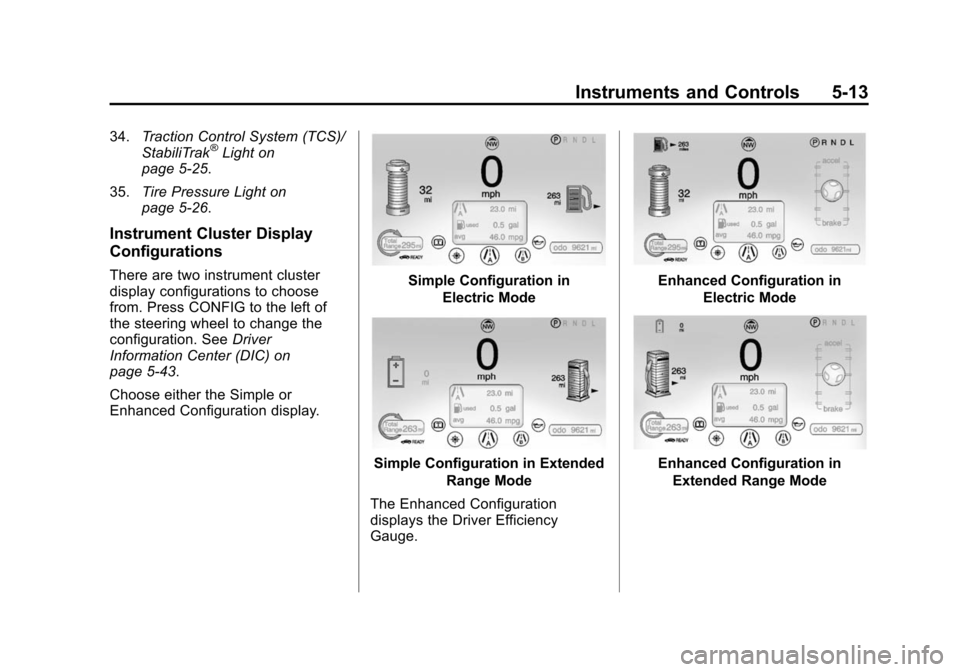
Instrument Cluster Display
Configurations
There are two instrument cluster
display configurations to choose
from. Press CONFIG to the left of
the steering wheel to change the
configuration. See Driver
Information Center (DIC) on
page 5-43.
Choose either the Simple or
Enhanced Configuration display.Simple Configuration in
Electric Mode
Simple Configuration in Extended Range Mode
The Enhanced Configuration
displays the Driver Efficiency
Gauge.
Enhanced Configuration in Electric Mode
Enhanced Configuration inExtended Range Mode
Page 129 of 394
(21,1)Chevrolet VOLT Owner Manual (GMNA-Localizing-U.S./Canada-6014139) -
2014 - CRC - 9/16/13
Instruments and Controls 5-21
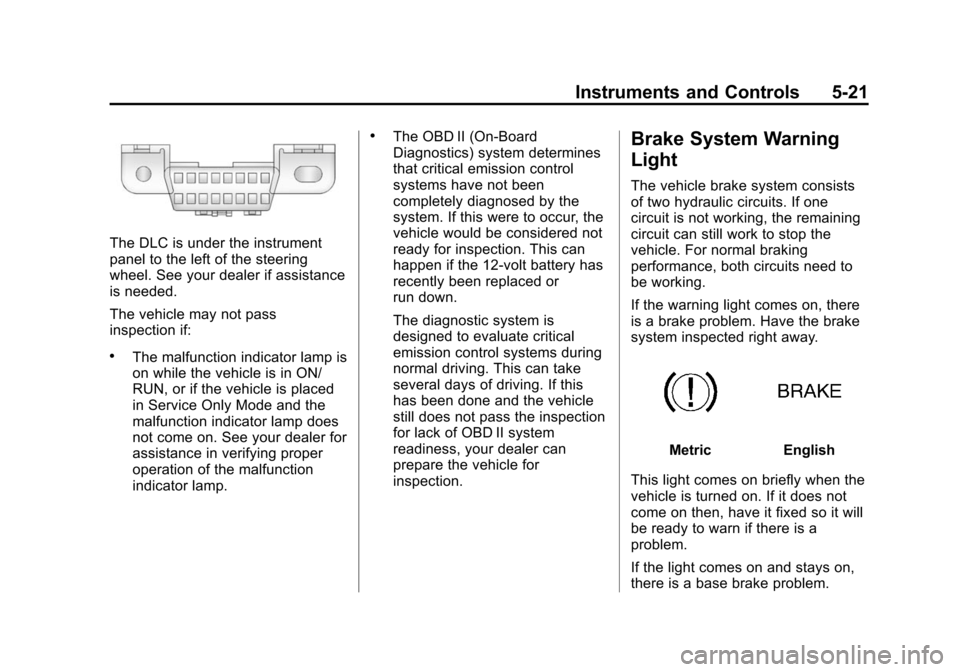
The DLC is under the instrument
panel to the left of the steering
wheel. See your dealer if assistance
is needed.
The vehicle may not pass
inspection if:
.The malfunction indicator lamp is
on while the vehicle is in ON/
RUN, or if the vehicle is placed
in Service Only Mode and the
malfunction indicator lamp does
not come on. See your dealer for
assistance in verifying proper
operation of the malfunction
indicator lamp.
.The OBD II (On-Board
Diagnostics) system determines
that critical emission control
systems have not been
completely diagnosed by the
system. If this were to occur, the
vehicle would be considered not
ready for inspection. This can
happen if the 12-volt battery has
recently been replaced or
run down.
The diagnostic system is
designed to evaluate critical
emission control systems during
normal driving. This can take
several days of driving. If this
has been done and the vehicle
still does not pass the inspection
for lack of OBD II system
readiness, your dealer can
prepare the vehicle for
inspection.Brake System Warning
Light
The vehicle brake system consists
of two hydraulic circuits. If one
circuit is not working, the remaining
circuit can still work to stop the
vehicle. For normal braking
performance, both circuits need to
be working.
If the warning light comes on, there
is a brake problem. Have the brake
system inspected right away.
MetricEnglish
This light comes on briefly when the
vehicle is turned on. If it does not
come on then, have it fixed so it will
be ready to warn if there is a
problem.
If the light comes on and stays on,
there is a base brake problem.
Page 151 of 394
(43,1)Chevrolet VOLT Owner Manual (GMNA-Localizing-U.S./Canada-6014139) -
2014 - CRC - 9/16/13
Instruments and Controls 5-43
from the list. Turn the TUNE/
MENU knob to scroll through the
available setup features. Press
the TUNE/MENU knob or press
the Time screen button to
display other options within that
feature.
2. Press + or −to increase or
decrease the Hours and Minutes
displayed on the clock.
If auto timing is set, the time
displayed on the clock may not
update immediately when driving
into a new time zone.
12/24 HR Format: Press the 12 HR
screen button for standard time;
press the 24 HR screen button for
military time.
Day + or Day −:Press the Day +
or Day −display buttons to increase
or decrease the day.
Display: Press Display to turn the
display of the time on the screen on
or off.Driver Information
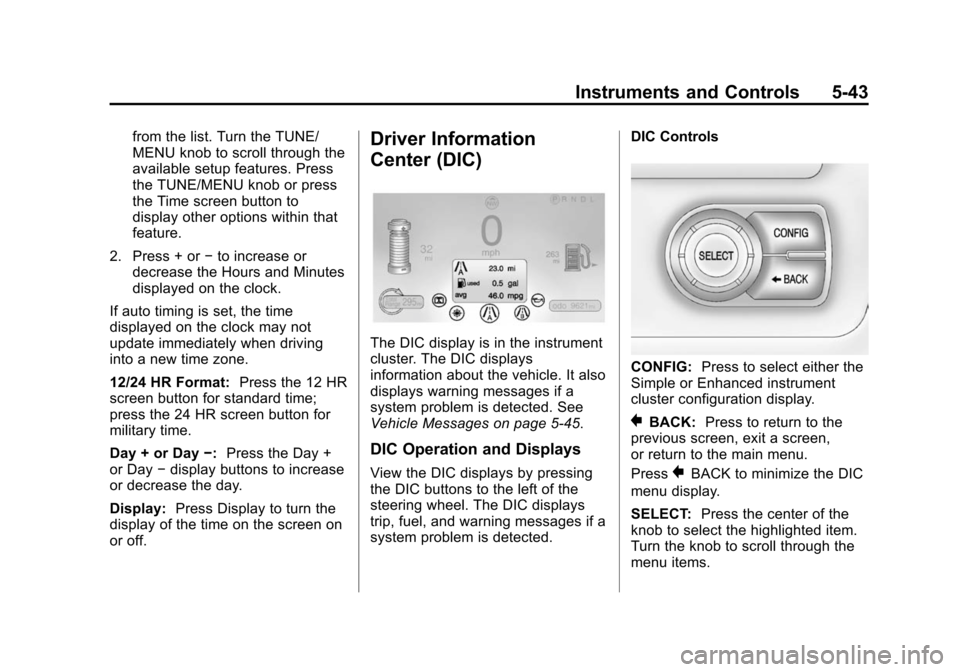
Center (DIC)
The DIC display is in the instrument
cluster. The DIC displays
information about the vehicle. It also
displays warning messages if a
system problem is detected. See
Vehicle Messages on page 5-45.
DIC Operation and Displays
View the DIC displays by pressing
the DIC buttons to the left of the
steering wheel. The DIC displays
trip, fuel, and warning messages if a
system problem is detected. DIC Controls
CONFIG:
Press to select either the
Simple or Enhanced instrument
cluster configuration display.
}BACK: Press to return to the
previous screen, exit a screen,
or return to the main menu.
Press
}BACK to minimize the DIC
menu display.
SELECT: Press the center of the
knob to select the highlighted item.
Turn the knob to scroll through the
menu items.
Page 176 of 394
(4,1)Chevrolet VOLT Owner Manual (GMNA-Localizing-U.S./Canada-6014139) -
2014 - CRC - 9/16/13
6-4 Lighting
If after signaling a turn or lane
change, the arrow flashes rapidly or
does not come on, a signal bulb
may be burned out.
Have any burned out bulbs
replaced. If a bulb is not burned out,
check the fuse. SeeInstrument
Panel Fuse Block (Left Side) on
page 10-35 orInstrument Panel
Fuse Block (Right Side) on
page 10-36.Interior Lighting
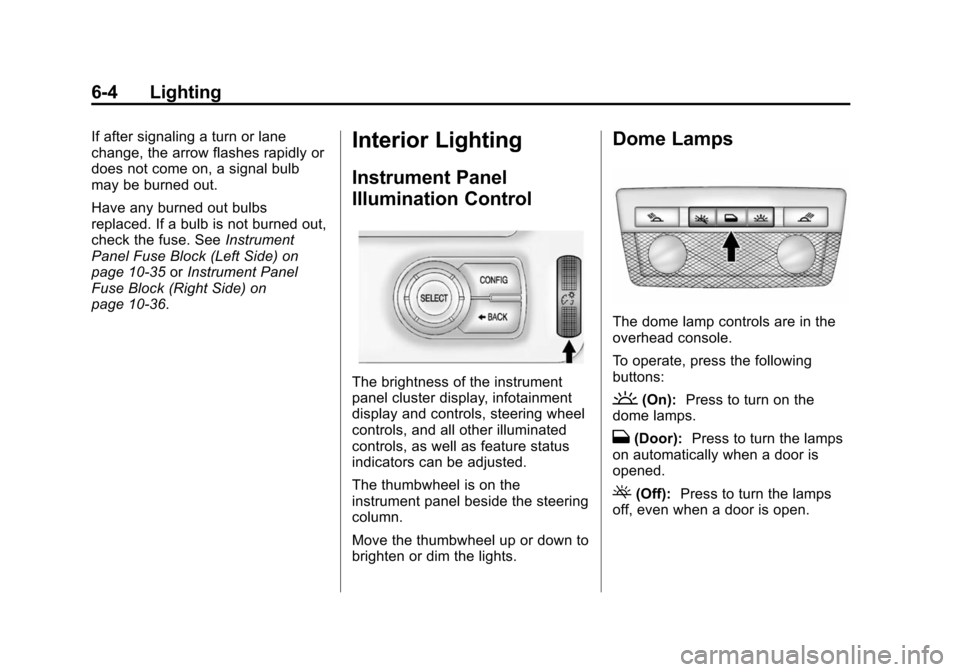
Instrument Panel
Illumination Control
The brightness of the instrument
panel cluster display, infotainment
display and controls, steering wheel
controls, and all other illuminated
controls, as well as feature status
indicators can be adjusted.
The thumbwheel is on the
instrument panel beside the steering
column.
Move the thumbwheel up or down to
brighten or dim the lights.
Dome Lamps
The dome lamp controls are in the
overhead console.
To operate, press the following
buttons:
'(On): Press to turn on the
dome lamps.
H(Door): Press to turn the lamps
on automatically when a door is
opened.
((Off): Press to turn the lamps
off, even when a door is open.
Page 194 of 394
(6,1)Chevrolet VOLT Owner Manual (GMNA-Localizing-U.S./Canada-6014139) -
2014 - CRC - 9/16/13
9-6 Driving and Operating
If propulsion is disabled while the
vehicle is being driven, brake
normally but do not pump the
brakes. If the brakes are pumped,
the pedal could get harder to push
down. If propulsion stops, there will
still be some power brake assist but
it will be used when the brake is
applied. Once the power assist is
used up, it can take longer to stop
and the brake pedal will be harder
to push.
Steering
Electric Power Steering
The vehicle has electric power
steering. It does not have power
steering fluid. Regular maintenance
is not required.
If power steering assist is lost due
to a system malfunction, the vehicle
can be steered, but may require
increased effort.
See your dealer if there is a
problem.If the steering wheel is turned until it
reaches the end of its travel and is
held against that position for an
extended period of time, power
steering assist may be reduced.
If the steering assist is used for an
extended period of time, power
assist may be reduced.
Normal use of the power steering
assist should return when the
system cools down.
See specific vehicle steering
messages under
Service Vehicle
Messages on page 5-52. See your
dealer if there is a problem.Curve Tips
.Take curves at a reasonable
speed.
.Reduce speed before entering a
curve.
.Maintain a reasonable steady
speed through the curve.
.Wait until the vehicle is out of
the curve before accelerating
gently into the straightaway.
Steering in Emergencies
.There are some situations when
steering around a problem may
be more effective than braking.
.Holding both sides of the
steering wheel allows you to turn
180 degrees without removing
a hand.
.The Antilock Brake System
(ABS) allows steering while
braking.
Page 195 of 394
(7,1)Chevrolet VOLT Owner Manual (GMNA-Localizing-U.S./Canada-6014139) -
2014 - CRC - 9/16/13
Driving and Operating 9-7
Off-Road Recovery
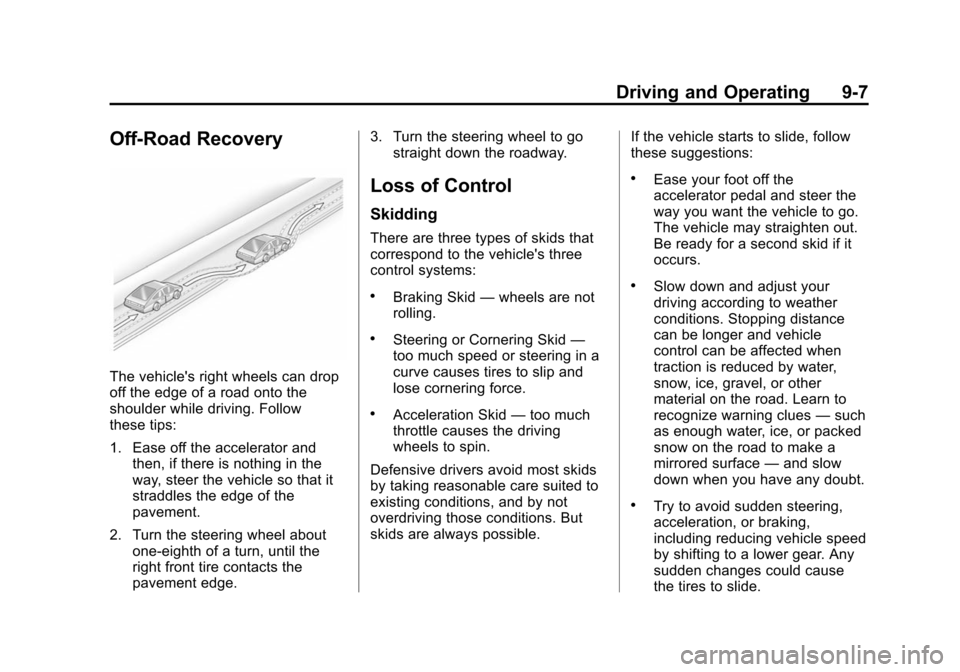
The vehicle's right wheels can drop
off the edge of a road onto the
shoulder while driving. Follow
these tips:
1. Ease off the accelerator andthen, if there is nothing in the
way, steer the vehicle so that it
straddles the edge of the
pavement.
2. Turn the steering wheel about one-eighth of a turn, until the
right front tire contacts the
pavement edge. 3. Turn the steering wheel to go
straight down the roadway.
Loss of Control
Skidding
There are three types of skids that
correspond to the vehicle's three
control systems:
.Braking Skid —wheels are not
rolling.
.Steering or Cornering Skid —
too much speed or steering in a
curve causes tires to slip and
lose cornering force.
.Acceleration Skid —too much
throttle causes the driving
wheels to spin.
Defensive drivers avoid most skids
by taking reasonable care suited to
existing conditions, and by not
overdriving those conditions. But
skids are always possible. If the vehicle starts to slide, follow
these suggestions:
.Ease your foot off the
accelerator pedal and steer the
way you want the vehicle to go.
The vehicle may straighten out.
Be ready for a second skid if it
occurs.
.Slow down and adjust your
driving according to weather
conditions. Stopping distance
can be longer and vehicle
control can be affected when
traction is reduced by water,
snow, ice, gravel, or other
material on the road. Learn to
recognize warning clues
—such
as enough water, ice, or packed
snow on the road to make a
mirrored surface —and slow
down when you have any doubt.
.Try to avoid sudden steering,
acceleration, or braking,
including reducing vehicle speed
by shifting to a lower gear. Any
sudden changes could cause
the tires to slide.