charging CHEVROLET VOLT 2014 1.G Owner's Manual
[x] Cancel search | Manufacturer: CHEVROLET, Model Year: 2014, Model line: VOLT, Model: CHEVROLET VOLT 2014 1.GPages: 394, PDF Size: 5.86 MB
Page 141 of 394
(33,1)Chevrolet VOLT Owner Manual (GMNA-Localizing-U.S./Canada-6014139) -
2014 - CRC - 9/16/13
Instruments and Controls 5-33
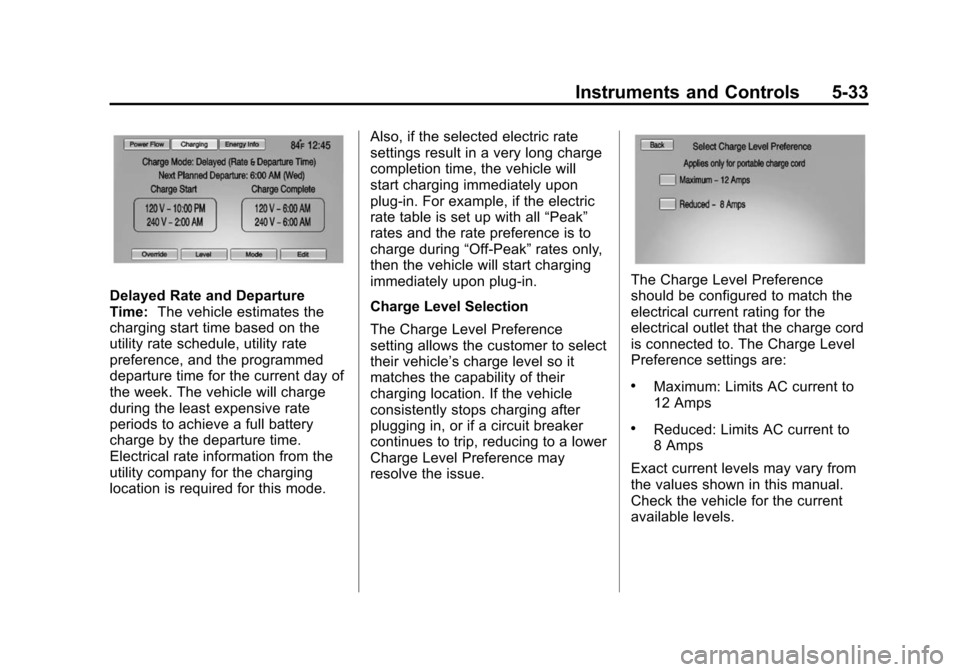
Delayed Rate and Departure
Time:The vehicle estimates the
charging start time based on the
utility rate schedule, utility rate
preference, and the programmed
departure time for the current day of
the week. The vehicle will charge
during the least expensive rate
periods to achieve a full battery
charge by the departure time.
Electrical rate information from the
utility company for the charging
location is required for this mode. Also, if the selected electric rate
settings result in a very long charge
completion time, the vehicle will
start charging immediately upon
plug-in. For example, if the electric
rate table is set up with all
“Peak”
rates and the rate preference is to
charge during “Off-Peak”rates only,
then the vehicle will start charging
immediately upon plug-in.
Charge Level Selection
The Charge Level Preference
setting allows the customer to select
their vehicle’s charge level so it
matches the capability of their
charging location. If the vehicle
consistently stops charging after
plugging in, or if a circuit breaker
continues to trip, reducing to a lower
Charge Level Preference may
resolve the issue.The Charge Level Preference
should be configured to match the
electrical current rating for the
electrical outlet that the charge cord
is connected to. The Charge Level
Preference settings are:
.Maximum: Limits AC current to
12 Amps
.Reduced: Limits AC current to
8 Amps
Exact current levels may vary from
the values shown in this manual.
Check the vehicle for the current
available levels.
Page 143 of 394
(35,1)Chevrolet VOLT Owner Manual (GMNA-Localizing-U.S./Canada-6014139) -
2014 - CRC - 9/16/13
Instruments and Controls 5-35
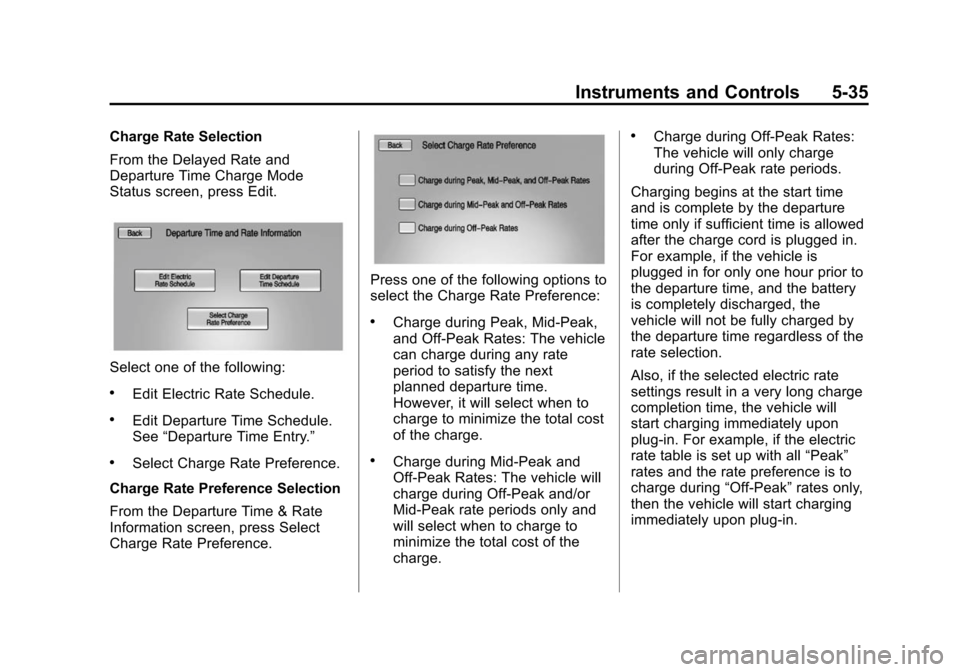
Charge Rate Selection
From the Delayed Rate and
Departure Time Charge Mode
Status screen, press Edit.
Select one of the following:
.Edit Electric Rate Schedule.
.Edit Departure Time Schedule.
See“Departure Time Entry.”
.Select Charge Rate Preference.
Charge Rate Preference Selection
From the Departure Time & Rate
Information screen, press Select
Charge Rate Preference.
Press one of the following options to
select the Charge Rate Preference:
.Charge during Peak, Mid-Peak,
and Off-Peak Rates: The vehicle
can charge during any rate
period to satisfy the next
planned departure time.
However, it will select when to
charge to minimize the total cost
of the charge.
.Charge during Mid-Peak and
Off-Peak Rates: The vehicle will
charge during Off-Peak and/or
Mid-Peak rate periods only and
will select when to charge to
minimize the total cost of the
charge.
.Charge during Off-Peak Rates:
The vehicle will only charge
during Off-Peak rate periods.
Charging begins at the start time
and is complete by the departure
time only if sufficient time is allowed
after the charge cord is plugged in.
For example, if the vehicle is
plugged in for only one hour prior to
the departure time, and the battery
is completely discharged, the
vehicle will not be fully charged by
the departure time regardless of the
rate selection.
Also, if the selected electric rate
settings result in a very long charge
completion time, the vehicle will
start charging immediately upon
plug-in. For example, if the electric
rate table is set up with all “Peak”
rates and the rate preference is to
charge during “Off-Peak”rates only,
then the vehicle will start charging
immediately upon plug-in.
Page 145 of 394
(37,1)Chevrolet VOLT Owner Manual (GMNA-Localizing-U.S./Canada-6014139) -
2014 - CRC - 9/16/13
Instruments and Controls 5-37
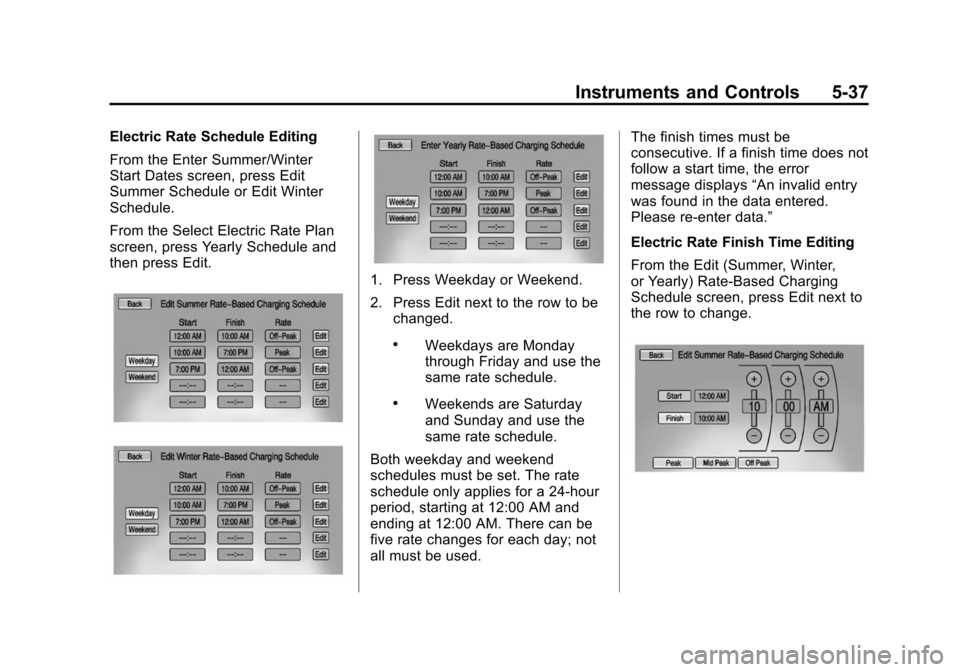
Electric Rate Schedule Editing
From the Enter Summer/Winter
Start Dates screen, press Edit
Summer Schedule or Edit Winter
Schedule.
From the Select Electric Rate Plan
screen, press Yearly Schedule and
then press Edit.
1. Press Weekday or Weekend.
2. Press Edit next to the row to bechanged.
.Weekdays are Monday
through Friday and use the
same rate schedule.
.Weekends are Saturday
and Sunday and use the
same rate schedule.
Both weekday and weekend
schedules must be set. The rate
schedule only applies for a 24-hour
period, starting at 12:00 AM and
ending at 12:00 AM. There can be
five rate changes for each day; not
all must be used. The finish times must be
consecutive. If a finish time does not
follow a start time, the error
message displays
“An invalid entry
was found in the data entered.
Please re-enter data.”
Electric Rate Finish Time Editing
From the Edit (Summer, Winter,
or Yearly) Rate-Based Charging
Schedule screen, press Edit next to
the row to change.
Page 146 of 394
(38,1)Chevrolet VOLT Owner Manual (GMNA-Localizing-U.S./Canada-6014139) -
2014 - CRC - 9/16/13
5-38 Instruments and Controls
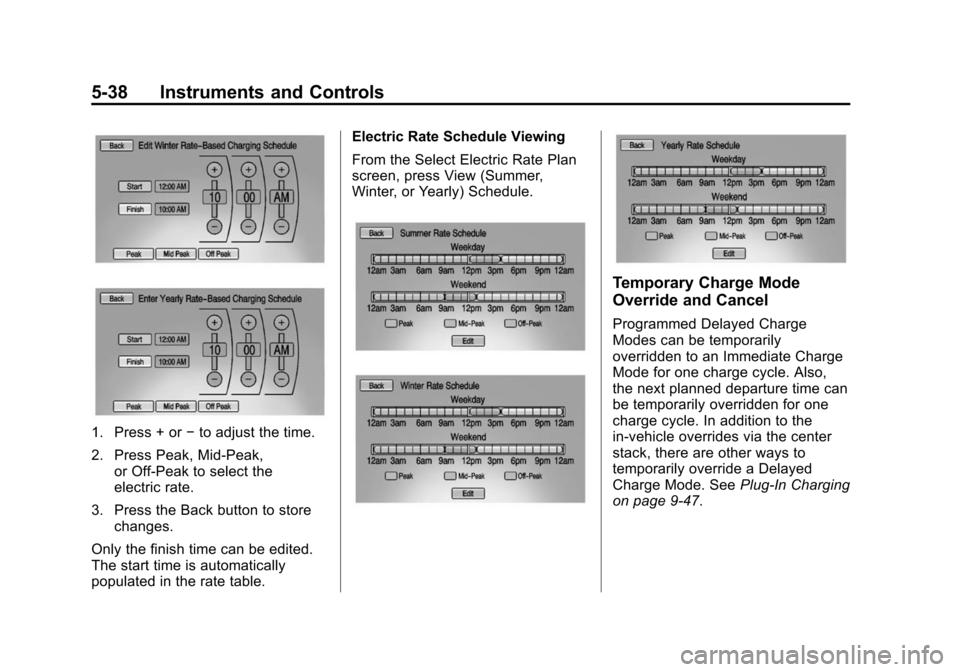
1. Press + or−to adjust the time.
2. Press Peak, Mid-Peak, or Off-Peak to select the
electric rate.
3. Press the Back button to store changes.
Only the finish time can be edited.
The start time is automatically
populated in the rate table. Electric Rate Schedule Viewing
From the Select Electric Rate Plan
screen, press View (Summer,
Winter, or Yearly) Schedule.
Temporary Charge Mode
Override and Cancel
Programmed Delayed Charge
Modes can be temporarily
overridden to an Immediate Charge
Mode for one charge cycle. Also,
the next planned departure time can
be temporarily overridden for one
charge cycle. In addition to the
in-vehicle overrides via the center
stack, there are other ways to
temporarily override a Delayed
Charge Mode. See
Plug-In Charging
on page 9-47.
Page 147 of 394
(39,1)Chevrolet VOLT Owner Manual (GMNA-Localizing-U.S./Canada-6014139) -
2014 - CRC - 9/16/13
Instruments and Controls 5-39
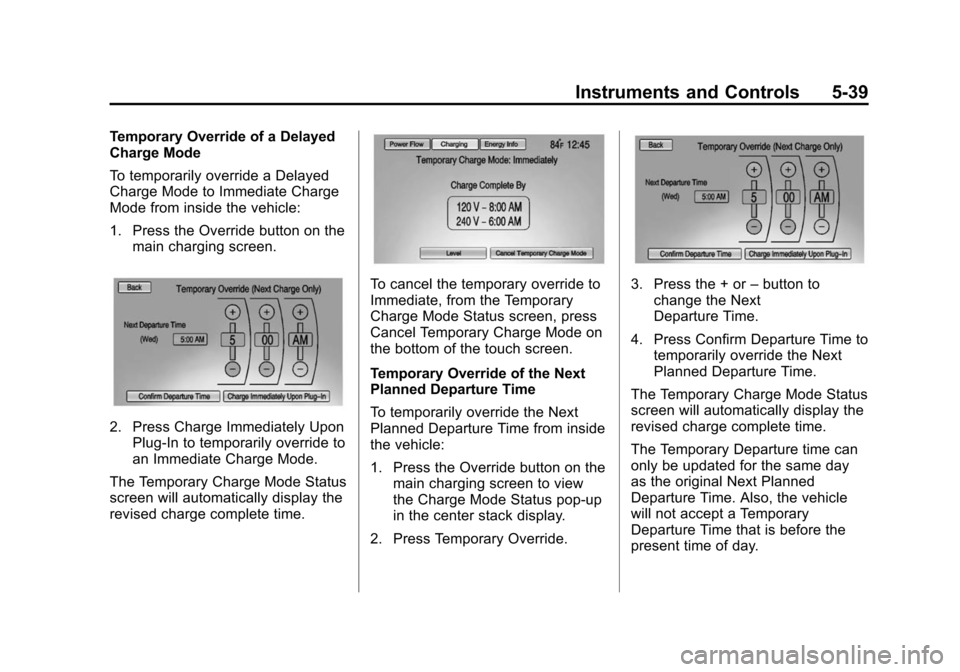
Temporary Override of a Delayed
Charge Mode
To temporarily override a Delayed
Charge Mode to Immediate Charge
Mode from inside the vehicle:
1. Press the Override button on themain charging screen.
2. Press Charge Immediately UponPlug-In to temporarily override to
an Immediate Charge Mode.
The Temporary Charge Mode Status
screen will automatically display the
revised charge complete time.
To cancel the temporary override to
Immediate, from the Temporary
Charge Mode Status screen, press
Cancel Temporary Charge Mode on
the bottom of the touch screen.
Temporary Override of the Next
Planned Departure Time
To temporarily override the Next
Planned Departure Time from inside
the vehicle:
1. Press the Override button on the main charging screen to view
the Charge Mode Status pop-up
in the center stack display.
2. Press Temporary Override.3. Press the + or –button to
change the Next
Departure Time.
4. Press Confirm Departure Time to temporarily override the Next
Planned Departure Time.
The Temporary Charge Mode Status
screen will automatically display the
revised charge complete time.
The Temporary Departure time can
only be updated for the same day
as the original Next Planned
Departure Time. Also, the vehicle
will not accept a Temporary
Departure Time that is before the
present time of day.
Page 148 of 394
(40,1)Chevrolet VOLT Owner Manual (GMNA-Localizing-U.S./Canada-6014139) -
2014 - CRC - 9/16/13
5-40 Instruments and Controls
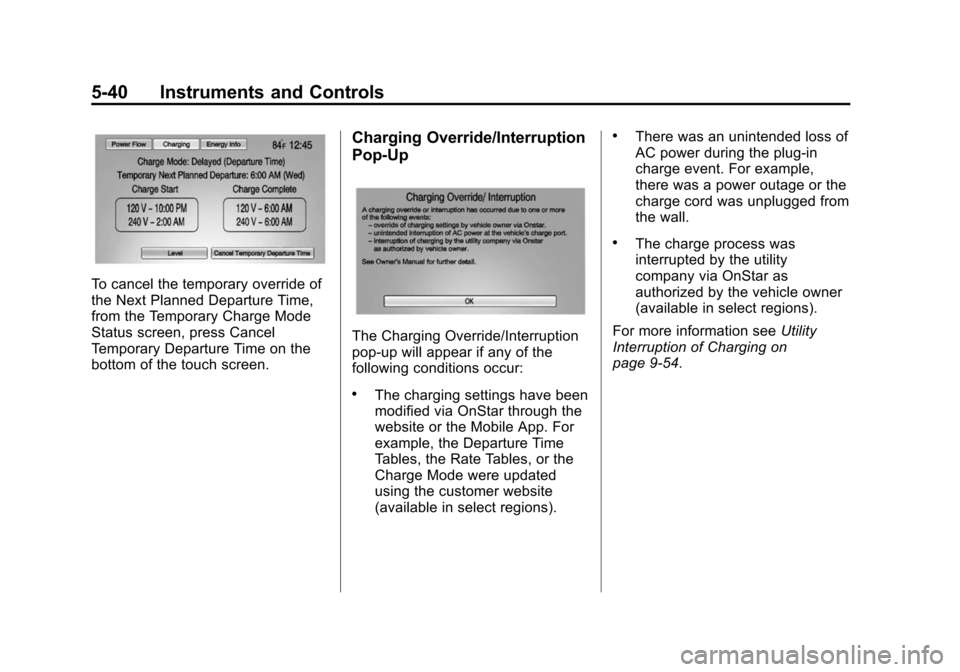
To cancel the temporary override of
the Next Planned Departure Time,
from the Temporary Charge Mode
Status screen, press Cancel
Temporary Departure Time on the
bottom of the touch screen.
Charging Override/Interruption
Pop-Up
The Charging Override/Interruption
pop-up will appear if any of the
following conditions occur:
.The charging settings have been
modified via OnStar through the
website or the Mobile App. For
example, the Departure Time
Tables, the Rate Tables, or the
Charge Mode were updated
using the customer website
(available in select regions).
.There was an unintended loss of
AC power during the plug-in
charge event. For example,
there was a power outage or the
charge cord was unplugged from
the wall.
.The charge process was
interrupted by the utility
company via OnStar as
authorized by the vehicle owner
(available in select regions).
For more information see Utility
Interruption of Charging on
page 9-54.
Page 149 of 394
(41,1)Chevrolet VOLT Owner Manual (GMNA-Localizing-U.S./Canada-6014139) -
2014 - CRC - 9/16/13
Instruments and Controls 5-41
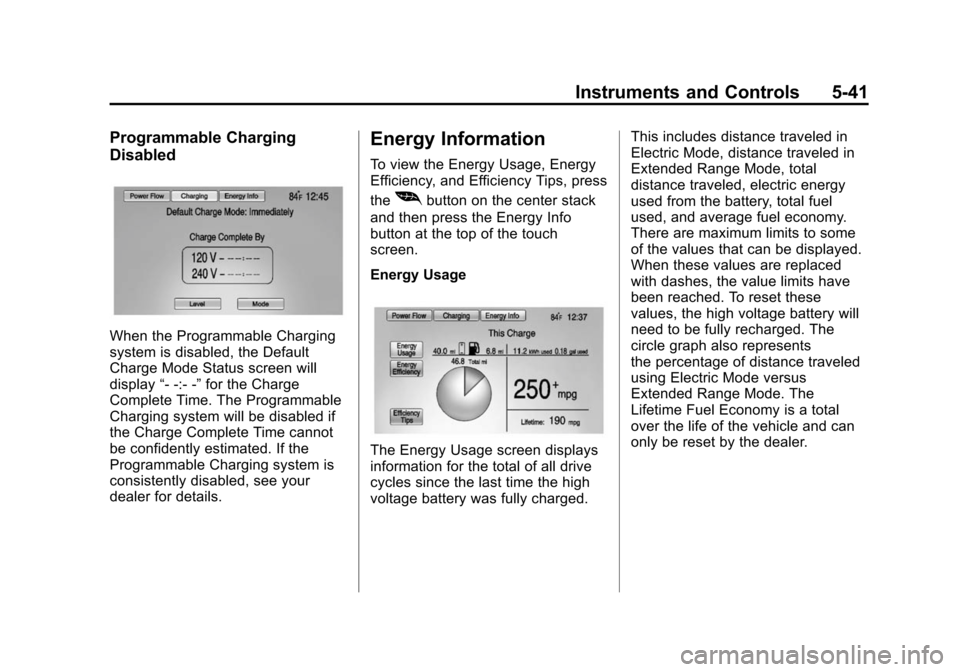
Programmable Charging
Disabled
When the Programmable Charging
system is disabled, the Default
Charge Mode Status screen will
display“- -:- -”for the Charge
Complete Time. The Programmable
Charging system will be disabled if
the Charge Complete Time cannot
be confidently estimated. If the
Programmable Charging system is
consistently disabled, see your
dealer for details.
Energy Information
To view the Energy Usage, Energy
Efficiency, and Efficiency Tips, press
the
[button on the center stack
and then press the Energy Info
button at the top of the touch
screen.
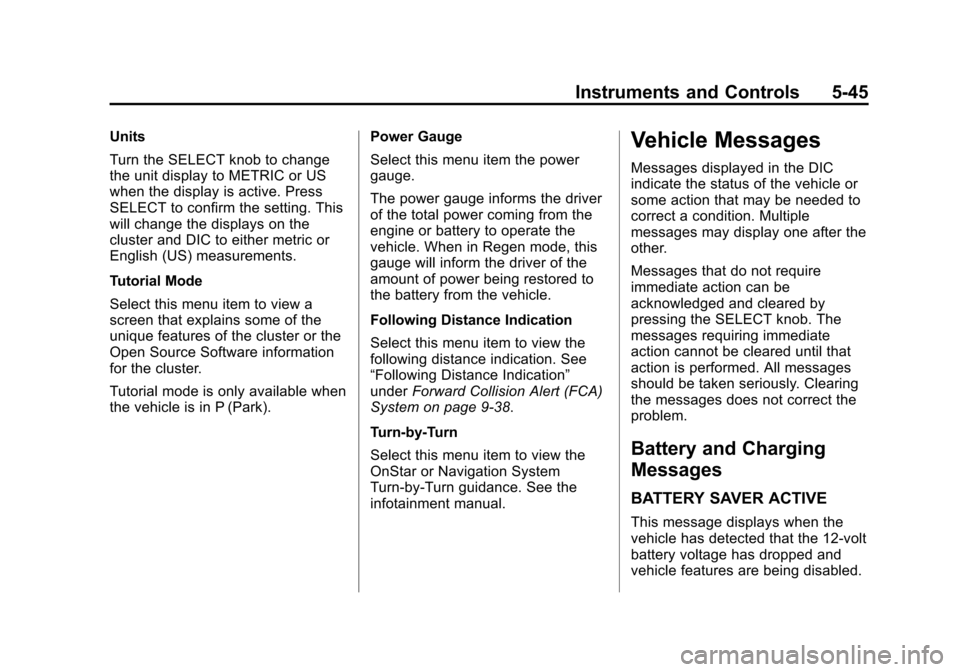
Energy Usage
The Energy Usage screen displays
information for the total of all drive
cycles since the last time the high
voltage battery was fully charged. This includes distance traveled in
Electric Mode, distance traveled in
Extended Range Mode, total
distance traveled, electric energy
used from the battery, total fuel
used, and average fuel economy.
There are maximum limits to some
of the values that can be displayed.
When these values are replaced
with dashes, the value limits have
been reached. To reset these
values, the high voltage battery will
need to be fully recharged. The
circle graph also represents
the percentage of distance traveled
using Electric Mode versus
Extended Range Mode. The
Lifetime Fuel Economy is a total
over the life of the vehicle and can
only be reset by the dealer.
Page 153 of 394
(45,1)Chevrolet VOLT Owner Manual (GMNA-Localizing-U.S./Canada-6014139) -
2014 - CRC - 9/16/13
Instruments and Controls 5-45
Units
Turn the SELECT knob to change
the unit display to METRIC or US
when the display is active. Press
SELECT to confirm the setting. This
will change the displays on the
cluster and DIC to either metric or
English (US) measurements.
Tutorial Mode
Select this menu item to view a
screen that explains some of the
unique features of the cluster or the
Open Source Software information
for the cluster.
Tutorial mode is only available when
the vehicle is in P (Park).Power Gauge
Select this menu item the power
gauge.
The power gauge informs the driver
of the total power coming from the
engine or battery to operate the
vehicle. When in Regen mode, this
gauge will inform the driver of the
amount of power being restored to
the battery from the vehicle.
Following Distance Indication
Select this menu item to view the
following distance indication. See
“Following Distance Indication”
under
Forward Collision Alert (FCA)
System on page 9-38.
Turn-by-Turn
Select this menu item to view the
OnStar or Navigation System
Turn-by-Turn guidance. See the
infotainment manual.Vehicle Messages
Messages displayed in the DIC
indicate the status of the vehicle or
some action that may be needed to
correct a condition. Multiple
messages may display one after the
other.
Messages that do not require
immediate action can be
acknowledged and cleared by
pressing the SELECT knob. The
messages requiring immediate
action cannot be cleared until that
action is performed. All messages
should be taken seriously. Clearing
the messages does not correct the
problem.
Battery and Charging
Messages
BATTERY SAVER ACTIVE
This message displays when the
vehicle has detected that the 12-volt
battery voltage has dropped and
vehicle features are being disabled.
Page 154 of 394
(46,1)Chevrolet VOLT Owner Manual (GMNA-Localizing-U.S./Canada-6014139) -
2014 - CRC - 9/16/13
5-46 Instruments and Controls
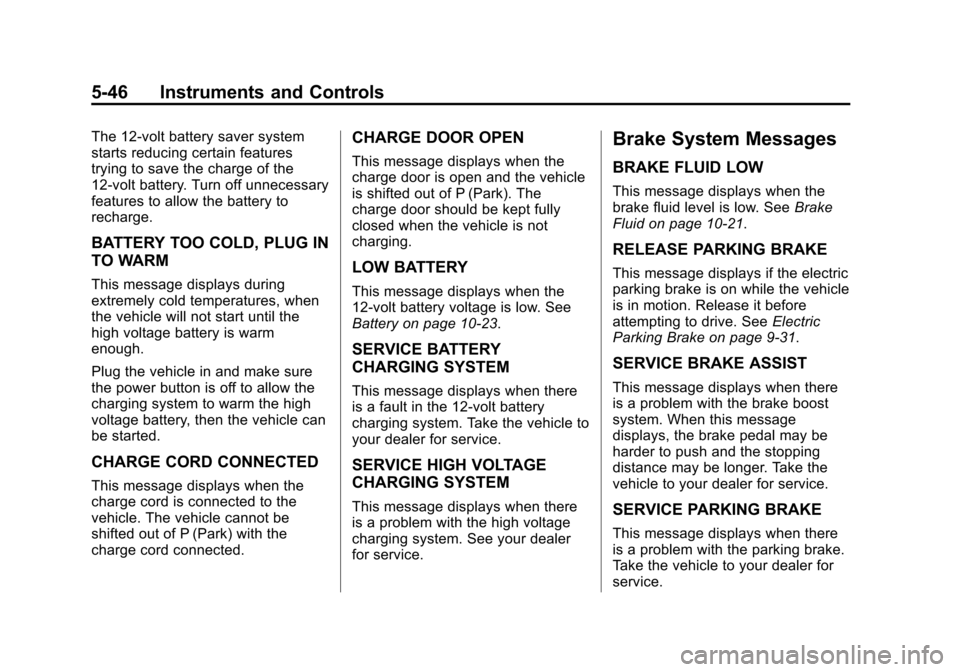
The 12-volt battery saver system
starts reducing certain features
trying to save the charge of the
12-volt battery. Turn off unnecessary
features to allow the battery to
recharge.
BATTERY TOO COLD, PLUG IN
TO WARM
This message displays during
extremely cold temperatures, when
the vehicle will not start until the
high voltage battery is warm
enough.
Plug the vehicle in and make sure
the power button is off to allow the
charging system to warm the high
voltage battery, then the vehicle can
be started.
CHARGE CORD CONNECTED
This message displays when the
charge cord is connected to the
vehicle. The vehicle cannot be
shifted out of P (Park) with the
charge cord connected.
CHARGE DOOR OPEN
This message displays when the
charge door is open and the vehicle
is shifted out of P (Park). The
charge door should be kept fully
closed when the vehicle is not
charging.
LOW BATTERY
This message displays when the
12-volt battery voltage is low. See
Battery on page 10-23.
SERVICE BATTERY
CHARGING SYSTEM
This message displays when there
is a fault in the 12-volt battery
charging system. Take the vehicle to
your dealer for service.
SERVICE HIGH VOLTAGE
CHARGING SYSTEM
This message displays when there
is a problem with the high voltage
charging system. See your dealer
for service.
Brake System Messages
BRAKE FLUID LOW
This message displays when the
brake fluid level is low. SeeBrake
Fluid on page 10-21.
RELEASE PARKING BRAKE
This message displays if the electric
parking brake is on while the vehicle
is in motion. Release it before
attempting to drive. See Electric
Parking Brake on page 9-31.
SERVICE BRAKE ASSIST
This message displays when there
is a problem with the brake boost
system. When this message
displays, the brake pedal may be
harder to push and the stopping
distance may be longer. Take the
vehicle to your dealer for service.
SERVICE PARKING BRAKE
This message displays when there
is a problem with the parking brake.
Take the vehicle to your dealer for
service.
Page 189 of 394
(1,1)Chevrolet VOLT Owner Manual (GMNA-Localizing-U.S./Canada-6014139) -
2014 - CRC - 9/16/13
Driving and Operating 9-1
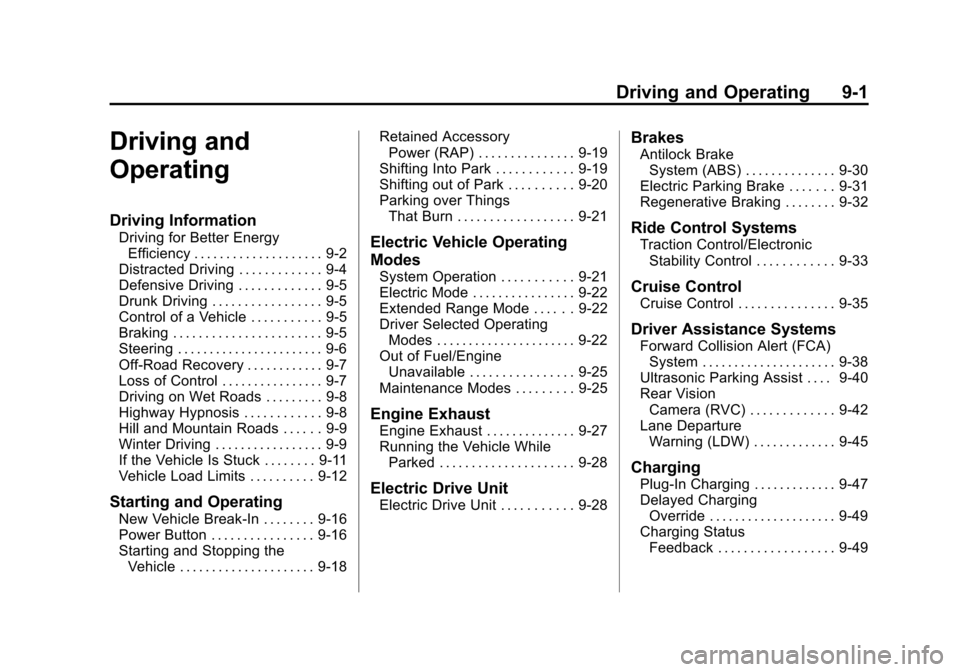
Driving and
Operating
Driving Information
Driving for Better EnergyEfficiency . . . . . . . . . . . . . . . . . . . . 9-2
Distracted Driving . . . . . . . . . . . . . 9-4
Defensive Driving . . . . . . . . . . . . . 9-5
Drunk Driving . . . . . . . . . . . . . . . . . 9-5
Control of a Vehicle . . . . . . . . . . . 9-5
Braking . . . . . . . . . . . . . . . . . . . . . . . 9-5
Steering . . . . . . . . . . . . . . . . . . . . . . . 9-6
Off-Road Recovery . . . . . . . . . . . . 9-7
Loss of Control . . . . . . . . . . . . . . . . 9-7
Driving on Wet Roads . . . . . . . . . 9-8
Highway Hypnosis . . . . . . . . . . . . 9-8
Hill and Mountain Roads . . . . . . 9-9
Winter Driving . . . . . . . . . . . . . . . . . 9-9
If the Vehicle Is Stuck . . . . . . . . 9-11
Vehicle Load Limits . . . . . . . . . . 9-12
Starting and Operating
New Vehicle Break-In . . . . . . . . 9-16
Power Button . . . . . . . . . . . . . . . . 9-16
Starting and Stopping the Vehicle . . . . . . . . . . . . . . . . . . . . . 9-18 Retained Accessory
Power (RAP) . . . . . . . . . . . . . . . 9-19
Shifting Into Park . . . . . . . . . . . . 9-19
Shifting out of Park . . . . . . . . . . 9-20
Parking over Things That Burn . . . . . . . . . . . . . . . . . . 9-21
Electric Vehicle Operating
Modes
System Operation . . . . . . . . . . . 9-21
Electric Mode . . . . . . . . . . . . . . . . 9-22
Extended Range Mode . . . . . . 9-22
Driver Selected OperatingModes . . . . . . . . . . . . . . . . . . . . . . 9-22
Out of Fuel/Engine Unavailable . . . . . . . . . . . . . . . . 9-25
Maintenance Modes . . . . . . . . . 9-25
Engine Exhaust
Engine Exhaust . . . . . . . . . . . . . . 9-27
Running the Vehicle While Parked . . . . . . . . . . . . . . . . . . . . . 9-28
Electric Drive Unit
Electric Drive Unit . . . . . . . . . . . 9-28
Brakes
Antilock BrakeSystem (ABS) . . . . . . . . . . . . . . 9-30
Electric Parking Brake . . . . . . . 9-31
Regenerative Braking . . . . . . . . 9-32
Ride Control Systems
Traction Control/Electronic Stability Control . . . . . . . . . . . . 9-33
Cruise Control
Cruise Control . . . . . . . . . . . . . . . 9-35
Driver Assistance Systems
Forward Collision Alert (FCA)System . . . . . . . . . . . . . . . . . . . . . 9-38
Ultrasonic Parking Assist . . . . 9-40
Rear Vision Camera (RVC) . . . . . . . . . . . . . 9-42
Lane Departure Warning (LDW) . . . . . . . . . . . . . 9-45
Charging
Plug-In Charging . . . . . . . . . . . . . 9-47
Delayed ChargingOverride . . . . . . . . . . . . . . . . . . . . 9-49
Charging Status Feedback . . . . . . . . . . . . . . . . . . 9-49