audio CHEVROLET VOLT 2014 1.G Owners Manual
[x] Cancel search | Manufacturer: CHEVROLET, Model Year: 2014, Model line: VOLT, Model: CHEVROLET VOLT 2014 1.GPages: 394, PDF Size: 5.86 MB
Page 5 of 394
(5,1)Chevrolet VOLT Owner Manual (GMNA-Localizing-U.S./Canada-6014139) -
2014 - CRC - 9/16/13
Introduction v
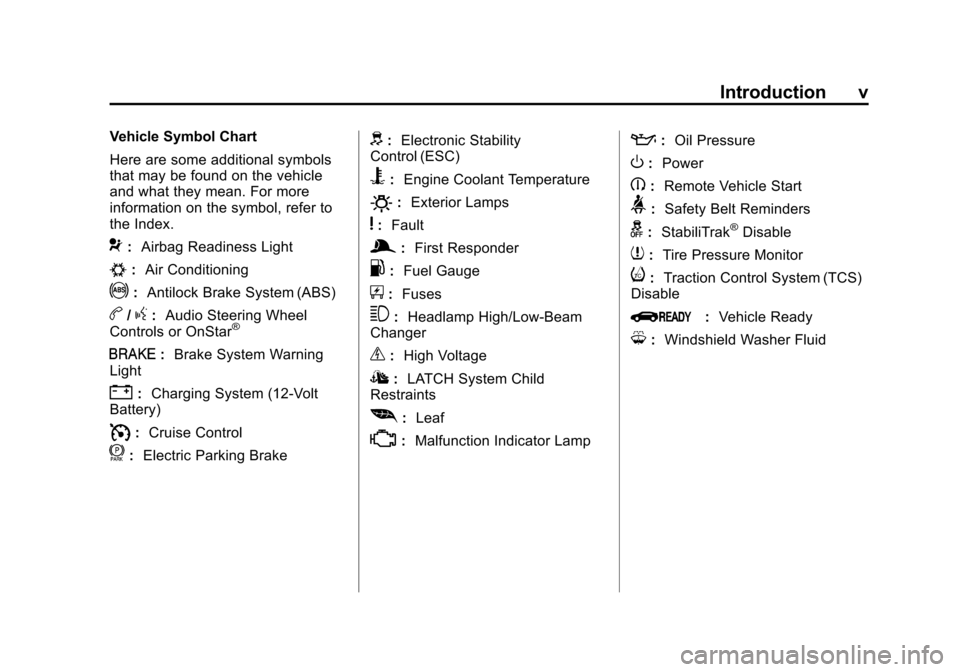
Vehicle Symbol Chart
Here are some additional symbols
that may be found on the vehicle
and what they mean. For more
information on the symbol, refer to
the Index.
9:Airbag Readiness Light
#:Air Conditioning
!:Antilock Brake System (ABS)
b/g:Audio Steering Wheel
Controls or OnStar®
I: Brake System Warning
Light
": Charging System (12-Volt
Battery)
I: Cruise Control
f: Electric Parking Brake
d:Electronic Stability
Control (ESC)
B: Engine Coolant Temperature
O:Exterior Lamps
y:Fault
g:First Responder
.: Fuel Gauge
+:Fuses
3: Headlamp High/Low-Beam
Changer
_: High Voltage
I:LATCH System Child
Restraints
[: Leaf
*:Malfunction Indicator Lamp
::Oil Pressure
O:Power
B:Remote Vehicle Start
>:Safety Belt Reminders
g: StabiliTrak®Disable
7:Tire Pressure Monitor
i:Traction Control System (TCS)
Disable
Q: Vehicle Ready
M:Windshield Washer Fluid
Page 22 of 394
(16,1)Chevrolet VOLT Owner Manual (GMNA-Localizing-U.S./Canada-6014139) -
2014 - CRC - 9/16/13
1-16 In Brief
Vehicle Features
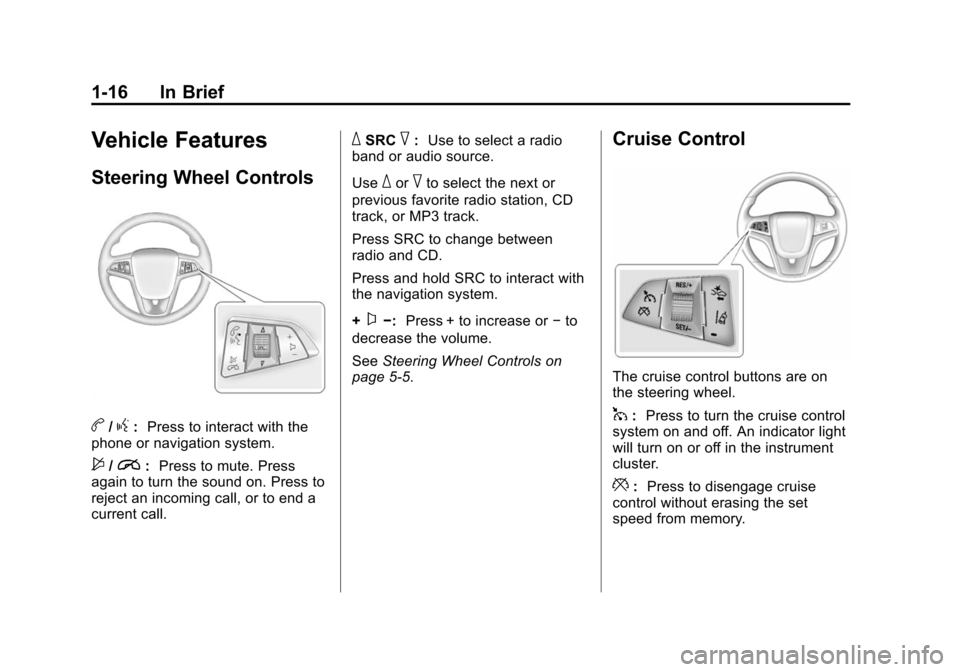
Steering Wheel Controls
b/g:Press to interact with the
phone or navigation system.
$/i: Press to mute. Press
again to turn the sound on. Press to
reject an incoming call, or to end a
current call.
_SRC^: Use to select a radio
band or audio source.
Use
_or^to select the next or
previous favorite radio station, CD
track, or MP3 track.
Press SRC to change between
radio and CD.
Press and hold SRC to interact with
the navigation system.
+
x−: Press + to increase or −to
decrease the volume.
See Steering Wheel Controls on
page 5-5.
Cruise Control
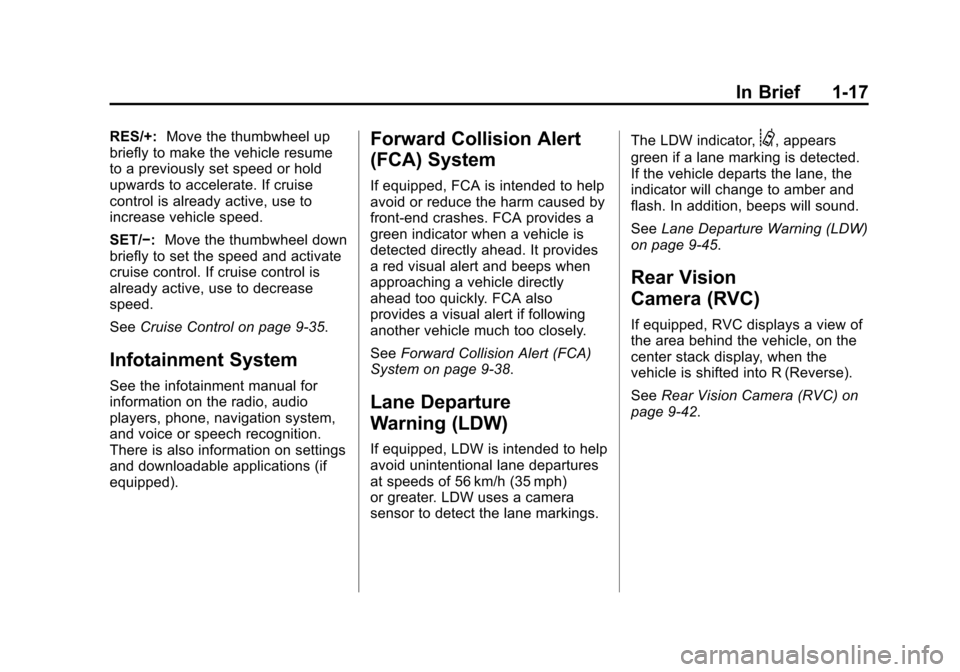
The cruise control buttons are on
the steering wheel.
1: Press to turn the cruise control
system on and off. An indicator light
will turn on or off in the instrument
cluster.
*: Press to disengage cruise
control without erasing the set
speed from memory.
Page 23 of 394
(17,1)Chevrolet VOLT Owner Manual (GMNA-Localizing-U.S./Canada-6014139) -
2014 - CRC - 9/16/13
In Brief 1-17
RES/+:Move the thumbwheel up
briefly to make the vehicle resume
to a previously set speed or hold
upwards to accelerate. If cruise
control is already active, use to
increase vehicle speed.
SET/−: Move the thumbwheel down
briefly to set the speed and activate
cruise control. If cruise control is
already active, use to decrease
speed.
See Cruise Control on page 9-35.
Infotainment System
See the infotainment manual for
information on the radio, audio
players, phone, navigation system,
and voice or speech recognition.
There is also information on settings
and downloadable applications (if
equipped).
Forward Collision Alert
(FCA) System
If equipped, FCA is intended to help
avoid or reduce the harm caused by
front-end crashes. FCA provides a
green indicator when a vehicle is
detected directly ahead. It provides
a red visual alert and beeps when
approaching a vehicle directly
ahead too quickly. FCA also
provides a visual alert if following
another vehicle much too closely.
SeeForward Collision Alert (FCA)
System on page 9-38.
Lane Departure
Warning (LDW)
If equipped, LDW is intended to help
avoid unintentional lane departures
at speeds of 56 km/h (35 mph)
or greater. LDW uses a camera
sensor to detect the lane markings. The LDW indicator,
@, appears
green if a lane marking is detected.
If the vehicle departs the lane, the
indicator will change to amber and
flash. In addition, beeps will sound.
See Lane Departure Warning (LDW)
on page 9-45.
Rear Vision
Camera (RVC)
If equipped, RVC displays a view of
the area behind the vehicle, on the
center stack display, when the
vehicle is shifted into R (Reverse).
See Rear Vision Camera (RVC) on
page 9-42.
Page 106 of 394
(2,1)Chevrolet VOLT Owner Manual (GMNA-Localizing-U.S./Canada-6014139) -
2014 - CRC - 9/16/13
4-2 Storage
Glove Box
Open the glove box by lifting up on
the lever.
Floor Console Storage
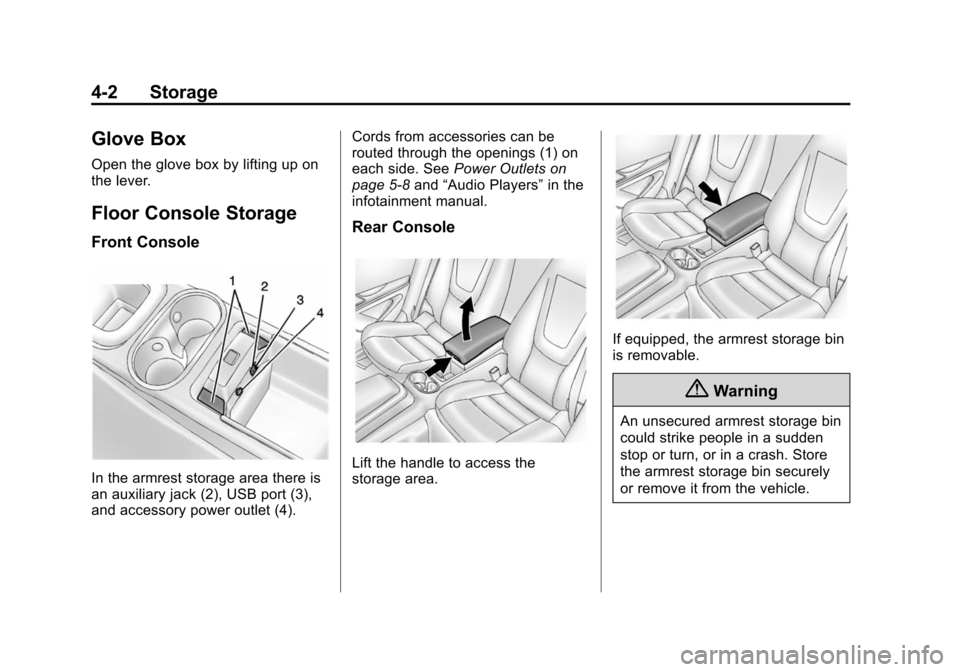
Front Console
In the armrest storage area there is
an auxiliary jack (2), USB port (3),
and accessory power outlet (4).Cords from accessories can be
routed through the openings (1) on
each side. See
Power Outlets on
page 5-8 and“Audio Players” in the
infotainment manual.
Rear Console
Lift the handle to access the
storage area.
If equipped, the armrest storage bin
is removable.
{Warning
An unsecured armrest storage bin
could strike people in a sudden
stop or turn, or in a crash. Store
the armrest storage bin securely
or remove it from the vehicle.
Page 113 of 394
(5,1)Chevrolet VOLT Owner Manual (GMNA-Localizing-U.S./Canada-6014139) -
2014 - CRC - 9/16/13
Instruments and Controls 5-5
Controls
Steering Wheel
Adjustment
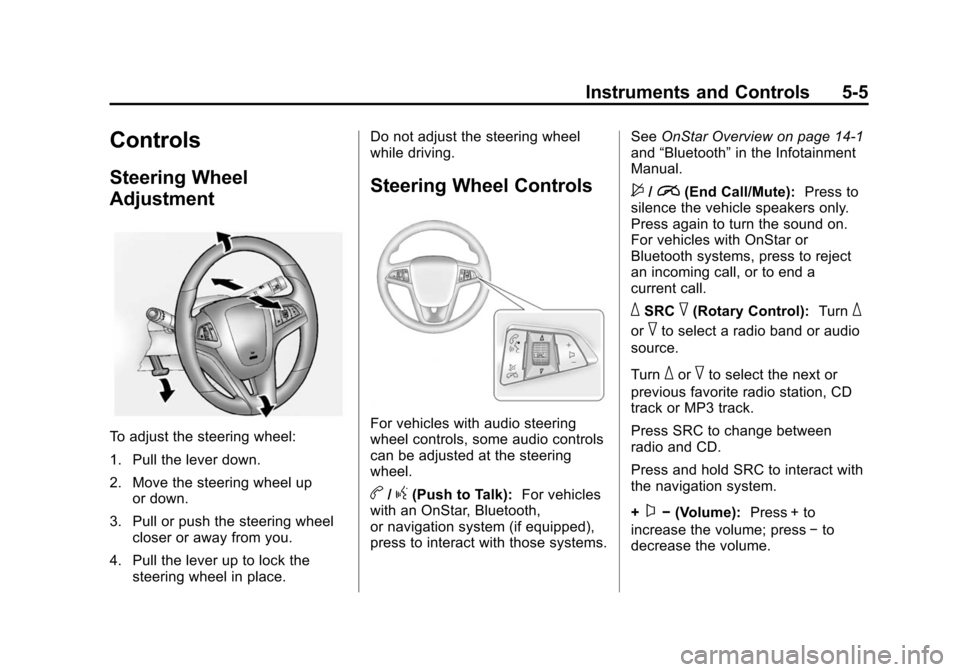
To adjust the steering wheel:
1. Pull the lever down.
2. Move the steering wheel upor down.
3. Pull or push the steering wheel closer or away from you.
4. Pull the lever up to lock the steering wheel in place. Do not adjust the steering wheel
while driving.
Steering Wheel Controls
For vehicles with audio steering
wheel controls, some audio controls
can be adjusted at the steering
wheel.
b/g(Push to Talk):
For vehicles
with an OnStar, Bluetooth,
or navigation system (if equipped),
press to interact with those systems. See
OnStar Overview on page 14-1
and “Bluetooth” in the Infotainment
Manual.
$/i(End Call/Mute): Press to
silence the vehicle speakers only.
Press again to turn the sound on.
For vehicles with OnStar or
Bluetooth systems, press to reject
an incoming call, or to end a
current call.
_SRC^(Rotary Control): Turn_
or^to select a radio band or audio
source.
Turn
_or^to select the next or
previous favorite radio station, CD
track or MP3 track.
Press SRC to change between
radio and CD.
Press and hold SRC to interact with
the navigation system.
+
x− (Volume): Press + to
increase the volume; press −to
decrease the volume.
Page 162 of 394
(54,1)Chevrolet VOLT Owner Manual (GMNA-Localizing-U.S./Canada-6014139) -
2014 - CRC - 9/16/13
5-54 Instruments and Controls
Vehicle
Personalization
Use the audio system controls to
access the personalization menus
for customizing vehicle features.
The following are all possible
personalization features. Depending
on the vehicle, some may not be
available.
Infotainment System Audio
System Controls
Using the Faceplate
TUNE/MENU Knob
.Press to enter, select, or activate
a highlighted menu option.
.Turn to highlight a menu option.
.Press to enable or disable a
system setting.
}BACK
.Press to exit a menu.
.Press to return to a previous
screen.
Using the Touch Screen
Press a screen feature to:
.View more feature options.
.Enable or disable the feature.
w: Press to scroll up.
x:Press to scroll down.
Back: Press to return to the
previous menu.
To access the
personalization menu:
1. Press Config on the Home page on the infotainment system
display or CONFIG on the
faceplate. 2. Select the desired feature to
display a list of available
options.
3. Select the desired feature setting.
Personalization Menus
The following list of menu items may
be available:
.Languages
.Time and Date
.Radio Settings
.Phone Settings
.Navigation Settings
.Display Settings
.Vehicle Settings
Each menu is detailed in the
following information.
Page 163 of 394
(55,1)Chevrolet VOLT Owner Manual (GMNA-Localizing-U.S./Canada-6014139) -
2014 - CRC - 9/16/13
Instruments and Controls 5-55
Languages
Select and the following may
display:
.English
.Francais Canadien
.Espanol Mexicano
Time and Date
Manually set the time and date. See
Clock on page 5-42.
Radio Settings
Select and the following may
display:
.Audio Cue Options
.Auto Volume
.Gracenote Options
.XM Channel Art
.Number of Favorites Pages
.XM Categories
.Software Versions MenuAudio Cue Options
Select and the following may
display:
.Audio Cue Volume
.Audio Cues
Audio Cue Volume
This feature adjusts the volume of
the startup and shutdown sounds.
Press + or −to increase or
decrease the volume.
Audio Cues
This feature allows for the sounds to
be turned on or off.
Select to enable or disable.
Auto Volume
This feature adjusts the volume to
minimize the effects of unwanted
background noise that can result
from changing road surfaces, driving
speeds, or open windows. This
feature works best at lower volume settings where background noise is
typically louder than the sound
system volume.
Select Off, Low, Medium, or High.
Gracenote Options
Select and the following may
display:
.Normalization
Normalization
This feature improves voice
recognition and media groupings.
See “CD Player”, “USB”,“Auxiliary
Devices”, and “Bluetooth Audio” in
the infotainment manual.
Select to enable or disable.
XM Channel Art
This feature turns the XM Audio
page background on the XM
Channel display on and off.
Select to enable or disable.
Page 205 of 394
(17,1)Chevrolet VOLT Owner Manual (GMNA-Localizing-U.S./Canada-6014139) -
2014 - CRC - 9/16/13
Driving and Operating 9-17
fuel and battery gauges. See
Starting and Stopping the Vehicle
on page 9-18.
Service Only Mode
This power mode is available for
service and diagnostics, and to
verify the proper operation of the
malfunction indicator lamp as may
be required for emission inspection
purposes. With the vehicle off, and
the brake pedal not applied,
pressing and holding the POWER
O
button for more than five seconds
will place the vehicle in Service
Only Mode. The instruments and
audio systems will operate as they
do in ON/RUN, but the vehicle will
not be able to be driven. The
propulsion system will not start in
Service Only Mode. Press the
button again to turn the vehicle off.
{Caution
Service Only Mode will discharge
the 12-volt battery. Do not use
Service Only Mode for an
extended period, or the vehicle
may not start.
STOPPING THE VEHICLE/OFF:
To turn the vehicle off, press the
POWER
Obutton with the vehicle in
P (Park). Retained Accessory Power
(RAP) will remain active until the
driver door is opened. See Retained
Accessory Power (RAP) on
page 9-19. When turning off the
vehicle, if the vehicle is not in
P (Park), the vehicle will go to ACC/
ACCESSORY and display the
message SHIFT TO PARK in the
Driver Information Center (DIC).
See Electric Drive Unit Messages
on page 5-47. If the vehicle must be shut off in an
emergency:
1. Brake using a firm and steady
pressure. Do not pump the
brakes repeatedly. This may
deplete power assist, requiring
increased brake pedal force.
2. Shift the vehicle to N (Neutral). This can be done while the
vehicle is moving. After shifting
to N (Neutral), firmly apply the
brakes and steer the vehicle to a
safe location.
3. Come to a complete stop, shift to P (Park), and turn the vehicle
off by pressing the POWER
O
button.
4. Set the parking brake. See Electric Parking Brake on
page 9-31.
Page 206 of 394
(18,1)Chevrolet VOLT Owner Manual (GMNA-Localizing-U.S./Canada-6014139) -
2014 - CRC - 9/16/13
9-18 Driving and Operating
{Warning
Turning off the vehicle while
moving may disable the airbags.
While driving, only shut the
propulsion system off in an
emergency.
If the vehicle cannot be pulled over,
and must be shut off while driving,
press and hold the POWER
O
button for longer than two seconds,
or press twice in five seconds.
Starting and Stopping the
Vehicle
Starting Procedure
Move the shift lever to P (Park) or
N (Neutral). The propulsion system
will not start in any other position.
{Caution
Do not try to shift to P (Park) if the
vehicle is moving or the electric
drive unit could be damaged.
Shift to P (Park) only when the
vehicle is stopped.
{Caution
If you add electrical parts or
accessories, you could change
the way the vehicle operates. Any
resulting damage would not be
covered by the vehicle warranty.
See Add-On Electrical Equipment
on page 9-60.
The Remote Keyless Entry (RKE)
transmitter must be in the vehicle.
Press the brake pedal and press
and release the POWER
Obutton.
If the RKE transmitter is not in the
vehicle or something is interfering
with the transmitter, a message displays in the Driver Information
Center (DIC). See
Key and Lock
Messages on page 5-49.
If the vehicle will not start due to a
low RKE transmitter battery, the
vehicle can still be driven. See
“Starting the Vehicle with a Low
Transmitter Battery” inRemote
Keyless Entry (RKE) System
Operation on page 2-2.A Welcome, Ready, and Good-bye
audio message will be heard in the
vehicle and animated on the
instrument cluster when opening the
Page 207 of 394
(19,1)Chevrolet VOLT Owner Manual (GMNA-Localizing-U.S./Canada-6014139) -
2014 - CRC - 9/16/13
Driving and Operating 9-19
driver door upon entry, when the
vehicle is ready to be driven, and
when the vehicle is turned off.
The instrument cluster displays an
active fuel or battery gauge, along
with an audio startup cue, when the
vehicle is ready to be driven. This
could take up to 15 seconds at
extremely cold temperatures. The
engine will only start if needed.
If the vehicle did not start, the
instrument cluster will display a
screen with inactive fuel and battery
gauges. SeeStarting and Stopping
the Vehicle on page 9-18.
Restarting Procedure
If the vehicle must be restarted
while it is still moving, move the shift
lever to N (Neutral) and press the
POWER
Obutton twice without
pressing the brake pedal. The
propulsion system will not restart in
any other position. Computers determine when the
engine needs to run. The engine
may start, if required, when the
propulsion system is on. Some
vehicle conditions that force the
engine to run:
.There are cold ambient
temperatures.
.The hood is open or not
completely latched.
.The high voltage battery has a
low charge.
.The engine is needed to
maintain the high voltage battery
temperature.
.The engine needs to run for
maintenance.
See Maintenance Modes on
page 9-25.
A chime will sound if the driver door
is opened while the vehicle is in ON/
RUN. Always press the POWER
O
button to turn the vehicle off before
exiting.
Stopping Procedure
For information on how to turn the
vehicle off, see Power Button on
page 9-16.
Retained Accessory
Power (RAP)
The following features will operate
for up to 10 minutes or until the
driver door is opened:
.Audio System
.Accessory Power Outlets
Power windows will operate for up
to 10 minutes or until any door is
opened.
Shifting Into Park
1. Hold the brake pedal down and set the parking brake. See
Electric Parking Brake on
page 9-31.