horn CHEVROLET VOLT 2015 2.G User Guide
[x] Cancel search | Manufacturer: CHEVROLET, Model Year: 2015, Model line: VOLT, Model: CHEVROLET VOLT 2015 2.GPages: 387, PDF Size: 12.83 MB
Page 234 of 387
Black plate (49,1)Chevrolet VOLT Owner Manual (GMNA-Localizing-U.S./Canada-7695131) -
2015 - crc - 4/25/14
Driving and Operating 9-49
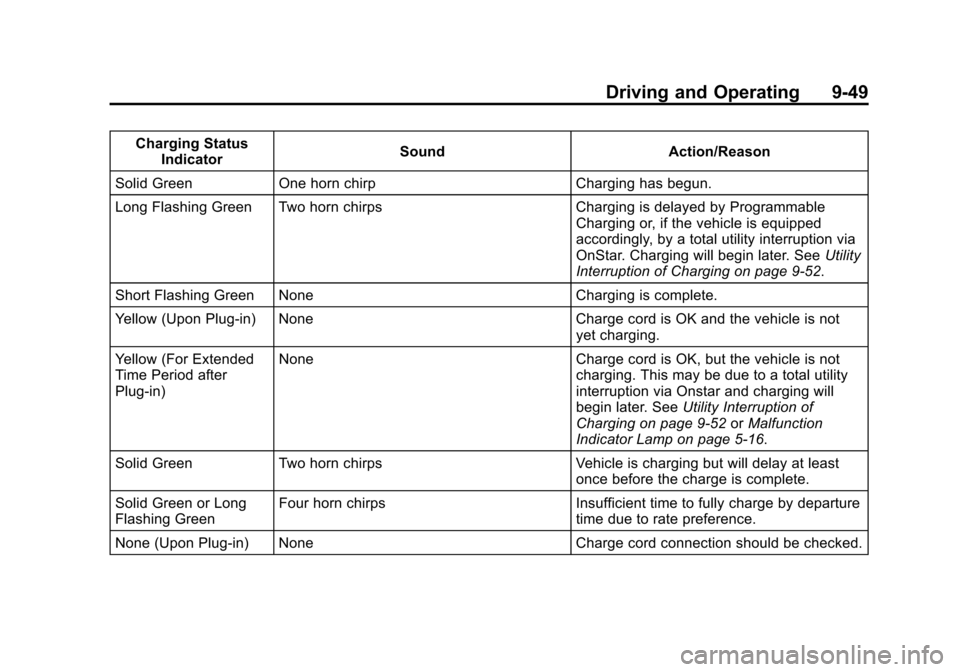
Charging StatusIndicator Sound
Action/Reason
Solid Green One horn chirp Charging has begun.
Long Flashing Green Two horn chirps Charging is delayed by Programmable
Charging or, if the vehicle is equipped
accordingly, by a total utility interruption via
OnStar. Charging will begin later. See Utility
Interruption of Charging on page 9-52.
Short Flashing Green None Charging is complete.
Yellow (Upon Plug-in) None Charge cord is OK and the vehicle is not
yet charging.
Yellow (For Extended
Time Period after
Plug-in) None
Charge cord is OK, but the vehicle is not
charging. This may be due to a total utility
interruption via Onstar and charging will
begin later. See Utility Interruption of
Charging on page 9-52 orMalfunction
Indicator Lamp on page 5-16.
Solid Green Two horn chirps Vehicle is charging but will delay at least
once before the charge is complete.
Solid Green or Long
Flashing Green Four horn chirps
Insufficient time to fully charge by departure
time due to rate preference.
None (Upon Plug-in) None Charge cord connection should be checked.
Page 235 of 387
Black plate (50,1)Chevrolet VOLT Owner Manual (GMNA-Localizing-U.S./Canada-7695131) -
2015 - crc - 4/25/14
9-50 Driving and Operating
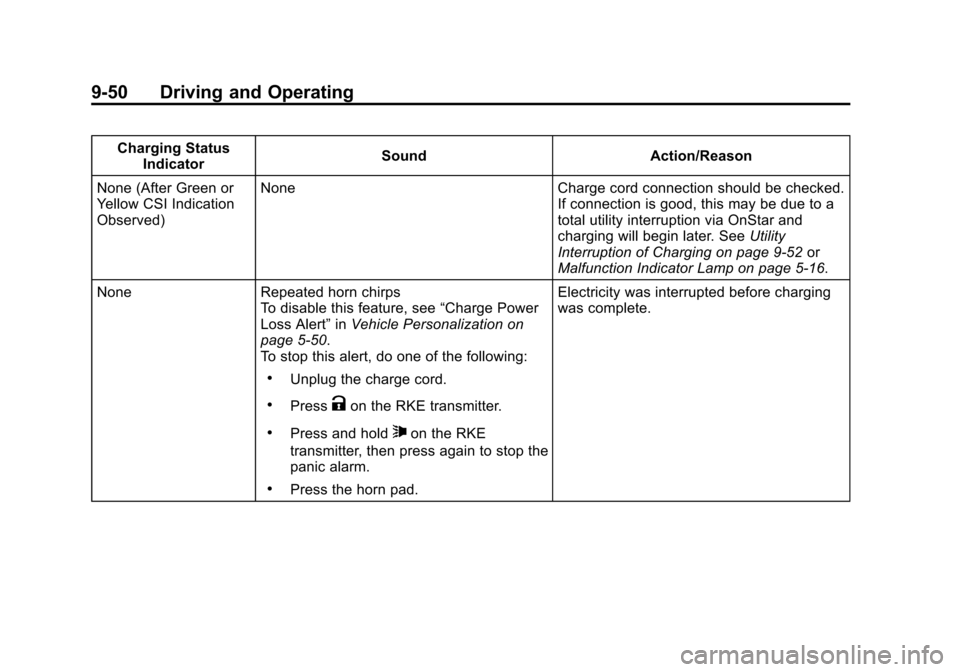
Charging StatusIndicator Sound
Action/Reason
None (After Green or
Yellow CSI Indication
Observed) None
Charge cord connection should be checked.
If connection is good, this may be due to a
total utility interruption via OnStar and
charging will begin later. See Utility
Interruption of Charging on page 9-52 or
Malfunction Indicator Lamp on page 5-16.
None Repeated horn chirps
To disable this feature, see “Charge Power
Loss Alert” inVehicle Personalization on
page 5-50.
To stop this alert, do one of the following:
.Unplug the charge cord.
.PressKon the RKE transmitter.
.Press and hold7on the RKE
transmitter, then press again to stop the
panic alarm.
.Press the horn pad. Electricity was interrupted before charging
was complete.
Page 282 of 387
Black plate (39,1)Chevrolet VOLT Owner Manual (GMNA-Localizing-U.S./Canada-7695131) -
2015 - crc - 4/25/14
Vehicle Care 10-39
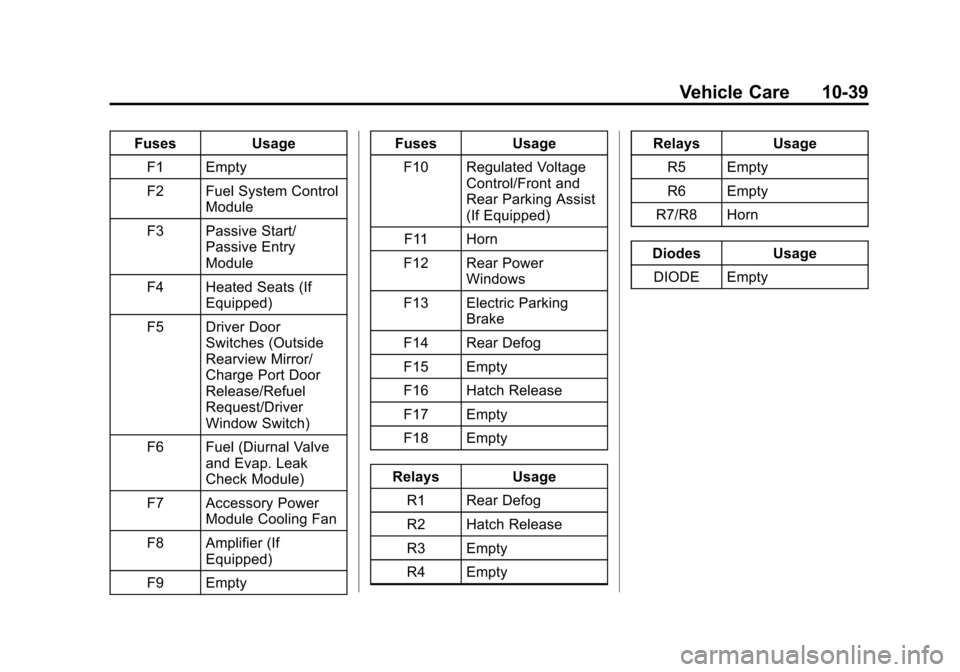
FusesUsage
F1 Empty
F2 Fuel System Control Module
F3 Passive Start/ Passive Entry
Module
F4 Heated Seats (If Equipped)
F5 Driver Door Switches (Outside
Rearview Mirror/
Charge Port Door
Release/Refuel
Request/Driver
Window Switch)
F6 Fuel (Diurnal Valve and Evap. Leak
Check Module)
F7 Accessory Power Module Cooling Fan
F8 Amplifier (If Equipped)
F9 Empty Fuses
Usage
F10 Regulated Voltage Control/Front and
Rear Parking Assist
(If Equipped)
F11 Horn
F12 Rear Power Windows
F13 Electric Parking Brake
F14 Rear Defog
F15 Empty
F16 Hatch Release
F17 Empty
F18 Empty
Relays Usage
R1 Rear Defog
R2 Hatch Release
R3 Empty
R4 Empty Relays
Usage
R5 Empty
R6 Empty
R7/R8 Horn
Diodes Usage DIODE Empty
Page 294 of 387
Black plate (51,1)Chevrolet VOLT Owner Manual (GMNA-Localizing-U.S./Canada-7695131) -
2015 - crc - 4/25/14
Vehicle Care 10-51
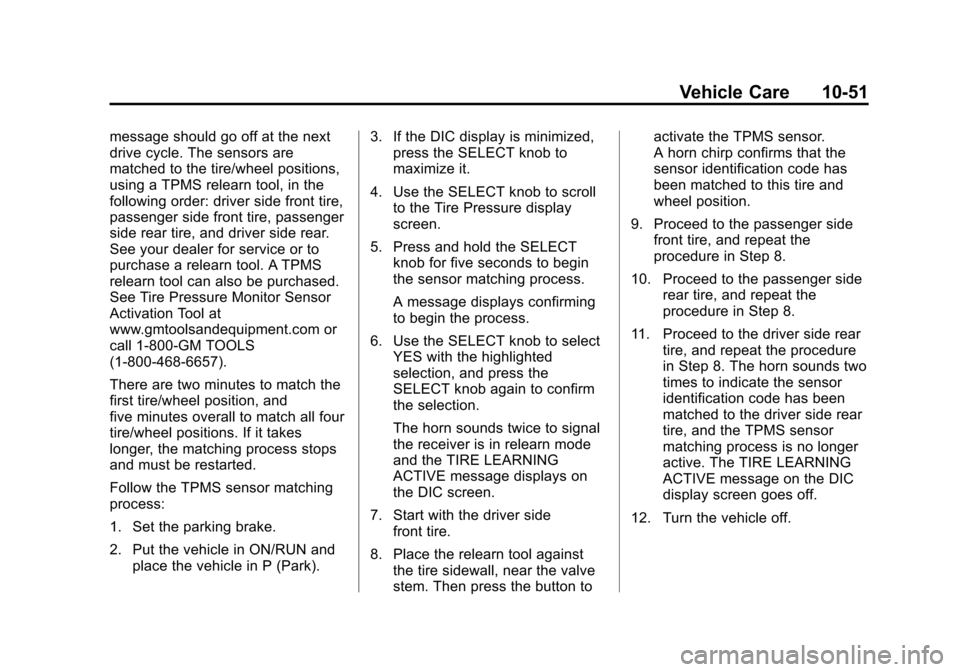
message should go off at the next
drive cycle. The sensors are
matched to the tire/wheel positions,
using a TPMS relearn tool, in the
following order: driver side front tire,
passenger side front tire, passenger
side rear tire, and driver side rear.
See your dealer for service or to
purchase a relearn tool. A TPMS
relearn tool can also be purchased.
See Tire Pressure Monitor Sensor
Activation Tool at
www.gmtoolsandequipment.com or
call 1-800-GM TOOLS
(1-800-468-6657).
There are two minutes to match the
first tire/wheel position, and
five minutes overall to match all four
tire/wheel positions. If it takes
longer, the matching process stops
and must be restarted.
Follow the TPMS sensor matching
process:
1. Set the parking brake.
2. Put the vehicle in ON/RUN andplace the vehicle in P (Park). 3. If the DIC display is minimized,
press the SELECT knob to
maximize it.
4. Use the SELECT knob to scroll to the Tire Pressure display
screen.
5. Press and hold the SELECT knob for five seconds to begin
the sensor matching process.
A message displays confirming
to begin the process.
6. Use the SELECT knob to select YES with the highlighted
selection, and press the
SELECT knob again to confirm
the selection.
The horn sounds twice to signal
the receiver is in relearn mode
and the TIRE LEARNING
ACTIVE message displays on
the DIC screen.
7. Start with the driver side front tire.
8. Place the relearn tool against the tire sidewall, near the valve
stem. Then press the button to activate the TPMS sensor.
A horn chirp confirms that the
sensor identification code has
been matched to this tire and
wheel position.
9. Proceed to the passenger side front tire, and repeat the
procedure in Step 8.
10. Proceed to the passenger side rear tire, and repeat the
procedure in Step 8.
11. Proceed to the driver side rear tire, and repeat the procedure
in Step 8. The horn sounds two
times to indicate the sensor
identification code has been
matched to the driver side rear
tire, and the TPMS sensor
matching process is no longer
active. The TIRE LEARNING
ACTIVE message on the DIC
display screen goes off.
12. Turn the vehicle off.
Page 369 of 387
Black plate (4,1)Chevrolet VOLT Owner Manual (GMNA-Localizing-U.S./Canada-7695131) -
2015 - crc - 4/25/14
14-4 OnStar
Destination Download:PressQ,
then request the Advisor to
download directions to the
navigation system in the vehicle (if
equipped). After the call ends, press
the “Go” button on the navigation
screen to begin driving directions.
If directions are downloaded to the
navigation system, the route can
only be canceled through the
navigation system.
Destinations can also be
downloaded on the go. For
information about eNav or
Destination Download, see
www.onstar.com (U.S.) or
www.onstar.ca (Canada).
Connections
The required specific Onstar
subscription plan includes the
services that follow to help
customers stay connected.
For coverage maps, see
www.onstar.com (U.S.) or
www.onstar.ca (Canada). WiFi Connectivity (If Equipped)
The vehicle has a WiFi hotspot that
provides a high-speed, wireless
Internet connection to connect
multiple mobile devices (data plan
required).
1. To retrieve WiFi hotspot
information, press
=and select
or say “WiFi settings.”
2. The WiFi settings will display the WiFi network name/SSID,
passphrase, and level of
encryption.
3. To change the SSID or passphrase, press
Qor call
1-888-4-ONSTAR to connect
with an Advisor.
OnStar RemoteLink
®Mobile App
(If Equipped)
Download the OnStar RemoteLink
mobile app to select Apple
®,
Android™, and BlackBerry®or
Windows 7 or 8 mobile devices.
From the mobile device, check the
vehicle’s fuel level, oil life, or tire pressure (if the vehicle is equipped
with the tire pressure monitoring
system); or activate remote horn
and lights. Also remote start the
vehicle (if factory equipped) or
unlock the doors from anywhere
with a wireless connection (if
equipped with automatic locks).
With a required specific OnStar
subscription plan, a destination can
be sent to the vehicle. For OnStar
RemoteLink information and
compatibility, see www.onstar.com
(U.S.) or www.onstar.ca (Canada).
OnStar RemoteLink
®Key Fob
Services
This feature is included for five
years and allows for remote door
lock/unlock (if equipped with
automatic locks), remote start (if
factory equipped), or activation of
horn and lights from anywhere with
a wireless signal. Download the app
and start using it any time during the
trial period to get started.
Page 380 of 387

Black plate (5,1)Chevrolet VOLT Owner Manual (GMNA-Localizing-U.S./Canada-7695131) -
2015 - crc - 4/25/14
INDEX i-5
Gauges (cont'd)Speedometer . . . . . . . . . . . . . . . . . 5-11
Trip Odometer . . . . . . . . . . . . . . . . 5-12
Warning Lights and
Indicators . . . . . . . . . . . . . . . . . . . . 5-8
General Information Service and Maintenance . . . . . 11-1
Towing . . . . . . . . . . . . . . . . . . . . . . . . 9-57
Vehicle Care . . . . . . . . . . . . . . . . . . 10-2
Glove Box . . . . . . . . . . . . . . . . . . . . . . 4-1
GM Mobility Reimbursement Program . . . . . . . . . . . . . . . . . . . . . . 13-5
H
Halogen Bulbs . . . . . . . . . . . . . . . . 10-27
Hatch . . . . . . . . . . . . . . . . . . . . . . . . . . 2-13
Hazard Warning Flashers . . . . . . . 6-3
Head Restraints . . . . . . . . . . . . . . . . 3-2
Headlamps . . . . . . . . . . . . . . . . . . . 10-27Aiming . . . . . . . . . . . . . . . . . . . . . . 10-27
Automatic . . . . . . . . . . . . . . . . . . . . . . 6-2
Bulb Replacement . . . . . . . . . . 10-27
Daytime Running
Lamps (DRL) . . . . . . . . . . . . . . . . . 6-2
Flash-to-Pass . . . . . . . . . . . . . . . . . . 6-1 Headlamps (cont'd)
High-Beam On Light . . . . . . . . . . 5-25
High/Low Beam Changer . . . . . . 6-1
Lamps On Reminder . . . . . . . . . 5-25
Heated Front Seats . . . . . . . . . . . . . 3-5
Heated Mirrors . . . . . . . . . . . . . . . . . 2-17
Heating and Air Conditioning . . . 8-1
High Voltage Battery Gauge . . . 5-12
High Voltage Devices and Wiring . . . . . . . . . . . . . . . . . . . . . . . 10-30
High-Beam On Light . . . . . . . . . . . 5-25
Hill and Mountain Roads . . . . . . . . 9-9
Hold Mode Light . . . . . . . . . . . . . . . 5-21
Hood . . . . . . . . . . . . . . . . . . . . . . . . . . 10-6
Hood, Door, Hatch Open Light . . . . . . . . . . . . . . . . . . . . . . . . . 5-25
Horn . . . . . . . . . . . . . . . . . . . . . . . . . . . . 5-5
How to Wear Safety Belts Properly . . . . . . . . . . . . . . . . . . . . . . 3-10
I
Immobilizer . . . . . . . . . . . . . . . . . . . . 2-15
IndicatorVehicle Ahead . . . . . . . . . . . . . . . . 5-22
Infants and Young Children,
Restraints . . . . . . . . . . . . . . . . . . . . 3-32 Information
Energy . . . . . . . . . . . . . . . . . . . . . . . 5-38
Infotainment . . . . . . . . . . . . . . . . . . . . 7-1
Infotainment System . . . . . . . . . . 13-15
Instrument Cluster . . . . . . . . . . . . . . 5-8
Instrument Panel Storage Area . . . . . . . . . . . . . . . . . . 4-1
Instrument Panel Overview . . . . . 5-3
Interior Rearview Mirrors . . . . . . . 2-17
Introduction . . . . . . . . . . . . . . . . . . . . . . . iii
J
Jump Starting . . . . . . . . . . . . . . . . . 10-69
K
Key and Lock Messages . . . . . . . 5-45
Keyless Entry Remote (RKE) System . . . . . . . . 2-2
Keys . . . . . . . . . . . . . . . . . . . . . . . . . . . . 2-1